Unity SDK

    Maven metadata URL

    Note

    This guide provides instructions for installing and setting up the Unity SDK v4. For earlier versions, refer to the Unity SDK guide (Previous).

    Install the Airbridge SDK and implement the necessary settings by following the steps below.

    Install SDK

    The Airbridge Unity SDK can be installed using the method below. After installation, you can confirm whether the SDK has been properly installed through the Unity SDK Test.

    1. Download the latest version of the Airbridge Unity SDK.

    2. Select [Assets]>[Import Package]>[Custom Package ...] in Unity and add the downloaded package file.

    3. Once the package is added to Unity, the [Airbridge] tab will appear in the top menu bar.

    Install Restricted SDK

    Note

    Install only one version of the SDK, either the general SDK or the restricted SDK.

    Depending on policies and environments, restrictions on collecting device IDs like GAID and IDFA may be required. When installing the Restricted SDK version, the device IDs are not collected.

    Install the Restricted SDK using the method below.

    1. load the latest version of the Airbridge Restricted Unity SDK.

    2. Select [Assets]>[Import Package]>[Custom Package ...] in Unity and add the downloaded package file.

    3. Once the package is added to Unity, the [Airbridge] tab will appear in the top menu bar.

    Initialize SDK

    Enter the correct App Name and App Token values in the SDK Settings window. The App Name and App Token can be found on the [Settings]>[Tokens] page in the Airbridge dashboard.

    Configure SDK settings

    Select [Airbridge]>[Airbridge Settings] from the top menu bar in Unity to open the SDK settings window. You may fill in the fields or click on the checkboxes that are necessary for your service.

    Note

    For Airbridge Unity SDK v4.2.0 or earlier, select AB180 > Airbridge Settings from the top menu bar in Unity.

    Note

    Airbridge Unity SDK v.4.5.0 or later is required.

    You can apply different SDK settings per build setting. For more details, refer to this section.

    Configure ATT prompt

    Note

    The functions necessary to ensure compliance with privacy policies should be reviewed with legal counsel.

    In the iOS environment, the IDFA can only be collected when users consent to data tracking through the App Tracking Transparency (ATT) prompt.

    Event collection should be delayed until the user allows tracking. If the install event is collected before the user allows tracking through the ATT prompt, the install event data will lack an identifier, making performance measurement difficult. We recommend setting a sufficient delay time for event collection to collect identifiers.

    1. Prepare the text you will use in the ATT prompt.

    2. Provide the ATT prompt following this guide provided by Apple.

    3. If the install event is not collected, the Airbridge React Native SDK delays collecting install events for 30 seconds until the user allows tracking each time the app is launched. If the user exits the app before deciding whether to allow tracking, the SDK will not collect the install event and will try again at the next app launch.

    In the SDK settings, configure the iOS Tracking Authorize Timeout Seconds to set a sufficient delay time for collecting install events. The default value is 30 seconds, and it can be set to up to 3600 seconds (1 hour).

    Attention

    Set a sufficient delay time to collect the app install event. If the SDK collects install events before users can allow tracking on the ATT prompt, the IDFA won't be collected along with the install events.

    Opt-in setup

    Attention

    Optional settings. Configure only if necessary.

    The opt-in policy requires user consent before using user data.

    After setting the Auto Start Tracking Enabled in the SDK settings to false, call the StartTracking function at the point of time when you can collect events. The SDK will start collecting events when the startTracking function is called.

    1
    Airbridge.StartTracking();

    Opt-out setup

    Attention

    Optional settings. Configure only if necessary.

    The opt-out policy allows the use of user information until the user explicitly declines.

    After setting the Auto Start Tracking Enabled in the SDK settings to true, call the StopTracking function at the point of time when you can no longer collect events. The SDK will stop collecting events when the stopTracking function is called.

    1
    Airbridge.StopTracking();

    SDK Signature

    Attention

    Optional settings. Configure only if necessary.

    With the SDK Signature, you can prevent SDK spoofing and use verified events to measure ad performance.

    The SDK Signature credentials, which are the Secret ID and the Secret, are required for the SDK Signature setup. They can be found on the [Management]>[Fraud Validation Rules]>[SDK Signature] page in the Airbridge dashboard. For more details on how to find the SDK Signature credentials, refer to this Airbridge guide.

    Once you have the credentials, go to the SDK settings and enter the Secret ID as sdkSignatureID and the Secret as sdkSignatureSecret.

    Deep Linking

    Deep linking allows you to redirect users from ads to specific locations within your app. The data collected from the tracking link enables you to monitor the performance of the deep link in Airbridge.

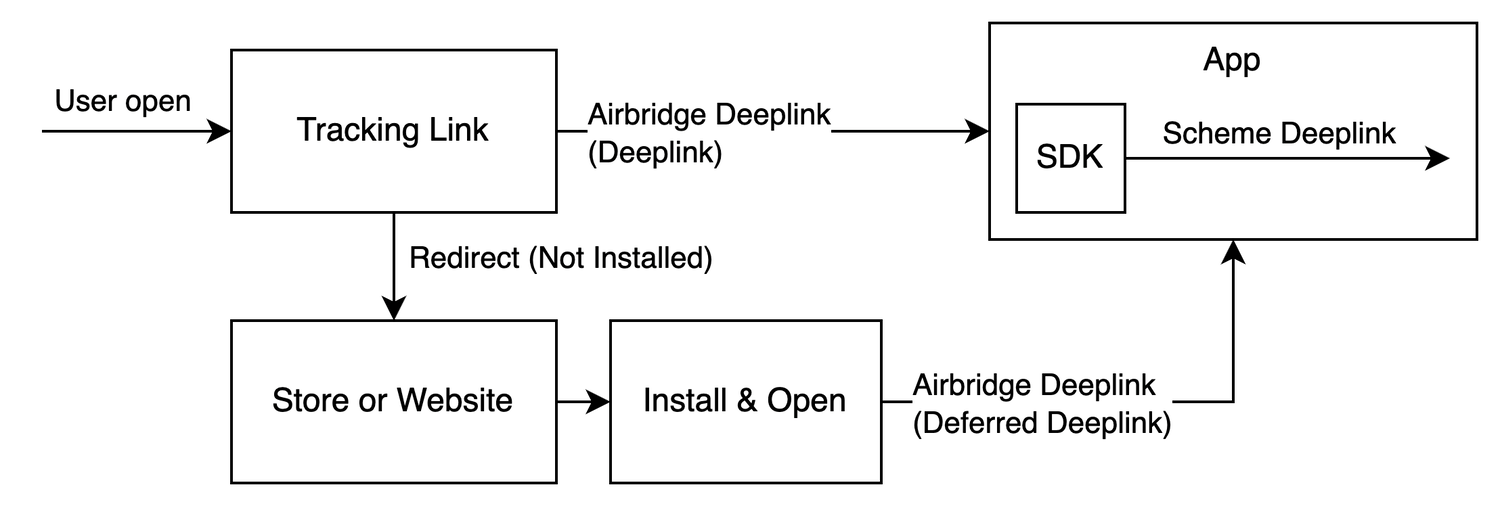
    When a user clicks on the Airbridge tracking link, the scheme deep link embedded in the tracking link is converted into an Airbridge Deep Link, which can be either an HTTP deep link or a scheme deep link. This Airbridge Deep Link redirects the user to the desired app location. Then, the Airbridge SDK converts the Airbridge Deep Link back to the original scheme deep link embedded in the tracking link and passes it to the app.

    • Example scheme deep link embedded in the tracking link: YOUR_SCHEME://product/12345

    • Examples of Airbridge Deep Links

      • HTTP deep link format 1: https://YOUR_APP_NAME.airbridge.io/~~~

      • HTTP deep link format 2: https://YOUR_APP_NAME.abr.ge/~~~

      • Scheme deep link format: YOUR_SCHEME://product/12345?airbridge_referrer=~~~

    When the app is installed on the device and the tracking link is clicked, the app opens through the Airbridge Deep Link. The Airbridge SDK converts the Airbridge Deep Link into the scheme deep embedded in the tracking link and passes it to the app.

    When the app is not installed on the device and the tracking link is clicked, the Airbridge SDK saves the Airbridge Deep Link. After the user is redirected to the app store or website and the app is installed and launched, the Airbridge SDK converts the saved Airbridge Deep Link into the scheme deep link embedded in the tracking link and passes it to the app.

    Set up deep linking

    For the deep linking setup, the following information is required.

    • Deep link information submitted in the Airbridge dashboard

    • In-app location address for user redirection

    First, submit the deep link information to the Airbridge dashboard.

    For the deep linking setup, the following information must be entered into the Airbridge dashboard.

    iOS

    • iOS URI scheme: The Airbridge Deep Link is converted to a scheme deep link using the iOS URI scheme.

    • iOS App ID: The universal link domain of the Airbridge Deep Link is set using the iOS App ID.

    Android

    • Android URI scheme: The Airbridge deep link is converted to a scheme deep link using the Android URI scheme. This information is necessary for the App Link and URI scheme.

    • Package name: This is the Android app identifier necessary for the App Link and URI scheme.

    • Android sha256_cert_fingerprints: This is used for setting the App Link domain. This information is necessary for the App Link.

    Attention

    To properly redirect users as intended, submit different information for the production app and the development app.

    Follow the steps below to submit the necessary information to the Airbridge dashboard.

    iOS

    1. Navigate to [Tracking Link]>[Deep Links] in the Airbridge dashboard.

    2. Enter the iOS URI scheme in the iOS URI Scheme field. Include ://. For example, if the iOS URI scheme is demo, enter demo://.

    3. In the Apple Developer Dashboard, navigate to [Identifier] of the app you want to set up the deep link. Find the App ID Prefix and Bundle ID.

    4. The iOS App ID is in the format of App ID Prefix+ . + Bundle ID. Enter the iOS App ID into the iOS App ID field. For example, if the App ID Prefix is prefix and the Bundle ID is example, the iOS App ID is prefix.example.

    Android

    1. Navigate to [Tracking Link]>[Deep Links] in the Airbridge dashboard.

    2. Enter the Android URI scheme into the Android URI Scheme field. Include ://. For example, if the URI scheme is demo, enter demo://.

    3. Enter the package name in the Package name field.

    4. You need to find the sha256_cert_fingerprints. Run the following command from the keystore file you are deploying.

    1
    keytool -list -v -keystore YOUR_KEYSTORE.keystore

    Find the SHA256 value in the results. The SHA256 value is the sha256_cert_fingerprints.

    1234
    Certificate fingerprints:
        MD5:  4C:65:04:52:F0:3F:F8:65:08:D3:71:86:FC:EF:C3:49
        SHA1: C8:BF:B7:B8:94:EA:5D:9D:38:59:FE:99:63:ED:47:B2:D9:5A:4E:CC
        SHA256: B5:EF:4D:F9:DC:95:E6:9B:F3:9A:5E:E9:D6:E0:D8:F6:7B:AB:79:C8:78:67:34:D9:A7:01:AB:6A:86:01:0E:99

    5. Enter the SHA256 value into the sha256_cert_fingerprints field.

    After entering the deep link information into the Airbridge dashboard, an additional setup is required to enable the following.

    • App launch with Airbridge Deep Links

    • Airbridge Deep Link event collection

    • User redirection with Airbridge Deep Links

    For detailed instructions, refer to the information below.

    Perform the following setup to enable app launch with Airbridge Deep Links after the user clicks on a tracking link.

    iOS

    In the SDK settings, enter the iOS URI scheme that you entered on the [Tracking Link]>[Deep Links] page in the Airbridge dashboard into the iOS URI Scheme field. The Universal Link domain will be automatically set up using the App Name value in the SDK settings.

    Android

    In the SDK settings, enter the Android URI scheme that you entered on the [Tracking Link]>[Deep Links] page in the Airbridge dashboard into the Android URI Scheme field. The App Name value will be used to set up the App Links automatically.

    Attention

    The following settings are performed automatically. Note that the setup should be performed manually when using a custom iOS AppDelegate or a custom Android Activity.

    iOS

    The Airbridge Unity SDK uses custom AppDelegate(Assets/Plugins/Airbridge/iOS/Delegate/AUAppDelegate.mm). If you are already using a custom AppDelegate, add the following code.

    12345678910111213141516
    #import "AirbridgeUnity.h"
    
    - (void)onOpenURL:(NSNotification *)notification {
        NSURL* url = notification.userInfo[@"url"];
        [Airbridge trackDeeplinkWithUrl:url];
        
        if (AirbridgeUnity.sharedInstance.deeplinkOnReceived == nil) { return; }
        AirbridgeUnity.sharedInstance.deeplinkOnReceived(url.absoluteString);
    }
    
    - (void)application:(UIApplication *)application continueUserActivity:(NSUserActivity *)userActivity restorationHandler:(void (^)(NSArray<id<UIUserActivityRestoring>>* _Nullable))restorationHandler {
        [Airbridge trackDeeplinkWithUserActivity:userActivity];
        
        if (AirbridgeUnity.sharedInstance.deeplinkOnReceived == nil) { return; }
        AirbridgeUnity.sharedInstance.deeplinkOnReceived(userActivity.webpageURL.absoluteString);
    }

    Android

    The Airbridge Unity SDK uses Android Activity (Assets/Plugins/Airbridge/Android/java/co/ab180/airbridge/unity/AirbridgeActivity.java). If you are using a custom Activity, add the following code.

    1234567891011
    import co.ab180.airbridge.unity.AirbridgeUnity
    
    override fun onResume() {
        super.onResume()
        AirbridgeUnity.processHandleDeeplink(intent)
    }
    
    override fun onNewIntent(intent: Intent?) {
        super.onNewIntent(intent)
        setIntent(intent)
    }
    12345678910111213
    import co.ab180.airbridge.unity.AirbridgeUnity;
    
    @Override
    protected void onResume() {
        super.onResume();
        AirbridgeUnity.processHandleDeeplink(getIntent());
    }
    
    @Override
    protected void onNewIntent(Intent intent) {
        super.onNewIntent(intent);
        setIntent(intent);
    }

    • When the Airbridge Deep Link is executed, it is converted into a scheme deep link and passed to the onDeeplinkReceived callback. And if a deep link that is not an Airbridge Deep Link is executed, it is passed to the callback without being converted.

    • Use the received deep link to redirect the user to the intended destination.

    1234
    Airbridge.SetOnDeeplinkReceived((string deeplink) =>
    {
        // show proper content using url
    });

    Set up deferred deep linking

    When a user clicks on a tracking link with deferred deep linking capabilities and the app is not installed on the device, the Airbridge SDK collects the deep link as follows.

    After initialization, the Airbridge SDK attempts to collect a deep link when all of the following conditions are met. When the app is closed before collection, the Airbridge SDK considers it as if there has not been an Airbridge Deep Link.

    • The Airbridge.startTracking function is called with the opt-in settings in place. Or, opt-in has not been set.

    • The user's response to the ATT prompt has been determined. Or, the event collection delay time configured regarding the ATT prompt has expired.

    Deferred deep links are automatically passed to onDeeplinkReceived callback, so no additional settings are required.

    Set up custom domain

    Attention

    Optional settings. Configure only if necessary.

    1. Enter the custom domain address into the Airbridge dashboard by referring to this article

    2. In the SDK Settings, enter the custom domain address in the Custom Domain and click Add URL.

      Attention

      The custom domain address you add to the SDK should be the same as the custom domain address entered into the Airbridge dashboard.

    In-app Events

    The Airbridge SDK collects user actions from the app as per settings and sends them as in-app events.

    Send in-app events

    SDK setup for hybrid apps

    You can set up the Unity SDK to handle Airbridge-related tasks within the in-app website without changing the website's code for your hybrid app.

    The Airbridge.TrackEvent function must be called to send events. Refer to the information below about the required Airbridge.TrackEvent function components and their types.

    12345
    public static void TrackEvent(
        string category,
        Dictionary<string, object> semanticAttributes = null,
        Dictionary<string, object> customAttributes = null
    )

    Refer to the component definition and available strings below.

    The Standard Event Categories provided by the Airbridge SDK can be found in the AirbridgeCategory. You can also enter the Event Categories from the list of Standard Events.

    Custom events can be sent by entering the event name set in the event taxonomy.

    Refer to the example below.

    123456
    // track standard event (provided by sdk)
    Airbridge.TrackEvent(AirbridgeCategory.ORDER_COMPLETED);
    // track standard event (not provided by sdk)
    Airbridge.TrackEvent("airbridge.ecommerce.order.canceled");
    // track custom event
    Airbridge.TrackEvent("eventViewed");

    Attention

    The Airbridge SDK v4 attributes differ from the previous version. The previous version's attributes do not include action, label, and value.

    Additional information about the event can be collected using attributes.

    • Action, Label: Collect information that can be used as GroupBys in the Airbridge reports

    • Value: Collect information that can be used for sales analysis. Airbridge can perform calculations using the collected data.

    • Semantic Attribute: Collect predefined attributes by Airbridge.

    • Custom Attributes: Collect attributes defined by Airbridge users.

    In the Airbridge.TrackEvent function, you can enter Action, Label, Value, and Semantic Attributes using the semanticAttributes parameter and Custom Attributes using the customAttributes parameter.

    The semantic attributes predefined by Airbridge can be found in the user guide below.

    Refer to the example below.

    123456789101112131415161718192021222324252627282930313233
    Airbridge.TrackEvent(
        category: AirbridgeCategory.ORDER_COMPLETED,
        semanticAttributes: new Dictionary<string, object>()
        {
            // action
            { AirbridgeAttribute.ACTION, "Tool" },
            // label
            { AirbridgeAttribute.LABEL, "Hammer" },
            // value
            { AirbridgeAttribute.VALUE, 10 },
            // semantic attribute (provided by sdk)
            { AirbridgeAttribute.CURRENCY, "USD" },
            {
                AirbridgeAttribute.PRODUCTS, new List<object>()
                {
                    new Dictionary<string, object>()
                    {
                        // semantic attribute value (provided by sdk)
                        { AirbridgeAttribute.PRODUCT_ID, "12345" },
                        // semantic attribute value (not provided by sdk)
                        { "name", "PlasticHammer" },
                    },
                }
            },
            // semantic attribute (not provided by sdk)
            { "totalQuantity", 1 }
        },
        customAttributes: new Dictionary<string, object>()
        {
            // custom attribute
            { "promotion", "FirstPurchasePromotion" }
        }
    );

    Attention

    Semantic attributes and custom attributes only allow JSON as a data type.

    • JSON types: String, Number, Boolean, Object<String, JSON>, Array<JSON>

    • Types that cannot be used in semantic attributes and custom attributes: Struct, Class, etc.

    The standard event categories and semantic attributes provided by the SDK are as follows.

    Refer to the example codes for each type of data below.

    1234567891011121314151617181920
    Airbridge.TrackEvent(
        category: "event",
        semanticAttributes: new Dictionary<string, object>()
        {
            { AirbridgeAttribute.VALUE, 10 },
        },
        customAttributes: new Dictionary<string, object>()
        {
            { "string", "string" },
            { "number", 1000 },
            { "boolean", true },
            {
                "object", new Dictionary<string, object>()
                {
                    { "key", "value" }
                }
            },
            { "array", new List<object>() { "value" } },
        }
    );

    Additional in-app event settings

    Attention

    The default settings will apply if no additional settings are configured. Proceed after reviewing whether additional settings are necessary.

    Configure additional settings for sending in-app events if necessary.

    The Airbridge SDK includes session information when sending event data.

    When the app moves to the background or the process is terminated, the background entry time is recorded. When the app returns to the foreground or the process is restarted, the re-entry time is recorded. If the time difference between the last background entry and re-entry exceeds the session timeout, the previous session ends and a new session begins.

    The default session timeout is 300 seconds (5 minutes). In the SDK settings, you can configure Session Timeout Seconds up to 604,800 seconds (7 days).

    Attention

    The Airbridge SDK collects Open events and Foreground events that initiate a new session. However, those events are not collected during a session. To collect them while the session is being maintained, additional settings are required.

    The default transmission interval is set to 0 seconds. In the SDK settings, you can adjust Event Transmit Interval Seconds to modify it to a maximum of 86,400 seconds (1 day).

    The following table shows the default and maximum values for the number of events and storage size.

    In the SDK settings, If you want to limit the number of events the SDK stores, use the Buffer Count Limit, and to limit the storage size of the SDK, use the Event Buffer Size Limit In Gibibyte.

    When the event deletion option is activated, all in-app events that are not transmitted during the Airbridge SDK's initialization process are deleted. By default, the event deletion option is inactive.

    In the SDK settings, set Clear Event Buffer On Initialize Enabled to true to activate the event deletion option.

    The Airbridge SDK supports functions to include device identifiers in all events for transmission.

    Refer to the example below.

    123
    Airbridge.SetDeviceAlias("string", "string");
    Airbridge.RemoveDeviceAlias("string");
    Airbridge.ClearDeviceAlias();

    Example codes

    Airbridge collects in-app events that are classified as Standard Events and Custom Events. Standard Events are events predefined by Airbridge. Refer to the example codes below.

    Sign Up

    1234567
    Airbridge.SetUserID("string");
    Airbridge.SetUserAlias("string", "string");
    Airbridge.SetUserEmail("string");
    Airbridge.SetUserPhone("string");
    Airbridge.SetUserAttribute("string", "string");
            
    Airbridge.TrackEvent(AirbridgeCategory.SIGN_UP);

    Sign In

    1234567
    Airbridge.SetUserID("string");
    Airbridge.SetUserAlias("string", "string");
    Airbridge.SetUserEmail("string");
    Airbridge.SetUserPhone("string");
    Airbridge.SetUserAttribute("string", "string");
            
    Airbridge.TrackEvent(AirbridgeCategory.SIGN_IN);

    Sign Out

    123
    Airbridge.TrackEvent(AirbridgeCategory.SIGN_OUT);
    
    Airbridge.ClearUser();

    Home viewed

    1
    Airbridge.TrackEvent(AirbridgeCategory.HOME_VIEWED);

    Product list viewed

    1234567891011121314151617181920212223242526272829
    Airbridge.TrackEvent(
        category: AirbridgeCategory.PRODUCT_LIST_VIEWED,
        semanticAttributes: new Dictionary<string, object>()
        {
            { AirbridgeAttribute.LIST_ID, "84e6e236-38c4-48db-9b49-16e4cc064386" },
            { AirbridgeAttribute.CURRENCY, "USD" },
            {
                AirbridgeAttribute.PRODUCTS, new List<object>()
                {
                    new Dictionary<string, object>()
                    {
                        { AirbridgeAttribute.PRODUCT_ID, "0117b32a-5a6c-4d4c-b64c-7858e07dba78" },
                        { AirbridgeAttribute.PRODUCT_NAME, "PlasticHammer" },
                        { AirbridgeAttribute.PRODUCT_PRICE, 10 },
                        { AirbridgeAttribute.PRODUCT_QUANTITY, 1 },
                        { AirbridgeAttribute.PRODUCT_CURRENCY, "USD" }
                    },
                    new Dictionary<string, object>()
                    {
                        { AirbridgeAttribute.PRODUCT_ID, "d6ab2fbe-decc-4362-b719-d257a131e91e" },
                        { AirbridgeAttribute.PRODUCT_NAME, "PlasticFork" },
                        { AirbridgeAttribute.PRODUCT_PRICE, 1 },
                        { AirbridgeAttribute.PRODUCT_QUANTITY, 1 },
                        { AirbridgeAttribute.PRODUCT_CURRENCY, "USD" }
                    },
                }
            }
        }
    );

    Search result viewed

    1234567891011121314151617181920212223242526272829
    Airbridge.TrackEvent(
        category: AirbridgeCategory.SEARCH_RESULTS_VIEWED,
        semanticAttributes: new Dictionary<string, object>()
        {
            { AirbridgeAttribute.QUERY, "Plastic" },
            { AirbridgeAttribute.CURRENCY, "USD" },
            {
                AirbridgeAttribute.PRODUCTS, new List<object>()
                {
                    new Dictionary<string, object>()
                    {
                        { AirbridgeAttribute.PRODUCT_ID, "0117b32a-5a6c-4d4c-b64c-7858e07dba78" },
                        { AirbridgeAttribute.PRODUCT_NAME, "PlasticHammer" },
                        { AirbridgeAttribute.PRODUCT_PRICE, 10 },
                        { AirbridgeAttribute.PRODUCT_QUANTITY, 1 },
                        { AirbridgeAttribute.PRODUCT_CURRENCY, "USD" }
                    },
                    new Dictionary<string, object>()
                    {
                        { AirbridgeAttribute.PRODUCT_ID, "d6ab2fbe-decc-4362-b719-d257a131e91e" },
                        { AirbridgeAttribute.PRODUCT_NAME, "PlasticFork" },
                        { AirbridgeAttribute.PRODUCT_PRICE, 1 },
                        { AirbridgeAttribute.PRODUCT_QUANTITY, 1 },
                        { AirbridgeAttribute.PRODUCT_CURRENCY, "USD" }
                    },
                }
            }
        }
    );

    Product viewed

    1234567891011121314151617181920
    Airbridge.TrackEvent(
        category: AirbridgeCategory.PRODUCT_VIEWED,
        semanticAttributes: new Dictionary<string, object>()
        {
            { AirbridgeAttribute.CURRENCY, "USD" },
            {
                AirbridgeAttribute.PRODUCTS, new List<object>()
                {
                    new Dictionary<string, object>()
                    {
                        { AirbridgeAttribute.PRODUCT_ID, "0117b32a-5a6c-4d4c-b64c-7858e07dba78" },
                        { AirbridgeAttribute.PRODUCT_NAME, "PlasticHammer" },
                        { AirbridgeAttribute.PRODUCT_PRICE, 10 },
                        { AirbridgeAttribute.PRODUCT_QUANTITY, 1 },
                        { AirbridgeAttribute.PRODUCT_CURRENCY, "USD" }
                    },
                }
            }
        }
    );

    Add payment info

    1234567
    Airbridge.TrackEvent(
        category: AirbridgeCategory.ADD_PAYMENT_INFO,
        semanticAttributes: new Dictionary<string, object>()
        {
            { AirbridgeAttribute.TYPE, "CreditCard" },
        }
    );

    Add to wishlist

    123456789101112131415161718192021
    Airbridge.TrackEvent(
        category: AirbridgeCategory.ADD_TO_WISHLIST,
        semanticAttributes: new Dictionary<string, object>()
        {
            { AirbridgeAttribute.LIST_ID, "189a2f8b-83ee-4074-8158-726be54e57d4" },
            { AirbridgeAttribute.CURRENCY, "USD" },
            {
                AirbridgeAttribute.PRODUCTS, new List<object>()
                {
                    new Dictionary<string, object>()
                    {
                        { AirbridgeAttribute.PRODUCT_ID, "0117b32a-5a6c-4d4c-b64c-7858e07dba78" },
                        { AirbridgeAttribute.PRODUCT_NAME, "PlasticHammer" },
                        { AirbridgeAttribute.PRODUCT_PRICE, 10 },
                        { AirbridgeAttribute.PRODUCT_QUANTITY, 1 },
                        { AirbridgeAttribute.PRODUCT_CURRENCY, "USD" }
                    },
                }
            }
        }
    );

    Add to cart

    123456789101112131415161718192021
    Airbridge.TrackEvent(
        category: AirbridgeCategory.ADDED_TO_CART,
        semanticAttributes: new Dictionary<string, object>()
        {
            { AirbridgeAttribute.CART_ID, "421eaeb7-6e80-4694-933e-f2e1a55e9cbd" },
            { AirbridgeAttribute.CURRENCY, "USD" },
            {
                AirbridgeAttribute.PRODUCTS, new List<object>()
                {
                    new Dictionary<string, object>()
                    {
                        { AirbridgeAttribute.PRODUCT_ID, "0117b32a-5a6c-4d4c-b64c-7858e07dba78" },
                        { AirbridgeAttribute.PRODUCT_NAME, "PlasticHammer" },
                        { AirbridgeAttribute.PRODUCT_PRICE, 10 },
                        { AirbridgeAttribute.PRODUCT_QUANTITY, 1 },
                        { AirbridgeAttribute.PRODUCT_CURRENCY, "USD" }
                    },
                }
            }
        }
    );

    Initiate checkout

    1234567891011121314151617181920212223242526272829
    Airbridge.TrackEvent(
        category: AirbridgeCategory.INITIATE_CHECKOUT,
        semanticAttributes: new Dictionary<string, object>()
        {
            { AirbridgeAttribute.TRANSACTION_ID, "0a7ee1ec-33da-4ffb-b775-89e80e75978a" },
            { AirbridgeAttribute.CURRENCY, "USD" },
            {
                AirbridgeAttribute.PRODUCTS, new List<object>()
                {
                    new Dictionary<string, object>()
                    {
                        { AirbridgeAttribute.PRODUCT_ID, "0117b32a-5a6c-4d4c-b64c-7858e07dba78" },
                        { AirbridgeAttribute.PRODUCT_NAME, "PlasticHammer" },
                        { AirbridgeAttribute.PRODUCT_PRICE, 10 },
                        { AirbridgeAttribute.PRODUCT_QUANTITY, 1 },
                        { AirbridgeAttribute.PRODUCT_CURRENCY, "USD" },
                    },
                    new Dictionary<string, object>()
                    {
                        { AirbridgeAttribute.PRODUCT_ID, "d6ab2fbe-decc-4362-b719-d257a131e91e" },
                        { AirbridgeAttribute.PRODUCT_NAME, "PlasticFork" },
                        { AirbridgeAttribute.PRODUCT_PRICE, 1 },
                        { AirbridgeAttribute.PRODUCT_QUANTITY, 1 },
                        { AirbridgeAttribute.PRODUCT_CURRENCY, "USD" },
                    },
                }
            }
        }
    );

    Order completed

    12345678910111213141516171819202122232425262728293031
    Airbridge.TrackEvent(
        category: AirbridgeCategory.ORDER_COMPLETED,
        semanticAttributes: new Dictionary<string, object>()
        {
            { AirbridgeAttribute.VALUE, 11 },
            { AirbridgeAttribute.TRANSACTION_ID, "8065ef16-162b-4a82-b683-e51aefdda7d5" },
            { AirbridgeAttribute.CURRENCY, "USD" },
            { AirbridgeAttribute.IN_APP_PURCHASED, true },
            {
                AirbridgeAttribute.PRODUCTS, new List<object>()
                {
                    new Dictionary<string, object>()
                    {
                        { AirbridgeAttribute.PRODUCT_ID, "0117b32a-5a6c-4d4c-b64c-7858e07dba78" },
                        { AirbridgeAttribute.PRODUCT_NAME, "PlasticHammer" },
                        { AirbridgeAttribute.PRODUCT_PRICE, 10 },
                        { AirbridgeAttribute.PRODUCT_QUANTITY, 1 },
                        { AirbridgeAttribute.PRODUCT_CURRENCY, "USD" },
                    },
                    new Dictionary<string, object>()
                    {
                        { AirbridgeAttribute.PRODUCT_ID, "d6ab2fbe-decc-4362-b719-d257a131e91e" },
                        { AirbridgeAttribute.PRODUCT_NAME, "PlasticFork" },
                        { AirbridgeAttribute.PRODUCT_PRICE, 1 },
                        { AirbridgeAttribute.PRODUCT_QUANTITY, 1 },
                        { AirbridgeAttribute.PRODUCT_CURRENCY, "USD" },
                    },
                }
            }
        }
    );

    Order canceled

    12345678910111213141516171819202122232425262728293031
    Airbridge.TrackEvent(
        category: AirbridgeCategory.ORDER_CANCELED,
        semanticAttributes: new Dictionary<string, object>()
        {
            { AirbridgeAttribute.VALUE, 11 },
            { AirbridgeAttribute.TRANSACTION_ID, "8065ef16-162b-4a82-b683-e51aefdda7d5" },
            { AirbridgeAttribute.CURRENCY, "USD" },
            { AirbridgeAttribute.IN_APP_PURCHASED, true },
            {
                AirbridgeAttribute.PRODUCTS, new List<object>()
                {
                    new Dictionary<string, object>()
                    {
                        { AirbridgeAttribute.PRODUCT_ID, "0117b32a-5a6c-4d4c-b64c-7858e07dba78" },
                        { AirbridgeAttribute.PRODUCT_NAME, "PlasticHammer" },
                        { AirbridgeAttribute.PRODUCT_PRICE, 10 },
                        { AirbridgeAttribute.PRODUCT_QUANTITY, 1 },
                        { AirbridgeAttribute.PRODUCT_CURRENCY, "USD" },
                    },
                    new Dictionary<string, object>()
                    {
                        { AirbridgeAttribute.PRODUCT_ID, "d6ab2fbe-decc-4362-b719-d257a131e91e" },
                        { AirbridgeAttribute.PRODUCT_NAME, "PlasticFork" },
                        { AirbridgeAttribute.PRODUCT_PRICE, 1 },
                        { AirbridgeAttribute.PRODUCT_QUANTITY, 1 },
                        { AirbridgeAttribute.PRODUCT_CURRENCY, "USD" },
                    },
                }
            }
        }
    );

    Start trial

    123456789101112131415161718192021
    Airbridge.TrackEvent(
        category: AirbridgeCategory.START_TRIAL,
        semanticAttributes: new Dictionary<string, object>()
        {
            { AirbridgeAttribute.TRANSACTION_ID, "ef1e5271-0370-407c-b1e9-669a8df1dc2c" },
            { AirbridgeAttribute.CURRENCY, "USD" },
            { AirbridgeAttribute.PERIOD, "P1M" },
            {
                AirbridgeAttribute.PRODUCTS, new List<object>()
                {
                    new Dictionary<string, object>()
                    {
                        { AirbridgeAttribute.PRODUCT_ID, "306a57cb-f653-4220-a208-8405d8e4d506" },
                        { AirbridgeAttribute.PRODUCT_NAME, "MusicStreamingMembership" },
                        { AirbridgeAttribute.PRODUCT_PRICE, 15 },
                        { AirbridgeAttribute.PRODUCT_CURRENCY, "USD" },
                    },
                }
            }
        }
    );

    Subscribe

    1234567891011121314151617181920212223
    Airbridge.TrackEvent(
        category: AirbridgeCategory.SUBSCRIBE,
        semanticAttributes: new Dictionary<string, object>()
        {
            { AirbridgeAttribute.VALUE, 15 },
            { AirbridgeAttribute.CURRENCY, "USD" },
            { AirbridgeAttribute.TRANSACTION_ID, "cbe718c7-e44e-4707-b5cd-4a6a29f29649" },
            { AirbridgeAttribute.PERIOD, "P1M" },
            { AirbridgeAttribute.IS_RENEWAL, true },
            {
                AirbridgeAttribute.PRODUCTS, new List<object>()
                {
                    new Dictionary<string, object>()
                    {
                        { AirbridgeAttribute.PRODUCT_ID, "306a57cb-f653-4220-a208-8405d8e4d506" },
                        { AirbridgeAttribute.PRODUCT_NAME, "MusicStreamingMembership" },
                        { AirbridgeAttribute.PRODUCT_PRICE, 15 },
                        { AirbridgeAttribute.PRODUCT_CURRENCY, "USD" },
                    },
                }
            }
        }
    );

    Unsubscribe

    12345678910111213141516171819202122
    Airbridge.TrackEvent(
        category: AirbridgeCategory.UNSUBSCRIBE,
        semanticAttributes: new Dictionary<string, object>()
        {
            { AirbridgeAttribute.VALUE, 15 },
            { AirbridgeAttribute.CURRENCY, "USD" },
            { AirbridgeAttribute.TRANSACTION_ID, "cbe718c7-e44e-4707-b5cd-4a6a29f29649" },
            { AirbridgeAttribute.IS_RENEWAL, true },
            {
                AirbridgeAttribute.PRODUCTS, new List<object>()
                {
                    new Dictionary<string, object>()
                    {
                        { AirbridgeAttribute.PRODUCT_ID, "306a57cb-f653-4220-a208-8405d8e4d506" },
                        { AirbridgeAttribute.PRODUCT_NAME, "MusicStreamingMembership" },
                        { AirbridgeAttribute.PRODUCT_PRICE, 15 },
                        { AirbridgeAttribute.PRODUCT_CURRENCY, "USD" },
                    },
                }
            }
        }
    );

    Add impression

    123456789101112131415161718192021222324252627282930313233
    Airbridge.TrackEvent(
        category: AirbridgeCategory.AD_IMPRESSION,
        semanticAttributes: new Dictionary<string, object>()
        {
            { AirbridgeAttribute.VALUE, 0.01 },
            {
                AirbridgeAttribute.AD_PARTNERS, new Dictionary<string, object>()
                {
                    {
                        "mopub", new Dictionary<string, object>()
                        {
                            { "app_version", "5.18.0" },
                            { "adunit_id", "12345" },
                            { "adunit_name", "12345" },
                            { "adunit_format", "Banner" },
                            { "id", "12345" },
                            { "currency", "USD" },
                            { "publisher_revenue", 12345.123 },
                            { "adgroup_id", "12345" },
                            { "adgroup_name", "12345" },
                            { "adgroup_type", "12345" },
                            { "adgroup_priority", "12345" },
                            { "country", "kr" },
                            { "precision", "publisher_defined" },
                            { "network_name", "12345" },
                            { "network_placement_id", "12345" },
                            { "demand_partner_data", "12345" },
                        }
                    }
                }
            },
        }
    );

    Ad click

    123456789101112131415161718192021222324252627282930313233
    Airbridge.TrackEvent(
        category: AirbridgeCategory.AD_CLICK,
        semanticAttributes: new Dictionary<string, object>()
        {
            { AirbridgeAttribute.VALUE, 0.01 },
            {
                AirbridgeAttribute.AD_PARTNERS, new Dictionary<string, object>()
                {
                    {
                        "mopub", new Dictionary<string, object>()
                        {
                            { "app_version", "5.18.0" },
                            { "adunit_id", "12345" },
                            { "adunit_name", "12345" },
                            { "adunit_format", "Banner" },
                            { "id", "12345" },
                            { "currency", "USD" },
                            { "publisher_revenue", 12345.123 },
                            { "adgroup_id", "12345" },
                            { "adgroup_name", "12345" },
                            { "adgroup_type", "12345" },
                            { "adgroup_priority", "12345" },
                            { "country", "kr" },
                            { "precision", "publisher_defined" },
                            { "network_name", "12345" },
                            { "network_placement_id", "12345" },
                            { "demand_partner_data", "12345" },
                        }
                    }
                }
            },
        }
    );

    Complete tutorial

    1234567
    Airbridge.TrackEvent(
        category: AirbridgeCategory.COMPLETE_TUTORIAL,
        semanticAttributes: new Dictionary<string, object>()
        {
            { AirbridgeAttribute.DESCRIPTION, "Finish Initial Tutorial" },
        }
    );

    Achieve level

    1234567
    Airbridge.TrackEvent(
        category: AirbridgeCategory.ACHIEVE_LEVEL,
        semanticAttributes: new Dictionary<string, object>()
        {
            { AirbridgeAttribute.LEVEL, 13 },
        }
    );

    Unlock achievement

    123456789
    Airbridge.TrackEvent(
        category: AirbridgeCategory.UNLOCK_ACHIEVEMENT,
        semanticAttributes: new Dictionary<string, object>()
        {
            { AirbridgeAttribute.ACHIEVEMENT_ID, "36a0f0bb-b153-4be1-a3e0-3cb5b2b076c1" },
            { AirbridgeAttribute.DESCRIPTION, "Get Score Over 50" },
            { AirbridgeAttribute.SCORE, 80 },
        }
    );

    Rate

    1234567891011121314151617181920212223
    Airbridge.TrackEvent(
        category: AirbridgeCategory.RATE,
        semanticAttributes: new Dictionary<string, object>()
        {
            { AirbridgeAttribute.RATE_ID, "531c64b3-4704-4780-a306-89014ec18daf" },
            { AirbridgeAttribute.RATE, 4.5 },
            { AirbridgeAttribute.MAX_RATE, 5 },
            { AirbridgeAttribute.CURRENCY, "USD" },
            {
                AirbridgeAttribute.PRODUCTS, new List<object>()
                {
                    new Dictionary<string, object>()
                    {
                        { AirbridgeAttribute.PRODUCT_ID, "0117b32a-5a6c-4d4c-b64c-7858e07dba78" },
                        { AirbridgeAttribute.PRODUCT_NAME, "PlasticHammer" },
                        { AirbridgeAttribute.PRODUCT_PRICE, 10 },
                        { AirbridgeAttribute.PRODUCT_QUANTITY, 1 },
                        { AirbridgeAttribute.PRODUCT_CURRENCY, "USD" }
                    },
                }
            }
        }
    );

    Share

    12345678
    Airbridge.TrackEvent(
        category: AirbridgeCategory.SHARE,
        semanticAttributes: new Dictionary<string, object>()
        {
            { AirbridgeAttribute.DESCRIPTION, "Share Promotion" },
            { AirbridgeAttribute.SHARED_CHANNEL, "CopyLink" },
        }
    );

    Schedule

    12345678910111213141516171819
    Airbridge.TrackEvent(
        category: AirbridgeCategory.SCHEDULE,
        semanticAttributes: new Dictionary<string, object>()
        {
            { AirbridgeAttribute.SCHEDULE_ID, "75712915-2cd9-4e42-a85e-8d42f356f4c6" },
            { AirbridgeAttribute.DATE_TIME, "2024-01-01T00:00:00+00:00" },
            { AirbridgeAttribute.PLACE, "ConferenceRoom" },
            {
                AirbridgeAttribute.PRODUCTS, new List<object>()
                {
                    new Dictionary<string, object>()
                    {
                        { AirbridgeAttribute.PRODUCT_ID, "abb3e65d-17bc-4b28-89e3-5e356c0ea697" },
                        { AirbridgeAttribute.PRODUCT_NAME, "ConferenceRoom" },
                    },
                }
            }
        }
    );

    Spend credits

    1234567891011121314151617181920
    Airbridge.TrackEvent(
        category: AirbridgeCategory.SPEND_CREDITS,
        semanticAttributes: new Dictionary<string, object>()
        {
            { AirbridgeAttribute.TRANSACTION_ID, "22eb193d-be11-4fe4-95da-c91a196faf1c" },
            { AirbridgeAttribute.CURRENCY, "USD" },
            {
                AirbridgeAttribute.PRODUCTS, new List<object>()
                {
                    new Dictionary<string, object>()
                    {
                        { AirbridgeAttribute.PRODUCT_ID, "0117b32a-5a6c-4d4c-b64c-7858e07dba78" },
                        { AirbridgeAttribute.PRODUCT_NAME, "PlasticHammer" },
                        { AirbridgeAttribute.PRODUCT_PRICE, 10 },
                        { AirbridgeAttribute.PRODUCT_CURRENCY, "USD" }
                    },
                }
            }
        }
    );

    Custom Events are events defined by Airbridge users to track user actions that are unique to their services. Refer to the example code below.

    1234567891011121314151617181920
    Airbridge.TrackEvent(
        category: "event",
        semanticAttributes: new Dictionary<string, object>()
        {
            { AirbridgeAttribute.VALUE, 10 },
        },
        customAttributes: new Dictionary<string, object>()
        {
            { "string", "string" },
            { "number", 1000 },
            { "boolean", true },
            {
                "object", new Dictionary<string, object>()
                {
                    { "key", "value" }
                }
            },
            { "array", new List<object>() { "value" } },
        }
    );

    User Data

    Airbridge sends user data along with events. User data allows for a more accurate ad performance measurement.

    Set User ID

    User IDs refer to the user identifier used in a service. User IDs should be unique IDs that can identify unique users across websites and apps.

    Refer to the example below.

    1234567
    // ID
    Airbridge.SetUserID("testID");
    
    // Alias
    Airbridge.SetUserAlias("ADD_YOUR_KEY", "ADD_YOUR_VALUE");
    Airbridge.RemoveUserAlias("DELETE_THIS_KEY");
    Airbridge.ClearUserAlias();

    Send additional user information

    Attention

    Sensitive user information may be included. Send after a thorough review with a legal advisor.

    Refer to the functions below to send additional user information.

    Refer to the example below.

    1234567891011121314
    // Automatically hashed on client side using SHA256
    // Can turn off hashing feature with special flag
    Airbridge.SetUserEmail("testID@ab180.co");
    Airbridge.SetUserPhone("821012341234");
    
    // Attributes
    Airbridge.SetUserAttribute("ADD_YOUR_KEY", 1);
    Airbridge.SetUserAttribute("ADD_YOUR_KEY", 1L);
    Airbridge.SetUserAttribute("ADD_YOUR_KEY", 1f);
    Airbridge.SetUserAttribute("ADD_YOUR_KEY", 1.0);
    Airbridge.SetUserAttribute("ADD_YOUR_KEY", "1");
    Airbridge.SetUserAttribute("ADD_YOUR_KEY", true);
    Airbridge.RemoveUserAttribute("DELETE_THIS_KEY");
    Airbridge.ClearUserAttributes();

    Hash user information

    When User Info Hash Enabled is set to false in the SDK settings, user emails and phone numbers are passed without being hashed. The default setting is true.

    Clear user data

    You can reset user information with the Airbridge.clearUser function.

    1
    Airbridge.ClearUser();

    Include User Information in Install/Open Events

    The SDK automatically sends install and open events immediately after the app launches. Therefore, if you call user information functions right after the app launches, the user information may not be included in the install/open events depending on the event transmission timing.

    To ensure user information is included in install/open events, control the timing of event transmission through Opt-In setup.

    Implement in the following order:

    1. Set the Auto Start Tracking Enabled option to false when Configure SDK settings.

    2. Call user information functions to set user information.

    3. Call the startTracking() function to start event collection.

    Additional SDK Settings

    Follow the instructions below for additional setup.

    Attention

    Optional settings. Configure only if necessary.

    Calculating SKAdNetwork Conversion Value on the Server

    By default, the ConversionValue in SKAdNetwork is calculated using the values from the SDK. If you want to measure events collected server-side through SKAN instead of the SDK, set the calculateSKAdNetworkByServerEnabled option to true.

    Attention

    If you are currently using conversion values calculated by the SDK via SKAdNetwork, please exercise caution when making changes. Altering the conversion value calculation method may cause inconsistencies between existing and new data.

    Restricting Identifier Tracking

    Note

    Airbridge Unity SDK v.4.7.0 or later is required.

    In SDK Settings, set the Tracking Blocklist to specify which identifiers should be blocked. Events collected after this configuration will exclude the specified identifiers.

    Check the restricted data in the identifier restriction list.

    Attention

    Airbridge Unity SDK v.4.9.0 or later is required.

    While the SDK is running, you can use the AllowTrackingItem and BlockTrackingItem functions to set the data to be restricted. The specified identifier items will be excluded or included. This does not affect events that have already been stored.

    12
    public static void AllowTrackingItem(AirbridgeTrackingBlocklist item)
    public static void BlockTrackingItem(AirbridgeTrackingBlocklist item)

    Check the restricted data in the identifier restriction list.

    An identifier restriction list is provided through AirbridgeTrackingBlocklist.

    SDK settings by build settings

    Note

    Airbridge Unity SDK v.4.5.0 or later is required.

    You can apply different SDK settings per build setting.

    Activate the Use Development Airbridge Settings or Use Production Airbridge Settings option depending on your build setting to configure the SDK accordingly.

    If the Use Development Airbridge Settings or Use Production Airbridge Settings option is inactive, the SDK settings are set to the Default settings.

    • When the Use Development Airbridge Settings is activated and your app is on development build setting, the SDK settings are set to the Development settings.

    • When the Use Production Airbridge Settings is activated and your app is on productino build setting, the SDK settings are set to the Production settings.

    Integrate Google's ICM attribution data

    Attention

    Unity SDK v.4.4.0 or later is required.

    Integrated Conversion Measurement (ICM) is Google’s privacy-driven solution for filling in conversion tracking gaps caused by stricter tracking limitations. Google provides the ICM attribution data, which is the non-deterministic attribution data provided by Google's privacy-preserving conversion modeling.

    To integrate the ICM attribution data, the Google's On-Device Conversion Measurement (ODM) SDK must be installed. For detailed information, refer to this article. or contact Google.

    Airbridge Unity SDK v.4.3.0 or later is required.

    Tracking links are links that are embedded to ads for data collection. When users click on the ad, the tracking link is used to pass the touchpoint data to Airbridge, allowing for ad attribution.

    Also, users who click on the ad with a tracking link can be redirected to a specific destination.

    Use the CreateTrackingLink function to create tracking links. Refer to the code examples and the parameter details below.

    123456
    public static void CreateTrackingLink(
        string channel, 
        Dictionary<string, object> option, 
        Action<AirbridgeTrackingLink> onSuccess,
        Action<Exception> onFailure = null
    )

    Use the option parameter in the CreateTrackingLink function to configure tracking link options.

    Use the onSuccess callback in the CreateTrackingLink function to pass the AirbridgeTrackingLink.

    12345
    public class AirbridgeTrackingLink
    {
        public string ShortURL { get; }
        public string QrcodeURL { get; }
    }

    Refer to the example codes below.

    12345678910111213
    Airbridge.CreateTrackingLink(
        channel: "test_channel",
        option: new Dictionary<string, object>
        {
            { AirbridgeTrackingLinkOption.CAMPAIGN, "test_campaign" },
            { AirbridgeTrackingLinkOption.DEEPLINK_URL, "YOUR_SCHEME://..." },
            { AirbridgeTrackingLinkOption.FALLBACK_IOS, "store" },
            { AirbridgeTrackingLinkOption.FALLBACK_ANDROID, "store" },
            { AirbridgeTrackingLinkOption.FALLBACK_DESKTOP, "https://example.com/" }
        },
        onSuccess: trackingLink => { },
        onFailure: exception => { }
    );

    12345678910111213
    Airbridge.CreateTrackingLink(
        channel: "test_channel",
        option: new Dictionary<string, object>
        {
            { AirbridgeTrackingLinkOption.CAMPAIGN, "test_campaign" },
            { AirbridgeTrackingLinkOption.DEEPLINK_URL, "sample://home" },
            { AirbridgeTrackingLinkOption.FALLBACK_IOS, "https://example.com/" },
            { AirbridgeTrackingLinkOption.FALLBACK_ANDROID, "https://example.com/" },
            { AirbridgeTrackingLinkOption.FALLBACK_DESKTOP, "https://example.com/" }
        },
        onSuccess: trackingLink => { },
        onFailure: exception => { }
    );

    123456789101112
    Airbridge.CreateTrackingLink(
        channel: "test_channel",
        option: new Dictionary<string, object>
        {
            { AirbridgeTrackingLinkOption.CAMPAIGN, "test_campaign" },
            { AirbridgeTrackingLinkOption.FALLBACK_IOS, "store" },
            { AirbridgeTrackingLinkOption.FALLBACK_ANDROID, "store" },
            { AirbridgeTrackingLinkOption.FALLBACK_DESKTOP, "https://example.com/" }
        },
        onSuccess: trackingLink => { },
        onFailure: exception => { }
    );

    123456789101112
    Airbridge.CreateTrackingLink(
        channel: "test_channel",
        option: new Dictionary<string, object>
        {
            { AirbridgeTrackingLinkOption.CAMPAIGN, "test_campaign" },
            { AirbridgeTrackingLinkOption.FALLBACK_IOS, "https://example.com" },
            { AirbridgeTrackingLinkOption.FALLBACK_ANDROID, "https://example.com" },
            { AirbridgeTrackingLinkOption.FALLBACK_DESKTOP, "https://example.com" }
        },
        onSuccess: trackingLink => { },
        onFailure: exception => { }
    );

    The deep links passed through the Airbridge.SetOnDeeplinkReceived method of the Airbridge Unity SDK include not only Airbridge Deep Links but also deep links from other solutions.

    1234
    Airbridge.SetOnDeeplinkReceived((string deeplink) =>
    {
        // show proper content using url
    });

    By setting Is Handle Airbridge Deeplink Only to true in the SDK settings, only Airbridge Deep Links will be passed to the onDeeplinkReceived callback. In this way, you can handle the deep links from other solutions separately from the Airbridge Deep Links.

    Depending on how the link is opened, it may be difficult to properly use the tracking link of the app in-app.

    By using the Airbridge.Click function or the Airbridge.Impression function, you can properly use the tracking link without going through an external browser.

    When a user clicks on the tracking link in the app, call the Airbridge.Click function. Depending on the tracking link settings, the scheme deep link is passed, or the user is redirected to the app store or website.

    123456789101112
    Airbridge.Click(
        trackingLink: "https://abr.ge/~~~",
        onSuccess: () =>
        {
            // when url is tracking link and succeed
        },
        onFailure: (Exception e) =>
        {
            // when url is tracking link and failed
            // example: url is another app's tracking link, internet is not connected
        }
    );

    When a user is impressed to the tracking link, call the Airbridge.Impression function. Calling this function collects Impression event data.

    123456789101112
    Airbridge.Impression(
        trackingLink: "https://abr.ge/~~~",
        onSuccess: () =>
        {
            // when url is tracking link and succeed
        },
        onFailure: (Exception e) =>
        {
            // when url is tracking link and failed
            // example: url is another app's tracking link, internet is not connected
        }
    );

    Attention

    When you set up the Airbridge SDK to use tracking links within apps, every time a tracking link is used within the app, Deeplink Pageviews are aggregated as Target Events. The deep link performance may be affected when Deeplink Pageviews occur frequently right after Deeplink Opens.

    The attribution window for Deeplink Pageviews is set to 3 days by default. If you want to change the attribution window for Deeplink Pageviews, contact your Airbridge CSM. If you don't have a designated CSM, contact the Airbridge Help Center.

    Get Attribution Results

    Attention

    It takes some time for the Airbridge SDK to collect attribution results. We do not recommend using attribution results for functionalities requiring real-time processing.

    You can receive attribution results for installation events through the Airbridge.SetOnAttributionReceived function.

    1234
    Airbridge.SetOnAttributionReceived((Dictionary<string, object> result) =>
    {
        // Process attribution data
    });

    The value is delivered as follows, depending on the existence of attribution results.

    If the attribution result exists, a dictionary including the values below will be passed to the callback. All keys provide the attribution data. For example, attributedChannel contains information about the ad channel to which the ad performance is attributed.

    The attribution results are passed to the callback within 1 minute after SDK initialization. If the app is closed before the attribution result is passed, the previous attribution results will be passed to the callback within 1 minute the next time the app is launched. Depending on network conditions and other factors, there may be a delay of up to 5 minutes.

    If there is no attribution result, the following dictionary will be sent to the callback. For this data to be passed, the app must be launched again at least 3 hours after the SDK initialization.

    123
    {
        "attributedChannel": "unattributed"
    }

    Attention

    Apply the code below using a custom iOS AppDelegate.

    After the push notification is clicked, you need to pass the deep link information in the payload to the Airbridge SDK to collect the deep link event. Set up the Airbridge.trackDeeplink function.

    iOS

    Add the code below to your custom AppDelegate.

    12345678910111213141516171819202122232425262728293031
    #import "UnityAppController.h"
    
    #import <Airbridge/Airbridge.h>
    #import <UserNotifications/UserNotifications.h>
    
    @interface SomeAppController : UnityAppController<UNUserNotificationCenterDelegate>
    
    @end
    
    @implementation SomeAppController
    
    - (void)application:(UIApplication *)application didReceiveRemoteNotification:(NSDictionary *)userInfo fetchCompletionHandler:(void (^)(UIBackgroundFetchResult))completionHandler {
        UIApplicationState state = UIApplication.sharedApplication.applicationState;
        if (state == UIApplicationStateInactive) {
            NSURL *url = // Deep links in push notification payloads
            
            Airbridge.trackDeeplink(url)
        }
    }
    
    - (void)userNotificationCenter:(UNUserNotificationCenter *)center didReceiveNotificationResponse:(UNNotificationResponse *)response withCompletionHandler:(void (^)(void))completionHandler {
        UIApplicationState state = UIApplication.sharedApplication.applicationState;
        if ((state == UIApplicationStateInactive || state == UIApplicationStateBackground)
            && [response.actionIdentifier isEqualToString:UNNotificationDefaultActionIdentifier]) {
            NSURL *url = // Deep links in push notification payloads
            
            Airbridge.trackDeeplink(url)
        }
    }
    
    IMPL_APP_CONTROLLER_SUBCLASS(SomeAppController)

    Android

    On Android, this is collected automatically, so no setup is required.

    The Airbridge SDK collects deep link events when the app is opened through a deep link, even if the deep link is not an Airbridge Deep Link. Configure Track Airbridge Link Only in the SDK Settings to true to collect deep link events only if the app is opened through an Airbridge Deep Link and prevent unnecessary event collection.

    Collect in-session lifecycle events

    The Airbridge SDK collects Open and Foreground events that initiate a new session. These events are not collected during an ongoing session.

    By configuring the Track In Session Life Cycle Event Enabled in the SDK settings to true, the Open and Foreground events can be collected during ongoing sessions.

    All collected Foreground events are recorded as Open events.

    Compliance with Google DMA

    To comply with the Digital Markets Act (DMA), the user consent data must be sent to Airbridge. For more information about the DMA and whether it applies to your service, refer to the Airbridge user guide.

    Attention

    Advertisers must collect user consent data from all existing and new users in the EEA at least once starting March 6, 2024.

    If you are collecting user consent data using a consent management platform that complies with the Transparency and Consent Framework v2.2 protocol, refer to the following method to pass the user consent data to the Airbridge SDK.

    Note

    Airbridge Unity SDK v.4.4.0 or later is required.

    1. In the SDK settings, set Collect TCF Data Enabled to true and Auto Start Tracking Enabled to false.

    2. After the user consent data is stored in the consent management platform, call the StartTracking function.

    1
    Airbridge.StartTracking();

    For all other cases, refer to the following method.

    Note

    Airbridge cannot provide guidance on storing the user consent data and implementing the prompts. For assistance, consult legal professionals.

    1. Check the location of the users who launched the app. If their location is within the EEA, check whether the user consent data has been previously collected. If not, user consent data collection is not required.

    2. Configure the Auto Start Tracking Enabledin the SDK settings to false.

    3. If no user consent data has been collected previously, you may collect the data using a prompt or other means. The user consent data fields that need to be collected are adPersonalization, adUserData.

    After initializing the Airbridge SDK, send the user consent data and the user location data (eea) to the Airbridge SDK using the Airbridge.SetDeviceAlias function.

    123456
    // Based on actual region
    Airbridge.SetDeviceAlias("eea", "0" /* or "1" */);
    
    // Based on actual user consent
    Airbridge.SetDeviceAlias("adPersonalization", "0" /* or "1" */);
    Airbridge.SetDeviceAlias("adUserData", "0" /* or "1" */);

    Refer to the table below for the user consent data and the user location data that need to be sent to the Airbridge SDK. Note that the Airbridge field names listed in the table below must be used to successfully send data.

    4. After the user consent data and the user location data are sent to the Airbridge SDK, call the StartTracking function.

    1
    Airbridge.StartTracking();

    Follow the steps below to use deferred deep linking in Meta ads. The Airbridge SDK collects the Meta deferred app links before the Airbridge deferred deep links. If there are no Meta deferred app links, the Airbridge deferred deep links are collected.

    Note that Meta does not support Meta deferred app links for SKAdNetwork campaigns.

    1. Install the Facebook SDK by referring to the Meta ads documentation for Unity.

    2. Configure the Facebook Deferred App Link Enabled in the SDK settings to true.

    Initialize the Airbridge SDK with all functions disabled

    Attention

    If the SDK is not enabled immediately after the SDK initialization, the Install, Open, and Deeplink Openbvevents may not be collected.

    Upon initialization, all functions of the SDK are enabled by default. By configuring SDK Enabled in the SDK settings to false, the SDK can be initialized with all functions disabled.

    You can also check the activation status of the Airbridge SDK and enable or disable all functions, as in the following example.

    123
    Airbridge.IsSDKEnabled();
    Airbridge.EnableSDK();
    Airbridge.DisableSDK();

    Set up Meta Install Referrer collection

    To collect the Meta Install Referrer, enter the Meta App ID as the key value for Meta Install Referrer (Facebook App ID) in the SDK settings.

    Note that the decryption key must be submitted to the Airbridge dashboard to read the decrypted Meta Install Referrer. Refer to this user guide to learn how to enter the decryption key.

    Set up uninstall tracking

    Airbridge sends a silent push every day between 3:00 PM and 4:00 PM (UTC) to users who performed an app event at least once in the last 6 months to check if the app has been deleted. You can check the uninstall event in the Airbridge reports and raw data export files.

    Refer to the article below for the detailed setup instructions.

    Integrate with third-party solutions

    An additional SDK setup is required to integrate with some third-party solutions. It is recommended that you complete this setup before collecting data with the Airbridge SDK.

    Refer to the articles listed below for integrating with third-party solutions.

    SDK logs

    The logs provided by the Airbridge SDK are categorized into Debug, Info, Warning, Error, and Fault levels. The Debug level is the least critical log, while the Fault level is the most critical log.

    By default, the Airbridge SDK provides logs at Warning, Error, and Fault levels. By entering a specific log level as the Log Level value in the SDK settings, the logs from that specified level up to the Fault level will be available.