
NoteThis feature is currently in beta. If you have any questions or suggestions for improvements, reach out to your Airbridge CSM. If you don’t have a dedicated CSM, contact us through the Airbridge Help Center.
Integration Methods
Recommended integration methodImplementing both S2S and SDK integration is recommended for more accurate ad performance measurement.The real-time data received through SDK integration is automatically updated with the enriched data received through S2S integration. The data received through SDK integration can be used for SKAN measurement.
Recommended integration methodWe recommend implementing both S2S integration and SDK integration for more accurate measurement.Make sure to check the version of the SDK you initially installed before implementing both S2S integration and SDK integration. You must have a certain version or later of the initially installed SDK to set up all integrations properly. If your SDK version is earlier than the required version, the number of users may not be accurately counted after integration.Airbridge automatically updates the data received in real-time through SDK integration with the enriched data received through S2S integration. Also, the data received through SDK integration can be used for SKAN conversion value setup.
Pre-setup
AttentionIf you are implementing both S2S integration and SDK integration, the Airbridge SDK initially installed must be the following versions or higher. If the Airbridge SDK version is earlier than the versions listed below, both S2S integration and SDK integration cannot be properly implemented.
- Android SDK 2.25.0
- React Native SDK 2.8.6
- Flutter SDK 3.5.6
- Cordova SDK 2.6.6
- Expo SDK 2.6.6
- Unity SDK 1.14.5
- Unreal SDK 1.3.5
Server-to-Server Integration
AttentionAirbridge doesn’t send postbacks via the server. To send postbacks, the SDK integration must be implemented.
Getting the credentials from Unity LevelPlay
The following credentials are required:- Secret Key
- Refresh Token
- Log in to your Unity LevelPlay (ironSource) account.
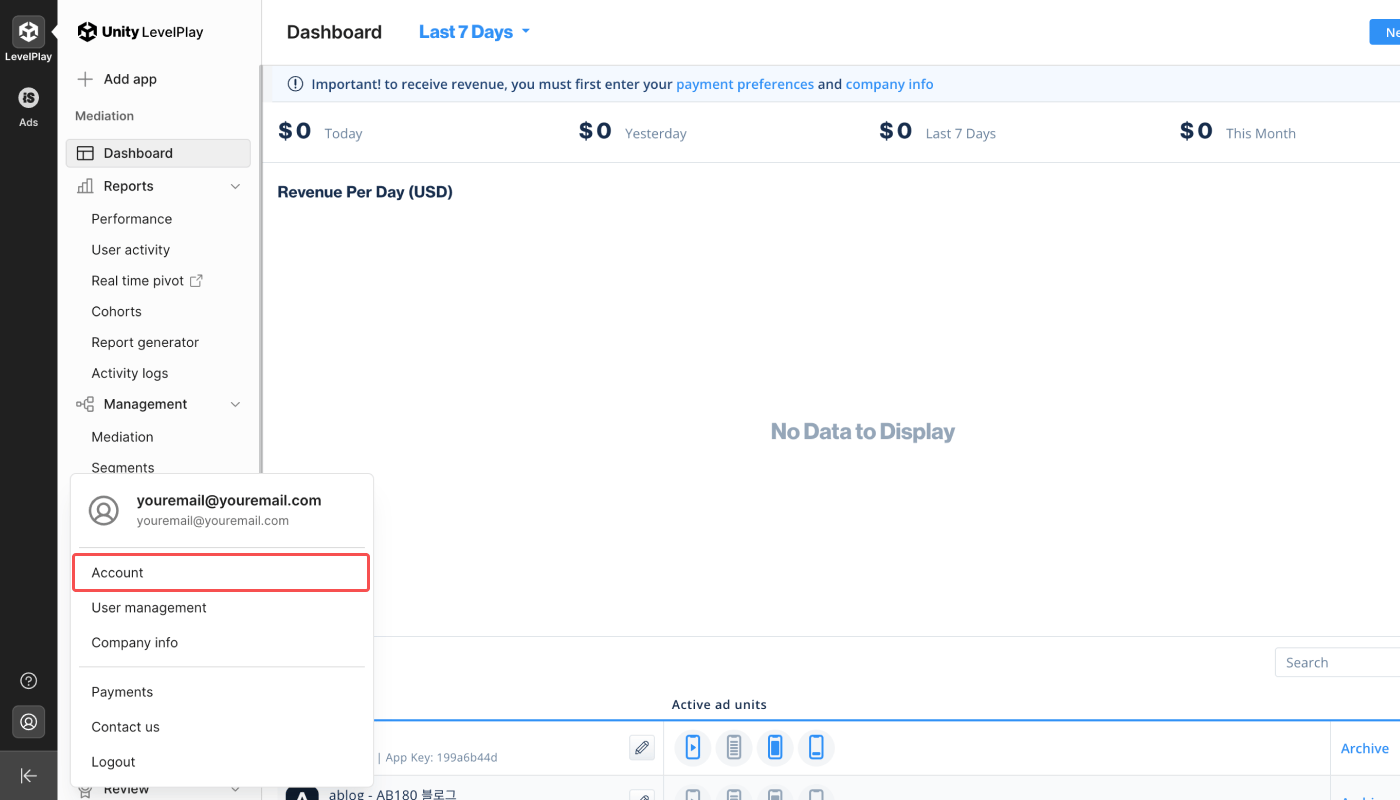
- Click the [account] icon at the bottom of the sidebar on the left. Click Account.
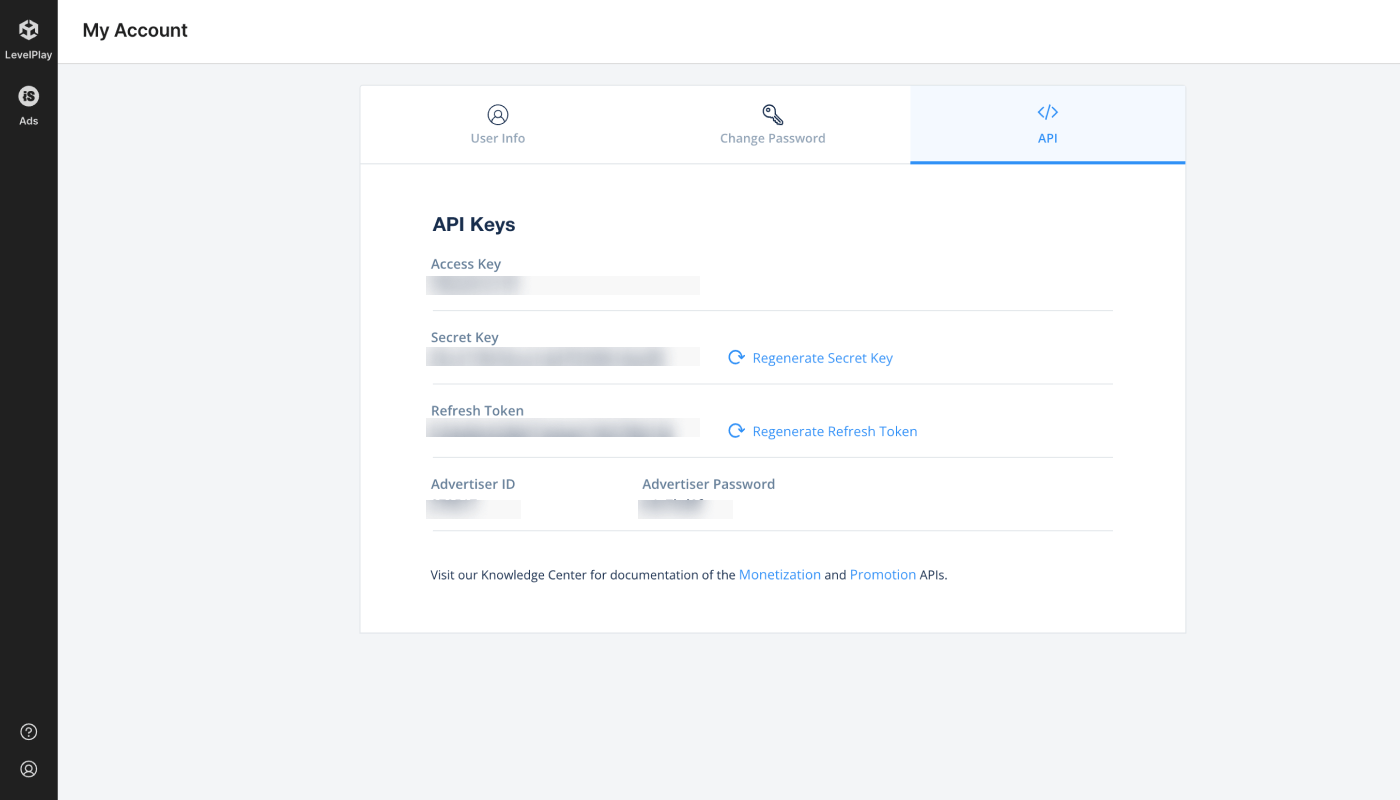
- Find the Secret Key와 Refresh Token in the [API] tab.
Providing the credentials to Airbridge
- Navigate to [Integrations]>[Third-party Integration] and select Unity LevelPlay (ironSource).
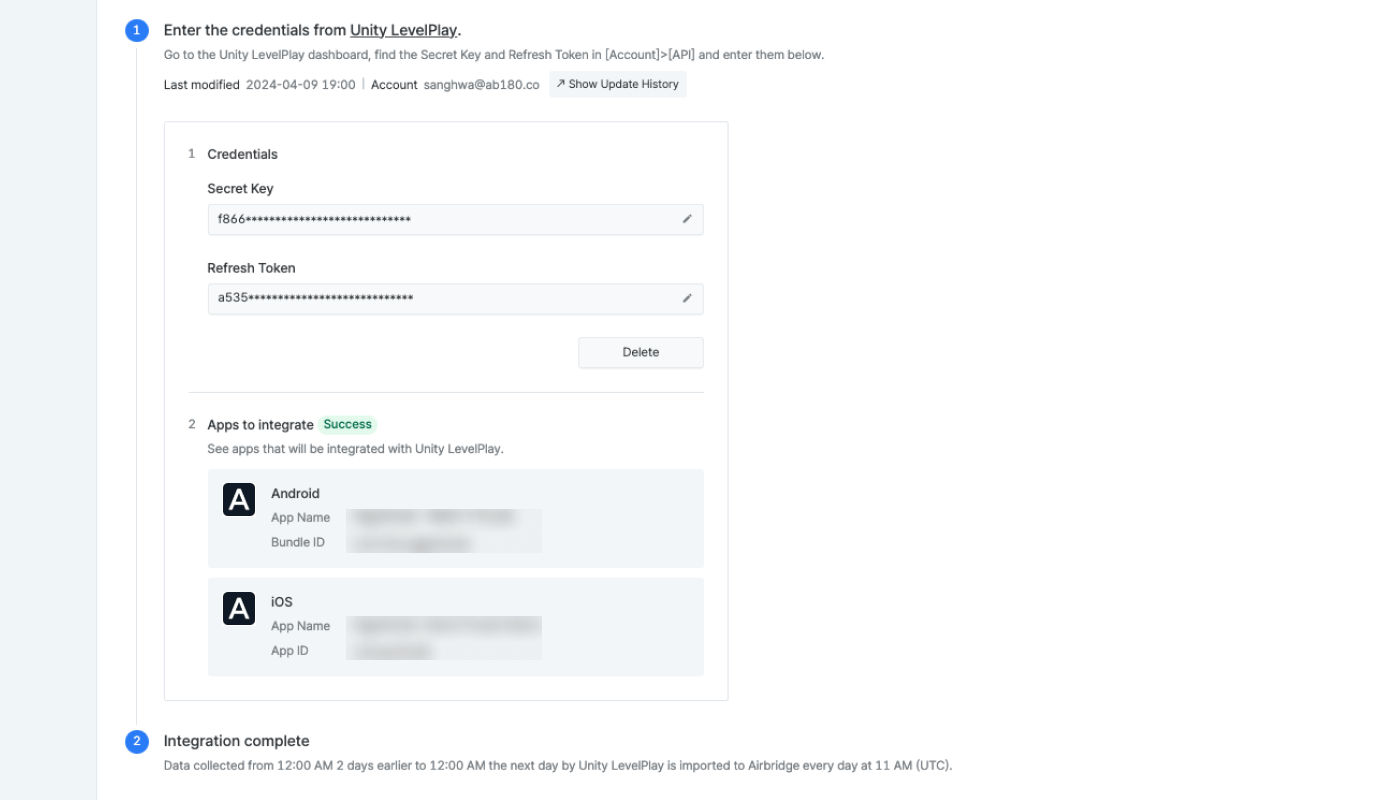
- Provide the Secret Key and Refresh Token to Airbridge and click Submit.
- Once the credentials are registered with Airbridge, the apps that will be integrated appear. If you leave the page before the apps appear, you must start the process again by providing the credentials. Have some patience.
- Once the apps that will be integrated appear on the dashboard, the connection is activated. At least 1 Android or iOS app must appear for the connection to be activated.
Troubleshooting - Your app doesn't show?
Troubleshooting - Your app doesn't show?
Refer to the following information to troubleshoot your problem.
Supported features
Refer to the table below to understand the integration status tags. Credentials refer to authentication tokens, report keys, IDs, etc.

The status tags are visible under the third-party names on the [Integrations]>[Third-party Integration] page.
Editing credentials
Editing credentials
Click the [pen] icon to edit the credential information. Click Done to save changes.
Deleting credentials
Deleting credentials
Click Delete to delete the credentials. When deleting the credentials, the integration is disabled. Data already pulled into Airbridge or to the third-party solution are not affected and remain in Airbridge or in the third-party solution. To reenable the integration, enter the credentials again.
Integrating more apps
Integrating more apps
If you want to integrate more apps from a different platform (Android, iOS), The integration must be set up from the start. Click Delete and enter the credentials again.
Data import schedule
NoteDepending on the data volume, the aggregation process may take a longer time. As a result, the time the data is made available in the Actuals Report may be delayed.
SDK Integration
AttentionDue to the real-time data updates in the third-party platform, data received via the SDK integration between Airbridge and the third-party platform may differ.
Imported Ad Revenue Data in Airbridge
Once the integration is complete, the ad revenue data can be viewed in the Airbridge dashboard.Parameter mapping table between Unity LevelPlay and Airbridge
Parameter mapping table between Unity LevelPlay and Airbridge
Attention
Data update after enrichment
Data update after enrichment
When implementing both S2S and SDK integration methods, the Unity LevelPlay data displayed in the Airbridge reports may be subject to change for up to 3 days.The real-time data received through SDK integration is updated with the enriched data received through the S2S integration. Therefore, the real-time data collected today may be updated within the next 3 days.For example, let’s say today is 2024-01-01. The Unity LevelPlay ad revenue data of 2024-01-01 displayed in the Airbridge reports may be updated on 2024-01-04.
Postbacks are not sent via the server
Postbacks are not sent via the server
Airbridge does not send postbacks via S2S integration. To get postbacks, implement the SDK integration.
Event duplication
Event duplication
When implementing both integration methods, event duplication may occur.
- When sending data to a data storage, duplicated events may be saved to the data storage.
- When exporting raw data from the [Raw Data]>[App Raw Data] menu multiple times, event duplication may occur depending on the export request time.
Data discrepancy between Unity LevelPlay and Airbridge due to timezone difference
Data discrepancy between Unity LevelPlay and Airbridge due to timezone difference
Unity LevelPlay data is based on UTC, and the timezone can’t be changed. If your Airbridge App’s timezone is set to anything other than UTC, differences in data may occur depending on the time the data was queried in Airbridge.
Credential update
Credential update
If the credentials are updated in the Unity LevelPlay dashboard after the integration is complete, the integration with Airbridge will be disabled. The integration must be set up from the start to be re-enabled.