Airbridge plans
Airbridge offers 2 plans. Each plan provides a different set of features to match your organization’s needs.Pricing unit
Airbridge uses pricing units to measure your organization’s usage. The available pricing units depend on your plan.MAU (Monthly Active Users)
MAU counts unique users who launched your app at least once during a calendar month (UTC). The same user launching the app multiple times counts as 1. Users who only uninstalled the app without any other activity are excluded. Unique users are identified by the Airbridge Device ID (User Count).Attributed Install
Attributed Install counts app installs attributed to ad channels plus installs confirmed by SKAN (SKAdNetwork) during each calendar month (UTC). The exact calculation depends on your SKAN version and settings.Example: Attributed Install with SKAN 4.0 Attribution Overlap
Example: Attributed Install with SKAN 4.0 Attribution Overlap
When using the Attribution Overlap for SKAN 4.0, the Attributed Installs are aggregated as follows:
- Aggregated data: Attributed Install (App) + SKAN Dedup Install (App)
In this case, for Ad Channel X, the Attributed Install (App) measured by Airbridge is 700. The SKAN Dedup Install (App), which is the Attributed Installs measured by SKAN only after excluding the duplicate installs (measured by Airbridge using IDFA), is 100. Therefore, the Attributed Installs used for measuring Airbridge usage regarding Ad Channel X is 800 (700+100).For Ad Channel Y, the Attributed Install (App) measured by Airbridge is 200. The SKAN Dedup Install (App), which is the Attributed Installs measured by SKAN only after excluding the duplicate installs (measured by Airbridge using IDFA), is 0. Therefore, the Attributed Installs used for measuring Airbridge usage regarding Ad Channel Y is 200 (200+0).As a result, the Attributed Installs used for measuring Airbridge usage for all ad channels is 1,000 (800+200).
Example: Attributed Install without Attribution Overlap
Example: Attributed Install without Attribution Overlap
If you are NOT using the “Attribution Overlap” feature in Airbridge for SKAN 4.0 or if you are using Airbridge for SKAN 3.0, the number of Attributed Installs is aggregated as follows:
- Aggregated data: The larger value between Attributed Installs (App) and SKAN Installs (App) is determined for each ad channel, and the larger values of each channel are summed.
By using the larger values for the Airbridge usage calculation, the Attributed Installs are 500 (200 + 300).
Data Point
Data points determine the maximum number of app events you can collect across all apps within the contract period. One event consumes one data point. For the Growth plan, total data points are calculated as:- Data points = (Usage limit) × (Data points per pricing unit)
For the Core plan, 500,000 data points are included each month with th monthly subscription. Each additional data point is billed at $0.0001.
Growth plan
The Growth plan gives you access to all Airbridge features. Measure ad performance and optimize campaigns using reports, raw data exports, ad channel integrations, tracking links, and attribution rules. Best for organizations running multiple campaigns or working with large volumes of data.Growth plan limits
Your plan limits are set during your contract with Airbridge. Limits are based on the total usage across all apps registered in your organization.Sample case: Growth plan with 100K Attributed Installs per year
Sample case: Growth plan with 100K Attributed Installs per year
Let’s say your organization’s plan details are as follows.
- Product Plan: Growth Plan
- Contract Period: Jan 01, 2025 to Dec 31, 2026
- Pricing Bucket: 1 year
- Pricing Unit: Attributed Install
- Usage Limit: 1M/year
- Data points per usage unit: 100 per Attributed Install
- Number of Apps Added to Airbridge: 2 apps
- Data points: 1,000,000 * 100 = 100,000,000
Growth plan payment
For detailed information on pricing, payment dates, and payment methods, contact sales.View plan and usage data
To view plan and usage data for the Growth plan, see guide.Core plan
The Core plan provides access to attribution for major ad channels and key reports. With the Core plan, you can integrate Meta Ads, Google Ads, Apple Ads, and TikTok for Business, and measure ad performance using tracking links, attribution rules, and reports. This plan is ideal for organizations starting paid campaigns or looking to quickly monitor performance across major channels.The Core plan supports:
- App campaigns on all supported ad channels
- Web campaigns on Google Ads and TikTok for Business
Core plan free trial
When you sign up for the Core plan and create an organization, a 30-day free trial period begins from the date of organization creation. During the trial, you can use the Core plan with no usage limit, at no charge.Core plan subscription and billing
After the 30-day free trial ends, the Core plan becomes a paid subscription, which includes 500,000 data points per billing period. Each data point beyond 500,000 is billed at $0.0001 as overage. Each billing period is one calendar month from your subscription start date. The $40 fee is charged in advance at the start of each billing period. Any overage is billed the day after the billing period ends. Both charges go to your registered payment method. To view your current usage, go to [Organization]>[Plan & Usage] in the Airbridge dashboard. Usage data for the previous day is updated in a single batch every day around 04:00 UTC.Core Plan sample case
Let’s say your organization signed up for the Core plan as follows.- Product Plan: Core Plan
- Sign-up date: Jan 14, 2026
- Organization creation date: Jan 15, 2026
- Free trial: Jan 15, 2026 to Feb 13, 2026 (30 days)
- Subscription start: Feb 14, 2026
- Apps: 2
Free trial
Your free trial lasts 30 days from the organization creation date, from Jan 15, 2026 to Feb 13, 2026. During the trial, you can use the Core plan with no usage limit, at no charge.Monthly subscription billing
When the free trial ends, your subscription begins on Feb 14, 2026, and the first billing period runs for a calendar month from Feb 14 to Mar 13, 2026. If your organization collects 700,000 data points during this period:- Monthly fee: $40, charged in advance on Feb 14, 2026
- Overage charge: (700,000 − 500,000) × $0.0001 = $20
- Overage billed: Mar 14, 2026 (the day after the billing period ends)
View plan and usage data
For the Core plan, go to [Organization]>[Plan & Usage]>[Current Plan] in the Airbridge dashboard.
Under [Free Usage], you can track your monthly data point usage against the 500,000 included data points with a progress bar. Usage data for the previous day is updated in a single batch every day around 04:00 UTC.
View the plan and usage data
NoteOnly Airbridge users with the Admin or Manager organization role can access the [Plan & Usage] menu.
Details of the current Airbridge plan
On the [Organization]>[Plan & Usage] page in the Airbridge dashboard, you can view the details of the current Airbridge plan in the [Current Plan] tab under the “Plan Details” section.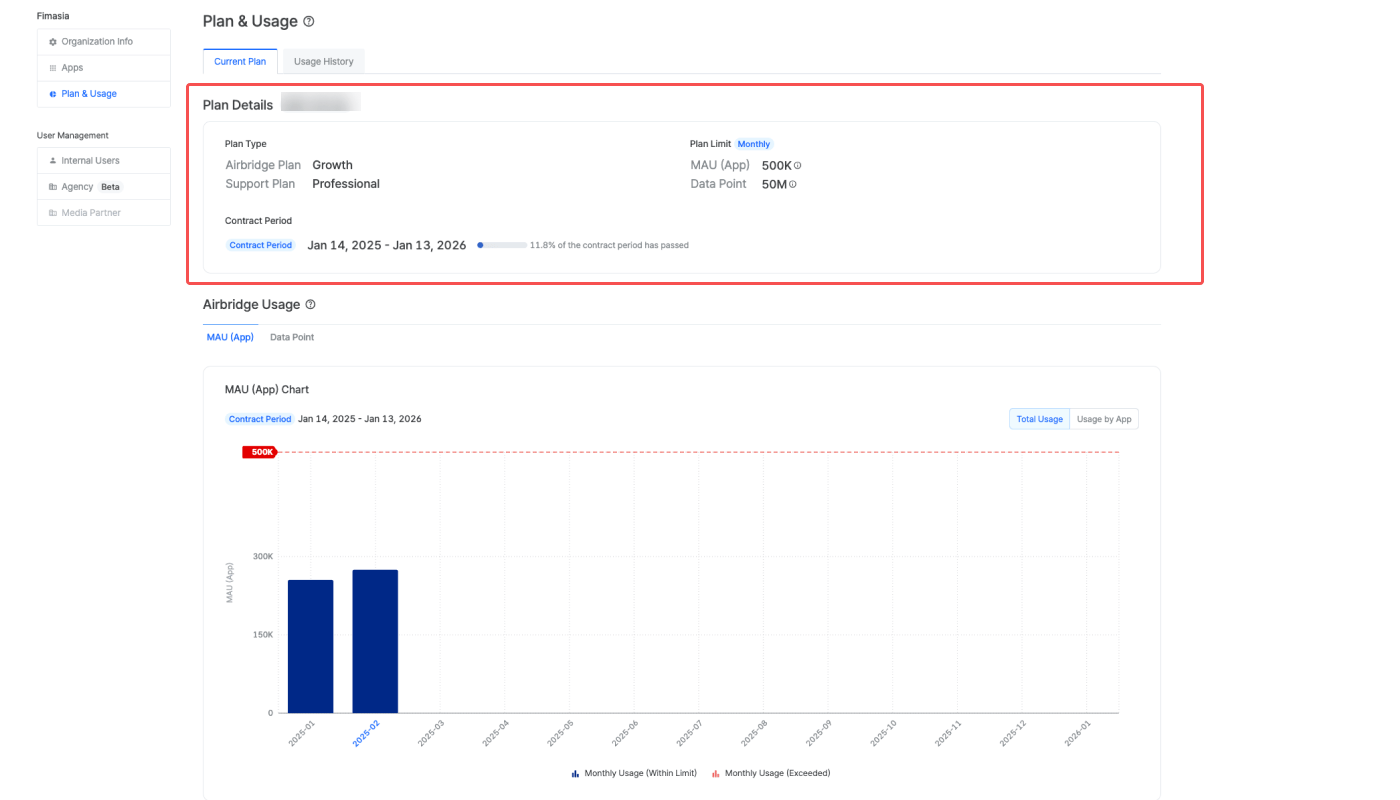
The following information is available for the Core Plan.
For the Core plan, you can check the monthly data point usage against the 500,000 included data points under [Free Usage] in [Plan Details]. The current usage, free allowance, and usage rate for each item are displayed with a progress bar.
Monitoring the Airbridge usage
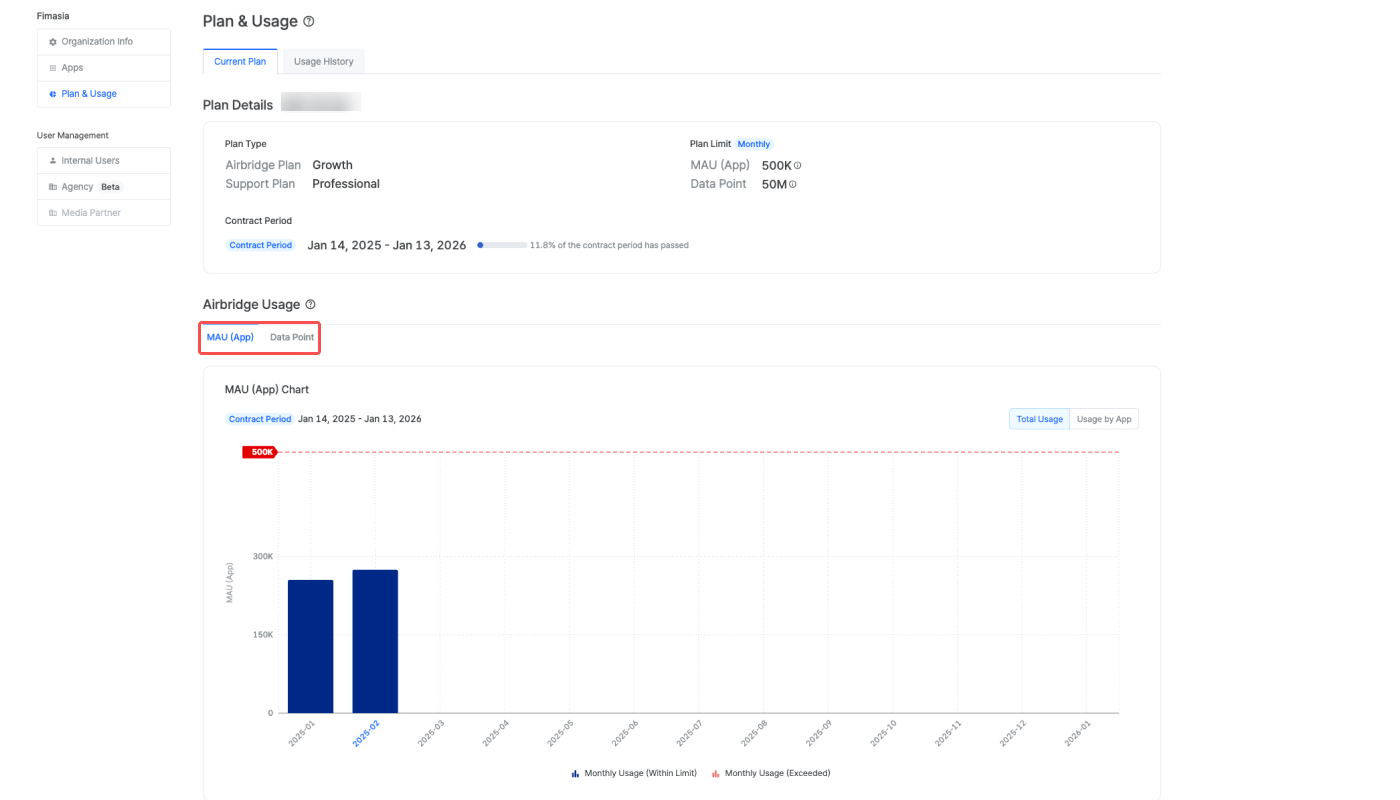
The usage data is visualized in the chart and table below the “Plan Details” section in the [Current Plan] tab on the [Organization]> [Plan & Usage] page in the Airbridge dashboard.NoteThe data in the usage chart and table are not updated in real time. For accurate reporting, the usage data is updated after adjustments that may take up to 8 days. The updated data is applied to the dashboard at 3:00 PM (UTC) daily.
Usage chart
Click Total Usage to view the total Airbridge usage or click Usage by App to view the usage by app registered within your organization in Airbridge.Airbridge usage with monthly limit
Airbridge usage with monthly limit
The monthly usage is displayed in a bar format, with each bar representing the usage for a month. If overages occur in a specific month, the bar will appear in red. Hovering over each bar will show the usage and any overages measured in the contracted pricing unit.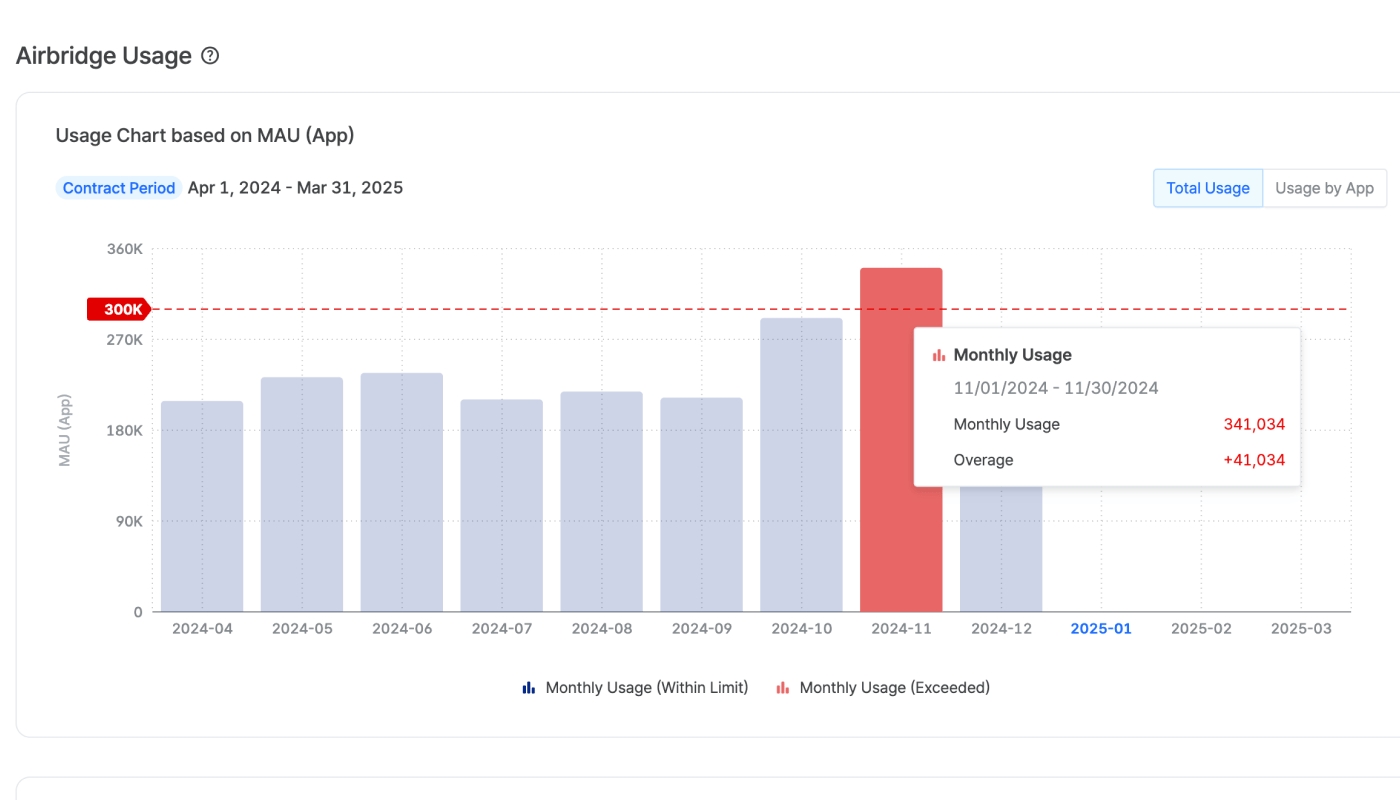
Airbridge usage with annual limit
Airbridge usage with annual limit
The monthly usage is shown in bars, while the cumulative usage data is represented in a line. If overages occur, the line will appear in red starting from the month the usage limit is surpassed. Hovering over each bar shows the monthly usage, cumulative usage, and overages measured in the contracted pricing unit.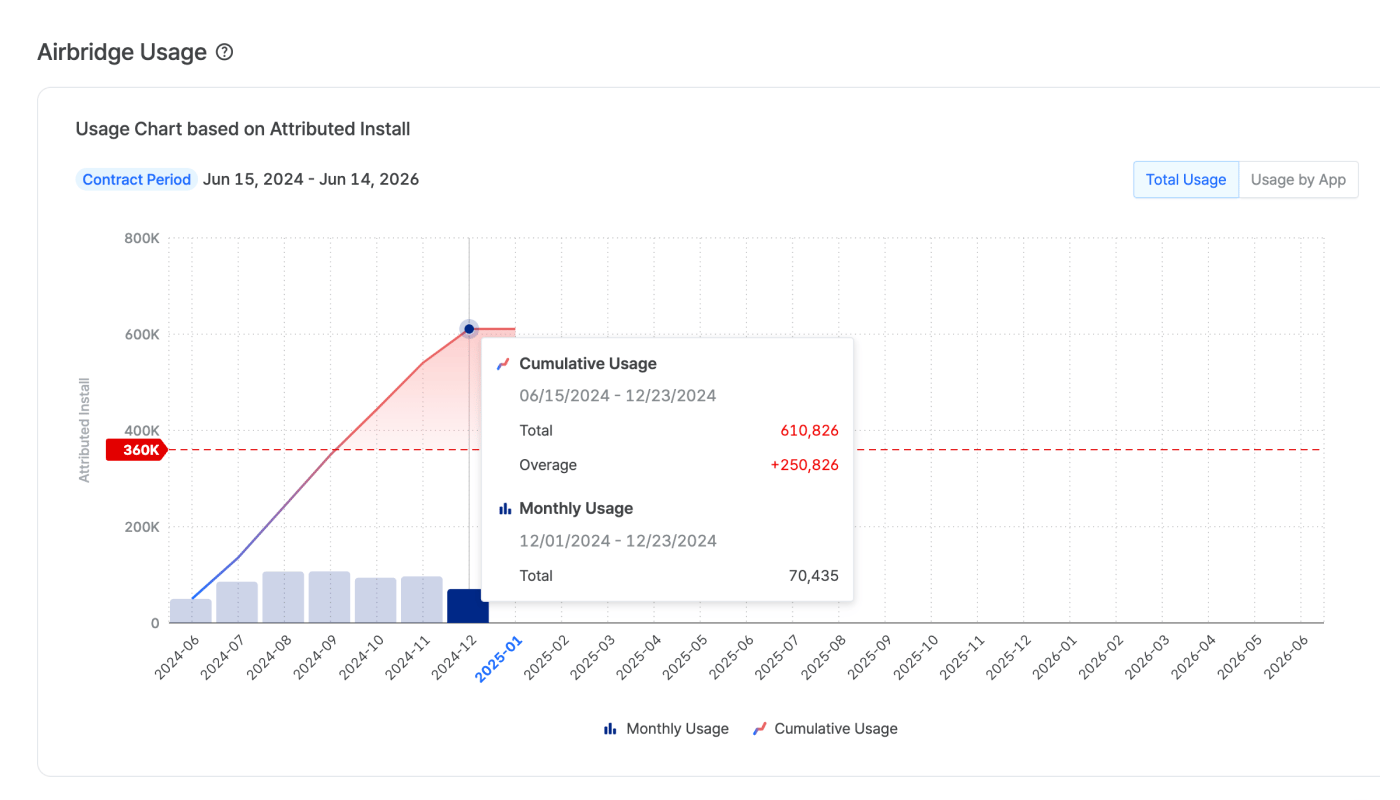
Data point chart with monthly limit
Data point chart with monthly limit
The monthly data point usage is displayed in a bar format, with each bar representing the usage for a month. If overages occur in a specific month, the bar will appear in red. Hovering over each bar shows the usage and any overages measured.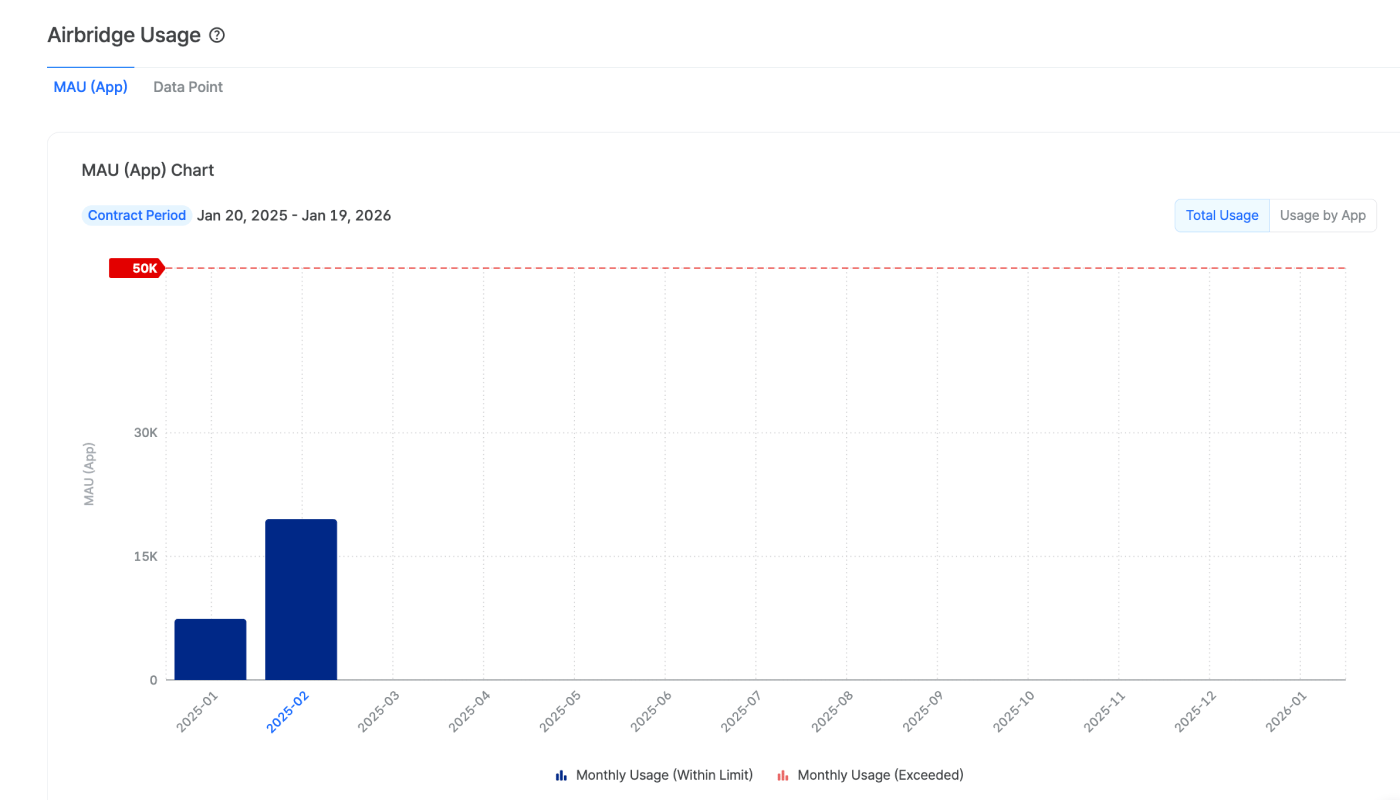
Data point chart with annual limit
Data point chart with annual limit
The monthly data point usage is shown in bars, while the cumulative data is represented in a line. If overages occur, the line will appear in red starting from the month the usage limit is surpassed. Hovering over each bar shows the monthly usage, cumulative usage, and overages measured.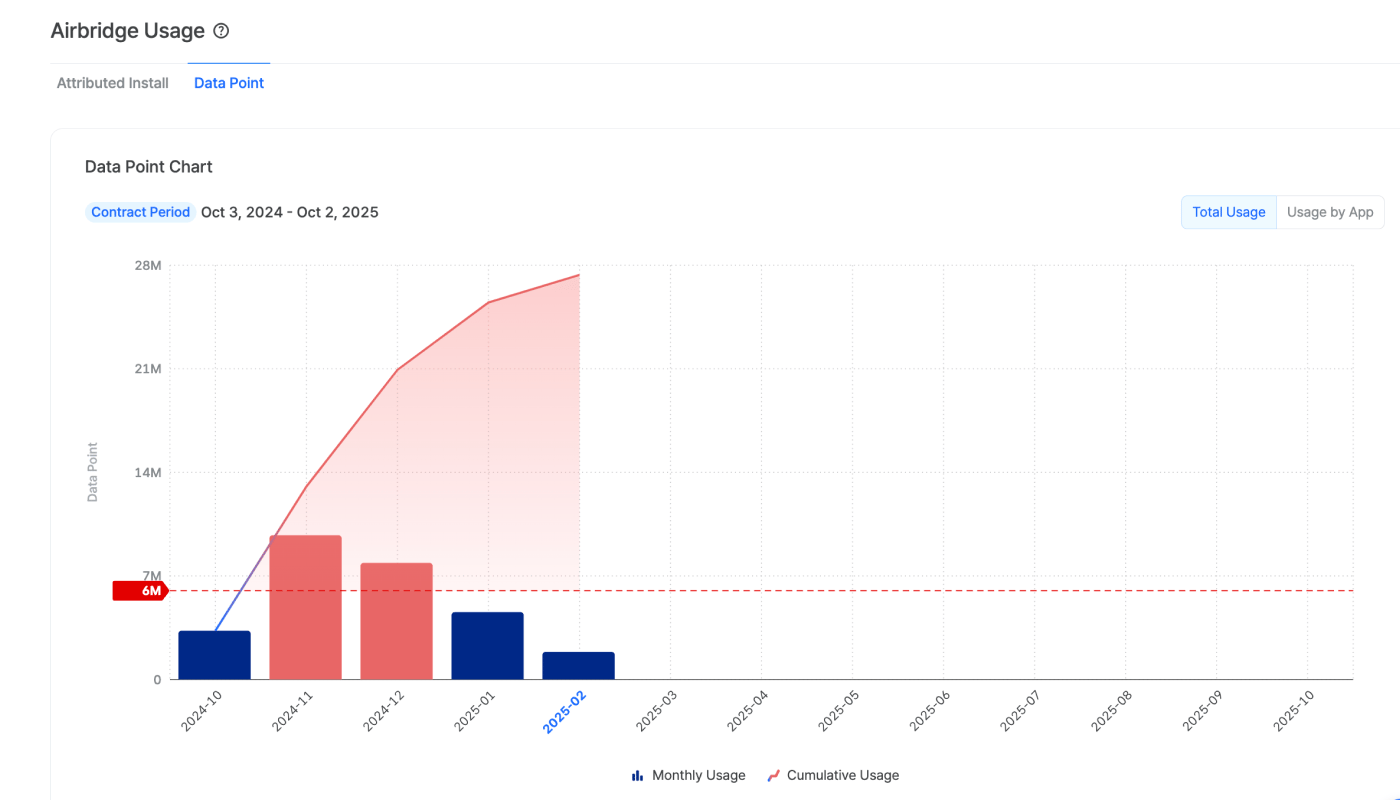
Usage table
In the usage table, you can find the detailed usage data, including monthly usage, usage limit, and any overages. Clicking on the monthly period will show the monthly usage measured per app added to Airbridge. The overage data will appear in red.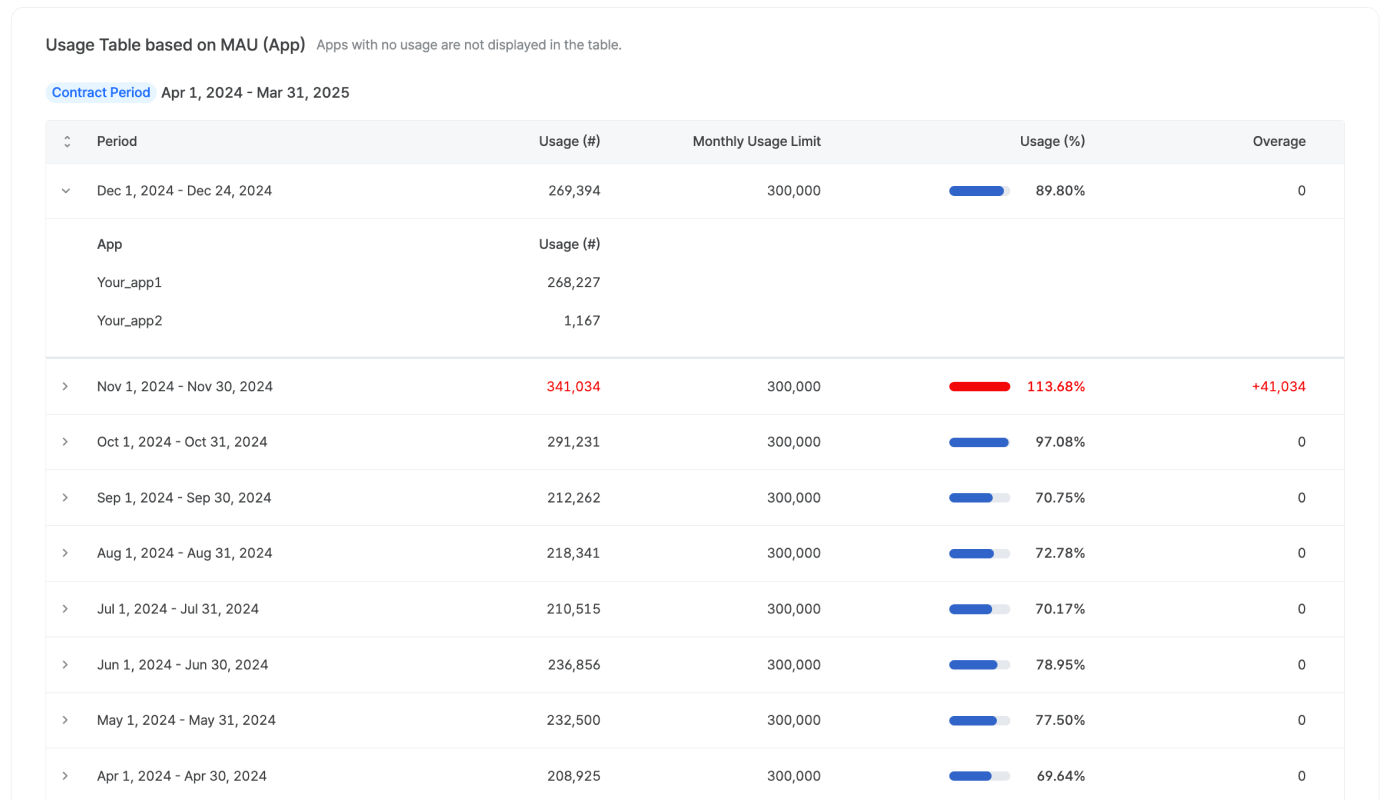
Usage history
NoteOnly contracts that started after February 1, 2023, will be displayed in the [Usage History] tab.
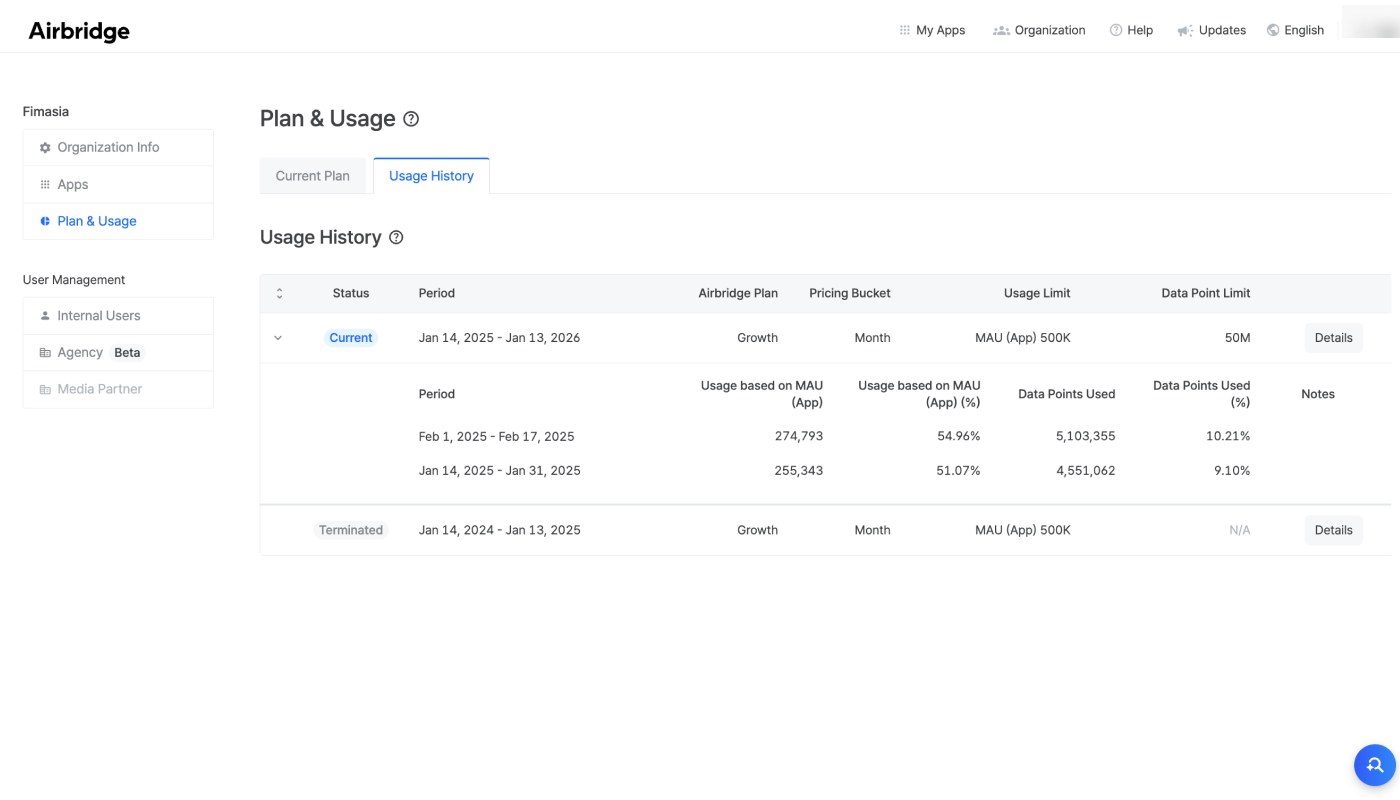
For “Current” and “Terminated” contracts, you can find the usage data measured by the contracted pricing unit when clicking on the contract period. The overages appear in red. For “Upcoming” contracts, you can only find the usage limit information.
Clicking Details of each contract will open a side panel that lists the contract details in full.