
Understanding Google Ads campaign data collection
When a user clicks on an ad served through Google Ads, they are redirected to the set final URL, which is the destination page, and campaign data is collected. Google Ads provides URL options that allow you to define the ad settings in the form of URL parameters. By selecting the appropriate URL options and adding URL parameters, data is collected as values are populated in each URL parameter when a user clicks the ad. This data can be imported to Airbridge through Google Ads integration and used for ad performance measurement.Final URL
The final URL is the destination where users land after clicking on your ad. It is also called the landing page URL and specified with the {lpurl} parameter.URL parameters
The URL parameters of a Google Ads campaign consist of a name (key) that indicates the data to be collected and the value that is filled in with actual data. When the campaign data you want to collect is defined using URL parameters, data corresponding to each parameter is filled in as values when a user clicks on the ad, allowing the data to be collected. URL parameters that can be used for data collection include ValueTrack parameters provided by Google Ads and custom parameters that advertisers define and use themselves.How URL parameters collect campaign data
How URL parameters collect campaign data
- Final URL:
www.footwear.com - URL parameters: keyword={keyword}&matchtype={matchtype}
- Landing page URL:
www.footwear.com/?keyword=running+shoes&matchtype=exact
ValueTrack parameters
ValueTrack parameters are URL parameters predefined by Google Ads, such as {campaignid}, {adgroupid}, {keyword}, {device}, etc. For the full list of ValueTrack parameters, refer to this article in the Google Ads Help Center.Custom parameters
Custom URL parameters are parameters that advertisers can define themselves. While they can be used to collect data not defined by ValueTrack parameters, there is a risk that your ad may be disapproved by Google Ads. For more details, refer to this article in the Google Ads Help Center.Defining campaign data for collection
In Google Ads, you can add URL parameters to the URL options to define the data to be collected. The URL options include the Final URL suffix and tracking templates.Final URL suffix
The Final URL suffix is a URL option that can be added to the end of the Final URL. You can include URL parameters in the final URL suffix to define the data to be collected. When a user clicks on an ad, data about that click is collected by populating the URL parameters included in the Final URL suffix with corresponding values. An optimized Final URL suffix is provided in the Airbridge dashboard as shown below. By applying it to your Google Ads account settings, you can track the data from web campaigns that direct users to environments with the Airbridge SDK installed and view it in the Airbridge dashboard. For more details, refer to this article.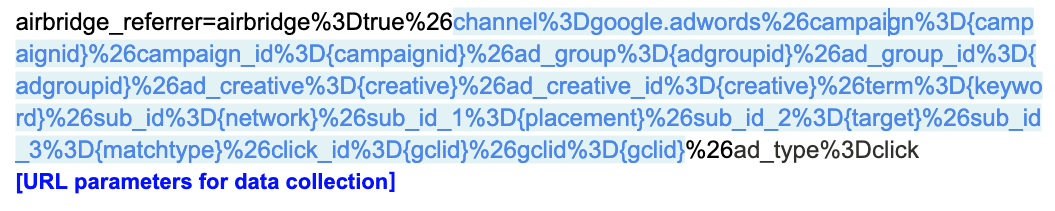
Tracking template
The tracking template is a URL option that looks like a link composed of a specific domain. You can add URL parameters to the tracking template to define the destination path, such as the Final URL, and the data to be collected. When a user clicks on an ad, they are directed to the Final URL, and the data is collected by populating the URL parameters with corresponding values. The tracking template must include the required URL parameters specified by Google Ads.Domain
Domain
Only domains from certified Google click trackers can be used in the tracking template. Airbridge uses
abr.ge and deeplink.page. Custom domains other than these cannot be used.Required URL parameters
Required URL parameters
These are URL parameters commonly required by Google Ads for all certified partners. They define the Final URL and fallback paths for each operating system. These parameters are already included in the tracking template provided by Airbridge. Note that if any required URL parameters are missing, your ad may be disapproved by Google Ads.
