정확한 구매 성과 측정을 위한 구매 취소 이벤트 분석하기

    이런 분께 이 플레이북을 추천해요

    • 주요 전환 지표가 구매 이벤트에요. 구매 취소 이벤트까지 반영한 실질적인 구매 성과를 분석하고 싶어요.

    • 어떤 채널에서 구매 이벤트와 구매 취소 이벤트가 가장 많이 또는 적게 일어나는지 구체적으로 알고 싶어요.

    구매한 제품에 대한 정보를 모두 수집해도 실제 구매 성과와 차이가 있을 수 있습니다. 일부 제품이 반품이 환불되기 때문입니다. 실제 구매 성과를 확인하기 위해서는 구매가 취소된 이벤트도 함께 수집해야 합니다.


    구매 취소 이벤트 수집하기

    구매 취소 이벤트는 에어브릿지가 기본적으로 제공하고 있는 스탠다드 이벤트중 하나입니다. 액츄얼스 리포트(Actuals Report)와 원본 데이터 추출 등에서 구매 취소 이벤트를 확인할 수 있습니다.

    구매 취소 이벤트는 구매 완료 이벤트가 항상 먼저 발생해야 발생할 수 있는 이벤트입니다. 구매 완료 이벤트와 구매 취소 이벤트의 여러 정보가 같아야 실제 구매액을 계산할 수 있습니다. 예를 들어 구매 취소 이벤트의 제품 가격은 앞서 발생한 구매 완료 이벤트의 제품 가격과 같아야 합니다.

    구매 취소 이벤트와 구매 완료 이벤트 매핑하기

    구매 취소 이벤트와 구매 완료 이벤트를 매핑해야 두 이벤트가 같은 정보를 가질 수 있습니다. 두 이벤트를 매핑하기 위해서는 구매 이벤트의 Transaction ID를 구매 취소 이벤트의 Transaction ID에 삽입해야 합니다.

    아래 구매 취소 이벤트의 예시 코드를 참고해 주세요.

    1234567891011121314151617181920
    airbridge.events.send("airbridge.ecommerce.order.canceled", {
      semanticAttributes: {
        transactionID: '1458132a-0d09-4944-a686-fcbee81b74f7',
        transactionPairedEventTimestamp: 1599186193324,
        totalValue: 99000,
        products: [{
          productID: "1234",
          name: "Nike 1",
          price: 55000,
          currency: "KRW",
          quantity: 1
        }, {
          productID: "1235",
          name: "Nike 2",
          price: 44000,
          currency: "KRW",
          quantity: 1
        }]
      }
    });
    123456789101112131415161718192021
    Map < String, Object > product1 = new HashMap < > ();
    product1.put("productID", "1234");
    product1.put("name", "Nike 1");
    product1.put("price", 55000);
    product1.put("currency", "KRW");
    product1.put("quantity", 1);
    Map < String, Object > product2 = new HashMap < > ();
    product1.put("productID", "1235");
    product1.put("name", "Nike 2");
    product1.put("price", 44000);
    product1.put("currency", "KRW");
    product1.put("quantity", 1);
    List < Map < String, Object >> products = new ArrayList < > ();
    products.add(product1);
    products.add(product2);
    Map < String, Object > semanticAttributes = new HashMap < > ();
    semanticAttributes.put("transactionID", "1458132a-0d09-4944-a686-fcbee81b74f7");
    semanticAttributes.put("transactionPairedEventTimestamp", 1599186193324 L);
    semanticAttributes.put("totalValue", 99000);
    semanticAttributes.put("product", products);
    Airbridge.trackEvent("airbridge.ecommerce.order.canceled", // Category null, // Action null, // Label null, // Value null, // Custom Attributes semanticAttributes // Semantic Attributes );
    123456789101112131415161718192021222324252627282930
    Airbridge.trackEvent(
      category = "airbridge.ecommerce.order.canceled",
      semanticAttributes =
        mapOf(
          "transactionID" to "1458132a-0d09-4944-a686-fcbee81b74f7",
          "transactionPairedEventTimestamp" to 1599186193324L,
          "totalValue" to 99000,
          "products" to
            mapOf(
              "totalValue" to 99000,
              "product" to
                listOf(
                  mapOf(
                    "productID" to "1234",
                    "name" to "Nike 1",
                    "price" to 55000,
                    "currency" to "KRW",
                    "quantity" to 1
                  ),
                  mapOf(
                    "productID" to "1235",
                    "name" to "Nike 2",
                    "price" to 44000,
                    "currency" to "KRW",
                    "quantity" to 1
                  )
              )
           )
        )
    )
    1234567891011121314151617181920212223
    #import <AirBridge / ABInAppEvent.h>
    ABInAppEvent * event = [[ABInAppEvent alloc] init];
    [event setCategory: @ "airbridge.ecommerce.order.canceled"];
    NSDictionary * semantics = @ {
      @"transactionID": @"1458132a-0d09-4944-a686-fcbee81b74f7",
      @"transactionPairedEventTimestamp": @1599186193324,
      @"totalValue": @99000,
      @ "products": @[@{
        @"productID": @"1234",
        @"name": @"Nike 1",
        @"price": @55000,
        @"currency": @"KRW",
        @"quantity": @1,
      }, @{
        @"productID": @"1235",
        @"name": @"Nike 2",
        @"price", @44000,
        @"currency": @"KRW",
        @"quantity": @1,
      }],
    };
    [event setSemantics: semantics];
    [event send];
    12345678910111213141516171819202122232425
    let event = ABInAppEvent ()
    event?.setCategory ("airbridge.ecommerce.order.canceled")
    let semantics : [String: Any]= [
      "transactionID" : "1458132a-0d09-4944-a686-fcbee81b74f7",
      "transactionPairedEventTimestamp" : 1599186193324,
      "totalValue" : 99000,
      "products" : [
        [
          "productID" : "1234",
          "name" : "Nike 1",
          "price" : 55000,
          "currency" : "KRW",
          "quantity" : 1,
        ],
        [
          "productID" : "1235",
          "name" : "Nike 2",
          "price" : 44000,
          "currency" : "KRW",
          "quantity" : 1,
        ]
      ]
    ]
    event?.setSemantics (semantics)
    event?.send ()

    구매 취소 이벤트의 시멘틱 어트리뷰트는 아래와 같습니다.

    구매 취소 이벤트의 시멘틱 어트리뷰트(Semantic Attributes)를 아래처럼 설정해 주세요.

    Attribute

    Type

    Description

    transactionID

    string

    구매 완료 이벤트의 Transaction ID

    transactionPairedEventTimestamp

    int

    구매 완료 이벤트가 발생한 시점 (13자리 Unix Timestamp)

    totalValue

    float

    구매 취소 금액(환불액)

    totalQuantity

    int

    구매 취소한 제품의 전체 수량

    currency

    string

    구매 취소 금액의 통화

    productListID

    string

    구매 취소한 제품 목록 ID

    products.$0.productID

    string

    구매 취소한 제품 ID

    products.$0.name

    string

    구매 취소한 제품 이름

    products.$0.price

    float

    구매 취소한 제품 가격

    products.$0.currency

    string

    구매 취소한 제품 가격 통화

    products.$0.quantity

    int

    구매 취소한 제품 개수


    실제 구매 성과 분석하기

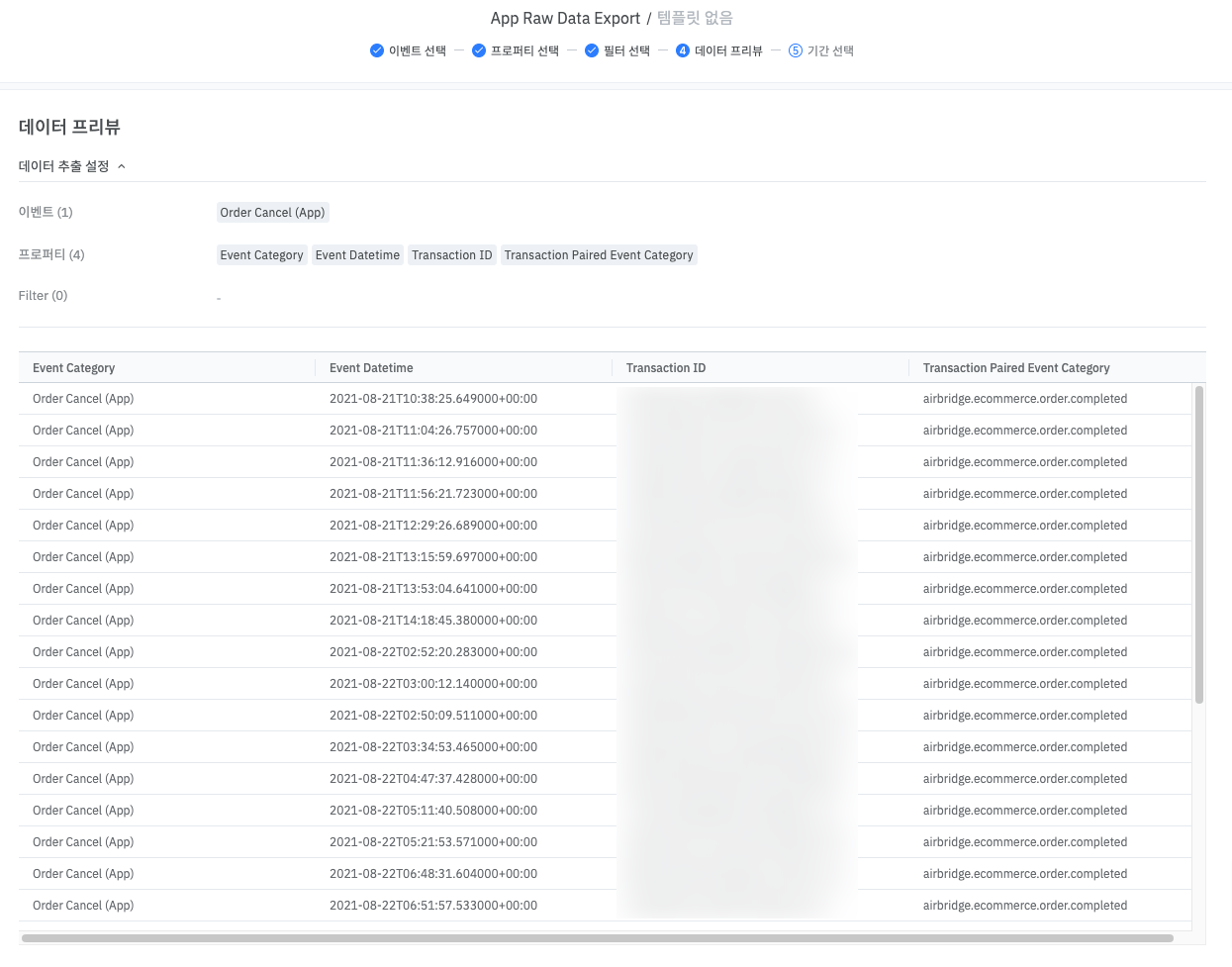
    원본 데이터 추출에서 구매 완료 이벤트와 구매 취소 이벤트를 추출합니다. 추출한 데이터를 Transaction ID 기준으로 정리하면 실제 구매 성과를 분석할 수 있습니다. 해당 실제 구매 성과를 채널별로 확인하면 구매 취소 이벤트가 제외된 채널별 실제 구매 성과를 확인할 수 있습니다.
    다른 이벤트에 응용하기

    예약, 견적 요청도 취소되면 성과에 영향을 주기 때문에 취소 이벤트를 정의해서 수집해야 정확한 성과를 확인할 수 있습니다. 취소 이벤트는 이전 이벤트가 취소된 이벤트를 수집하는 이벤트입니다.

    취소 이벤트 정의하기

    취소 이벤트는 이전 이벤트가 취소된 이벤트를 수집하는 이벤트입니다. 예를 들어 예약 취소 이벤트는 수집된 예약 이벤트를 취소하면 발생합니다.

    취소 이벤트를 커스텀 이벤트로 정의할 수 있습니다. 커스텀 이벤트의 시멘틱 어트리뷰트(Semantic Attribute)를 아래 같이 설정합니다.

    • semanticAttributes.transactionType에 cancel을 넣습니다

    • semanticAttributes.transactionPairedEventCategory에 예약 등 수집된 이벤트 중 취소되는 이벤트의 카테고리를 넣습니다

    구매 취소 이벤트는 스탠다드 이벤트이기 때문에 별도 설정이 필요하지 않습니다. 구매 취소 이벤트의 시멘틱 어트리뷰트는 아래와 같이 설정됩니다.

    • semanticAttributes.transactionType에 cancel이 있습니다

    • semanticAttributes.transactionPairedEventCategory에 구매 완료 이벤트의 카테고리 (airbridge.ecommerce.order.completed)가 있습니다.

    아래에 있는 취소 이벤트 예시를 참고해 주세요.

    12345678
    airbridge.events.send("reservation_cancel", {
      semanticAttributes: { 
        transactionID: '1458132a-0d09-4944-a686-fcbee81b74f7', 
        transactionType: 'cancel', 
        transactionPairedEventCategory: 'reservation', 
        transactionPairedEventTimestamp: 1599186193324,
      },
    });

    취소 이벤트의 어트리뷰션 규칙

    아래 조건 중 하나라도 만족하는 에어브릿지 이벤트는 취소 이벤트입니다.

    • 구매 취소 이벤트 (airbridge.ecommerce.order.canceled)

    • semanticAttributes.transactionType에 cancel이 있는 이벤트

    에어브릿지 어트리뷰션 모델은 취소 이벤트의 위닝 터치포인트가 항상 없는 것으로 측정합니다. 취소 이벤트에 기여한 채널은 항상 미기여(unattributed)로 나옵니다.

    도움이 되었나요?

    더 필요한 내용이 있나요?