
AttentionMake sure channel integration with Meta ads is completed before enabling cost integration.
Cost Integration Setup
NoteYou can view the Meta ads campaign data by configuring the filter in the report configuration as follows.
Channelisfacebook.business
- Navigate to [Integration]>[Ad Channel]>[Facebook Business], select the [Cost Integration] tab, and switch on the Cost integration toggle.
- Click Add an account and log in to your account. The account must have a recent history of campaign operation. In the login process, allow Airbridge to access your account.
- Select the ad accounts you want to connect with Airbridge from the ad account list. The ad accounts must have a recent history of campaign operation. Ad accounts already connected won’t show.
AttentionWhen selecting the ad accounts, select the ones you want to connect with Airbridge for ad spend data integration.
- When you complete the steps above, you will see the ad accounts in the list.
Managing Cost Integration
Pause cost integration
Pause cost integration
Turn off the toggle to pause the integration. Airbridge stops collecting cost data once the integration is paused.Any data collected before the pause remains available in Airbridge reports.Airbridge retains the credentials of the integrated account, so you can resume the integration at any time by turning the toggle on. However, deleting the integrated account removes these credentials.
Delete integrated account
Delete integrated account
Select the account from the integrated account list and click Delete to remove the account. To re-integrate the account after deletion, set up the integration from the beginning.
Integration status
You can view the current status of your connections in the status column. Even if you have completed the cost integration, the status will show “Waiting” until the ad spend data is actually imported to Airbridge.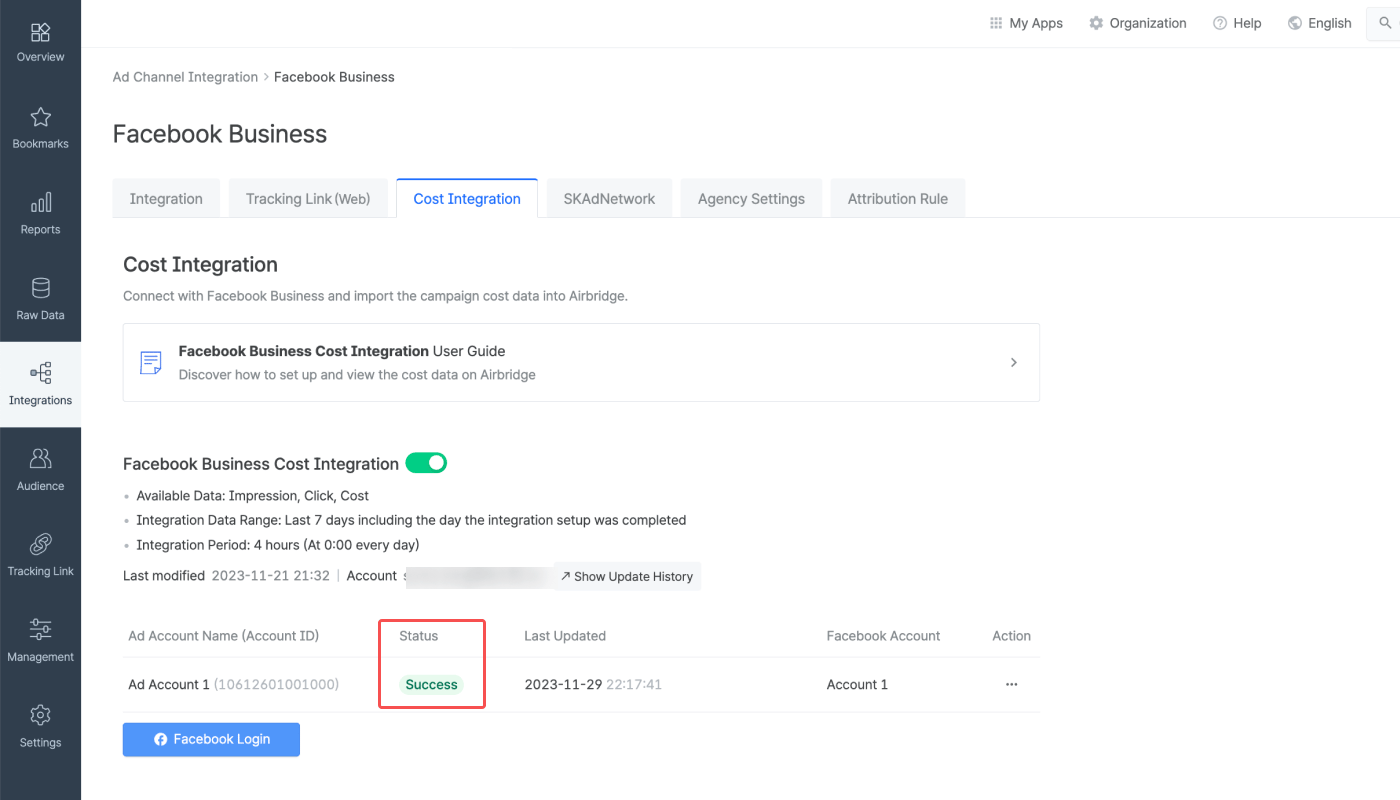
Cost data import schedule
Cost data import schedule
- Frequency: Every 4 hours, 6 times a day, starting at 3:00 PM UTC
- Import times: 3:00 PM, 7:00 PM, 11:00 PM, 3:00 AM, 7:00 AM, 11:00 AM UTC
- Data range: Current day (D-0) to 6 days ago (D-6)
Cost integration status
Cost integration status
Reporting
The cost data imported from Meta ads via cost integration can be viewed in the Actuals Report and Trend Report at the campaign level or ad group level. The following metrics and GroupBys can be used for report configuration.Metrics for cost data
Metrics for cost data
Difference between Clicks and Clicks (Channel)Both Clicks and Clicks (Channel) show click count, but the data source differs:
- Clicks: Collected through Airbridge tracking links
- Clicks (Channel): Provided by the ad channel
GroupBys for cost data
GroupBys for cost data
NoteUse the groupBys below to break down cost data in Airbridge reports. Available groupBys vary by ad channel.
Touchpoint
Device
Event Datetime
Attention
Meta's privacy policy
Meta's privacy policy
Following Meta’s privacy policy, Meta Ads campaign data is masked in Airbridge until you accept Meta’s Advanced Mobile Measurement (AMM) Terms, provided that both of the following conditions are met for the set date range:If Meta Ads data is still not visible after agreeing to the terms, you may try changing your report settings as follows:
- The sum of impressions and engaged views from Meta Ads campaigns is less than 1,000
- The Meta Ads campaign data is imported to Airbridge through channel integration and cost integration
NoteTo gain full visibility of your Meta ads campaign data in Airbridge reports, you need to accept Meta’s Advanced Mobile Measurement (AMM) Terms. Otherwise, Meta ads campaign data remains masked in Airbridge. For more information about Meta’s AMM terms, refer to this article.
- Change or extend the date range. Only data from periods after consent is provided in raw data.
- Change or remove some of the GroupBys and filters.
Discrepancy in cost data
Discrepancy in cost data
Airbridge pulls the cost data from the past 7 days, every 4 hours, 6 times a day starting at 3:00 PM (UTC). As the updates are not real-time, there may be data discrepancies between Airbridge and the ad channel, depending on the time of reporting.
App time zone and currency settings
App time zone and currency settings
The data pulled via cost integration is provided by the app time zone and app standard currency set within Airbridge.To minimize data discrepancy, align your app’s currency and time zone settings in your Airbridge dashboard and your ad channel’s dashboard.
GroupBys for the Cost (Channel) metric
GroupBys for the Cost (Channel) metric
The Cost (Channel) metric, which shows your ad spend reported by the ad channel, displays value only when used with specific GroupBys.Below are the GroupBys that can be used in the Actuals Report to view data with the metric:
- Channel
- Campaign
- Ad Group
- Ad Creative
When modifying campaign information in Meta Ads Manager
When modifying campaign information in Meta Ads Manager
It is advised not to modify the following items once the cost integration is enabled, as an error in data import may occur.
- Campaign name
- Ad group
- Ad creative name
AttentionIf the ad account name has not been entered, the Ad Account Name field will remain empty.