> ## Documentation Index
> Fetch the complete documentation index at: https://help.airbridge.io/llms.txt
> Use this file to discover all available pages before exploring further.
# DAU와 MAU 조회하기
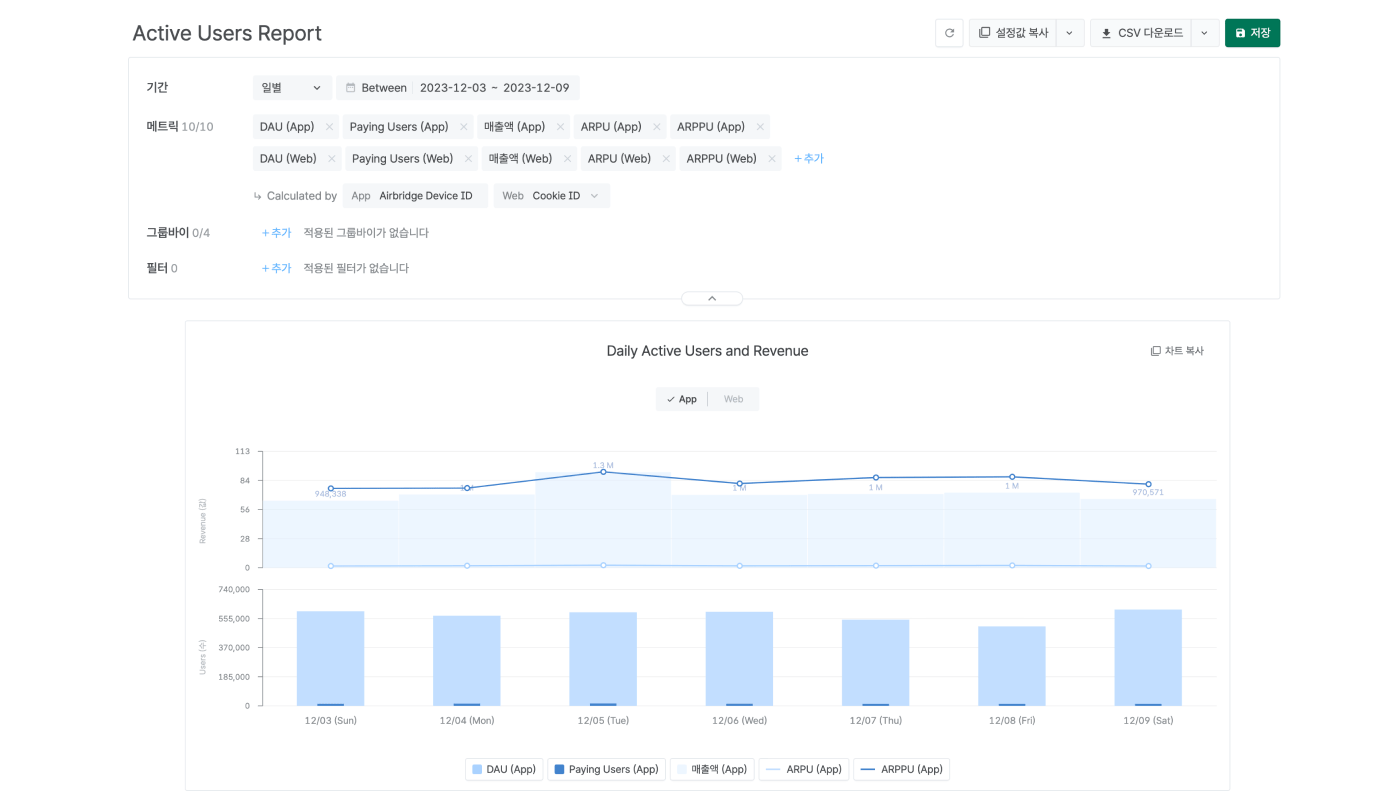
액티브 유저 리포트(Active Users Report)에서 주요 마케팅 성과 지표 DAU, MAU을 바로 확인할 수 있습니다. 액티브 유저의 성과를 주기별로 확인해 보세요.
## 액티브 유저 리포트 조회하기
액티브 유저 리포트(Active Users Report)를 조회하기 위해 필요한 기본적인 설정을 확인해 보세요. 기본적인 설정을 이해하면 DAU, WAU, MAU와 주기별 유저 성과를 원하는 대로 조회할 수 있습니다.
* [액티브 유저 리포트 조회하기](/ko/guides/understanding-the-active-user-report)
* [자주 묻는 질문](/ko/guides/active-users-report-faq)
### 액티브 유저 리포트에서 MAU 조회하기
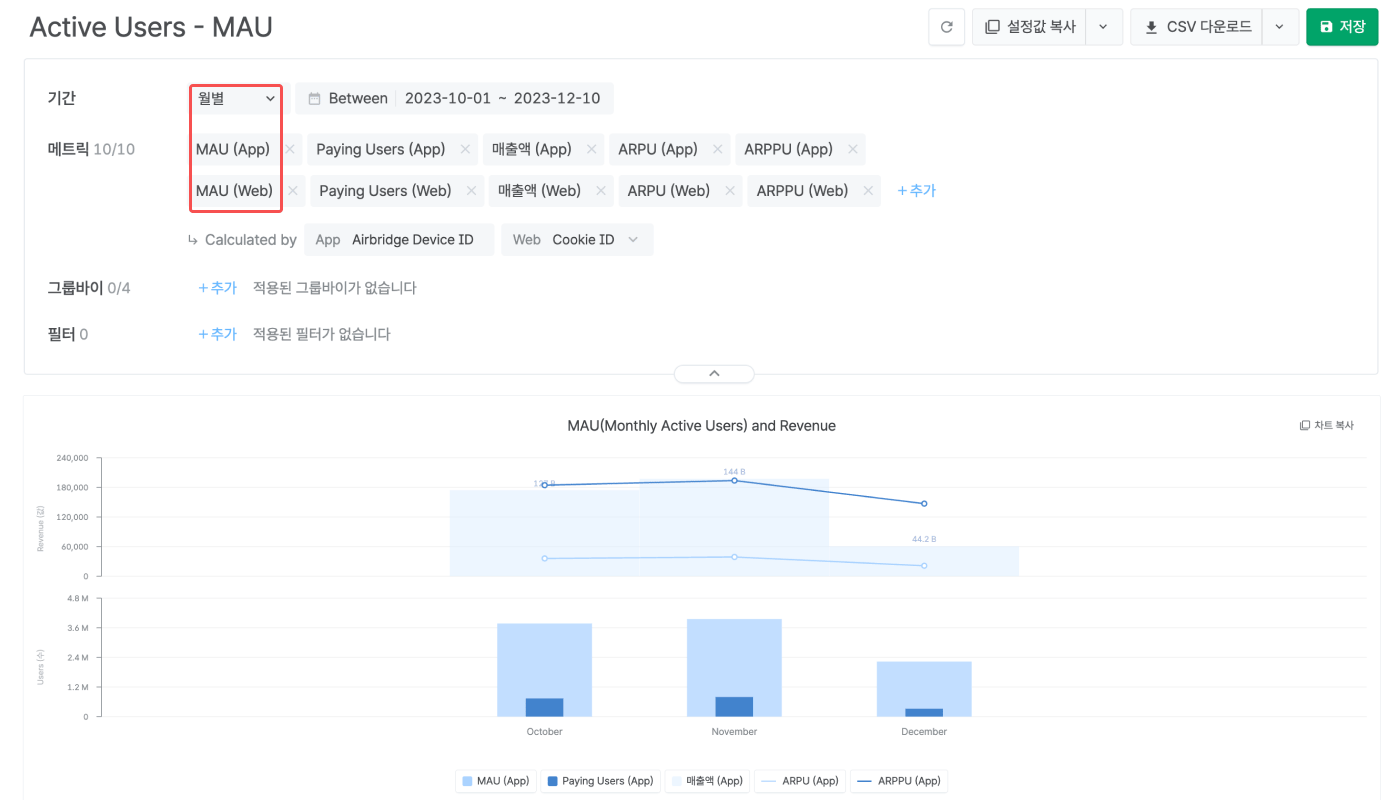
액티브 유저 리포트에서 주기를 월별로 설정하면 메트릭으로 MAU(Monthly Active Users)를 선택할 수 있습니다. 메트릭으로 MAU를 선택하면 조회 기간 동안 집계된 MAU를 액티브 유저 리포트에서 조회할 수 있습니다.
주기를 변경하면 메트릭으로 DAU, WAU를 확인할 수 있습니다. 자세한 내용은 [에어브릿지 가이드](/ko/guides/understanding-the-active-user-report#액티브-유저-리포트에서-사용할-수-있는-메트릭)를 참고해 주세요.
 ## 액티브 유저 리포트 조회하기
액티브 유저 리포트(Active Users Report)를 조회하기 위해 필요한 기본적인 설정을 확인해 보세요. 기본적인 설정을 이해하면 DAU, WAU, MAU와 주기별 유저 성과를 원하는 대로 조회할 수 있습니다.
* [액티브 유저 리포트 조회하기](/ko/guides/understanding-the-active-user-report)
* [자주 묻는 질문](/ko/guides/active-users-report-faq)
### 액티브 유저 리포트에서 MAU 조회하기
액티브 유저 리포트에서 주기를 월별로 설정하면 메트릭으로 MAU(Monthly Active Users)를 선택할 수 있습니다. 메트릭으로 MAU를 선택하면 조회 기간 동안 집계된 MAU를 액티브 유저 리포트에서 조회할 수 있습니다.
## 액티브 유저 리포트 조회하기
액티브 유저 리포트(Active Users Report)를 조회하기 위해 필요한 기본적인 설정을 확인해 보세요. 기본적인 설정을 이해하면 DAU, WAU, MAU와 주기별 유저 성과를 원하는 대로 조회할 수 있습니다.
* [액티브 유저 리포트 조회하기](/ko/guides/understanding-the-active-user-report)
* [자주 묻는 질문](/ko/guides/active-users-report-faq)
### 액티브 유저 리포트에서 MAU 조회하기
액티브 유저 리포트에서 주기를 월별로 설정하면 메트릭으로 MAU(Monthly Active Users)를 선택할 수 있습니다. 메트릭으로 MAU를 선택하면 조회 기간 동안 집계된 MAU를 액티브 유저 리포트에서 조회할 수 있습니다.
 주기를 변경하면 메트릭으로 DAU, WAU를 확인할 수 있습니다. 자세한 내용은 [에어브릿지 가이드](/ko/guides/understanding-the-active-user-report#액티브-유저-리포트에서-사용할-수-있는-메트릭)를 참고해 주세요.