> ## Documentation Index
> Fetch the complete documentation index at: https://help.airbridge.io/llms.txt
> Use this file to discover all available pages before exploring further.
# Unity LevelPlay (ironSource)
**Note**
This feature is currently in beta. If you have any questions or suggestions for improvements, reach out to your Airbridge CSM. If you don't have a dedicated CSM, contact us through the [Airbridge Help Center](https://app.airbridge.io/supports).
Airbridge supports server-to-server (S2S) and SDK integration with Unity LevelPlay (ironSource). With the integration, you can import the ad revenue into Airbridge.
## Integration Methods
**Recommended integration method**
Implementing both S2S and SDK integration is recommended for more accurate ad performance measurement.
The real-time data received through SDK integration is automatically updated with the enriched data received through S2S integration. The data received through SDK integration can be used for SKAN measurement.
When deciding on the integration method, it's important to consider each method's specifics. You can use one or both methods to integrate Airbridge with Unity LevelPlay.
| Integration Method | Real-time Data Collection | Data Consistency | Purpose |
| --------------------------- | ------------------------- | ---------------- | -------------------------------------------------------------------------------------------------------------------------------------------------------------------------------------------------------------- |
| Server-to-server (S2S) | Not possible | Relatively high | - Receiving data for attribution - Uploading data to the data storage - Configuring SKAN conversion values NOT POSSIBLE |
| SDK | Possible | Relatively low | - Receiving real-time data to make available in the Airbridge Actuals Report, Real-time Log, etc. - Sending postbacks - Uploading data to the data storage - Configuring SKAN conversion values |
**Recommended integration method**
We recommend implementing both S2S integration and SDK integration for more accurate measurement.
Make sure to check the [version of the SDK](/en/guides/unity-levelplay#pre-setup) you initially installed before implementing both S2S integration and SDK integration. You must have a certain version or later of the initially installed SDK to set up all integrations properly. If your SDK version is earlier than the required version, the number of users may not be accurately counted after integration.
Airbridge automatically updates the data received in real-time through SDK integration with the enriched data received through S2S integration. Also, the data received through SDK integration can be used for SKAN conversion value setup.
## Pre-setup
**Attention**
If you are implementing both S2S integration and SDK integration, the Airbridge SDK initially installed must be the following versions or higher. If the Airbridge SDK version is earlier than the versions listed below, both S2S integration and SDK integration cannot be properly implemented.
Update the Airbridge SDK to the versions listed below or later. No additional steps are required beyond the update.
* Android SDK 2.25.0
* React Native SDK 2.8.6
* Flutter SDK 3.5.6
* Cordova SDK 2.6.6
* Expo SDK 2.6.6
* Unity SDK 1.14.5
* Unreal SDK 1.3.5
## Server-to-Server Integration
**Attention**
Airbridge doesn’t send postbacks via the server. To send postbacks, the SDK integration must be implemented.
To implement the S2S integration, you need to enter the Secret Key and Refresh Token provided by Unity LevelPlay into the Airbridge dashboard.
### Getting the credentials from Unity LevelPlay
The following credentials are required:
* Secret Key
* Refresh Token
Follow the steps below to get the credentials from Unity LevelPlay.
1. Log in to your [Unity LevelPlay (ironSource)](https://platform.ironsrc.com/partners/login) account.
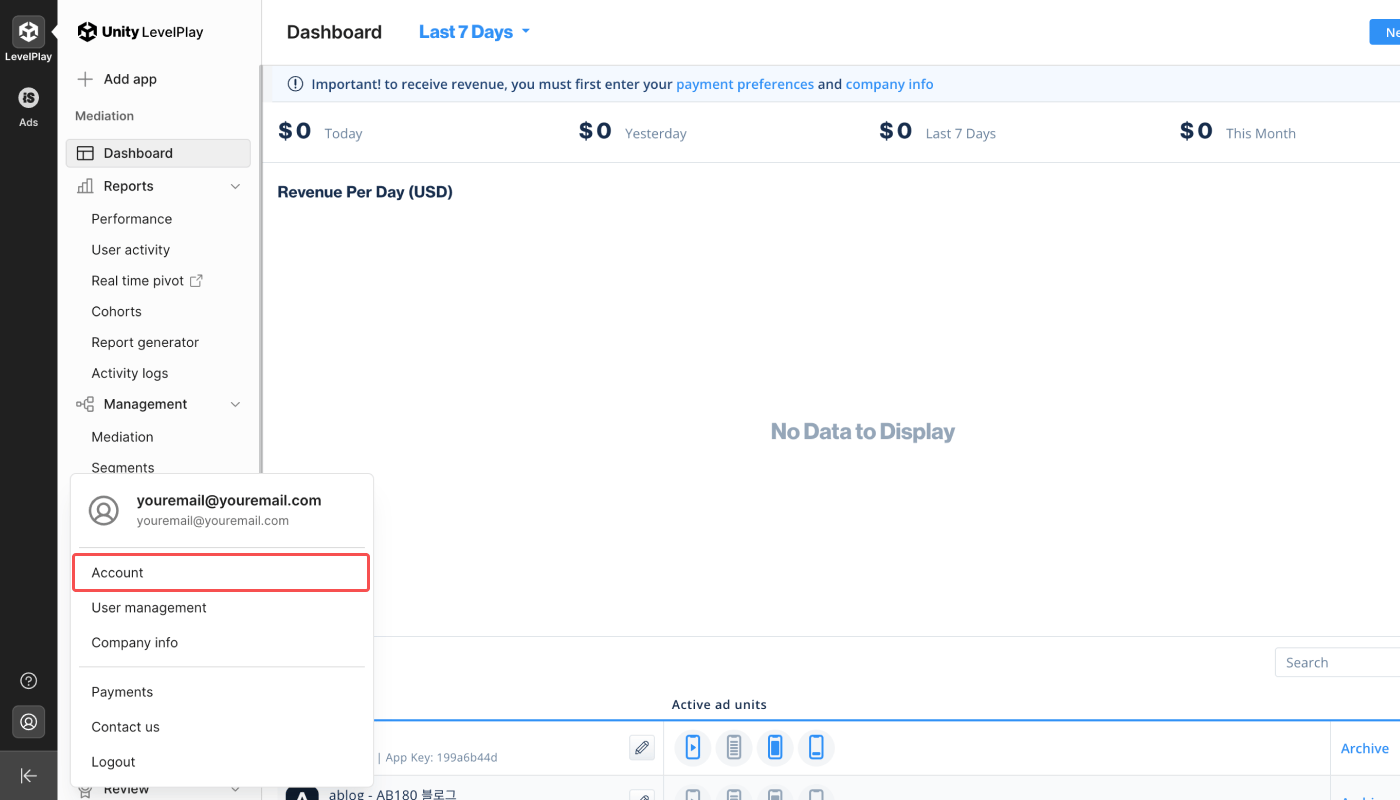
2. Click the **\[account] icon** at the bottom of the sidebar on the left. Click **Account**.
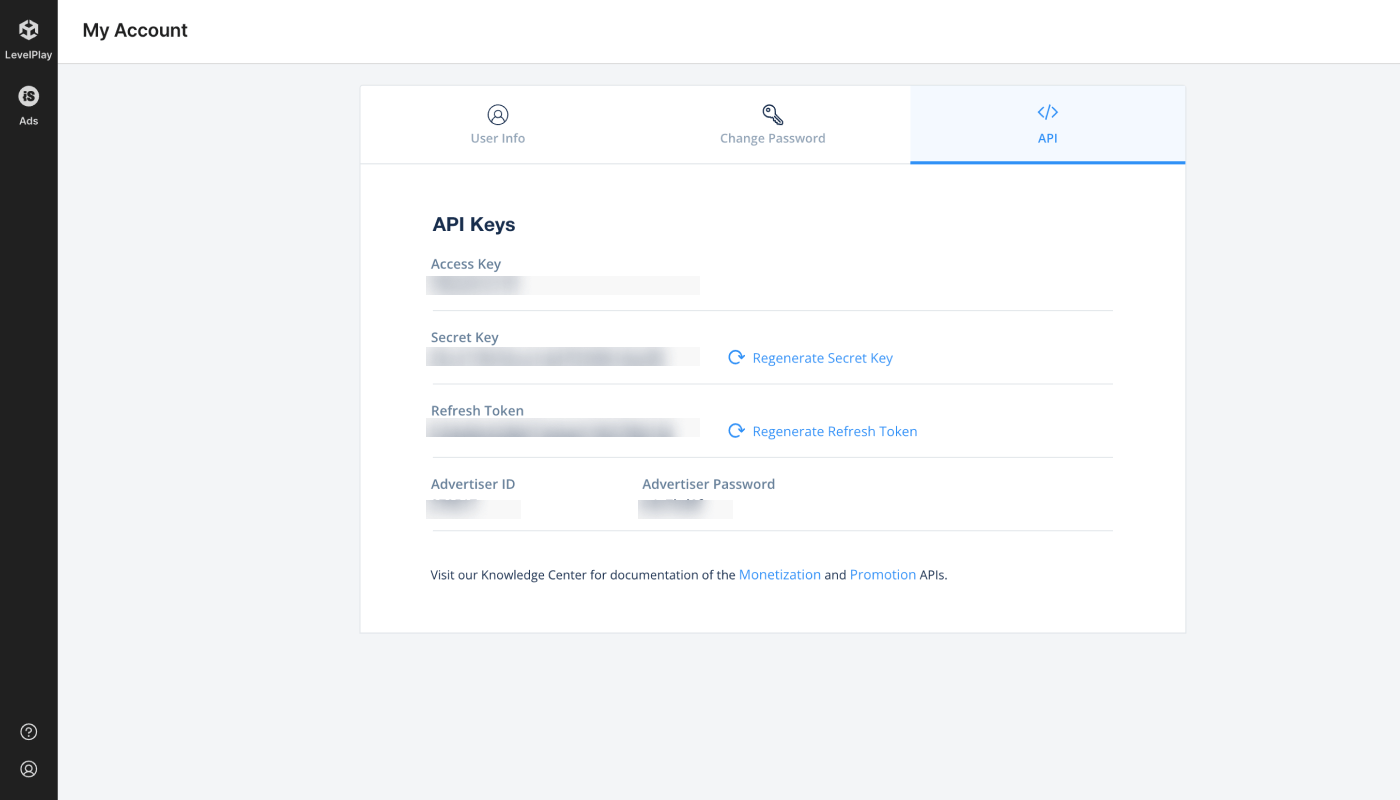
3. Find the **Secret Key**와 **Refresh Token** in the **\[API]** tab.
### Providing the credentials to Airbridge
1. Navigate to **\[Integrations]>\[Third-party Integration]** and select **Unity LevelPlay (ironSource)**.
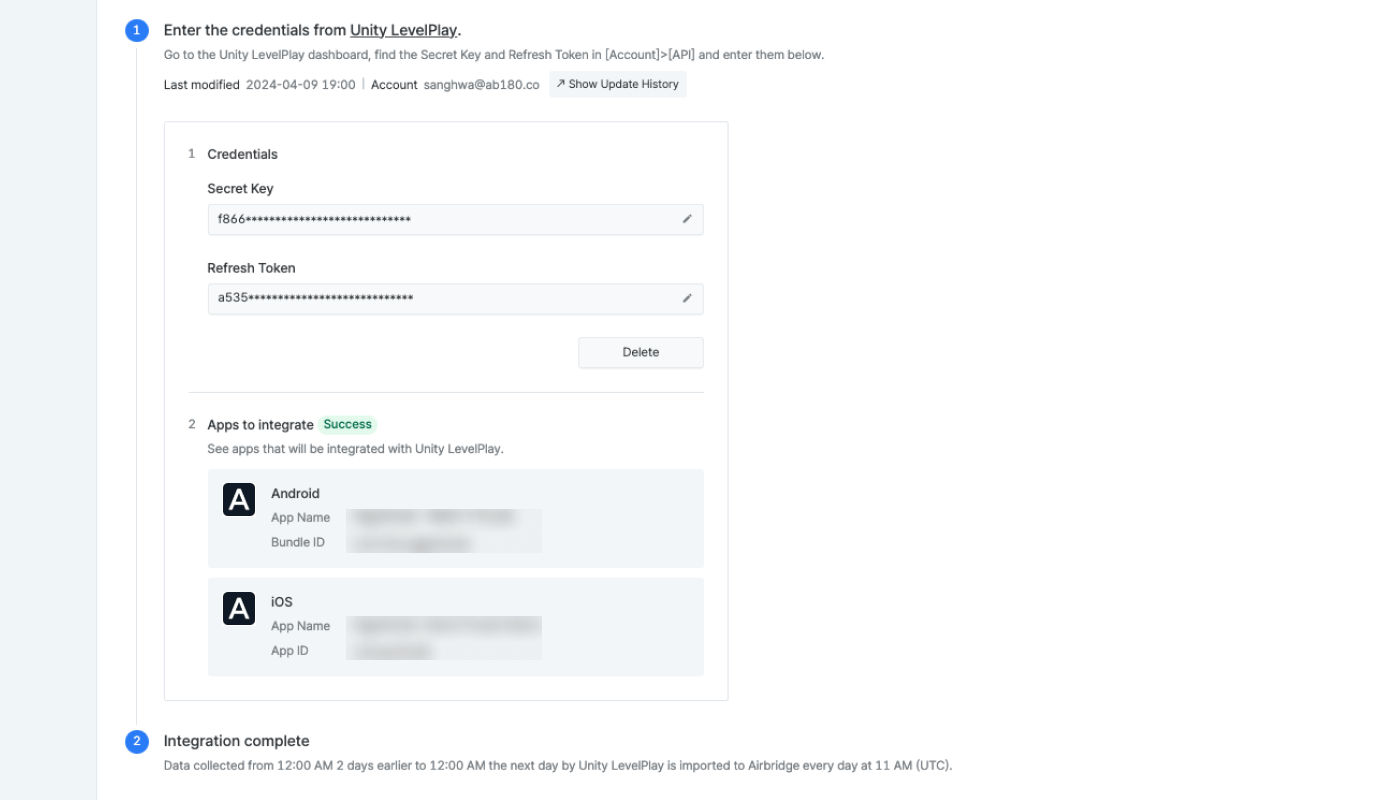
2. Provide the **Secret Key** and **Refresh Token** to Airbridge and click **Submit**.
3. Once the credentials are registered with Airbridge, the apps that will be integrated appear. If you leave the page before the apps appear, you must start the process again by providing the credentials. Have some patience.
4. Once the apps that will be integrated appear on the dashboard, the connection is activated. At least 1 Android or iOS app must appear for the connection to be activated.
If the app you want to integrate does not show up, refer to the troubleshooting tips below.
Refer to the following information to troubleshoot your problem.
| Cause of the problem | Solution |
| --------------------------------------------------------------------- | ------------------------------------------------------------------------------------------------------------------------------------------------------------------------------------ |
| Your app is not registered with Airbridge as an Airbridge App. | Navigate to **\[App Settings]** and make sure the app registered with Unity LevelPlay is registered as the [Registered Service](/en/guides/default-app-settings#registered-service). |
| The app registered with Airbridge cannot be found in Unity LevelPlay. | Make sure that the app registered with Airbridge is also registered with Unity LevelPlay. |
### Supported features
Refer to the table below to understand the integration status tags. Credentials refer to authentication tokens, report keys, IDs, etc.
| Status Tag | Description |
| ---------- | -------------------------------------------------------------------------------------- |
| (No tag) | No credentials are registered with Airbridge. |
| Configured | Credentials are registered with Airbridge. |
| Error | No data is being received due to the third-party server error or authentication issue. |
The status tags are visible under the third-party names on the **\[Integrations]>\[Third-party Integration]** page.
On the individual integration setup pages, the integration status tag is visible next to the third-party name.
Click the **\[pen] icon** to edit the credential information. Click **Done** to save changes.
Click **Delete** to delete the credentials. When deleting the credentials, the integration is disabled. Data already pulled into Airbridge or to the third-party solution are not affected and remain in Airbridge or in the third-party solution. To reenable the integration, enter the credentials again.
If you want to integrate more apps from a different platform (Android, iOS), The integration must be set up from the start. Click **Delete** and enter the credentials again.
### Data import schedule
**Note**
Depending on the data volume, the aggregation process may take a longer time. As a result, the time the data is made available in the Actuals Report may be delayed.
Data collected by Unity LevelPlay from 12:00 AM (UTC) two days earlier to 12:00 AM the next day is imported to Airbridge every day at 11:00 AM (UTC). This means that the Unity LevelPlay data is available in Airbridge within up to 3 days from the day the data was collected.
For example, given that the Airbridge App timezone is set to UTC, the Unity LevelPlay data collected from 12:00 AM, 2024-01-01, to 12:00 AM, 2024-01-02, is imported by Airbridge at 11:00 AM, 2024-01-03. This data is available in the Actuals Report from 9:00 PM, 2024-01-03.
## SDK Integration
**Attention**
Due to the real-time data updates in the third-party platform, data received via the SDK integration between Airbridge and the third-party platform may differ.
For instructions on how to implement the SDK integration, refer to this [**article**](/en/developers/unity-levelplay-mediation-ad-revenue-integration) in the developer guide.
## Imported Ad Revenue Data in Airbridge
Once the integration is complete, the ad revenue data can be viewed in the Airbridge dashboard.
| Unity LevelPlay | Airbridge | Description |
| --------------- | ------------------------ | --------------------------------------------------------- |
| Network | Channel | The ad channel the ad was exposed |
| Country | Country | 2-digit country code |
| Advertising ID | Airbridge Device ID Type | Device identifiers such as IDFA(iOS), GAID(Android), etc. |
| Revenue | Event Value | Ad revenue |
## Attention
When implementing both S2S and SDK integration methods, the Unity LevelPlay data displayed in the Airbridge reports may be subject to change for up to 3 days.
The real-time data received through SDK integration is updated with the enriched data received through the S2S integration. Therefore, the real-time data collected today may be updated within the next 3 days.
For example, let's say today is 2024-01-01. The Unity LevelPlay ad revenue data of 2024-01-01 displayed in the Airbridge reports may be updated on 2024-01-04.
Airbridge does not send postbacks via S2S integration. To get postbacks, implement the SDK integration.
When implementing both integration methods, event duplication may occur.
* When sending data to a **data storage**, duplicated events may be saved to the data storage.
* When exporting raw data from the **\[Raw Data]>\[App Raw Data]** menu multiple times, event duplication may occur depending on the export request time.
Unity LevelPlay data is based on UTC, and the timezone can’t be changed. If your Airbridge App’s timezone is set to anything other than UTC, differences in data may occur depending on the time the data was queried in Airbridge.
If the credentials are updated in the Unity LevelPlay dashboard after the integration is complete, the integration with Airbridge will be disabled. The integration must be set up from the start to be re-enabled.
 On the individual integration setup pages, the integration status tag is visible next to the third-party name.


 3. Find the **Secret Key**와 **Refresh Token** in the **\[API]** tab.
 ### Providing the credentials to Airbridge
1. Navigate to **\[Integrations]>\[Third-party Integration]** and select **Unity LevelPlay (ironSource)**.
2. Provide the **Secret Key** and **Refresh Token** to Airbridge and click **Submit**.
3. Once the credentials are registered with Airbridge, the apps that will be integrated appear. If you leave the page before the apps appear, you must start the process again by providing the credentials. Have some patience.
4. Once the apps that will be integrated appear on the dashboard, the connection is activated. At least 1 Android or iOS app must appear for the connection to be activated.
### Providing the credentials to Airbridge
1. Navigate to **\[Integrations]>\[Third-party Integration]** and select **Unity LevelPlay (ironSource)**.
2. Provide the **Secret Key** and **Refresh Token** to Airbridge and click **Submit**.
3. Once the credentials are registered with Airbridge, the apps that will be integrated appear. If you leave the page before the apps appear, you must start the process again by providing the credentials. Have some patience.
4. Once the apps that will be integrated appear on the dashboard, the connection is activated. At least 1 Android or iOS app must appear for the connection to be activated.
 If the app you want to integrate does not show up, refer to the troubleshooting tips below.