> ## Documentation Index
> Fetch the complete documentation index at: https://help.airbridge.io/llms.txt
> Use this file to discover all available pages before exploring further.
# Snapchat
Airbridge supports Snapchat’s Conversions API integration.
**Attention**
Airbridge currently supports the integration with Snapchat’s Conversions API only. The Snapchat campaign data cannot be imported to Airbridge.
## **Conversions API Integration**
With the Conversions API integration, you can send in-app events collected by Airbridge to Snapchat for campaign optimization.
**Attention**
By enabling the in-app event postback, in-app events collected by Airbridge are sent to Snapchat. Event duplication may occur if the Snapchat SDK is also collecting in-app events.
### **Credentials required**
For the integration, the following are required.
* Snap App ID
* Platform ID(Android App URL or iOS App ID)
* Conversions API token
Follow the steps below to find them.
1. Log in to your Snapchat dashboard.
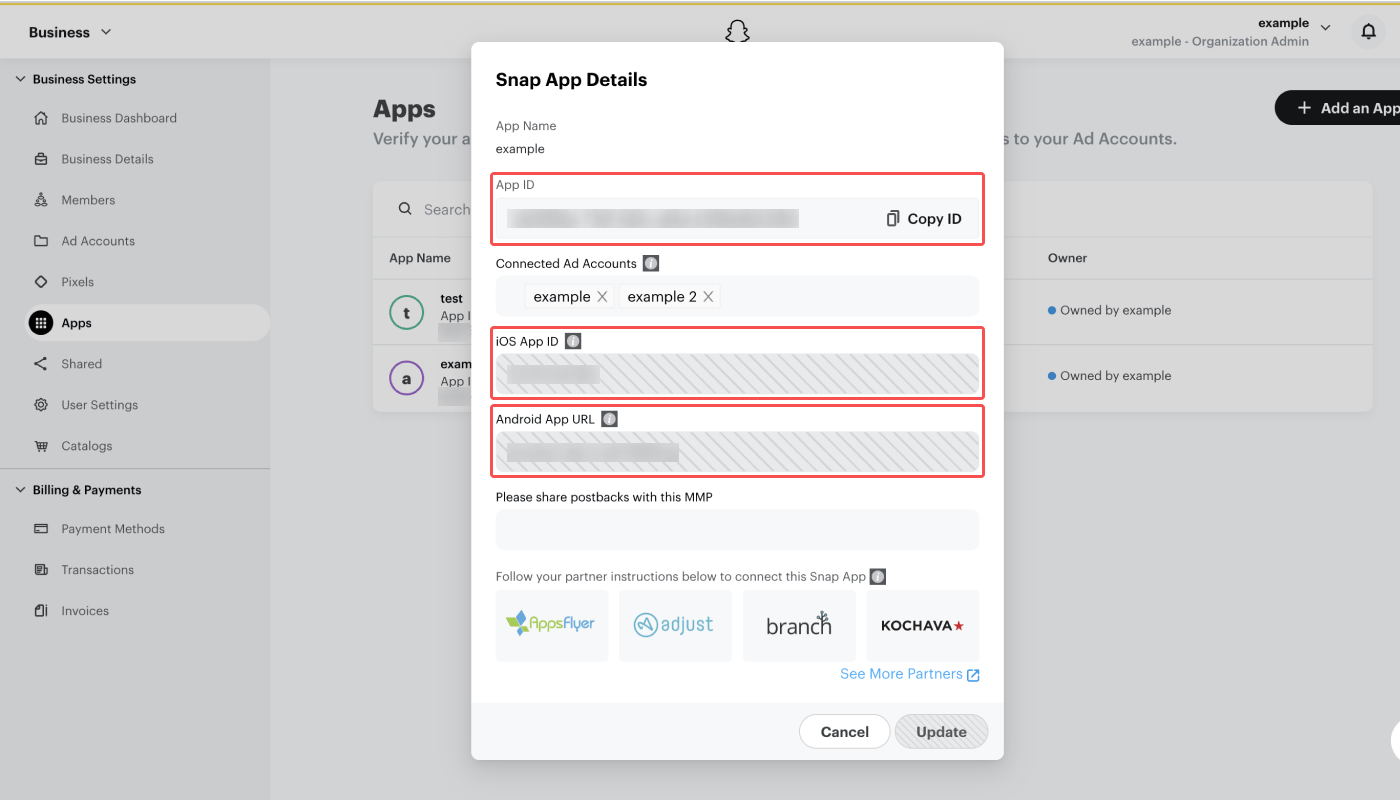
2. Navigate to **\[Business Settings]>\[Apps]**. Click the app you want to enable the Conversions API integration. In the **Snap App Details**, find the **App ID**, **iOS App ID**, and the **Android App URL.**
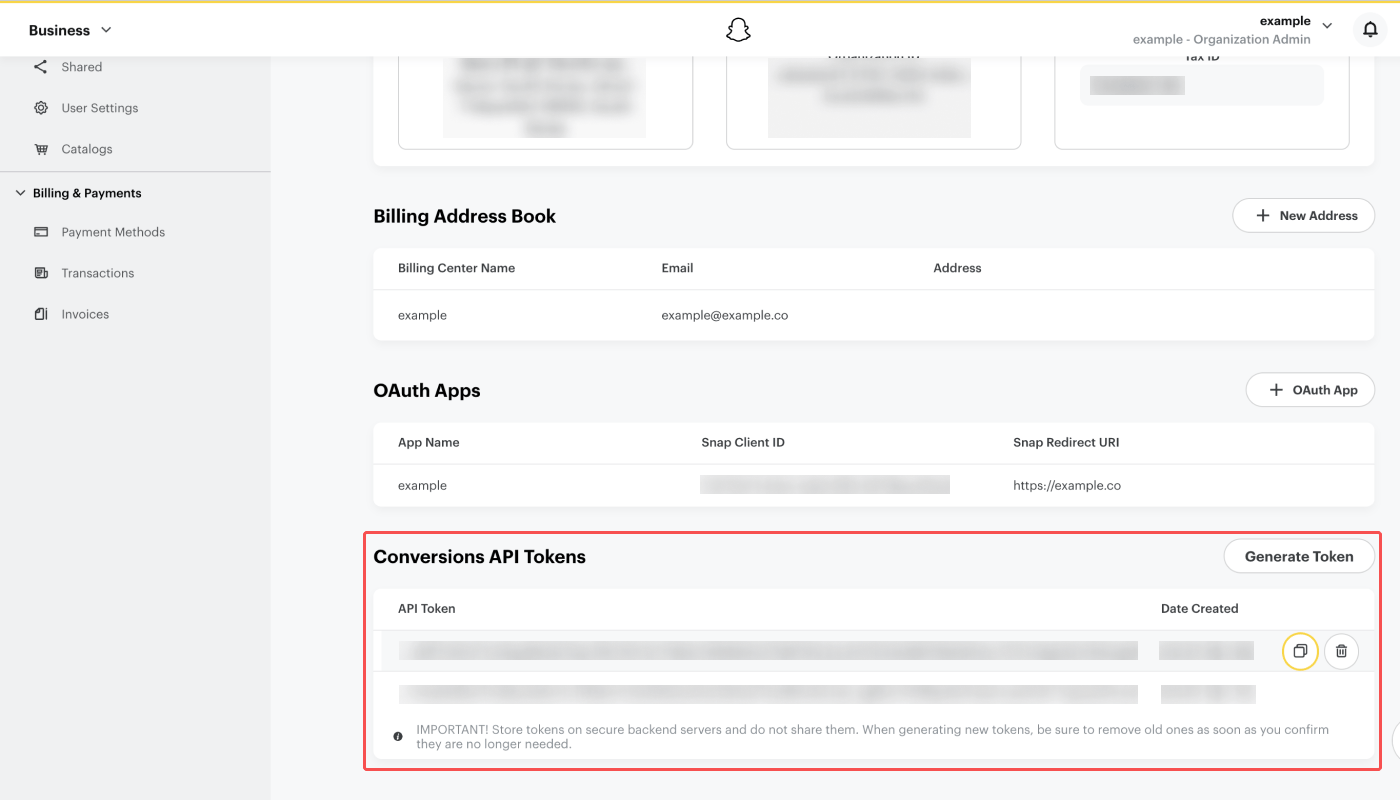
3. To get the Conversions API token, navigate to **\[Business Settings]>\[Business Details]** and click **Generate Token**. Only users with permissions can generate tokens. Refer to this [article](https://businesshelp.snapchat.com/s/article/activate-capi?language=en_US) from Snapchat to learn more.
### **Providing credentials to Airbridge**
When you found all the required information from your Snapchat dashboard, you need to provide them to the Airbridge dashboard to enable the integration.
Once the credentials are entered, the Install and Deeplink Open events are automatically sent to Snapchat. The Deeplink Pageview events are also sent along if Airbridge is collecting them.
Follow the steps below to enable the Conversions API integration.
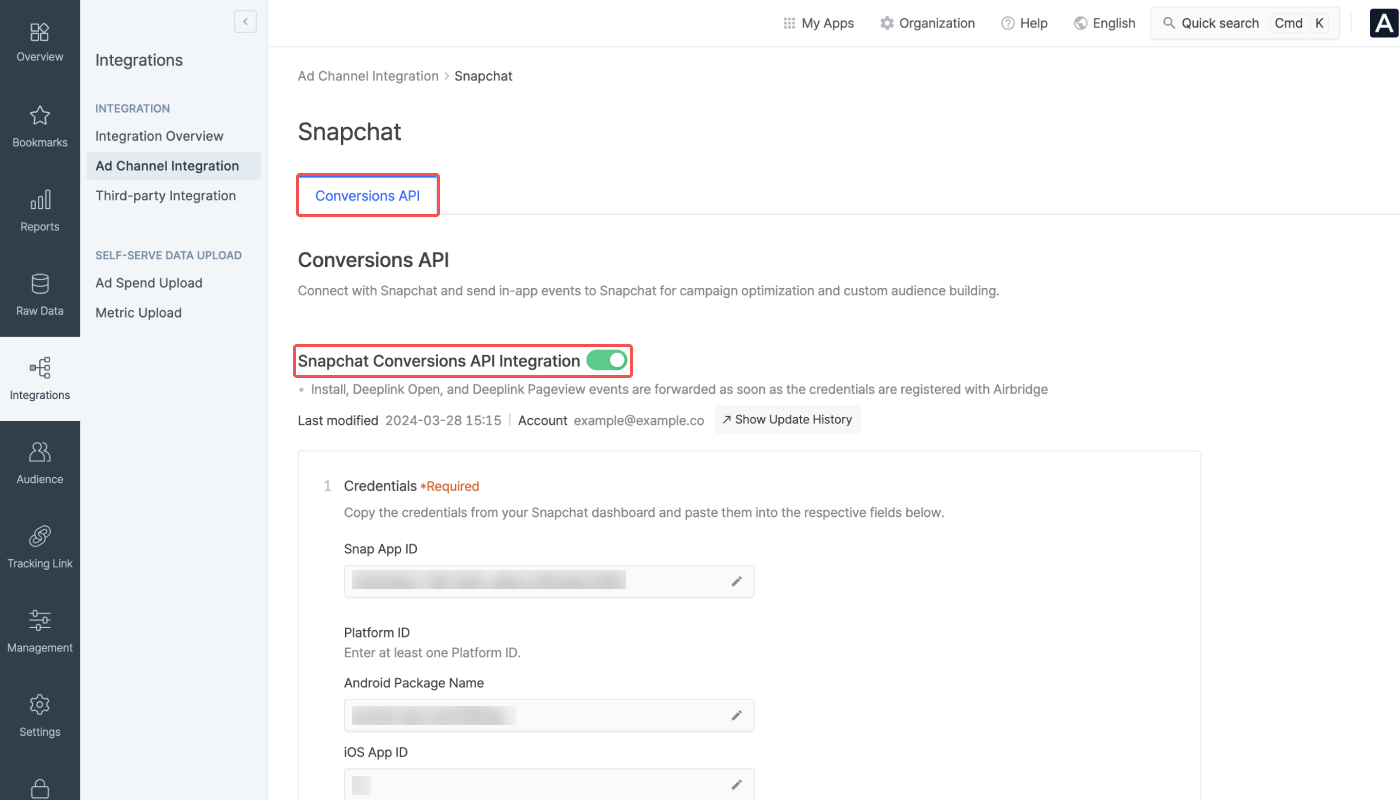
1. Navigate to **\[Integration]>\[Ad Channel Integration]** and select **Snapchat**.
2. Switch on the **\[Conversions API Integration]** toggle on the **\[Conversions API]** tab page.
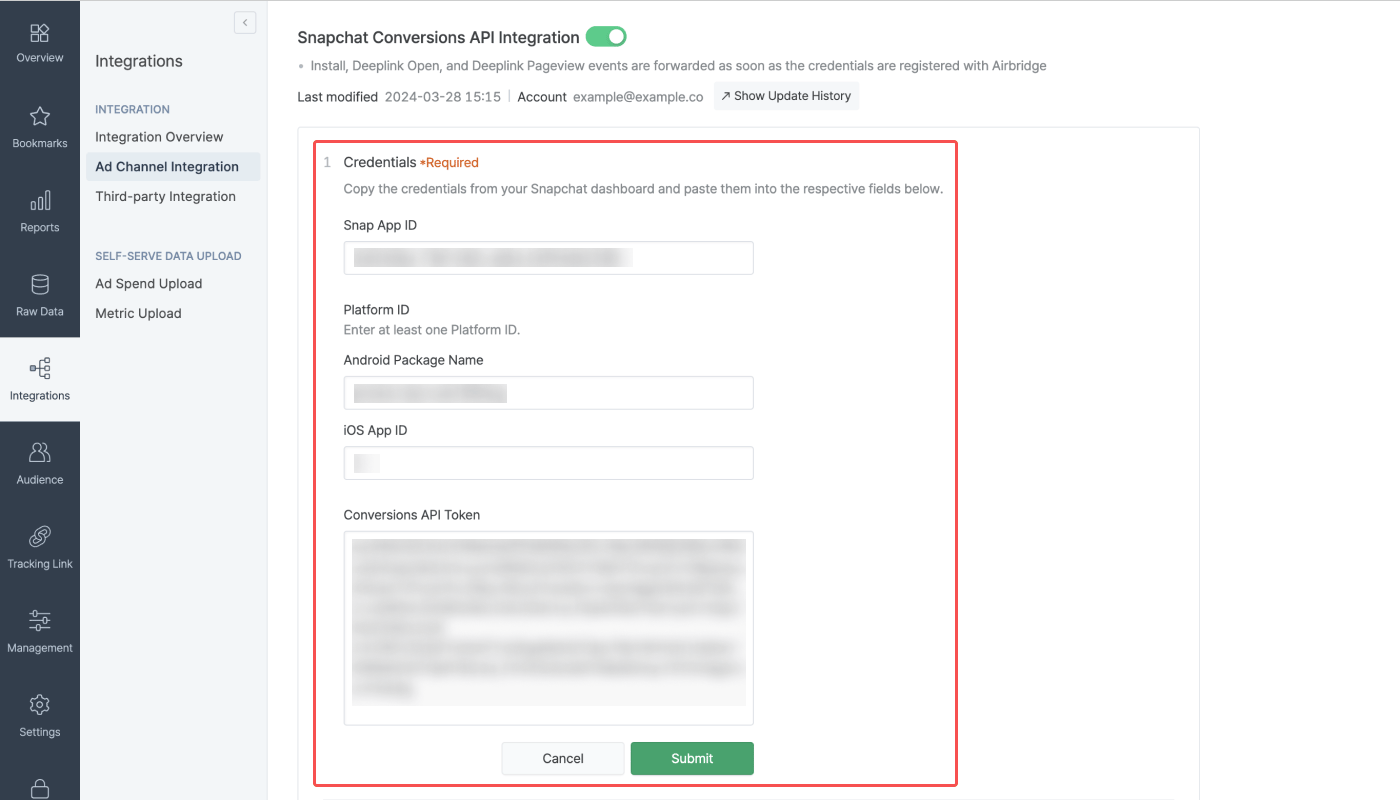
3. Enter the Snap App ID, Platform ID, and the Conversions API Token into the respective fields.
* Enter at least one Platform ID, either the Android Package Name or the iOS App ID.
* Snatchat’s Android App URL is the Android Package Name in Airbridge.
### **In-app Event Postback Configuration**
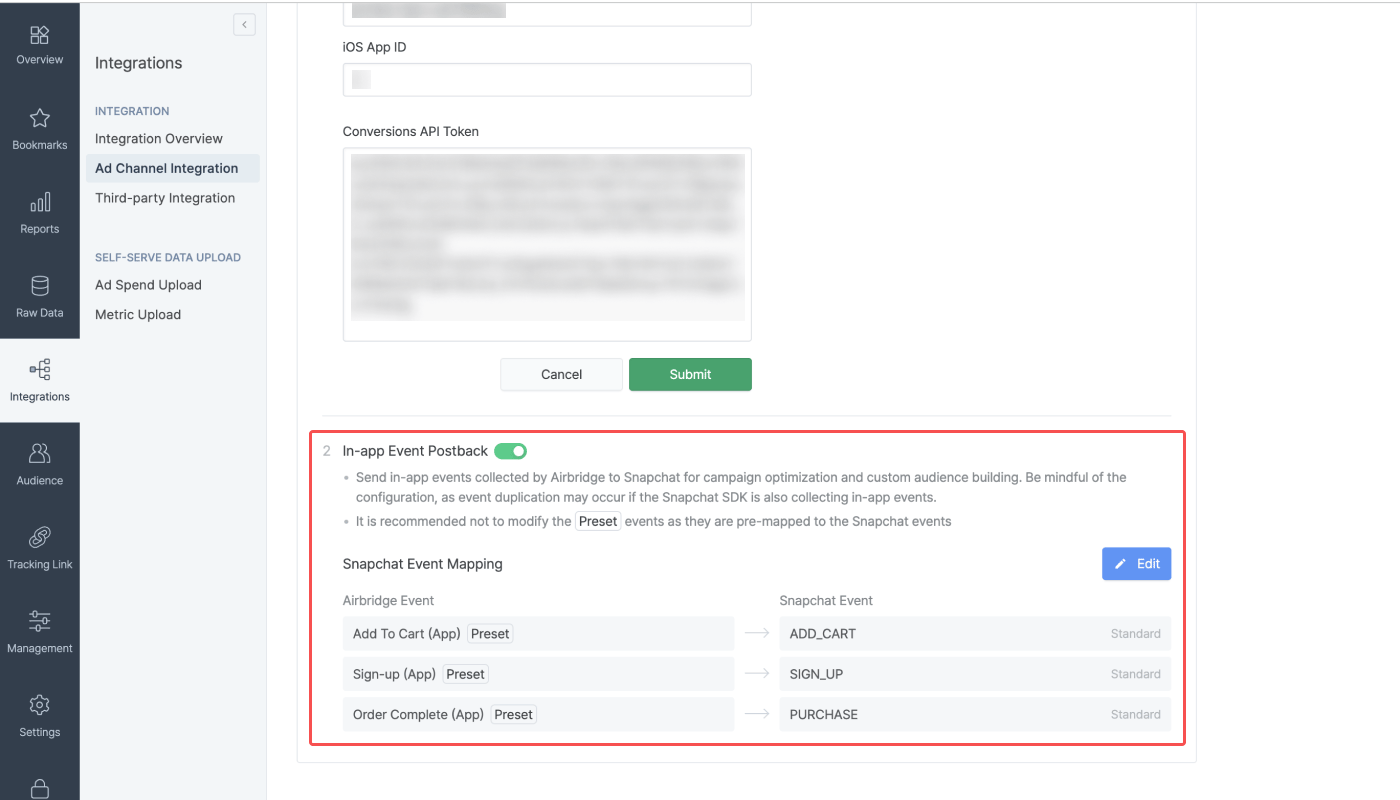
By switching on the **\[In-app Event Postback]** toggle, you can send in-app events other than Install, Deeplink Open, and Deeplink Pageview events collected by Airbridge to Snapchat. The toggle can only be switched on when the credentials are all entered. When the toggle is switched on, the event mapping table between Airbridge and Snapchat will appear.
Click **Edit** to edit the mapping table. You can delete the event pairs by clicking the **\[minus]** icon.
Click **Add Event** to add a new event pair. When you select an Airbridge event with the `Preset` tag, the Snapchat event that has been pre-mapped by Airbridge considering the nature of the event data will automatically paired. You can change the pre-mapped event to a different Snapchat event if needed. You can go back to the pre-mapped pair by clicking the **Preset** button.
When you select an Airbridge event without the `Preset` tag, you need to pair a Snapchat event to the Airbridge event yourself.
| **Airbridge Event** | **Snapchat Event** |
| ------------------------------- | --------------------- |
| Open (App), Deeplink Open (App) | APP\_OPEN |
| Install (App) | APP\_INSTALL |
| Deeplink Pageview (App) | PAGE\_VIEW |
| Order Complete (App) | PURCHASE |
| Initiate Checkout (App) | START\_CHECKOUT |
| Add to Cart (App) | ADD\_CART |
| Product View (App) | VIEW\_CONTENT |
| Add Payment Info (App) | ADD\_BILLING |
| Sign-up (App) | SIGN\_UP |
| Search Results (App) | SEARCH |
| Subscribe (App) | SUBSCRIBE |
| Ad Click (App) | AD\_CLICK |
| Ad Impression (App) | AD\_VIEW |
| Complete Tutorial (App) | COMPLETE\_TUTORIAL |
| Achieve Level (App) | LEVEL\_COMPLETE |
| Sign-in (App) | LOGIN |
| Share (App) | SHARE |
| Unlock Achievement (App) | ACHIEVEMENT\_UNLOCKED |
| Add to Wishlist (App) | ADD\_TO\_WISHLIST |
| Spend Credits (App) | SPENT\_CREDITS |
| Rate (App) | RATE |
| Start Trial (App) | START\_TRIAL |
| Product Catalog (App) | LIST\_VIEW |
| Schedule (App) | RESERVE |
When switching off the toggle, Airbridge will no longer sent the in-app events other than the Install, Deeplink Open, and Deeplink Pageview events to Snapchat.
**Attention**
If you are using Airbridge events for Snapchat campaign optimization, disabling the in-app postback may have a direct impact on your campaign performance.
## Agency Settings
Manage the access permissions of the agencies and have control over which agency has access to your campaign data.
* [Agency Settings](/en/guides/agency-setting)
 3. To get the Conversions API token, navigate to **\[Business Settings]>\[Business Details]** and click **Generate Token**. Only users with permissions can generate tokens. Refer to this [article](https://businesshelp.snapchat.com/s/article/activate-capi?language=en_US) from Snapchat to learn more.
 ### **Providing credentials to Airbridge**
When you found all the required information from your Snapchat dashboard, you need to provide them to the Airbridge dashboard to enable the integration.
Once the credentials are entered, the Install and Deeplink Open events are automatically sent to Snapchat. The Deeplink Pageview events are also sent along if Airbridge is collecting them.
Follow the steps below to enable the Conversions API integration.
1. Navigate to **\[Integration]>\[Ad Channel Integration]** and select **Snapchat**.
2. Switch on the **\[Conversions API Integration]** toggle on the **\[Conversions API]** tab page.
### **Providing credentials to Airbridge**
When you found all the required information from your Snapchat dashboard, you need to provide them to the Airbridge dashboard to enable the integration.
Once the credentials are entered, the Install and Deeplink Open events are automatically sent to Snapchat. The Deeplink Pageview events are also sent along if Airbridge is collecting them.
Follow the steps below to enable the Conversions API integration.
1. Navigate to **\[Integration]>\[Ad Channel Integration]** and select **Snapchat**.
2. Switch on the **\[Conversions API Integration]** toggle on the **\[Conversions API]** tab page.
 3. Enter the Snap App ID, Platform ID, and the Conversions API Token into the respective fields.
* Enter at least one Platform ID, either the Android Package Name or the iOS App ID.
* Snatchat’s Android App URL is the Android Package Name in Airbridge.
3. Enter the Snap App ID, Platform ID, and the Conversions API Token into the respective fields.
* Enter at least one Platform ID, either the Android Package Name or the iOS App ID.
* Snatchat’s Android App URL is the Android Package Name in Airbridge.
 ### **In-app Event Postback Configuration**
By switching on the **\[In-app Event Postback]** toggle, you can send in-app events other than Install, Deeplink Open, and Deeplink Pageview events collected by Airbridge to Snapchat. The toggle can only be switched on when the credentials are all entered. When the toggle is switched on, the event mapping table between Airbridge and Snapchat will appear.
### **In-app Event Postback Configuration**
By switching on the **\[In-app Event Postback]** toggle, you can send in-app events other than Install, Deeplink Open, and Deeplink Pageview events collected by Airbridge to Snapchat. The toggle can only be switched on when the credentials are all entered. When the toggle is switched on, the event mapping table between Airbridge and Snapchat will appear.
 Click **Edit** to edit the mapping table. You can delete the event pairs by clicking the **\[minus]** icon.
Click **Add Event** to add a new event pair. When you select an Airbridge event with the `Preset` tag, the Snapchat event that has been pre-mapped by Airbridge considering the nature of the event data will automatically paired. You can change the pre-mapped event to a different Snapchat event if needed. You can go back to the pre-mapped pair by clicking the **Preset** button.
When you select an Airbridge event without the `Preset` tag, you need to pair a Snapchat event to the Airbridge event yourself.
Click **Edit** to edit the mapping table. You can delete the event pairs by clicking the **\[minus]** icon.
Click **Add Event** to add a new event pair. When you select an Airbridge event with the `Preset` tag, the Snapchat event that has been pre-mapped by Airbridge considering the nature of the event data will automatically paired. You can change the pre-mapped event to a different Snapchat event if needed. You can go back to the pre-mapped pair by clicking the **Preset** button.
When you select an Airbridge event without the `Preset` tag, you need to pair a Snapchat event to the Airbridge event yourself.