> ## Documentation Index
> Fetch the complete documentation index at: https://help.airbridge.io/llms.txt
> Use this file to discover all available pages before exploring further.
# RTB House
**Note**
Depending on the app role assigned, Airbridge users can access the integration features as follows:
* Access to all features: Owner and In-house Marketer users
* Limited access depending on the access level granted: Agency and Media Partner users
Airbridge supports RTB House integration, including cost data integration and agency settings features. With the integration, Owner and In-house Marketer users and Agency users who are granted access can track and measure the performance of RTB House campaigns in Airbridge.
## **Collecting Data with Tracking Links**
Navigate to **\[Integrations]>\[Ad Channel Integration]** in your Airbridge dashboard and select **RTB House**. In the **\[Tracking Link]** tab, you can create and manage tracking links to measure the performance of your RTB House campaigns.
For detailed instructions on creating and managing tracking links in Airbridge, refer to the articles below.
* [Creating Tracking Links](/en/guides/creating-a-new-tracking-link)
* [Tracking Link Management](/en/guides/tracking-link-management)
**Attention**
Set up postback before using tracking links. Postback must be set up before data collection to ensure all collected data is sent to the ad channel. If not, data collected through tracking links will not be sent to the ad channel.
## **Attribution rules**
In the **\[Attribution Rules]** tab, you can configure the lookback window and attribution window for RTB House. Click **Go to edit page** to move to the **\[Management]>\[Attribution Rules]** page, where you can edit attribution rules.
Refer to this [article](/en/guides/setting-attribution-window) for detailed instructions on configuring the lookback window and attribution window.
## **Cost Integration Setup**
Follow the steps below to enable cost integration with RTB House.
### Get RTB House account information
To enable cost integration with RTB House, find the following account information and submit it to Airbridge.
* Username for RTB House login
* Password for RTB House login
### Submit account information to Airbridge
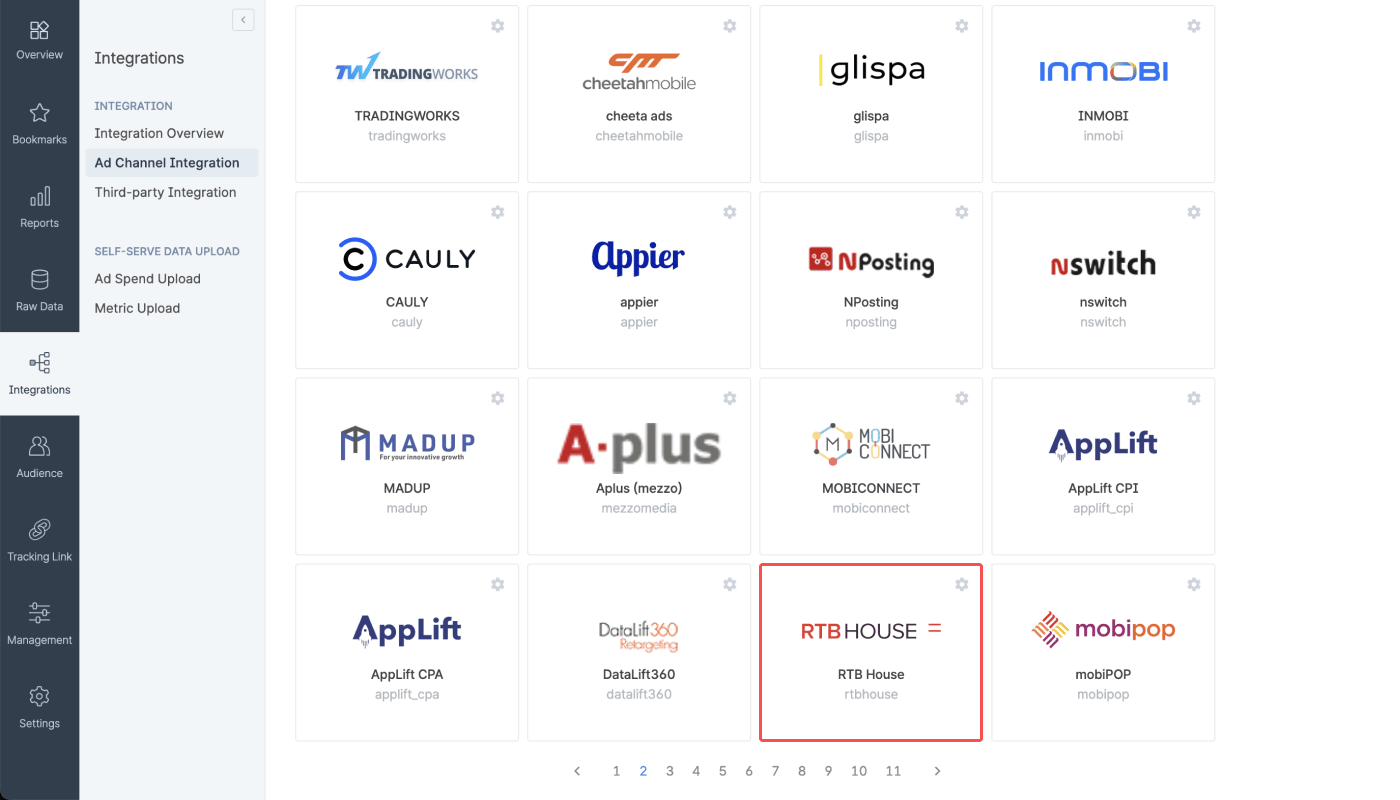
1. Navigate to **\[Integrations]>\[Ad Channel Integration]** in your Airbridge dashboard. Select **RTB House**.
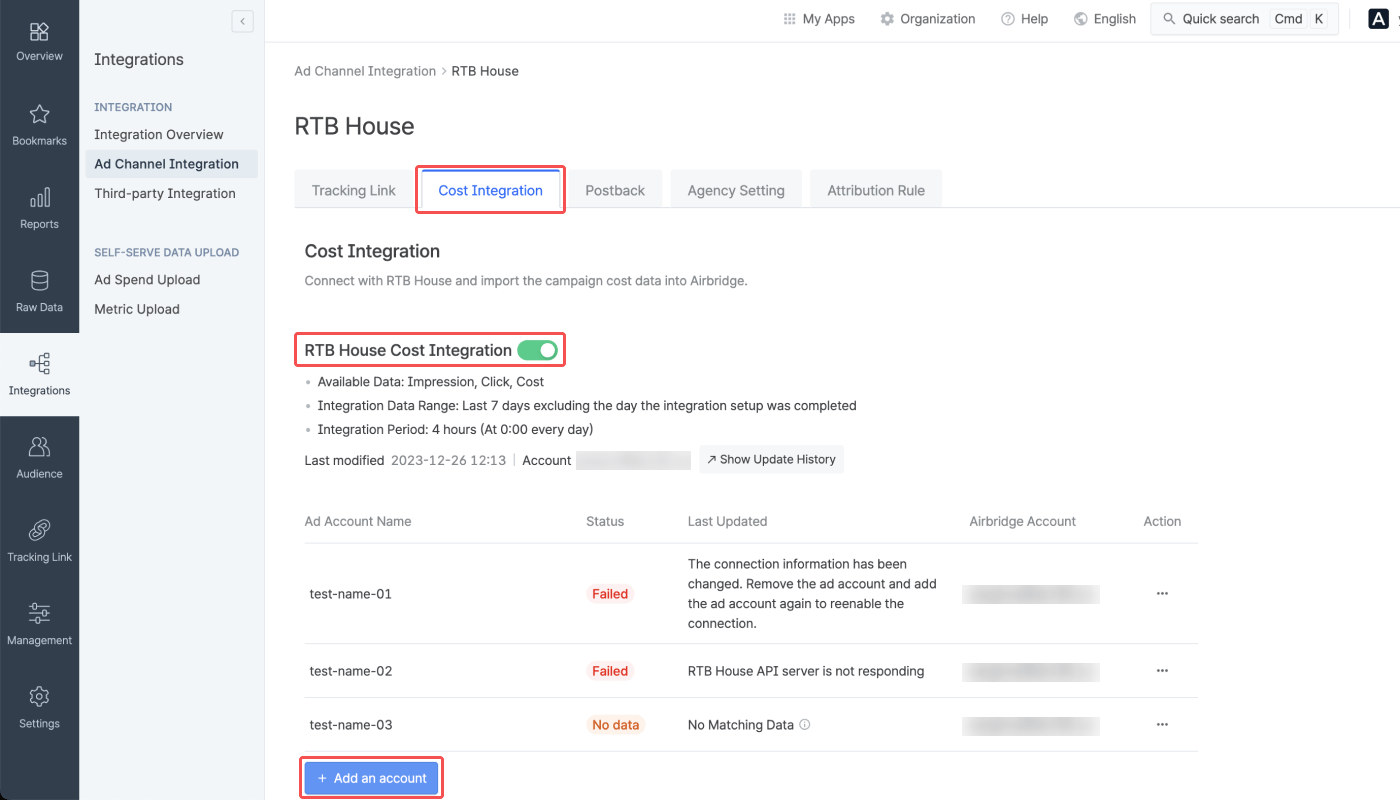
2. Select the **\[Cost Integration]** tab. Switch on the **RTB House Cost Integration** toggle and click **Add an account.**
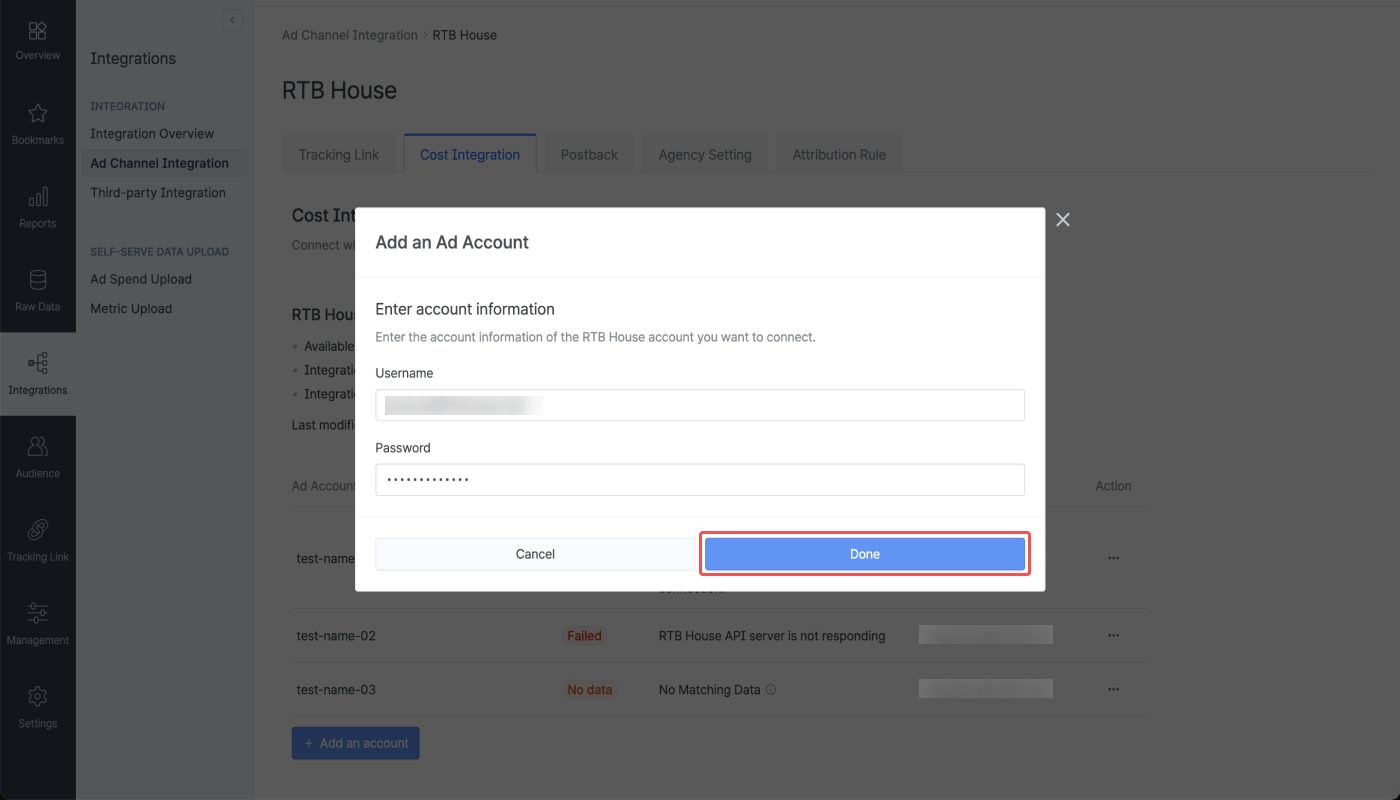
3. Enter the username and password of the [RTB House](https://panel.rtbhouse.com/) account you want to connect with Airbridge and click **Done**. The username is in the email address format.
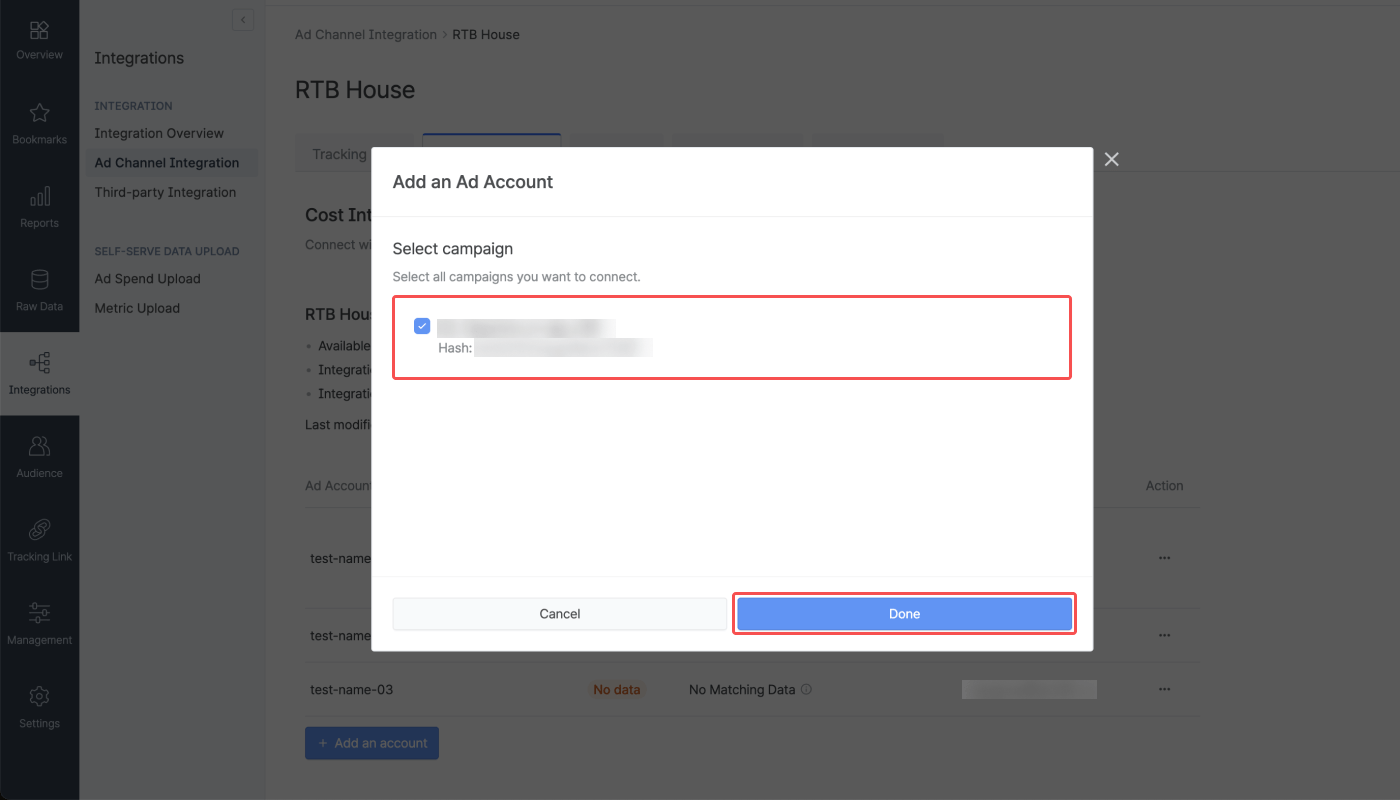
4. Select all campaigns you want to connect with Airbridge. Each campaign is assigned a unique hash.
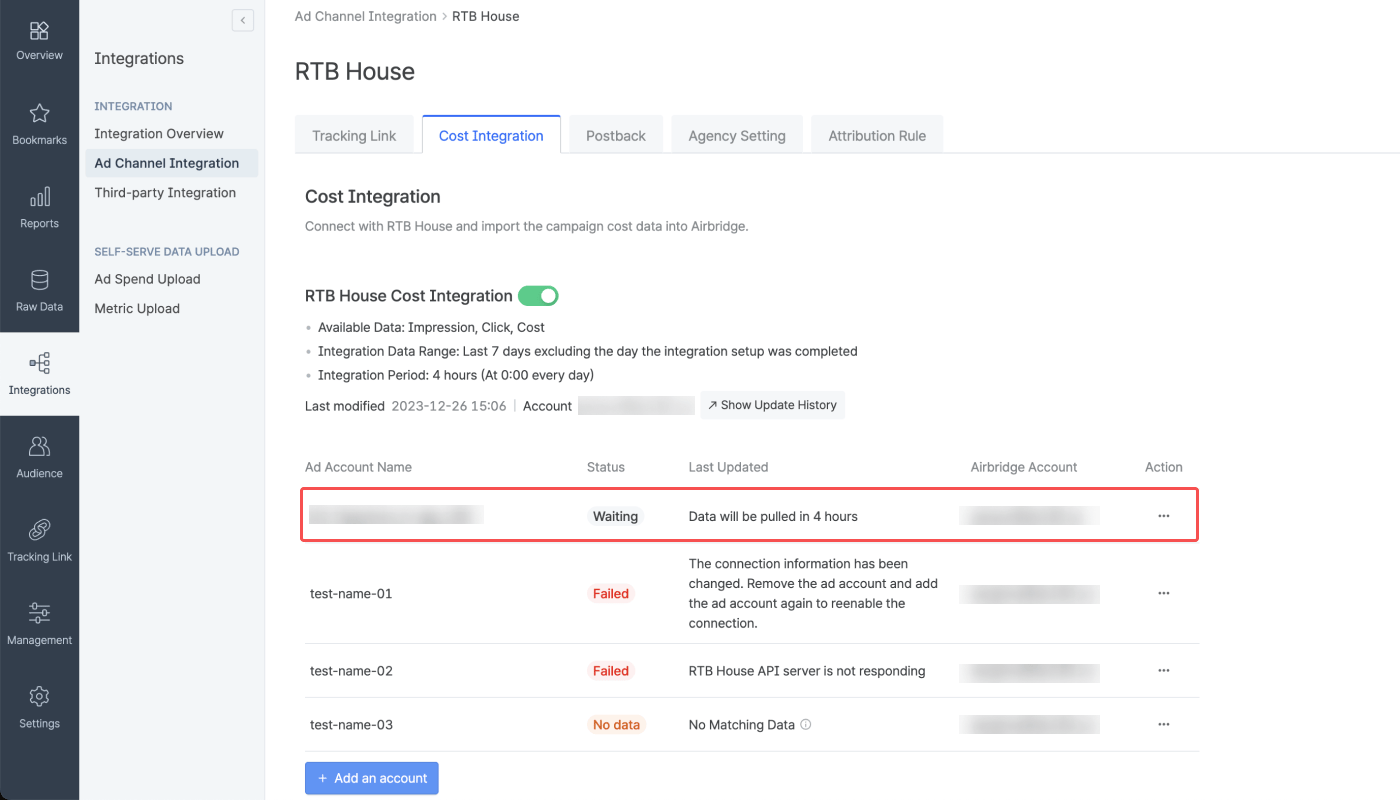
5. When the popup window closes, the account connected to Airbridge will appear in the integrated account list. The status will show “Waiting” for up to 4 hours from the time the account is added and will change to “Success” when data is pulled for the first time.
### Integration management
Turn off the toggle to pause the integration. Airbridge stops collecting cost data once the integration is paused.
Any data collected before the pause remains available in Airbridge reports.
Airbridge retains the credentials of the integrated account, so you can resume the integration at any time by turning the toggle on. However, deleting the integrated account removes these credentials.
Select the account from the integrated account list and click **Delete** to remove the account. To re-integrate the account after deletion, set up the integration from the beginning.
The cost data import fails when there is a change in the connection information. Below are some of the main causes of failures when importing cost data.
* The permission level granted to the RTB House account has been changed.
* The hash assigned to the RTB House campaign has been changed.
* The password of the RTB House account has been changed.
In the above cases, remove the ad account and add the ad account again to reenable the connection.
**Hash update**
RTB House assigns a unique hash to each campaign. Airbridge uses the hash to pull the cost data into Airbridge. In rare cases, Airbridge is unable to pull cost data because the hash assigned to the RTB House campaign has been changed. In such cases, remove the ad account and add the ad account again to reenable the connection. If the problem persists, contact RTB House.
### Integration status
Upon submitting your ad account information to Airbridge, you can check if the integration is running. The status may show “Waiting” even when the account is successfully added if no data has been pulled yet.
For more details on the data import schedule and integration status, refer to the below information.
* Frequency: Every 4 hours, 6 times a day, starting at 3:00 PM UTC
* Import times: 3:00 PM, 7:00 PM, 11:00 PM, 3:00 AM, 7:00 AM, 11:00 AM UTC
* Data range: Current day (D-0) to 6 days ago (D-6)
**\[Last Updated]** shows the last time Airbridge actually received the data.
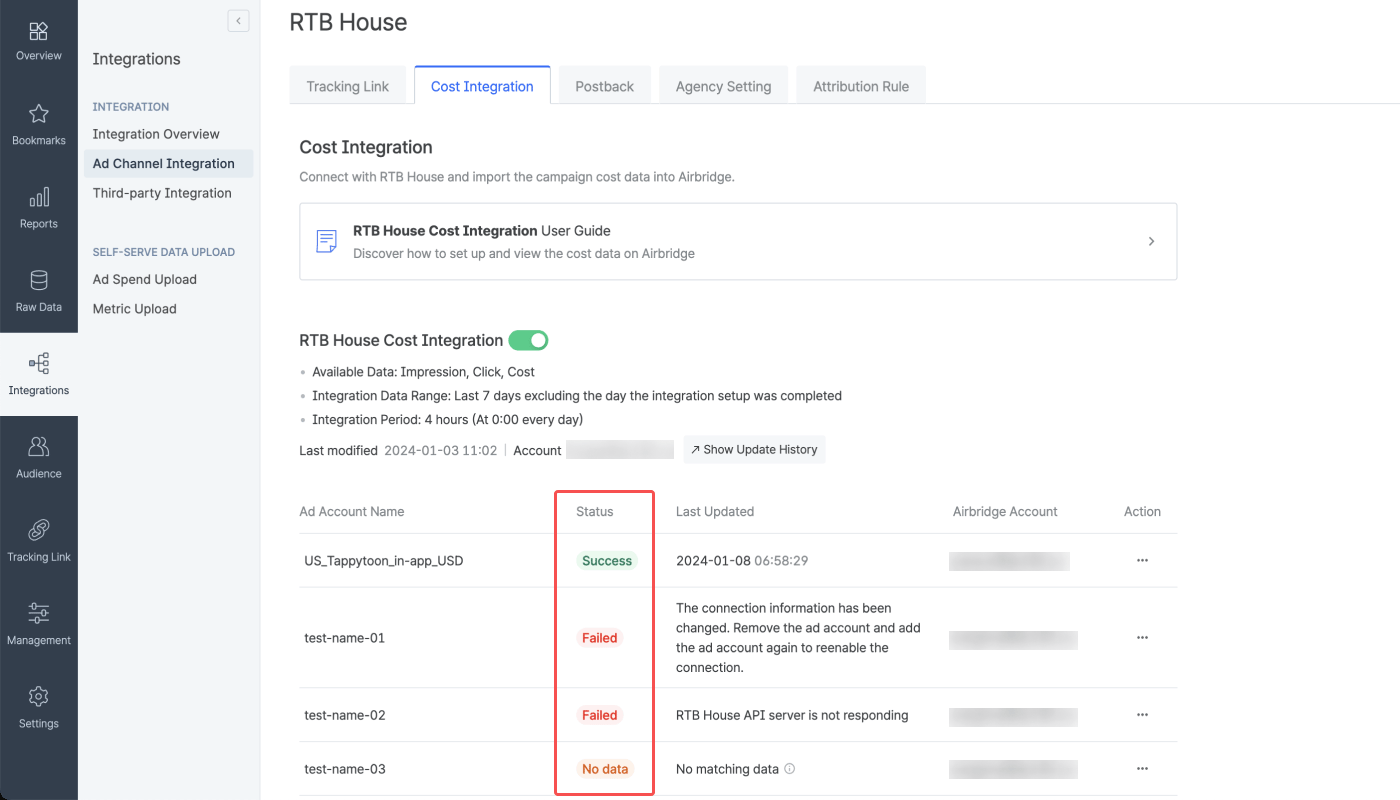
The integration status shows your cost integration and data update status at a glance.
| Status | Description |
| ------- | ------------------------------------------------------------------------------------------------------------------------------------------------------------------------------------------------------- |
| Waiting | The ad account has been successfully added, but no data has been pulled yet. This status may remain for up to 4 hours. |
| Success | The data is being pulled and updated regularly. The last update time is displayed. |
| No data | No data has been pulled as the campaign has not been run for the past 7 days. |
| Failed | API is not responding, or the connection information has been changed. Try reenabling the connection by referring to this [section](/en/guides/rtbhouse#reenabling-connection-when-data-import-fails). |
### C**ost data in Airbridge Reports**
The cost data pulled from RTB House can be viewed in the Actuals Report using the metrics and GroupBys below.
| Metrics | Description |
| --------------------- | ---------------------------------------------------- |
| Clicks (Channel) | The number of clicks provided by the ad channel |
| Impressions (Channel) | The number of impressions provided by the ad channel |
| Cost (Channel) | The ad spend provided by the ad channel |
**Difference between Clicks and Clicks (Channel)**
Both **Clicks** and **Clicks (Channel)** show click count, but the data source differs:
* **Clicks**: Collected through Airbridge tracking links
* **Clicks (Channel)**: Provided by the ad channel
Any metric with **(Channel)** in its name represents data provided by the integrated ad channel. The same applies to **Impressions** and **Impressions (Channel)**.
###### Touchpoint
| GroupBy | Description |
| --------------------------------------------------------------------------- | -------------------------------------------------- |
| Channel | The media source of the winning touchpoint |
| Campaign | The name of the campaign of the winning touchpoint |
###### Device
| GroupBy | Description |
| --------------------------------------------------------------------------- | -------------------------------------- |
| Country | The country code for the mobile device |
###### Event Datetime
| GroupBy | Description |
| --------------------------------------------------------------------------- | --------------------------------------- |
| Event Date | The day the event occurred (YYYY-MM-DD) |
**Ad group and ad creative of RTB House campaigns**
The ad group and ad creative of RTB House campaigns can’t be viewed in Airbridge due to the following reasons.
* The ad group data is not provided by RTB House.
* The ad creative is provided by RTB House in hash only.
## **Agency Settings**
1. Navigate to **\[Integrations]>\[Ad Channel integration]** in your Airbridge dashboard. Select “RTB House.”
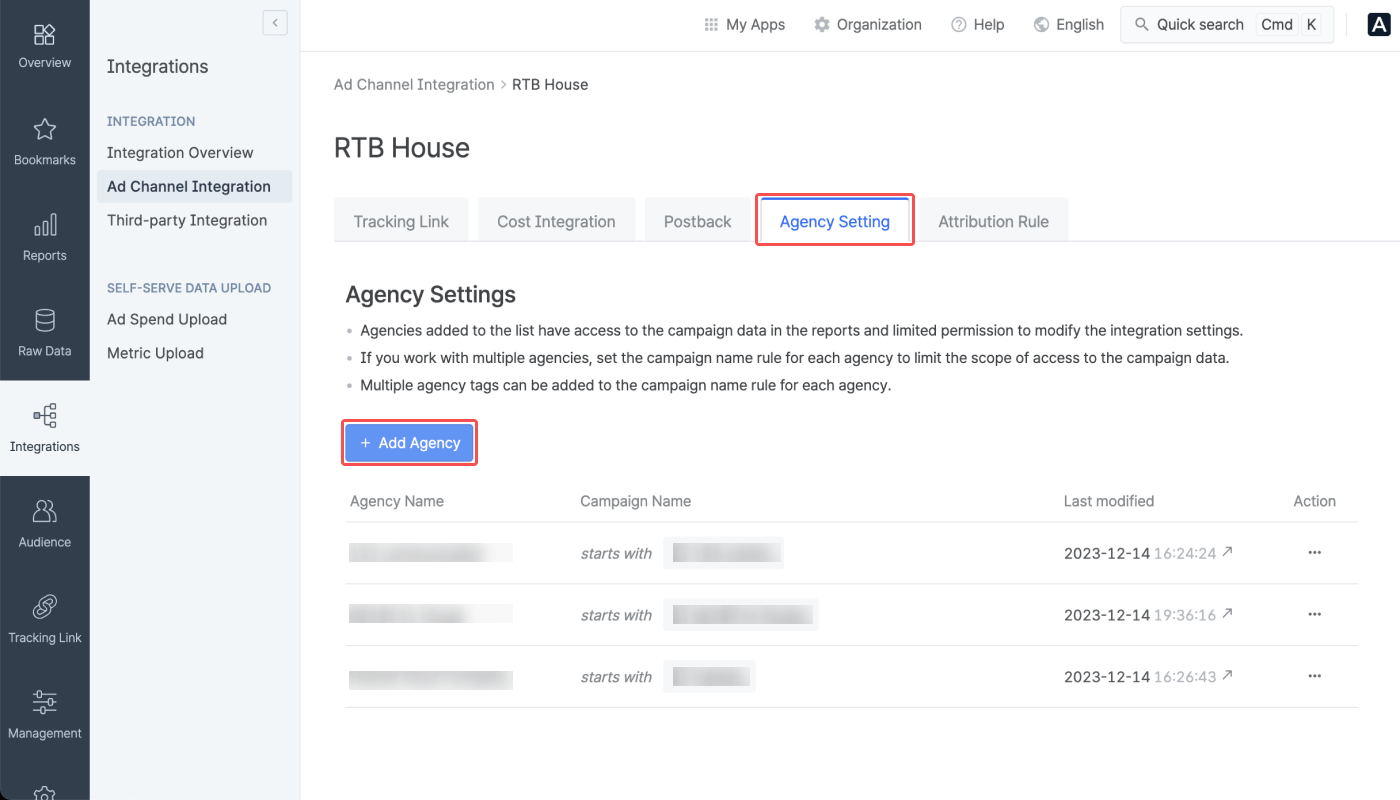
2. Select the **\[Agency Settings]** tab and click the **+ Add an agency**.
3. Select the agency you want to add from the agency list. Agencies already added are not displayed in the list.
4. Configure the campaign name rule. The agency role account users can view the campaign data given access based on the campaign name rules.
The campaign name rule can be configured by selecting “starts with” or “ends with” and selecting an agency tag. You can also enter the agency tag using less than 50 characters, which can be a combination of letters in mixed case, numbers, and hyphens. More than one campaign name rule can be configured. When you are done, click **Save**.
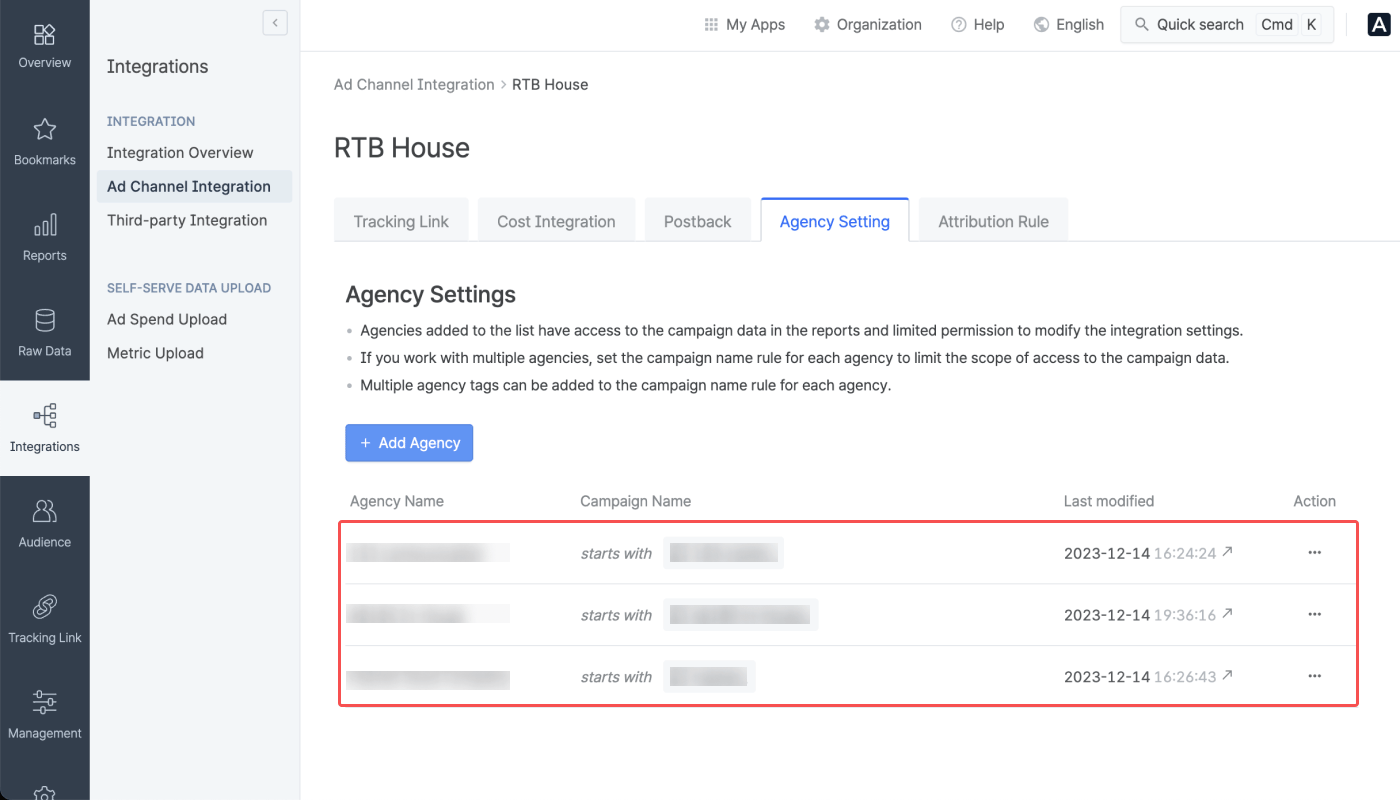
5. From the agency list, you can see which agency is given access to which campaign data from RTB House.
### Permission granted to agencies
Agency role account users who belong to the agencies added to the agency list are granted permission to the following.
* Access to the campaign data based on the campaign name rules
* Access to the cost data pulled from the account added by the Agency role account user from the same Agency
* Manage the accounts added by the Agency role account user from the same Agency for cost integration
**Note**
Even though the agency has been granted access to a specific channel data, the Agency users cannot edit the integration toggle, the event mapping table, or view the edit history.
If you are an Agency user and need to do the above, ask the Admin or Manager for help.
### How to manage the agency list
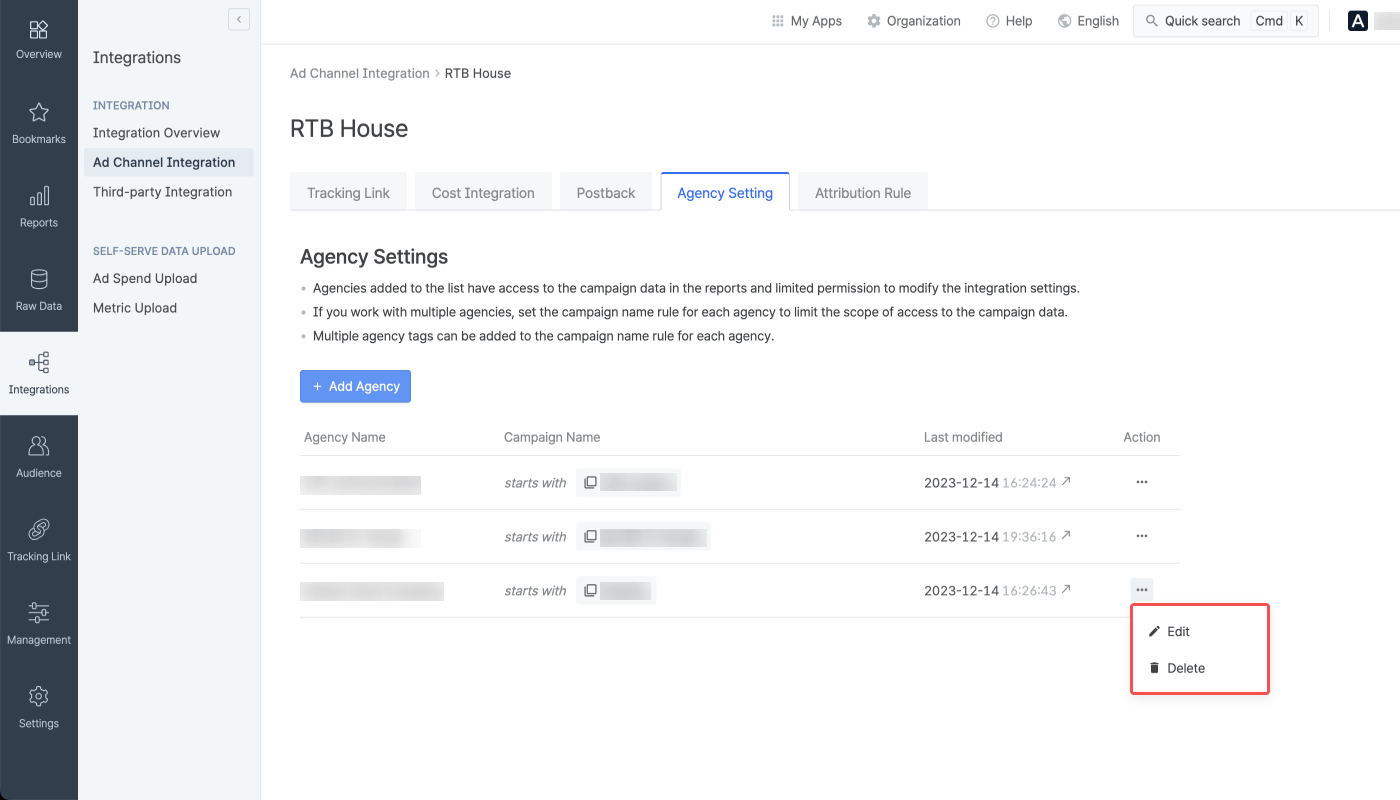
To edit the campaign name rule for an agency or delete an agency from the list, click the **\[…]** icon. If you have deleted an agency and want to add that agency again, repeat the steps to add an agency from the start.
## **Postback Settings**
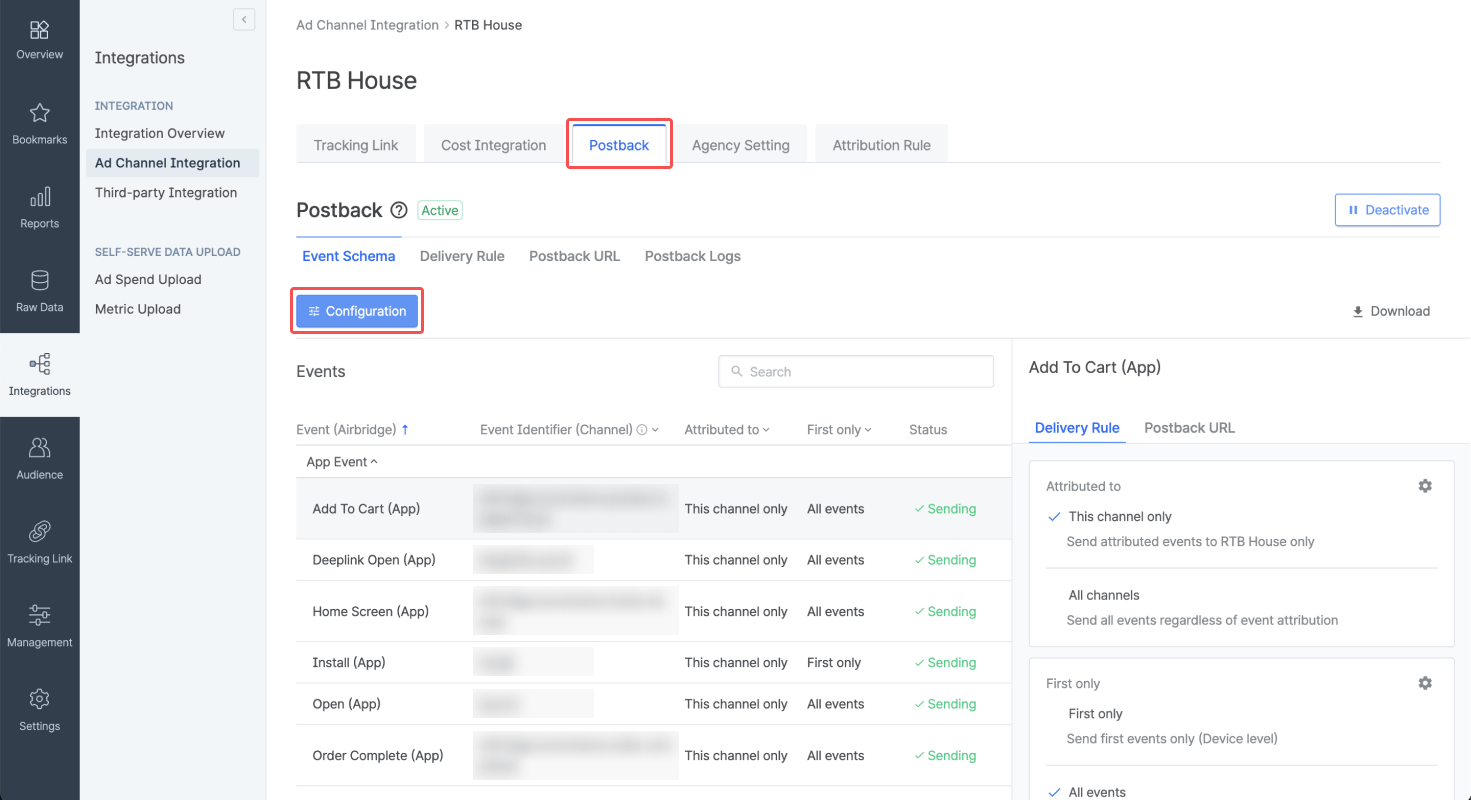
In the **\[Postback]** tab, you can configure postbacks and determine which in-app events and attribution results to send as postbacks. The data collected with the Airbridge SDK and tracking links enables you to optimize campaigns and make strategic decisions about budget allocation.
For more details on postback settings, read this [article](/en/guides/postback-settings).
## Attention
Read the following information before enabling cost integration with RTB House.
Airbridge pulls the cost data from the past 7 days, every 4 hours, 6 times a day starting at 3:00 PM (UTC). As the updates are not real-time, there may be data discrepancies between Airbridge and the ad channel, depending on the time of reporting.
The **Cost (Channel)** metric, which shows your ad spend reported by the ad channel, displays value only when used with specific GroupBys.
Below are the GroupBys that can be used in the Actuals Report to view data with the metric:
* Channel
* Campaign
Depending on the data reported, the metric may not display any value even if you use the GroupBys above.
The data pulled via cost integration is provided by the app time zone and app standard currency set within Airbridge.
To minimize data discrepancy, align your app’s currency and time zone settings in your Airbridge dashboard and your ad channel’s dashboard.
* [App Time Zone Setup](/en/guides/set-app-timezone)
* [App Standard Currency Setup](/en/guides/set-app-standard-currency)
Once the cost integration is enabled, the following campaign details are advised not to be edited to avoid any error in pulling data into Airbridge.
* Campaign name
The table below illustrates how Airbridge and [RTB House](https://panel.rtbhouse.com/api/docs) use the terms "account" and "campaign" for different purposes.
| | The term used in Airbridge | The term used in RTB House |
| ---------------------- | -------------------------- | -------------------------- |
| To refer to "Account" | Account | Campaign |
| To refer to "Campaign" | Campaign | Sub-campaign |
 ### Submit account information to Airbridge
1. Navigate to **\[Integrations]>\[Ad Channel Integration]** in your Airbridge dashboard. Select **RTB House**.
### Submit account information to Airbridge
1. Navigate to **\[Integrations]>\[Ad Channel Integration]** in your Airbridge dashboard. Select **RTB House**.
 2. Select the **\[Cost Integration]** tab. Switch on the **RTB House Cost Integration** toggle and click **Add an account.**
 3. Enter the username and password of the [RTB House](https://panel.rtbhouse.com/) account you want to connect with Airbridge and click **Done**. The username is in the email address format.
 4. Select all campaigns you want to connect with Airbridge. Each campaign is assigned a unique hash.
 5. When the popup window closes, the account connected to Airbridge will appear in the integrated account list. The status will show “Waiting” for up to 4 hours from the time the account is added and will change to “Success” when data is pulled for the first time.
 ### Integration management
 For more details on the data import schedule and integration status, refer to the below information.
 3. Select the agency you want to add from the agency list. Agencies already added are not displayed in the list.
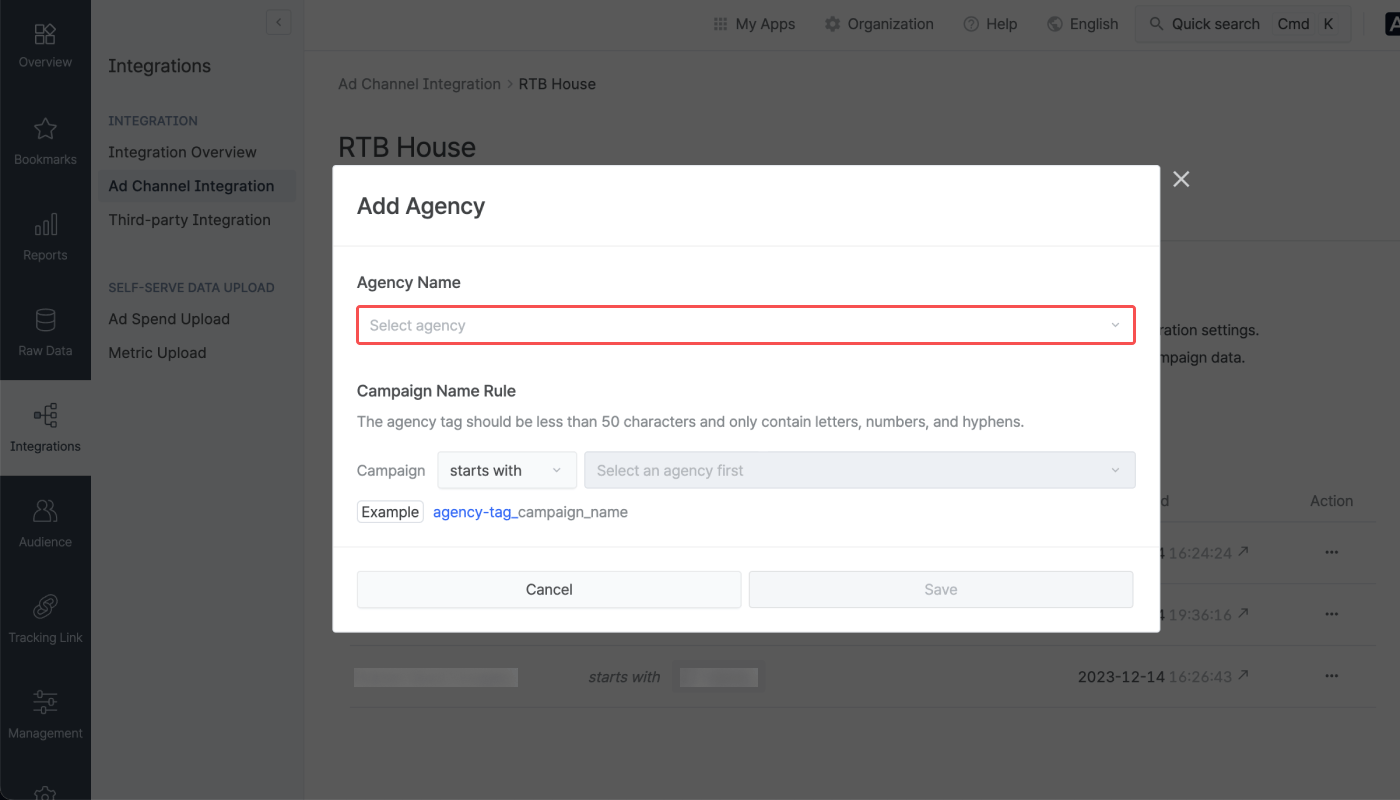 4. Configure the campaign name rule. The agency role account users can view the campaign data given access based on the campaign name rules.
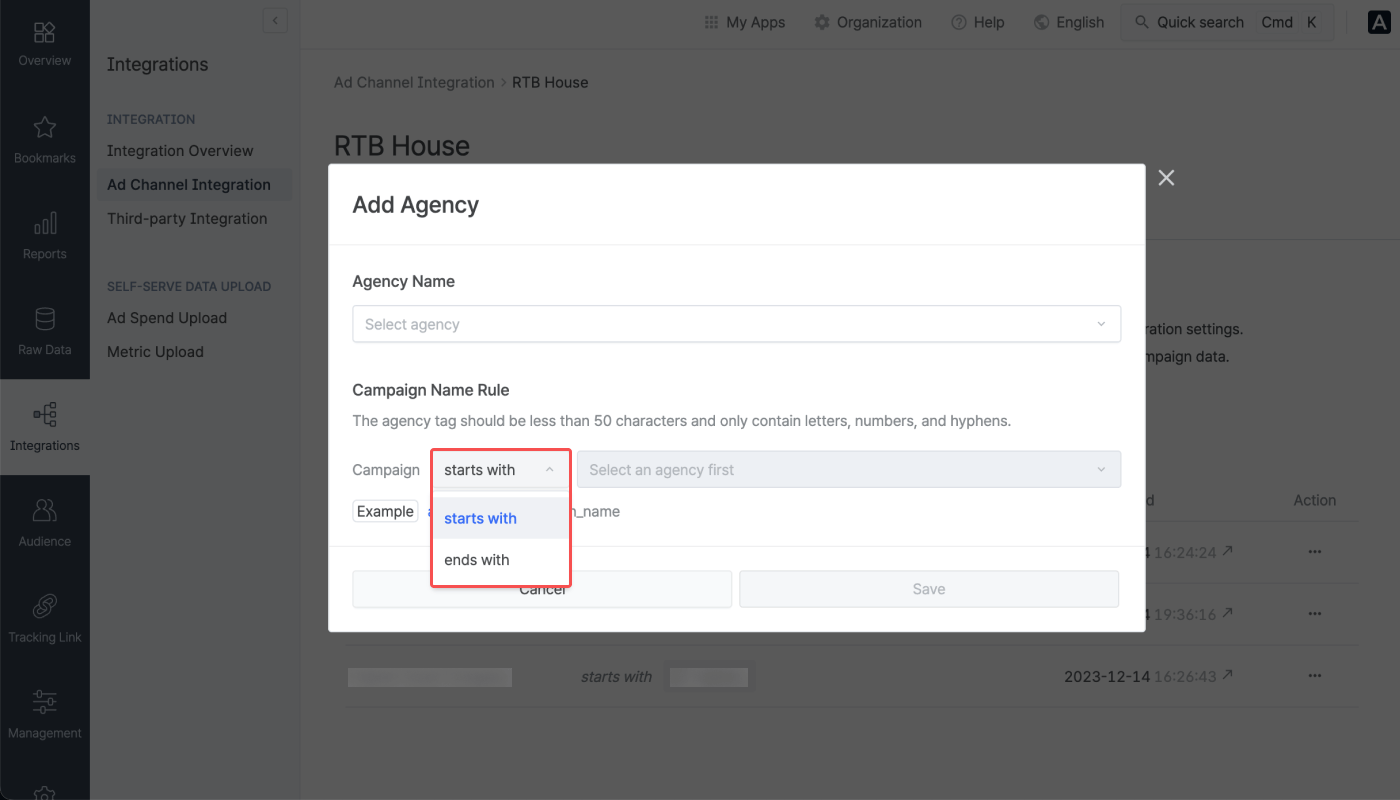 The campaign name rule can be configured by selecting “starts with” or “ends with” and selecting an agency tag. You can also enter the agency tag using less than 50 characters, which can be a combination of letters in mixed case, numbers, and hyphens. More than one campaign name rule can be configured. When you are done, click **Save**.
5. From the agency list, you can see which agency is given access to which campaign data from RTB House.
The campaign name rule can be configured by selecting “starts with” or “ends with” and selecting an agency tag. You can also enter the agency tag using less than 50 characters, which can be a combination of letters in mixed case, numbers, and hyphens. More than one campaign name rule can be configured. When you are done, click **Save**.
5. From the agency list, you can see which agency is given access to which campaign data from RTB House.
 ### Permission granted to agencies
Agency role account users who belong to the agencies added to the agency list are granted permission to the following.
* Access to the campaign data based on the campaign name rules
* Access to the cost data pulled from the account added by the Agency role account user from the same Agency
* Manage the accounts added by the Agency role account user from the same Agency for cost integration
### Permission granted to agencies
Agency role account users who belong to the agencies added to the agency list are granted permission to the following.
* Access to the campaign data based on the campaign name rules
* Access to the cost data pulled from the account added by the Agency role account user from the same Agency
* Manage the accounts added by the Agency role account user from the same Agency for cost integration
 ## **Postback Settings**
In the **\[Postback]** tab, you can configure postbacks and determine which in-app events and attribution results to send as postbacks. The data collected with the Airbridge SDK and tracking links enables you to optimize campaigns and make strategic decisions about budget allocation.
For more details on postback settings, read this [article](/en/guides/postback-settings).
## **Postback Settings**
In the **\[Postback]** tab, you can configure postbacks and determine which in-app events and attribution results to send as postbacks. The data collected with the Airbridge SDK and tracking links enables you to optimize campaigns and make strategic decisions about budget allocation.
For more details on postback settings, read this [article](/en/guides/postback-settings).
 ## Attention
Read the following information before enabling cost integration with RTB House.
## Attention
Read the following information before enabling cost integration with RTB House.