> ## Documentation Index
> Fetch the complete documentation index at: https://help.airbridge.io/llms.txt
> Use this file to discover all available pages before exploring further.
# Pinterest Ads
View Pinterest campaign performance within Airbridge by integrating Pinterest Ads with Airbridge. Set up the integration in **\[Integrations]>\[Ad Channel Integration]**.
## Collecting Data with Tracking Links
Go to the **\[Tracking Link]** tab and create and manage tracking links for measuring Pinterest campaign performance. For detailed instructions, refer to the articles below.
* [Creating Tracking Links](/en/guides/creating-a-new-tracking-link)
* [Tracking Link Management](/en/guides/tracking-link-management)
**Attention**
Set up postback before using tracking links. Postback must be set up before data collection to ensure all collected data is sent to the ad channel. If not, data collected through tracking links will not be sent to the ad channel.
## Attribution Rules
**Note**
For this ad channel, Airbridge uses only the [probabilistic approach](/en/guides/identity-matching#probabilistic-approach) for user identification. Note this when analyzing this channel’s performance in Airbridge.
Go to the **\[Attribution Rule]** tab to set up lookback window and attribution window. Click **Go to edit page** to move to the **\[Management]>\[Attribution Rules]** page, where you can edit the windows.
* [Lookback and Attribution Window Setup](/en/guides/setting-attribution-window)
## Postback Settings
Go to the **\[Postback]** tab and set up conditions for sending data collected by Airbridge tracking links and SDK. You can use the data sent through postbacks for campaign optimization and ad spend settlement.
**Note**
For campaign optimization, this ad channel recommends sending all events as postbacks, regardless of attribution or first event status.
* [Postback Settings](/en/guides/postback-settings-new)
To send events to Pinterest Ads through postbacks, you need to register Pinterest Ads ad account ID and conversion access token as postback keys in the **\[Postback]** tab.
### Obtaining postback keys from Pinterest Ads
Obtain the ad account ID and conversion access token from Pinterest Ads by following the steps below. First, log in to [Pinterest Ads](https://ads.pinterest.com/).
#### Ad account ID
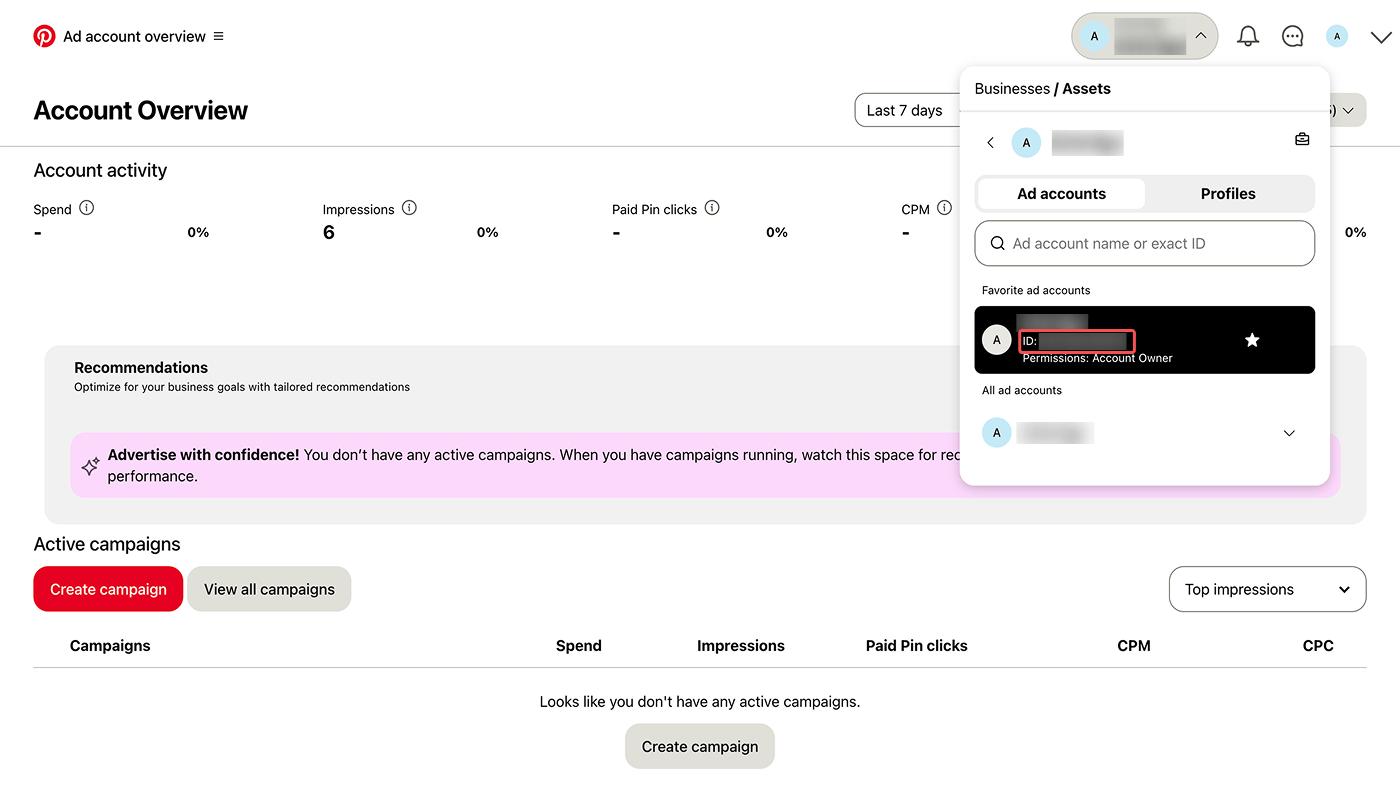
In the Pinterest Ads dashboard, click the ad account in the top right corner to obtain its ID.
#### Conversion access token
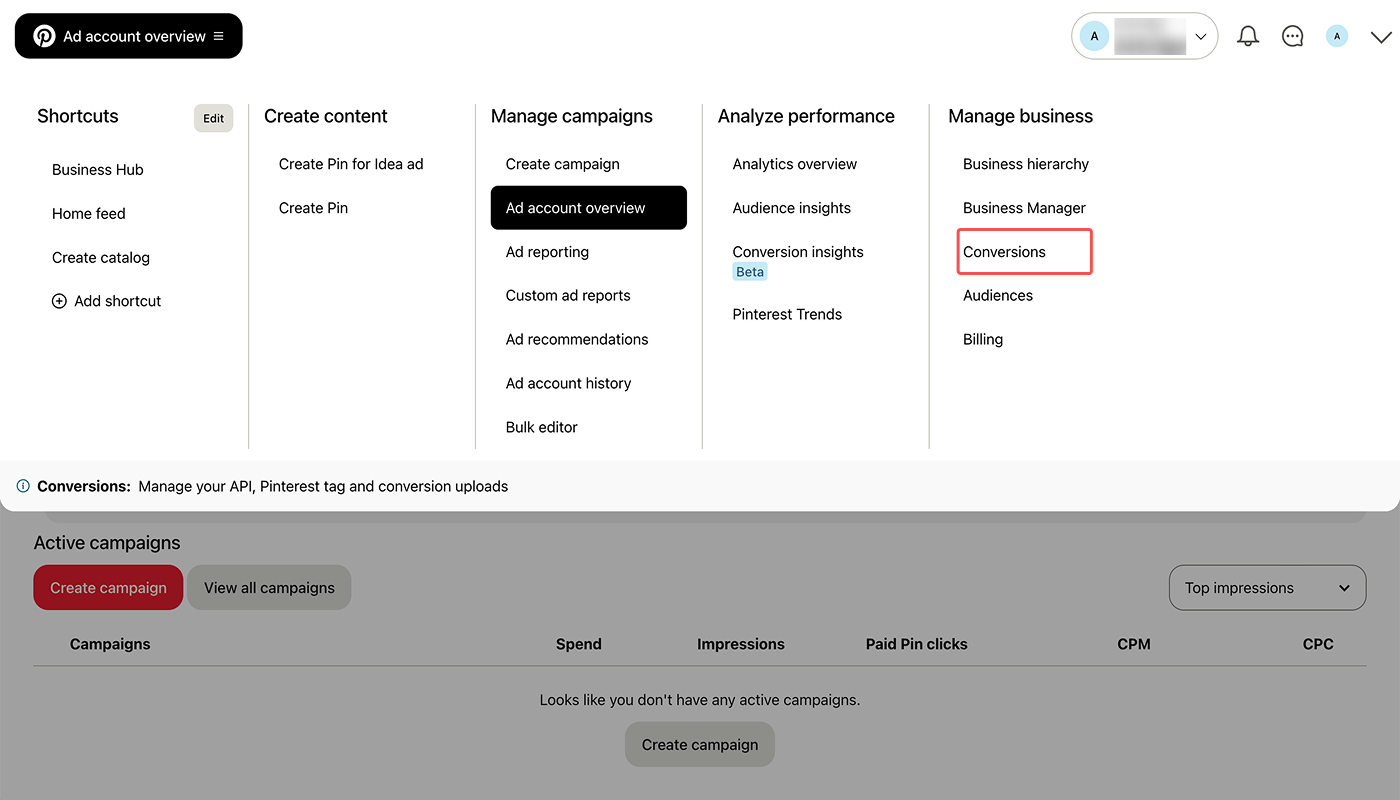
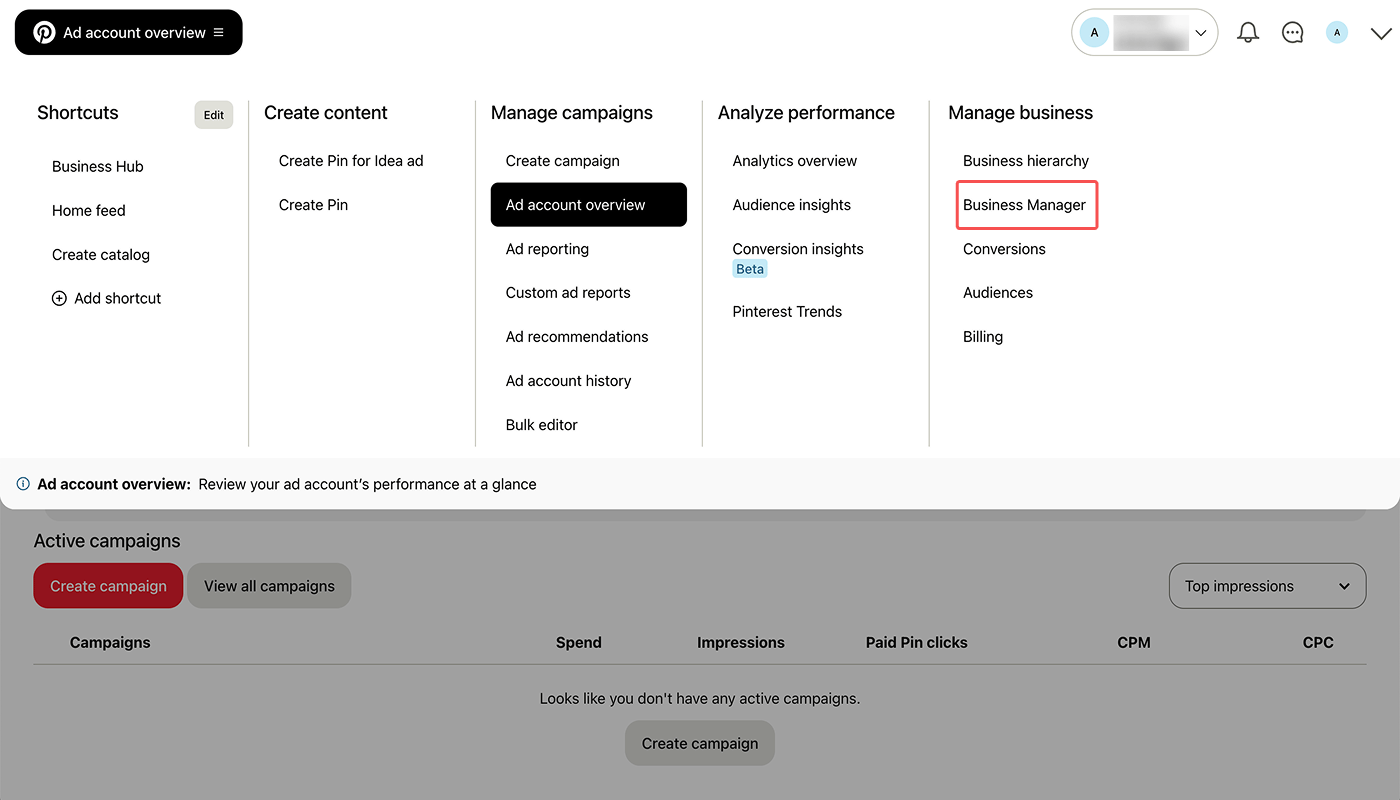
1. In the Pinterest Ads dashboard, navigate to **\[Ad account overview]>\[Manage business]>\[Conversions]**.
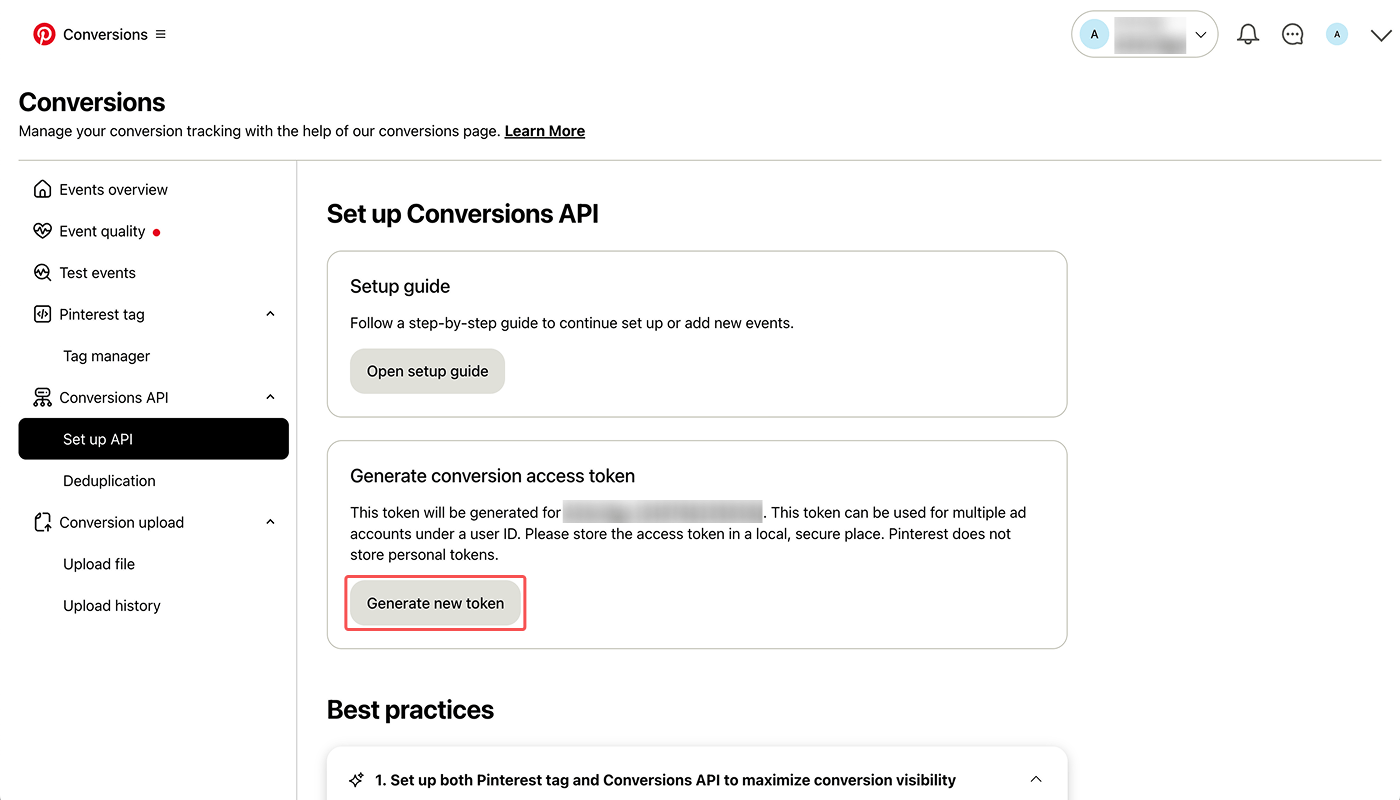
2. Select **\[Conversions API]>\[Set up API]**. Click **Generate new token** in **\[Generate conversion access token]** and copy the token that appears.
**Attention**
If you regenerate a conversion access token in Pinterest Ads after registering a token as a postback key in Airbridge, you must register the new token in Airbridge again. Otherwise, an error will occur.
### Recommended event name setting
We recommend configuring event names in the **\[Postback]** tab as shown below. The sent Airbridge events will appear in Pinterest Ads as the ad channel event names you configured.
| **Ad channel event name** | **Airbridge event name** |
| ------------------------- | ------------------------ |
| add\_to\_cart | Add To Cart |
| add\_to\_wishlist | Add to Wishlist |
| add\_payment\_info | Add Payment Info |
| checkout | Order Complete |
| initiate\_checkout | Initiate Checkout |
| page\_visit | Product View |
| search | Search Results |
| signup | Sign-up |
| subscribe | Subscribe |
| view\_category | Product Catalog |
| view\_content | Home Screen |
You can set an Airbridge event’s ad channel event name to “custom” to send it to Pinterest Ads through postbacks. If you set multiple Airbridge events’ ad channel event names to “custom”, all those events sent to Pinterest Ads will appear identically as “custom”.
## Measuring Catalog-based Campaigns
You can measure performance of Pinterest Ads’ catalog-based campaigns using the following method.
**Attention**
You cannot use Airbridge tracking links as tracking URLs. Make sure to complete the setup by following the instructions below.
1. Add URL parameters to the destination URL you will use for Pinterest Ads. Refer to this [Pinterest Ads documentation](https://help.pinterest.com/en/business/article/add-url-parameters-to-your-ads).
2. In the Pinterest Ads dashboard, navigate to **\[Ad account overview]>\[Manage business]>\[Business Manager]**.
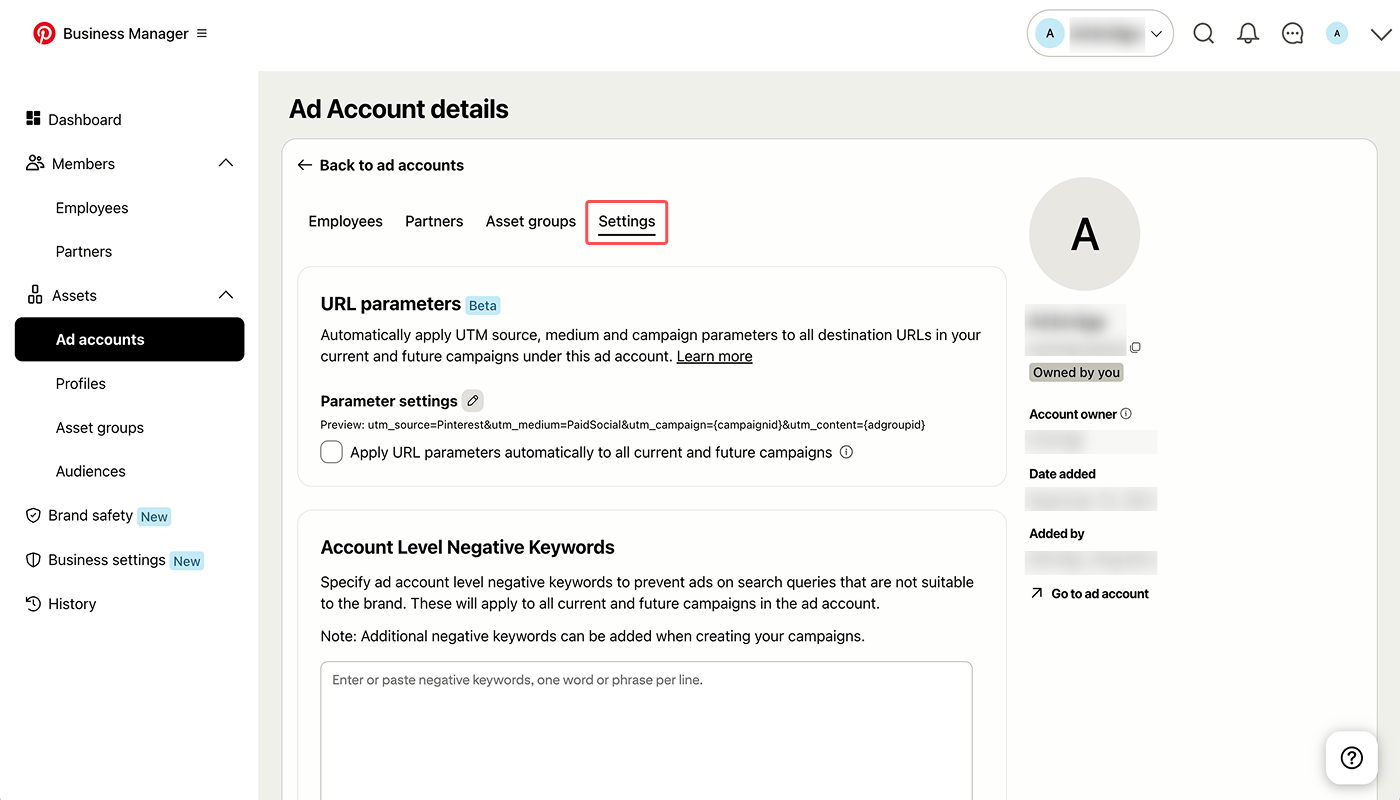
3. Click **\[Assets]>\[Ad accounts]**. Select the ad account that will run catalog-based campaigns and click **Settings**.
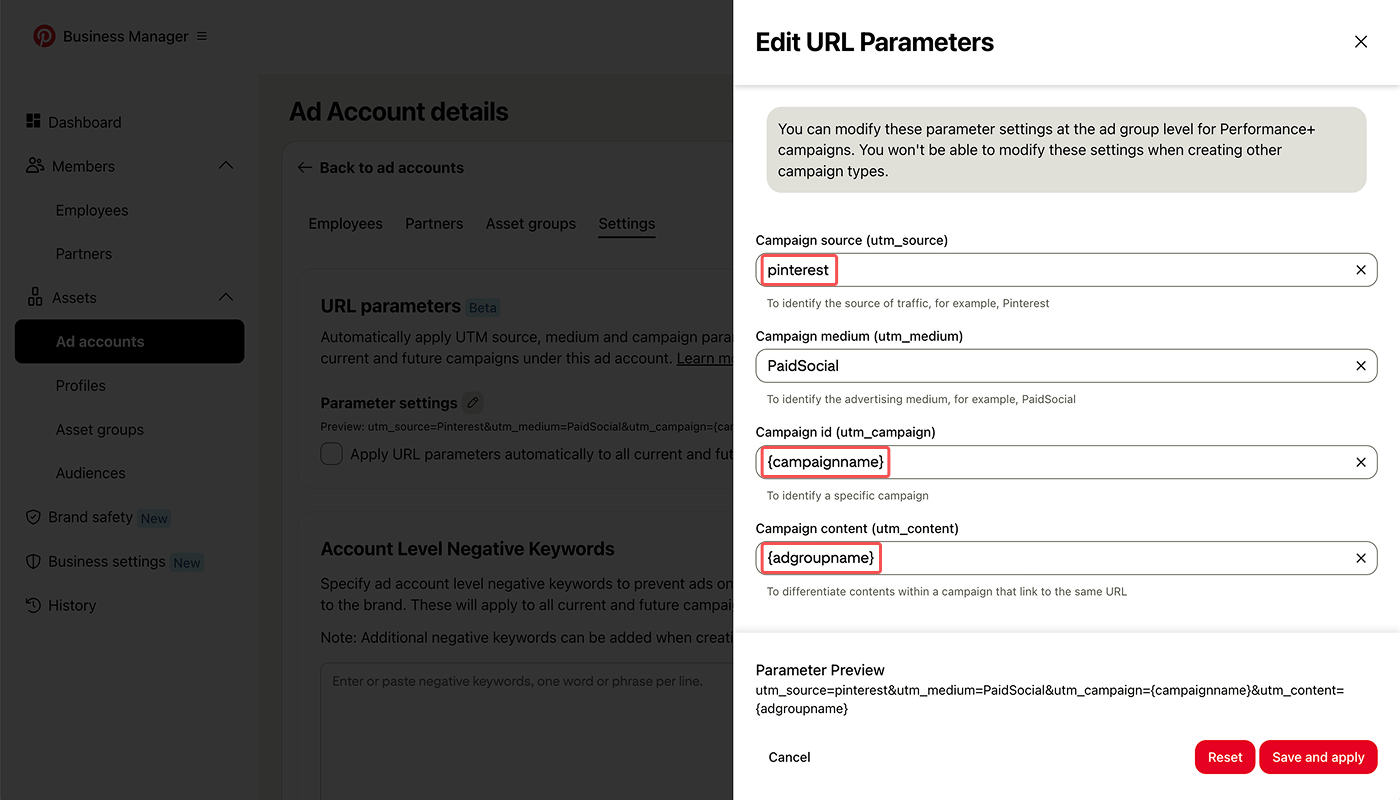
4. Click the edit button next to **\[Parameter settings]** and make sure to complete the following 3 edits:
* Change the uppercase “P” in the default “Pinterest” to lowercase “p” and enter “pinterest” as the **Campaign source (utm\_source)**.
* Enter “\{campaignname}” as the **Campaign id (utm\_campaign)**.
* Enter “\{adgroupname}” as the **Campaign content (utm\_content)**.
If the destination for the catalog-based campaign is a web page, you must complete the following. Ask your developer for help.
* [Install the Airbridge Web SDK](/en/developers/web-sdk#install-sdk) on the web page.
* Set up [utmParsing](/en/developers/web-sdk#automatic-parsing-utmparsing) in the Airbridge Web SDK.
If you place a call-to-action (CTA) button on the destination web page, set up [Protected Attribution Window (PAW)](/en/developers/web-sdk#set-up-protected-attribution-window) as needed. Touchpoints collected during the PAW timeframe are excluded from attribution. You can use PAW to exclude Airbridge Web SDK touchpoints collected when users click CTA buttons from attribution.
## Agency Settings
Manage the access permissions of the agencies and have control over which agency has access to your campaign data.
* [Agency Settings](/en/guides/agency-setting)
 #### Conversion access token
1. In the Pinterest Ads dashboard, navigate to **\[Ad account overview]>\[Manage business]>\[Conversions]**.
#### Conversion access token
1. In the Pinterest Ads dashboard, navigate to **\[Ad account overview]>\[Manage business]>\[Conversions]**.
 2. Select **\[Conversions API]>\[Set up API]**. Click **Generate new token** in **\[Generate conversion access token]** and copy the token that appears.
 3. Click **\[Assets]>\[Ad accounts]**. Select the ad account that will run catalog-based campaigns and click **Settings**.
 4. Click the edit button next to **\[Parameter settings]** and make sure to complete the following 3 edits:
* Change the uppercase “P” in the default “Pinterest” to lowercase “p” and enter “pinterest” as the **Campaign source (utm\_source)**.
* Enter “\{campaignname}” as the **Campaign id (utm\_campaign)**.
* Enter “\{adgroupname}” as the **Campaign content (utm\_content)**.
4. Click the edit button next to **\[Parameter settings]** and make sure to complete the following 3 edits:
* Change the uppercase “P” in the default “Pinterest” to lowercase “p” and enter “pinterest” as the **Campaign source (utm\_source)**.
* Enter “\{campaignname}” as the **Campaign id (utm\_campaign)**.
* Enter “\{adgroupname}” as the **Campaign content (utm\_content)**.