
> ## Documentation Index
> Fetch the complete documentation index at: https://help.airbridge.io/llms.txt
> Use this file to discover all available pages before exploring further.

# PC Game Measurement

PC game advertising incorporates various campaign strategies across different platforms. Airbridge ensures cross-platform advertising measurement on mobile devices, the web, and PCs to provide you with comprehensive insight into your PC game's growth.

<div id="note" />

<Info>
  **Note**

  This feature is currently in beta. If you have any questions or suggestions for improvements, reach out to your Airbridge CSM. If you don't have a dedicated CSM, contact us through the [Airbridge Help Center](https://app.airbridge.io/supports).
</Info>

<h2 id="pc-game-measurement">
  PC Game Measurement
</h2>

Cross-platform measurement is required to measure the effectiveness of PC game ads, as user engagement with the ads can occur across various platforms beyond the PC or console where the game is played. Airbridge supports data collection across mobile devices, the web, and PCs.

<AccordionGroup>
  <Accordion title="PC game measurement scenario using a landing page (Recommended)">
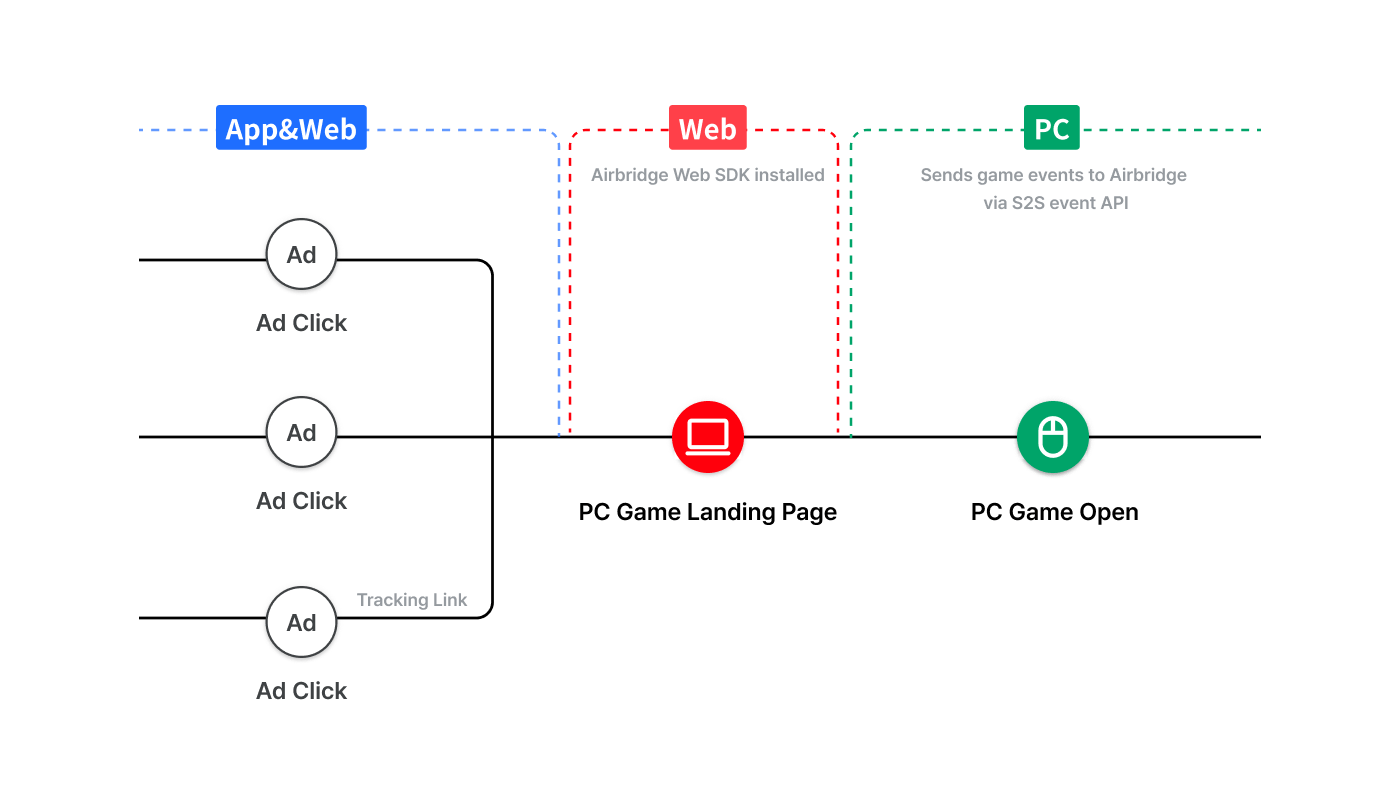
    In this scenario, users who click an ad are redirected to a landing page where the Airbridge Web SDK is installed. Airbridge collects data from this website and the PC game to measure ad performance. This method is recommended when tracking campaigns where tracking links can’t be used. The collected cookie IDs can also be used for running effective retargeting campaigns.

    <Frame>
      <img src="https://mintcdn.com/airbridge-help-center/zcoDbC5M5VnxBtGt/images/ca4fk0iik512/3YBDBR2LWLYaxv9ocBIKDT/0266f59d766947eb8c020c33d09840f1/PCGameTracking_2_EN.png?fit=max&auto=format&n=zcoDbC5M5VnxBtGt&q=85&s=8ddbf9fd37eda3dbb0a766bef8469404" alt="PCGameTracking 2 EN" width="1400" height="800" data-path="images/ca4fk0iik512/3YBDBR2LWLYaxv9ocBIKDT/0266f59d766947eb8c020c33d09840f1/PCGameTracking_2_EN.png" />
    </Frame>
  </Accordion>

  <Accordion title="PC game measurement scenario without a landing page">
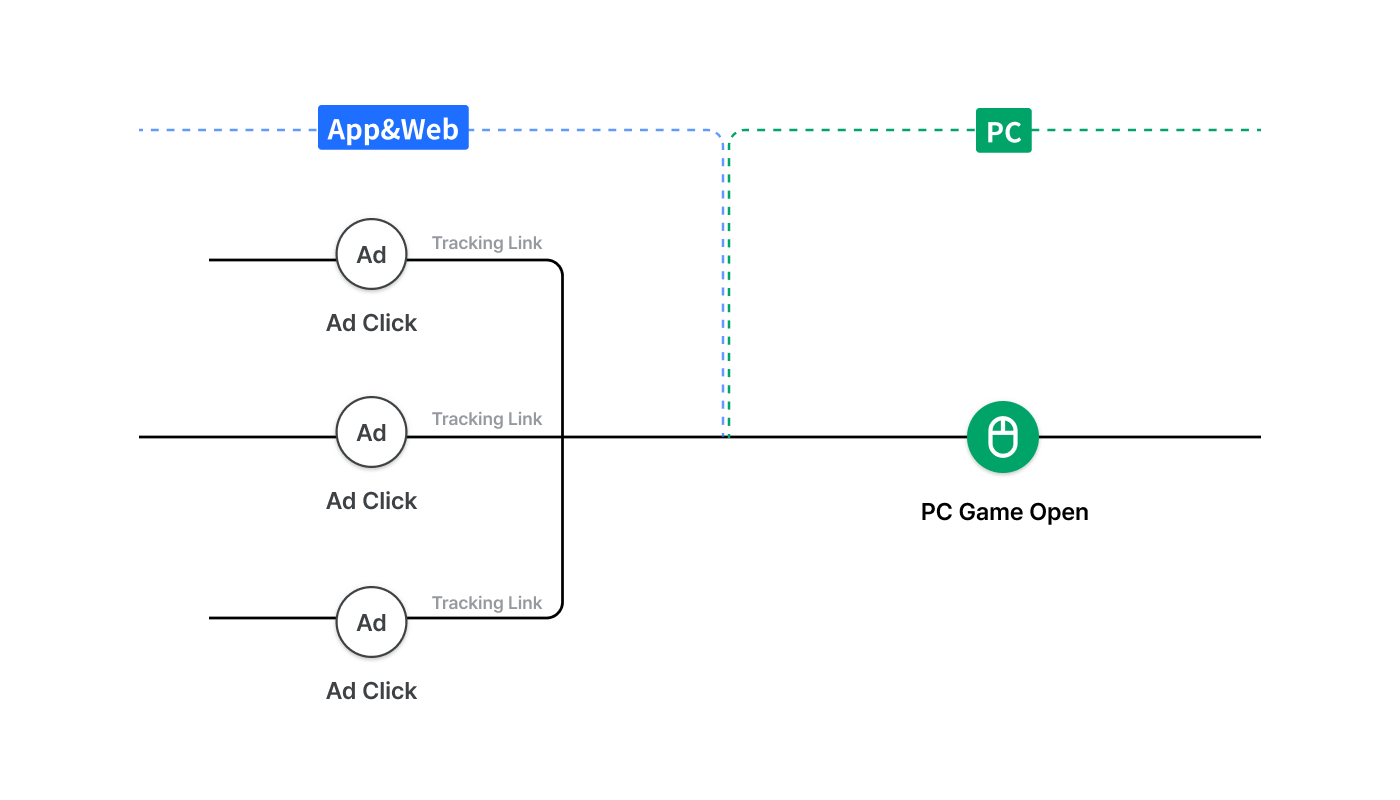
    Airbridge collects data using the tracking links across platforms to measure the performance of PC game ads.

    <Frame>
      <img src="https://mintcdn.com/airbridge-help-center/zcoDbC5M5VnxBtGt/images/ca4fk0iik512/3VsYc9fEntBPy2BMWMFDzW/07e43f0721782d03fc4203e901908c10/PCGameTracking_1_EN.png?fit=max&auto=format&n=zcoDbC5M5VnxBtGt&q=85&s=61e032dbccdff2487489c3c434b86bb3" alt="PCGameTracking 1 JA" width="1400" height="800" data-path="images/ca4fk0iik512/3VsYc9fEntBPy2BMWMFDzW/07e43f0721782d03fc4203e901908c10/PCGameTracking_1_EN.png" />
    </Frame>
  </Accordion>
</AccordionGroup>

<h2 id="pc-game-measurement-setup-using-a-landing-page-recommended">
  PC Game Measurement Setup Using a Landing Page (Recommended)
</h2>

For PC game measurement, data from mobile devices, the web, and PC games must be collected and sent to Airbridge. The data collected from websites can be sent to Airbridge through the Airbridge SDK, and the data collected from the PC games can be sent to Airbridge through API.

<h3 id="pre-setup">
  **Pre-setup**
</h3>

The following pre-setup must be complete to continue.

<AccordionGroup>
  <Accordion title="Prepare a landing page">
    Prepare a landing page to redirect users who click your ad. From the landing page, users can either start the PC game directly or navigate to other gaming platforms such as Steam or Epic Games Store.

    Installing the Airbridge Web SDK to the landing page allows you to track ad performance without tracking links and run effective retargeting campaigns using the cookie IDs collected via the SDK.

    <Frame>
      <img src="https://mintcdn.com/airbridge-help-center/JXq0bv51LKilSS4T/images/ca4fk0iik512/5NwdG7B7sPKB3joGKcWO1a/9a29467d33545a31bc4509c71b37db48/240131_Airbridge_User_guide_illust_Landing_Page_1.png?fit=max&auto=format&n=JXq0bv51LKilSS4T&q=85&s=cceba475995d33df7fbd71aabb5728b3" alt="240131 Airbridge User guide illust Landing Page (1)" width="1400" height="800" data-path="images/ca4fk0iik512/5NwdG7B7sPKB3joGKcWO1a/9a29467d33545a31bc4509c71b37db48/240131_Airbridge_User_guide_illust_Landing_Page_1.png" />
    </Frame>
  </Accordion>

  <Accordion title="Get started with Airbridge">
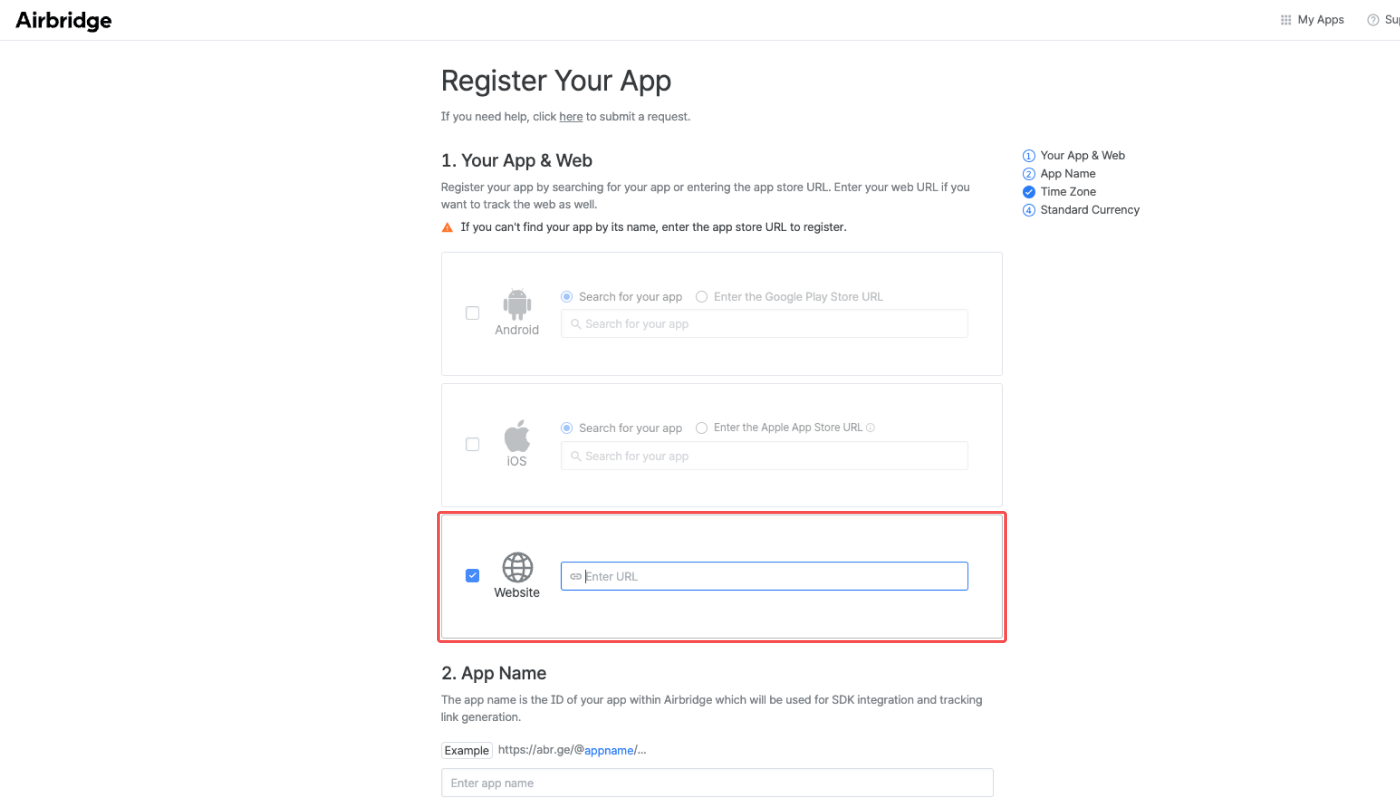
    Registering a mobile app is not required to get started. Simply enter a website or the desired landing page into the **Website** field.  It can be changed afterward.

    Refer to this [article](/en/guides/register-a-new-app) to learn more about getting started with Airbridge.

    <Frame>
      <img src="https://mintcdn.com/airbridge-help-center/bhBdovSFpO8_k8rJ/images/ca4fk0iik512/3jr0yQ86r0y2kLrR2aWi5j/bb0b6bea4d6d27c84bb84d508fd1b75c/01-en-PCgametracking.png?fit=max&auto=format&n=bhBdovSFpO8_k8rJ&q=85&s=2e56a32a98e1f67093293b2f99527a72" alt="01-en-PCgametracking" width="1400" height="800" data-path="images/ca4fk0iik512/3jr0yQ86r0y2kLrR2aWi5j/bb0b6bea4d6d27c84bb84d508fd1b75c/01-en-PCgametracking.png" />
    </Frame>
  </Accordion>

  <Accordion title="Install the Airbridge Web SDK">
    Install the Airbridge Web SDK to the desired landing page. By enabling the UTM parsing of the Web SDK, Airbridge can track data via UTM parameters without the use of tracking links.

    * [Airbridge Web SDK Setup](/en/developers/web-sdk)
    * [UTM Parsing](/en/developers/web-sdk#advanced-settings)
  </Accordion>

  <Accordion title="Design the event taxonomy">
    Design the event taxonomy for your PC game measurement. The game events will be sent to Airbridge and recorded following the set event taxonomy.

    * [Event Taxonomy](/en/guides/airbridge-event-taxonomy)
  </Accordion>

  <Accordion title="Request updating the probabilistic modeling settings">
    <div id="attention-5" />

    <Info>
      **Attention**

      Upon updating the probabilistic modeling settings, more conversions will be attributed to ad channels by Airbridge, and the change will be visible in the Airbridge reports.
    </Info>

    To set up PC game measurement, the [probabilistic modeling](/en/guides/identity-matching#probabilistic-modeling) settings must be updated. Contact your Airbridge CSM for more details.
  </Accordion>
</AccordionGroup>

<h3 id="sending-pc-game-events-to-airbridge">
  **Sending PC game events to Airbridge**
</h3>

The in-game events collected from the PC game shall be sent to Airbridge via the S2S event API.

<h4 id="s2s-event-api-configuration">
  S2S event API configuration
</h4>

Refer to the information below and send the PC game events via the S2S event API. For more details on the S2S event API, refer to this [article](/en/references/s2s-event/send-in-app-events). Make sure to send the game events to the in-app event endpoints and not to the in-web event endpoints.

<AccordionGroup>
  <Accordion title="Endpoints for key events">
    The following table shows the different endpoints for the PC Game Installs, PC Game Opens, and In-game events.

    In-game events are events that are performed after the user performs the PC Game Install or PC Game Open events, such as Complete Tutorial, Achieve Level 1, etc.

    <div style={{ overflowX: 'auto' }}>
      <table style={{ display: 'table' }}>
        <thead>
          <tr>
            <th width="80px">
              Event
            </th>

            <th width="240px">
              Endpoint
            </th>
          </tr>
        </thead>

        <tbody>
          <tr>
            <td>
              PC Game Install
            </td>

            <td>
              `https://api.airbridge.io/events/v1/apps/{{APP_NAME}}/mobile-app/9161`
            </td>
          </tr>

          <tr>
            <td>
              PC Game Open
            </td>

            <td>
              `https://api.airbridge.io/events/v1/apps/{{APP_NAME}}/mobile-app/9160`
            </td>
          </tr>

          <tr>
            <td>
              In-game events
            </td>

            <td>
              `https://api.airbridge.io/events/v1/apps/{{APP_NAME}}/mobile-app/9360`
            </td>
          </tr>
        </tbody>
      </table>
    </div>
  </Accordion>

  <Accordion title="Header">
    Refer to the table below for the header configuration.

    <div style={{ overflowX: 'auto' }}>
      <table style={{ display: 'table' }}>
        <thead>
          <tr>
            <th width="80px">
              Header
            </th>

            <th width="40px">
              Is it required?
            </th>

            <th width="200px">
              Description
            </th>
          </tr>
        </thead>

        <tbody>
          <tr>
            <td>
              `Authorization`
            </td>

            <td>
              Required
            </td>

            <td>
              The [API token](/en/developers/getting-started#api-token)is required which can be found in the Airbridge dashboard.
            </td>
          </tr>

          <tr>
            <td>
              `X-Forwarded-For`
            </td>

            <td>
              Required
            </td>

            <td>
              Send the IPs with the `X-Forwarded-For` header when in-game events occur. If not, the server IP that called the API will be sent with the in-game events, and Airbridge will be unable to connect the ad click and in-game event.
            </td>
          </tr>

          <tr>
            <td>
              `Accept-Language`
            </td>

            <td>
              Optional
            </td>

            <td>
              Configure the preferred natural language and locale. ISO-639-1 applies.
            </td>
          </tr>

          <tr>
            <td>
              `Content-Type`
            </td>

            <td>
              Optional
            </td>

            <td>
              The media type of the resource. Default value is `application/json`.
            </td>
          </tr>
        </tbody>
      </table>
    </div>

    <div id="attention-2" />

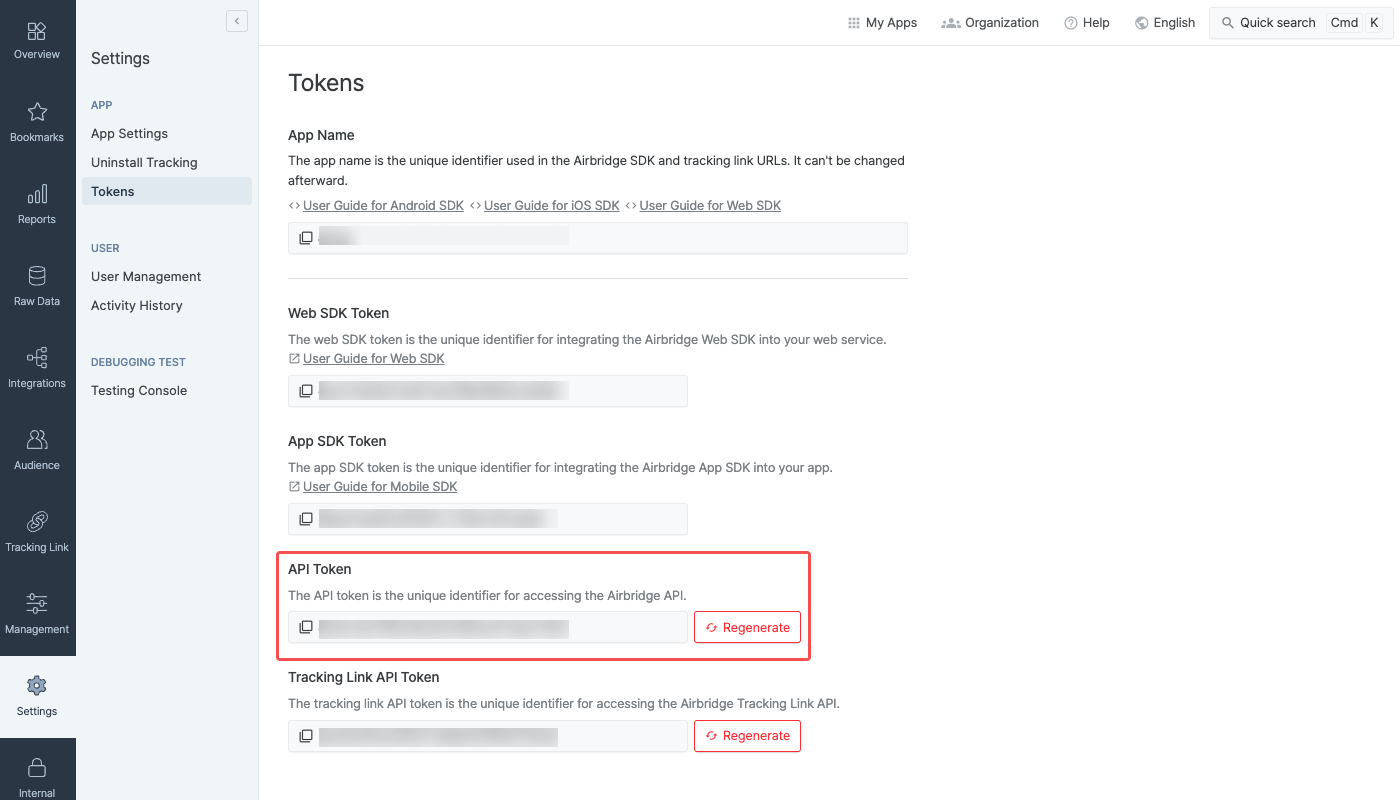
    <Danger>
      **Attention**

      The API token required for configuring the `Authorization` header can be found on the **\[Settings]>\[Tokens]** page in the Airbridge dashboard.

      <Frame>
        <img src="https://mintcdn.com/airbridge-help-center/7vnC4ePxiO4nPLE6/images/ca4fk0iik512/1ghOWCtHb0Kk5oMhcTQBqp/86bd85ee3bc046512d76c93d8270e0a9/01-en-PCgame.png?fit=max&auto=format&n=7vnC4ePxiO4nPLE6&q=85&s=29cec9debed6d2e8b4e8f54ce8e4f2f8" alt="01-en-PCgame" width="1400" height="800" data-path="images/ca4fk0iik512/1ghOWCtHb0Kk5oMhcTQBqp/86bd85ee3bc046512d76c93d8270e0a9/01-en-PCgame.png" />
      </Frame>
    </Danger>
  </Accordion>

  <Accordion title="Parameters">
    Refer to the following table for sending the PC game events to Airbridge. The events can be defined as Standard or Ecutom Events depending on the information sent to `eventData.goal`. To learn more about Standard and Custom Events, refer to this [article](/en/guides/airbridge-event-types).

    <div style={{ overflowX: 'auto' }}>
      <table style={{ display: 'table' }}>
        <thead>
          <tr>
            <th width="80px">
              Name
            </th>

            <th width="40px">
              Required or Optional
            </th>

            <th width="200px">
              Description
            </th>
          </tr>
        </thead>

        <tbody>
          <tr>
            <td>
              `user.externalUserID`
            </td>

            <td>
              Required
            </td>

            <td>
              Send the user ID that is used to identify users in your gaming service. This user ID will be used for attribution.<br />For more details, refer to this [article](/en/guides/cross-platform-measurement-faq#which-ids-should-i-send-to-airbridge).
            </td>
          </tr>

          <tr>
            <td>
              `device`
            </td>

            <td>
              Optional
            </td>

            <td>
              Send the device and platform information.
            </td>
          </tr>

          <tr>
            <td>
              `eventData.goal`
            </td>

            <td>
              Optional
            </td>

            <td>
              Send events collected from the PC game. The `eventData.goal.category` parameter carries the event names that appear in the reports. More information can be sent via the `eventData.goal.action`, `eventData.goal.label`, `eventData.goal.value` parameters, which can be viewed in the reports.<br />Information sent via the `eventData.goal.customAttributes`parameter can only be viewed in raw data.
            </td>
          </tr>
        </tbody>
      </table>
    </div>

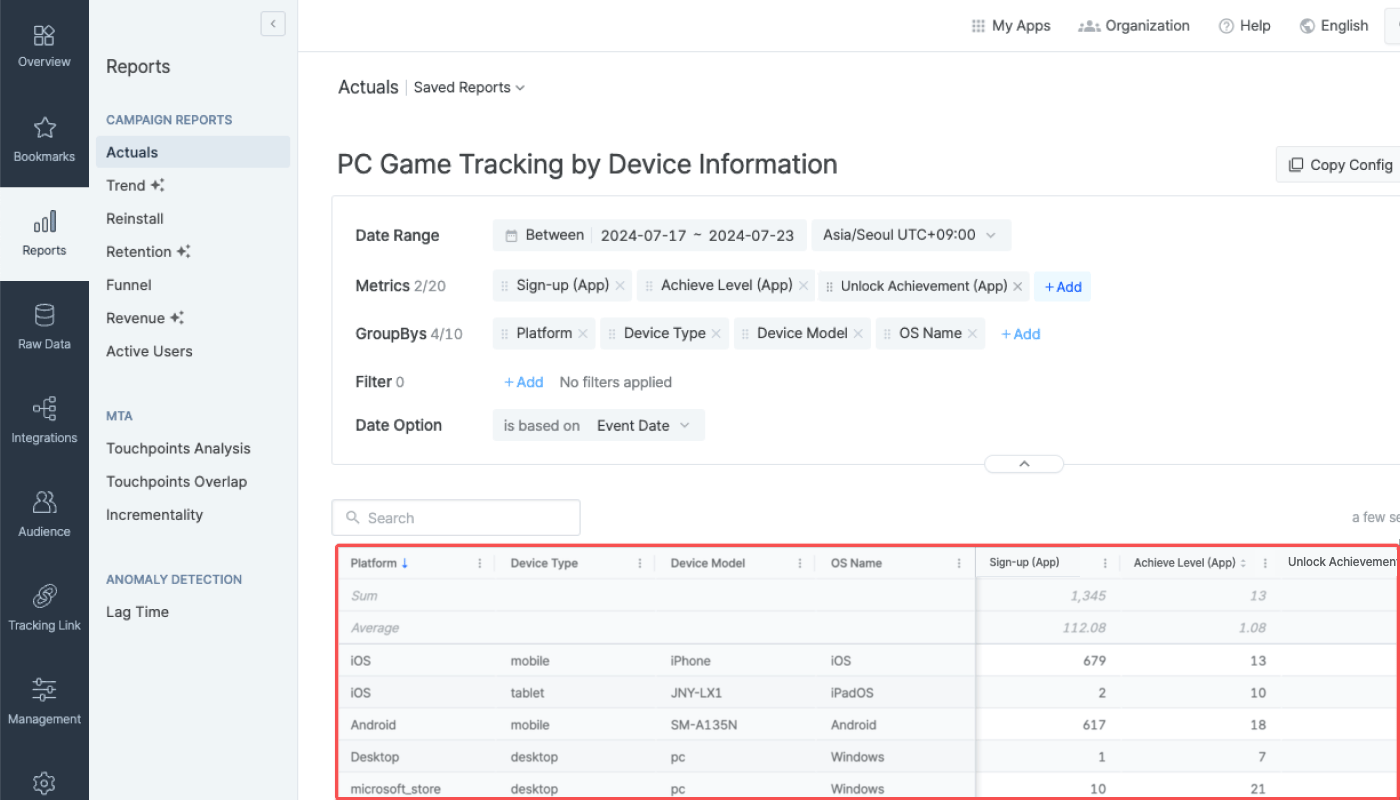
    Airbridge supports the following `device`sub-variables.

    <div id="sending-device-information-recommended" />

    <Note>
      **Sending device information recommended**

      We recommend sending the device information. The device information is required to view the PC game events by platform, OS, and other details in the Airbridge reports.
    </Note>

    | Name               | Description                      |
    | ------------------ | -------------------------------- |
    | device.platform    | Platform supported by the device |
    | device.deviceType  | Device type                      |
    | device.osName      | OS name used on the device       |
    | device.osVersion   | OS version used on the device    |
    | device.deviceModel | Device model name                |

    The PC game tracking results can be monitored in the Airbridge report by using the device information as GroupBys.

    <Frame>
      <img src="https://mintcdn.com/airbridge-help-center/2eRJXoHP1hLyz29I/images/ca4fk0iik512/6v1fQtGs0cmmvUFaUShNUJ/eb3c10cd1476eaf8defc95113d037964/02-en-PCgame.png?fit=max&auto=format&n=2eRJXoHP1hLyz29I&q=85&s=e5c31124588423df5c660ff8c29373fb" alt="02-en-PCgame" width="1400" height="800" data-path="images/ca4fk0iik512/6v1fQtGs0cmmvUFaUShNUJ/eb3c10cd1476eaf8defc95113d037964/02-en-PCgame.png" />
    </Frame>

    <div id="attention-3" />

    <Danger>
      **Attention**

      If the device information is not sent, you might see some unexpected results in your Airbridge reports.
    </Danger>
  </Accordion>
</AccordionGroup>

<h4 id="send-in-game-events-to-airbridge">
  Send in-game events to Airbridge
</h4>

Send the PC Game Install or the PC Game Open events before sending the in-game events to Airbridge. The attribution result of the in-game events sent afterward will vary depending on the event first sent.

Enabling Airbridge's reactivation tracking feature can measure the users who return to your game after a certain period of time. Refer to this [article](/en/guides/reactivation-tracking)to find out more.

<div style={{ overflowX: 'auto' }}>
  <table style={{ display: 'table' }}>
    <thead>
      <tr>
        <th width="120px">
          User type
        </th>

        <th width="80px">
          Send first
        </th>

        <th width="200px">
          Description
        </th>
      </tr>
    </thead>

    <tbody>
      <tr>
        <td>
          New users or users with no tracking records in Airbridge
        </td>

        <td>
          PC Game Install
        </td>

        <td>
          This is a [Target Event](/en/guides/airbridge-attribution-model#target-events), triggering attribution.<br />Attribution is performed following the configured [attribution rule](/en/guides/setting-attribution-window).
        </td>
      </tr>

      <tr>
        <td>
          Existing users or users with tracking records in Airbridge
        </td>

        <td>
          PC Game Open
        </td>

        <td>
          This is not a Target Event, and attribution is not triggered.<br />It will be included in the prior attribution result or classified as unattributed.
        </td>
      </tr>
    </tbody>
  </table>
</div>

<Accordion title="Attribution scenario">
  In the following scenario, the [attribution window](/en/guides/airbridge-attribution-model#attribution-window) is set to 3 days.

  <div style={{ overflowX: 'auto' }}>
    <table style={{ display: 'table' }}>
      <thead>
        <tr>
          <th width="80px">
            Date
          </th>

          <th width="60px">
            User
          </th>

          <th width="100px">
            Events sent to Airbridge
          </th>

          <th width="240px">
            Description
          </th>
        </tr>
      </thead>

      <tbody>
        <tr>
          <td>
            Jan 1
          </td>

          <td>
            User A
          </td>

          <td>
            1. PC Game Install event<br />2. Tutorial Complete event<br />3. Achieve Level event
          </td>

          <td>
            The **PC Game Install** event triggers attribution.
          </td>
        </tr>

        <tr>
          <td>
            Jan 2
          </td>

          <td>
            User A
          </td>

          <td>
            1. PC Game Install event<br />2. Purchase Item event
          </td>

          <td>
            The **Purchase Item** event occurred within the attribution window and is attributed to the same touchpoint that drove the **PC Game Install** event.
          </td>
        </tr>

        <tr>
          <td>
            Jan 3
          </td>

          <td>
            User B
          </td>

          <td>
            1. PC Game Install event<br />2. Last Mission Complete event
          </td>

          <td>
            The **PC Game Install** event triggers attribution.
          </td>
        </tr>

        <tr>
          <td>
            Jan 4
          </td>

          <td>
            User C
          </td>

          <td>
            1. PC Game Open event<br />2. Tutorial Complete event<br />3. Achieve Level event<br />4. Purchase Item event
          </td>

          <td>
            There is no prior Target Event.<br />Therefore, all events are classified as **Unattributed**.
          </td>
        </tr>

        <tr>
          <td>
            Jan 5
          </td>

          <td>
            User A
          </td>

          <td>
            1. PC Game Open event<br />2. Purchase Item event
          </td>

          <td>
            The events occurred beyond the attribution window of the **PC Game Install** event of User A, which triggered the attribution.<br />Therefore, all events are classified as **Unattributed**.
          </td>
        </tr>
      </tbody>
    </table>
  </div>
</Accordion>

<h4 id="s2s-event-api-sending-examples">
  S2S event API sending examples
</h4>

Refer to the examples below for sending PC game events via the S2S event API.

<AccordionGroup>
  <Accordion title="Sending PC Game Install events">
    Refer to the example below.

    ```json lines theme={"theme":{"light":"github-dark-dimmed","dark":"github-dark-dimmed"}}
    curl --location 'https://api.airbridge.io/events/v1/apps/{{ APP_NAME }}/mobile-app/9161' \
    --header 'Authorization: AIRBRIDGE-API-TOKEN {{ API_TOKEN }}' \
    --header 'Content-Type: application/json' \
    --header 'X-Forwarded-For: {{ DEVICE_CLIENT_IP }}' \
    --data '{
        "user": {
            "externalUserID": "abrid123"
        },
        "device": {
            "platform": "steam",
            "deviceType": "desktop",
            "osName": "Windows",
            "osVersion": "11",
            "deviceModel": "pc",
            "screen": {
                "width": 1920,
                "height": 1080
            }
        }
    }'
    ```
  </Accordion>

  <Accordion title="Sending PC Game Open events">
    Refer to the example below.

    ```json lines theme={"theme":{"light":"github-dark-dimmed","dark":"github-dark-dimmed"}}
    curl --location 'https://api.airbridge.io/events/v1/apps/{{ APP_NAME }}/mobile-app/9160' \
    --header 'Authorization: AIRBRIDGE-API-TOKEN {{ API_TOKEN }}' \
    --header 'Content-Type: application/json' \
    --header 'X-Forwarded-For: {{ DEVICE_CLIENT_IP }}' \
    --data '{
        "user": {
            "externalUserID": "abrid123"
        },
        "device": {
            "platform": "playstation",
            "deviceType": "console",
            "osName": "playstation_5",
            "screen": {
                "width": 1920,
                "height": 1080
            }
        }
    }'
    ```
  </Accordion>

  <Accordion title="Sending in-game events without values">
    Refer to the example below to send various in-game events to Airbridge.

    ```json lines theme={"theme":{"light":"github-dark-dimmed","dark":"github-dark-dimmed"}}
    curl --location 'https://api.airbridge.io/events/v1/apps/{{ APP_NAME }}/mobile-app/9360' \
    --header 'Authorization: AIRBRIDGE-API-TOKEN {{ API_TOKEN }}' \
    --header 'Content-Type: application/json' \
    --header 'X-Forwarded-For: {{ DEVICE_CLIENT_IP }}' \
    --data '{
        "user": {
            "externalUserID": "abrid123"
        },
        "device": {
            "platform": "iOS",
            "deviceType": "desktop",
            "osName": "iOS",
            "osVersion": "17.1",
            "deviceModel": "Mac",
            "screen": {
                "width": 1920,
                "height": 1080
            }
        },
        "eventData": {
            "goal": {
                "category": "buy_item",
                "action": "weapon",
                "label": "longsword",
                "value": 1.234,
                "customAttributes": {
                    "foo": "foo",
                    "bar": 1.234
                }
            }
        }
    }'
    ```
  </Accordion>

  <Accordion title="Sending revenue events">
    It is advised to send revenue events as Airbridge Standard Events so you can use the revenue data for postbacks and view them in Airbridge reports such as the [Revenue Report](/en/guides/revenue-report).

    When configuring the`eventData.goal.category`as `airbridge.ecommerce.order.completed`, the revenue data is sent as the **Order Complete** event, and the `eventData.goal.value` will be reported as the revenue amount.

    ```json lines theme={"theme":{"light":"github-dark-dimmed","dark":"github-dark-dimmed"}}
    curl --location 'https://api.airbridge.io/events/v1/apps/{{ APP_NAME }}/mobile-app/9360' \
    --header 'Authorization: AIRBRIDGE-API-TOKEN {{ API_TOKEN }}' \
    --header 'Content-Type: application/json' \
    --header 'X-Forwarded-For: {{ DEVICE_CLIENT_IP }}' \
    --data '{
        "user": {
            "externalUserID": "abrid123"
        },
        "device": {
            "platform": "Android",
            "deviceType": "desktop",
            "osName": "Android",
            "osVersion": "7",
            "deviceModel": "pc",
            "screen": {
                "width": 1920,
                "height": 1080
            }
        },
        "eventData": {
            "goal": {
                "category": "airbridge.ecommerce.order.completed",
                "value": 1.234,
                "semanticAttributes": {
                    "currency": "USD"
                }
            }
        }
    }'
    ```
  </Accordion>
</AccordionGroup>

<h3 id="testing">
  Testing
</h3>

Check the items below to make sure the PC game measurement is successfully set up.

<div style={{ overflowX: 'auto' }}>
  <table style={{ display: 'table' }}>
    <thead>
      <tr>
        <th width="80px">
          Items
        </th>

        <th width="240px">
          What to test
        </th>

        <th width="160px">
          Troubleshooting
        </th>
      </tr>
    </thead>

    <tbody>
      <tr>
        <td>
          Attribution
        </td>

        <td>
          Make sure that the PC game installs and in-game events are attributed to the intended ad channel after clicking the tracking link.<br />Check the attribution result of the PC game installs and in-game events you confirmed on the **\[Raw Data]>\[App Real-time Logs]** page in the Airbridge dashboard.
        </td>

        <td>
          Make sure the IPs that have generated in-game events are sent with the `X-Forwarded-For` header.
        </td>
      </tr>

      <tr>
        <td>
          API configuration
        </td>

        <td>
          Make sure the events are collected according to the API configuration. The API configuration can be tested by sending events without the `X-Forwarded-For` header.
        </td>

        <td>
          Check the API configuration again.
        </td>
      </tr>
    </tbody>
  </table>
</div>

<h2 id="pc-game-measurement-setup-using-tracking-links">
  PC Game Measurement Setup Using Tracking Links
</h2>

For PC game measurement, data from mobile devices, the web, and PC games must be collected and sent to Airbridge. The data collected from tracking links can be sent to Airbridge through the Airbridge SDK, and the data collected from the PC games can be sent to Airbridge through API.

<h3 id="pre-setup-2">
  Pre-setup
</h3>

The following pre-setup must be complete to continue.

<AccordionGroup>
  <Accordion title="Create a tracking link">
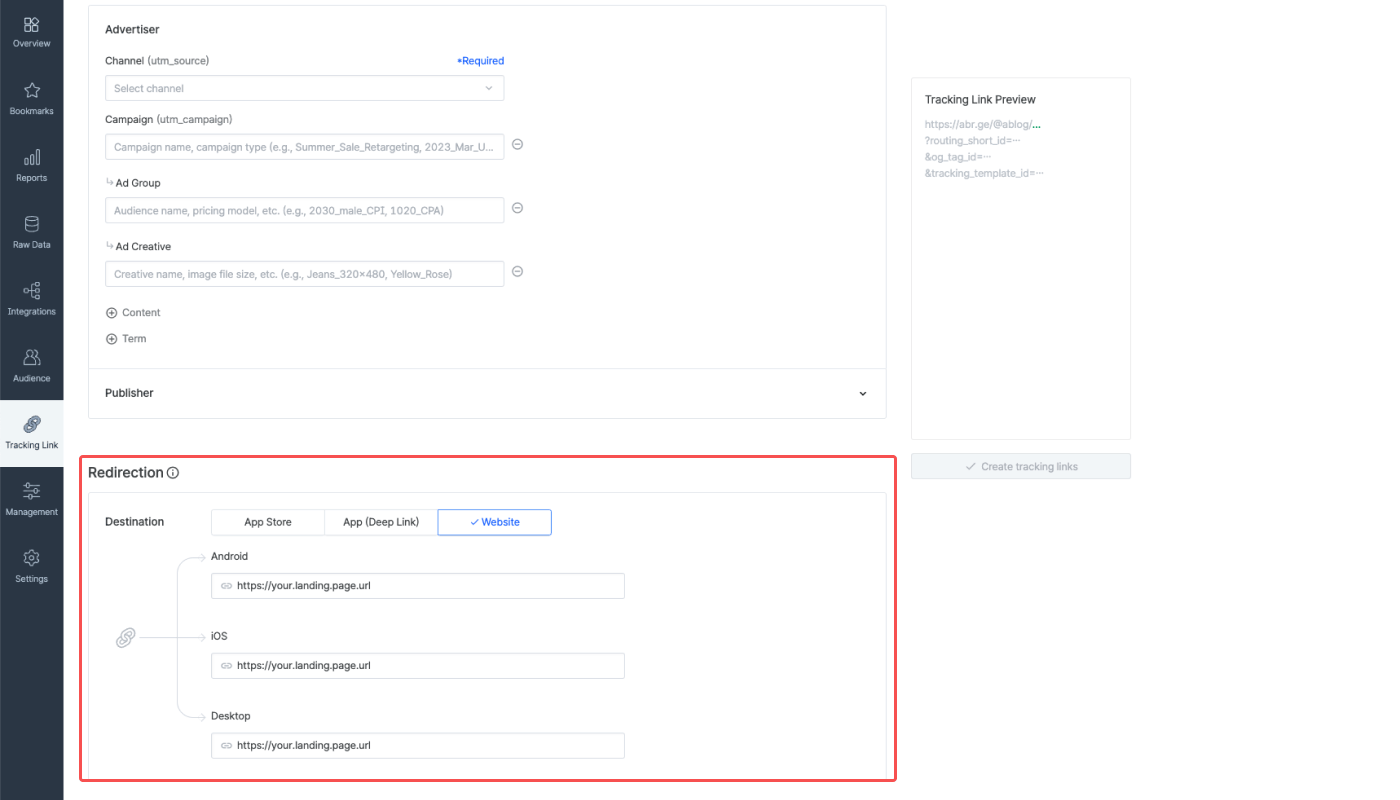
    Create a tracking link to use for your ad. When creating an integration channel tracking link in the Airbridge dashboard, click **\[Website]** in the **Redirection** section and configure the destination for all platforms as the desired landing page. If you don't have a landing page for redirection purposes, you can enter the URL of the game distribution platform, such as Steam, Epic Games Store, etc.

    For detailed instructions on how to create tracking links, refer to this [article](/en/guides/creating-tracking-links-on-the-dashboard).

    <Frame>
      <img src="https://mintcdn.com/airbridge-help-center/w-UBaImCCVluwkZP/images/ca4fk0iik512/5qu8nbnpEagQL8j9zYQO6J/7056154a97ec3c91bd8f329330fb112d/01-en-PC.png?fit=max&auto=format&n=w-UBaImCCVluwkZP&q=85&s=5edc427ee5140523f260f2d93ca9426e" alt="01-en-PC" width="1400" height="800" data-path="images/ca4fk0iik512/5qu8nbnpEagQL8j9zYQO6J/7056154a97ec3c91bd8f329330fb112d/01-en-PC.png" />
    </Frame>
  </Accordion>

  <Accordion title="Get started with Airbridge">
    Registering a mobile app is not required to get started. Simply enter a website or the desired landing page into the **Website** field.  It can be changed afterward.

    Refer to this [article](/en/guides/register-a-new-app) to learn more about getting started with Airbridge.

    <Frame>
      <img src="https://mintcdn.com/airbridge-help-center/bhBdovSFpO8_k8rJ/images/ca4fk0iik512/3jr0yQ86r0y2kLrR2aWi5j/bb0b6bea4d6d27c84bb84d508fd1b75c/01-en-PCgametracking.png?fit=max&auto=format&n=bhBdovSFpO8_k8rJ&q=85&s=2e56a32a98e1f67093293b2f99527a72" alt="01-en-PCgametracking" width="1400" height="800" data-path="images/ca4fk0iik512/3jr0yQ86r0y2kLrR2aWi5j/bb0b6bea4d6d27c84bb84d508fd1b75c/01-en-PCgametracking.png" />
    </Frame>
  </Accordion>

  <Accordion title="Design the event taxonomy">
    Design the event taxonomy for your PC game measurement. The game events will be sent to Airbridge and recorded following the set event taxonomy.

    * [Event Taxonomy](/en/guides/airbridge-event-taxonomy)
  </Accordion>

  <Accordion title="Request updating the probabilistic modeling settings">
    <div id="attention-4" />

    <Info>
      **Attention**

      Upon updating the probabilistic modeling settings, more conversions will be attributed to ad channels by Airbridge, and the change will be visible in the Airbridge reports.
    </Info>

    To set up PC game measurement, the [probabilistic modeling](/en/guides/identity-matching#probabilistic-modeling) settings must be updated. Contact your Airbridge CSM for more details.
  </Accordion>
</AccordionGroup>

<h3 id="sending-pc-game-events-to-airbridge-2">
  **Sending PC game events to Airbridge**
</h3>

The in-game events collected from the PC game shall be sent to Airbridge via the S2S event API. Refer to this [section](/en/guides/pc-game-tracking-guide#s2s-event-api-configuration) of the article.

<h3 id="testing-2">
  Testing
</h3>

Check the items below to make sure the PC game measurement is successfully set up.

<div style={{ overflowX: 'auto' }}>
  <table style={{ display: 'table' }}>
    <thead>
      <tr>
        <th width="80px">
          Items
        </th>

        <th width="240px">
          What to test
        </th>

        <th width="160px">
          Troubleshooting
        </th>
      </tr>
    </thead>

    <tbody>
      <tr>
        <td>
          Attribution
        </td>

        <td>
          Make sure that the PC game installs and in-game events are attributed to the intended ad channel after clicking the tracking link.<br />Check the attribution result of the PC game installs and in-game events you confirmed on the **\[Raw Data]>\[App Real-time Logs]** page in the Airbridge dashboard.
        </td>

        <td>
          Make sure the IPs that have generated in-game events are sent with the `X-Forwarded-For` header.
        </td>
      </tr>

      <tr>
        <td>
          API configuration
        </td>

        <td>
          Make sure the events are collected according to the API configuration. The API configuration can be tested by sending events without the `X-Forwarded-For` header.
        </td>

        <td>
          Check the API configuration again.
        </td>
      </tr>
    </tbody>
  </table>
</div>

<h2 id="reporting">
  Reporting
</h2>

The PC game measurement results can be viewed in the Airbridge report by selecting the game events as the report metric. The game events will be recorded as app events, with “(App)” appended to the metric name.

The PC game events are defined by the information sent via the `eventData.goal` parameter. You can create a customized report view using the information sent via the `eventData.goal` parameters to fit your marketing needs.

<AccordionGroup>
  <Accordion title="View “Level Achieved” events">
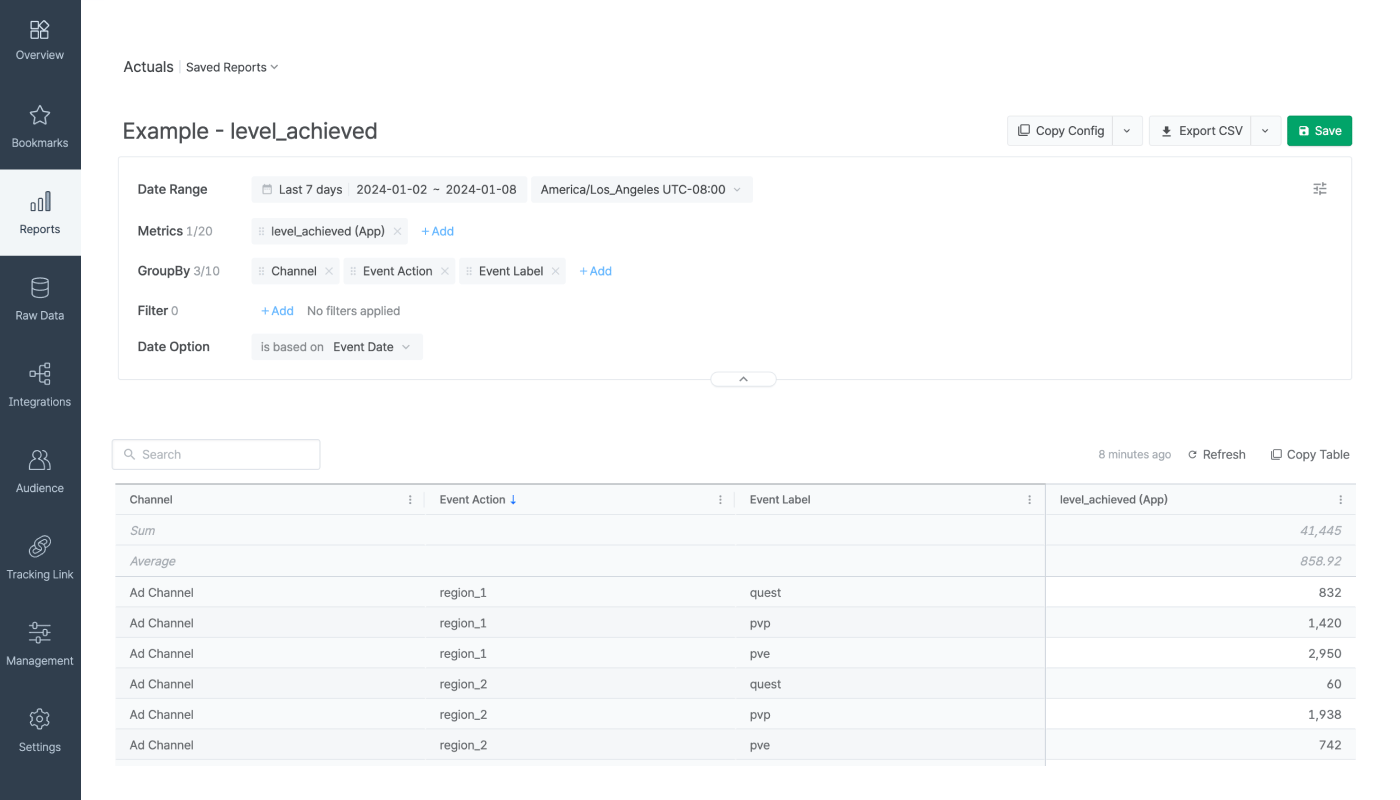
    Suppose the "Level Achieved" event parameters have been configured as below.

    * `eventData.goal.action`: The location information of the user who achieved a certain level within the game
    * `eventData.goal.label`: The method of achieving the level

    In the Airbridge report, select **level\_achieved (App)** as the metric and **Channel**, **Event Action**, and **Event Label** as GroupBy to create a report view like the following image.

    <Frame>
      <img src="https://mintcdn.com/airbridge-help-center/Htx4FOCjbD1i8oed/images/ca4fk0iik512/1p7p4V8liBKE9giMrEUL18/063c34d938f55406642d3a8243c6fbf9/Frame_3573.png?fit=max&auto=format&n=Htx4FOCjbD1i8oed&q=85&s=29864a078e168ae331f3f4d10e46a1f8" alt="pc-game-tracking-en-02" width="1400" height="800" data-path="images/ca4fk0iik512/1p7p4V8liBKE9giMrEUL18/063c34d938f55406642d3a8243c6fbf9/Frame_3573.png" />
    </Frame>
  </Accordion>

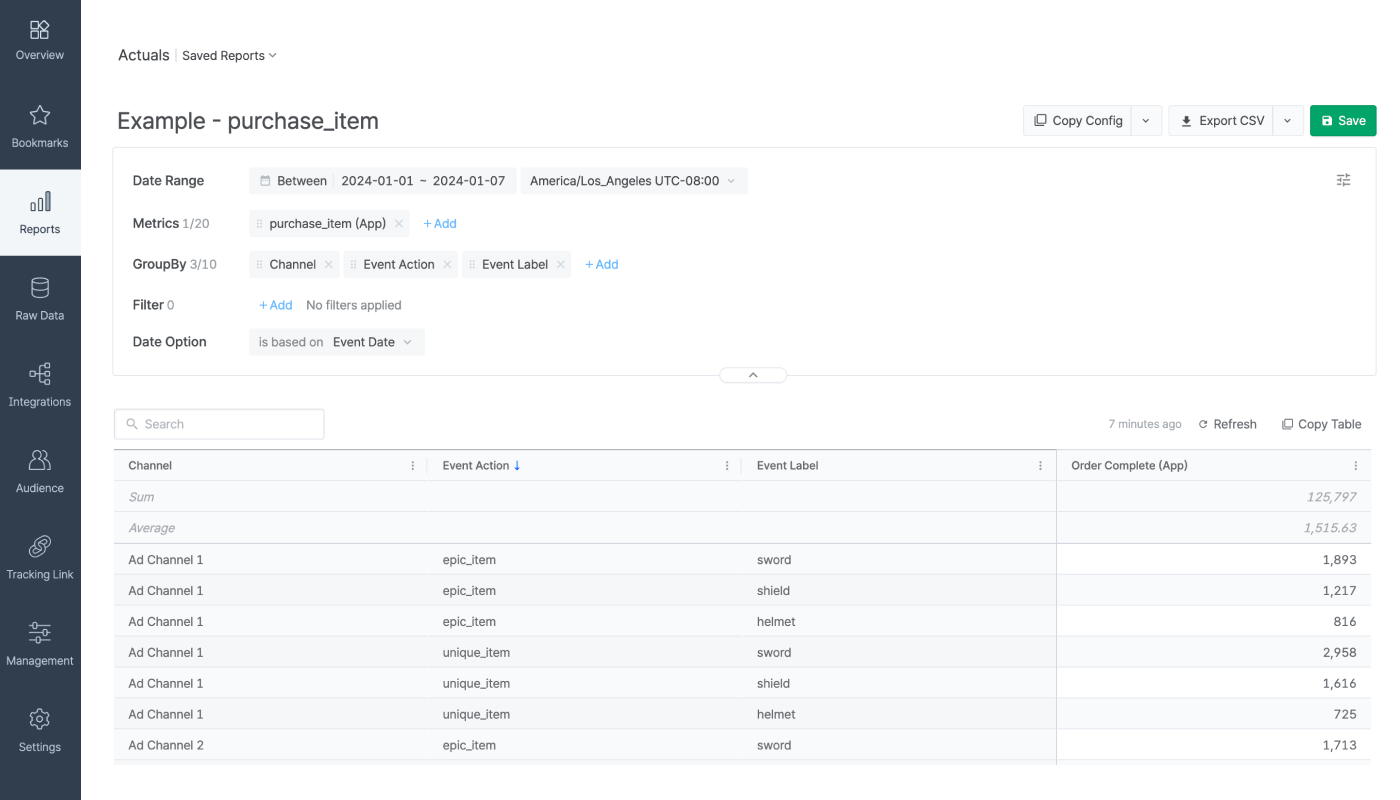
  <Accordion title="View &#x22;Purchase Item&#x22; event">
    Suppose the parameters of the “Purchase Item” event have been configured as below.

    * `eventData.goal.category`: purchase\_item
    * `eventData.goal.action`: The type information of the purchased item
    * `eventData.goal.label`: The information on how the item was attached to the game character

    In the Airbridge report, select **purchase\_item (App)** as the metric and **Channel**, **Event Action**, and **Event Label** as GroupBy to create a report view like the following image.

    <Frame>
      <img src="https://mintcdn.com/airbridge-help-center/w-UBaImCCVluwkZP/images/ca4fk0iik512/5fYC9zE0k9If3yfOTKy85P/13e4139bd283a8b6cc95408abbfa04e9/pcgametracking-purchase-item-en.png?fit=max&auto=format&n=w-UBaImCCVluwkZP&q=85&s=34213a73a87c2deaa0b5e3da769e09c6" alt="Frame 3573" width="1400" height="800" data-path="images/ca4fk0iik512/5fYC9zE0k9If3yfOTKy85P/13e4139bd283a8b6cc95408abbfa04e9/pcgametracking-purchase-item-en.png" />
    </Frame>
  </Accordion>
</AccordionGroup>

Explore the wide range of report types and features offered by Airbridge.

* [Airbridge Reports Overview](/en/guides/airbridge-report-overview)
* [Exploring Airbridge Reports - Features and Limitations](/en/guides/reports-and-raw-data-traits-and-limitations)

<h2 id="attention">
  Attention
</h2>

<AccordionGroup>
  <Accordion title="User identification method for PC game measurement">
    Airbridge uses [probabilistic approach](/en/guides/identity-matching#probabilistic-approach) for PC game measurement. The connection between touchpoints and conversions is inferred within a 6-hour timeframe, but the timeframe can be modified for PC game measurement.
  </Accordion>

  <Accordion title="Commonly made mistakes">
    Make sure to avoid the following mistakes.

    * IP not sent: Send IP with the  `X-Forwarded-For`header when an in-game event occurs.
    * Wrong endpoint: Send events to the correct [endpoints](/en/guides/pc-game-tracking-guide#endpoints).
    * S2S API configuration error: Send data via the S2S event API for in-app events.
  </Accordion>
</AccordionGroup>

<link rel="alternate" hrefLang="en" href="https://help.airbridge.io/en/guides/pc-game-tracking-guide" />

<link rel="alternate" hrefLang="ko" href="https://help.airbridge.io/ko/guides/pc-game-tracking-guide" />