> ## Documentation Index
> Fetch the complete documentation index at: https://help.airbridge.io/llms.txt
> Use this file to discover all available pages before exploring further.
# SKAdNetwork Integration - Meta Ads
Airbridge supports SKAdNetwork integration with Meta ads. Follow the instructions below for the integration.
**Note**
You can view the Meta ads campaign data by configuring the filter in the report configuration as follows.
* `Channel` is `facebook.business`
## SKAN conversion value setup in Airbridge
Go to **\[Management]>\[SKAN Conversion Value Rule]** and configure the SKAN conversion value rules. This step must be completed to proceed to the event mapping between Airbridge events and Meta ads events. For detailed instructions, refer to the article that matches the conversion value setup applied to your app:
* [Set Up All Conversion Values (SKAN 3 and SKAN 4)](https://help.airbridge.io/en/guides/skadnetwork-4-settings)
* [Set Up Basic Conversion Values (SKAN 3)](https://help.airbridge.io/en/guides/skadnetwork-3-settings)
## **Event mapping between Airbridge and Meta ads**
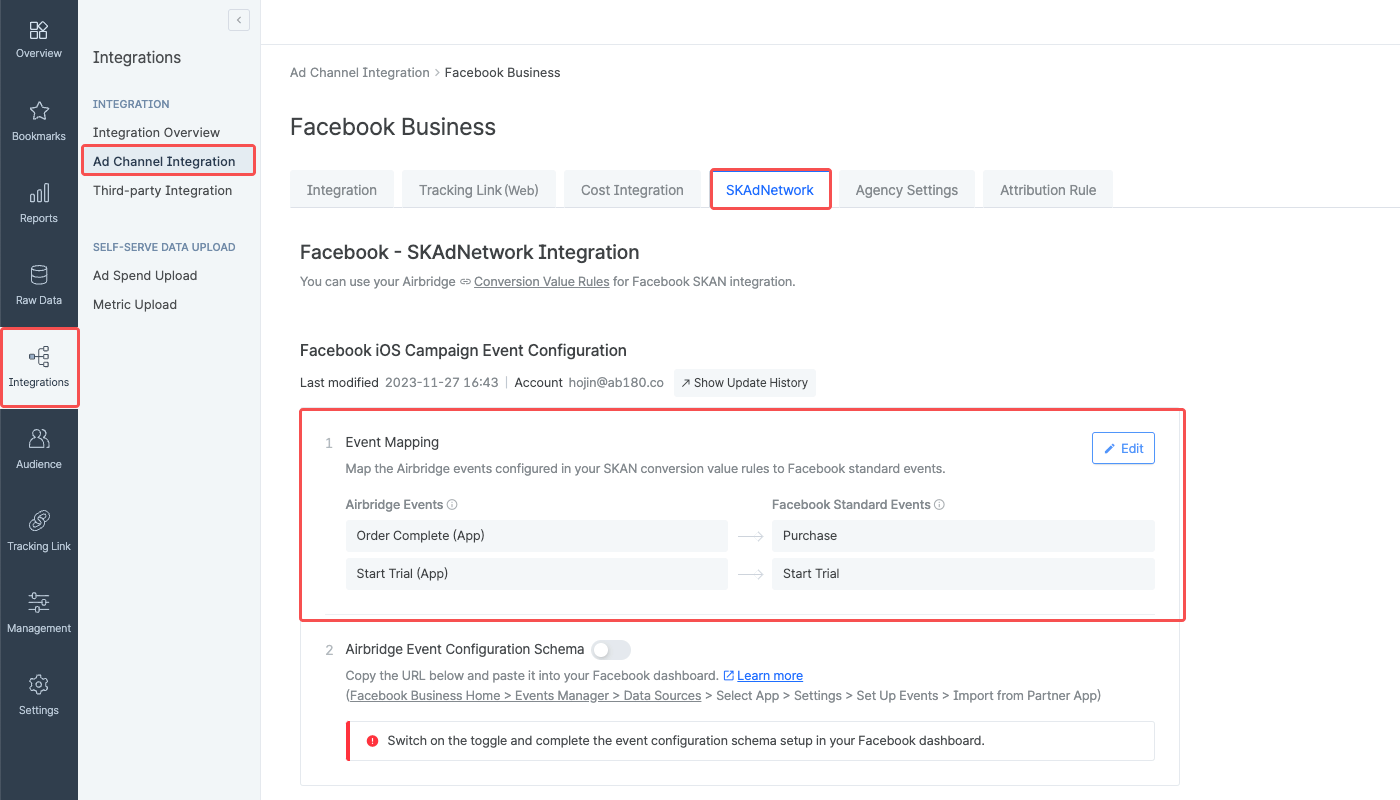
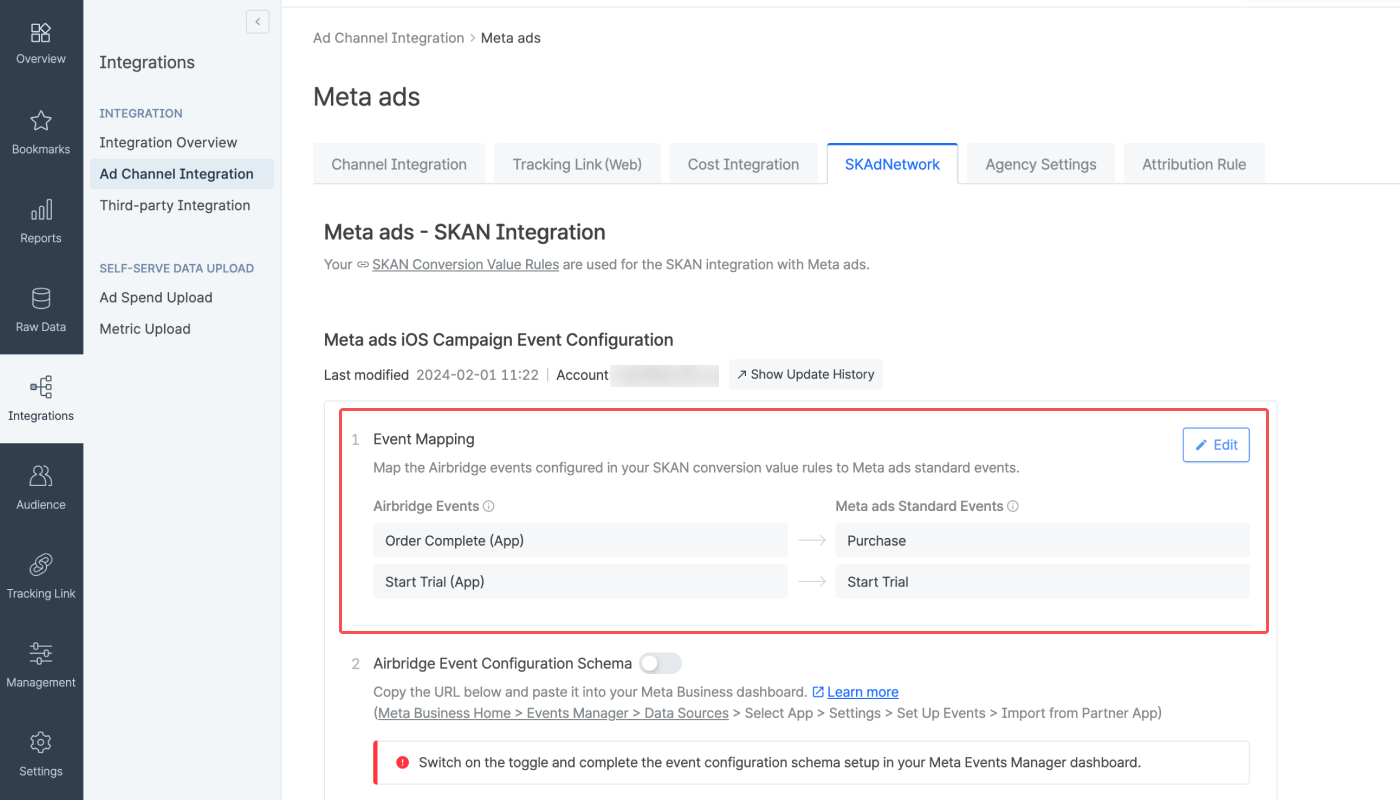
Navigate to **\[Integrations]>\[Ad Channel Integration]>\[Facebook Business]>\[SKAdNetwork]** and map the Airbridge events with the Meta ads events. The Airbridge events are the events configured for the SKAN conversion value setup.
Data discrepancies may occur if multiple Airbridge events are mapped to a single Meta ads event.
## Event configuration schema URL in Airbridge
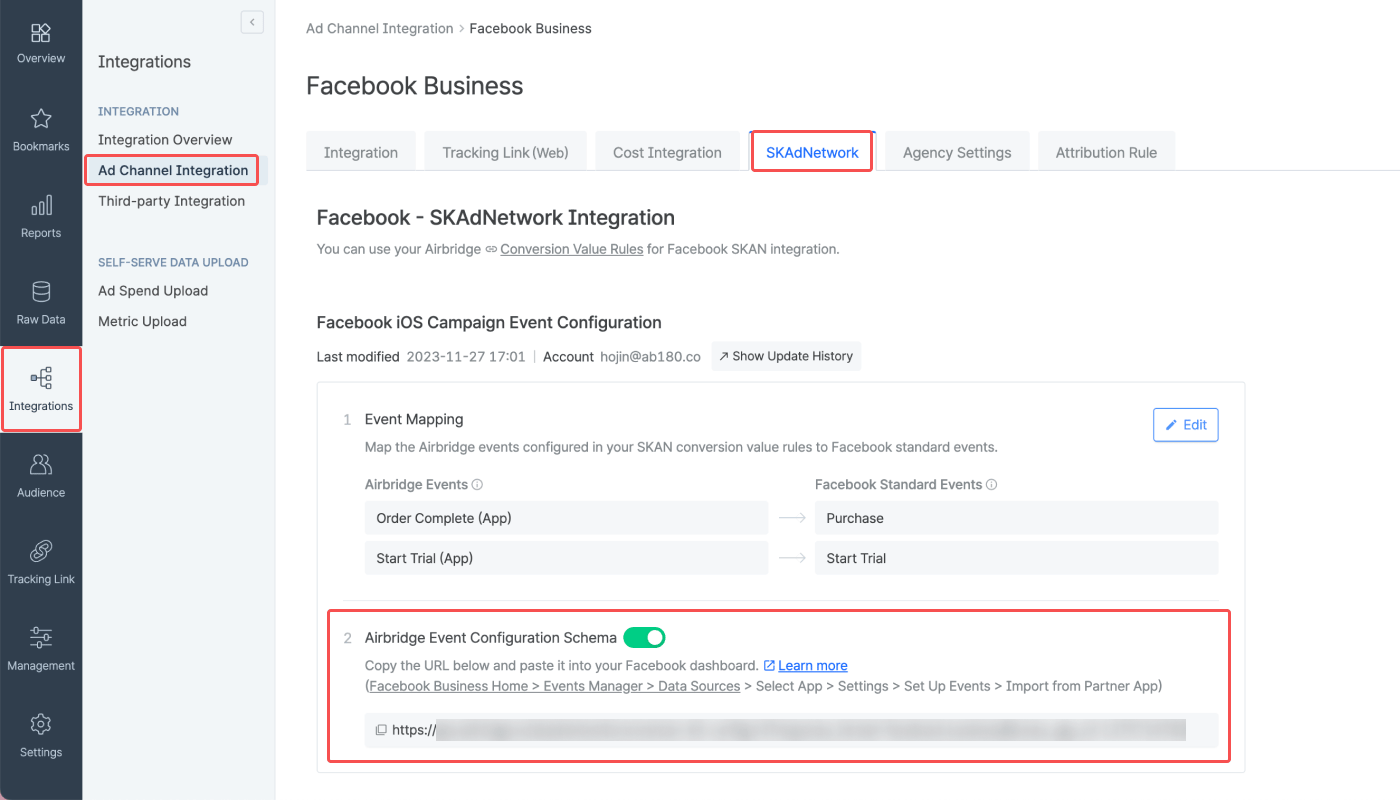
Once the event mapping is completed, switch on the **\[Event configuration schema]** toggle to activate the Airbridge event configuration schema URL, which is the URL used to send the event mapping to Meta. Copy the URL.
## How to get the event mapping from Meta
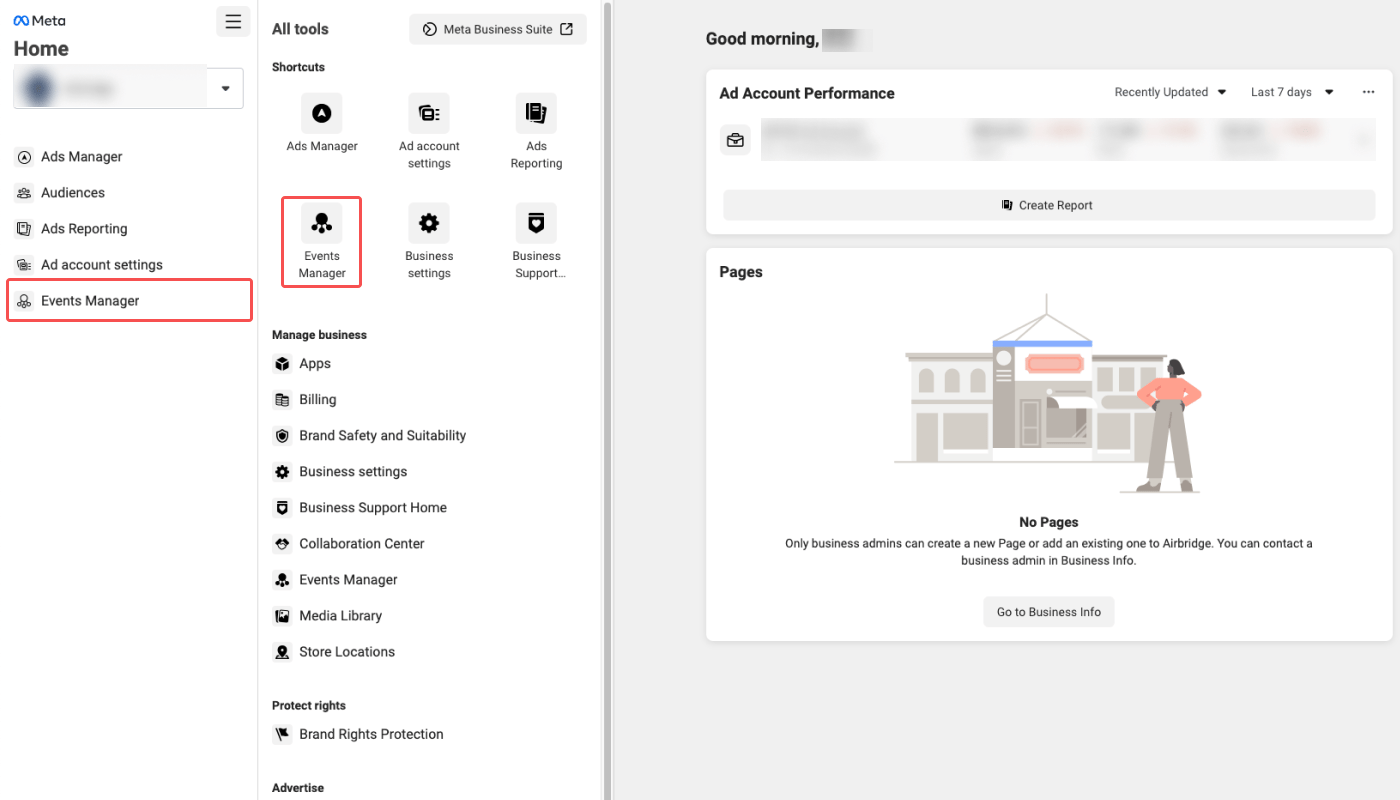
1. Sign in to Meta Business Suite and navigate to **\[Event Manager]**.
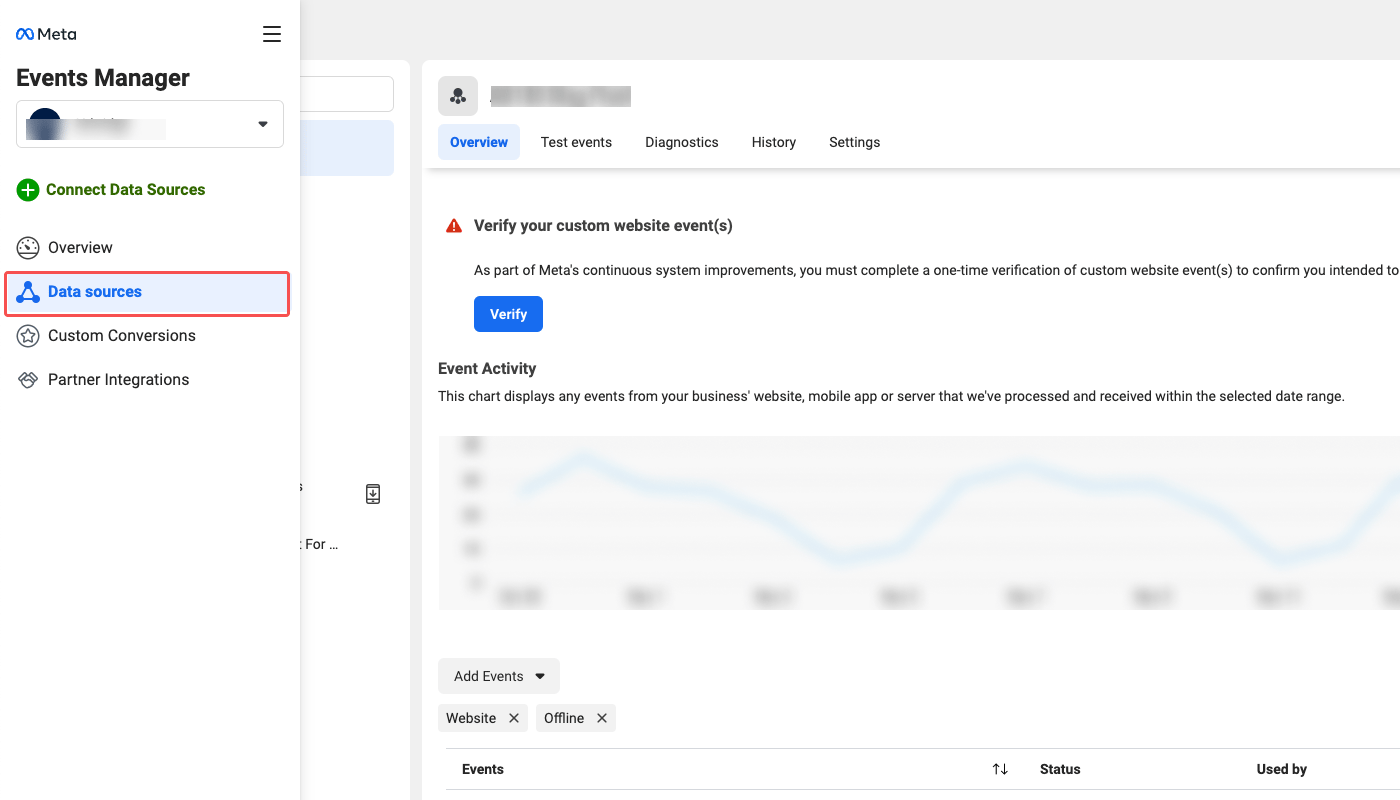
2. Select **\[Data Source]** from the sidebar.
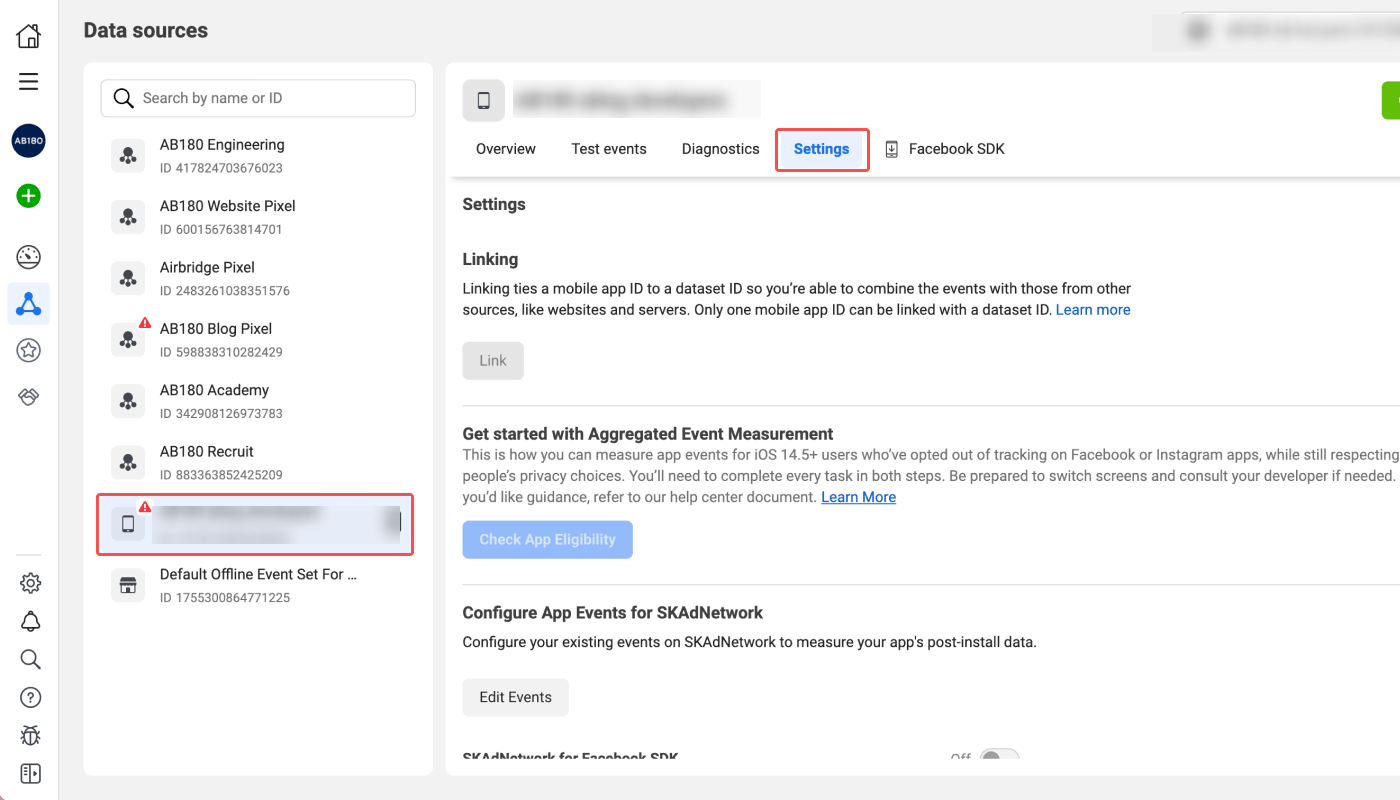
3. Select the app you want to configure. Then select **\[Settings]**.
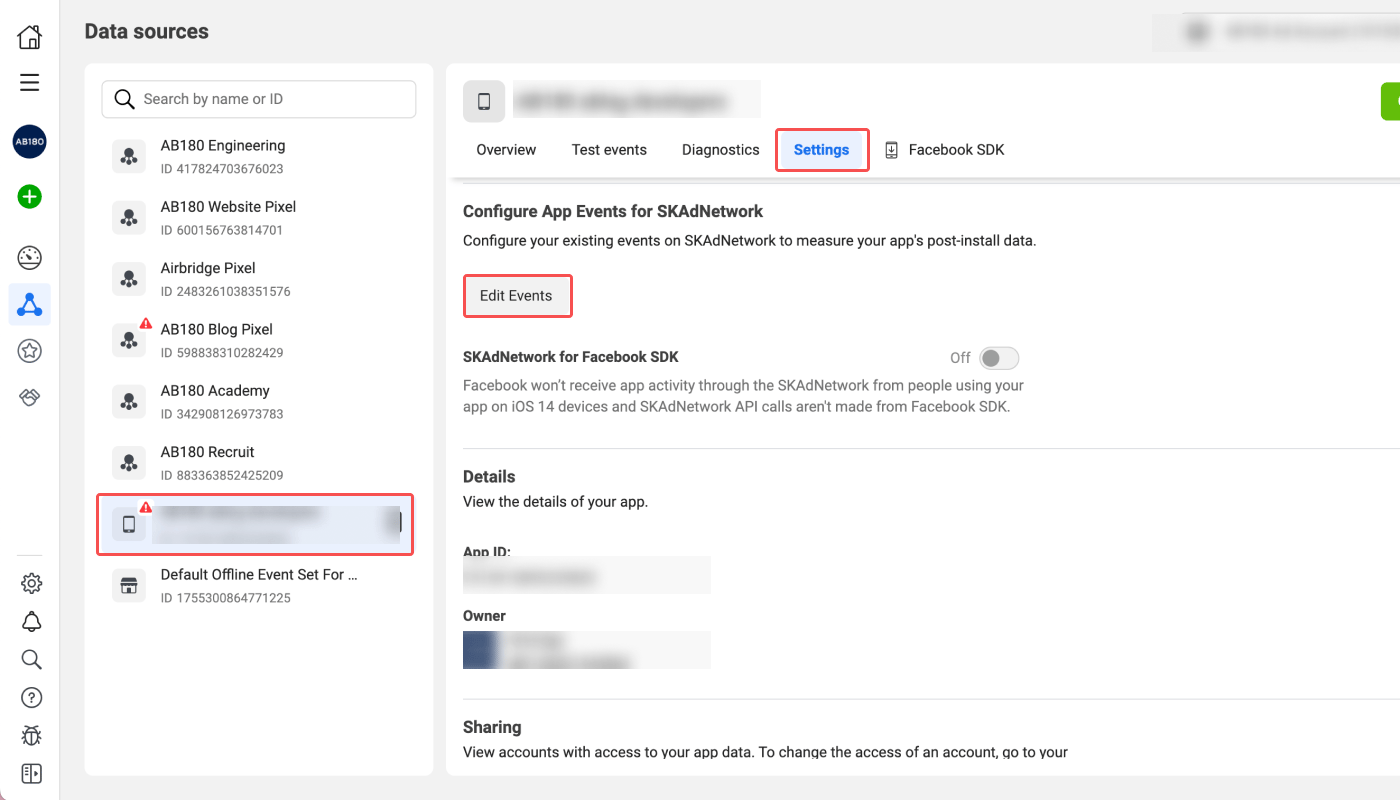
4. Find the **Configure App Events for SKAdNetwork** section and click **Configure Events** or **Edit Events**.
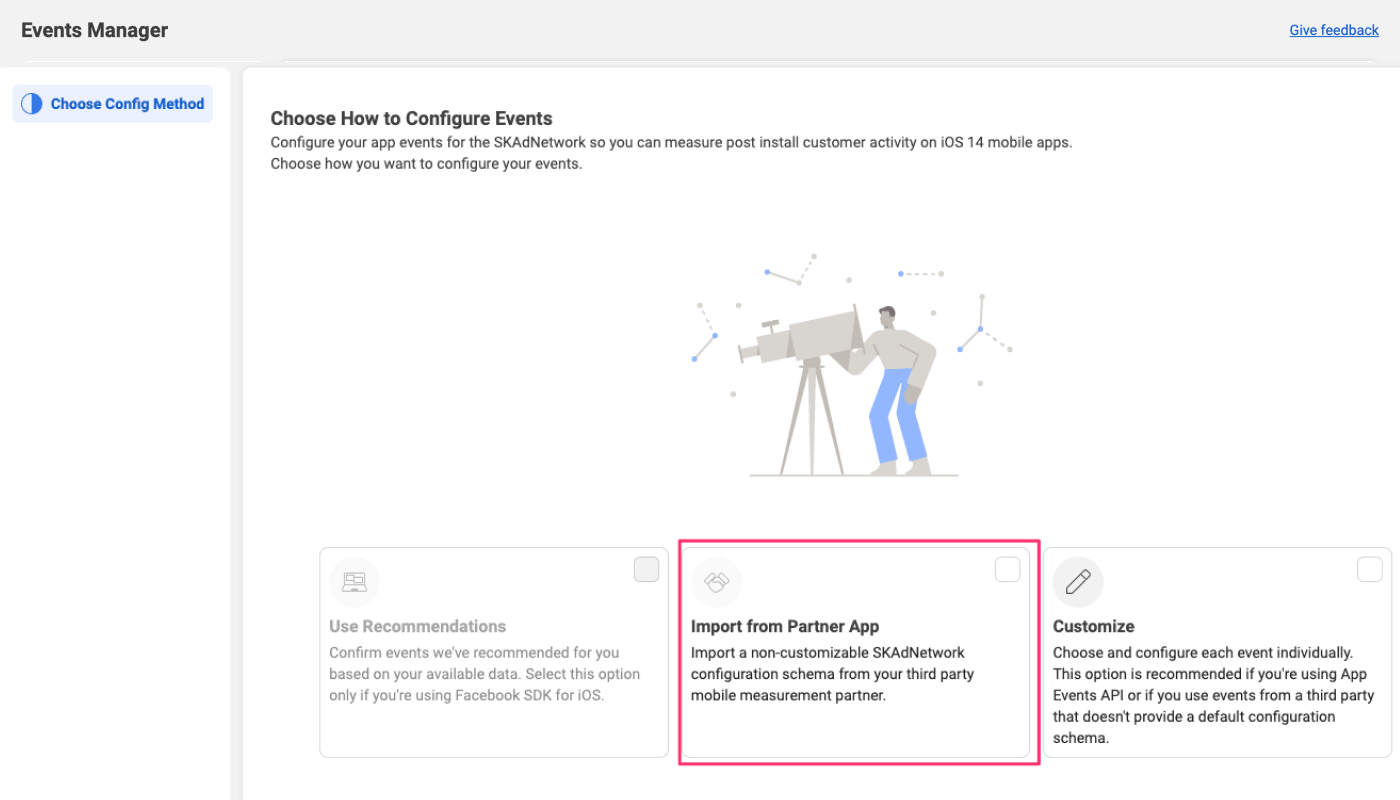
5. Select **Import from Partner App**.
6. Paste the event configuration schema URL you copied from Airbridge into the field and click **Connect**.
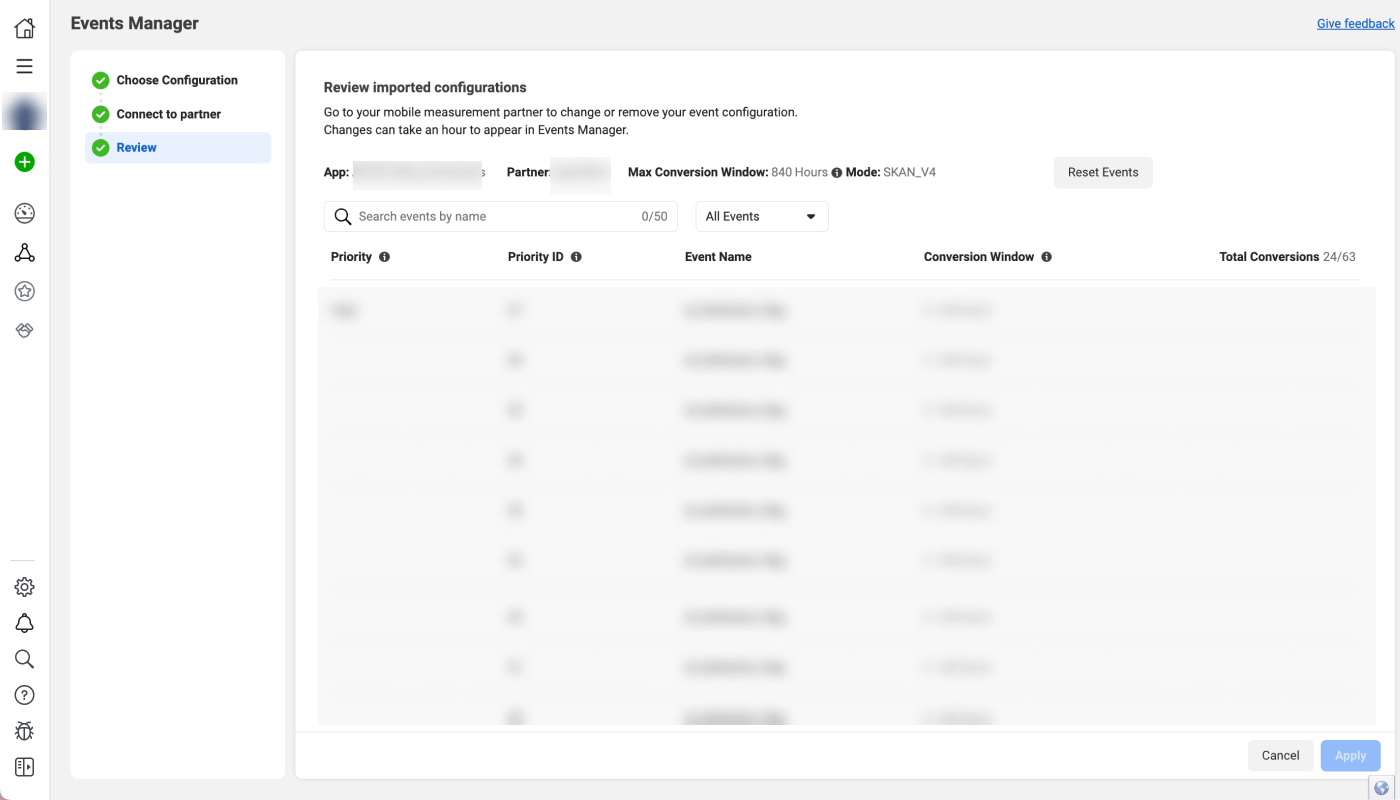
7. Review the SKAN event mapping of Airbridge and Meta ads events and click **Apply**.
## **Enable SKAdNetwork 4.0 in Meta ads**
In Meta ads, enable SKAdNetwork 4.0 separately for each app.
1. Sign in to Meta Business Suite and go to **\[Events Manager]**.
2. Select the app for which you configured SKAdNetwork app events. Then select **\[Settings]**.
3. Find the **Apple's SKAdNetwork** section and click **See More Settings**.
4. Turn on the **SKAdNetwork 4.0** toggle.
## How to edit the **SKAN integration configuration**
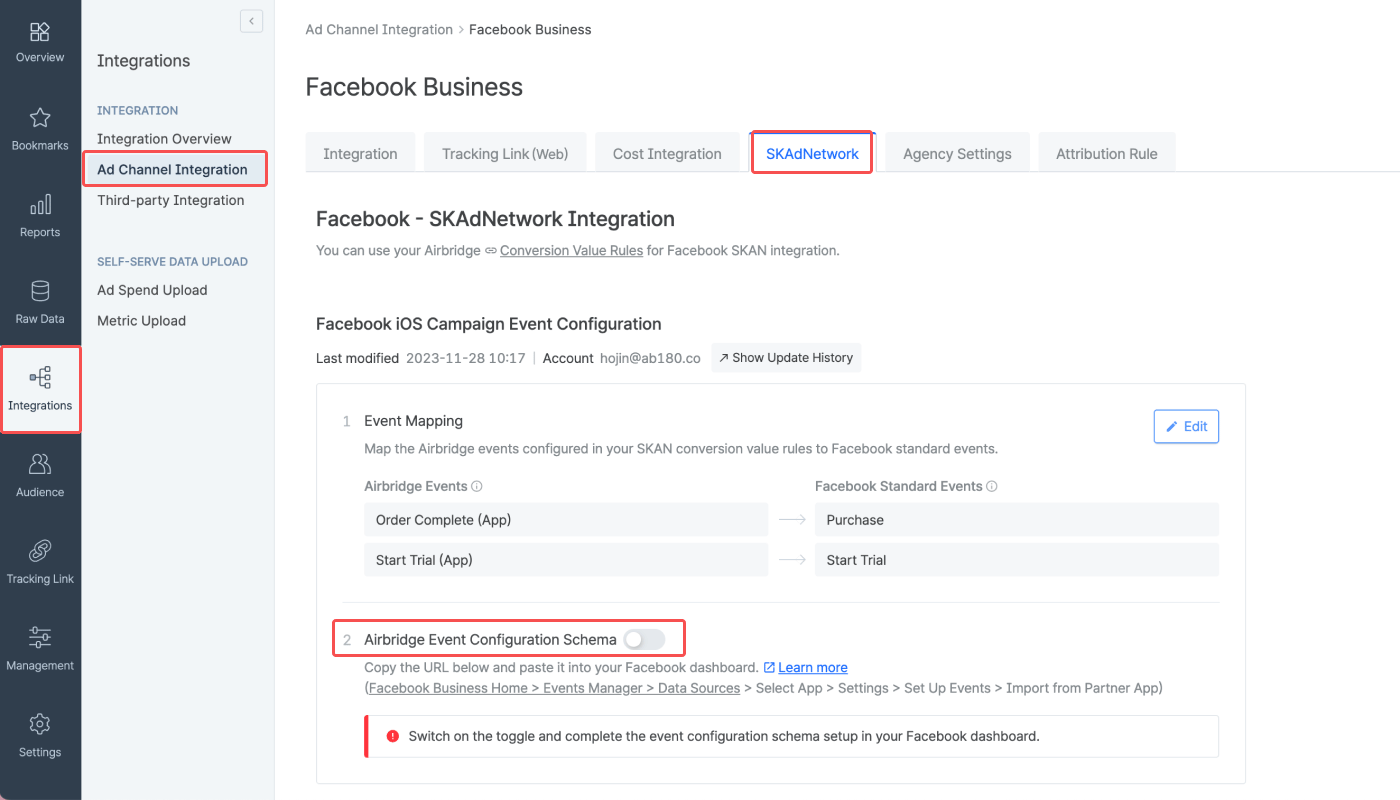
1. Navigate to **\[Integration]>\[Ad Channel Integration]>\[Meta ads]** and select the **\[SKAdNetwork]** tab. Switch off the **\[Event Configuration Schema]** toggle. The toggle turns grey when switched off.
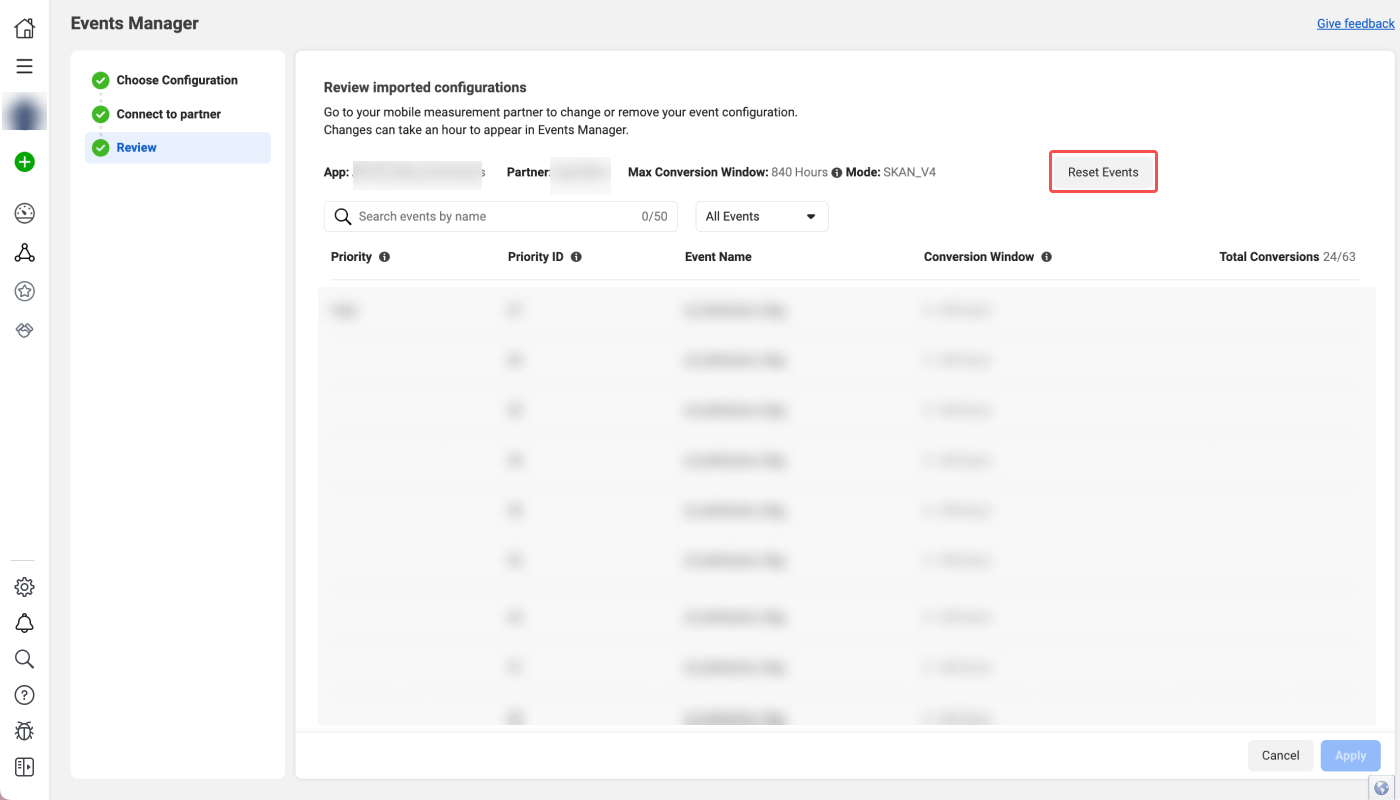
2. Then, move back to the Meta Ads Manager. On the **\[Event Manager]>\[Review]** page, click **Reset Events**. The rest of the process is the same as the SKAN integration setup process.
## Attention
Before proceeding with the SKAN integration, make sure the requirements are met to measure your iOS app campaigns with SKAN. Refer to the following article.
* [Preparing for iOS App Campaign Measurement with SKAN](/en/guides/preparing-for-skan)
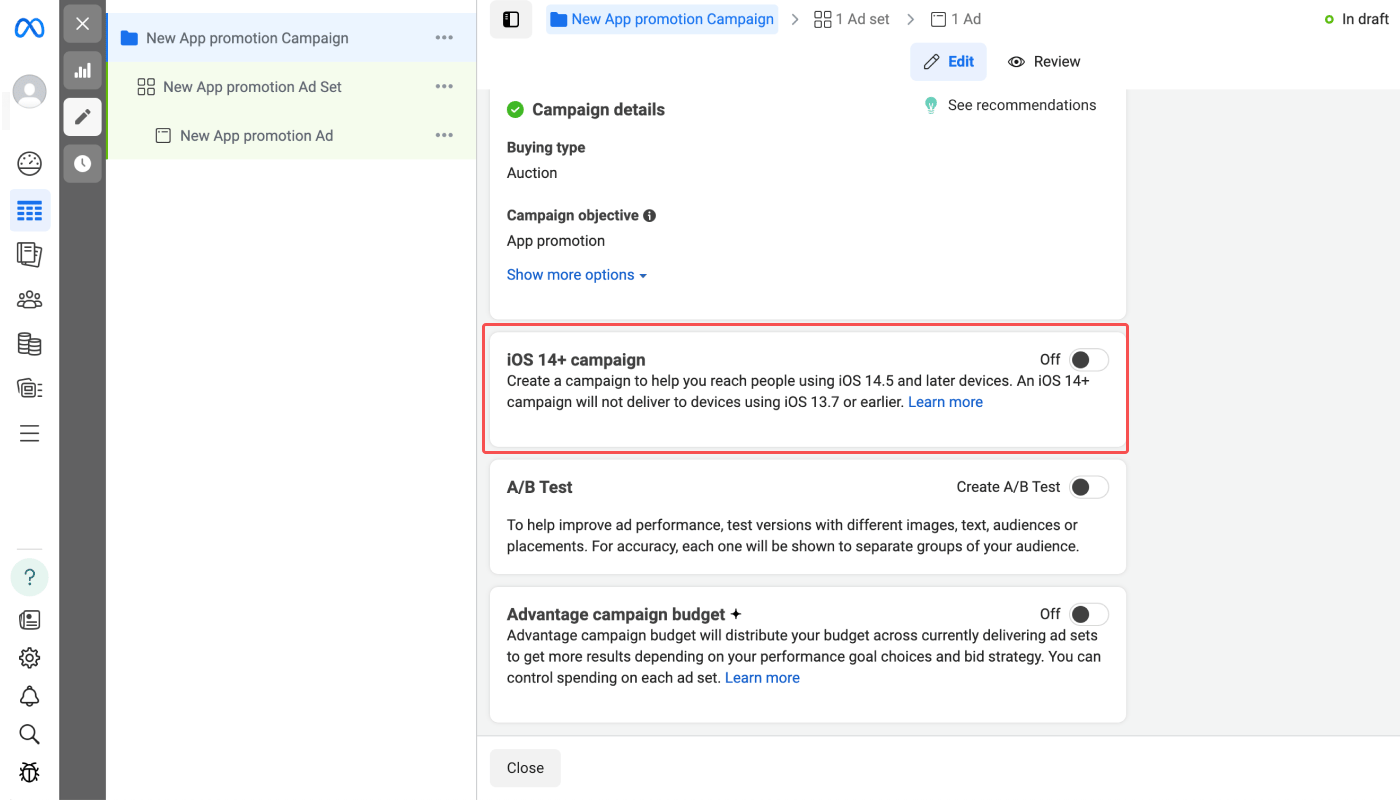
The “iOS 14+ campaign” toggle must be switched on to make your app promotion campaigns reach people using iOS 14.5 or later devices and measure the campaign via SKAN. In Airbridge, you can view SKAN data collected from devices using iOS 14 and later only.
The location of the toggle may change depending on the updates in the Meta Ads Manager.
Depending on the event mapping between the Airbridge events that are measured with the SKAN conversion value rules set up in Airbridge and Meta ads events, SKAN data may be displayed differently in the Airbridge dashboard and Meta Ads Manager dashboard. When 1 Airbridge event is mapped to 1 Meta ads event, the data is displayed the same in both dashboards. However, the data may be displayed differently if several Airbridge Events are mapped to a single Meta ads event.
Refer to the following cases where the `Order Complete (App)` and `Start Trial (App)` events are mapped to Meta ads events differently and how it affects the SKAN data reporting in the dashboards.
**Case 1) When each Airbridge event is mapped to different Meta ads events**
The `Order Complete (App)` and `Start Trial (App)` events in Airbridge are reported as `Purchase` and `Start Trial` events in Meta Ads Manager.
When Airbridge reports 50 `Order Complete (App)` events and 50 `Start Trial (App)` events, 50 `Purchase` and 50 `Start Trial` events are reported in Meta Ads Manager.
**Case 2) When 2 Airbridge events are mapped to a single Meta ads event**
The `Order Complete (App)` and `Start Trial (App)` events are both reported as a `Purchase` event in Meta Ads Manager. When Airbridge reports 50 `Order Complete (App)` events and 50 `Start Trial (App)` events, 100 `Purchase` events are reported in Meta Ads Manager.
Mapping several Airbridge events to a specific Meta ads event is a strategic approach to increase the count of that particular event. This is helpful in leveraging Meta’s App Event Optimization (AEO) for app growth.
**Meta’s App Event Optimization (AEO)**
App event optimization allows you to optimize your ad delivery and show your ads to people who are more likely to perform specific actions that are valuable to your app. For example, if you want more purchases in your app, you can run mobile app promotion ads optimized for the purchase event.
Meta recommends optimizing your ad delivery for events that are driven by Meta ads the most. This is why strategic event mapping between Airbridge and Meta ads events is needed to leverage Meta’s app event optimization.
Differences in data may occur between SAN dashboards, such as Meta ads and Google Ads dashboards, and the Airbridge dashboard because Airbridge pulls the SKAN data of the past 7 days from the SANs and updates the reports daily at 4:00 PM (UTC).
The display of SKAN data varies between Meta Ada Manager and Airbridge. Refer to this [article](/en/guides/meta-business-faq#the-skan-data-in-meta-ad-manager-and-airbridge-appear-to-be-different-why-is-it-so) to understand the difference and how to configure your Actuals Report to display the SKAN data the way it is displayed in Meta Ad Manager.
 ## Event configuration schema URL in Airbridge
Once the event mapping is completed, switch on the **\[Event configuration schema]** toggle to activate the Airbridge event configuration schema URL, which is the URL used to send the event mapping to Meta. Copy the URL.
## Event configuration schema URL in Airbridge
Once the event mapping is completed, switch on the **\[Event configuration schema]** toggle to activate the Airbridge event configuration schema URL, which is the URL used to send the event mapping to Meta. Copy the URL.
 ## How to get the event mapping from Meta
1. Sign in to Meta Business Suite and navigate to **\[Event Manager]**.
## How to get the event mapping from Meta
1. Sign in to Meta Business Suite and navigate to **\[Event Manager]**.
 2. Select **\[Data Source]** from the sidebar.
 3. Select the app you want to configure. Then select **\[Settings]**.
 4. Find the **Configure App Events for SKAdNetwork** section and click **Configure Events** or **Edit Events**.
 5. Select **Import from Partner App**.
 6. Paste the event configuration schema URL you copied from Airbridge into the field and click **Connect**.
7. Review the SKAN event mapping of Airbridge and Meta ads events and click **Apply**.
6. Paste the event configuration schema URL you copied from Airbridge into the field and click **Connect**.
7. Review the SKAN event mapping of Airbridge and Meta ads events and click **Apply**.
 ## **Enable SKAdNetwork 4.0 in Meta ads**
In Meta ads, enable SKAdNetwork 4.0 separately for each app.
1. Sign in to Meta Business Suite and go to **\[Events Manager]**.
2. Select the app for which you configured SKAdNetwork app events. Then select **\[Settings]**.
3. Find the **Apple's SKAdNetwork** section and click **See More Settings**.
4. Turn on the **SKAdNetwork 4.0** toggle.
## How to edit the **SKAN integration configuration**
1. Navigate to **\[Integration]>\[Ad Channel Integration]>\[Meta ads]** and select the **\[SKAdNetwork]** tab. Switch off the **\[Event Configuration Schema]** toggle. The toggle turns grey when switched off.
## **Enable SKAdNetwork 4.0 in Meta ads**
In Meta ads, enable SKAdNetwork 4.0 separately for each app.
1. Sign in to Meta Business Suite and go to **\[Events Manager]**.
2. Select the app for which you configured SKAdNetwork app events. Then select **\[Settings]**.
3. Find the **Apple's SKAdNetwork** section and click **See More Settings**.
4. Turn on the **SKAdNetwork 4.0** toggle.
## How to edit the **SKAN integration configuration**
1. Navigate to **\[Integration]>\[Ad Channel Integration]>\[Meta ads]** and select the **\[SKAdNetwork]** tab. Switch off the **\[Event Configuration Schema]** toggle. The toggle turns grey when switched off.
 2. Then, move back to the Meta Ads Manager. On the **\[Event Manager]>\[Review]** page, click **Reset Events**. The rest of the process is the same as the SKAN integration setup process.
 ## Attention
 The `Order Complete (App)` and `Start Trial (App)` events in Airbridge are reported as `Purchase` and `Start Trial` events in Meta Ads Manager.
When Airbridge reports 50 `Order Complete (App)` events and 50 `Start Trial (App)` events, 50 `Purchase` and 50 `Start Trial` events are reported in Meta Ads Manager.
**Case 2) When 2 Airbridge events are mapped to a single Meta ads event**
The `Order Complete (App)` and `Start Trial (App)` events in Airbridge are reported as `Purchase` and `Start Trial` events in Meta Ads Manager.
When Airbridge reports 50 `Order Complete (App)` events and 50 `Start Trial (App)` events, 50 `Purchase` and 50 `Start Trial` events are reported in Meta Ads Manager.
**Case 2) When 2 Airbridge events are mapped to a single Meta ads event**
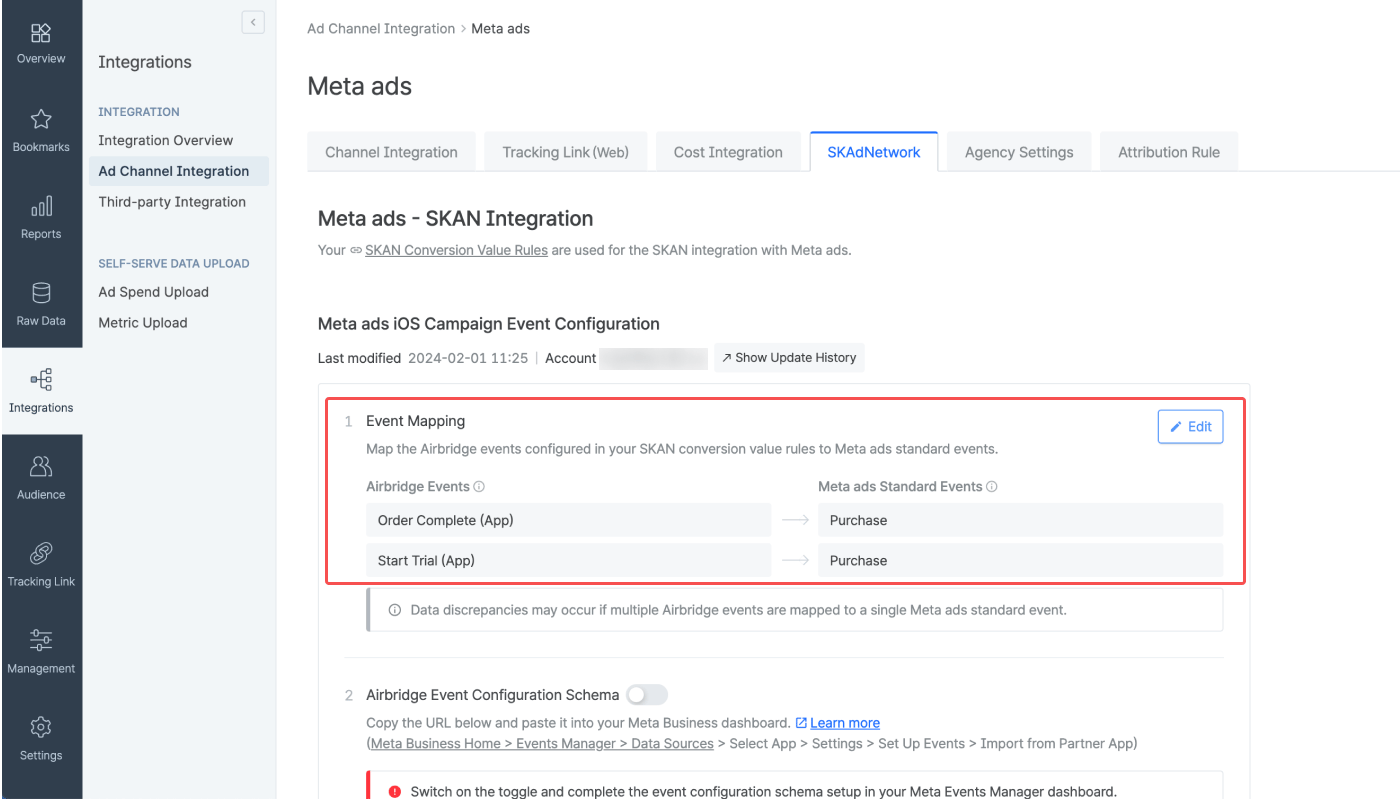 The `Order Complete (App)` and `Start Trial (App)` events are both reported as a `Purchase` event in Meta Ads Manager. When Airbridge reports 50 `Order Complete (App)` events and 50 `Start Trial (App)` events, 100 `Purchase` events are reported in Meta Ads Manager.
Mapping several Airbridge events to a specific Meta ads event is a strategic approach to increase the count of that particular event. This is helpful in leveraging Meta’s App Event Optimization (AEO) for app growth.
The `Order Complete (App)` and `Start Trial (App)` events are both reported as a `Purchase` event in Meta Ads Manager. When Airbridge reports 50 `Order Complete (App)` events and 50 `Start Trial (App)` events, 100 `Purchase` events are reported in Meta Ads Manager.
Mapping several Airbridge events to a specific Meta ads event is a strategic approach to increase the count of that particular event. This is helpful in leveraging Meta’s App Event Optimization (AEO) for app growth.