> ## Documentation Index
> Fetch the complete documentation index at: https://help.airbridge.io/llms.txt
> Use this file to discover all available pages before exploring further.
# Campaign Tracking via Install Referrer - Meta Ads
**Note**
You can view the Meta ads campaign data by configuring the filter in the report configuration as follows.
* `Channel` is `facebook.business`
The Google Play Install Referrer and the Meta install referrer provide you with a more complete picture of your Meta Android Campaign performance.
## About Install Referrer Data
**Note**
The [Airbridge Android SDK](/en/developers/android-sdk-v4) must be installed in your app in advance to use the Google Play Install Referrer and the Meta install referrer.
To collect the meta install referrer data, the [Airbridge Android SDK](/en/developers/android-sdk-v4#set-up-meta-install-referrer-collection) must be properly configured by your developer before entering the decryption key.
Install Referrers contain data about the user journey before installing the app. To view this data, register the Install Referrer Decryption Key in the Airbridge dashboard. Once registered, you can view data from both Meta Install Referrer and Google Play Install Referrer in Airbridge without duplication.
* Meta install referrer: Meta's Android-specific measurement solution designed to help attribute views and clicks to the correlating app download
* [Google Play Install Referrer](https://developer.android.com/google/play/installreferrer): Google Play's measurement solution designed to help attribute clicks to the correlating app download from Google Play
The following data sources are used for attributing conversions to Meta ads, listed in the order of attribution priority: Google Play Install Referrer, Meta install referrer, and touchpoint data imported to Airbridge through channel integration with Meta.
Refer to the following table for the details of each data source.
| | Google Play Install Referrer | Meta Install Referrer | Touchpoint data via channel integration |
| --------------------------------- | ------------------------------------------------------------------------------------------------- | ------------------------------------------------------ | -------------------------------------------------------------------------------------------------------------------------------------------------------------------- |
| Provided by | Google Play | Meta | Meta |
| Provided when | App installs in Google Play occur | App installs in Google Play are attributed to Meta ads | Trigger events are attributed to Meta ads |
| Touchpoint Generation Type | Google Install Referrer (Meta) | Meta Install Referrer | Self-attributing Network |
| Supported Attribution | Same-session click-through | Non-same session click-through and view-through | Non-same session click-through and view-through |
| Touchpoint Timestamp | Not available. Airbridge assumes that the touchpoint occurred 1 hour before the install occurred. | The datetime the touchpoint occurred | The datetime the touchpoint occurred |
| Availability in Airbridge Reports | Available as `facebook.business`channel data | Available as `facebook.business`channel data | Available as `facebook.business`channel data |
| Availability in Raw Data | Available | Available | Available (Only "Restricted" without agreement to [Meta's AMM terms](/en/guides/meta-business-faq#q-why-are-some-of-the-attributed-meta-ads-data-masked-in-reports)) |
| Privacy Policy | Not relevant | Not relevant | Under influence |
| Data Stored up to | 1 year | 1 year | 6 months |
| When Sharing with a Third-Party | Sent as “Restricted” | Sent as “Restricted” | Sent as “Restricted” |
**Attribution supported by Meta install referrer**
The Meta install referrer supports same-session click-through attribution and use cases unsupported by Google Play Install Referrer: most view-through attribution and non-same session click-through attribution.
###### Encrypted metadata
```text theme={"theme":{"light":"github-dark-dimmed","dark":"github-dark-dimmed"}}
referrer = {
utm_content: {
source: {
"data": "afe56cf6228c6ea8c79da49186e718e92a579824596ae1d0d4d20d7793dca797bd4034ccf467bfae5c79a3981e7a2968c41949237e2b2db678c1c3d39c9ae564c5cafd52f2b77a3dc77bf1bae063114d0283b97417487207735da31ddc1531d5645a9c3e602c195a0ebf69c272aa5fda3a2d781cb47e117310164715a54c7a5a032740584e2789a7b4e596034c16425139a77e507c492b629c848573c714a03a2e7d25b9459b95842332b460f3682d19c35dbc7d53e3a51e0497ff6a6cbb367e760debc4194ae097498108df7b95eac2fa9bac4320077b510be3b7b823248bfe02ae501d9fe4ba179c7de6733c92bf89d523df9e31238ef497b9db719484cbab7531dbf6c5ea5a8087f95d59f5e4f89050e0f1dc03e464168ad76a64cca64b79",
"nonce": "b7203c6a6fb633d16e9cf5c1",
},
...
},
...
}
```
###### Decrypted metadata
The Install Referrer Decryption Key is used for the decryption.
```text theme={"theme":{"light":"github-dark-dimmed","dark":"github-dark-dimmed"}}
{
"account_id": 988056874045064,
"ad_id": 59263050382376798,
"ad_objective_name": "APP_INSTALLS",
"adgroup_id": 63244591281507997,
"adgroup_name": "discount_banner",
"campaign_group_id": 47071347859859780,
"campaign_group_name": "install_summer_promotion",
"campaign_id": 20683163274650358,
"campaign_name": "aos_female",
"is_instagram": true,
"publisher_platform": "instagram"
}
```
### How to find the Decryption Key
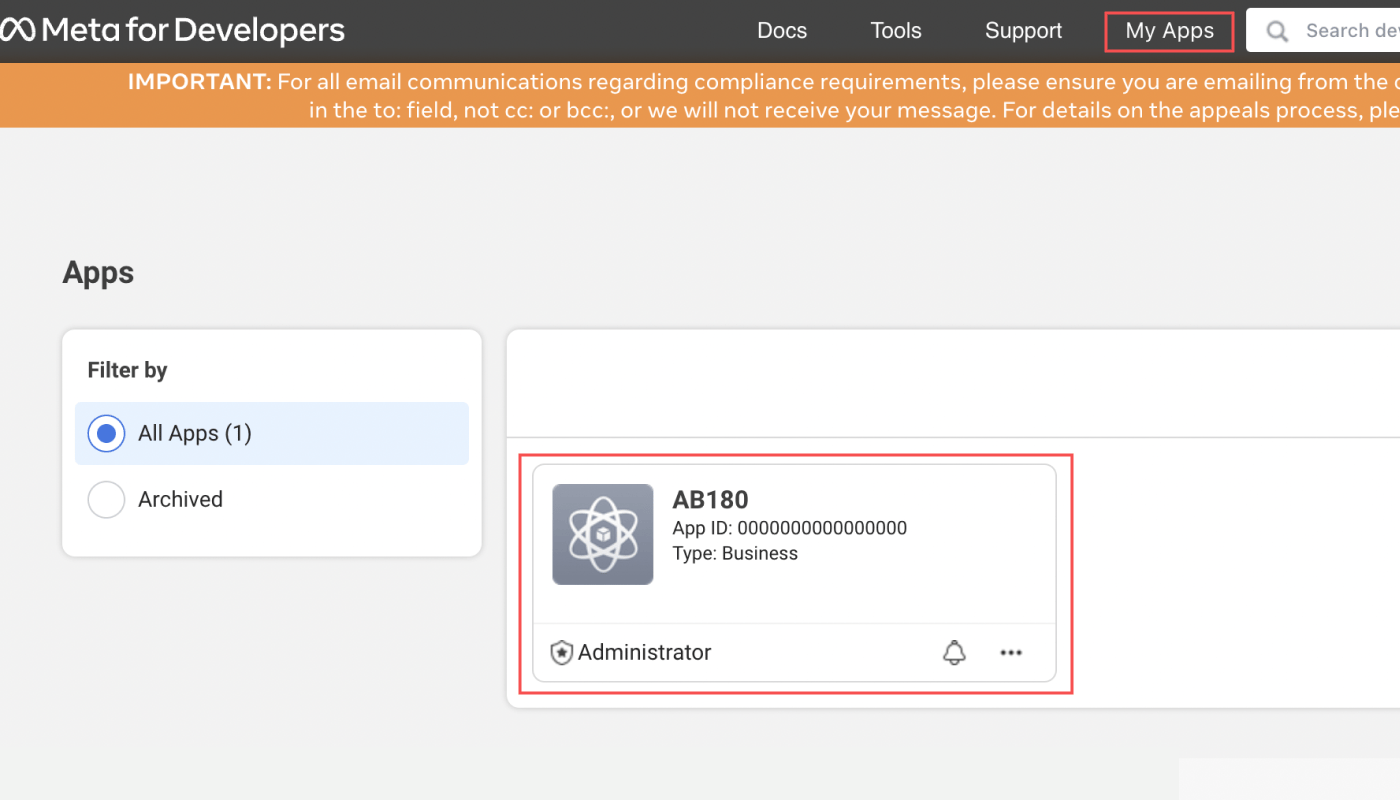
1. Sign in to your [Meta for Developers](https://developers.facebook.com/apps) account, navigate to \[My App], and select your app.
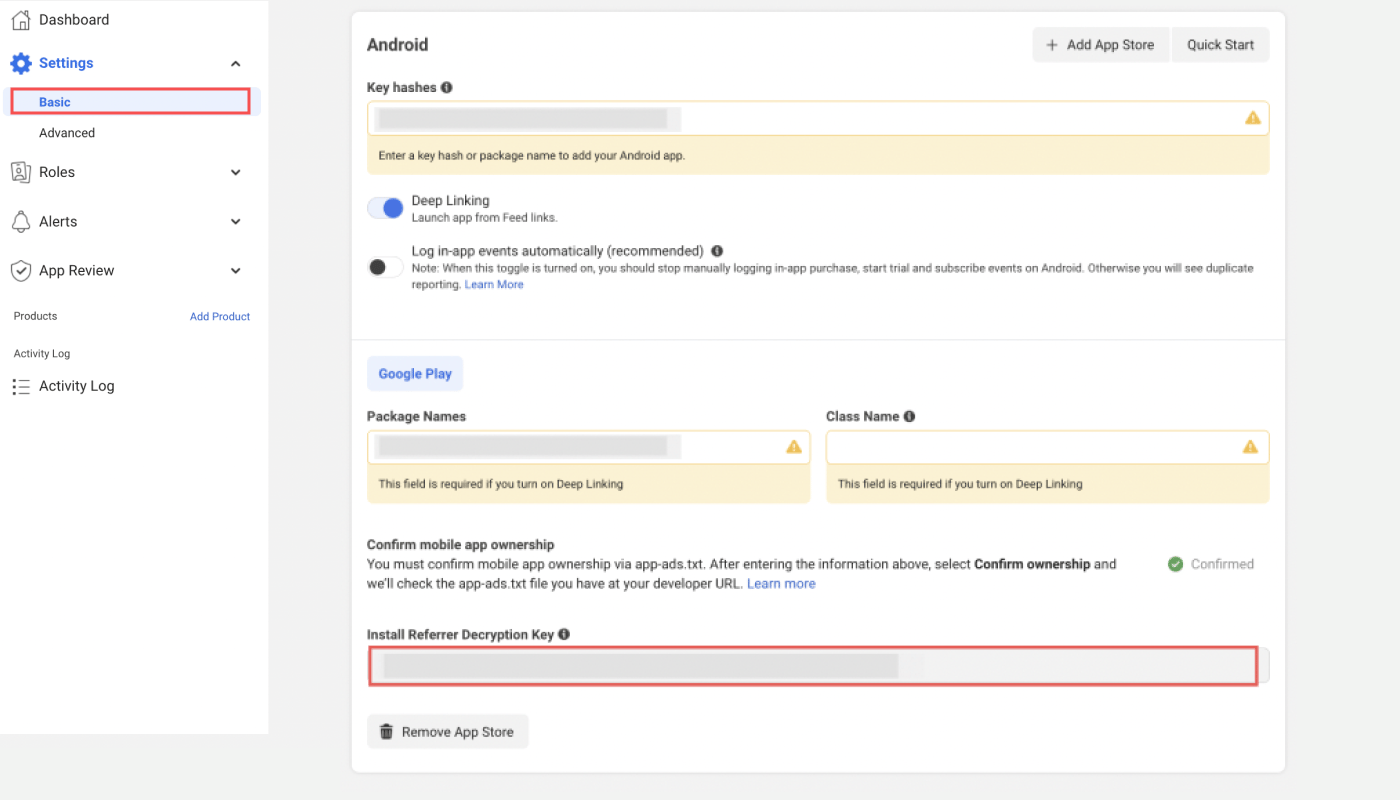
2. Navigate to \[Basic]>\[Settings] and scroll down to the Android section. Copy the Install Referrer Decryption Key. If you don't see the Android section, click **Add Platform** and select **Google Play**.
### Register Decryption Key in Airbridge
Copy the Install Referrer Decryption Key from Meta for Developers. Go to Airbridge dashboard **\[Integrations]>\[Ad Channel Integration]>\[Meta Ads]>\[Channel Integration]**, and paste the Decryption Key into the **\[Install Referrer Decryption Key]** field. Make sure the Decryption Key is correct, as data will not be decrypted with an incorrect key.
### Campaign data available via Install Referrer
| Meta Campaign Data | Meta Campaign Metadata (Raw) | Airbridge Data | Airbridge Data (Raw) |
| ---------------------- | ---------------------------- | -------------------- | -------------------------------------------------- |
| Ad Campaign Group Name | campaign\_group\_name | Campaign | attributionResult. attributedCampaign |
| Ad Campaign Group ID | campaign\_group\_id | Campaign ID | attributionResult. attributedCampaignID |
| Ad Campaign Name | campaign\_name | Ad Group | attributionResult. attributedAdGroup |
| Ad Campaign ID | campaign\_id | Ad Group ID | attributionResult. attributedAdGroupID |
| Adgroup Name | adgroup\_name | Ad Creative | attributionResult. attributedAdCreative |
| Adgroup ID | adgroup\_id | Ad Creative ID | attributionResult. attributedAdCreativeID |
| Ad Objective Name | ad\_objective\_name | Content | attributionResult. attributedContent |
| Ad Publisher Platform | publisher\_platform | Sub Publisher | attributionResult. attributedSubPublisher |
| Ad ID | ad\_id | Sub Sub Publisher 2 | attributionResult. attributedSubSubPublisher2 |
| Ad Account ID | account\_id | Ad Account ID | attributionResult. attributedAdAccountID |
## **How to View the Install Referrer Data in Airbridge**
### Meta install referrer data
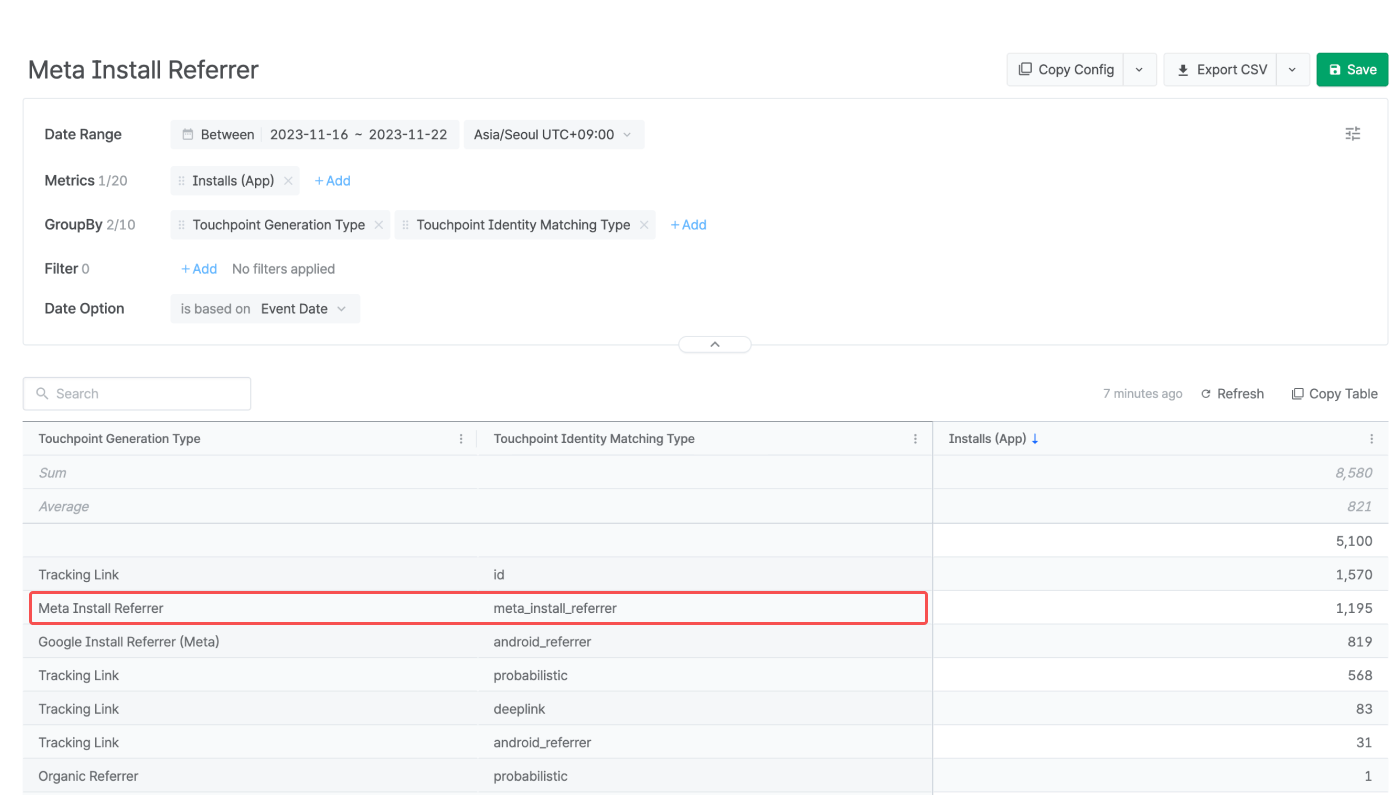
Select “Touchpoint Generation Type” as GroupBy or Filter in the Actuals Report and Trend Report. The Meta Install Referrer data is displayed as “Meta Install Referrer.”
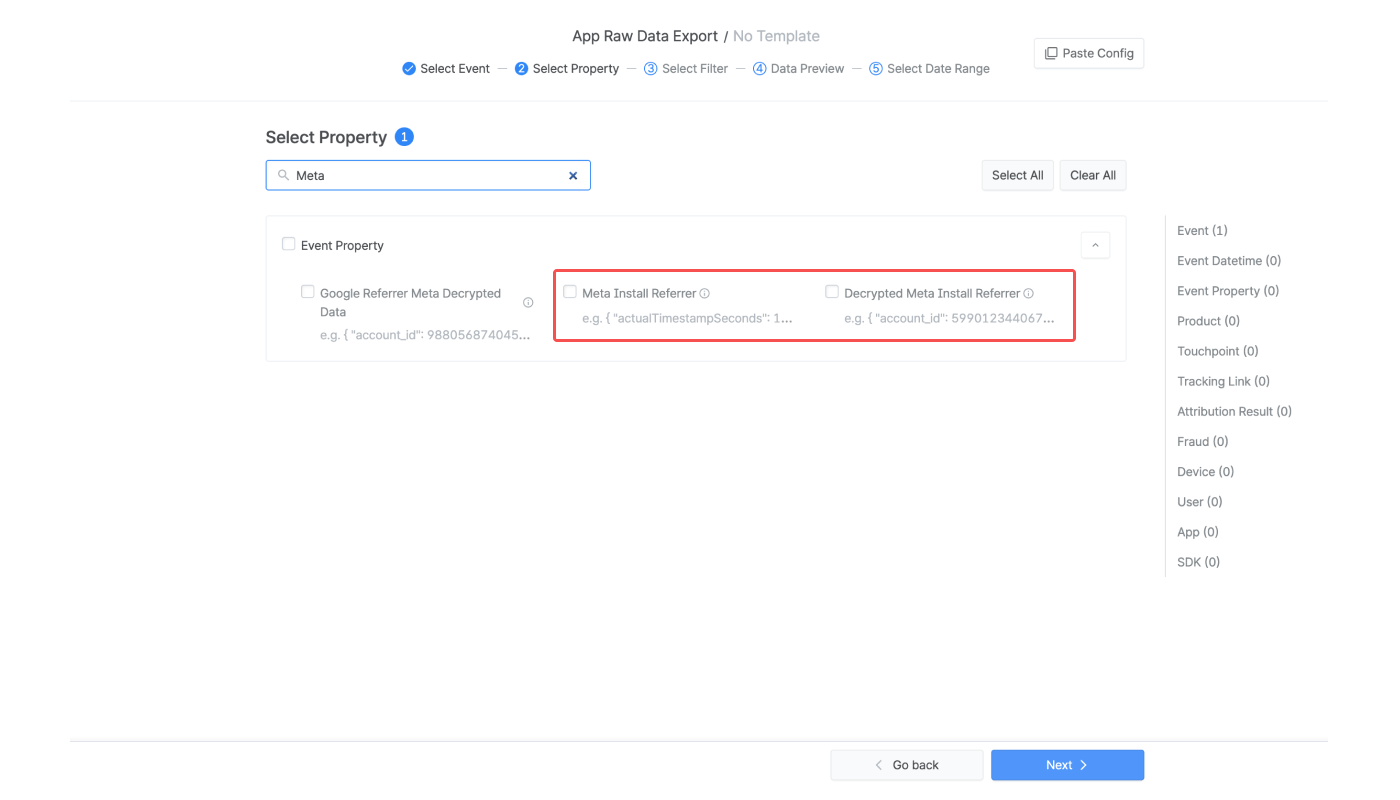
* Navigate to \[Raw Data]>\[App Raw Data] and include “Meta Install Referrer” and “Decrypted Meta Install” in the property list for export. Refer to this [article](/en/guides/checking-raw-data) for detailed instructions on raw data export.
* Navigate to \[Raw Data]>\[App Real-time Log] and find the “decryptedMetaInstallReferrer.” The real-time log can’t be searched by the search keyword “decryptedMetaInstallReferrer” Refer to this [article](/en/guides/tracking-events-with-real-time-logs) for detailed instructions on real-time logs.
### Google Play Install Referrer data
Select “Touchpoint Generation Type” as GroupBy or Filter in the Actuals Report and Trend Report. The Google Play install referrer data is displayed as “Google Install Referrer (Meta).”
* Navigate to \[Raw Data]>\[App Raw Data] and include “Google Referrer Meta Decrypted Data” in the property list for export. Refer to this [article](/en/guides/checking-raw-data) for detailed instructions on raw data export.
* Navigate to \[Raw Data]>\[App Real-time Log] and find the “googleReferrerMetaDecryptedData.” The real-time log can’t be searched by the search keyword “googleReferrerMetaDecryptedData.” Refer to this [article](/en/guides/tracking-events-with-real-time-logs) for detailed instructions on real-time logs.
 2. Navigate to \[Basic]>\[Settings] and scroll down to the Android section. Copy the Install Referrer Decryption Key. If you don't see the Android section, click **Add Platform** and select **Google Play**.
 ### Register Decryption Key in Airbridge
Copy the Install Referrer Decryption Key from Meta for Developers. Go to Airbridge dashboard **\[Integrations]>\[Ad Channel Integration]>\[Meta Ads]>\[Channel Integration]**, and paste the Decryption Key into the **\[Install Referrer Decryption Key]** field. Make sure the Decryption Key is correct, as data will not be decrypted with an incorrect key.
### Campaign data available via Install Referrer
### Register Decryption Key in Airbridge
Copy the Install Referrer Decryption Key from Meta for Developers. Go to Airbridge dashboard **\[Integrations]>\[Ad Channel Integration]>\[Meta Ads]>\[Channel Integration]**, and paste the Decryption Key into the **\[Install Referrer Decryption Key]** field. Make sure the Decryption Key is correct, as data will not be decrypted with an incorrect key.
### Campaign data available via Install Referrer