> ## Documentation Index
> Fetch the complete documentation index at: https://help.airbridge.io/llms.txt
> Use this file to discover all available pages before exploring further.
# Cost Integration - Meta Ads
Airbridge supports cost integration with Meta to import Meta ads campaign cost data to Airbridge.
**Attention**
Make sure channel integration with Meta ads is completed before enabling cost integration.
* [Channel Integration](/en/guides/meta-business-channel-integration)
## Cost Integration Setup
**Note**
You can view the Meta ads campaign data by configuring the filter in the report configuration as follows.
* `Channel` is `facebook.business`
1. Navigate to **\[Integration]>\[Ad Channel]>\[Facebook Business]**, select the **\[Cost Integration]** tab, and switch on the **Cost integration** toggle.
2. Click **Add an account** and log in to your account. The account must have a recent history of campaign operation. In the login process, allow Airbridge to access your account.
3. Select the ad accounts you want to connect with Airbridge from the ad account list. The ad accounts must have a recent history of campaign operation. Ad accounts already connected won’t show.
**Attention**
When selecting the ad accounts, select the ones you want to connect with Airbridge for ad spend data integration.
4. When you complete the steps above, you will see the ad accounts in the list.
## Managing Cost Integration
Turn off the toggle to pause the integration. Airbridge stops collecting cost data once the integration is paused.
Any data collected before the pause remains available in Airbridge reports.
Airbridge retains the credentials of the integrated account, so you can resume the integration at any time by turning the toggle on. However, deleting the integrated account removes these credentials.
Select the account from the integrated account list and click **Delete** to remove the account. To re-integrate the account after deletion, set up the integration from the beginning.
### Integration status
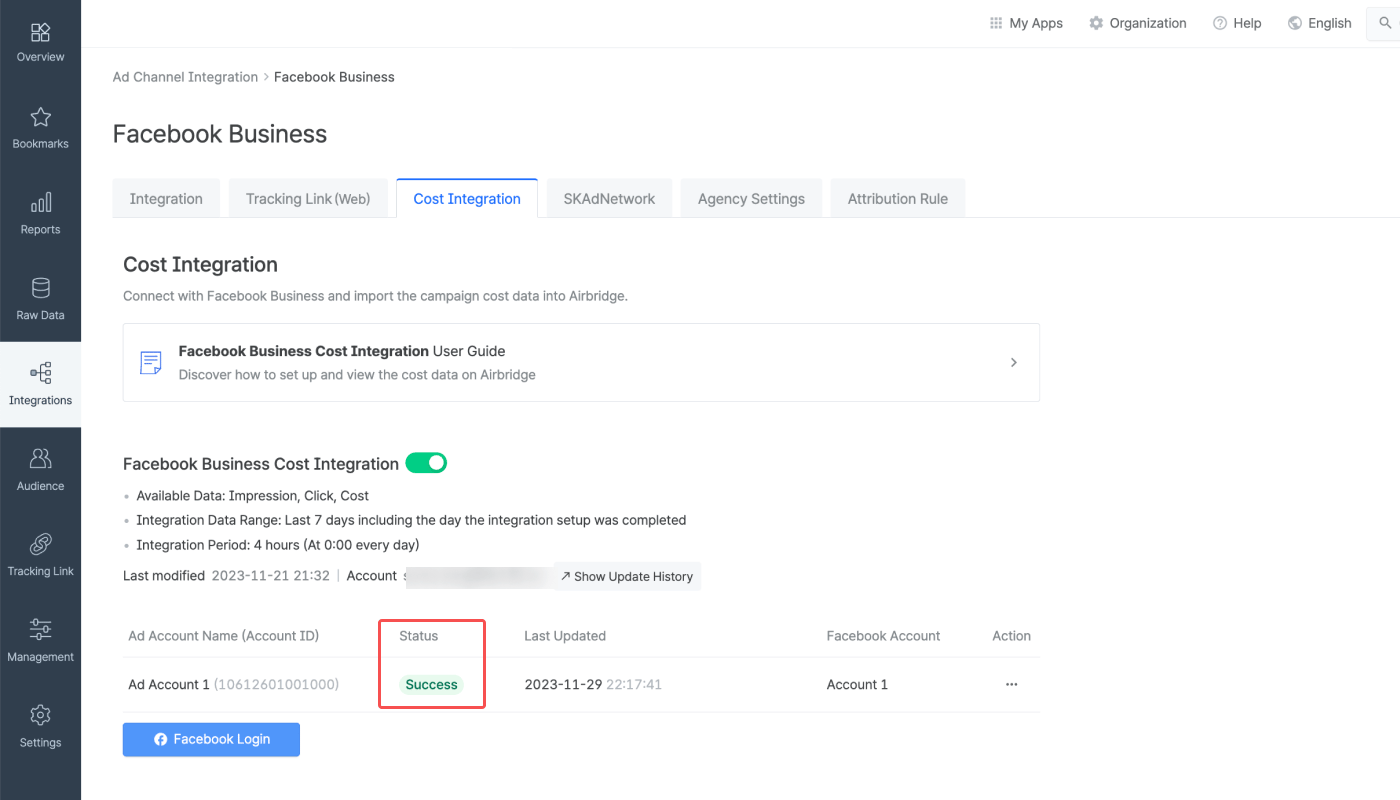
You can view the current status of your connections in the status column. Even if you have completed the cost integration, the status will show "Waiting" until the ad spend data is actually imported to Airbridge.
* Frequency: Every 4 hours, 6 times a day, starting at 3:00 PM UTC
* Import times: 3:00 PM, 7:00 PM, 11:00 PM, 3:00 AM, 7:00 AM, 11:00 AM UTC
* Data range: Current day (D-0) to 6 days ago (D-6)
**\[Last Updated]** shows the last time Airbridge actually received the data.
| Status | Description |
| ----------- | ----------------------------------------------------------------------------------------------------------------------------------------------------------------------------------------- |
| Waiting | Integration set up successfully. Pending data import. This may take up to 4 hours. |
| Success | Import complete. New data received from the ad channel. The **\[Last Updated]** timestamp reflects the latest import. |
| No new data | Import complete, but no new data was available from the ad channel. Check again at the next import. |
| Failed | Import failed. Possible causes: - The ad channel API is not responding. - The ad account details are incorrect. - The ad channel permissions are not configured correctly. |
## Reporting
The cost data imported from Meta ads via cost integration can be viewed in the Actuals Report and Trend Report at the campaign level or ad group level. The following metrics and GroupBys can be used for report configuration.
| Metrics | Description |
| --------------------- | ---------------------------------------------------- |
| Clicks (Channel) | The number of clicks provided by the ad channel |
| Impressions (Channel) | The number of impressions provided by the ad channel |
| Cost (Channel) | The ad spend provided by the ad channel |
**Difference between Clicks and Clicks (Channel)**
Both **Clicks** and **Clicks (Channel)** show click count, but the data source differs:
* **Clicks**: Collected through Airbridge tracking links
* **Clicks (Channel)**: Provided by the ad channel
Any metric with **(Channel)** in its name represents data provided by the integrated ad channel. The same applies to **Impressions** and **Impressions (Channel)**.
**Note**
Use the groupBys below to break down cost data in Airbridge reports. Available groupBys vary by ad channel.
###### Touchpoint
| GroupBy | Description |
| ------------- | --------------------------------------------------------------------------------------------------------- |
| Channel | The media source of the winning touchpoint |
| Campaign | The name of the campaign of the winning touchpoint |
| Ad Group | The name of the ad group of the winning touchpoint |
| Ad Creative | The name of the ad creative of the winning touchpoint |
| Term | The term, or the search keyword, of the winning touchpoint (Only available for search ads or keyword ads) |
| Campaign ID | The unique ID assigned to the campaign of the winning touchpoint |
| Ad Group ID | The unique ID assigned to the ad group of the winning touchpoint |
| Term ID | The unique ID assigned to the term, or the search keyword, of the winning touchpoint |
| Ad Account ID | The unique ID assigned to the ad account of the winning touchpoint |
| Sub Publisher | The second-tier media source of the winning touchpoint |
###### Device
| GroupBy | Description |
| ------- | --------------------------------------------------- |
| Country | The country code for the mobile device |
| OS Name | The operating system installed on the mobile device |
###### Event Datetime
| GroupBy | Description |
| ---------------------- | -------------------------------------------------------------------- |
| Event Hour | The hour the event occurred in a 24-hour format |
| Event Date | The day the event occurred (YYYY-MM-DD) |
| Event Year | The year the event occurred (YYYY) |
| Event Month | The month the event occurred (MM) |
| Event Week | The week the event occurred (WW) |
| Event Day of the month | The day of the month the event occurred (DD) |
| Event Day of the week | The day of the week the event occurred in three-letter abbreviations |
If the connected ad account has active campaigns running for multiple apps, provide the Facebook App ID in the **\[Channel Integration]** tab. The cost data is integrated with Airbridge by individual apps only when the Facebook App ID is provided in the Airbridge dashboard.
## Attention
Following Meta's privacy policy, Meta Ads campaign data is masked in Airbridge until you accept Meta's Advanced Mobile Measurement (AMM) Terms, provided that both of the following conditions are met for the set date range:
* The sum of impressions and engaged views from Meta Ads campaigns is less than 1,000
* The Meta Ads campaign data is imported to Airbridge through [channel integration](/en/guides/meta-business-channel-integration) and [cost integration](/en/guides/meta-business-cost-integration)
The masked data will be displayed as follows instead:
| Display | Description |
| ------------- | ---------------------------------------------------------- |
| Privacy Block | All data is masked; only "Privacy Block" will be displayed |
| +α, ±α | Data is partially masked |
**Note**
To gain full visibility of your Meta ads campaign data in Airbridge reports, you need to accept Meta’s Advanced Mobile Measurement (AMM) Terms. Otherwise, Meta ads campaign data remains masked in Airbridge. For more information about Meta's AMM terms, refer to this [article](/en/guides/meta-business-faq#q-why-are-some-of-the-attributed-meta-ads-data-masked-in-reports).
If Meta Ads data is still not visible after agreeing to the terms, you may try changing your report settings as follows:
* Change or extend the date range. Only data from periods after consent is provided in raw data.
* Change or remove some of the GroupBys and filters.
Airbridge pulls the cost data from the past 7 days, every 4 hours, 6 times a day starting at 3:00 PM (UTC). As the updates are not real-time, there may be data discrepancies between Airbridge and the ad channel, depending on the time of reporting.
The data pulled via cost integration is provided by the app time zone and app standard currency set within Airbridge.
To minimize data discrepancy, align your app’s currency and time zone settings in your Airbridge dashboard and your ad channel’s dashboard.
* [App Time Zone Setup](/en/guides/set-app-timezone)
* [App Standard Currency Setup](/en/guides/set-app-standard-currency)
The **Cost (Channel)** metric, which shows your ad spend reported by the ad channel, displays value only when used with specific GroupBys.
Below are the GroupBys that can be used in the Actuals Report to view data with the metric:
* Channel
* Campaign
* Ad Group
* Ad Creative
Depending on the data reported, the metric may not display any value even if you use the GroupBys above.
It is advised not to modify the following items once the cost integration is enabled, as an error in data import may occur.
* Campaign name
* Ad group
* Ad creative name
**Attention**
If the ad account name has not been entered, the Ad Account Name field will remain empty.