> ## Documentation Index
> Fetch the complete documentation index at: https://help.airbridge.io/llms.txt
> Use this file to discover all available pages before exploring further.
# FAQ - Funnel Analysis
## Creating a Funnel Report
Yes, you can select web events as steps.
Configure the steps using app events and web events. This allows you to reconstruct the web-to-app user journey and get insights into user behavior from the Funnel Report.
**Best practices for identifier selection**
When selecting the identifier, consider the nature of the user journey you want to reconstruct.
* If the user journey consists of only app events or web events, select the identifier you see fit.
* If the user journey includes both app and web events, it is advised to select "User.”
No, because when computing the average step time, the user data changes per step. However, you can create a new funnel to view the average time to convert between certain Steps.
For example, if the average step time of Step 3 is 10 minutes and the average step time of Step 4 is 20 minutes, it doesn’t mean that the average time to convert from Step 2 to Step 4 is 30 minutes. If you want to know the average time to convert from Step 2 to Step 4, you have to redesign the funnel so that Step 2 event and Step 4 event are set as Step 1 and Step 3 and look for the average conversion time.
If you have successfully set up the Funnel Report, Step 1 should always show a conversion rate of 100%. The reason other Steps show a conversion rate of less than 1% is that they simply have a low conversion rate. Try any of the solutions below and reload the report.
* Delete Step 1.
* Expand the Conversion Window. A sufficient amount of time may be required for conversions to happen.
* Reconsider the user journey and the order of the Steps.
Yes, but the analysis result may change every time you import the report when the date range was set using the date operator “Last”. Reports with the funnel entrance date range set using “Between” or “Since” will always yield the same results. However, reports using “Last” as their date operator will show different results on different days. For example, if you save a report with the funnel entrance date range set to “Last 10 days,” the report will always show you the results from the last 10 days before importing the report.
When setting up a GroupBy, all step data is grouped by the GroupBy option in the Funnel Report. Therefore, when adding event property filters to steps after Step 1 and the GroupBy option matches with the filter item, the event property filter may seem to be not working.
Refer to the following example to understand how to interpret the Funnel Report in such a case.
**Example: When configuring the GroupBy and Event Property as Channel**
Let’s say the funnel steps have been configured, as shown in the table below. **GroupBy** is set to `Channel`.
| | Event | Event Property Filter |
| ------ | ------------- | -------------------------- |
| Step 1 | Install (App) | Not configured |
| Step 2 | Open (App) | **Channel** is `Channel B` |
| Step 3 | Sign-in (App) | Not configured |
In this Funnel Report, users who performed the Install (App) event will enter Step 1. From the users who entered Step 1, users who performed the **Open (App)** event attributed to **Channel B** will convert through Step 2. Finally, from the users who entered Step 2, users who performed the Sign-in **(App)** event will convert through Step 3.
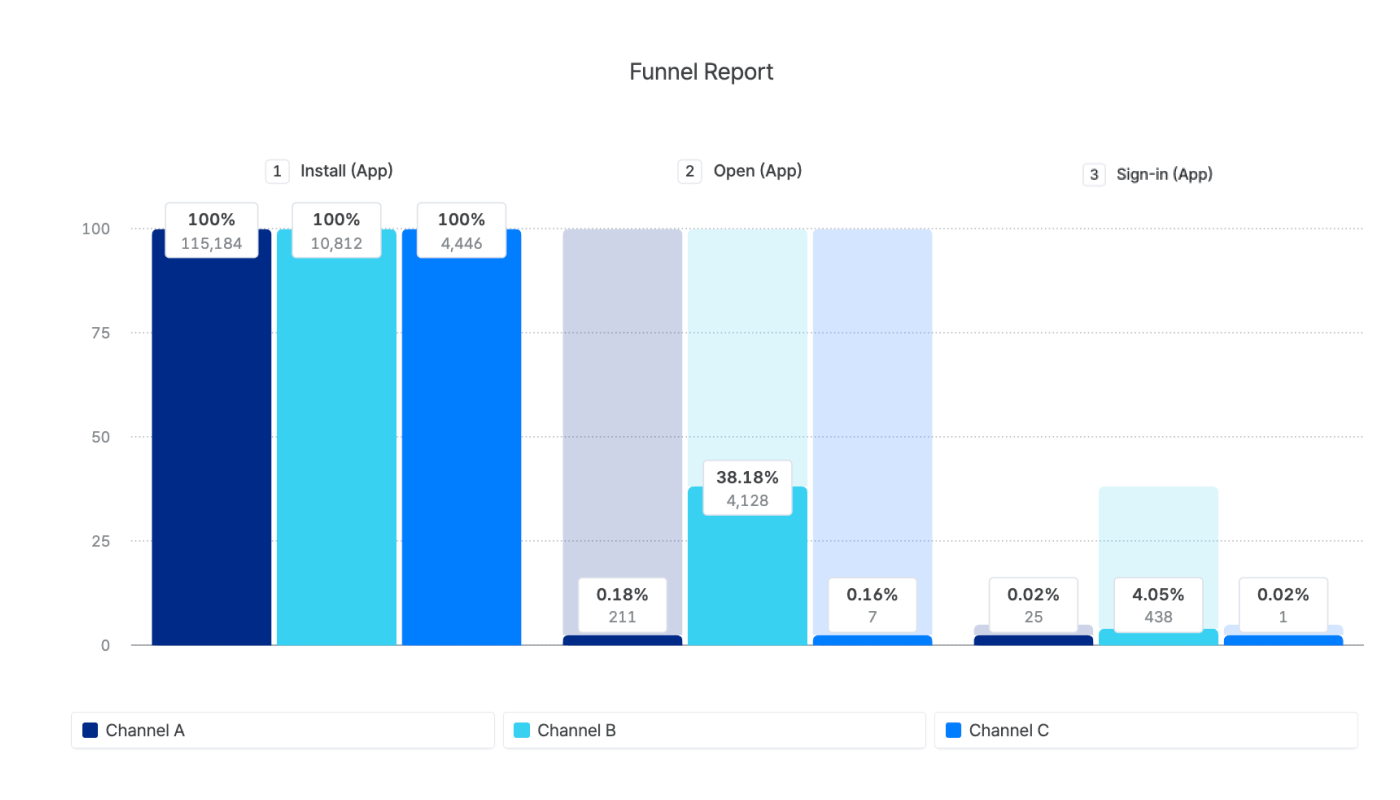
Because the GroupBy is set to **Channel**, the data is grouped by channels, where each bar represents a channel in the chart.
Here is how to interpret the Step 2 bars on the chart:
The **first bar of Step 2** represents users who entered the Funnel by performing the **Install (App)** event, which is attributed to Channel A, and converted to Step 2 by performing the **Open (App)** event, which is attributed to Channel B.
The **second bar of Step 2** represents users who entered the Funnel by performing the **Install (App)** event, which is attributed to Channel B, and converted to Step 2 by performing the **Open (App)** event, which is attributed to Channel B.
The **third bar of Step 2** represents users who entered the Funnel by performing the **Install (App)** event, which is attributed to Channel C, and converted to Step 2 by performing the **Open (App)** event, which is attributed to Channel B.
## About Identifiers
The "Identifier" option specifies which identifier is used in a Funnel Report. When "Device" is selected, the Airbridge Device ID is used as the identifier. When "User" is selected, the Airbridge ID is used instead. For more details, refer to this [article](/en/guides/identifiers).
When selecting the identifier, consider the nature of the user journey you want to reconstruct. If the user journey only consists of web events, you can select either “Device” or “User,” as you see fit.
However, if the user journey consists of both app events and web events, it is advised to select “User” as the identifier.
By selecting “User” as the identifier, Airbridge IDs are used to determine unique users. The Airbridge ID allows you to utilize data collected from different platforms and is better suited for analyzing web-to-app user journeys. For more information about the identifiers supported by Airbridge, refer to this [article](/en/guides/identifiers).
No. You should select the identifier that best suits your purpose of creating the Funnel Report.
For analyzing cross-platform user journeys, the Airbridge ID is better suited because it is generated by consolidating the device ID and the user ID. This signifies that by using the Airbridge ID, you can reconstruct a complete user journey that includes both pre-sign-in and post-sign-in events.
For more information about the identifiers supported by Airbridge, refer to this [article](/en/guides/identifiers).
 Here is how to interpret the Step 2 bars on the chart:
The **first bar of Step 2** represents users who entered the Funnel by performing the **Install (App)** event, which is attributed to Channel A, and converted to Step 2 by performing the **Open (App)** event, which is attributed to Channel B.
The **second bar of Step 2** represents users who entered the Funnel by performing the **Install (App)** event, which is attributed to Channel B, and converted to Step 2 by performing the **Open (App)** event, which is attributed to Channel B.
The **third bar of Step 2** represents users who entered the Funnel by performing the **Install (App)** event, which is attributed to Channel C, and converted to Step 2 by performing the **Open (App)** event, which is attributed to Channel B.
Here is how to interpret the Step 2 bars on the chart:
The **first bar of Step 2** represents users who entered the Funnel by performing the **Install (App)** event, which is attributed to Channel A, and converted to Step 2 by performing the **Open (App)** event, which is attributed to Channel B.
The **second bar of Step 2** represents users who entered the Funnel by performing the **Install (App)** event, which is attributed to Channel B, and converted to Step 2 by performing the **Open (App)** event, which is attributed to Channel B.
The **third bar of Step 2** represents users who entered the Funnel by performing the **Install (App)** event, which is attributed to Channel C, and converted to Step 2 by performing the **Open (App)** event, which is attributed to Channel B.