> ## Documentation Index
> Fetch the complete documentation index at: https://help.airbridge.io/llms.txt
> Use this file to discover all available pages before exploring further.
# CTV Campaign Tracking
Airbridge supports measuring Connected TV (CTV) campaigns. With Airbridge, you can track the impact of CTV campaigns on your mobile app performance and gain a more detailed understanding of the user journey leading up to the conversion in your app.
## Measuring CTV Campaigns
Create tracking links to measure the performance of CTV campaigns in Airbridge. The ad channels supported by Airbridge for measuring CTV campaigns are listed below.
* ACCESSTRADE VIETNAM
* AdFlex
* Adikteev
* Anypoint Media
* BigTrunk
* CROSSTARGET
* Edge 226
* Mobupps
* Moloco
* Motiv Intelligence
* Olimob
* One Ace Digital
* Propfit DSP
* Pusimob
* Remerge
* Sijak Media
* Smadex
* Starti TV
* tvScientific
* Vibe
* Vytomi Media
### Creating tracking links
**Attention**
CTV tracking links should only be used to track CTV campaigns. Using them to track app or web campaigns may cause errors in the measurement process.
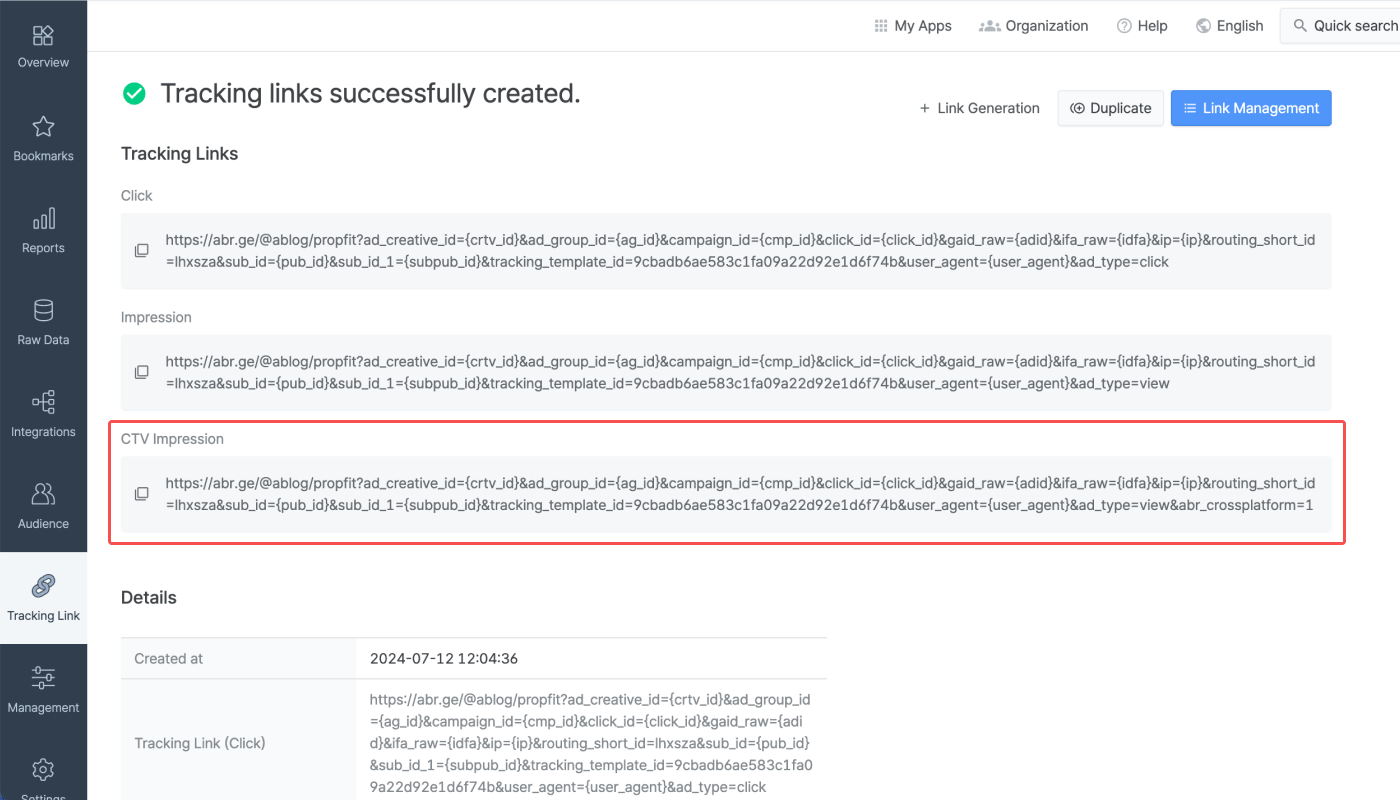
To create a tracking link to apply to your CTV ad, navigate to **\[Tracking Link]>\[Link Generation]** and select the channel that will carry the CTV ad in the **\[Channel]** field.
When creating a tracking link, `abr_crossplatform=1` will be appended for CTV tracking links. No additional configurations are required.
For more details on how to create tracking links, refer to [this article](/en/guides/creating-tracking-links-on-the-dashboard).
### Enable Click Parity for CTV Impressions
By default, CTV impressions are given lower [attribution priority](/en/guides/airbridge-attribution-model#prioritization-by-touchpoint-type) than clicks because Airbridge prioritizes clicks over impressions.
To give CTV impressions the same priority as clicks, enable the Click Parity for CTV Impressions. “Clicks” here refer to clicks where the user is identified by [Device ID Matching](/en/guides/identity-matching#device-id-matching).
To set this up, go to **\[Management]>\[Attribution Rules]** in the Airbridge dashboard. See [this article](/en/guides/setting-attribution-window#apply-click-parity-to-ctv-impressions) for details.
## View CTV campaign data
To view CTV campaign performance, filter the report by the ad channel you’re running your CTV campaign on. Refer to the section below to learn how Airbridge measures CTV campaign performance.
1. The marketer adds a CTV Impression tracking link to a CTV creative.
2. When a user views the CTV creative, the tracking link collects data.
3. When the user installs the app, the Airbridge SDK collects data.
4. Airbridge uses [Probabilistic Modeling Matching](/en/guides/identity-matching#probabilistic-approach) based on IP addresses to identify the user who viewed the CTV creative and the user who installed the app.
5. If both users are identified as the same user, the app install in step 3 is attributed to the CTV impression in step 2, crediting the CTV campaign for the install.
## Attention
CTV tracking links should only be used to track CTV campaigns. Using them to track app or web campaigns may cause errors in the measurement process. Make sure that CTV tracking links are only used for CTV campaigns.
 ### Enable Click Parity for CTV Impressions
By default, CTV impressions are given lower [attribution priority](/en/guides/airbridge-attribution-model#prioritization-by-touchpoint-type) than clicks because Airbridge prioritizes clicks over impressions.
To give CTV impressions the same priority as clicks, enable the Click Parity for CTV Impressions. “Clicks” here refer to clicks where the user is identified by [Device ID Matching](/en/guides/identity-matching#device-id-matching).
To set this up, go to **\[Management]>\[Attribution Rules]** in the Airbridge dashboard. See [this article](/en/guides/setting-attribution-window#apply-click-parity-to-ctv-impressions) for details.
## View CTV campaign data
To view CTV campaign performance, filter the report by the ad channel you’re running your CTV campaign on. Refer to the section below to learn how Airbridge measures CTV campaign performance.
### Enable Click Parity for CTV Impressions
By default, CTV impressions are given lower [attribution priority](/en/guides/airbridge-attribution-model#prioritization-by-touchpoint-type) than clicks because Airbridge prioritizes clicks over impressions.
To give CTV impressions the same priority as clicks, enable the Click Parity for CTV Impressions. “Clicks” here refer to clicks where the user is identified by [Device ID Matching](/en/guides/identity-matching#device-id-matching).
To set this up, go to **\[Management]>\[Attribution Rules]** in the Airbridge dashboard. See [this article](/en/guides/setting-attribution-window#apply-click-parity-to-ctv-impressions) for details.
## View CTV campaign data
To view CTV campaign performance, filter the report by the ad channel you’re running your CTV campaign on. Refer to the section below to learn how Airbridge measures CTV campaign performance.