> ## Documentation Index
> Fetch the complete documentation index at: https://help.airbridge.io/llms.txt
> Use this file to discover all available pages before exploring further.
# Channel Integration - Apple Ads
Airbridge supports integration with Apple Ads. With the integration, you can view the Apple Ads campaign performance in Airbridge.
**Attention**
Apple Ads measures the campaign performance independently from SKAN.
## Channel Integration
Your Apple Ads campaigns can be tracked by Airbridge when the Airbridge iOS SDK is installed on your app and the AdServices framework is enabled.
### Airbridge SDK installation
To integrate with Apple Ads, you need to install the Airbridge SDK in your app. The table below lists the minimum required version for the SDKs. Depending on the installation method for the Airbridge SDK, framework configuration may be required. For more details, refer to this [article](/en/developers/ios-sdk-v4#install-sdk).
| SDK | Minimum Required Version |
| ----------------- | ------------------------ |
| iOS SDK | 1.15.3 |
| React Native SDK | 1.3.1 |
| Cordova-Ionic SDK | 1.3.2 |
| Flutter SDK | 1.3.0 |
| Expo SDK | 2.0.0 |
| Unity SDK | 1.3.0 |
| Unreal SDK | 1.0.0 |
**Attention**
To manually install the [Airbridge iOS SDK](/en/developers/ios-sdk-v4#install-sdk), you need to additionally configure the Airbridge framework and dependency frameworks.
### Attribution rule settings
In the **\[Attribution Rules]** tab, you can view the attribution rules for Apple Ads. Click **Go to edit page** to move to the **\[Management]>\[Attribution Rules]** page, where you can edit the attribution rules. To learn about the detailed instructions on how to set the attribution rules, follow this [article](/en/guides/setting-attribution-window).
The default click lookback window when using device matching is 7 days for all ad channels except Apple Ads, whose default is 30 days. The 30-day lookback window allows you to minimize attribution discrepancy by having Airbridge and Apple Ads share the same lookback window.
The lookback window for the [pre-orders](https://developer.apple.com/app-store/pre-orders/) on Apple Ads is fixed to 90 days, regardless of your attribution settings on Airbridge.
The lookback window for pre-orders can't be viewed or modified in the Airbridge dashboard. If you want to modify the lookback window for pre-orders, contact your Airbridge CSM. If you don’t have a dedicated CSM, contact the [Airbridge Help Center](https://app.airbridge.io/supports).
## Campaign Management API Integration
Airbridge supports Apple Ads Campaign Management API integration. With the integration, you can view the campaign details, such as the campaign name, ad group name, keyword, and ad creative name in your Airbridge dashboard.
### Why the Campaign Management API integration is necessary
The AdServices framework returns only a limited amount of data because the AdServices REST API does not require any authentication. Through the integration with the Campaign Management API, which requires secured access, the names of the campaign, ad group, keyword, and ad creative can be fetched and made available in your Airbridge dashboard.
* Data available via the AdServices framework:
* Country, campaign ID, ad group ID, keyword ID, ad creative ID
* Data unavailable via the AdServices framework:
* Campaign name, ad group name, keyword, ad creative name
**Note**
Apple’s Campaign Management API is available only to those using Apple Ads Advanced. If you are using Apple Ads Basic, you can't use the Campaign Management API.
Without the Campaign Management API integration, Airbridge won't be able to fetch the campaign name, ad group name, keyword, and ad creative name. Moreover, cost integration cannot be enabled without the Campaign Management API integration.
Check your [Apple Ads solution](https://searchads.apple.com/help/apple-search-ads-basic/0001-compare-apple-search-ads-solutions) before proceeding with the integration process.
### Enabling the Campaign Management API integration
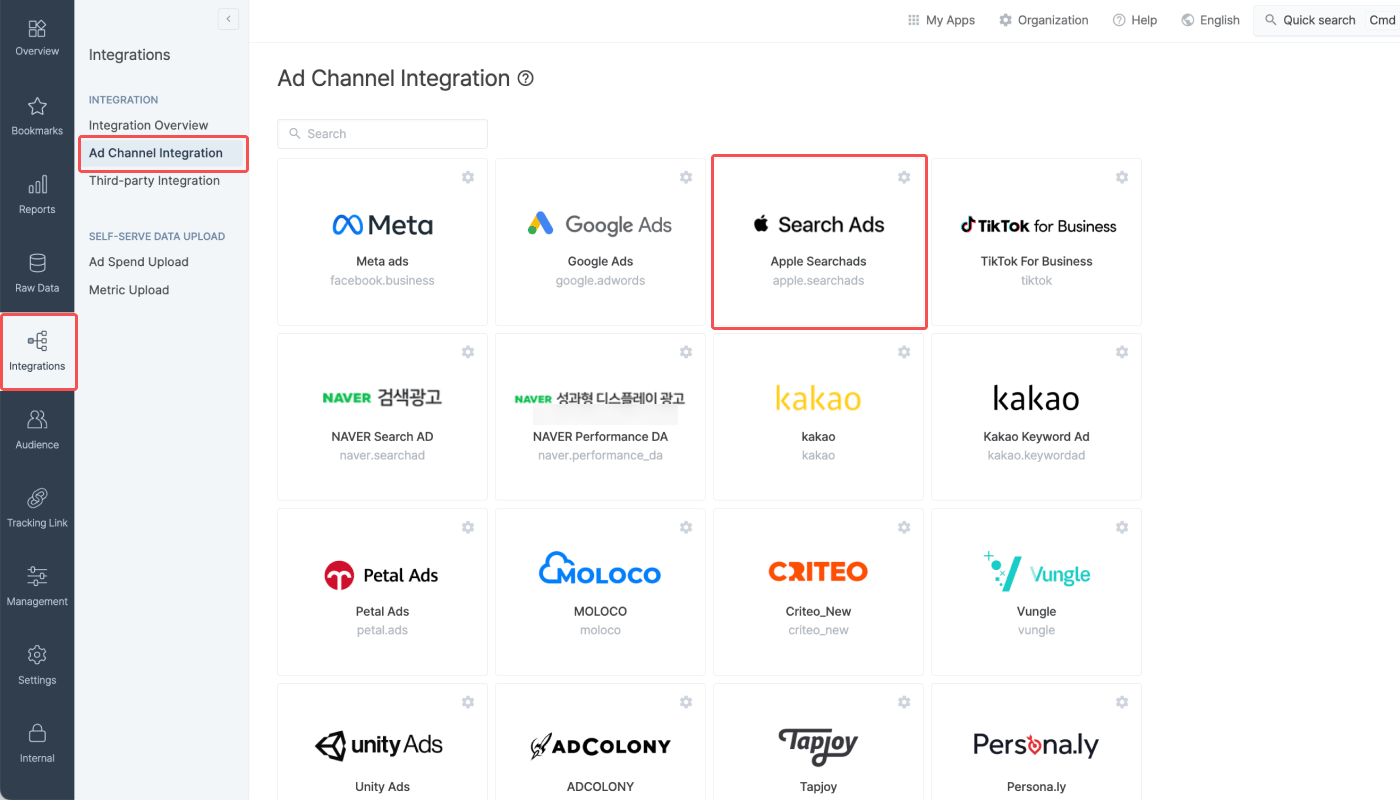
1. Navigate to **\[Integration]>\[Ad Channel Integration]** and click **Apple Ads**.
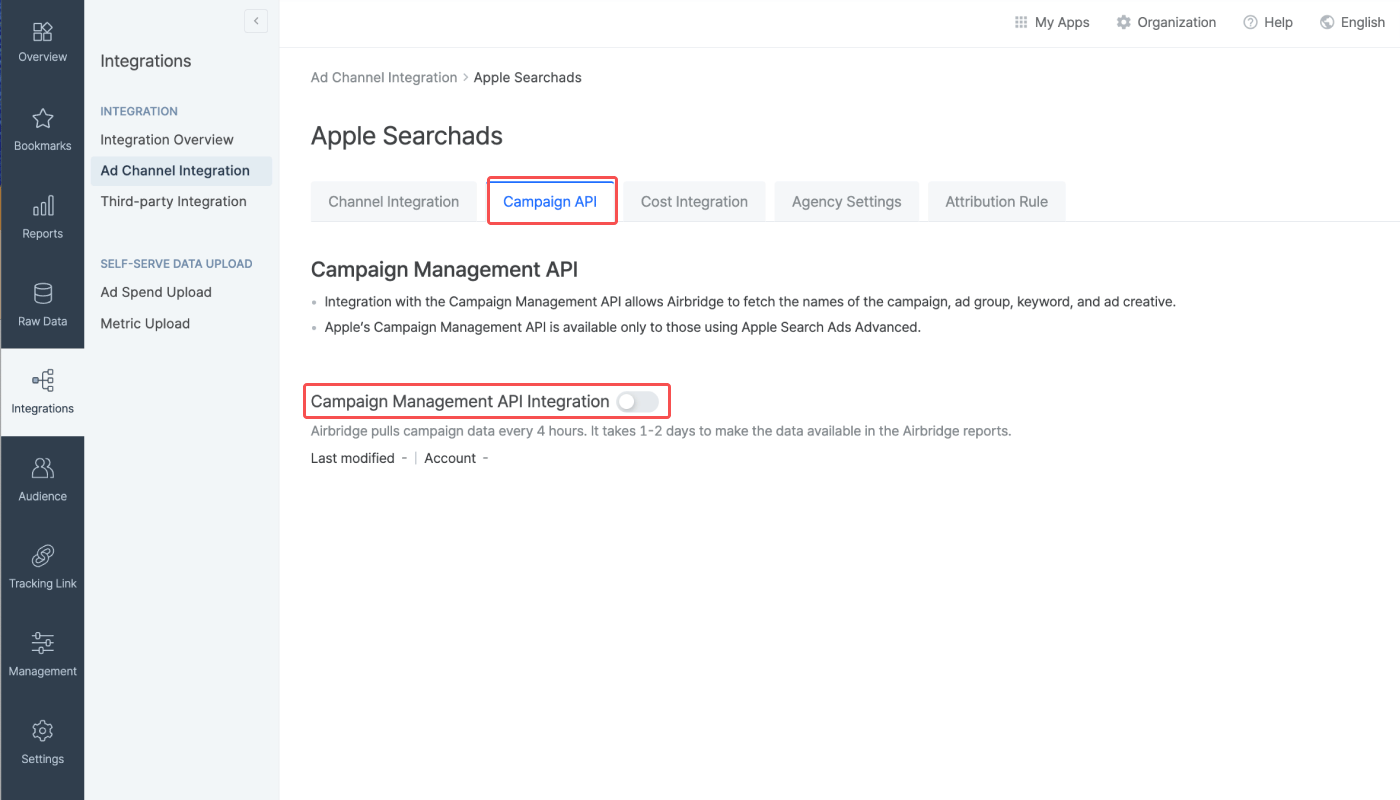
2. Select the **\[Campaign API]** tab and switch on the **Campaign Management API** toggle.
3. Click **Add a campaign group** and log in to your Apple account.
The Apple account must be on the Apple Ads Advanced solution and must have the Account Admin role. Integration is not possible when logging in to Apple accounts with Campaign Group Manager roles. The account must have a recent history of campaign operation.
After logging in, grant access permission to Airbridge by choosing "Account Read Only" to allow Airbridge access data from all campaign groups of the Apple account.
4. The integrated campaign groups will appear on the list when the integration is complete.
### Integration management
**Note**
Agency users can enable or disable the Campaign Management API integration when [granted permission](/en/guides/agency-setting) to do so. Read on and learn the steps to be followed depending on your user role.
* Owner or In-house Marketer: Delete all campaign group information except for the campaign group information of the Agency to allow editing the Campaign Management API integration toggle whenever needed. Note that Agency users can only view and delete their own Agency's campaign group information.
* Agency user: To disable the Campaign Management API integration, delete all campaign group information. After deleting all campaign group information, the Campaign Management API integration can disabled by switching off the toggle. If the toggle cannot be edited, contact the Owner or the In-house Marketer.
For more information on the app access permission of Agency users, refer to this [article](/en/guides/agency-setting#%EC%A0%91%EA%B7%BC-%EA%B6%8C%ED%95%9C%EC%9D%B4-%ED%97%88%EC%9A%A9%EB%90%9C-%EB%8C%80%ED%96%89%EC%82%AC-%EC%82%AC%EC%9A%A9%EC%9E%90%EC%9D%98-%EA%B6%8C%ED%95%9C).
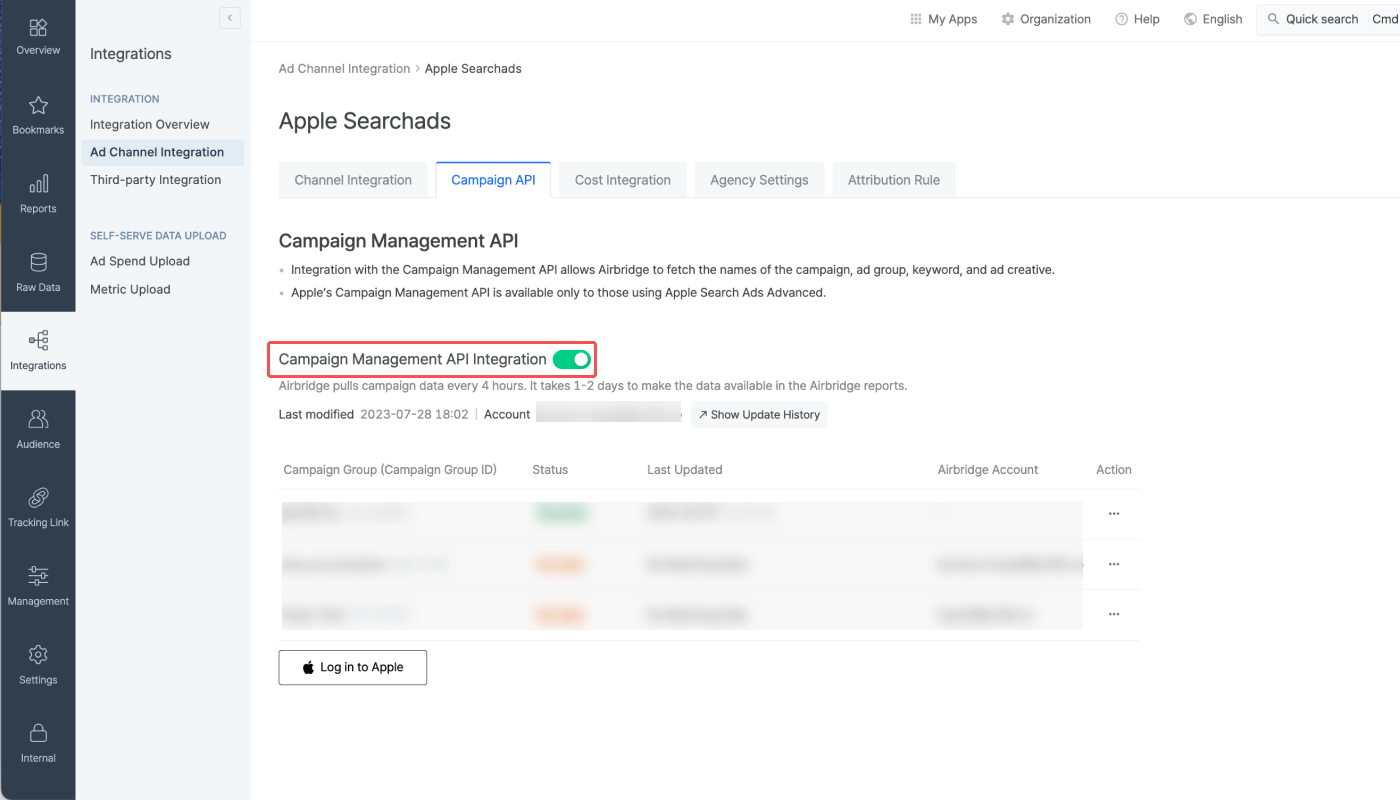
Switch off the **Campaign Management API Integration** toggle to disable the integration.
Once the integration is disabled, Airbridge will no longer pull data from the Campaign Management API. Data already pulled into Airbridge won't be affected.
You can reconnect with the campaign groups by switching on the toggle again unless the connections to the campaign groups are deleted from the integration list.
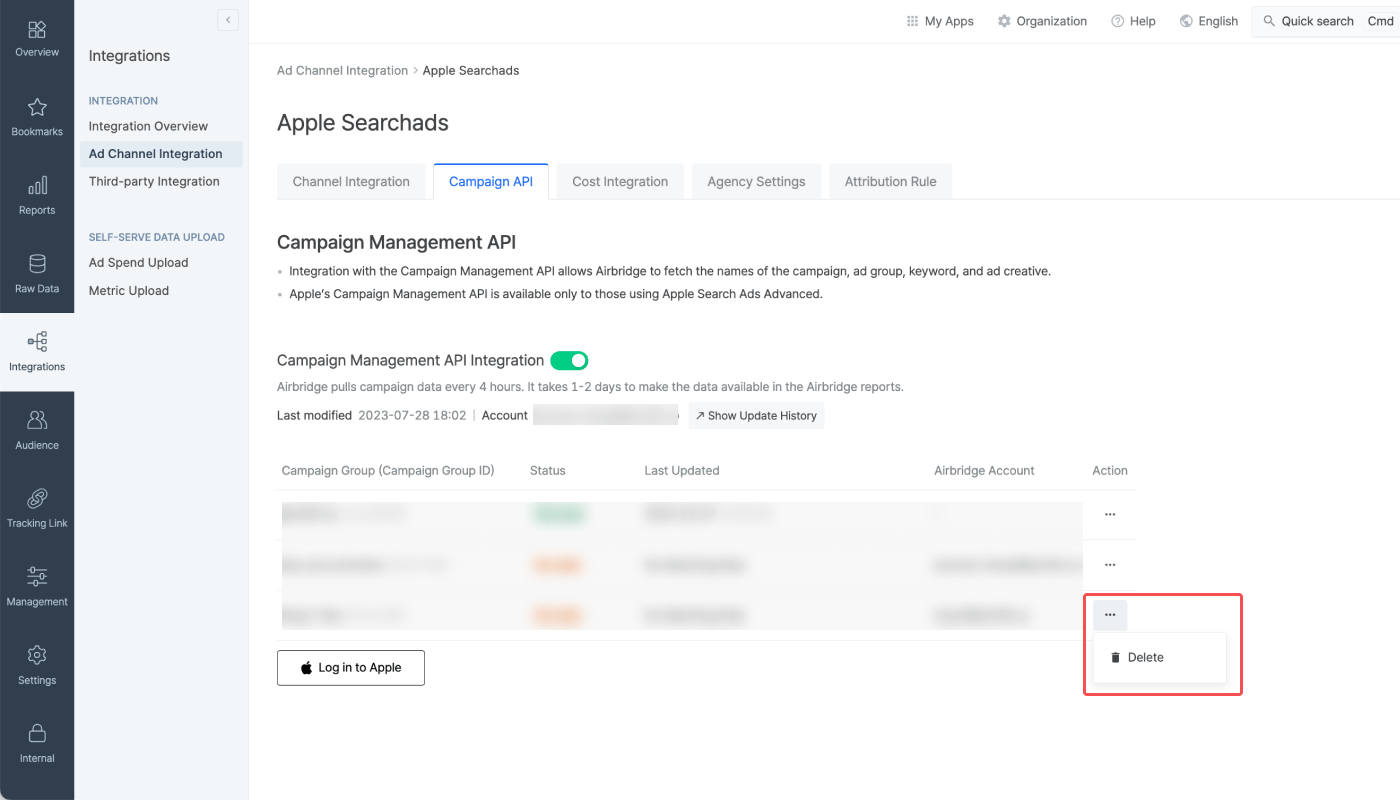
Click **\[…]** in the integration list and click **Delete** to delete a connection.
## Attention
When a user allows data tracking, Apple Ads sends touchpoint data with timestamps to Airbridge. However, if a user opts out of data tracking, the timestamp is not sent. Touchpoints without timestamp data have lower attribution priority than those with timestamp data. Therefore, the ATT opt-in rate can affect the attribution result of the Apple Ads campaigns in Airbridge.
Refer to the table below for more details.
| **ATT status** | **Timestamp provided** **by Apple Ads** | **Description** |
| --------------------------------------------------------------------------------- | --------------------------------------------------------------------------------------------------------------- | -------------------------------------------------------------------------------------------------------------------------------------------------------- |
| Opt-in | O | The touchpoint is attributed by the [deterministic attribution method](/en/guides/identity-matching#deterministic-approach). |
| Opt-out | X | The touchpoint is given a lower attribution priority than other touchpoints with timestamp data when attributed by the deterministic attribution method. |
Discrepancies in data may occur between Airbridge and Apple Ads due to varying reasons such as limited ad tracking features, differences in data processing speed, etc.
To learn more about the causes of data discrepancy, refer to this [article](/en/guides/apple-search-ads-discrepancy).
 2. Select the **\[Campaign API]** tab and switch on the **Campaign Management API** toggle.
 3. Click **Add a campaign group** and log in to your Apple account.
The Apple account must be on the Apple Ads Advanced solution and must have the Account Admin role. Integration is not possible when logging in to Apple accounts with Campaign Group Manager roles. The account must have a recent history of campaign operation.
After logging in, grant access permission to Airbridge by choosing "Account Read Only" to allow Airbridge access data from all campaign groups of the Apple account.
4. The integrated campaign groups will appear on the list when the integration is complete.
### Integration management
3. Click **Add a campaign group** and log in to your Apple account.
The Apple account must be on the Apple Ads Advanced solution and must have the Account Admin role. Integration is not possible when logging in to Apple accounts with Campaign Group Manager roles. The account must have a recent history of campaign operation.
After logging in, grant access permission to Airbridge by choosing "Account Read Only" to allow Airbridge access data from all campaign groups of the Apple account.
4. The integrated campaign groups will appear on the list when the integration is complete.
### Integration management