
> ## Documentation Index
> Fetch the complete documentation index at: https://help.airbridge.io/llms.txt
> Use this file to discover all available pages before exploring further.

# iOS SDK

<img alt="GitHub Tag" src="https://img.shields.io/github/v/tag/ab180/airbridge-ios-sdk-deployment?style=flat&label=Airbridge%20iOS%20SDK" />

Install the Airbridge iOS SDK and implement the necessary settings following the steps below.
<h2 id="install-sdk">
  Install SDK
</h2>

The Airbridge iOS SDK can be installed using the method below. After installation, you can verify whether the SDK has been properly installed through the [iOS SDK Test](/en/developers/testing-ios-sdk-v4).

<Tabs>
  <Tab title="SwiftPackageManager">
    1. Navigate to **\[File]>\[Add Packages...]** in Xcode.

    2. Enter the following address into the search bar and click **Add Package**.

    * [https://github.com/ab180/airbridge-ios-sdk-deployment](https://github.com/ab180/airbridge-ios-sdk-deployment)

    3. Click **Add** **Package** again.

    4. The Airbridge iOS SDK will be added to **Package Dependencies**.
  </Tab>

  <Tab title="CocoaPods">
    <div id="attention" />

    <Danger>
      **Attention**

      Before installing the iOS SDK, navigate to **\[YOUR\_PROJECT]>\[Build Settings]** in your Xcode and make sure to set the **User Script Sandboxing** to "No." For more details, refer to the [CocoaPods document](https://github.com/CocoaPods/CocoaPods/issues/11946).
    </Danger>

    1. Install CocoaPods with `brew install cocoapods`.

    2. Create a Podfile with `pod init`.

    3. Add the SDK as a dependency with the code below in the Podfile. Check the latest SDK version from [this page](/en/developers/release-note-ios-sdk) and replace `$HERE_LATEST_VERSION` with the latest version number.

    ```ruby Podfile lines theme={"theme":{"light":"github-dark-dimmed","dark":"github-dark-dimmed"}}
    target '[Project Name]' do
        ...
        # Replace $HERE_LATEST_VERSION with latest version
        # - Versions: https://help.airbridge.io/developers/release-note-ios-sdk
        # - Example: pod 'airbridge-ios-sdk', '4.X.X'
        pod 'airbridge-ios-sdk', '$HERE_LATEST_VERSION'
        ...
    end
    ```

    4. The installation will start when you enter `pod install --repo-update`.

    5. Run `YOUR_PROJECT.xcworkspace` to verify that the Airbridge iOS SDK is successfully installed.
  </Tab>

  <Tab title="Tuist">
    <div id="attention-2" />

    <Danger>
      **Attention**

      You cannot install the Airbridge iOS SDK with Tuist's[ XcodeProj-based integration](https://docs.tuist.dev/en/guides/develop/projects/dependencies#tuists-xcodeprojbased-integration). Make sure to install the iOS SDK through [Xcode's default integration](https://docs.tuist.dev/en/guides/develop/projects/dependencies#xcodes-default-integration).
    </Danger>

    1. Run the `tuist edit` command.

    2. Add `remote` to `project.packages`. Add SDK as `package` to `project.targets[...].target.dependencies` and the dependency framework as `sdk`. Then Check the latest SDK version from [this page](/en/developers/release-note-ios-sdk) and replace `$HERE_LATEST_VERSION` with the latest version number. For the dependency framework list, refer to the table below.

    | Framework                         | Description                                                |
    | --------------------------------- | ---------------------------------------------------------- |
    | AdSupport.framework               | Used for IDFA collection                                   |
    | CoreTelephony.framework           | Used for carrier information collection                    |
    | StoreKit.framework                | Used for SKAdNetwork data collection                       |
    | AppTrackingTransparency.framework | Used for user consent information collection               |
    | AdServices.framework              | Used for Apple Ads attribution data collection (iOS 14.3+) |
    | WebKit.framework                  | Used for event collection through web SDK integration      |

    ```swift lines theme={"theme":{"light":"github-dark-dimmed","dark":"github-dark-dimmed"}}
    import ProjectDescription

    let project = Project(
        packages: [
            .remote(
                url: "https://github.com/ab180/airbridge-ios-sdk-deployment",
                // Replace $HERE_LATEST_VERSION with latest version
                // - Versions: https://help.airbridge.io/developers/release-note-ios-sdk
                // - Example: requirement: .exact(from: "4.X.X")
                requirement: .exact(from: "$HERE_LATEST_VERSION")
            ),
            ...
        ],
        targets: [
            .target(
                dependencies: [
                    .package(product: "Airbridge", type: .runtime),
                    .sdk(name: "AdSupport", type: .framework, status: .optional),
                    .sdk(name: "AdServices", type: .framework, status: .optional),
                    .sdk(name: "CoreTelephony", type: .framework, status: .optional),
                    .sdk(name: "StoreKit", type: .framework, status: .optional),
                    .sdk(name: "AppTrackingTransparency", type: .framework, status: .optional),
                    .sdk(name: "WebKit", type: .framework, status: .optional),
                    ...
                ]
            ),
            ...
        ],
        ...
    )
    ```

    3. Run the `tuist generate` command.

    4. Airbridge is added to the Package Dependencies in Xcode.
  </Tab>

  <Tab title="Manual install">
    1. Download the Airbridge iOS SDK from the link below.

    * [https://sdk-download.airbridge.io/airbridge-ios-sdk/latest/Airbridge.zip](https://sdk-download.airbridge.io/airbridge-ios-sdk/latest/Airbridge.zip)

    2. Add **Airbridge.xcframework** to your project. Navigate to **\[Project File]>\[General]>\[Frameworks, Libraries, and Embedded Content]** in Xcode and click **+**.

    3. Click **Add Files...** under **\[Add Other...]** and select **Airbridge.xcframework**.

    4. Set the **Embed** of **Airbridge.xcframework** to "Embed & Sign".
  </Tab>
</Tabs>

<h3 id="install-restricted-sdk">
  Install Restricted SDK
</h3>

<div id="note" />

<Info>
  **Note**

  Install only one version of the SDK, either the general SDK or the restricted SDK.
</Info>

Depending on policies and environments, restrictions on collecting [device ID](/en/guides/identifiers)s like GAID and IDFA may be required. When installing the Restricted SDK version, the device IDs are not collected.

Install the Restricted SDK using the method below.

<Tabs>
  <Tab title="SwiftPackageManager">
    1. Navigate to **\[File]>\[Add Packages...]** in Xcode.

    2. Enter the following address into the search bar and click **Add Package**.

    * [https://github.com/ab180/airbridge-ios-sdk-restricted-deployment](https://github.com/ab180/airbridge-ios-sdk-restricted-deployment)

    3. Click **Add Package** again.

    4. The Airbridge iOS SDK will be added to **Package Dependencies**.

    5. Add the framework corresponding to the dependency of SDK to the project. Navigate to **\[Project File]>\[General]>\[Frameworks, Libraries, and Embedded Content]** in Xcode and click **+**.

    6. Add all the frameworks below. Set the **Embed** of the added frameworks to "Do not Embed." Then, navigate to **\[Project File]>\[Build Phase]>\[Link Binary With Libraries]** in the Xcode and set the **Status** to "Optional."

    | Framework               | Description                                                                              |
    | ----------------------- | ---------------------------------------------------------------------------------------- |
    | CoreTelephony.framework | The framework used to collect carrier information.                                       |
    | StoreKit.framework      | The framework used to collect SKAdNetwork information.                                   |
    | AdServices.framework    | The framework used to collect Apple Ads' attribution information for iOS 14.3 and later. |
    | WebKit.framework        | Used to collect events using integration with Web SDK.                                   |
  </Tab>

  <Tab title="CocoaPods">
    <div id="attention-3" />

    <Danger>
      **Attention**

      Before installing the iOS SDK, navigate to **\[YOUR\_PROJECT]>\[Build Settings]** in your Xcode and make sure to set the **User Script Sandboxing** to "No." For more details, refer to the [CocoaPods document](https://github.com/CocoaPods/CocoaPods/issues/11946).
    </Danger>

    1. Install CocoaPods with `brew install cocoapods`.

    2. Create a Podfile with `pod init`.

    3. Add the SDK as a dependency with the code below in the Podfile. Check the latest SDK version from [this page](/en/developers/release-note-ios-sdk) and replace `$HERE_LATEST_VERSION` with the latest version number.

    ```ruby Podfile lines theme={"theme":{"light":"github-dark-dimmed","dark":"github-dark-dimmed"}}
    target '[Project Name]' do
        ...
        # Replace $HERE_LATEST_VERSION with latest version
        # - Versions: https://help.airbridge.io/developers/release-note-ios-sdk
        # - Example: pod 'airbridge-ios-sdk-restricted', '4.X.X'
        pod 'airbridge-ios-sdk-restricted', '$HERE_LATEST_VERSION'
        ...
    end
    ```

    4. The installation will start when you enter `pod install --repo-update`.

    5. Run `YOUR_PROJECT.xcworkspace` to verify that the Airbridge iOS SDK is successfully installed.
  </Tab>

  <Tab title="Tuist">
    <div id="attention-4" />

    <Danger>
      **Attention**

      You cannot install the Airbridge iOS SDK with Tuist's[ XcodeProj-based integration](https://docs.tuist.dev/en/guides/develop/projects/dependencies#tuists-xcodeprojbased-integration). Make sure to install the iOS SDK through [Xcode's default integration](https://docs.tuist.dev/en/guides/develop/projects/dependencies#xcodes-default-integration).
    </Danger>

    1. Run the `tuist edit` command.

    2. Add remote to `project.packages`. Add the `package` to `project.targets [...].target.dependencies`. Refer to the code below.

    Add `remote` to `project.packages`. Add SDK as `package` to `project.targets[...].target.dependencies` and the dependency framework as `sdk`. Then Check the latest SDK version from [this page](/en/developers/release-note-ios-sdk) and replace `$HERE_LATEST_VERSION` with the latest version number. For the dependency framework list, refer to the table below.

    | Framework               | Description                                                |
    | ----------------------- | ---------------------------------------------------------- |
    | CoreTelephony.framework | Used for carrier information collection                    |
    | StoreKit.framework      | Used for SKAdNetwork data collection                       |
    | AdServices.framework    | Used for Apple Ads attribution data collection (iOS 14.3+) |
    | WebKit.framework        | Used for event collection through web SDK integration      |

    ```swift lines theme={"theme":{"light":"github-dark-dimmed","dark":"github-dark-dimmed"}}
    import ProjectDescription

    let project = Project(
        packages: [
            .remote(
                url: "https://github.com/ab180/airbridge-ios-sdk-restricted-deployment",
                // Replace $HERE_LATEST_VERSION with latest version
                // - Versions: https://help.airbridge.io/developers/release-note-ios-sdk
                // - Example: requirement: .exact(from: "4.X.X")
                requirement: .exact(from: "$HERE_LATEST_VERSION")
            ),
            ...
        ],
        targets: [
            .target(
                dependencies: [
                    .package(product: "Airbridge", type: .runtime),
                    .sdk(name: "AdServices", type: .framework, status: .optional),
                    .sdk(name: "CoreTelephony", type: .framework, status: .optional),
                    .sdk(name: "StoreKit", type: .framework, status: .optional),
                    .sdk(name: "WebKit", type: .framework, status: .optional),
                    ...
                ]
            ),
            ...
        ],
        ...
    )
    ```

    3. Run the `tuist generate` command.

    4. Airbridge is added to the Package Dependencies in Xcode.
  </Tab>

  <Tab title="Manual install">
    1. Download the Airbridge iOS SDK from the link below.

    * [https://sdk-download.airbridge.io/airbridge-ios-sdk-restricted/latest/Airbridge.zip](https://sdk-download.airbridge.io/airbridge-ios-sdk-restricted/latest/Airbridge.zip)

    2. Add **Airbridge.xcframework** to your project. Navigate to **\[Project File]>\[General]>\[Frameworks, Libraries, and Embedded Content]** in Xcode and click **+**.

    3. Click **Add Files...** under **\[Add Other...]** and select **Airbridge.xcframework**.

    4. Set the **Embed** of **Airbridge.xcframework** to "Embed & Sign".

    5. Add the framework corresponding to the dependency of SDK to the project. Navigate to **\[Project File]>\[General]>\[Frameworks, Libraries, and Embedded Content]** in Xcode and click **+**.

    6. Add all the frameworks below. Set the **Embed** of the added frameworks to "Do not Embed." Then, navigate to **\[Project File]>\[Build Phase]>\[Link Binary With Libraries]** in the Xcode and set the **Status** to "Optional."

    | Framework               | Description                                                                              |
    | ----------------------- | ---------------------------------------------------------------------------------------- |
    | CoreTelephony.framework | The framework used to collect carrier information.                                       |
    | StoreKit.framework      | The framework used to collect SKAdNetwork information.                                   |
    | AdServices.framework    | The framework used to collect Apple Ads' attribution information for iOS 14.3 and later. |
    | WebKit.framework        | Used to collect events using integration with Web SDK.                                   |
  </Tab>
</Tabs>

<h3 id="initialize-sdk">
  Initialize SDK
</h3>

SDK initialization methods vary depending on the system architecture. For SceneDelegate Lifecycle or AppDelegate Lifecycle, refer to the method for AppDelegate. For SwiftUI Lifecycle, refer to the method for SwiftUI.

The YOUR\_APP\_NAME and YOUR\_APP\_SDK\_TOKEN can be found on the **\[Settings]>\[Tokens]** page in the Airbridge dashboard.

<Tabs>
  <Tab title="AppDelegate (Swift)">
    Call the `Airbridge.initializeSDK` function at the very top of AppDelegate's `application(_:didFinishLaunchingWithOptions:)` function.

    ```swift lines theme={"theme":{"light":"github-dark-dimmed","dark":"github-dark-dimmed"}}
    import UIKit
    import Airbridge

    @main
    class AppDelegate: UIResponder, UIApplicationDelegate {
        func application(
            _ application: UIApplication,
            didFinishLaunchingWithOptions launchOptions: [UIApplication.LaunchOptionsKey: Any]?
        ) -> Bool {
            let option = AirbridgeOptionBuilder(name: "YOUR_APP_NAME", token: "YOUR_APP_SDK_TOKEN")
                .build()
            Airbridge.initializeSDK(option: option)
            return true
        }
    }
    ```

    <div id="attention-5" />

    <Danger>
      **Attention**

      Make sure that the `Airbridge.initalizeSDK` function is called within the `application(_:didFinishLaunchingWithOptions:)` of the `AppDelegate` for proper functionality.
    </Danger>
  </Tab>

  <Tab title="AppDelegate (Objective-C)">
    Call the `Airbridge.initializeSDK` function at the very top of AppDelegate's `application(_:didFinishLaunchingWithOptions:)` function.

    ```objective-c lines theme={"theme":{"light":"github-dark-dimmed","dark":"github-dark-dimmed"}}
    #import "AppDelegate.h"
    #import <Airbridge/Airbridge.h>

    @interface AppDelegate ()

    @end

    @implementation AppDelegate

    - (BOOL)application:(UIApplication *)application didFinishLaunchingWithOptions:(NSDictionary *)launchOptions {
        AirbridgeOptionBuilder* optionBuilder = [[AirbridgeOptionBuilder alloc] initWithName:@"YOUR_APP_NAME"
                                                                                       token:@"YOUR_APP_SDK_TOKEN"];
        AirbridgeOption* option = [optionBuilder build];
        [Airbridge initializeSDKWithOption:option];
        return YES;
    }

    @end
    ```

    <div id="attention-6" />

    <Danger>
      **Attention**

      Make sure that the `Airbridge.initalizeSDK` function is called within the `application(_:didFinishLaunchingWithOptions:)` of the `AppDelegate` for proper functionality.
    </Danger>
  </Tab>

  <Tab title="SwiftUI">
    Call the `Airbridge.initializeSDK` function at the top of `init`.

    ```swift lines theme={"theme":{"light":"github-dark-dimmed","dark":"github-dark-dimmed"}}
    import SwiftUI
    import Airbridge

    @main
    struct ExampleApp: App {
        init() {
            let option = AirbridgeOptionBuilder(name: "YOUR_APP_NAME", token: "YOUR_APP_SDK_TOKEN")
                .build()
            Airbridge.initializeSDK(option: option)
        }
        
        var body: some Scene {
            WindowGroup {
                ContentView()
            }
        }
    }
    ```

    <div id="attention-7" />

    <Danger>
      **Attention**

      Make sure that the `Airbridge.initalizeSDK` function is called within the `init` of the `App` for proper functionality.
    </Danger>

    <div id="attention-8" />

    <Danger>
      **Attention**

      The SwiftUI Lifecycle method does not provide a Referrer URL, so the [Organic Referrer Attribution](/en/guides/organic-referrer-attribution) cannot be used. Even with the use of UIApplicationDelegateAdaptor, the Organic Referrer Attribution cannot be used in the SwiftUI Lifecycle method.
    </Danger>
  </Tab>
</Tabs>

<h3 id="configure-att-prompt">
  Configure ATT Prompt
</h3>

<div id="note-2" />

<Info>
  **Note**

  The functions necessary to ensure compliance with privacy policies should be reviewed with legal counsel.
</Info>

The [IDFA](https://developer.apple.com/documentation/adsupport/asidentifiermanager/advertisingidentifier) can only be collected if users consent to data tracking via the [App Tracking Transparency (ATT)](https://developer.apple.com/app-store/user-privacy-and-data-use/) prompt.

Event collection should be delayed until the user allows tracking. If the install event is collected before the user allows tracking through the ATT prompt, the install event data will lack an identifier, making performance measurement difficult. We recommend setting a sufficient delay time for event collection to collect identifiers.

1. Prepare the text you will use in the ATT prompt.

2. Enter the prepared text in the `NSUserTrackingUsageDescription` key of the `Info.plist` file.

<Tabs>
  <Tab title="Xcode">
    1) Navigate to **\[YOUR\_PROJECT]>\[Info]>\[Custom iOS Target Properties]** in Xcode.
    2) Hover your mouse over the key items, click **+**  that appears, and enter `Privacy - Tracking Usage Description`.
    3) Enter the text for the ATT prompt as value.
  </Tab>

  <Tab title="Tuist">
    1. Run the `tuist edit` command.

    2. Enter `NSUserTrackingUsageDescription` as key to `.extendingDefault` in `project.targets[...].infoPlist`.

    3. Enter the text for the ATT prompt as value.

    ```swift lines theme={"theme":{"light":"github-dark-dimmed","dark":"github-dark-dimmed"}}
    import ProjectDescription

    let project = Project(
        targets: [
            .target(
                infoPlist: .extendingDefault(
                    with: [
                        "NSUserTrackingUsageDescription": "YOUR_DESCRIPTION",
                        ...
                    ]
                ),
                ...
            ),
            ...
        ]
        ...
    )
    ```
  </Tab>
</Tabs>

3. Set the time for displaying the ATT prompt on the app.

<AccordionGroup>
  <Accordion title="Provide the ATT prompt at a desired time">
    The `ATTrackingManager.requestTrackingAuthorization` function should be called at the desired time you want to display the ATT prompt.

    <CodeGroup>
      ```swift Swift lines theme={"theme":{"light":"github-dark-dimmed","dark":"github-dark-dimmed"}}
      import AppTrackingTransparency
      ...
      ATTrackingManager.requestTrackingAuthorization { _ in }
      ```

      ```objective-c Objective-C lines theme={"theme":{"light":"github-dark-dimmed","dark":"github-dark-dimmed"}}
      #import <AppTrackingTransparency/AppTrackingTransparency.h>
      ...
      [ATTrackingManager requestTrackingAuthorizationWithCompletionHandler:^(ATTrackingManagerAuthorizationStatus status) {}];
      ```
    </CodeGroup>

    <div id="attention-9" />

    <Danger>
      **Attention**

      The `ATTrackingManager.requestTrackingAuthorization` function does not provide the ATT prompt if the app that called it is not in an active state.
    </Danger>
  </Accordion>

  <Accordion title="Provide the ATT prompt at app launch">
    The ATT prompt can be displayed as soon as the app is launched.

    <CodeGroup>
      ```swift AppDelegate (Swift) lines theme={"theme":{"light":"github-dark-dimmed","dark":"github-dark-dimmed"}}
      import UIKit
      import Airbridge
      import AppTrackingTransparency

      @main
      class AppDelegate: UIResponder, UIApplicationDelegate {
          var observer: Any?

          func application(
              _ application: UIApplication,
              didFinishLaunchingWithOptions launchOptions: [UIApplication.LaunchOptionsKey: Any]?
          ) -> Bool {
              let option = AirbridgeOptionBuilder(name: "YOUR_APP_NAME", token: "YOUR_APP_SDK_TOKEN")
                  .build()
              Airbridge.initializeSDK(option: option)

              observer = NotificationCenter.default.addObserver(
                  forName: UIApplication.didBecomeActiveNotification,
                  object: nil,
                  queue: nil
              ) { [weak self] _ in
                  if #available(iOS 14, *) {
                      ATTrackingManager.requestTrackingAuthorization { _ in }
                  }
                  if let observer = self?.observer {
                      NotificationCenter.default.removeObserver(observer)
                  }
              }

              return true
          }
      }
      ```

      ```objective-c AppDelegate (Objective-C) lines theme={"theme":{"light":"github-dark-dimmed","dark":"github-dark-dimmed"}}
      #import "AppDelegate.h"
      #import <Airbridge/Airbridge.h>
      #import <AppTrackingTransparency/AppTrackingTransparency.h>

      @interface AppDelegate ()

      @end

      @implementation AppDelegate {
          id observer;
      }

      - (BOOL)application:(UIApplication *)application didFinishLaunchingWithOptions:(NSDictionary *)launchOptions {
          AirbridgeOptionBuilder* optionBuilder = [[AirbridgeOptionBuilder alloc] initWithName:@"YOUR_APP_NAME"
                                                                                         token:@"YOUR_APP_SDK_TOKEN"];
          AirbridgeOption* option = [optionBuilder build];
          [Airbridge initializeSDKWithOption:option];

          __weak typeof(self) weakSelf = self;
          observer = [NSNotificationCenter.defaultCenter addObserverForName:UIApplicationDidBecomeActiveNotification
                                                                  object:nil
                                                                      queue:nil
                                                              usingBlock:^(NSNotification * _Nonnull notification) {
              if (@available(iOS 14, *)) {
                  [ATTrackingManager requestTrackingAuthorizationWithCompletionHandler:^(ATTrackingManagerAuthorizationStatus status) {}];
              }
              if (weakSelf != nil && weakSelf->observer != nil) {
                  [NSNotificationCenter.defaultCenter removeObserver:observer];
              }
          }];

          return YES;
      }

      @end
      ```

      ```swift SwiftUI lines theme={"theme":{"light":"github-dark-dimmed","dark":"github-dark-dimmed"}}
      import SwiftUI
      import Airbridge
      import AppTrackingTransparency

      @main
      struct ExampleApp: App {
          init() {
              let option = AirbridgeOptionBuilder(name: "YOUR_APP_NAME", token: "YOUR_APP_SDK_TOKEN")
                  .build()
              Airbridge.initializeSDK(option: option)

              var observer: Any?
              observer = NotificationCenter.default.addObserver(
                  forName: UIApplication.didBecomeActiveNotification,
                  object: nil,
                  queue: nil
              ) { _ in
                  if #available(iOS 14, *) {
                      ATTrackingManager.requestTrackingAuthorization { _ in }
                  }
                  if let observer {
                      NotificationCenter.default.removeObserver(observer)
                  }
              }
          }
          
          var body: some Scene {
              WindowGroup {
                  ContentView()
              }
          }
      }
      ```
    </CodeGroup>
  </Accordion>
</AccordionGroup>

4. If the install event is not collected, the Airbridge iOS SDK delays collecting install events for 30 seconds until the user allows tracking each time the app is launched. If the user exits the app before deciding whether to allow tracking, the SDK will not collect the install event and will try again at the next app launch.

The `setAutoDetermineTrackingAuthorizationTimeout` function can be used to set a sufficient delay before event collection. The default setting is 30 seconds and can be set to up to 3600 seconds (1 hour).

<CodeGroup>
  ```swift Swift lines theme={"theme":{"light":"github-dark-dimmed","dark":"github-dark-dimmed"}}
  import Airbridge
  ...
  let option = AirbridgeOptionBuilder(name: "YOUR_APP_NAME",
                                      token: "YOUR_APP_SDK_TOKEN")
      .setAutoDetermineTrackingAuthorizationTimeout(second: 30)
      .build()
  Airbridge.initializeSDK(option: option)
  ```

  ```objective-c Objective-C lines theme={"theme":{"light":"github-dark-dimmed","dark":"github-dark-dimmed"}}
  #import <Airbridge/Airbridge.h>
  ...
  AirbridgeOptionBuilder* optionBuilder = [[AirbridgeOptionBuilder alloc] initWithName:@"YOUR_APP_NAME"
                                                                                 token:@"YOUR_APP_SDK_TOKEN"];
  [optionBuilder setAutoDetermineTrackingAuthorizationTimeoutWithSecond:30];
  AirbridgeOption* option = [optionBuilder build];
  [Airbridge initializeSDKWithOption:option];
  ```
</CodeGroup>

<div id="attention-10" />

<Danger>
  **Attention**

  Set a sufficient delay time to collect the app install event. If the SDK collects install events before users can allow tracking on the ATT prompt, the IDFA won't be collected along with the install events.
</Danger>

<h3 id="opt-in-setup">
  Opt-in setup
</h3>

<div id="attention-11" />

<Info>
  **Attention**

  Optional settings. Configure only if necessary.
</Info>

The opt-in policy requires user consent before using user data.

After setting the `setAutoStartTrackingEnabled` function to `false`, call the `startTracking` function at the time when you can collect events. The SDK will start collecting events when the `startTracking` function is called.

<CodeGroup>
  ```swift Swift lines theme={"theme":{"light":"github-dark-dimmed","dark":"github-dark-dimmed"}}
  import Airbridge
  ...
  let option = AirbridgeOptionBuilder(name: "YOUR_APP_NAME", token: "YOUR_APP_SDK_TOKEN")
      .setAutoStartTrackingEnabled(false)
      .build()
  Airbridge.initializeSDK(option: option)
  ...
  Airbridge.startTracking()
  ```

  ```objective-c Objective-C lines theme={"theme":{"light":"github-dark-dimmed","dark":"github-dark-dimmed"}}
  #import <Airbridge/Airbridge.h>
  ...
  AirbridgeOptionBuilder* optionBuilder = [[AirbridgeOptionBuilder alloc] initWithName:@"YOUR_APP_NAME"
                                                                                 token:@"YOUR_APP_SDK_TOKEN"];
  [optionBuilder setAutoStartTrackingEnabled:NO];
  AirbridgeOption* option = [optionBuilder build];
  [Airbridge initializeSDKWithOption:option];
  ...
  [Airbridge startTracking];
  ```
</CodeGroup>

<h3 id="opt-out-setup">
  Opt-out setup
</h3>

<div id="attention-12" />

<Info>
  **Attention**

  Optional settings. Configure only if necessary.
</Info>

The opt-out policy allows the use of user information until the user explicitly declines.

After setting the `setAutoStartTrackingEnabled` function to `true`, call the `stopTracking` function at the time when you can no longer collect events. When the `stopTracking` function is called, the SDK will stop collecting events.

<CodeGroup>
  ```swift Swift lines theme={"theme":{"light":"github-dark-dimmed","dark":"github-dark-dimmed"}}
  import Airbridge
  ...
  let option = AirbridgeOptionBuilder(name: "YOUR_APP_NAME", token: "YOUR_APP_SDK_TOKEN")
      .setAutoStartTrackingEnabled(true)
      .build()
  Airbridge.initializeSDK(option: option)
  ...
  Airbridge.stopTracking()
  ```

  ```objective-c Objective-C lines theme={"theme":{"light":"github-dark-dimmed","dark":"github-dark-dimmed"}}
  #import <Airbridge/Airbridge.h>
  ...
  AirbridgeOptionBuilder* optionBuilder = [[AirbridgeOptionBuilder alloc] initWithName:@"YOUR_APP_NAME"
                                                                                 token:@"YOUR_APP_SDK_TOKEN"];
  [optionBuilder setAutoStartTrackingEnabled:YES];
  AirbridgeOption* option = [optionBuilder build];
  [Airbridge initializeSDKWithOption:option];
  ...
  [Airbridge stopTracking];
  ```
</CodeGroup>

<h3 id="sdk-signature">
  SDK Signature
</h3>

<div id="attention-13" />

<Info>
  **Attention**

  Optional settings. Configure only if necessary.
</Info>

With the SDK Signature, you can prevent SDK spoofing and use verified events to measure ad performance.

The SDK Signature credentials, which are the Secret ID and the Secret, are required for the SDK Signature setup. They can be found on the **\[Management]>\[Fraud Validation Rules]>\[SDK Signature]** page in the Airbridge dashboard. For more details on how to find the SDK Signature credentials, refer to this [Airbridge guide](/en/guides/sdk-signature).

Once you have the credentials, call the `setSDKSignature` function above the SDK initialization code.

<CodeGroup>
  ```swift Swift lines theme={"theme":{"light":"github-dark-dimmed","dark":"github-dark-dimmed"}}
  import Airbridge
  ...
  let option = AirbridgeOptionBuilder(name: "YOUR_APP_NAME", token: "YOUR_APP_SDK_TOKEN")
      .setSDKSignature(
          id: "YOUR_SDK_SIGNATURE_SECRET_ID",
          secret: "YOUR_SDK_SIGNATURE_SECRET"
      )
      .build()
  Airbridge.initializeSDK(option: option)
  ```

  ```objective-c Objective-C lines theme={"theme":{"light":"github-dark-dimmed","dark":"github-dark-dimmed"}}
  #import <Airbridge/Airbridge.h>
  ...
  AirbridgeOptionBuilder* optionBuilder = [[AirbridgeOptionBuilder alloc] initWithName:@"YOUR_APP_NAME"
                                                                                 token:@"YOUR_APP_SDK_TOKEN"];
  [optionBuilder setSDKSignatureWithId:@"YOUR_SDK_SIGNATURE_SECRET_ID"
                                secret:@"YOUR_SDK_SIGNATURE_SECRET"];
  AirbridgeOption* option = [optionBuilder build];
  [Airbridge initializeSDKWithOption:option];
  ```
</CodeGroup>

<h2 id="deep-linking">
  Deep Linking
</h2>

Deep linking allows you to redirect users from ads to specific locations within your app. The data collected from the tracking link enables you to monitor the performance of the deep link in Airbridge.

* [Understanding Tracking Links (User Guide)](/en/guides/understanding-tracking-link)
* [Understanding Deep Links (User Guide)](/en/guides/understanding-deep-link)

<h3 id="how-airbridge-deep-links-work">
  How Airbridge Deep Links work
</h3>

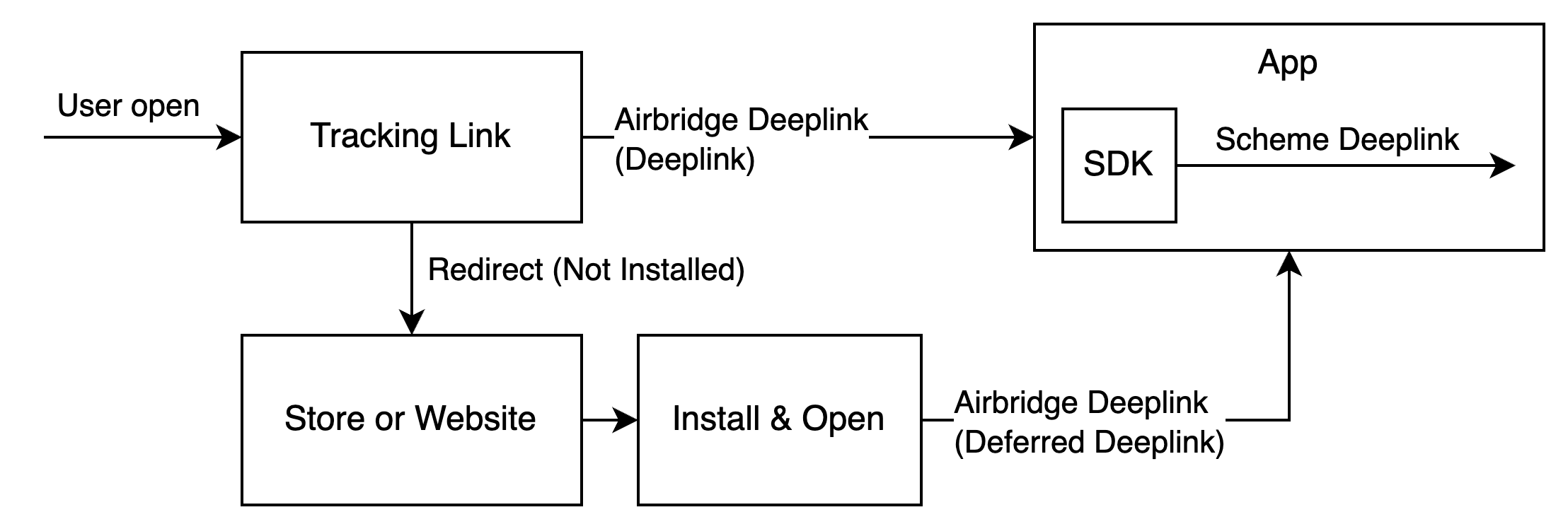
When a user clicks on the Airbridge tracking link, the scheme deep link embedded in the tracking link is converted into an Airbridge Deep Link, which can be either an HTTP deep link or a scheme deep link. This Airbridge Deep Link redirects the user to the desired app location. Then, the Airbridge SDK converts the Airbridge Deep Link back to the original scheme deep link embedded in the tracking link and passes it to the app.

* Example scheme deep link embedded in the tracking link: YOUR\_SCHEME://product/12345
* Examples of Airbridge Deep Links

  * HTTP deep link format 1: https<span>://</span>YOUR\_APP\_NAME.airbridge.io/\~\~\~
  * HTTP deep link format 2: https<span>://</span>YOUR\_APP\_NAME.abr.ge/\~\~\~
  * Scheme deep link format: YOUR\_SCHEME://product/12345?airbridge\_referrer=\~\~\~

When the app is installed on the device and the tracking link is clicked, the app opens through the Airbridge Deep Link. The Airbridge SDK converts the Airbridge Deep Link into the scheme deep link embedded in the tracking link and passes it to the app.

When the app is not installed on the device and the tracking link is clicked, the Airbridge SDK saves the Airbridge Deep Link. After the user is redirected to the app store or website and the app is installed and launched, the Airbridge SDK converts the saved Airbridge Deep Link into the scheme deep link embedded in the tracking link and passes it to the app.

<Frame>
  <img src="https://mintcdn.com/airbridge-help-center/Htx4FOCjbD1i8oed/images/ca4fk0iik512/1zFsKkUhhtquqQxMlTXiNm/fef1b56be608e57abea15b0b341acd45/AirbridgeDeeplinkSimpleStructure.drawio.png?fit=max&auto=format&n=Htx4FOCjbD1i8oed&q=85&s=af84ad3d507781bbcaa67fb51910c8f4" alt="Simple structure of Airbridge Deeplink" width="2216" height="748" data-path="images/ca4fk0iik512/1zFsKkUhhtquqQxMlTXiNm/fef1b56be608e57abea15b0b341acd45/AirbridgeDeeplinkSimpleStructure.drawio.png" />
</Frame>

<h3 id="set-up-deep-linking">
  Set up deep linking
</h3>

For the deep linking setup, the following information is required.

* Deep link information submitted in the Airbridge dashboard
* In-app location address for user redirection

First, enter the deep link information into the Airbridge dashboard.

<Accordion title="Enter the deep link information into the Airbridge dashboard">
  Navigate to **\[Tracking Link]>\[Deep Links]** in the Airbridge dashboard and enter the following information.

  **iOS URI Scheme**

  Enter the sheme of your deep links. Airbridge will perform deep linking using the entered scheme only.   (e.g., `scheme://`)

  **iOS App ID**

  1. In the [Apple Developer Dashboard](https://developer.apple.com/account/resources), go to the **\[Identifier]** of the app you want to set up the deep link and find the App ID Prefix and Bundle ID value.

  2. Enter the iOS App ID in the format of `App ID Prefix+ .+ Bundle ID`. (e.g. `9JA89QQLNQ.com.apple.wwdc`)

  <div id="attention-14" />

  <Danger>
    **Attention**

    To ensure proper user redirection, the iOS URI scheme and iOS App ID must be entered differently for the production app and the development app.
  </Danger>
</Accordion>

After entering the deep link information into the Airbridge dashboard, an additional setup is required to enable the following.

* App launch with Airbridge Deep Links
* User redirection with Airbridge Deep Links

For detailed instructions, refer to the information below.

<AccordionGroup>
  <Accordion title="Enable app launch with Airbridge Deep Links">
    Perform the following setup to enable app launch with Airbridge Deep Links after the user clicks on a tracking link.

    **Scheme Deep Link setup**

    1. Navigate to **\[YOUR\_PROJECT]>\[Info]>\[URL Types] i**n Xcode.

    2. Click **+** and enter the iOS URI scheme you submitted to the Airbridge dashboard into the **URL Schemes** field.

    <div id="attention-15" />

    <Danger>
      **Attention**

      Enter the iOS URL scheme without `://`.
    </Danger>

    **Universal Link setup**

    1. Navigate to **\[YOUR\_PROJECT]>\[Signing & Capabilities]** in Xcode.

    2. Click **+ Capability** to add **Associated Domains**.

    3. Add `applinks:YOUR_APP_NAME.airbridge.io` and `applinks:YOUR_APP_NAME.abr.ge` to Associated Domains. YOUR\_APP\_NAME is the App Name, which can be found on the **\[Settings]>\[App Settings]** page in the Airbridge dashboard.

    <div id="attention-16" />

    <Danger>
      **Attention**

      If you are using or plan to use the Password AutoFill feature, you must add the Webcredentials domain. A situation may arise where the domain of the password saved through the Password AutoFill feature appears as airbridge.io or abr.ge to users of the app.
    </Danger>
  </Accordion>

  <Accordion title="Enable user redirection with Airbridge Deep Links">
    When the app is launched via a deep link, call the `trackDeeplink` function to collect the Deeplink Open events through the SDK. Then call the `handleDeeplink` function to convert the Airbridge Deep Link into the original scheme deep link that was used to create the tracking link. Lastly, redirect the user to the intended in-app location.

    When the app is launched via an Airbridge Deep Link `isAirbridgeDeeplink` is `true` and the scheme deep link is sent to the callback uri. When the app is launched via other links `isAirbridgeDeeplink` is `false` and no callbacks are triggered. You can handle the Airbridge Deep Links separately by using this logic.

    <CodeGroup>
      ```swift Swift lines theme={"theme":{"light":"github-dark-dimmed","dark":"github-dark-dimmed"}}
      import Airbridge
      ...
      /** when app is opened with deeplink */

      // track deeplink
      Airbridge.trackDeeplink(url: url)
      // handle deeplink
      var isAirbridgeDeeplink = Airbridge.handleDeeplink(url: url) { url in
          // when app is opened with airbridge deeplink
          // show proper content using url (YOUR_SCHEME://...)
          handleAirbridgeDeeplink(url: url)
      }
      if isAirbridgeDeeplink { return }
      // when app is opened with other deeplink
      // use existing logic as it is
      ```

      ```objective-c Objective-C lines theme={"theme":{"light":"github-dark-dimmed","dark":"github-dark-dimmed"}}
      #import <Airbridge/Airbridge.h>
      ...
      /** when app is opened with deeplink */

      // track deeplink
      [Airbridge trackDeeplinkWithUrl:url];
      // handle deeplink
      BOOL isAirbridgeDeeplink = [Airbridge handleDeeplinkWithUrl:url onSuccess:^(NSURL* url) {
          // when app is opened with airbridge deeplink
          // show proper content using url (YOUR_SCHEME://...)
      }];
      if (isAirbridgeDeeplink) { return; }
      // when app is opened with other deeplink
      // use existing logic as it is
      ```
    </CodeGroup>

    Whenever the app is opened via a deep link, make sure to call the `trackDeeplink` and `handleDeeplink` functions to track the Deep Link Open event and navigate the user to the intended in-app location.

    If both `SceneDelegate` and `AppDelegate` are present, set up the following callbacks in the `SceneDelegate` class. If only `AppDelegate` is used, set them up in the `AppDelegate` class. If neither is present and you are using SwiftUI, configure them in the `App` class.

    <Tabs>
      <Tab title="SceneDelegate (Swift)">
        The callbacks invoked in the SceneDelegate class when the app is opened via a deep link are as follows.

        | Deep link open scenario                                                        | Callback                       |
        | ------------------------------------------------------------------------------ | ------------------------------ |
        | When the app is terminated and opened via a `URL scheme` or a `Universal Link` | `scene:willConnectTo:options:` |
        | When the app is in the background and opened via a `URL scheme`                | `scene:openURLContexts:`       |
        | When the app is in the background and opened via a `Universal Link`            | `scene:continue:`              |

        1. Implement a function to navigate the user when the app is opened via an Airbridge deep link.

        ```swift lines theme={"theme":{"light":"github-dark-dimmed","dark":"github-dark-dimmed"}}
        import UIKit
        import Airbridge
        ...
        class SceneDelegate: UIResponder, UIWindowSceneDelegate {
            ...
            // when app is opened with airbridge deeplink
            func handleAirbridgeDeeplink(url: URL) {
                // show proper content using url (YOUR_SCHEME://...)
            }
            ...
        }
        ```

        2. Set up the `scene:willConnectTo:options:` callback. Call the `trackDeeplink` and `handleDeeplink` functions to collect Deeplink Open events, and call the function implemented above to navigate the user.

        ```swift lines theme={"theme":{"light":"github-dark-dimmed","dark":"github-dark-dimmed"}}
        import UIKit
        import Airbridge
        ...
        class SceneDelegate: UIResponder, UIWindowSceneDelegate {
            ...
            // when terminated app is opened with scheme deeplink or universal links
            func scene(
                _ scene: UIScene,
                willConnectTo session: UISceneSession,
                options connectionOptions: UIScene.ConnectionOptions
            ) {
                // track deeplink
                Airbridge.trackDeeplink(connectionOptions: connectionOptions)
                // handle deeplink

                var isAirbridgeDeeplink = Airbridge.handleDeeplink(connectionOptions: connectionOptions)
                    // when app is opened with airbridge deeplink
                    // show proper content using url (YOUR_SCHEME://...)
                    handleAirbridgeDeeplink(url: url)
                }
                
                if isAirbridgeDeeplink { return }
                // when app is opened with other deeplink
                // use existing logic as it is
            }
            ...
        }
        ```

        3. Set up the `scene:openURLContexts:` callback. Call the `trackDeeplink` and `handleDeeplink` functions to collect Deeplink Open events, and call the function implemented above to navigate the user.

        ```swift lines theme={"theme":{"light":"github-dark-dimmed","dark":"github-dark-dimmed"}}
        import UIKit
        import Airbridge
        ...
        class SceneDelegate: UIResponder, UIWindowSceneDelegate {
            ...
            // when backgrounded app is opened with scheme deeplink
            func scene(
                _ scene: UIScene,
                openURLContexts URLContexts: Set<UIOpenURLContext>
            ) {
                // track deeplink
                Airbridge.trackDeeplink(openURLContexts: openURLContexts)
                // handle deeplink

                var isAirbridgeDeeplink = Airbridge.handleDeeplink(openURLContexts: openURLContexts) { url in
                    // when app is opened with airbridge deeplink
                    // show proper content using url (YOUR_SCHEME://...)
                    handleAirbridgeDeeplink(url: url)
                }
                
                if isAirbridgeDeeplink { return }
                // when app is opened with other deeplink
                // use existing logic as it is
            }
            ...
        }
        ```

        4. Set up the `scene:continue:` callback. Call the `trackDeeplink` and `handleDeeplink` functions to collect Deeplink Open events, and call the function implemented above to navigate the user.

        ```swift lines theme={"theme":{"light":"github-dark-dimmed","dark":"github-dark-dimmed"}}
        import UIKit
        import Airbridge
        ...
        class SceneDelegate: UIResponder, UIWindowSceneDelegate {
            ...
            // when backgrounded app is opened with universal links
            func scene(
                _ scene: UIScene,
                continue userActivity: NSUserActivity
            ) {
                // track deeplink
                Airbridge.trackDeeplink(userActivity: userActivity)
                // handle deeplink
                var isAirbridgeDeeplink = Airbridge.handleDeeplink(userActivity: userActivity) { url in
                    // when app is opened with airbridge deeplink
                    // show proper content using url (YOUR_SCHEME://...)
                    handleAirbridgeDeeplink(url: url)
                }
                if isAirbridgeDeeplink { return }
                // when app is opened with other deeplink
                // use existing logic as it is
            }
            ...
        }
        ```
      </Tab>

      <Tab title="AppDelegate (Swift)">
        The callbacks invoked in the AppDelegate class when the app is opened via a deep link are as follows.

        | Deep link open scenario                                                           | Callback                                   |
        | --------------------------------------------------------------------------------- | ------------------------------------------ |
        | When the app is terminated or in the background and opened via a `URL scheme`     | `application:open:options:`                |
        | When the app is terminated or in the background and opened via a `Universal Link` | `application:continue:restorationHandler:` |

        1. Implement a function to navigate the user when the app is opened via an Airbridge deep link. This function should be added to each callback to redirect the user to the intended screen.

        ```swift lines theme={"theme":{"light":"github-dark-dimmed","dark":"github-dark-dimmed"}}
        import UIKit
        import Airbridge
        ...
        class AppDelegate: UIResponder, UIApplicationDelegate {
            ...
            // when app is opened with airbridge deeplink
            func handleAirbridgeDeeplink(url: URL) {
                // show proper content using url (YOUR_SCHEME://...)
            }
            ...
        }
        ```

        2. Set up the `application:open:options:` callback. Call the `trackDeeplink` and `handleDeeplink` functions to collect Deeplink Open events, and call the function implemented above to navigate the user.

        ```swift lines theme={"theme":{"light":"github-dark-dimmed","dark":"github-dark-dimmed"}}
        import UIKit
        import Airbridge
        ...
        class AppDelegate: UIResponder, UIApplicationDelegate {
            ...
            // when app is opened with scheme deeplink
            func application(
                _ app: UIApplication,
                open url: URL,
                options: [UIApplication.OpenURLOptionsKey : Any] = [:]
            ) -> Bool {
                // track deeplink
                Airbridge.trackDeeplink(url: url)
                // handle deeplink
                var isAirbridgeDeeplink = Airbridge.handleDeeplink(url: url) { url in
                    // when app is opened with airbridge deeplink
                    // show proper content using url (YOUR_SCHEME://...)
                    handleAirbridgeDeeplink(url: url)
                }
                
                if isAirbridgeDeeplink { return true }
                // when app is opened with other deeplink
                // use existing logic as it is
                return isAirbridgeDeeplink
            }
            ...
        }
        ```

        3. Set up the `application:continue:restorationHandler:` callback. Call the `trackDeeplink` and `handleDeeplink` functions to collect Deeplink Open events, and call the function implemented above to navigate the user.

        ```swift lines theme={"theme":{"light":"github-dark-dimmed","dark":"github-dark-dimmed"}}
        import UIKit
        import Airbridge
        ...
        class AppDelegate: UIResponder, UIApplicationDelegate {
            ...
            // when app is opened with universal links
            func application(
                _ application: UIApplication,
                continue userActivity: NSUserActivity,
                restorationHandler: @escaping ([UIUserActivityRestoring]?) -> Void
            ) -> Bool {
                // track deeplink
                Airbridge.trackDeeplink(userActivity: userActivity)
                // handle deeplink
                var isAirbridgeDeeplink = Airbridge.handleDeeplink(userActivity: userActivity) { url in
                    // when app is opened with airbridge deeplink
                    // show proper content using url (YOUR_SCHEME://...)
                    handleAirbridgeDeeplink(url: url)
                }
                if isAirbridgeDeeplink { return true }
                // when app is opened with other deeplink
                // use existing logic as it is
                return isAirbridgeDeeplink
            }
            ...
        }
        ```
      </Tab>

      <Tab title="SwiftUI (Swift)">
        The callbacks invoked in the App class when the app is opened via a deep link are as follows.

        | Deep link open scenario                                                                             | Callback    |
        | --------------------------------------------------------------------------------------------------- | ----------- |
        | When the app is terminated or in the background and opened via a `URL Scheme` or a `Universal Link` | `onOpenURL` |

        1. Set up the `onOpenURL` callback. Call the `trackDeeplink` and `handleDeeplink` functions to collect Deeplink Open events, and call the function implemented above to navigate the user.

        ```swift lines theme={"theme":{"light":"github-dark-dimmed","dark":"github-dark-dimmed"}}
        import SwiftUI
        import Airbridge

        @main
        struct ActualApp: App {
            var body: some Scene {
                WindowGroup {
                    ContentView()
                        // when app is opened with scheme deeplink or universal links
                        .onOpenURL { url in
                            // track deeplink
                            Airbridge.trackDeeplink(url: url)
                            // handle deeplink
                            var isAirbridgeDeeplink = Airbridge.handleDeeplink(url: url) { url in
                                // when app is opened with airbridge deeplink
                                // show proper content using url (YOUR_SCHEME://...)
                            }
                            if isAirbridgeDeeplink { return }
                            // when app is opened with other deeplink
                            // use existing logic as it is
                        }
                }
            }
        }
        ```
      </Tab>

      <Tab title="SceneDelegate (Objective-C)">
        The callbacks invoked in the SceneDelegate class when the app is opened via a deep link are as follows.

        | Deep link open scenario                                                        | Callback                              |
        | ------------------------------------------------------------------------------ | ------------------------------------- |
        | When the app is terminated and opened via a `URL scheme` or a `Universal Link` | `scene:willConnectToSession:options:` |
        | When the app is in the background and opened via a `URL scheme`                | `scene:openURLContexts:`              |
        | When the app is in the background and opened via a `Universal Link`            | `scene:continueUserActivity:`         |

        1. Implement a function to navigate the user when the app is opened via an Airbridge deep link. This function should be added to each callback to redirect the user to the intended screen.

        ```objective-c lines theme={"theme":{"light":"github-dark-dimmed","dark":"github-dark-dimmed"}}
        #import "SceneDelegate.h"
        #import <Airbridge/Airbridge.h>

        @interface SceneDelegate ()

        @end

        @implementation SceneDelegate
        ...
        // when app is opened with airbridge deeplink
        - (void)handleAirbridgeDeeplink:(NSURL *)url {
            // show proper content using url (YOUR_SCHEME://...)
        }
        ...
        @end
        ```

        2. Set up the `scene:willConnectToSession:options:` callback. Call the `trackDeeplink` and `handleDeeplink` functions to collect Deeplink Open events, and call the function implemented above to navigate the user.

        Separate configurations are required for when the app is opened via a `URL scheme` and a `Universal Link`.

        ```objective-c lines theme={"theme":{"light":"github-dark-dimmed","dark":"github-dark-dimmed"}}
        #import "SceneDelegate.h"
        #import <Airbridge/Airbridge.h>

        @interface SceneDelegate ()

        @end

        @implementation SceneDelegate
        ...
        // when terminated app is opened with scheme deeplink or universal links
        - (void)scene:(UIScene *)scene willConnectToSession:(UISceneSession *)session options:(UISceneConnectionOptions *)connectionOptions {
            // track deeplink
            [Airbridge trackDeeplinkWithConnectionOptions:connectionOptions];
            // handle deeplink

            BOOL isAirbridgeDeeplink = [Airbridge handleDeeplinkWithConnectionOptions:connectionOptions onSuccess:^(NSURL* url) {
                // when app is opened with airbridge deeplink
                // show proper content using url (YOUR_SCHEME://...)
                [self handleAirbridgeDeeplink:url];
            }];
            
            if (isAirbridgeDeeplink) { return; }
            // when app is opened with other deeplink
            // use existing logic as it is
        }
        ...
        @end
        ```

        3. Set up the `scene:openURLContexts:` callback. Call the `trackDeeplink` and `handleDeeplink` functions to collect Deeplink Open events, and call the function implemented above to navigate the user.

        ```objective-c lines theme={"theme":{"light":"github-dark-dimmed","dark":"github-dark-dimmed"}}
        #import "SceneDelegate.h"
        #import <Airbridge/Airbridge.h>

        @interface SceneDelegate ()

        @end

        @implementation SceneDelegate
        ...
        // when backgrounded app is opened with scheme deeplink
        - (void)scene:(UIScene *)scene openURLContexts:(NSSet<UIOpenURLContext *> *)URLContexts {
            // track deeplink
            [Airbridge trackDeeplinkWithOpenURLContexts:URLContexts];
            // handle deeplink

            BOOL isAirbridgeDeeplink = [Airbridge handleDeeplinkWithOpenURLContexts:URLContexts onSuccess:^(NSURL* url) {
                // when app is opened with airbridge deeplink
                // show proper content using url (YOUR_SCHEME://...)
                [self handleAirbridgeDeeplink:url];
            }];
            
            if (isAirbridgeDeeplink) { return; }
            // when app is opened with other deeplink
            // use existing logic as it is
        }
        ...
        @end
        ```

        4. Set up the `scene:continueUserActivity:` callback. Call the `trackDeeplink` and `handleDeeplink` functions to collect Deeplink Open events, and call the function implemented above to navigate the user.

        ```objective-c lines theme={"theme":{"light":"github-dark-dimmed","dark":"github-dark-dimmed"}}
        #import "SceneDelegate.h"
        #import <Airbridge/Airbridge.h>

        @interface SceneDelegate ()

        @end

        @implementation SceneDelegate
        ...
        // when backgrounded app is opened with universal links
        - (void)scene:(UIScene *)scene continueUserActivity:(NSUserActivity *)userActivity {
            // track deeplink
            [Airbridge trackDeeplinkWithUserActivity:userActivity];
            // handle deeplink
            BOOL isAirbridgeDeeplink = [Airbridge handleDeeplinkWithUserActivity:userActivity onSuccess:^(NSURL* url) {
                // when app is opened with airbridge deeplink
                // show proper content using url (YOUR_SCHEME://...)
                [self handleAirbridgeDeeplink:url];
            }];
            if (isAirbridgeDeeplink) { return; }
            // when app is opened with other deeplink
            // use existing logic as it is
        }
        ...
        @end
        ```
      </Tab>

      <Tab title="AppDelegate (Objective-C)">
        The callbacks invoked in the AppDelegate class when the app is opened via a deep link are as follows.

        | Deep link open scenario                                                           | Callback                                               |
        | --------------------------------------------------------------------------------- | ------------------------------------------------------ |
        | When the app is terminated or in the background and opened via a `URL scheme`     | `application:openURL:options:`                         |
        | When the app is terminated or in the background and opened via a `Universal Link` | `application:continueUserActivity:restorationHandler:` |

        1. Implement a function to navigate the user when the app is opened via an Airbridge deep link. This function should be added to each callback to redirect the user to the intended screen.

        ```objective-c lines theme={"theme":{"light":"github-dark-dimmed","dark":"github-dark-dimmed"}}
        #import "AppDelegate.h"
        #import <Airbridge/Airbridge.h>

        @interface AppDelegate ()

        @end

        @implementation AppDelegate
        ...
        // when app is opened with airbridge deeplink
        - (void)handleAirbridgeDeeplink:(NSURL *)url {
            // show proper content using url (YOUR_SCHEME://...)
        }
        ...
        @end
        ```

        2. Set up the `application:openURL:options:` callback. Call the `trackDeeplink` and `handleDeeplink` functions to collect Deeplink Open events, and call the function implemented above to navigate the user.

        ```objective-c lines theme={"theme":{"light":"github-dark-dimmed","dark":"github-dark-dimmed"}}
        #import "AppDelegate.h"
        #import <Airbridge/Airbridge.h>

        @interface AppDelegate ()

        @end

        @implementation AppDelegate
        ...
        // when app is opened with scheme deeplink
        - (BOOL)application:(UIApplication *)app openURL:(NSURL *)url options:(NSDictionary<UIApplicationOpenURLOptionsKey,id> *)options {
            // track deeplink
            [Airbridge trackDeeplinkWithUrl:url];
            // handle deeplink
            BOOL isAirbridgeDeeplink = [Airbridge handleDeeplinkWithUrl:url onSuccess:^(NSURL* url) {
                // when app is opened with airbridge deeplink
                // show proper content using url (YOUR_SCHEME://...)
                [self handleAirbridgeDeeplink:url];
            }];
            if (isAirbridgeDeeplink) { return; }
            // when app is opened with other deeplink
            // use existing logic as it is
            return isAirbridgeDeeplink;
        }
        ...
        @end
        ```

        3. Set up the `application:continueUserActivity:restorationHandler:` callback. Call the `trackDeeplink` and `handleDeeplink` functions to collect Deeplink Open events, and call the function implemented above to navigate the user.

        ```objective-c lines theme={"theme":{"light":"github-dark-dimmed","dark":"github-dark-dimmed"}}
        #import "AppDelegate.h"
        #import <Airbridge/Airbridge.h>

        @interface AppDelegate ()

        @end

        @implementation AppDelegate
        ...
        // when app is opened with universal links
        - (BOOL)application:(UIApplication *)application continueUserActivity:(NSUserActivity *)userActivity restorationHandler:(void (^)(NSArray<id<UIUserActivityRestoring>> * _Nullable))restorationHandler {
            // track deeplink
            [Airbridge trackDeeplinkWithUserActivity:userActivity];
            // handle deeplink
            BOOL isAirbridgeDeeplink = [Airbridge handleDeeplinkWithUserActivity:userActivity onSuccess:^(NSURL* url) {
                // when app is opened with airbridge deeplink
                // show proper content using url (YOUR_SCHEME://...)
                [self handleAirbridgeDeeplink:url];
            }];
            if (isAirbridgeDeeplink) { return YES; }
            // when app is opened with other deeplink
            // use existing logic as it is
            return isAirbridgeDeeplink;
        }
        ...
        @end
        ```
      </Tab>
    </Tabs>
  </Accordion>
</AccordionGroup>

<h3 id="set-up-deferred-deep-linking">
  Set up deferred deep linking
</h3>

When a user clicks on a tracking link with deferred deep linking capabilities and your app is not installed on the device, the Airbridge SDK collects the deep link as follows.

<Accordion title="How the Airbridge SDK collects deferred deep links">
  The Airbridge SDK attempts to collect a deep link after initializing the SDK when all the following conditions are met. If the app is closed during collection, the Airbridge SDK treats it as if there is no stored Airbridge deep link.

  * The `Airbridge.startTracking` function is called with the opt-in settings in place. Or, opt-in has not been set.
  * The ATT tracking response has been determined. Or, the event collection delay time set in the ATT prompt has expired.
</Accordion>

Use the `Airbridge.handleDeferredDeeplink` function to convert the saved Airbridge Deep Link into a scheme deep link after collection and pass it to the app. The converted scheme deep link should be used to send the user to the intended destination.

<CodeGroup>
  ```swift Swift lines theme={"theme":{"light":"github-dark-dimmed","dark":"github-dark-dimmed"}}
  import Airbridge
  ...
  let option = AirbridgeOptionBuilder(name: "YOUR_APP_NAME", token: "YOUR_APP_SDK_TOKEN")
      .build()
  Airbridge.initializeSDK(option: option)
  ...
  let isFirstCalled = Airbridge.handleDeferredDeeplink() { url in
      // when handleDeferredDeeplink is called firstly after install
      if let url {
          // show proper content using url (YOUR_SCHEME://...)
      }
  }
  ```

  ```objective-c Objective-C lines theme={"theme":{"light":"github-dark-dimmed","dark":"github-dark-dimmed"}}
  #import <Airbridge/Airbridge.h>
  ...
  AirbridgeOptionBuilder* optionBuilder = [[AirbridgeOptionBuilder alloc] initWithName:@"YOUR_APP_NAME"
                                                                                 token:@"YOUR_APP_SDK_TOKEN"];
  AirbridgeOption* option = [optionBuilder build];
  [Airbridge initializeSDKWithOption:option];
  ...
  BOOL isFirstCalled = [Airbridge handleDeferredDeeplinkOnSuccess:^(NSURL* url) {
      // when handleDeferredDeeplink is called firstly after install
      if (url != nil) {
          // show proper content using url (YOUR_SCHEME://...)
      }
  }];
  ```
</CodeGroup>

The `Airbridge.handleDeferredDeeplink` function returns `true` if the app is installed and called for the first time, waits for the Airbridge Deep Link collection, and converts it to a scheme deep link to pass it to `onSuccess`. You can use this scheme deep link to send users to the intended destination.

If there is no stored Airbridge Deep Link, `nil` is passed to `onSuccess`. If the SDK is not initialized or if the `Airbridge.handleDeferredDeeplink` function has not been called for the first time, `false` will be returned.

The scheme deep link passed is generally in the format of `YOUR_SCHEME://...` URL. If you use services like Meta Deferred App Links, it may be passed in a different format.

<div id="attention-17" />

<Danger>
  **Attention**

  When the app is opened via a deep link, Airbridge passes null to onSuccess regardless of whether a deferred deep link exists or not, ensuring that only the deep link is processed.
</Danger>

<h3 id="set-up-custom-domain">
  Set up custom domain
</h3>

<div id="attention-18" />

<Info>
  **Attention**

  Optional settings. Configure only if necessary.
</Info>

1. Enter the custom domain address into the Airbridge dashboard by referring to this [article](/en/guides/custom-domain)
2. When initializing the Airbridge SDK, use the `setTrackingLinkCustomDomains`function to add the custom domain address. The `YOUR_APP_CUSTOM_DOMAIN` should be the Fully Qualified Domain Name (FQDN).

<CodeGroup>
  ```swift Swift lines theme={"theme":{"light":"github-dark-dimmed","dark":"github-dark-dimmed"}}
  import Airbridge
  ...
  // YOUR_APP_NAME: input your app name
  // YOUR_APP_SDK_TOKEN: input your app token
  // YOUR_APP_CUSTOM_DOMAIN: input your app custom domain. ex) example.domain.com
  let option = AirbridgeOptionBuilder(name: "YOUR_APP_NAME",
                                      token: "YOUR_APP_SDK_TOKEN")
      .setTrackingLinkCustomDomains(["YOUR_APP_CUSTOM_DOMAIN"])
      .build()
  Airbridge.initializeSDK(option: option)
  ```

  ```objective-c Objective-C lines theme={"theme":{"light":"github-dark-dimmed","dark":"github-dark-dimmed"}}
  #import <Airbridge/Airbridge.h>
  ...
  // YOUR_APP_NAME: input your app name
  // YOUR_APP_SDK_TOKEN: input your app token
  // YOUR_APP_CUSTOM_DOMAIN: input your app custom domain. ex) example.domain.com
  AirbridgeOptionBuilder* optionBuilder = [[AirbridgeOptionBuilder alloc] initWithName:@"YOUR_APP_NAME"
                                                                                 token:@"YOUR_APP_SDK_TOKEN"];
  [optionBuilder setTrackingLinkCustomDomains:@[@"YOUR_APP_CUSTOM_DOMAIN"]];
  AirbridgeOption* option = [optionBuilder build];
  [Airbridge initializeSDKWithOption:option];
  ```
</CodeGroup>

<div id="attention-19" />

<Danger>
  **Attention**

  The custom domain address you add to the SDK should be the same as the custom domain address entered into the Airbridge dashboard.
</Danger>

<h2 id="in-app-events">
  In-app Events
</h2>

The Airbridge SDK collects user actions from the app as per settings and sends them as in-app events.

* [Understanding Airbridge Events ](/en/guides/airbridge-event)

<h3 id="send-in-app-events">
  Send in-app events
</h3>

<div id="sdk-setup-for-hybrid-app" />

<Note>
  **SDK setup for hybrid app**

  You can set up the Android SDK to handle Airbridge-related tasks within the in-app website without changing the website's code for your hybrid app.

  * [Hybrid App Setup (v4)](/en/developers/hybrid-app-settings-ios-sdk-v4)
</Note>

Call the `Airbridge.trackEvent` function to send events. Refer to the information below about the required  `Airbridge.trackEvent` function components and their types.

| Component          | Required | Type           | Description                   |
| ------------------ | -------- | -------------- | ----------------------------- |
| category           | Required | String         | Event name                    |
| semanticAttributes | Optional | \[String: Any] | Semantic attributes of events |
| customAttributes   | Optional | \[String: Any] | Custom attributes of events   |

Refer to the component definition and available strings below.

<AccordionGroup>
  <Accordion title="Event Category">
    The Standard Event Categories provided by the Airbridge SDK can be found in the AirbridgeCategory. You can also enter the Event Categories from the list of Standard Events.

    * [List of Standard Events](/en/guides/airbridge-event-types#list-of-standard-events)

    You can send a custom event by entering the event name set in the [event taxonomy](/en/guides/airbridge-event-taxonomy).

    Refer to the example below.

    <CodeGroup>
      ```swift Swift lines theme={"theme":{"light":"github-dark-dimmed","dark":"github-dark-dimmed"}}
      import Airbridge
      ...
      // track standard event (provided by sdk)
      Airbridge.trackEvent(category: AirbridgeCategory.ORDER_COMPLETED)
      // track standard event (not provided by sdk)
      Airbridge.trackEvent(category: "airbridge.ecommerce.order.canceled")
      // track custom event
      Airbridge.trackEvent(category: "eventViewed")
      ```

      ```objective-c Objective-C lines theme={"theme":{"light":"github-dark-dimmed","dark":"github-dark-dimmed"}}
      #import <Airbridge/Airbridge.h>
      ...
      // track standard event (provided by sdk)
      [Airbridge trackEventWithCategory:AirbridgeCategory.ORDER_COMPLETED];
      // track standard event (not provided by sdk)
      [Airbridge trackEventWithCategory:@"airbridge.ecommerce.order.canceled"];
      // track custom event
      [Airbridge trackEventWithCategory:@"eventViewed"];
      ```
    </CodeGroup>
  </Accordion>

  <Accordion title="Attributes">
    <div id="attention-20" />

    <Danger>
      **Attention**

      The Airbridge SDK v4 attributes differ from the previous version. The previous version's attributes do not include action, label, and value.
    </Danger>

    Additional information about the event can be collected using attributes.

    * Action, Label: Collect information that can be used as GroupBys in the Airbridge reports
    * Value: Collect information that can be used for sales analysis. Airbridge can perform calculations using the collected data.
    * Semantic Attribute: Collect predefined attributes by Airbridge.
    * Custom Attributes: Collect attributes defined by Airbridge users.

    In the `Airbridge.trackEvent` function, you can enter Action, Label, Value, and Semantic Attributes using the `semanticAttributes` parameter and Custom Attributes using the `customAttributes` parameter.

    The semantic attributes predefined by Airbridge can be found in the user guide below.

    * [List of semantic attributes](/en/guides/airbridge-event-elements#list-of-semantic-attributes)

    Refer to the example below.

    <CodeGroup>
      ```swift Swift lines theme={"theme":{"light":"github-dark-dimmed","dark":"github-dark-dimmed"}}
      import Airbridge
      ...
      Airbridge.trackEvent(
          category: AirbridgeCategory.ORDER_COMPLETED,
          semanticAttributes: [
              // action
              AirbridgeAttribute.ACTION: "Tool",
              // label
              AirbridgeAttribute.LABEL: "Hammer",
              // value
              AirbridgeAttribute.VALUE: 10,
              // semantic attribute (provided by sdk)
              AirbridgeAttribute.CURRENCY: "USD",
              AirbridgeAttribute.PRODUCTS: [
                  [
                      // semantic attribute value (provided by sdk)
                      AirbridgeAttribute.PRODUCT_ID: "12345",
                      // semantic attribute value (not provided by sdk)
                      "name": "PlasticHammer",
                  ],
              ],
              // semantic attribute (not provided by sdk)
              "totalQuantity": 1,
          ],
          customAttributes: [
              // custom attribute
              "promotion": "FirstPurchasePromotion",
          ]
      )
      ```

      ```objective-c Objective-C lines theme={"theme":{"light":"github-dark-dimmed","dark":"github-dark-dimmed"}}
      #import <Airbridge/Airbridge.h>
      ...
      [Airbridge trackEventWithCategory:@"event" semanticAttributes:@{
          // action
          AirbridgeAttribute.ACTION: @"Tool",
          // label
          AirbridgeAttribute.LABEL: @"Hammer",
          // value
          AirbridgeAttribute.VALUE: @(10),
          // semantic attribute (provided by sdk)
          AirbridgeAttribute.CURRENCY: @"USD",
          AirbridgeAttribute.PRODUCTS: @[
              @{
                  // semantic attribute value (provided by sdk)
                  AirbridgeAttribute.PRODUCT_ID: @"12345",
                  // semantic attribute value (not provided by sdk)
                  @"name": @"PlasticHammer",
              },
          ],
          // semantic attribute (not provided by sdk)
          @"totalQuantity": @(1),
      }, customAttributes:@{
          // custom attribute
          @"promotion": @"FirstPurchasePromotion",
      }];
      ```
    </CodeGroup>

    <div id="attention-21" />

    <Danger>
      **Attention**

      Semantic attributes and custom attributes only allow JSON as a data type.

      * JSON types: String, Number, Boolean, Object\<String, JSON>, Array\<JSON>
      * Types that cannot be used in semantic attributes and custom attributes: Struct, Class, etc.
    </Danger>
  </Accordion>
</AccordionGroup>

The Event Category of Standard Events and Semantic Attributes provided by the SDK are as follows.

<AccordionGroup>
  <Accordion title="Event Category of Standard Events provided by the SDK (AirbridgeCategory)">
    | Key                     | Data                                     |
    | ----------------------- | ---------------------------------------- |
    | SIGN\_UP                | airbridge.user.signup                    |
    | SIGN\_IN                | airbridge.user.signin                    |
    | SIGN\_OUT               | airbridge.user.signout                   |
    | HOME\_VIEWED            | airbridge.ecommerce.home.viewed          |
    | PRODUCT\_LIST\_VIEWED   | airbridge.ecommerce.productList.viewed   |
    | SEARCH\_RESULTS\_VIEWED | airbridge.ecommerce.searchResults.viewed |
    | PRODUCT\_VIEWED         | airbridge.ecommerce.product.viewed       |
    | ADD\_PAYMENT\_INFO      | airbridge.addPaymentInfo                 |
    | ADD\_TO\_WISHLIST       | airbridge.addToWishlist                  |
    | ADDED\_TO\_CART         | airbridge.ecommerce.product.addedToCart  |
    | INITIATE\_CHECKOUT      | airbridge.initiateCheckout               |
    | ORDER\_COMPLETED        | airbridge.ecommerce.order.completed      |
    | ORDER\_CANCELED         | airbridge.ecommerce.order.canceled       |
    | START\_TRIAL            | airbridge.startTrial                     |
    | SUBSCRIBE               | airbridge.subscribe                      |
    | UNSUBSCRIBE             | airbridge.unsubscribe                    |
    | AD\_IMPRESSION          | airbridge.adImpression                   |
    | AD\_CLICK               | airbridge.adClick                        |
    | COMPLETE\_TUTORIAL      | airbridge.completeTutorial               |
    | ACHIEVE\_LEVEL          | airbridge.achieveLevel                   |
    | UNLOCK\_ACHIEVEMENT     | airbridge.unlockAchievement              |
    | RATE                    | airbridge.rate                           |
    | SHARE                   | airbridge.share                          |
    | SCHEDULE                | airbridge.schedule                       |
    | SPEND\_CREDITS          | airbridge.spendCredits                   |
  </Accordion>

  <Accordion title="Semantic Attributes provided by the SDK (AirbridgeAttribute)">
    | Key                                   | Data                            | Data type |
    | ------------------------------------- | ------------------------------- | --------- |
    | ACTION                                | action                          | string    |
    | LABEL                                 | label                           | string    |
    | VALUE                                 | value                           | float     |
    | CURRENCY                              | currency                        | string    |
    | PRODUCTS                              | products                        | array     |
    | PRODUCT\_ID                           | productID                       | string    |
    | PRODUCT\_NAME                         | name                            | string    |
    | PRODUCT\_PRICE                        | price                           | float     |
    | PRODUCT\_QUANTITY                     | quantity                        | int       |
    | PRODUCT\_CURRENCY                     | currency                        | string    |
    | PRODUCT\_POSITION                     | position                        | int       |
    | PRODUCT\_CATEGORY\_ID                 | categoryID                      | string    |
    | PRODUCT\_CATEGORY\_NAME               | categoryName                    | string    |
    | PRODUCT\_BRAND\_ID                    | brandID                         | string    |
    | PRODUCT\_BRAND\_NAME                  | brandName                       | string    |
    | PERIOD                                | period                          | string    |
    | IS\_RENEWAL                           | isRenewal                       | boolean   |
    | RENEWAL\_COUNT                        | renewalCount                    | int       |
    | PRODUCT\_LIST\_ID                     | productListID                   | string    |
    | CART\_ID                              | cartID                          | string    |
    | TRANSACTION\_ID                       | transactionID                   | string    |
    | TRANSACTION\_TYPE                     | transactionType                 | string    |
    | TRANSACTION\_PAIRED\_EVENT\_CATEGORY  | transactionPairedEventCategory  | string    |
    | TRANSACTION\_PAIRED\_EVENT\_TIMESTAMP | transactionPairedEventTimestamp | int       |
    | TOTAL\_QUANTITY                       | totalQuantity                   | int       |
    | QUERY                                 | query                           | string    |
    | IN\_APP\_PURCHASED                    | inAppPurchased                  | boolean   |
    | CONTRIBUTION\_MARGIN                  | contributionMargin              | float     |
    | LIST\_ID                              | listID                          | string    |
    | RATE\_ID                              | rateID                          | string    |
    | RATE                                  | rate                            | float     |
    | MAX\_RATE                             | maxRate                         | float     |
    | ACHIEVEMENT\_ID                       | achievementID                   | string    |
    | SHARED\_CHANNEL                       | sharedChannel                   | string    |
    | DATE\_TIME                            | datetime                        | string    |
    | DESCRIPTION                           | description                     | string    |
    | IS\_REVENUE                           | isRevenue                       | boolean   |
    | PLACE                                 | place                           | string    |
    | SCHEDULE\_ID                          | scheduleID                      | string    |
    | TYPE                                  | type                            | string    |
    | LEVEL                                 | level                           | string    |
    | SCORE                                 | score                           | float     |
    | AD\_PARTNERS                          | adPartners                      | array     |
    | IS\_FIRST\_PER\_USER                  | isFirstPerUser                  | boolean   |
  </Accordion>
</AccordionGroup>

Refer to the example codes for each data type below.

<CodeGroup>
  ```swift Swift lines theme={"theme":{"light":"github-dark-dimmed","dark":"github-dark-dimmed"}}
  import Airbridge
  ...
  Airbridge.trackEvent(
      category: "event",
      semanticAttributes: [
          AirbridgeAttribute.VALUE: 10,
      ],
      customAttributes: [
          "string": "string",
          "number": 1000,
          "boolean": true,
          "object": ["key": "value"],
          "array": ["value"],
      ]
  )
  ```

  ```objective-c Objective-C lines theme={"theme":{"light":"github-dark-dimmed","dark":"github-dark-dimmed"}}
  #import <Airbridge/Airbridge.h>
  ...
  [Airbridge trackEventWithCategory:@"event" semanticAttributes:@{
      AirbridgeAttribute.VALUE: @(10),
  } customAttributes:@{
      @"string": "string",
      @"number": @(1000),
      @"boolean": @(YES),
      @"object": @{@"key": @"value"},
      @"array": @[@"value"],
      @"key": @"value",
  }];
  ```
</CodeGroup>

<h3 id="additional-in-app-event-settings">
  Additional in-app event settings
</h3>

<div id="attention-22" />

<Info>
  **Attention**

  The default settings will apply if no additional settings are configured. Proceed after reviewing whether additional settings are necessary.
</Info>

Configure additional settings for sending in-app events if necessary.

<AccordionGroup>
  <Accordion title="Configure in-app event sessions">
    The Airbridge SDK includes session information when sending event data.

    When the app moves to the background or the process is terminated, the background entry time is recorded. When the app returns to the foreground or the process is restarted, the re-entry time is recorded. If the time difference between the last background entry and re-entry exceeds the session timeout, the previous session ends and a new session begins.

    The default session timeout is 300 seconds (5 minutes). You can set this value to up to 604,800 seconds (7 days) using the `setSessionTimeout` function.

    <CodeGroup>
      ```swift Swift lines theme={"theme":{"light":"github-dark-dimmed","dark":"github-dark-dimmed"}}
      import Airbridge
      ...
      let option = AirbridgeOptionBuilder(name: "YOUR_APP_NAME", token: "YOUR_APP_SDK_TOKEN")
          .setSessionTimeout(second: 300)
          .build()
      Airbridge.initializeSDK(option: option)
      ```

      ```objective-c Objective-C lines theme={"theme":{"light":"github-dark-dimmed","dark":"github-dark-dimmed"}}
      #import <Airbridge/Airbridge.h>
      ...
      AirbridgeOptionBuilder* optionBuilder = [[AirbridgeOptionBuilder alloc] initWithName:@"YOUR_APP_NAME"
                                                                                     token:@"YOUR_APP_SDK_TOKEN"];
      [optionBuilder setSessionTimeoutWithSecond:300];
      AirbridgeOption* option = [optionBuilder build];
      [Airbridge initializeSDKWithOption:option];
      ```
    </CodeGroup>

    <div id="attention-23" />

    <Danger>
      **Attention**

      The Airbridge SDK collects Open events and Foreground events that initiate a new session. However, those events are not collected during a session. To collect them while the session is being maintained, [additional settings](#collect-in-session-lifecycle-events) are required.
    </Danger>
  </Accordion>

  <Accordion title="Configure in-app event transmission frequency">
    The default transmission interval is set to 0 seconds. Using the `setEventTransmitInterval` function, you can modify it to a maximum of 86,400 seconds (1 day).

    Refer to the example below.

    <CodeGroup>
      ```swift Swift lines theme={"theme":{"light":"github-dark-dimmed","dark":"github-dark-dimmed"}}
      import Airbridge
      ...
      let option = AirbridgeOptionBuilder(name: "YOUR_APP_NAME", token: "YOUR_APP_SDK_TOKEN")
          .setEventTransmitInterval(second: 0)
          .build()
      Airbridge.initializeSDK(option: option)
      ```

      ```objective-c Objective-C lines theme={"theme":{"light":"github-dark-dimmed","dark":"github-dark-dimmed"}}
      #import <Airbridge/Airbridge.h>
      ...
      AirbridgeOptionBuilder* optionBuilder = [[AirbridgeOptionBuilder alloc] initWithName:@"YOUR_APP_NAME"
                                                                                     token:@"YOUR_APP_SDK_TOKEN"];
      [optionBuilder setEventTransmitIntervalWithSecond:0];
      AirbridgeOption* option = [optionBuilder build];
      [Airbridge initializeSDKWithOption:option];
      ```
    </CodeGroup>
  </Accordion>

  <Accordion title="Configure in-app event storage">
    The following table shows the default and maximum values for the number of events and storage size.

    |                       | Number of Events | Storage Size |
    | --------------------- | ---------------- | ------------ |
    | Default Value         | INT\_MAX         | 1024 GiB     |
    | Maximum Value Allowed | INT\_MAX         | 1024 GiB     |

    If you want to limit the number of events the SDK stores, use the `setEventBufferCountLimit` function, and to limit the storage size of the SDK, use the `setEventBufferSizeLimit` function.

    Refer to the example below.

    <CodeGroup>
      ```swift Swift lines theme={"theme":{"light":"github-dark-dimmed","dark":"github-dark-dimmed"}}
      import Airbridge
      ...
      let option = AirbridgeOptionBuilder(name: "YOUR_APP_NAME", token: "YOUR_APP_TOKEN")
          .setEventBufferCountLimit(Int.max)
          .setEventBufferSizeLimit(gibibyte: 1024)
          .build()
      Airbridge.initializeSDK(option: option)
      ```

      ```objective-c Objective-C lines theme={"theme":{"light":"github-dark-dimmed","dark":"github-dark-dimmed"}}
      #import <Airbridge/Airbridge.h>
      ...
      AirbridgeOptionBuilder* optionBuilder = [[AirbridgeOptionBuilder alloc] initWithName:@"YOUR_APP_NAME"
                                                                                     token:@"YOUR_APP_TOKEN"];
      [optionBuilder setEventBufferCountLimit:INT_MAX];
      [optionBuilder setEventBufferSizeLimitWithGibibyte:1024];
      AirbridgeOption* option = [optionBuilder build];
      [Airbridge initializeSDKWithOption:option];
      ```
    </CodeGroup>
  </Accordion>

  <Accordion title="Clear unsent in-app events">
    When the event deletion option is activated, all in-app events that are not transmitted during the initialization process are deleted. By default, the event deletion option is inactive.

    Set the `setClearEventBufferOnInitializeEnabled` function to `true` to activate the event deletion option.

    <CodeGroup>
      ```swift Swift lines theme={"theme":{"light":"github-dark-dimmed","dark":"github-dark-dimmed"}}
      import Airbridge
      ...
      let option = AirbridgeOptionBuilder(name: "YOUR_APP_NAME", token: "YOUR_APP_TOKEN")
          .setClearEventBufferOnInitializeEnabled(true)
          .build()
      Airbridge.initializeSDK(option: option)
      ```

      ```objective-c Objective-C lines theme={"theme":{"light":"github-dark-dimmed","dark":"github-dark-dimmed"}}
      #import <Airbridge/Airbridge.h>
      ...
      AirbridgeOptionBuilder* optionBuilder = [[AirbridgeOptionBuilder alloc] initWithName:@"YOUR_APP_NAME"
                                                                                     token:@"YOUR_APP_TOKEN"];
      [optionBuilder setClearEventBufferOnInitializeEnabled:YES];
      AirbridgeOption* option = [optionBuilder build];
      [Airbridge initializeSDKWithOption:option];
      ```
    </CodeGroup>
  </Accordion>

  <Accordion title="Configure device IDs">
    The Airbridge SDK supports functions to include device identifiers in all events for transmission.

    <div style={{ overflowX: 'auto' }}>
      <table style={{ display: 'table' }}>
        <thead>
          <tr>
            <th>
              \#\{"width": "140px"}<br />Function
            </th>

            <th>
              \#\{"width": "240px"}<br />Description
            </th>
          </tr>
        </thead>

        <tbody>
          <tr>
            <td>
              `Airbridge.setDeviceAlias`
            </td>

            <td>
              Adds additional device identifiers. Up to 10 can be entered.<br />- key: Maximum 128 characters. It must satisfy the regular expression `^[a-zA-Z_][a-zA-Z0-9_]*$`.<br />- value: Maximum 128 characters.
            </td>
          </tr>

          <tr>
            <td>
              `Airbridge.removeDeviceAlias`
            </td>

            <td>
              Deletes only specified device identifiers.
            </td>
          </tr>

          <tr>
            <td>
              `Airbridge.clearDeviceAlias`
            </td>

            <td>
              Deletes all device identifiers.
            </td>
          </tr>
        </tbody>
      </table>
    </div>

    Refer to the example below.

    <CodeGroup>
      ```swift Swift lines theme={"theme":{"light":"github-dark-dimmed","dark":"github-dark-dimmed"}}
      import Airbridge
      ...
      Airbridge.setDeviceAlias(key: "string", value: "string")
      Airbridge.removeDeviceAlias(key: "string")
      Airbridge.clearDeviceAlias()
      ```

      ```objective-c Objective-C lines theme={"theme":{"light":"github-dark-dimmed","dark":"github-dark-dimmed"}}
      #import <Airbridge/Airbridge.h>
      ...
      [Airbridge setDeviceAliasWithKey:@"string" value:@"string"];
      [Airbridge removeDeviceAliasWithKey:@"string"];
      [Airbridge clearDeviceAlias];
      ```
    </CodeGroup>
  </Accordion>
</AccordionGroup>

<h3 id="example-codes">
  Example codes
</h3>

Airbridge collects in-app events that are classified as Standard Events and Custom Events. Standard Events are events predefined by Airbridge. Refer to the example codes below.

<AccordionGroup>
  <Accordion title="Sign-up, Sign-in, Sign-out, Home Screen, Product Catalog">
    ###### Sign up

    <CodeGroup>
      ```swift Swift lines theme={"theme":{"light":"github-dark-dimmed","dark":"github-dark-dimmed"}}
      import Airbridge
      ...
      Airbridge.setUserID("string")
      Airbridge.setUserAlias(key: "string", value: "string")
      Airbridge.setUserEmail("string")
      Airbridge.setUserPhone("string")
      Airbridge.setUserAttribute(key: "string", value: "string")

      Airbridge.trackEvent(
          category: AirbridgeCategory.SIGN_UP
      )
      ```

      ```objective-c Objective-C lines theme={"theme":{"light":"github-dark-dimmed","dark":"github-dark-dimmed"}}
      #import <Airbridge/Airbridge.h>
      ...
      [Airbridge setUserID:@"string"];
      [Airbridge setUserAliasWithKey:@"string" value:@"string"];
      [Airbridge setUserEmail:@"string"];
      [Airbridge setUserPhone:@"string"];
      [Airbridge setUserAttributeWithKey:@"string" value:@"string"];

      [Airbridge trackEventWithCategory:AirbridgeCategory.SIGN_UP];
      ```
    </CodeGroup>

    ###### Sign in

    <CodeGroup>
      ```swift Swift lines theme={"theme":{"light":"github-dark-dimmed","dark":"github-dark-dimmed"}}
      import Airbridge
      ...
      Airbridge.setUserID("string")
      Airbridge.setUserAlias(key: "string", value: "string")
      Airbridge.setUserEmail("string")
      Airbridge.setUserPhone("string")
      Airbridge.setUserAttribute(key: "string", value: "string")

      Airbridge.trackEvent(
          category: AirbridgeCategory.SIGN_IN
      )
      ```

      ```objective-c Objective-C lines theme={"theme":{"light":"github-dark-dimmed","dark":"github-dark-dimmed"}}
      #import <Airbridge/Airbridge.h>
      ...
      [Airbridge setUserID:@"string"];
      [Airbridge setUserAliasWithKey:@"string" value:@"string"];
      [Airbridge setUserEmail:@"string"];
      [Airbridge setUserPhone:@"string"];
      [Airbridge setUserAttributeWithKey:@"string" value:@"string"];

      [Airbridge trackEventWithCategory:AirbridgeCategory.SIGN_IN];
      ```
    </CodeGroup>

    ###### Sign out

    <CodeGroup>
      ```swift Swift lines theme={"theme":{"light":"github-dark-dimmed","dark":"github-dark-dimmed"}}
      import Airbridge
      ...
      Airbridge.trackEvent(
          category: AirbridgeCategory.SIGN_OUT
      )

      Airbridge.clearUser()
      ```

      ```objective-c Objective-C lines theme={"theme":{"light":"github-dark-dimmed","dark":"github-dark-dimmed"}}
      #import <Airbridge/Airbridge.h>
      ...
      [Airbridge trackEventWithCategory:AirbridgeCategory.SIGN_OUT];

      [Airbridge clearUser];
      ```
    </CodeGroup>

    ###### Home screen view

    <CodeGroup>
      ```swift Swift lines theme={"theme":{"light":"github-dark-dimmed","dark":"github-dark-dimmed"}}
      import Airbridge
      ...
      Airbridge.trackEvent(
          category: AirbridgeCategory.HOME_VIEWED
      )
      ```

      ```objective-c Objective-C lines theme={"theme":{"light":"github-dark-dimmed","dark":"github-dark-dimmed"}}
      #import <Airbridge/Airbridge.h>
      ...
      [Airbridge trackEventWithCategory:AirbridgeCategory.HOME_VIEWED];
      ```
    </CodeGroup>

    ###### Product list viewed

    <CodeGroup>
      ```swift Swift lines theme={"theme":{"light":"github-dark-dimmed","dark":"github-dark-dimmed"}}
      import Airbridge
      ...
      Airbridge.trackEvent(
          category: AirbridgeCategory.PRODUCT_LIST_VIEWED, 
          semanticAttributes: [
              AirbridgeAttribute.LIST_ID: "84e6e236-38c4-48db-9b49-16e4cc064386",
              AirbridgeAttribute.PRODUCT_CURRENCY: "USD",
              AirbridgeAttribute.PRODUCTS: [
                  [
                      AirbridgeAttribute.PRODUCT_ID: "0117b32a-5a6c-4d4c-b64c-7858e07dba78",
                      AirbridgeAttribute.PRODUCT_NAME: "PlasticHammer",
                      AirbridgeAttribute.PRODUCT_PRICE: 10,
                      AirbridgeAttribute.PRODUCT_QUANTITY: 1,
                      AirbridgeAttribute.PRODUCT_CURRENCY: "USD"
                  ],
                  [
                      AirbridgeAttribute.PRODUCT_ID: "d6ab2fbe-decc-4362-b719-d257a131e91e",
                      AirbridgeAttribute.PRODUCT_NAME: "PlasticFork",
                      AirbridgeAttribute.PRODUCT_PRICE: 1,
                      AirbridgeAttribute.PRODUCT_QUANTITY: 1,
                      AirbridgeAttribute.PRODUCT_CURRENCY: "USD"
                  ],
              ],
          ]
      )
      ```

      ```objective-c Objective-C lines theme={"theme":{"light":"github-dark-dimmed","dark":"github-dark-dimmed"}}
      #import <Airbridge/Airbridge.h>
      ...
      [Airbridge trackEventWithCategory:AirbridgeCategory.PRODUCT_LIST_VIEWED semanticAttributes:@{
          AirbridgeAttribute.LIST_ID: @"84e6e236-38c4-48db-9b49-16e4cc064386",
          AirbridgeAttribute.PRODUCT_CURRENCY: @"USD",
          AirbridgeAttribute.PRODUCTS: @[
              @{
                  AirbridgeAttribute.PRODUCT_ID: @"0117b32a-5a6c-4d4c-b64c-7858e07dba78",
                  AirbridgeAttribute.PRODUCT_NAME: @"PlasticHammer",
                  AirbridgeAttribute.PRODUCT_PRICE: @(10),
                  AirbridgeAttribute.PRODUCT_QUANTITY: @(1),
                  AirbridgeAttribute.PRODUCT_CURRENCY: @"USD",
              },
              @{
                  AirbridgeAttribute.PRODUCT_ID: @"d6ab2fbe-decc-4362-b719-d257a131e91e",
                  AirbridgeAttribute.PRODUCT_NAME: @"PlasticFork",
                  AirbridgeAttribute.PRODUCT_PRICE: @(1),
                  AirbridgeAttribute.PRODUCT_QUANTITY: @(1),
                  AirbridgeAttribute.PRODUCT_CURRENCY: @"USD",
              },
          ],
      }];
      ```
    </CodeGroup>
  </Accordion>

  <Accordion title="Search Results, Product View, Add Payment Info, Add to Wishlist, Add to Cart">
    ###### Search results view

    <CodeGroup>
      ```swift Swift lines theme={"theme":{"light":"github-dark-dimmed","dark":"github-dark-dimmed"}}
      import Airbridge
      ...
      Airbridge.trackEvent(
          category: AirbridgeCategory.SEARCH_RESULTS_VIEWED, 
          semanticAttributes: [
              AirbridgeAttribute.QUERY: "Plastic",
              AirbridgeAttribute.PRODUCT_CURRENCY: "USD",
              AirbridgeAttribute.PRODUCTS: [
                  [
                      AirbridgeAttribute.PRODUCT_ID: "0117b32a-5a6c-4d4c-b64c-7858e07dba78",
                      AirbridgeAttribute.PRODUCT_NAME: "PlasticHammer",
                      AirbridgeAttribute.PRODUCT_PRICE: 10,
                      AirbridgeAttribute.PRODUCT_QUANTITY: 1,
                      AirbridgeAttribute.PRODUCT_CURRENCY: "USD"
                  ],
                  [
                      AirbridgeAttribute.PRODUCT_ID: "d6ab2fbe-decc-4362-b719-d257a131e91e",
                      AirbridgeAttribute.PRODUCT_NAME: "PlasticFork",
                      AirbridgeAttribute.PRODUCT_PRICE: 1,
                      AirbridgeAttribute.PRODUCT_QUANTITY: 1,
                      AirbridgeAttribute.PRODUCT_CURRENCY: "USD"
                  ],
              ],
          ]
      )
      ```

      ```objective-c Objective-C lines theme={"theme":{"light":"github-dark-dimmed","dark":"github-dark-dimmed"}}
      #import <Airbridge/Airbridge.h>
      ...
      [Airbridge trackEventWithCategory:AirbridgeCategory.SEARCH_RESULTS_VIEWED semanticAttributes:@{
          AirbridgeAttribute.QUERY: @"Plastic",
          AirbridgeAttribute.PRODUCT_CURRENCY: @"USD",
          AirbridgeAttribute.PRODUCTS: @[
              @{
                  AirbridgeAttribute.PRODUCT_ID: @"0117b32a-5a6c-4d4c-b64c-7858e07dba78",
                  AirbridgeAttribute.PRODUCT_NAME: @"PlasticHammer",
                  AirbridgeAttribute.PRODUCT_PRICE: @(10),
                  AirbridgeAttribute.PRODUCT_QUANTITY: @(1),
                  AirbridgeAttribute.PRODUCT_CURRENCY: @"USD"
              },
              @{
                  AirbridgeAttribute.PRODUCT_ID: @"d6ab2fbe-decc-4362-b719-d257a131e91e",
                  AirbridgeAttribute.PRODUCT_NAME: @"PlasticFork",
                  AirbridgeAttribute.PRODUCT_PRICE: @(1),
                  AirbridgeAttribute.PRODUCT_QUANTITY: @(1),
                  AirbridgeAttribute.PRODUCT_CURRENCY: @"USD"
              },
          ],
      }];
      ```
    </CodeGroup>

    ###### Product detail page view

    <CodeGroup>
      ```swift Swift lines theme={"theme":{"light":"github-dark-dimmed","dark":"github-dark-dimmed"}}
      import Airbridge
      ...
      Airbridge.trackEvent(
          category: AirbridgeCategory.PRODUCT_VIEWED, 
          semanticAttributes: [
              AirbridgeAttribute.PRODUCTS: [
                  [
                      AirbridgeAttribute.PRODUCT_ID: "0117b32a-5a6c-4d4c-b64c-7858e07dba78",
                      AirbridgeAttribute.PRODUCT_NAME: "PlasticHammer",
                      AirbridgeAttribute.PRODUCT_PRICE: 10,
                      AirbridgeAttribute.PRODUCT_QUANTITY: 1,
                      AirbridgeAttribute.PRODUCT_CURRENCY: "USD",
                  ],
              ],
          ]
      )
      ```

      ```objective-c Objective-C lines theme={"theme":{"light":"github-dark-dimmed","dark":"github-dark-dimmed"}}
      #import <Airbridge/Airbridge.h>
      ...
      [Airbridge trackEventWithCategory:AirbridgeCategory.PRODUCT_VIEWED semanticAttributes:@{
          AirbridgeAttribute.PRODUCT_CURRENCY: @"USD",
          AirbridgeAttribute.PRODUCTS: @[
              @{
                  AirbridgeAttribute.PRODUCT_ID: @"0117b32a-5a6c-4d4c-b64c-7858e07dba78",
                  AirbridgeAttribute.PRODUCT_NAME: @"PlasticHammer",
                  AirbridgeAttribute.PRODUCT_PRICE: @(10),
                  AirbridgeAttribute.PRODUCT_QUANTITY: @(1),
                  AirbridgeAttribute.PRODUCT_CURRENCY: @"USD"
              },
          ],
      }];
      ```
    </CodeGroup>

    ###### Payment method registration

    <CodeGroup>
      ```swift Swift lines theme={"theme":{"light":"github-dark-dimmed","dark":"github-dark-dimmed"}}
      import Airbridge
      ...
      Airbridge.trackEvent(
          category: AirbridgeCategory.ADD_PAYMENT_INFO, 
          semanticAttributes: [
              AirbridgeAttribute.TYPE: "CreditCard",
          ]
      )
      ```

      ```objective-c Objective-C lines theme={"theme":{"light":"github-dark-dimmed","dark":"github-dark-dimmed"}}
      #import <Airbridge/Airbridge.h>
      ...
      [Airbridge trackEventWithCategory:AirbridgeCategory.ADD_PAYMENT_INFO semanticAttributes:@{
          AirbridgeAttribute.TYPE: @"CreditCard",
      }];
      ```
    </CodeGroup>

    ###### Adding to wishlist

    <CodeGroup>
      ```swift Swift lines theme={"theme":{"light":"github-dark-dimmed","dark":"github-dark-dimmed"}}
      import Airbridge
      ...
      Airbridge.trackEvent(
          category: AirbridgeCategory.ADD_TO_WISHLIST, 
          semanticAttributes: [
              AirbridgeAttribute.LIST_ID: "189a2f8b-83ee-4074-8158-726be54e57d4",
              AirbridgeAttribute.CURRENCY: "USD",
              AirbridgeAttribute.PRODUCTS: [
                  [
                      AirbridgeAttribute.PRODUCT_ID: "0117b32a-5a6c-4d4c-b64c-7858e07dba78",
                      AirbridgeAttribute.PRODUCT_NAME: "PlasticHammer",
                      AirbridgeAttribute.PRODUCT_PRICE: 10,
                      AirbridgeAttribute.PRODUCT_QUANTITY: 1,
                      AirbridgeAttribute.PRODUCT_CURRENCY: "USD"
                  ],
              ],
          ]
      )
      ```

      ```objective-c Objective-C lines theme={"theme":{"light":"github-dark-dimmed","dark":"github-dark-dimmed"}}
      #import <Airbridge/Airbridge.h>
      ...
      [Airbridge trackEventWithCategory:AirbridgeCategory.ADD_TO_WISHLIST semanticAttributes:@{
          AirbridgeAttribute.LIST_ID: @"189a2f8b-83ee-4074-8158-726be54e57d4",
          AirbridgeAttribute.CURRENCY: @"USD",
          AirbridgeAttribute.PRODUCTS: @[
              @{
                  AirbridgeAttribute.PRODUCT_ID: @"0117b32a-5a6c-4d4c-b64c-7858e07dba78",
                  AirbridgeAttribute.PRODUCT_NAME: @"PlasticHammer",
                  AirbridgeAttribute.PRODUCT_PRICE: @(10),
                  AirbridgeAttribute.PRODUCT_QUANTITY: @(1),
                  AirbridgeAttribute.PRODUCT_CURRENCY: @"USD"
              },
          ],
      }];
      ```
    </CodeGroup>

    ###### Adding to cart

    <CodeGroup>
      ```swift Swift lines theme={"theme":{"light":"github-dark-dimmed","dark":"github-dark-dimmed"}}
      import Airbridge
      ...
      Airbridge.trackEvent(
          category: AirbridgeCategory.ADDED_TO_CART, 
          semanticAttributes: [
              AirbridgeAttribute.CART_ID: "421eaeb7-6e80-4694-933e-f2e1a55e9cbd",
              AirbridgeAttribute.CURRENCY: "USD",
              AirbridgeAttribute.PRODUCTS: [
                  [
                      AirbridgeAttribute.PRODUCT_ID: "0117b32a-5a6c-4d4c-b64c-7858e07dba78",
                      AirbridgeAttribute.PRODUCT_NAME: "PlasticHammer",
                      AirbridgeAttribute.PRODUCT_PRICE: 10,
                      AirbridgeAttribute.PRODUCT_QUANTITY: 1,
                      AirbridgeAttribute.PRODUCT_CURRENCY: "USD"
                  ],
              ],
          ]
      )
      ```

      ```objective-c Objective-C lines theme={"theme":{"light":"github-dark-dimmed","dark":"github-dark-dimmed"}}
      #import <Airbridge/Airbridge.h>
      ...
      [Airbridge trackEventWithCategory:AirbridgeCategory.ADDED_TO_CART semanticAttributes:@{
          AirbridgeAttribute.CART_ID: @"421eaeb7-6e80-4694-933e-f2e1a55e9cbd",
          AirbridgeAttribute.CURRENCY: @"USD",
          AirbridgeAttribute.PRODUCTS: @[
              @{
                  AirbridgeAttribute.PRODUCT_ID: @"0117b32a-5a6c-4d4c-b64c-7858e07dba78",
                  AirbridgeAttribute.PRODUCT_NAME: @"PlasticHammer",
                  AirbridgeAttribute.PRODUCT_PRICE: @(10),
                  AirbridgeAttribute.PRODUCT_QUANTITY: @(1),
                  AirbridgeAttribute.PRODUCT_CURRENCY: @"USD"
              },
          ],
      }];
      ```
    </CodeGroup>
  </Accordion>

  <Accordion title="Initiate Checkout, Order Complete, Order Cancel, Start Trial, Subscribe, Unsubscribe">
    ###### Start payment

    <CodeGroup>
      ```swift Swift lines theme={"theme":{"light":"github-dark-dimmed","dark":"github-dark-dimmed"}}
      import Airbridge
      ...
      Airbridge.trackEvent(
          category: AirbridgeCategory.INITIATE_CHECKOUT, 
          semanticAttributes: [
              AirbridgeAttribute.TRANSACTION_ID: "0a7ee1ec-33da-4ffb-b775-89e80e75978a",
              AirbridgeAttribute.CURRENCY: "USD",
              AirbridgeAttribute.PRODUCTS: [
                  [
                      AirbridgeAttribute.PRODUCT_ID: "0117b32a-5a6c-4d4c-b64c-7858e07dba78",
                      AirbridgeAttribute.PRODUCT_NAME: "PlasticHammer",
                      AirbridgeAttribute.PRODUCT_PRICE: 10,
                      AirbridgeAttribute.PRODUCT_QUANTITY: 1,
                      AirbridgeAttribute.PRODUCT_CURRENCY: "USD"
                  ],
                  [
                      AirbridgeAttribute.PRODUCT_ID: "d6ab2fbe-decc-4362-b719-d257a131e91e",
                      AirbridgeAttribute.PRODUCT_NAME: "PlasticFork",
                      AirbridgeAttribute.PRODUCT_PRICE: 1,
                      AirbridgeAttribute.PRODUCT_QUANTITY: 1,
                      AirbridgeAttribute.PRODUCT_CURRENCY: "USD"
                  ],
              ],
          ]
      )
      ```

      ```objective-c Objective-C lines theme={"theme":{"light":"github-dark-dimmed","dark":"github-dark-dimmed"}}
      #import <Airbridge/Airbridge.h>
      ...
      [Airbridge trackEventWithCategory:AirbridgeCategory.INITIATE_CHECKOUT semanticAttributes:@{
          AirbridgeAttribute.TRANSACTION_ID: @"0a7ee1ec-33da-4ffb-b775-89e80e75978a",
          AirbridgeAttribute.CURRENCY: @"USD",
          AirbridgeAttribute.PRODUCTS: @[
              @{
                  AirbridgeAttribute.PRODUCT_ID: @"0117b32a-5a6c-4d4c-b64c-7858e07dba78",
                  AirbridgeAttribute.PRODUCT_NAME: @"PlasticHammer",
                  AirbridgeAttribute.PRODUCT_PRICE: @(10),
                  AirbridgeAttribute.PRODUCT_QUANTITY: @(1),
                  AirbridgeAttribute.PRODUCT_CURRENCY: @"USD",
              },
              @{
                  AirbridgeAttribute.PRODUCT_ID: @"d6ab2fbe-decc-4362-b719-d257a131e91e",
                  AirbridgeAttribute.PRODUCT_NAME: @"PlasticFork",
                  AirbridgeAttribute.PRODUCT_PRICE: @(1),
                  AirbridgeAttribute.PRODUCT_QUANTITY: @(1),
                  AirbridgeAttribute.PRODUCT_CURRENCY: @"USD",
              },
          ],
      }];
      ```
    </CodeGroup>

    ###### Purchase complete

    <CodeGroup>
      ```swift Swift lines theme={"theme":{"light":"github-dark-dimmed","dark":"github-dark-dimmed"}}
      import Airbridge
      ...
      Airbridge.trackEvent(
          category: AirbridgeCategory.ORDER_COMPLETED, 
          semanticAttributes: [
              AirbridgeAttribute.VALUE: 11,
              AirbridgeAttribute.TRANSACTION_ID: "8065ef16-162b-4a82-b683-e51aefdda7d5",
              AirbridgeAttribute.CURRENCY: "USD",
              AirbridgeAttribute.IN_APP_PURCHASED: true,
              AirbridgeAttribute.PRODUCTS: [
                  [
                      AirbridgeAttribute.PRODUCT_ID: "0117b32a-5a6c-4d4c-b64c-7858e07dba78",
                      AirbridgeAttribute.PRODUCT_NAME: "PlasticHammer",
                      AirbridgeAttribute.PRODUCT_PRICE: 10,
                      AirbridgeAttribute.PRODUCT_QUANTITY: 1,
                      AirbridgeAttribute.PRODUCT_CURRENCY: "USD"
                  ],
                  [
                      AirbridgeAttribute.PRODUCT_ID: "d6ab2fbe-decc-4362-b719-d257a131e91e",
                      AirbridgeAttribute.PRODUCT_NAME: "PlasticFork",
                      AirbridgeAttribute.PRODUCT_PRICE: 1,
                      AirbridgeAttribute.PRODUCT_QUANTITY: 1,
                      AirbridgeAttribute.PRODUCT_CURRENCY: "USD"
                  ],
              ],
          ]
      )
      ```

      ```objective-c Objective-C lines theme={"theme":{"light":"github-dark-dimmed","dark":"github-dark-dimmed"}}
      #import <Airbridge/Airbridge.h>
      ...
      [Airbridge trackEventWithCategory:AirbridgeCategory.ORDER_COMPLETED semanticAttributes:@{
          AirbridgeAttribute.VALUE: @(11),
          AirbridgeAttribute.TRANSACTION_ID: @"8065ef16-162b-4a82-b683-e51aefdda7d5",
          AirbridgeAttribute.CURRENCY: @"USD",
          AirbridgeAttribute.IN_APP_PURCHASED: @(YES),
          AirbridgeAttribute.PRODUCTS: @[
              @{
                  AirbridgeAttribute.PRODUCT_ID: @"0117b32a-5a6c-4d4c-b64c-7858e07dba78",
                  AirbridgeAttribute.PRODUCT_NAME: @"PlasticHammer",
                  AirbridgeAttribute.PRODUCT_PRICE: @(10),
                  AirbridgeAttribute.PRODUCT_QUANTITY: @(1),
                  AirbridgeAttribute.PRODUCT_CURRENCY: @"USD"
              },
              @{
                  AirbridgeAttribute.PRODUCT_ID: @"d6ab2fbe-decc-4362-b719-d257a131e91e",
                  AirbridgeAttribute.PRODUCT_NAME: @"PlasticFork",
                  AirbridgeAttribute.PRODUCT_PRICE: @(1),
                  AirbridgeAttribute.PRODUCT_QUANTITY: @(1),
                  AirbridgeAttribute.PRODUCT_CURRENCY: @"USD"
              },
          ],
      }];
      ```
    </CodeGroup>

    ###### Purchase cancellation

    <CodeGroup>
      ```swift Swift lines theme={"theme":{"light":"github-dark-dimmed","dark":"github-dark-dimmed"}}
      import Airbridge
      ...
      Airbridge.trackEvent(
          category: AirbridgeCategory.ORDER_CANCELED, 
          semanticAttributes: [
              AirbridgeAttribute.VALUE: 11,
              AirbridgeAttribute.TRANSACTION_ID: "8065ef16-162b-4a82-b683-e51aefdda7d5",
              AirbridgeAttribute.CURRENCY: "USD",
              AirbridgeAttribute.IN_APP_PURCHASED: true,
              AirbridgeAttribute.PRODUCTS: [
                  [
                      AirbridgeAttribute.PRODUCT_ID: "0117b32a-5a6c-4d4c-b64c-7858e07dba78",
                      AirbridgeAttribute.PRODUCT_NAME: "PlasticHammer",
                      AirbridgeAttribute.PRODUCT_PRICE: 10,
                      AirbridgeAttribute.PRODUCT_QUANTITY: 1,
                      AirbridgeAttribute.PRODUCT_CURRENCY: "USD"
                  ],
                  [
                      AirbridgeAttribute.PRODUCT_ID: "d6ab2fbe-decc-4362-b719-d257a131e91e",
                      AirbridgeAttribute.PRODUCT_NAME: "PlasticFork",
                      AirbridgeAttribute.PRODUCT_PRICE: 1,
                      AirbridgeAttribute.PRODUCT_QUANTITY: 1,
                      AirbridgeAttribute.PRODUCT_CURRENCY: "USD"
                  ],
              ],
          ]
      )
      ```

      ```objective-c Objective-C lines theme={"theme":{"light":"github-dark-dimmed","dark":"github-dark-dimmed"}}
      #import <Airbridge/Airbridge.h>
      ...
      [Airbridge trackEventWithCategory:AirbridgeCategory.ORDER_CANCELED semanticAttributes:@{
          AirbridgeAttribute.VALUE: @(11),
          AirbridgeAttribute.TRANSACTION_ID: @"8065ef16-162b-4a82-b683-e51aefdda7d5",
          AirbridgeAttribute.CURRENCY: @"USD",
          AirbridgeAttribute.IN_APP_PURCHASED: @(YES),
          AirbridgeAttribute.PRODUCTS: @[
              @{
                  AirbridgeAttribute.PRODUCT_ID: @"0117b32a-5a6c-4d4c-b64c-7858e07dba78",
                  AirbridgeAttribute.PRODUCT_NAME: @"PlasticHammer",
                  AirbridgeAttribute.PRODUCT_PRICE: @(10),
                  AirbridgeAttribute.PRODUCT_QUANTITY: @(1),
                  AirbridgeAttribute.PRODUCT_CURRENCY: @"USD"
              },
              @{
                  AirbridgeAttribute.PRODUCT_ID: @"d6ab2fbe-decc-4362-b719-d257a131e91e",
                  AirbridgeAttribute.PRODUCT_NAME: @"PlasticFork",
                  AirbridgeAttribute.PRODUCT_PRICE: @(1),
                  AirbridgeAttribute.PRODUCT_QUANTITY: @(1),
                  AirbridgeAttribute.PRODUCT_CURRENCY: @"USD"
              },
          ],
      }];
      ```
    </CodeGroup>

    ###### Start trial

    <CodeGroup>
      ```swift Swift lines theme={"theme":{"light":"github-dark-dimmed","dark":"github-dark-dimmed"}}
      import Airbridge
      ...
      Airbridge.trackEvent(
          category: AirbridgeCategory.START_TRIAL, 
          semanticAttributes: [
              AirbridgeAttribute.TRANSACTION_ID: "ef1e5271-0370-407c-b1e9-669a8df1dc2c",
              AirbridgeAttribute.CURRENCY: "USD",
              AirbridgeAttribute.PERIOD: "P1M",
              AirbridgeAttribute.PRODUCTS: [
                  [
                      AirbridgeAttribute.PRODUCT_ID: "306a57cb-f653-4220-a208-8405d8e4d506",
                      AirbridgeAttribute.PRODUCT_NAME: "MusicStreamingMemebership",
                      AirbridgeAttribute.PRODUCT_PRICE: 15,
                      AirbridgeAttribute.PRODUCT_CURRENCY: "USD"
                  ],
              ],
          ]
      )
      ```

      ```objective-c Objective-C lines theme={"theme":{"light":"github-dark-dimmed","dark":"github-dark-dimmed"}}
      #import <Airbridge/Airbridge.h>
      ...
      [Airbridge trackEventWithCategory:AirbridgeCategory.START_TRIAL semanticAttributes:@{
          AirbridgeAttribute.TRANSACTION_ID: @"ef1e5271-0370-407c-b1e9-669a8df1dc2c",
          AirbridgeAttribute.CURRENCY: @"USD",
          AirbridgeAttribute.PERIOD: @"P1M",
          AirbridgeAttribute.PRODUCTS: @[
              @{
                  AirbridgeAttribute.PRODUCT_ID: @"306a57cb-f653-4220-a208-8405d8e4d506",
                  AirbridgeAttribute.PRODUCT_NAME: @"MusicStreamingMemebership",
                  AirbridgeAttribute.PRODUCT_PRICE: @(15),
                  AirbridgeAttribute.PRODUCT_CURRENCY: @"USD"
              },
          ],
      }];
      ```
    </CodeGroup>

    ###### Subscription

    <CodeGroup>
      ```swift Swift lines theme={"theme":{"light":"github-dark-dimmed","dark":"github-dark-dimmed"}}
      import Airbridge
      ...
      Airbridge.trackEvent(
          category: AirbridgeCategory.SUBSCRIBE, 
          semanticAttributes: [
              AirbridgeAttribute.VALUE: 15,
              AirbridgeAttribute.CURRENCY: "USD",
              AirbridgeAttribute.TRANSACTION_ID: "cbe718c7-e44e-4707-b5cd-4a6a29f29649",
              AirbridgeAttribute.PERIOD: "P1M",
              AirbridgeAttribute.IS_RENEWAL: true,
              AirbridgeAttribute.PRODUCTS: [
                  [
                      AirbridgeAttribute.PRODUCT_ID: "306a57cb-f653-4220-a208-8405d8e4d506",
                      AirbridgeAttribute.PRODUCT_NAME: "MusicStreamingMemebership",
                      AirbridgeAttribute.PRODUCT_PRICE: 15,
                      AirbridgeAttribute.PRODUCT_CURRENCY: "USD"
                  ],
              ]
          ]
      )
      ```

      ```objective-c Objective-C lines theme={"theme":{"light":"github-dark-dimmed","dark":"github-dark-dimmed"}}
      #import <Airbridge/Airbridge.h>
      ...
      [Airbridge trackEventWithCategory:AirbridgeCategory.SUBSCRIBE semanticAttributes:@{
          AirbridgeAttribute.VALUE: @(15),
          AirbridgeAttribute.CURRENCY: @"USD",
          AirbridgeAttribute.TRANSACTION_ID: @"cbe718c7-e44e-4707-b5cd-4a6a29f29649",
          AirbridgeAttribute.PERIOD: @"P1M",
          AirbridgeAttribute.IS_RENEWAL: @(YES),
          AirbridgeAttribute.PRODUCTS: @[
              @{
                  AirbridgeAttribute.PRODUCT_ID: @"306a57cb-f653-4220-a208-8405d8e4d506",
                  AirbridgeAttribute.PRODUCT_NAME: @"MusicStreamingMemebership",
                  AirbridgeAttribute.PRODUCT_PRICE: @(15),
                  AirbridgeAttribute.PRODUCT_CURRENCY: @"USD",
              },
          ],
      }];
      ```
    </CodeGroup>

    ###### Unsubscribe

    <CodeGroup>
      ```swift Swift lines theme={"theme":{"light":"github-dark-dimmed","dark":"github-dark-dimmed"}}
      import Airbridge
      ...
      Airbridge.trackEvent(
          category: AirbridgeCategory.UNSUBSCRIBE, 
          semanticAttributes: [
              AirbridgeAttribute.VALUE: 15,
              AirbridgeAttribute.CURRENCY: "USD",
              AirbridgeAttribute.TRANSACTION_ID: "cbe718c7-e44e-4707-b5cd-4a6a29f29649",
              AirbridgeAttribute.IS_RENEWAL: true,
              AirbridgeAttribute.PRODUCTS: [
                  [
                      AirbridgeAttribute.PRODUCT_ID: "306a57cb-f653-4220-a208-8405d8e4d506",
                      AirbridgeAttribute.PRODUCT_NAME: "MusicStreamingMemebership",
                      AirbridgeAttribute.PRODUCT_PRICE: 15,
                      AirbridgeAttribute.PRODUCT_CURRENCY: "USD"
                  ]
              ]
          ]
      )
      ```

      ```objective-c Objective-C lines theme={"theme":{"light":"github-dark-dimmed","dark":"github-dark-dimmed"}}
      #import <Airbridge/Airbridge.h>
      ...
      [Airbridge trackEventWithCategory:AirbridgeCategory.UNSUBSCRIBE semanticAttributes:@{
          AirbridgeAttribute.VALUE: @(15),
          AirbridgeAttribute.CURRENCY: @"USD",
          AirbridgeAttribute.TRANSACTION_ID: @"cbe718c7-e44e-4707-b5cd-4a6a29f29649",
          AirbridgeAttribute.IS_RENEWAL: @(YES),
          AirbridgeAttribute.PRODUCTS: @[
              @{
                  AirbridgeAttribute.PRODUCT_ID: @"306a57cb-f653-4220-a208-8405d8e4d506",
                  AirbridgeAttribute.PRODUCT_NAME: @"MusicStreamingMemebership",
                  AirbridgeAttribute.PRODUCT_PRICE: @(15),
                  AirbridgeAttribute.PRODUCT_CURRENCY: @"USD"
              }
          ]
      }];
      ```
    </CodeGroup>
  </Accordion>

  <Accordion title="Ad Impression, Ad Click, Complete Tutorial, Achieve Level, Unlock Achievement">
    ###### Ad exposure

    <CodeGroup>
      ```swift Swift lines theme={"theme":{"light":"github-dark-dimmed","dark":"github-dark-dimmed"}}
      import Airbridge
      ...
      Airbridge.trackEvent(
          category: AirbridgeCategory.AD_IMPRESSION, 
          semanticAttributes: [
              AirbridgeAttribute.VALUE: 0.01,
              AirbridgeAttribute.AD_PARTNERS: [
                  "mopub": [
                      "app_version": "5.18.0",
                      "adunit_id": "12345",
                      "adunit_name": "12345",
                      "adunit_format": "Banner",
                      "id": "12345",
                      "currency": "USD",
                      "publisher_revenue": 12345.123,
                      "adgroup_id": "12345",
                      "adgroup_name": "12345",
                      "adgroup_type": "12345",
                      "adgroup_priority": "12345",
                      "country": "kr",
                      "precision": "publisher_defined",
                      "network_name": "12345",
                      "network_placement_id": "12345",
                      "demand_partner_data": "12345",
                  ]
              ]
          ]
      )
      ```

      ```objective-c Objective-C lines theme={"theme":{"light":"github-dark-dimmed","dark":"github-dark-dimmed"}}
      #import <Airbridge/Airbridge.h>
      ...
      [Airbridge trackEventWithCategory:AirbridgeCategory.AD_IMPRESSION semanticAttributes:@{
          AirbridgeAttribute.VALUE: @(0.01),
          AirbridgeAttribute.AD_PARTNERS: @{
              @"mopub": @{
                  @"app_version": @"5.18.0",
                  @"adunit_id": @"12345",
                  @"adunit_name": @"12345",
                  @"adunit_format": @"Banner",
                  @"id": @"12345",
                  @"currency": @"USD",
                  @"publisher_revenue": @(12345.123),
                  @"adgroup_id": @"12345",
                  @"adgroup_name": @"12345",
                  @"adgroup_type": @"12345",
                  @"adgroup_priority": @"12345",
                  @"country": @"kr",
                  @"precision": @"publisher_defined",
                  @"network_name": @"12345",
                  @"network_placement_id": @"12345",
                  @"demand_partner_data": @"12345",
              }
          }
      }];
      ```
    </CodeGroup>

    ###### Ad click

    <CodeGroup>
      ```swift Swift lines theme={"theme":{"light":"github-dark-dimmed","dark":"github-dark-dimmed"}}
      import Airbridge
      ...
      Airbridge.trackEvent(
          category: AirbridgeCategory.AD_CLICK, 
          semanticAttributes: [
              AirbridgeAttribute.VALUE: 0.1,
              AirbridgeAttribute.AD_PARTNERS: [
                  "mopub": [
                      "app_version": "5.18.0",
                      "adunit_id": "12345",
                      "adunit_name": "12345",
                      "adunit_format": "Banner",
                      "id": "12345",
                      "currency": "USD",
                      "publisher_revenue": 12345.123,
                      "adgroup_id": "12345",
                      "adgroup_name": "12345",
                      "adgroup_type": "12345",
                      "adgroup_priority": "12345",
                      "country": "kr",
                      "precision": "publisher_defined",
                      "network_name": "12345",
                      "network_placement_id": "12345",
                      "demand_partner_data": "12345",
                  ]
              ]
          ]
      )
      ```

      ```objective-c Objective-C lines theme={"theme":{"light":"github-dark-dimmed","dark":"github-dark-dimmed"}}
      #import <Airbridge/Airbridge.h>
      ...
      [Airbridge trackEventWithCategory:AirbridgeCategory.AD_CLICK semanticAttributes:@{
          AirbridgeAttribute.VALUE: @(0.1),
          AirbridgeAttribute.AD_PARTNERS: @{
              @"mopub": @{
                  @"app_version": @"5.18.0",
                  @"adunit_id": @"12345",
                  @"adunit_name": @"12345",
                  @"adunit_format": @"Banner",
                  @"id": @"12345",
                  @"currency": @"USD",
                  @"publisher_revenue": @(12345.123),
                  @"adgroup_id": @"12345",
                  @"adgroup_name": @"12345",
                  @"adgroup_type": @"12345",
                  @"adgroup_priority": @"12345",
                  @"country": @"kr",
                  @"precision": @"publisher_defined",
                  @"network_name": @"12345",
                  @"network_placement_id": @"12345",
                  @"demand_partner_data": @"12345",
              }
          }
      }];
      ```
    </CodeGroup>

    ###### Tutorial completion

    <CodeGroup>
      ```swift Swift lines theme={"theme":{"light":"github-dark-dimmed","dark":"github-dark-dimmed"}}
      import Airbridge
      ...
      Airbridge.trackEvent(
          category: AirbridgeCategory.COMPLETE_TUTORIAL, 
          semanticAttributes: [
              AirbridgeAttribute.DESCRIPTION: "Finish Initial Tutorial",
          ]
      )
      ```

      ```objective-c Objective-C lines theme={"theme":{"light":"github-dark-dimmed","dark":"github-dark-dimmed"}}
      #import <Airbridge/Airbridge.h>
      ...
      [Airbridge trackEventWithCategory:AirbridgeCategory.COMPLETE_TUTORIAL semanticAttributes:@{
          AirbridgeAttribute.DESCRIPTION: @"Finish Initial Tutorial",
      }];
      ```
    </CodeGroup>

    ###### Level achievement

    <CodeGroup>
      ```swift Swift lines theme={"theme":{"light":"github-dark-dimmed","dark":"github-dark-dimmed"}}
      import Airbridge
      ...
      Airbridge.trackEvent(
          category: AirbridgeCategory.ACHIEVE_LEVEL, 
          semanticAttributes: [
              AirbridgeAttribute.LEVEL: 13,
          ]
      )
      ```

      ```objective-c Objective-C lines theme={"theme":{"light":"github-dark-dimmed","dark":"github-dark-dimmed"}}
      #import <Airbridge/Airbridge.h>
      ...
      [Airbridge trackEventWithCategory:AirbridgeCategory.ACHIEVE_LEVEL semanticAttributes:@{
          AirbridgeAttribute.LEVEL: @(13),
      }];
      ```
    </CodeGroup>

    ###### Task completion

    <CodeGroup>
      ```swift Swift lines theme={"theme":{"light":"github-dark-dimmed","dark":"github-dark-dimmed"}}
      import Airbridge
      ...
      Airbridge.trackEvent(
          category: AirbridgeCategory.UNLOCK_ACHIEVEMENT, 
          semanticAttributes: [
              AirbridgeAttribute.ACHIEVEMENT_ID: "36a0f0bb-b153-4be1-a3e0-3cb5b2b076c1",
              AirbridgeAttribute.DESCRIPTION: "Get Score Over 50",
              AirbridgeAttribute.SCORE: 80,
          ]
      )
      ```

      ```objective-c Objective-C lines theme={"theme":{"light":"github-dark-dimmed","dark":"github-dark-dimmed"}}
      #import <Airbridge/Airbridge.h>
      ...
      [Airbridge trackEventWithCategory:AirbridgeCategory.UNLOCK_ACHIEVEMENT semanticAttributes:@{
          AirbridgeAttribute.ACHIEVEMENT_ID: @"36a0f0bb-b153-4be1-a3e0-3cb5b2b076c1",
          AirbridgeAttribute.DESCRIPTION: @"Get Score Over 50",
          AirbridgeAttribute.SCORE: @(80),
      }];
      ```
    </CodeGroup>
  </Accordion>

  <Accordion title="Rate, Share, Schedule, Spend Credits">
    ###### Evaluation

    <CodeGroup>
      ```swift Swift lines theme={"theme":{"light":"github-dark-dimmed","dark":"github-dark-dimmed"}}
      import Airbridge
      ...
      Airbridge.trackEvent(
          category: AirbridgeCategory.RATE, 
          semanticAttributes: [
              AirbridgeAttribute.RATE_ID: "531c64b3-4704-4780-a306-89014ec18daf",
              AirbridgeAttribute.RATE: 4.5,
              AirbridgeAttribute.MAX_RATE: 5,
              AirbridgeAttribute.PRODUCTS: [
                  [
                      AirbridgeAttribute.PRODUCT_ID: "0117b32a-5a6c-4d4c-b64c-7858e07dba78",
                      AirbridgeAttribute.PRODUCT_NAME: "PlasticHammer",
                      AirbridgeAttribute.PRODUCT_PRICE: 10,
                      AirbridgeAttribute.PRODUCT_CURRENCY: "USD",
                  ],
              ],
          ]
      )
      ```

      ```objective-c Objective-C lines theme={"theme":{"light":"github-dark-dimmed","dark":"github-dark-dimmed"}}
      #import <Airbridge/Airbridge.h>
      ...
      [Airbridge trackEventWithCategory:AirbridgeCategory.RATE semanticAttributes:@{
          AirbridgeAttribute.RATE_ID: @"531c64b3-4704-4780-a306-89014ec18daf",
          AirbridgeAttribute.RATE: @(4.5),
          AirbridgeAttribute.MAX_RATE: @(5),
          AirbridgeAttribute.PRODUCTS: @[
              @{
                  AirbridgeAttribute.PRODUCT_ID: @"0117b32a-5a6c-4d4c-b64c-7858e07dba78",
                  AirbridgeAttribute.PRODUCT_NAME: @"PlasticHammer",
                  AirbridgeAttribute.PRODUCT_PRICE: @(10),
                  AirbridgeAttribute.PRODUCT_CURRENCY: @"USD",
              },
          ],
      }];
      ```
    </CodeGroup>

    ###### Sharing

    <CodeGroup>
      ```swift Swift lines theme={"theme":{"light":"github-dark-dimmed","dark":"github-dark-dimmed"}}
      import Airbridge
      ...
      Airbridge.trackEvent(
          category: AirbridgeCategory.SHARE, 
          semanticAttributes: [
              AirbridgeAttribute.DESCRIPTION: "Share Promotion",
              AirbridgeAttribute.SHARED_CHANNEL: "CopyLink",
          ]
      )
      ```

      ```objective-c Objective-C lines theme={"theme":{"light":"github-dark-dimmed","dark":"github-dark-dimmed"}}
      #import <Airbridge/Airbridge.h>
      ...
      [Airbridge trackEventWithCategory:AirbridgeCategory.SHARE semanticAttributes:@{
          AirbridgeAttribute.DESCRIPTION: @"Share Promotion",
          AirbridgeAttribute.SHARED_CHANNEL: @"CopyLink",
      }];
      ```
    </CodeGroup>

    ###### Schedule reservation

    <CodeGroup>
      ```swift Swift lines theme={"theme":{"light":"github-dark-dimmed","dark":"github-dark-dimmed"}}
      import Airbridge
      ...
      Airbridge.trackEvent(
          category: AirbridgeCategory.SCHEDULE, 
          semanticAttributes: [
              AirbridgeAttribute.SCHEDULE_ID: "75712915-2cd9-4e42-a85e-8d42f356f4c6",
              AirbridgeAttribute.DATE_TIME: "2024-01-01T00:00:00+00:00",
              AirbridgeAttribute.PLACE: "ConferenceRoom",
              AirbridgeAttribute.PRODUCTS: [
                  [
                      AirbridgeAttribute.PRODUCT_ID: "abb3e65d-17bc-4b28-89e3-5e356c0ea697",
                      AirbridgeAttribute.PRODUCT_NAME: "ConferenceRoom",
                  ],
              ],
          ]
      )
      ```

      ```objective-c Objective-C lines theme={"theme":{"light":"github-dark-dimmed","dark":"github-dark-dimmed"}}
      #import <Airbridge/Airbridge.h>
      ...
      [Airbridge trackEventWithCategory:AirbridgeCategory.SCHEDULE semanticAttributes:@{
          AirbridgeAttribute.SCHEDULE_ID: @"75712915-2cd9-4e42-a85e-8d42f356f4c6",
          AirbridgeAttribute.DATE_TIME: @"2024-01-01T00:00:00+00:00",
          AirbridgeAttribute.PLACE: @"ConferenceRoom",
          AirbridgeAttribute.PRODUCTS: @[
              @{
                  AirbridgeAttribute.PRODUCT_ID: @"abb3e65d-17bc-4b28-89e3-5e356c0ea697",
                  AirbridgeAttribute.PRODUCT_NAME: @"ConferenceRoom",
              },
          ],
      }];
      ```
    </CodeGroup>

    ###### Credit use

    <CodeGroup>
      ```swift Swift lines theme={"theme":{"light":"github-dark-dimmed","dark":"github-dark-dimmed"}}
      import Airbridge
      ...
      Airbridge.trackEvent(
          category: AirbridgeCategory.SPEND_CREDITS, 
          semanticAttributes: [
              AirbridgeAttribute.TRANSACTION_ID: "22eb193d-be11-4fe4-95da-c91a196faf1c",
              AirbridgeAttribute.PRODUCT_CURRENCY: "USD",
              AirbridgeAttribute.PRODUCTS: [
                  [
                      AirbridgeAttribute.PRODUCT_ID: "0117b32a-5a6c-4d4c-b64c-7858e07dba78",
                      AirbridgeAttribute.PRODUCT_NAME: "PlasticHammer",
                      AirbridgeAttribute.PRODUCT_PRICE: 10,
                      AirbridgeAttribute.PRODUCT_CURRENCY: "USD"
                  ]
              ]
          ]
      )
      ```

      ```objective-c Objective-C lines theme={"theme":{"light":"github-dark-dimmed","dark":"github-dark-dimmed"}}
      #import <Airbridge/Airbridge.h>
      ...
      [Airbridge trackEventWithCategory:AirbridgeCategory.SPEND_CREDITS semanticAttributes:@{
          AirbridgeAttribute.TRANSACTION_ID: @"22eb193d-be11-4fe4-95da-c91a196faf1c",
          AirbridgeAttribute.PRODUCT_CURRENCY: @"USD",
          AirbridgeAttribute.PRODUCTS: @[
              @{
                  AirbridgeAttribute.PRODUCT_ID: @"0117b32a-5a6c-4d4c-b64c-7858e07dba78",
                  AirbridgeAttribute.PRODUCT_NAME: @"PlasticHammer",
                  AirbridgeAttribute.PRODUCT_PRICE: @(10),
                  AirbridgeAttribute.PRODUCT_CURRENCY: @"USD"
              }
          ]
      }];
      ```
    </CodeGroup>
  </Accordion>
</AccordionGroup>

Custom Events are events defined by Airbridge users to track user actions that are unique to their services. Refer to the example code below.

<CodeGroup>
  ```swift Swift lines theme={"theme":{"light":"github-dark-dimmed","dark":"github-dark-dimmed"}}
  import Airbridge
  ...
  Airbridge.trackEvent(
      category: "event",
      semanticAttributes: [
          AirbridgeAttribute.VALUE: 10,
      ],
      customAttributes: [
          "string": "string",
          "number": 1000,
          "boolean": true,
          "object": ["key": "value"],
          "array": ["value"],
      ]
  )
  ```

  ```objective-c Objective-C lines theme={"theme":{"light":"github-dark-dimmed","dark":"github-dark-dimmed"}}
  #import <Airbridge/Airbridge.h>
  ...
  [Airbridge trackEventWithCategory:@"event" semanticAttributes:@{
      AirbridgeAttribute.VALUE: @(10),
  } customAttributes:@{
      @"string": "string",
      @"number": @(1000),
      @"boolean": @(YES),
      @"object": @{@"key": @"value"},
      @"array": @[@"value"],
      @"key": @"value",
  }];
  ```
</CodeGroup>

<h2 id="user-data">
  User Data
</h2>

Airbridge sends user data along with events. User data allows for a more accurate ad performance measurement.

<h3 id="set-user-ids">
  Set User IDs
</h3>

User IDs refer to the user identifier used in a service. User IDs should be unique IDs that can identify unique users across websites and apps.

<div style={{ overflowX: 'auto' }}>
  <table style={{ display: 'table' }}>
    <thead>
      <tr>
        <th width="140px">
          Function
        </th>

        <th width="240px">
          Description
        </th>
      </tr>
    </thead>

    <tbody>
      <tr>
        <td>
          `Airbridge.setUserID`
        </td>

        <td>
          Inputs the user ID.
        </td>
      </tr>

      <tr>
        <td>
          `Airbridge.clearUserID`
        </td>

        <td>
          Deletes the user ID.
        </td>
      </tr>

      <tr>
        <td>
          `Airbridge.setUserAlias`
        </td>

        <td>
          Adds additional user identifiers. Up to 10 items can be added.<br />- key: Up to 128 characters. Must follow the regular expression `^[a-zA-Z_][a-zA-Z0-9_]*$`.<br />- value: Up to 1024 characters.
        </td>
      </tr>

      <tr>
        <td>
          `Airbridge.removeUserAlias`
        </td>

        <td>
          Deletes only specified identifiers.
        </td>
      </tr>

      <tr>
        <td>
          `Airbridge.clearUserAlias`
        </td>

        <td>
          Deletes all additional user identifiers.
        </td>
      </tr>
    </tbody>
  </table>
</div>

Refer to the example below.

<CodeGroup>
  ```swift Swift lines theme={"theme":{"light":"github-dark-dimmed","dark":"github-dark-dimmed"}}
  import Airbridge
  ...
  // identifier
  Airbridge.setUserID("string")
  Airbridge.clearUserID()
  // addtional identifier
  Airbridge.setUserAlias(key: "string", value: "string")
  Airbridge.removeUserAlias(key: "string")
  Airbridge.clearUserAlias()
  ```

  ```objective-c Objective-C lines theme={"theme":{"light":"github-dark-dimmed","dark":"github-dark-dimmed"}}
  #import <Airbridge/Airbridge.h>
  ...
  // identifier
  [Airbridge setUserID:@"string"];
  [Airbridge clearUserID];
  // additional identifier
  [Airbridge setUserAliasWithKey:@"string" value:@"string"];
  [Airbridge removeUserAliasWithKey:@"string"];
  [Airbridge clearUserAlias];
  ```
</CodeGroup>

<h3 id="send-additional-user-information">
  Send additional user information
</h3>

<div id="attention-24" />

<Danger>
  **Attention**

  Sensitive user information may be included. Send after a thorough review with a legal advisor.
</Danger>

Refer to the functions below to send additional user information.

<div style={{ overflowX: 'auto' }}>
  <table style={{ display: 'table' }}>
    <thead>
      <tr>
        <th width="140px">
          Function
        </th>

        <th width="240px">
          Description
        </th>
      </tr>
    </thead>

    <tbody>
      <tr>
        <td>
          `Airbridge.setUserEmail`
        </td>

        <td>
          Inputs the user email. It is hashed with SHA256.
        </td>
      </tr>

      <tr>
        <td>
          `Airbridge.clearUserEmail`
        </td>

        <td>
          Deletes the user email.
        </td>
      </tr>

      <tr>
        <td>
          `Airbridge.setUserPhone`
        </td>

        <td>
          Inputs user's phone number.  The data is hashed using SHA256.
        </td>
      </tr>

      <tr>
        <td>
          `Airbridge.clearUserPhone`
        </td>

        <td>
          Deletes the user's phone number.
        </td>
      </tr>

      <tr>
        <td>
          `Airbridge.setUserAttribute`
        </td>

        <td>
          Adds additional user attributes. Up to 100 items can be added.<br />- key: Up to 128 characters. Must satisfy the regular expression: `^[a-zA-Z_][a-zA-Z0-9_]*$`.<br />- value: Only supports string, number, and Boolean types. Up to 1024 characters.
        </td>
      </tr>

      <tr>
        <td>
          `Airbridge.removeUserAttribute`
        </td>

        <td>
          Deletes only specified attributes from the additional attributes.
        </td>
      </tr>

      <tr>
        <td>
          `Airbridge.clearUserAttributes`
        </td>

        <td>
          Deletes all additional user attributes.
        </td>
      </tr>
    </tbody>
  </table>
</div>

Refer to the example below.

<CodeGroup>
  ```swift Swift lines theme={"theme":{"light":"github-dark-dimmed","dark":"github-dark-dimmed"}}
  import Airbridge
  ...
  // email, phone
  Airbridge.setUserEmail("string")
  Airbridge.clearUserEmail()
  Airbridge.setUserPhone("string")
  Airbridge.clearUserPhone()
  // addtional attribute
  Airbridge.setUserAttribute(key: "string", value: "string")
  Airbridge.setUserAttribute(key: "number", value: 1000)
  Airbridge.removeUserAttribute(key: "string")
  Airbridge.clearUserAttributes()
  ```

  ```objective-c Objective-C lines theme={"theme":{"light":"github-dark-dimmed","dark":"github-dark-dimmed"}}
  #import <Airbridge/Airbridge.h>
  ...
  // email, phone
  [Airbridge setUserEmail:@"string"];
  [Airbridge clearUserEmail];
  [Airbridge setUserPhone:@"string"];
  [Airbridge clearUserPhone];
  // addtional attribute
  [Airbridge setUserAttributeWithKey:@"string" value:@"string"];
  [Airbridge setUserAttributeWithKey:@"number" value:@(1000)];
  [Airbridge removeUserAttributeWithKey:@"string"];
  [Airbridge clearUserAttributes];
  ```
</CodeGroup>

When the `Airbridge.setHashUserInformationEnabled` function is set to `false`, the user's email and phone number are sent without hashing. The default setting is `true`.

<CodeGroup>
  ```swift Swift lines theme={"theme":{"light":"github-dark-dimmed","dark":"github-dark-dimmed"}}
  import Airbridge
  ...
  let option = AirbridgeOptionBuilder(name: "YOUR_APP_NAME", token: "YOUR_APP_SDK_TOKEN")
      .setHashUserInformationEnabled(false)
      .build()
  Airbridge.initializeSDK(option: option)
  ```

  ```objective-c Objective-C lines theme={"theme":{"light":"github-dark-dimmed","dark":"github-dark-dimmed"}}
  #import <Airbridge/Airbridge.h>
  ...
  AirbridgeOptionBuilder* optionBuilder = [[AirbridgeOptionBuilder alloc] initWithName:@"YOUR_APP_NAME"
                                                                                 token:@"YOUR_APP_SDK_TOKEN"];
  [optionBuilder setHashUserInformationEnabled:NO];
  AirbridgeOption* option = [optionBuilder build];
  [Airbridge initializeSDKWithOption:option];
  ```
</CodeGroup>

<h3 id="clear-user-data">
  Clear user data
</h3>

You can reset user information with the `Airbridge.clearUser` function.

<CodeGroup>
  ```swift Swift lines theme={"theme":{"light":"github-dark-dimmed","dark":"github-dark-dimmed"}}
  import Airbridge
  ...
  Airbridge.clearUser()
  ```

  ```objective-c Objective-C lines theme={"theme":{"light":"github-dark-dimmed","dark":"github-dark-dimmed"}}
  #import <Airbridge/Airbridge.h>
  ...
  [Airbridge clearUser];
  ```
</CodeGroup>

<h3 id="include-user-information-in-install-open-events">
  Include User Information in Install/Open Events
</h3>

The SDK automatically sends install and open events immediately after initialization. Therefore, if you call user information functions right after initialization, the user information may not be included in the install/open events depending on the event transmission timing.

To ensure user information is included in install/open events, control the timing of event transmission through [Opt-In setup](#opt-in-setup).

Follow these steps:

<CodeGroup>
  ```swift Swift lines theme={"theme":{"light":"github-dark-dimmed","dark":"github-dark-dimmed"}}
  // 1. initialize SDK. Opt-in setup
  let option = AirbridgeOptionBuilder(name: "YOUR_APP_NAME", token: "YOUR_APP_SDK_TOKEN")
      .setAutoStartTrackingEnabled(false)
      .build()
  Airbridge.initializeSDK(option: option)

  // 2. Set up user data
  Airbridge.setUserID("testID")
  Airbridge.setUserEmail("testID@ab180.co")

  // 3. Explicitly start tracking
  Airbridge.startTracking()
  ```

  ```objective-c Objective-C lines theme={"theme":{"light":"github-dark-dimmed","dark":"github-dark-dimmed"}}
  // 1. initialize SDK. Opt-in setup
  AirbridgeOptionBuilder* optionBuilder = [[AirbridgeOptionBuilder alloc] initWithName:@"YOUR_APP_NAME"
                                                                                 token:@"YOUR_APP_SDK_TOKEN"];
  [optionBuilder setAutoStartTrackingEnabled:NO];
  AirbridgeOption* option = [optionBuilder build];
  [Airbridge initializeSDKWithOption:option];

  // 2. Set up user data
  [Airbridge setUserID:@"testID"];
  [Airbridge setUserEmail:@"testID@ab180.co"];

  // 3. Explicitly start tracking
  [Airbridge startTracking];
  ```
</CodeGroup>

<h2 id="additional-sdk-settings">
  Additional SDK Settings
</h2>

Follow the instructions below for additional setup.

<div id="attention-25" />

<Info>
  **Attention**

  Optional settings. Configure only if necessary.
</Info>

<h3 id="using-multiple-instance-apps">
  Using Multiple Instance Apps
</h3>

<div id="attention-26" />

<Info>
  **Attention**

  Airbridge iOS SDK v.4.9.0 or later is required.
</Info>

By default, the SDK is controlled through the global `Airbridge` object. However, in certain situations, you may need an independent SDK instance.

The SDK supports multi-tenant environments where multiple Airbridge projects can be operated simultaneously within a single app.

You can create a new instance using `AirbridgeInterface`.

<h4 id="instance-creation-and-initialization">
  **Instance Creation and Initialization**
</h4>

<CodeGroup>
  ```swift Swift lines theme={"theme":{"light":"github-dark-dimmed","dark":"github-dark-dimmed"}}
  import Airbridge

  final public class CustomInstance: AirbridgeInterface {}

  CustomInstance.initializeSDK(
      option: AirbridgeOptionBuilder(name: "YOUR_APP_NAME", token: "YOUR_APP_TOKEN").build()
  )

  ```

  ```objective-c Objective-C lines theme={"theme":{"light":"github-dark-dimmed","dark":"github-dark-dimmed"}}
  // Bridging .swift
  import Airbridge

  final public class CustomInstance: AirbridgeInterface {}

  // Implements .m
  AirbridgeOptionBuilder *optionBuilder = [
      [AirbridgeOptionBuilder alloc]
      initWithName:@"YOUR_APP_NAME"
      token:@"YOUR_APP_NAME"
  ];
  [CustomInstnce initializeSDKWithOption:[optionBuilder build]];
  ```
</CodeGroup>

Each instance operates completely independently from the global `Airbridge` object and other instances, allowing you to use all SDK features, including initialization, independently.

<div id="skadnetwork-identifier-restriction-notice" />

<Danger>
  **SKAdNetwork Identifier Restriction Notice**

  In a multi-app environment, SKAdNetwork-related identifiers must be allowed in **only one instance.**

  If SKAdNetwork is allowed in multiple instances, SKAdNetwork attribution may not function correctly due to duplicate conversion data.

  For more details, see [Restricting Identifier Tracking](#restricting-identifiers-during-sdk-initialization).
</Danger>

<h4 id="event-tracking-example">
  **Event Tracking Example**
</h4>

<CodeGroup>
  ```swift Swift lines theme={"theme":{"light":"github-dark-dimmed","dark":"github-dark-dimmed"}}
  CustomInstnce.trackEvent(
      category: "event",
      semanticAttributes: [
          AirbridgeAttribute.VALUE: 10,
      ],
      customAttributes: [
          "string": "string",
          "number": 1000,
          "boolean": true,
          "object": ["key": "value"],
          "array": ["value"],
      ]
  )
  ```

  ```objective-c Objective-C lines theme={"theme":{"light":"github-dark-dimmed","dark":"github-dark-dimmed"}}
  [CustomInstnce trackEventWithCategory:@"event" semanticAttributes:@{
      AirbridgeAttribute.VALUE: @(10),
  } customAttributes:@{
      @"string": @"string",
      @"number": @(1000),
      @"boolean": @(YES),
      @"object": @{@"key": @"value"},
      @"array": @[@"value"],
      @"key": @"value",
  }];
  ```
</CodeGroup>

<h3 id="set-up-deferred-deeplinks-for-multiple-instance-apps">
  Set Up Deferred Deeplinks for Multiple Instance Apps
</h3>

<div id="attention-27" />

<Note>
  **Attention**

  Airbridge iOS SDK v.4.10.0 or later is required.
</Note>

To receive deferred deeplinks in a multi-app environment, use the `Airbridge.handleDeferredDeeplink(apps:onSuccess:onFailure)` function.

When using the existing `Airbridge.handleDeferredDeeplink(onSuccess:onFailure)` function in a multi-app environment, each Airbridge instance may independently receive the deferred deeplink from the tracking link that was clicked, resulting in duplicate deliveries. This causes the `onSuccess` callback to be invoked multiple times, which can lead to unintended navigation behavior.

The `Airbridge.handleDeferredDeeplink(apps:onSuccess:onFailure)` function delivers via callback only the deferred deeplink from the most recently clicked tracking link, determined across all Airbridge instances passed through `apps`. The deferred deeplink is delivered only once per app install.

<div id="attention-28" />

<Danger>
  **Attention**

  In a multi-app environment, always use `Airbridge.handleDeferredDeeplink(apps:onSuccess:onFailure)` instead of `Airbridge.handleDeferredDeeplink(onSuccess:onFailure)`.
</Danger>

For details on how deferred deeplinks are retrieved, see [Handling Deferred Deeplinks](https://app.notion.com/p/ab180/25aa69a82507809b9712f82ae535ec14?v=280a69a8250780eda460000c0ff7b132\&p=365a69a825078025b621e530f516c7c0\&pm=s#).

<CodeGroup>
  ```swift Swift lines theme={"theme":{"light":"github-dark-dimmed","dark":"github-dark-dimmed"}}
  import Airbridge
  ...
  let option = AirbridgeOptionBuilder(name: "YOUR_APP_NAME", token: "YOUR_APP_SDK_TOKEN")
      .build()
  CustomInstance1.initializeSDK(option: option)
  ...
  let canHandle = CustomInstance1.handleDeferredDeeplink(apps: [CustomInstance1, CustomInstance2]) { url in
      // when handleDeferredDeeplink is called firstly after install
      if let url {
          // show proper content using url (YOUR_SCHEME://...)
      }
  }
  ```

  ```objective-c Objective-C lines theme={"theme":{"light":"github-dark-dimmed","dark":"github-dark-dimmed"}}
  #incldue <
  AirbridgeOptionBuilder *optionBuilder = [[AirbridgeOptionBuilder alloc] initWithName:@"YOUR_APP_NAME" token:@"YOUR_APP_SDK_TOKEN"];
  [CustomInstance1 initializeSDKWithOption:[optionBuilder build]];

  bool canHandle = [CustomInstance1 handleDeferredDeeplinkWithApps:@[CustomInstance1.class, CustomInstance2.class] onSuccess:^(NSURL * _Nullable url) {
      // when handleDeferredDeeplink is called firstly after install
      if (url != nil) {
          // show proper content using url (YOUR_SCHEME://...)
      }
  }];
  ```
</CodeGroup>

<h3 id="calculating-skadnetwork-conversion-value-on-the-server">
  Calculating SKAdNetwork Conversion Value on the Server
</h3>

<div id="attention-29" />

<Info>
  **Attention**

  Airbridge iOS SDK v.4.8.0 or later is required.
</Info>

By default, the ConversionValue in SKAdNetwork is calculated using the values from the SDK. If you want to measure events collected server-side through SKAN instead of the SDK, set the `calculateSKAdNetworkByServerEnabled` option to `true`.

<CodeGroup>
  ```swift Swift lines theme={"theme":{"light":"github-dark-dimmed","dark":"github-dark-dimmed"}}
  import Airbridge

  let option = AirbridgeOptionBuilder(name: "YOUR_APP_NAME", token: "YOUR_APP_SDK_TOKEN")
      .setCalculateSKAdNetworkByServerEnabled(true or false)
      .build()
      
  Airbridge.initializeSDK(option: option)
  ```

  ```objective-c Objective-C lines theme={"theme":{"light":"github-dark-dimmed","dark":"github-dark-dimmed"}}
  #import <Airbridge/Airbridge.h>
  ...
  AirbridgeOptionBuilder* optionBuilder = [[AirbridgeOptionBuilder alloc] initWithName:@"YOUR_APP_NAME"
                                                                                 token:@"YOUR_APP_SDK_TOKEN"];
  [optionBuilder setCalculateSKAdNetworkByServerEnabled:YES or NO];

  AirbridgeOption* option = [optionBuilder build];
  [Airbridge initializeSDKWithOption:option];
  ```
</CodeGroup>

<div id="attention-30" />

<Danger>
  **Attention**

  If you are currently using conversion values calculated by the SDK via SKAdNetwork, please exercise caution when making changes. Altering the conversion value calculation method may cause inconsistencies between existing and new data.
</Danger>

<h3 id="restricting-identifier-tracking">
  **Restricting Identifier Tracking**
</h3>

You can prevent the SDK from collecting certain identifier data.

<AccordionGroup>
  <Accordion title="Restricting Identifiers During SDK Initialization">
    <div id="attention-31" />

    <Info>
      **Attention**

      Airbridge iOS SDK v.4.7.0 or later is required.
    </Info>

    When initializing the SDK, call the `setTrackingBlocklist` method to specify which identifiers should be blocked. Events sent after this configuration will <em>not</em> include those identifiers.

    <CodeGroup>
      ```swift Swift lines theme={"theme":{"light":"github-dark-dimmed","dark":"github-dark-dimmed"}}
      import Airbridge

      let option = AirbridgeOptionBuilder(name: "YOUR_APP_NAME", token: "YOUR_APP_SDK_TOKEN")
          .setTrackingBlocklist([
      	      .idfa,
      	      .idfv,
      	  ])
          .build()
      Airbridge.initializeSDK(option: option)
      ```

      ```objective-c Objective-C lines theme={"theme":{"light":"github-dark-dimmed","dark":"github-dark-dimmed"}}
      #import <Airbridge/Airbridge.h>

      AirbridgeOptionBuilder *builder = [[AirbridgeOptionBuilder alloc] initWithName:@"YOUR_APP_NAME" token:@"YOUR_APP_SDK_TOKEN"];
      [builder setTrackingBlocklist:@[
          AirbridgeTrackingBlocklist.idfa,
          AirbridgeTrackingBlocklist.idfv
      ]];
          
      [Airbridge initializeSDKWithOption:[builder build]];
      ```
    </CodeGroup>

    Check the restricted data in the [identifier restriction list](#identifier-restriction-list).
  </Accordion>

  <Accordion title="Restricting Identifiers During SDK runtime">
    <div id="attention-32" />

    <Info>
      **Attention**

      Airbridge iOS SDK v.4.9.0 or later is required.
    </Info>

    While the SDK is running, you can use the `allowTrackingItem` and `blockTrackingItem` functions to set the data to be restricted. The specified identifier items will be excluded or included. This does not affect events that have already been stored.

    <CodeGroup>
      ```swift Swift lines theme={"theme":{"light":"github-dark-dimmed","dark":"github-dark-dimmed"}}
      static func allowTrackingItem(
          _ item: AirbridgeTrackingBlocklist
      )

      static func blockTrackingItem(
          _ item: AirbridgeTrackingBlocklist
      )
      ```

      ```objective-c Objective-C lines theme={"theme":{"light":"github-dark-dimmed","dark":"github-dark-dimmed"}}
      + (void)allowTrackingItem:(AirbridgeTrackingBlocklist)item

      + (void)blockTrackingItem:(AirbridgeTrackingBlocklist)item
      ```
    </CodeGroup>

    Check the restricted data in the [identifier restriction list](#identifier-restriction-list).
  </Accordion>

  <Accordion title="Identifier Restriction List">
    | Identifier  | Required | Description                                                                                                                                                                                                                                  |
    | ----------- | -------- | -------------------------------------------------------------------------------------------------------------------------------------------------------------------------------------------------------------------------------------------- |
    | idfa        | 4.7.0    | Restricts the collection of IDFA.                                                                                                                                                                                                            |
    | idfv        | 4.7.0    | Restricts the collection of IDFV.                                                                                                                                                                                                            |
    | skAdNetwork | 4.9.0    | Restricts the collection of SKAdNetwork. Even if SKAdNetwork calculation is performed, the SKAdNetwork value will not be updated.<br />In a multi-app environment, SKAdNetwork-related identifiers must be allowed in **only one instance.** |
  </Accordion>
</AccordionGroup>

<h3 id="integrate-google-s-icm-attribution-data">
  Integrate Google's ICM attribution data
</h3>

<div id="attention-33" />

<Info>
  **Attention**

  Airbridge iOS SDK v.4.4.1 or later is required.
</Info>

[Integrated Conversion Measurement (ICM)](https://support.google.com/google-ads/answer/16203286) is Google’s privacy-driven solution for filling in conversion tracking gaps caused by stricter tracking limitations. Google provides the ICM attribution data, which is the non-deterministic attribution data provided by Google's privacy-preserving conversion modeling.

To integrate the ICM attribution data, the Google's On-Device Conversion Measurement (ODM) SDK must be installed. For detailed information, refer to this [article](https://support.google.com/google-ads/answer/16384720).

<h3 id="create-tracking-links-within-the-app">
  Create tracking links within the app
</h3>

<div id="attention-34" />

<Info>
  **Attention**

  Airbridge iOS SDK v.4.0.0 or later is required.
</Info>

Tracking links are links that are embedded to ads for data collection. When users click on the ad, the tracking link is used to pass the touchpoint data to Airbridge, allowing for ad attribution.

Also, users who click on the ad with a tracking link can be redirected to a specific destination.

Use the `createTrackingLink` function to create tracking links. Refer to the code examples and the parameter details below.

<CodeGroup>
  ```swift Swift lines theme={"theme":{"light":"github-dark-dimmed","dark":"github-dark-dimmed"}}
  public static func createTrackingLink(
      channel: String,
      option: [String: Any],
      onSuccess: @escaping (AirbridgeTrackingLink) -> Void
  )

  public static func createTrackingLink(
      channel: String,
      option: [String: Any],
      onSuccess: @escaping (AirbridgeTrackingLink) -> Void,
      onFailure: @escaping (Error) -> Void
  )
  ```

  ```objective-c Objective-C lines theme={"theme":{"light":"github-dark-dimmed","dark":"github-dark-dimmed"}}
  + (void)createTrackingLinkWithChannel:(NSString*)channel
                                 option:(NSDictionary<NSString*, id>*)option
                              onSuccess:(void (^)(AirbridgeTrackingLink*))onSuccess;

  + (void)createTrackingLinkWithChannel:(NSString*)channel
                                 option:(NSDictionary<NSString*, id>*)option
                              onSuccess:(void (^)(AirbridgeTrackingLink*))onSuccess
                              onFailure:(void (^)(NSError*))onFailure;
  ```
</CodeGroup>

| Name      | Required or Optional | Type                            | Description                              |
| --------- | -------------------- | ------------------------------- | ---------------------------------------- |
| channel   | Required             | String                          | The ad channel the tracking link is used |
| option    | Required             | \[String: Any]                  | Options for creating tracking links      |
| onSuccess | Required             | (AirbridgeTrackingLink) -> Void | Success callback                         |
| onFailure | Optional             | (Error) -> Void                 | Fail callback                            |

Use the `option` parameter in the `createTrackingLink` function to configure tracking link options.

<Accordion title="Configure tracking link options">
  <div style={{ overflowX: 'auto' }}>
    <table style={{ display: 'table' }}>
      <thead>
        <tr>
          <th>
            Key
          </th>

          <th>
            Type
          </th>

          <th>
            Description
          </th>
        </tr>
      </thead>

      <tbody>
        <tr>
          <td>
            AirbridgeTrackingLinkOption.CAMPAIGN
          </td>

          <td>
            String
          </td>

          <td>
            The campaign credited with the winning touchpoint or conversion.
          </td>
        </tr>

        <tr>
          <td>
            AirbridgeTrackingLinkOption.AD\_GROUP
          </td>

          <td>
            String
          </td>

          <td>
            The ad group credited with the winning touchpoint or conversion.
          </td>
        </tr>

        <tr>
          <td>
            AirbridgeTrackingLinkOption.AD\_CREATIVE
          </td>

          <td>
            String
          </td>

          <td>
            The ad creative credited with the winning touchpoint or conversion.
          </td>
        </tr>

        <tr>
          <td>
            AirbridgeTrackingLinkOption.CONTENT
          </td>

          <td>
            String
          </td>

          <td>
            The content credited with the winning touchpoint or conversion.
          </td>
        </tr>

        <tr>
          <td>
            AirbridgeTrackingLinkOption.TERM
          </td>

          <td>
            String
          </td>

          <td>
            The search term credited with the winning touchpoint or conversion.
          </td>
        </tr>

        <tr>
          <td>
            AirbridgeTrackingLinkOption.SUB\_ID
          </td>

          <td>
            String
          </td>

          <td>
            The sub publisher that generated the touchpoint.<br />Sub media values are usually provided by predefined "integrated" channels.
          </td>
        </tr>

        <tr>
          <td>
            AirbridgeTrackingLinkOption.SUB\_ID\_1
          </td>

          <td>
            String
          </td>

          <td>
            The 1st level sub-sub publisher that generated the touchpoint.<br />Sub media values are usually provided by predefined "integrated" channels.
          </td>
        </tr>

        <tr>
          <td>
            AirbridgeTrackingLinkOption.SUB\_ID\_2
          </td>

          <td>
            String
          </td>

          <td>
            The 2nd level sub-sub publisher that generated the touchpoint.<br />Sub media values are usually provided by predefined "integrated" channels.
          </td>
        </tr>

        <tr>
          <td>
            AirbridgeTrackingLinkOption.SUB\_ID\_3
          </td>

          <td>
            String
          </td>

          <td>
            The 3rd level sub-sub publisher that generated the touchpoint.<br />Sub media values are usually provided by predefined "integrated" channels.
          </td>
        </tr>

        <tr>
          <td>
            AirbridgeTrackingLinkOption.DEEPLINK\_URL
          </td>

          <td>
            (Custom Scheme URL String)
          </td>

          <td>
            Configure the Deeplink URL for redirect.
          </td>
        </tr>

        <tr>
          <td>
            AirbridgeTrackingLinkOption.DEEPLINK\_STOPOVER
          </td>

          <td>
            Boolean
          </td>

          <td>
            Stopover Airpage feature of the Deep Link<br />`true`: activate<br />`false`: deactivate
          </td>
        </tr>

        <tr>
          <td>
            AirbridgeTrackingLinkOption.FALLBACK\_IOS
          </td>

          <td>
            ("store" | Web URL String)
          </td>

          <td>
            ios fallback when app is not installed
          </td>
        </tr>

        <tr>
          <td>
            AirbridgeTrackingLinkOption.FALLBACK\_ANDROID
          </td>

          <td>
            ("store" | Web URL String)
          </td>

          <td>
            android fallback when app is not installed
          </td>
        </tr>

        <tr>
          <td>
            AirbridgeTrackingLinkOption.FALLBACK\_DESKTOP
          </td>

          <td>
            (Web URL String)
          </td>

          <td>
            desktop fallback when app is not installed
          </td>
        </tr>

        <tr>
          <td>
            AirbridgeTrackingLinkOption.FALLBACK\_IOS\_STORE\_PPID
          </td>

          <td>
            String
          </td>

          <td>
            The ppid for the Custom Product Page in the Apple App Store.<br />Enable the custom product page to be shown when landing in the App Store.
          </td>
        </tr>

        <tr>
          <td>
            AirbridgeTrackingLinkOption.FALLBACK\_ANDROID\_STORE\_LISTING
          </td>

          <td>
            String
          </td>

          <td>
            The Custom Store Listing listing value for the Google Play Store.<br />Enables the display of your custom store listing when landing on the Google Play Store.
          </td>
        </tr>

        <tr>
          <td>
            AirbridgeTrackingLinkOption.OGTAG\_TITLE
          </td>

          <td>
            String
          </td>

          <td>
            `og:title` for tracking link
          </td>
        </tr>

        <tr>
          <td>
            AirbridgeTrackingLinkOption.OGTAG\_DESCRIPTION
          </td>

          <td>
            String
          </td>

          <td>
            `og:description` for tracking link
          </td>
        </tr>

        <tr>
          <td>
            AirbridgeTrackingLinkOption.OGTAG\_IMAGE\_URL
          </td>

          <td>
            (Web URL String)
          </td>

          <td>
            `og:image` for tracking link
          </td>
        </tr>

        <tr>
          <td>
            AirbridgeTrackingLinkOption.OGTAG\_WEBSITE\_CRAWL
          </td>

          <td>
            ("desktop")
          </td>

          <td>
            When the tracking link is shared, the social media platform directly crawls the Open Graph of the desktop URL specified in fallbackPaths and uses it for the social share preview. Dynamic URLs are also supported, and any change to the Open Graph is reflected automatically from the next time the link is shared. The values set for title, description, and imageUrl will be ignored.
          </td>
        </tr>

        <tr>
          <td>
            AirbridgeTrackingLinkOption.CUSTOM\_SHORT\_ID
          </td>

          <td>
            String
          </td>

          <td>
            Configure the short ID of tracking links depending on your campaign or contents.<br />If not passed, a random short ID will be generate, and can not be changed once generated.
          </td>
        </tr>

        <tr>
          <td>
            AirbridgeTrackingLinkOption.IS\_REENGAGEMENT
          </td>

          <td>
            ("off" | "on\_true" | "on\_false")
          </td>

          <td>
            Configure the Re-engagement parameter. The Re-engagement parameter has three options.<br />off: OFF is the default setting. The touchpoint can be attributed to both install events and post-install events (in-app events).<br />on\_true: ON-TRUE is used for re-engagement campaigns for installed users. The touchpoint generated by the tracking link is attributed only to the deeplink open and the following in-app events, not to the install event.<br />on\_false: ON-FALSE is used for user acquisition campaigns targeting uninstalled users. The touchpoint generated by the tracking link is attributed only to the install event and the following in-app events, not to the 'deeplink open' event.
          </td>
        </tr>
      </tbody>
    </table>
  </div>
</Accordion>

Use the `onSuccess` callback in the `createTrackingLink` function to pass the `AirbridgeTrackingLink`.

<CodeGroup>
  ```swift Swift lines theme={"theme":{"light":"github-dark-dimmed","dark":"github-dark-dimmed"}}
  public final class AirbridgeTrackingLink: NSObject {
      public let shortURL: URL
      public let qrcodeURL: URL
  }
  ```

  ```objective-c Objective-C lines theme={"theme":{"light":"github-dark-dimmed","dark":"github-dark-dimmed"}}
  @interface AirbridgeTrackingLink : NSObject

  + (NSURL*)shortURL;
  + (NSURL*)qrcodeURL;

  @end
  ```
</CodeGroup>

| Name      | Type | Description                          |
| --------- | ---- | ------------------------------------ |
| shortURL  | URL  | The short URL of the tracking link   |
| qrcodeURL | URL  | The QR code URL of the tracking link |

Refer to the example codes below.

<AccordionGroup>
  <Accordion title="Create tracking links that launch the app or redirect users to the app store">
    <CodeGroup>
      ```swift Swift lines theme={"theme":{"light":"github-dark-dimmed","dark":"github-dark-dimmed"}}
      Airbridge.createTrackingLink(
          channel: "test_channel",
          option: [
              AirbridgeTrackingLinkOption.CAMPAIGN: "test_campaign",
              AirbridgeTrackingLinkOption.DEEPLINK_URL: "YOUR_SCHEME://...",
              AirbridgeTrackingLinkOption.FALLBACK_IOS: "store",
              AirbridgeTrackingLinkOption.FALLBACK_ANDROID: "store",
              AirbridgeTrackingLinkOption.FALLBACK_DESKTOP: "https://example.com/"
          ],
          onSuccess: { trackingLink in
              // Handling created tracking-link
          },
          onFailure: { error in
              // Handling error
          }
      )
      ```

      ```objective-c Objective-C lines theme={"theme":{"light":"github-dark-dimmed","dark":"github-dark-dimmed"}}
      [Airbridge createTrackingLinkWithChannel:@"test_channel" option:@{
          AirbridgeTrackingLinkOption.CAMPAIGN: @"test_campaign",
          AirbridgeTrackingLinkOption.DEEPLINK_URL: @"YOUR_SCHEME://...",
          AirbridgeTrackingLinkOption.FALLBACK_IOS: @"store",
          AirbridgeTrackingLinkOption.FALLBACK_ANDROID: @"store",
          AirbridgeTrackingLinkOption.FALLBACK_DESKTOP: @"https://example.com/"
      } onSuccess:^(AirbridgeTrackingLink* trackingLink) {
          // Handling created tracking-link
      } onFailure:^(NSError* error) {
          // Handling error
      }];
      ```
    </CodeGroup>
  </Accordion>

  <Accordion title="Create tracking links that launch the app or redirect users to a webpage">
    <CodeGroup>
      ```swift Swift lines theme={"theme":{"light":"github-dark-dimmed","dark":"github-dark-dimmed"}}
      Airbridge.createTrackingLink(
          channel: "test_channel",
          option: [
              AirbridgeTrackingLinkOption.CAMPAIGN: "test_campaign",
              AirbridgeTrackingLinkOption.DEEPLINK_URL: "YOUR_SCHEME://...",
              AirbridgeTrackingLinkOption.FALLBACK_IOS: "https://example.com/",
              AirbridgeTrackingLinkOption.FALLBACK_ANDROID: "https://example.com/",
              AirbridgeTrackingLinkOption.FALLBACK_DESKTOP: "https://example.com/"
          ],
          onSuccess: { trackingLink in
              // Handling created tracking-link
          },
          onFailure: { error in
              // Handling error
          }
      )
      ```

      ```objective-c Objective-C lines theme={"theme":{"light":"github-dark-dimmed","dark":"github-dark-dimmed"}}
      [Airbridge createTrackingLinkWithChannel:@"test_channel" option:@{
          AirbridgeTrackingLinkOption.CAMPAIGN: @"test_campaign",
          AirbridgeTrackingLinkOption.DEEPLINK_URL: @"YOUR_SCHEME://...",
          AirbridgeTrackingLinkOption.FALLBACK_IOS: @"https://example.com/",
          AirbridgeTrackingLinkOption.FALLBACK_ANDROID: @"https://example.com/",
          AirbridgeTrackingLinkOption.FALLBACK_DESKTOP: @"https://example.com/"
      } onSuccess:^(AirbridgeTrackingLink* trackingLink) {
          // Handling created tracking-link
      } onFailure:^(NSError* error) {
          // Handling error
      }];
      ```
    </CodeGroup>
  </Accordion>

  <Accordion title="Create tracking links that redirects users to the app store only">
    <CodeGroup>
      ```swift Swift lines theme={"theme":{"light":"github-dark-dimmed","dark":"github-dark-dimmed"}}
      Airbridge.createTrackingLink(
          channel: "test_channel",
          option: [
              AirbridgeTrackingLinkOption.CAMPAIGN: "test_campaign",
              AirbridgeTrackingLinkOption.FALLBACK_IOS: "store",
              AirbridgeTrackingLinkOption.FALLBACK_ANDROID: "store",
              AirbridgeTrackingLinkOption.FALLBACK_DESKTOP: "https://example.com/"
          ],
          onSuccess: { trackingLink in
              // Handling created tracking-link
          },
          onFailure: { error in
              // Handling error
          }
      )
      ```

      ```objective-c Objective-C lines theme={"theme":{"light":"github-dark-dimmed","dark":"github-dark-dimmed"}}
      [Airbridge createTrackingLinkWithChannel:@"test_channel" option:@{
          AirbridgeTrackingLinkOption.CAMPAIGN: @"test_campaign",
          AirbridgeTrackingLinkOption.FALLBACK_IOS: @"store",
          AirbridgeTrackingLinkOption.FALLBACK_ANDROID: @"store",
          AirbridgeTrackingLinkOption.FALLBACK_DESKTOP: @"https://example.com/"
      } onSuccess:^(AirbridgeTrackingLink* trackingLink) {
          // Handling created tracking-link
      } onFailure:^(NSError* error) {
          // Handling error
      }];
      ```
    </CodeGroup>
  </Accordion>

  <Accordion title="Create tracking links that redirects users to a webpage only">
    <CodeGroup>
      ```swift Swift lines theme={"theme":{"light":"github-dark-dimmed","dark":"github-dark-dimmed"}}
      Airbridge.createTrackingLink(
          channel: "test_channel",
          option: [
              AirbridgeTrackingLinkOption.CAMPAIGN: "test_campaign",
              AirbridgeTrackingLinkOption.FALLBACK_IOS: "https://example.com/",
              AirbridgeTrackingLinkOption.FALLBACK_ANDROID: "https://example.com/",
              AirbridgeTrackingLinkOption.FALLBACK_DESKTOP: "https://example.com/"
          ],
          onSuccess: { trackingLink in
              // Handling created tracking-link
          },
          onFailure: { error in
              // Handling error
          }
      )
      ```

      ```objective-c Objective-C lines theme={"theme":{"light":"github-dark-dimmed","dark":"github-dark-dimmed"}}
      [Airbridge createTrackingLinkWithChannel:@"test_channel" option:@{
          AirbridgeTrackingLinkOption.CAMPAIGN: @"test_campaign",
          AirbridgeTrackingLinkOption.FALLBACK_IOS: @"https://example.com/",
          AirbridgeTrackingLinkOption.FALLBACK_ANDROID: @"https://example.com/",
          AirbridgeTrackingLinkOption.FALLBACK_DESKTOP: @"https://example.com/"
      } onSuccess:^(AirbridgeTrackingLink* trackingLink) {
          // Handling created tracking-link
      } onFailure:^(NSError* error) {
          // Handling error
      }];
      ```
    </CodeGroup>
  </Accordion>
</AccordionGroup>

<h3 id="use-tracking-links-within-the-app">
  Use tracking links within the app
</h3>

Depending on how links are opened, it may be challenging to properly use the tracking link within the app.

By using the `Airbridge.click` function or the `Airbridge.impression` function, you can properly use the tracking link within the app without sending users to an external browser.

<AccordionGroup>
  <Accordion title="When the user clicks a tracking link within the app">
    When a user clicks a tracking link within the app, the `Airbridge.click` function is called. Depending on the tracking link settings, the scheme deep link is passed, or the user is redirected to the app store or website.

    <CodeGroup>
      ```swift Swift lines theme={"theme":{"light":"github-dark-dimmed","dark":"github-dark-dimmed"}}
      import Airbridge
      ...
      let isHandled = Airbridge.click(trackingLink: url) {
          // when url is tracking link and succeed
      } onFailure: { error in
          // when url is tracking link and failed
          // example: url is another app's tracking link, internet is not connected
      }
      if !isHandled {
          // when url is not tracking link
      }
      ```

      ```objective-c Objective-C lines theme={"theme":{"light":"github-dark-dimmed","dark":"github-dark-dimmed"}}
      #import <Airbridge/Airbridge.h>
      ...
      BOOL isHandled = [Airbridge clickWithTrackingLink:url onSuccess:^{
          // when url is tracking link and succeed
      } onFailure:^(NSError * _Nonnull) {
          // when url is tracking link and failed
          // example: url is another app's tracking link, internet is not connected
      }];
      if (!isHandled) {
          // when url is not tracking link
      }
      ```
    </CodeGroup>
  </Accordion>

  <Accordion title="When the user engages with a tracking link within the app">
    When a user engages with the tracking link, the `Airbridge.impression` function is called, and the impression event data is collected.

    <CodeGroup>
      ```swift Swift lines theme={"theme":{"light":"github-dark-dimmed","dark":"github-dark-dimmed"}}
      import Airbridge
      ...
      let isHandled = Airbridge.impression(trackingLink: url) {
          // when url is tracking link and succeed
      } onFailure: { error in
          // when url is tracking link and failed
      }
      if !isHandled {
          // when url is not tracking link
      }
      ```

      ```objective-c Objective-C lines theme={"theme":{"light":"github-dark-dimmed","dark":"github-dark-dimmed"}}
      #import <Airbridge/Airbridge.h>
      ...
      BOOL isHandled = [Airbridge impressionWithTrackingLink:url onSuccess:^{
          // when url is tracking link and succeed
      } onFailure:^(NSError * _Nonnull) {
          // when url is tracking link and failed
      }];
      if (!isHandled) {
          // when url is not tracking link
      }
      ```
    </CodeGroup>
  </Accordion>
</AccordionGroup>

<div id="attention-35" />

<Danger>
  **Attention**

  When you set up the Airbridge iOS SDK v1.24.0 or later to use tracking links within apps, every time a tracking link is used within the app, Deeplink Pageviews are aggregated as [Target Events](/en/guides/airbridge-attribution-model#target-events). The deep link performance may be affected when Deeplink Pageviews occur frequently right after Deeplink Opens.

  The attribution window for Deeplink Pageviews is set to 3 days by default. If you want to change the attribution window for Deeplink Pageviews, contact your Airbridge CSM. If you don't have a dedicated CSM, contact the [Airbridge Help Center](https://app.airbridge.io/supports).
</Danger>

<h3 id="get-attribution-results">
  Get attribution results
</h3>

<div id="attention-36" />

<Danger>
  **Attention**

  It takes some time for the Airbridge SDK to collect attribution results. We do not recommend using attribution results for functionalities requiring real-time processing.
</Danger>

Use the `setOnAttributionReceived` function to get the attribution data of install events.

<CodeGroup>
  ```swift Swift lines theme={"theme":{"light":"github-dark-dimmed","dark":"github-dark-dimmed"}}
  import Airbridge
  ...
  let option = AirbridgeOptionBuilder(name: "YOUR_APP_NAME", token: "YOUR_APP_SDK_TOKEN")
      .setOnAttributionReceived({ attribution in
          // when attribution is received
      })
      .build()
  Airbridge.initializeSDK(option: option)
  ```

  ```objective-c Objective-C lines theme={"theme":{"light":"github-dark-dimmed","dark":"github-dark-dimmed"}}
  #import <Airbridge/Airbridge.h>
  ...
  AirbridgeOptionBuilder* optionBuilder = [[AirbridgeOptionBuilder alloc] initWithName:@"YOUR_APP_NAME"
                                                                                 token:@"YOUR_APP_SDK_TOKEN"];
  [optionBuilder setOnAttributionReceived:^(NSDictionary<NSString *,NSString *> * attribution) {
      // when attribution is received
  }];
  AirbridgeOption* option = [optionBuilder build];
  [Airbridge initializeSDKWithOption:option];
  ```
</CodeGroup>

Depending on whether the attribution result exists or not, data is passed as follows.

<AccordionGroup>
  <Accordion title="When the attribution result exists">
    If the attribution result exists, a dictionary including the values below will be passed as a callback. All keys provide the attribution data. For example, `attributedChannel` contains information about the ad channel to which the ad performance is attributed.

    The attribution result is passed to the callback within 1 minute after the install event is passed. If the app is closed before the attribution result is passed, the previous attribution result will be passed to the callback within 1 minute the next time the app is launched. Depending on network conditions and other factors, there may be a delay of up to 5 minutes.

    | Key                        | Type   | Description         |
    | -------------------------- | ------ | ------------------- |
    | attributedChannel          | String | Channel             |
    | attributedCampaign         | String | Campaign            |
    | attributedAdGroup          | String | Ad Group            |
    | attributedAdCreative       | String | Ad Creative         |
    | attributedContent          | String | Content             |
    | attributedTerm             | String | Keyword             |
    | attributedSubPublisher     | String | Sub Publisher       |
    | attributedSubSubPublisher1 | String | Sub Sub Publisher 1 |
    | attributedSubSubPublisher2 | String | Sub Sub Publisher 2 |
    | attributedSubSubPublisher3 | String | Sub Sub Publisher 3 |
  </Accordion>

  <Accordion title="When no attribution result exists (Organic)">
    If there is no attribution result, the following dictionary will be sent to the callback.

    ```json lines theme={"theme":{"light":"github-dark-dimmed","dark":"github-dark-dimmed"}}
    {
        "attributedChannel": "unattributed"
    }
    ```
  </Accordion>
</AccordionGroup>

<h3 id="track-deeplink-opens-from-push-notifications">
  Track Deeplink Opens from push notifications
</h3>

When a user clicks a push notification, the deep link information in the payload should be passed to the Airbridge SDK to enable the collection of deep link events. Use the `Airbridge.trackDeeplink` function.

<CodeGroup>
  ```swift Swift lines theme={"theme":{"light":"github-dark-dimmed","dark":"github-dark-dimmed"}}
  import Airbridge

  func application(
      _ application: UIApplication,
      didReceiveRemoteNotification userInfo: [AnyHashable : Any],
      fetchCompletionHandler completionHandler: @escaping (UIBackgroundFetchResult) -> Void
  ) {
      if UIApplication.shared.applicationState == .inactive {
          let url = // Deep link from the push notification

          Airbridge.trackDeeplink(url)
      }
  }

  func userNotificationCenter(
      _ center: UNUserNotificationCenter,
      didReceive response: UNNotificationResponse,
      withCompletionHandlercompletionHandler: @escaping () -> Void
  ) {
      if 
          UIApplication.shared.applicationState == .inactive || UIApplication.shared.applicationState == .background,
          response.actionIdentifier == UNNotificationDefaultActionIdentifier
      {
          let url = // Deep link from the push notification

          Airbridge.trackDeeplink(url)
      }
  }
  ```

  ```objective-c Objective-C lines theme={"theme":{"light":"github-dark-dimmed","dark":"github-dark-dimmed"}}
  #import <Airbridge/Airbridge.h>

  - (void)application:(UIApplication *)application didReceiveRemoteNotification:(NSDictionary *)userInfo fetchCompletionHandler:(void (^)(UIBackgroundFetchResult))completionHandler {
      if (UIApplication.sharedApplication.applicationState == UIApplicationStateInactive) {
          NSURL* url = // Deep link from the push notification

          [Airbridge trackDeeplinkWithUrl:url];
      }
  }

  - (void)userNotificationCenter:(UNUserNotificationCenter *)center didReceiveNotificationResponse:(UNNotificationResponse *)response withCompletionHandler:(void (^)(void))completionHandler {
      if ((UIApplication.sharedApplication.applicationState == UIApplicationStateInactive || UIApplication.sharedApplication.applicationState == UIApplicationStateBackground)
          && [response.actionIdentifier isEqual:UNNotificationDefaultActionIdentifier])
      {
          NSURL* url = // Deep link from the push notification

          [Airbridge trackDeeplinkWithUrl:url];
      }
  }
  ```
</CodeGroup>

<h3 id="track-only-airbridge-deep-links">
  Track only Airbridge Deep Links
</h3>

The Airbridge SDK collects deep link events when the app is opened through a deep link, even if the deep link is not an Airbridge Deep Link. Set the `setTrackAirbridgeDeeplinkOnlyEnabled` function to `true` to collect deep link events only if the app is opened through an Airbridge Deep Link and prevent unnecessary event collection.

<CodeGroup>
  ```swift Swift lines theme={"theme":{"light":"github-dark-dimmed","dark":"github-dark-dimmed"}}
  import Airbridge
  ...
  let option = AirbridgeOptionBuilder(name: "YOUR_APP_NAME", token: "YOUR_APP_SDK_TOKEN")
      .setTrackAirbridgeDeeplinkOnlyEnabled(true)
      .build()
  Airbridge.initializeSDK(option: option)
  ```

  ```objective-c Objective-C lines theme={"theme":{"light":"github-dark-dimmed","dark":"github-dark-dimmed"}}
  #import <Airbridge/Airbridge.h>
  ...
  AirbridgeOptionBuilder* optionBuilder = [[AirbridgeOptionBuilder alloc] initWithName:@"YOUR_APP_NAME"
                                                                                 token:@"YOUR_APP_SDK_TOKEN"];
  [optionBuilder setTrackAirbridgeDeeplinkOnlyEnabled:YES];
  AirbridgeOption* option = [optionBuilder build];
  [Airbridge initializeSDKWithOption:option];
  ```
</CodeGroup>

<h3 id="collect-events-using-action-extension">
  Collect events using Action extension
</h3>

<Info>
  Airbridge iOS SDK v.4.0.0 or later is required.
</Info>

The Airbridge SDK supports event collection using [Action extension](https://developer.apple.com/library/archive/documentation/General/Conceptual/ExtensibilityPG/Action.html). You can collect events using the [trackEvent](/en/developers/ios-sdk-v4#send-in-app-events) function in an Action extension following the steps below.

1. Add **App Group**.

2. Navigate to **\[YOUR\_PROJECT]>\[Signing & Capabilities]** in Xcode. Click **+ Capability** and add **App Groups**. Enter a value in the following format in the App Groups field:

* `group.YOUR_DOMAIN.YOUR_DOMAIN.YOUR_PRODUCT.airbridge`

3. Add the SDK initialization code under the `viewDidLoad` function.

<CodeGroup>
  ```swift Swift lines theme={"theme":{"light":"github-dark-dimmed","dark":"github-dark-dimmed"}}
  import Airbridge
  ...
  override func viewDidLoad() {
      super.viewDidLoad()
      let option = AirbridgeOptionBuilder(name: "YOUR_APP_NAME", token: "YOUR_APP_SDK_TOKEN")
          .setAppGroup("group.YOUR_DOMAIN.YOUR_DOMAIN.YOUR_PRODUCT.airbridge")
          .build()
      Airbridge.initializeSDK(option: option)
  }
  ```

  ```objective-c Objective-C lines theme={"theme":{"light":"github-dark-dimmed","dark":"github-dark-dimmed"}}
  #import <Airbridge/Airbridge.h>
  ...
  - (void)viewDidLoad {
      [super viewDidLoad];
      AirbridgeOptionBuilder* optionBuilder = [[AirbridgeOptionBuilder alloc] initWithName:@"YOUR_APP_NAME"
                                                                                     token:@"YOUR_APP_SDK_TOKEN"];
      [optionBuilder setAppGroup:@"group.YOUR_DOMAIN.YOUR_DOMAIN.YOUR_PRODUCT.airbridge"];
      AirbridgeOption* option = [optionBuilder build];
      [Airbridge initializeSDKWithOption:option];
  }
  ```
</CodeGroup>

<div id="attention-37" />

<Danger>
  **Attention**

  You must carefully decide on `setAppGroup` settings. You need to delete all information related to the existing Airbridge SDK to remove or change the `setAppGroup` settings. This may cause unexpected results, such as previously collected install events being collected again.
</Danger>

<h3 id="compliance-with-google-dma">
  Compliance with Google DMA
</h3>

To comply with the Digital Markets Act (DMA), the user consent data must be sent to Airbridge. For more information about the DMA and whether it applies to your service, refer to the [Airbridge user guide](/en/guides/supporting-the-updated-google-eu-user-consent-policy).

<div id="attention-38" />

<Danger>
  **Attention**

  Advertisers must collect user consent data from all existing and new users in the EEA at least once starting March 6, 2024.
</Danger>

If you are collecting user consent data using a consent management platform that complies with the Transparency and Consent Framework v2.2 protocol, refer to the following method to pass the user consent data to the Airbridge SDK.

<Accordion title="Collecting user consent data through consent management platforms">
  <div id="note-3" />

  <Info>
    **Note**

    iOS SDK v.4.4.0 or later is required.
  </Info>

  1. When initializing the SDK, set the `setCollectTCFDataEnabled` function to `true` and the `setAutoStartTrackingEnabled` function to `false`.

  <CodeGroup>
    ```swift Swift lines theme={"theme":{"light":"github-dark-dimmed","dark":"github-dark-dimmed"}}
    let option = AirbridgeOptionBuilder("YOUR_APP_NAME", "YOUR_APP_SDK_TOKEN")
        // Make Airbridge SDK explicitly Collect TCFData
        .setCollectTCFDataEnabled(true)
        // Make Airbridge SDK explicitly start tracking
        .setAutoStartTrackingEnabled(false)
        .build()

    Airbridge.initializeSDK(option: option)
    ```

    ```objective-c Objective-C lines theme={"theme":{"light":"github-dark-dimmed","dark":"github-dark-dimmed"}}
    AirbridgeOptionBuilder *optionBuilder = [[AirbridgeOptionBuilder alloc] initWithName:@"YOUR_APP_NAME" token:@"YOUR_APP_SDK_TOKEN"];
    // Make Airbridge SDK explicitly Collect TCFData
    optionBuilder = [optionBuilder setCollectTCFDataEnabled:YES];
    // Make Airbridge SDK explicitly start tracking
    optionBuilder = [optionBuilder setAutoStartTrackingEnabled:NO];

    AirbridgeOption *option = [optionBuilder build];
    [Airbridge initializeSDKWithOption:option];
    ```
  </CodeGroup>

  2. After the user consent data is stored in the consent management platform, call the `startTracking` function.

  <CodeGroup>
    ```swift Swift lines theme={"theme":{"light":"github-dark-dimmed","dark":"github-dark-dimmed"}}
    // Explicitly start tracking
    Airbridge.startTracking()
    ```

    ```objective-c Objective-C lines theme={"theme":{"light":"github-dark-dimmed","dark":"github-dark-dimmed"}}
    // Explicitly start tracking
    [Airbridge startTracking];
    ```
  </CodeGroup>
</Accordion>

For all other cases, refer to the following method.

<Accordion title="Collecting user consent data using the Airbridge.setDeviceAlias function">
  <div id="note-4" />

  <Info>
    **Note**

    Airbridge cannot provide guidance on storing the user consent data and implementing the prompts. For assistance, consult legal professionals.
  </Info>

  1. Check the location of the users who launched the app. If their location is within the EEA, check whether the user consent data has been previously collected. If not, user consent data collection is not required.

  <CodeGroup>
    ```swift Swift lines theme={"theme":{"light":"github-dark-dimmed","dark":"github-dark-dimmed"}}
    let option = AirbridgeOptionBuilder("YOUR_APP_NAME", "YOUR_APP_SDK_TOKEN")
        // Make Airbridge SDK explicitly start tracking
        .setAutoStartTrackingEnabled(true)
        .build()

    Airbridge.initializeSDK(option: option)
    ```

    ```objective-c Objective-C lines theme={"theme":{"light":"github-dark-dimmed","dark":"github-dark-dimmed"}}
    AirbridgeOptionBuilder *optionBuilder = [[AirbridgeOptionBuilder alloc] initWithName:@"YOUR_APP_NAME" token:@"YOUR_APP_SDK_TOKEN"];
    // Make Airbridge SDK explicitly start tracking
    optionBuilder = [optionBuilder setAutoStartTrackingEnabled:YES];

    AirbridgeOption *option = [optionBuilder build];
    [Airbridge initializeSDKWithOption:option];
    ```
  </CodeGroup>

  2. If no user consent data has been collected previously, you may collect the data using a prompt or other means. The user consent data fields that need to be collected are `adPersonalization`, `adUserData.`

  After initializing the Airbridge SDK, send the user consent data and the user location data (`eea`) to the Airbridge SDK using the `Airbridge.setDeviceAlias` function.

  <CodeGroup>
    ```swift Swift lines theme={"theme":{"light":"github-dark-dimmed","dark":"github-dark-dimmed"}}
    // Based on actual region
    Airbridge.setDeviceAlias("eea", "0" or "1")

    // Based on actual user consent
    Airbridge.setDeviceAlias("adPersonalization", "0" or "1")
    Airbridge.setDeviceAlias("adUserData", "0" or "1")
    ```

    ```objective-c Objective-C lines theme={"theme":{"light":"github-dark-dimmed","dark":"github-dark-dimmed"}}
    // Based on actual region
    [Airbridge setDeviceAliasWithKey:"eea" value:"0" or "1"];

    // Based on actual user consent
    [Airbridge setDeviceAliasWithKey:"adPersonalization" value:"0" or "1"];
    [Airbridge setDeviceAliasWithKey:"adUserData" value:"0" or "1"];
    ```
  </CodeGroup>

  Refer to the table below for the user consent data and the user location data that need to be sent to the Airbridge SDK. Note that the Airbridge field names listed in the table below must be used to successfully send data.

  <div style={{ overflowX: 'auto' }}>
    <table style={{ display: 'table' }}>
      <thead>
        <tr>
          <th width="80px">
            Airbridge Field Name
          </th>

          <th width="80px">
            Google Field Name
          </th>

          <th width="160px">
            Description
          </th>
        </tr>
      </thead>

      <tbody>
        <tr>
          <td>
            `eea`<br />\<string>
          </td>

          <td>
            `eea`
          </td>

          <td>
            Data indicating whether the user location is within the EEA or not<br />- `0`: Non-EEA. DMA not applicable.<br />- `1`: EEA. DMA applicable.
          </td>
        </tr>

        <tr>
          <td>
            `adPersonalization`<br />\<string>
          </td>

          <td>
            `ad_personalization`
          </td>

          <td>
            Data indicating whether the user allowed data tracking for ad personalization<br />- `0`: User didn't allow tracking.<br />- `1`: User allowed tracking.
          </td>
        </tr>

        <tr>
          <td>
            `adUserData`<br />\<string>
          </td>

          <td>
            `ad_user_data`
          </td>

          <td>
            Data indicating whether the user allowed data sharing with Google<br />- `0`: User didn't allow sharing.<br />- `1`: User allowed sharing.
          </td>
        </tr>
      </tbody>
    </table>
  </div>

  3. After the user consent data and the user location data are sent to the Airbridge SDK, call the `startTracking` function.

  <CodeGroup>
    ```swift Swift lines theme={"theme":{"light":"github-dark-dimmed","dark":"github-dark-dimmed"}}
    // Explicitly start tracking
    Airbridge.startTracking()
    ```

    ```objective-c Objective-C lines theme={"theme":{"light":"github-dark-dimmed","dark":"github-dark-dimmed"}}
    // Explicitly start tracking
    [Airbridge startTracking];
    ```
  </CodeGroup>
</Accordion>

<h3 id="set-up-meta-deferred-app-links">
  Set up Meta deferred app links
</h3>

<div id="attention-39" />

<Danger>
  **Attention**

  Upon completing the SDK setup to use Meta deferred app links, Facebook SDK's `fetchDeferredAppLink` function should not be used.
</Danger>

Follow the steps below to use [deferred deep linking](#set-up-deferred-deep-linking) in Meta ads. The Airbridge SDK collects the Meta deferred app links before it collects the Airbridge deferred deep links. If there are no Meta deferred app links, the Airbridge deferred deep links are collected.

Note that Meta does not support Meta deferred app links for SKAdNetwork campaigns.

1. Refer to the [Meta ads document](https://developers.facebook.com/docs/ios/getting-started) and install the Facebook SDK.

2. Set the `setTrackMetaDeferredAppLinkEnabled` function in the Airbridge SDK to `true`.

<CodeGroup>
  ```swift Swift lines theme={"theme":{"light":"github-dark-dimmed","dark":"github-dark-dimmed"}}
  import Airbridge
  ...
  let option = AirbridgeOptionBuilder(name: "YOUR_APP_NAME", token: "YOUR_APP_SDK_TOKEN")
      .setTrackMetaDeferredAppLinkEnabled(true)
      .build()
  Airbridge.initializeSDK(option: option)
  ```

  ```objective-c Objective-C lines theme={"theme":{"light":"github-dark-dimmed","dark":"github-dark-dimmed"}}
  #import <Airbridge/Airbridge.h>
  ...
  AirbridgeOptionBuilder* optionBuilder = [[AirbridgeOptionBuilder alloc] initWithName:@"YOUR_APP_NAME"
                                                                                 token:@"YOUR_APP_SDK_TOKEN"];
  [optionBuilder setTrackMetaDeferredAppLinkEnabled:YES];
  AirbridgeOption* option = [optionBuilder build];
  [Airbridge initializeSDKWithOption:option];
  ```
</CodeGroup>

<h3 id="initialize-the-airbridge-sdk-with-all-functions-disabled">
  Initialize the Airbridge SDK with all functions disabled
</h3>

<div id="attention-40" />

<Danger>
  **Attention**

  If the SDK is not enabled immediately after the SDK initialization, the Install, Open, and Deeplink Openbvevents may not be collected.
</Danger>

Upon initialization, all functions of the SDK are enabled by default. By setting the `setSDKEnabled` function to `false`, the SDK can be initialized with all functions disabled.

<CodeGroup>
  ```swift Swift lines theme={"theme":{"light":"github-dark-dimmed","dark":"github-dark-dimmed"}}
  import Airbridge
  ...
  let option = AirbridgeOptionBuilder(name: "YOUR_APP_NAME", token: "YOUR_APP_SDK_TOKEN")
      .setSDKEnabled(false)
      .build()
  Airbridge.initializeSDK(option: option)
  ```

  ```objective-c Objective-C lines theme={"theme":{"light":"github-dark-dimmed","dark":"github-dark-dimmed"}}
  #import <Airbridge/Airbridge.h>
  ...
  AirbridgeOptionBuilder* optionBuilder = [[AirbridgeOptionBuilder alloc] initWithName:@"YOUR_APP_NAME"
                                                                                 token:@"YOUR_APP_SDK_TOKEN"];
  [optionBuilder setSDKEnabled:NO];
  AirbridgeOption* option = [optionBuilder build];
  [Airbridge initializeSDKWithOption:option];
  ```
</CodeGroup>

You can also check the activation status of the Airbridge SDK and enable or disable all functions, as in the following example.

<CodeGroup>
  ```swift Swift lines theme={"theme":{"light":"github-dark-dimmed","dark":"github-dark-dimmed"}}
  import Airbridge
  ...
  Airbridge.isSDKEnabled
  Airbridge.enableSDK()
  Airbridge.disableSDK()
  ```

  ```objective-c Objective-C lines theme={"theme":{"light":"github-dark-dimmed","dark":"github-dark-dimmed"}}
  #import <Airbridge/Airbridge.h>
  ...
  Airbridge.isSDKEnabled;
  [Airbridge enableSDK];
  [Airbridge disableSDK];
  ```
</CodeGroup>

<h3 id="set-up-uninstall-tracking">
  Set up uninstall tracking
</h3>

Airbridge sends a silent push every day between 3:00 PM and 4:00 PM (UTC) to users who performed an app event at least once in the last 6 months to check if the app has been deleted. You can check the uninstall event in the Airbridge reports and raw data export files.

Refer to the article below for the detailed setup instructions.

* [Uninstall Tracking Setup - iOS SDK (v4)](/en/developers/uninstall-tracking-ios-sdk-v4)

<h3 id="integrate-with-third-party-solutions">
  Integrate with third-party solutions
</h3>

An additional SDK setup is required to integrate with some third-party solutions. It is recommended that you complete this setup before collecting data with the Airbridge SDK.

Refer to the articles listed below for integrating with third-party solutions.

<Accordion title="Third-party platforms integrated with Airbridge">
  * [Amplitude](/en/guides/amplitude)
  * [Google Analytics 4 (GA4)](/en/guides/google-analytics-4)
  * [Mixpanel](/en/guides/mixpanel)
  * [MoEngage](/en/guides/moengage)
  * [Braze](/en/guides/braze)
  * [CleverTap](/en/guides/clevertap)
  * [RevenueCat](/en/guides/revenuecat)
  * [Adapty](/en/guides/adapty)
  * [AppLovin MAX](/en/guides/applovin-max)
  * [GameAnalytics](/en/guides/gameanalytics)
  * [App Store Connect](/en/guides/app-store-connect)
  * [SearchAds.com](/en/guides/search-ads-dot-com)
  * [Segment](/en/guides/segment)
  * [Unity LevelPlay (ironSource)](/en/guides/unity-levelplay)
</Accordion>

<h3 id="sdk-logs">
  SDK logs
</h3>

The logs provided by the Airbridge SDK are categorized into `Debug`, `Info`, `Warning`, `Error`, and `Fault` levels. The `Debug` level is the least critical log, while the `Fault` level is the most critical log.

By default, the Airbridge SDK provides logs at `Warning`, `Error`, and `Fault` levels. By entering a specific log level as the value for `setLogLevel` function,  the logs from that specified level up to the `Fault` level will be available.

<CodeGroup>
  ```swift Swift lines theme={"theme":{"light":"github-dark-dimmed","dark":"github-dark-dimmed"}}
  import Airbridge
  ...
  let option = AirbridgeOptionBuilder(name: "YOUR_APP_NAME", token: "YOUR_APP_SDK_TOKEN")
      .setLogLevel(.debug)
      .build()
  Airbridge.initializeSDK(option: option)
  ```

  ```objective-c Objective-C lines theme={"theme":{"light":"github-dark-dimmed","dark":"github-dark-dimmed"}}
  #import <Airbridge/Airbridge.h>
  ...
  AirbridgeOptionBuilder* optionBuilder = [[AirbridgeOptionBuilder alloc] initWithName:@"YOUR_APP_NAME"
                                                                                 token:@"YOUR_APP_SDK_TOKEN"];
  [optionBuilder setLogLevel:AirbridgeLogLevelDebug];
  AirbridgeOption* option = [optionBuilder build];
  [Airbridge initializeSDKWithOption:option];
  ```
</CodeGroup>

<div id="how-to-view-airbridge-sdk-logs-only" />

<Note>
  **How to view Airbridge SDK logs only**

  Enter `Subsystem:` `co.ab180.airbridge` into the filter at the bottom right in Xcode to view only Airbridge SDK logs.
</Note>

<link rel="alternate" hrefLang="en" href="https://help.airbridge.io/en/developers/ios-sdk-v4" />

<link rel="alternate" hrefLang="ko" href="https://help.airbridge.io/ko/developers/ios-sdk-v4" />
