> ## Documentation Index
> Fetch the complete documentation index at: https://help.airbridge.io/llms.txt
> Use this file to discover all available pages before exploring further.
# Event Structure
## Event Structure
* **Event Category (`string`, required)**: It is the name of the event, and all events collected by Airbridge will have an "Event Category". Events without an "Event Category" will not be collected by Airbridge.
* **Event Action (`string`, optional)**: Event property 1.
* **Event Label (`string`, optional)**: Event property 2.
* **Event Value (`float`, optional)**: A numeric value that is useful when aggregating the worth of an event.
* **Semantic Attributes (`map`, optional)**: Pre-defined key-value pairs by Airbridge. There are set Semantic Attributes depending on the "Event Category". Please refer to [Semantic Attributes](/en/developers/event-structure#semantic-attributes) below for more information.
* **Custom Attributes (`map`, optional)**: User-defined key-value pairs for an event. Please refer to [Custom Attributes](/en/developers/event-structure#custom-attributes) below for more information.
Please refer to [FAQ](/en/developers/event-property-faq#what-are-the-validation-specifications-for-custom-event-attributes-that-are-collected-by-the-airbridge-sdk) for more information on the validation specifications for "Event Category", Action and Label.
**You can be flexible when using Event Category, Action, Label properties when designing your Event Taxonomy.**
"Event Action" does not require a value that reflects an user action, nor does "Event Label" require a value that labels the event. Please note that "Event Category" is the only part that is mandatory, and "Event Action" and "Event Label" is used to filter events for the "Actuals Report". If you wish to filter your events by using "Event Category" only, you do not have to use "Event Action" or "Event Label". Please see the below example of an event taxonomy.
**Why use "Action" and "Label" instead of Custom Attributes**
"Event Category", "Event Action" and "Event Label" values will be indexed accordingly, allowing for faster aggregation of data.
If you only want to parse custom attributes in JSON string format by extracting data from "Raw Data Exports" or S3 Integrations, using custom attributes should not be a problem. However, if you want to see aggregation data in the "Actuals Report" or see property defined columns in your "Raw Data Export", we recommend you to use "Event Action" and "Event Label".
## Event Taxonomy Examples
***
### Example of "Event Action", "Event Label" not being used
| Event Category | Event Action | Event Label | Event Value | Sample Code (Web) |
| -------------- | ------------ | ----------- | ----------- | --------------------------------------------------------- |
| purhcase\_card | - | - | 35 | `airbridge.events.send("purchase_card", { "value": 35 })` |
| purchase\_cash | - | - | 55 | `airbridge.events.send("purchase_cash", { "value": 55 })` |
Example of an Actuals Report not using Event Action and Event Label
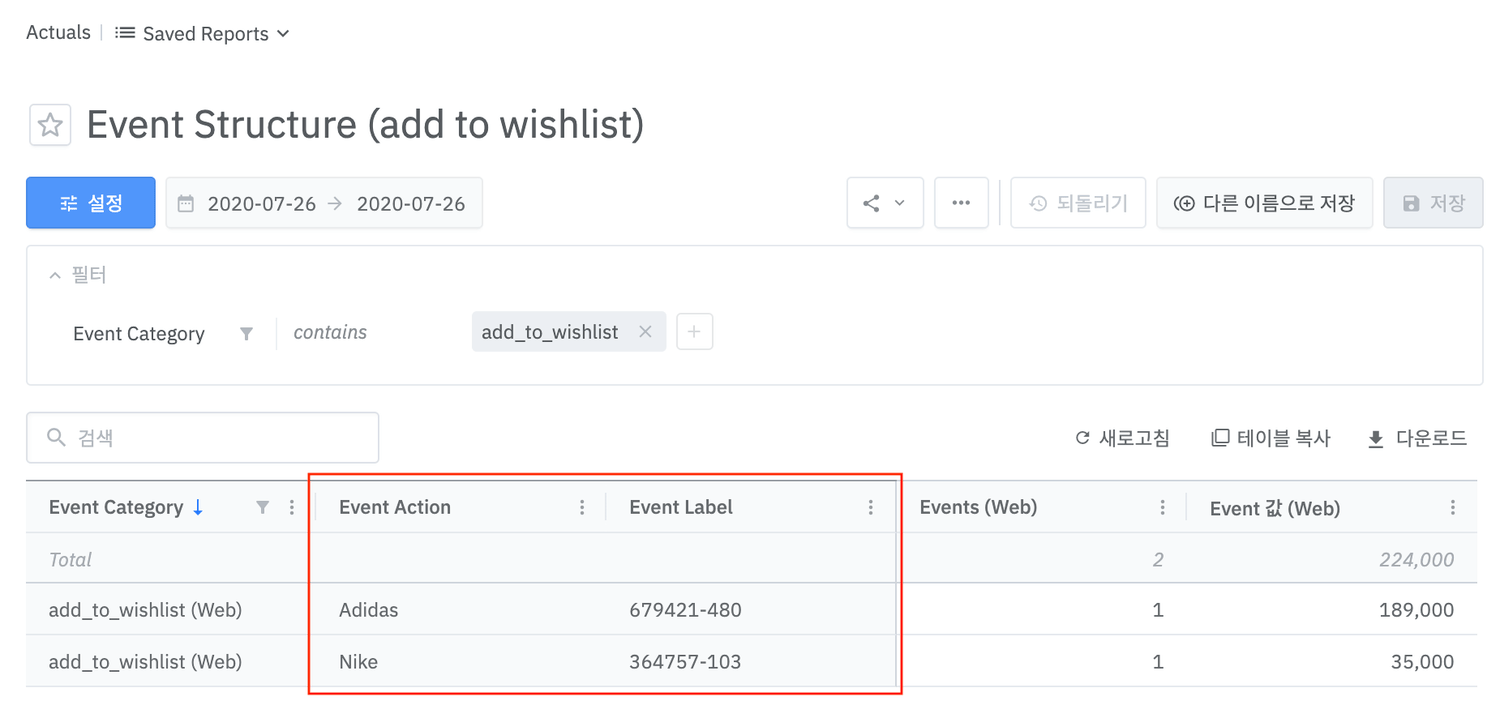
### Example of "Event Action" and "Event Label" being used
| Event Category | Event Action | Event Label | Event Value | Sample Code (Web) |
| ----------------- | ------------ | ----------- | ----------- | ---------------------------------------------------------------------------------------------------------- |
| add\_to\_wishlist | Shoe | 364757-103 | 35 | `airbridge.events.send("add_to_wishlist", { "action": "Nike", "label": "364757-103", "value": 35000 })` |
| add\_to\_wishlist | Cloth | 679421-480 | 189 | `airbridge.events.send("add_to_wishlist", { "action": "Adidas", "label": "679421-480", "value": 189000 })` |
## Semantic Attributes
***
Semantic Attributes are key-value paired properties pre-defined by Airbridge. Airbridge uses "Semantic Attributes" for "Raw Data Export" columns, or to fill in parameters when sending postbacks to media channels. Please refer to this [sheet](https://docs.google.com/spreadsheets/d/13ThNnryqRmZQwJVecM8lZ2OB7LzA8s3cwLlQBGpbXLg/edit#gid=176781833) for details on "Semantic Attributes" per "Event Category".
| Key | Type | Description |
| ---------------------- | ------- | -------------------------------------------------------- |
| totalValue | float | Total revenue (Total worth of products) |
| currency | string | Currency |
| totalQuantity | int | Total quantity |
| transactionID | string | ID of transaction |
| cartID | string | ID of cart |
| productListID | string | ID of product list |
| inAppPurchased | boolean | true: In-app purchase false: Not an in-app purchase |
| query | string | Query used to search |
| products | array | Product list |
| products.\$0.productID | string | ID of product |
| products.\$0.name | string | Name of product |
| products.\$0.price | float | Price of product |
| products.\$0.quantity | int | Quantity of product |
| products.\$0.currency | string | Currency |
| products.\$0.position | int | Location of product |
```javascript JavaScript lines theme={"theme":{"light":"github-dark-dimmed","dark":"github-dark-dimmed"}}
// Example code for semanticAttributes
airbridge.events.send("purchase_card", {
semanticAttributes: {
transactionID: '1458132a-0d09-4944-a686-fcbee81b74f7',
products: [{
productID: "1234",
name: "Nike 1",
price: 55,
currency: "USD",
quantity: 1
}, {
productID: "1235",
name: "Nike 2",
price: 44,
currency: "USD",
quantity: 1
}]
}
});
```
```objective-c Objective-C lines theme={"theme":{"light":"github-dark-dimmed","dark":"github-dark-dimmed"}}
#import
ABInAppEvent* event = [[ABInAppEvent alloc] init];
[event setCategory:@"purchase_card"];
NSDictionary* semantics = @{
@"transactionID": @"1458132a-0d09-4944-a686-fcbee81b74f7",
@"products": @[@{
@"productID": @"1234",
@"name": @"Nike 1",
@"price": @55,
@"currency": @"USD",
@"quantity": @1,
}, @{
@"productID": @"1235",
@"name": @"Nike 2",
@"price": @44,
@"currency": @"USD",
@"quantity": @1,
}],
};
[event setSemantics:semantics];
[event send];
```
```swift Swift lines theme={"theme":{"light":"github-dark-dimmed","dark":"github-dark-dimmed"}}
let event = ABInAppEvent()
event?.setCategory("purchase_card")
let semantics: [String: Any] = [
"transactionID": "1458132a-0d09-4944-a686-fcbee81b74f7",
"products": [[
"productID": "1234",
"name": "Nike 1",
"price": 55,
"currency": "USD",
"quantity": 1,
], [
"productID": "1235",
"name": "Nike 2",
"price": 44,
"currency": "USD",
"quantity": 1,
]]
]
event?.setSemantics(semantics)
event?.send()
```
```java Java lines theme={"theme":{"light":"github-dark-dimmed","dark":"github-dark-dimmed"}}
Map product1 = new HashMap<>();
product1.put("productID", "1234");
product1.put("name", "Nike 1");
product1.put("price", 55);
product1.put("currency", "USD");
product1.put("quantity", 1);
Map product2 = new HashMap<>();
product1.put("productID", "1235");
product1.put("name", "Nike 2");
product1.put("price", 44);
product1.put("currency", "USD");
product1.put("quantity", 1);
List> products = new ArrayList<>();
products.add(product1);
products.add(product2);
Map semanticAttributes = new HashMap<>();
semanticAttributes.put("transactionID", "1458132a-0d09-4944-a686-fcbee81b74f7");
semanticAttributes.put("product", products);
Airbridge.trackEvent(
"purchase_card", // Category
null, // Action
null, // Label
null, // Value
null, // Custom Attributes
semanticAttributes // Semantic Attributes
);
```
```kotlin Kotlin lines theme={"theme":{"light":"github-dark-dimmed","dark":"github-dark-dimmed"}}
Airbridge.trackEvent(
category = "purchase_card",
semanticAttributes = mapOf(
"transactionID" to "1458132a-0d09-4944-a686-fcbee81b74f7",
"products" to mapOf(
"product" to listOf(
mapOf(
"productID" to "1234",
"name" to "Nike 1",
"price" to 55,
"currency" to "USD",
"quantity" to 1
),
mapOf(
"productID" to "1235",
"name" to "Nike 2",
"price" to 44,
"currency" to "USD",
"quantity" to 1
)
)
)
)
)
```
You do not have to send `semanticAttributes.totalQuantity` through the SDK or API if `semanticAttributes.products.$.quantity` is being sent. Airbridge will calculate and provide the total quantity in the "Raw Data Export".
\
```text theme={"theme":{"light":"github-dark-dimmed","dark":"github-dark-dimmed"}}
airbridge.events.addedToCart({
products: [
{
productID: "1",
name: "MacBook Pro",
price: 1500000,
quantity: 3
},
{
productID: "2",
name: "MacBook Air",
price: 1500000,
quantity: 2
}
],
cartID: "73926365"
});
```
\
```text theme={"theme":{"light":"github-dark-dimmed","dark":"github-dark-dimmed"}}
{
"totalQuantity": 5, // Total quantity of items are automatically summed
"cartID": "73926365",
"products": [
{
"quantity": 3,
"productID": "1",
"price": 1500,
"name": "MacBook Pro",
"currency": "USD",
"position": 1
},
{
"quantity": 2,
"productID": "2",
"price": 1500,
"name": "MacBook Air",
"currency": "USD",
"position": 2
}
]
}
```
#### For refund and exchange events
When collecting refund and exchange events, you can use negative numbers for `products.$0.price`.
For example, if a customer bought a 120 USD shoe, and then exchanges for something else worth 100 USD, you can use the below example.
```text theme={"theme":{"light":"github-dark-dimmed","dark":"github-dark-dimmed"}}
airbridge.events.send("exchange", {
semanticAttributes: {
products: [{
"name": "shoe",
"price": -2000
}]
}
})
```
## Custom Attributes
***
"Custom Attributes" can be used to define properties not provided by "Semantic Attributes".
Please note that the values for "Custom Attributes" can not be used as postbacks to media channels or in "Raw Data Exports".
```javascript JavaScript lines theme={"theme":{"light":"github-dark-dimmed","dark":"github-dark-dimmed"}}
//Example code for customAttributes
airbridge.events.send("purchase_card", {
"customAttributes": {
"userRank": "1",
"itemType": "sword"
}
})
```
```objective-c Objective-C lines theme={"theme":{"light":"github-dark-dimmed","dark":"github-dark-dimmed"}}
#import
ABInAppEvent* event = [[ABInAppEvent alloc] init];
[event setCategory:@"purchase_card"];
NSDictionary* customs = @{
@"userRank": @"1",
@"itemType": @"sword"
};
[event setCustoms:customs];
[event send];
```
```swift Swift lines theme={"theme":{"light":"github-dark-dimmed","dark":"github-dark-dimmed"}}
let event = ABInAppEvent()
event?.setCategory("purchase_card")
let customs : [String: Any] = [
"userRank": "1",
"itemType": "sword"
]
event?.setCustoms(customs)
event?.send()
```
```java Java lines theme={"theme":{"light":"github-dark-dimmed","dark":"github-dark-dimmed"}}
Map customAttributes = new HashMap<>();
customAttributes.put("userRank", "1");
customAttributes.put("itemType", "sword");
Airbridge.trackEvent(
"purchase_card", // Category
null, // Action
null, // Label
null, // Value
customAttributes, // Custom Attributes
null, // Semantic Attributes
);
```
```kotlin Kotlin lines theme={"theme":{"light":"github-dark-dimmed","dark":"github-dark-dimmed"}}
Airbridge.trackEvent(
category = "purchase_card",
customAttributes = mapOf(
"userRank" to "1",
"itemType" to "sword"
)
)
```
**Advantages when using "Semantic Attributes" over "Custom Attributes"**
1. Columns are created per event when using "Raw Data Export" or S3 dumps. ("Search Query", "Transaction ID", "Product ID" and other columns will be created, while JSON strings will be provide when using "Custom Attributes")
2. Event properties are automatically mapped when sending postbacks to media channels or third party solutions. For example, postbacks for user search queries are configured to automatically be recognized by the media channels when using `semanticAttributes.query`.
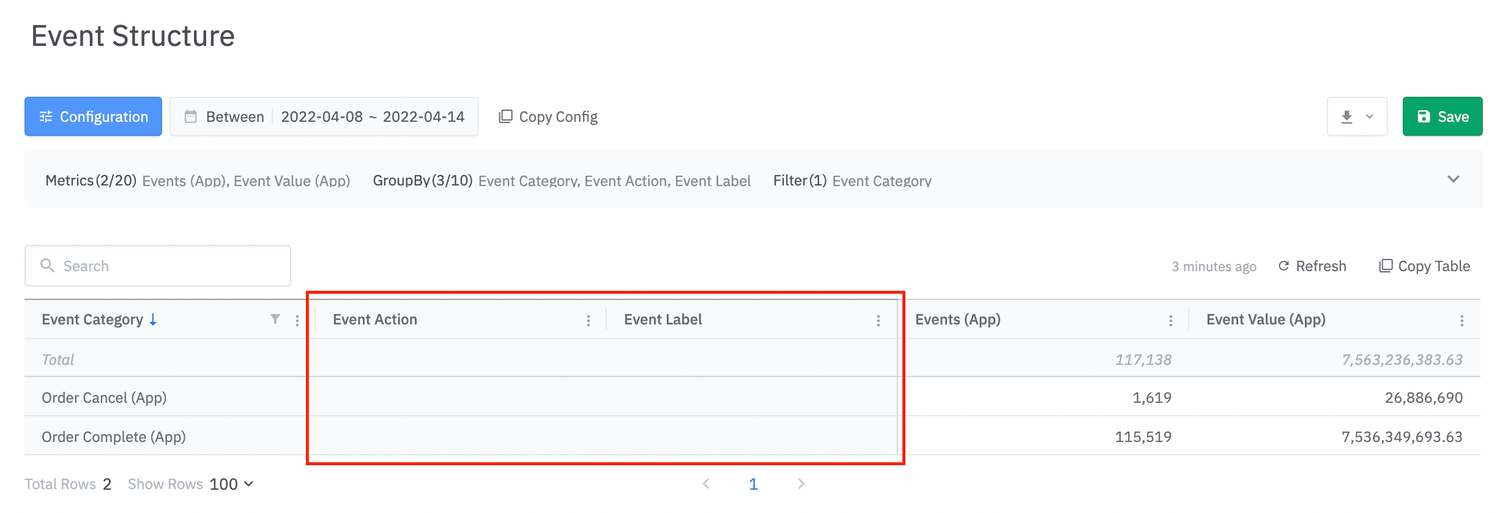 Example of an Actuals Report not using Event Action and Event Label
### Example of "Event Action" and "Event Label" being used
| Event Category | Event Action | Event Label | Event Value | Sample Code (Web) |
| ----------------- | ------------ | ----------- | ----------- | ---------------------------------------------------------------------------------------------------------- |
| add\_to\_wishlist | Shoe | 364757-103 | 35 | `airbridge.events.send("add_to_wishlist", { "action": "Nike", "label": "364757-103", "value": 35000 })` |
| add\_to\_wishlist | Cloth | 679421-480 | 189 | `airbridge.events.send("add_to_wishlist", { "action": "Adidas", "label": "679421-480", "value": 189000 })` |
Example of an Actuals Report not using Event Action and Event Label
### Example of "Event Action" and "Event Label" being used
| Event Category | Event Action | Event Label | Event Value | Sample Code (Web) |
| ----------------- | ------------ | ----------- | ----------- | ---------------------------------------------------------------------------------------------------------- |
| add\_to\_wishlist | Shoe | 364757-103 | 35 | `airbridge.events.send("add_to_wishlist", { "action": "Nike", "label": "364757-103", "value": 35000 })` |
| add\_to\_wishlist | Cloth | 679421-480 | 189 | `airbridge.events.send("add_to_wishlist", { "action": "Adidas", "label": "679421-480", "value": 189000 })` |
 ## Semantic Attributes
***
Semantic Attributes are key-value paired properties pre-defined by Airbridge. Airbridge uses "Semantic Attributes" for "Raw Data Export" columns, or to fill in parameters when sending postbacks to media channels. Please refer to this [sheet](https://docs.google.com/spreadsheets/d/13ThNnryqRmZQwJVecM8lZ2OB7LzA8s3cwLlQBGpbXLg/edit#gid=176781833) for details on "Semantic Attributes" per "Event Category".
| Key | Type | Description |
| ---------------------- | ------- | -------------------------------------------------------- |
| totalValue | float | Total revenue (Total worth of products) |
| currency | string | Currency |
| totalQuantity | int | Total quantity |
| transactionID | string | ID of transaction |
| cartID | string | ID of cart |
| productListID | string | ID of product list |
| inAppPurchased | boolean | true: In-app purchase
## Semantic Attributes
***
Semantic Attributes are key-value paired properties pre-defined by Airbridge. Airbridge uses "Semantic Attributes" for "Raw Data Export" columns, or to fill in parameters when sending postbacks to media channels. Please refer to this [sheet](https://docs.google.com/spreadsheets/d/13ThNnryqRmZQwJVecM8lZ2OB7LzA8s3cwLlQBGpbXLg/edit#gid=176781833) for details on "Semantic Attributes" per "Event Category".
| Key | Type | Description |
| ---------------------- | ------- | -------------------------------------------------------- |
| totalValue | float | Total revenue (Total worth of products) |
| currency | string | Currency |
| totalQuantity | int | Total quantity |
| transactionID | string | ID of transaction |
| cartID | string | ID of cart |
| productListID | string | ID of product list |
| inAppPurchased | boolean | true: In-app purchase