> ## Documentation Index
> Fetch the complete documentation index at: https://help.airbridge.io/llms.txt
> Use this file to discover all available pages before exploring further.
# iOS SDK (Deprecated)

## Install SDK
**Attention**
Due to known issues in the Airbridge SDK versions earlier than v1.35.1, we advise installing the Airbridge SDK v.1.35.1 or later.
### Install package
#### Install using CocoaPods
1. Create a `Podfile` file with the below commands.
```bash lines theme={"theme":{"light":"github-dark-dimmed","dark":"github-dark-dimmed"}}
cd path/to/project
touch Podfile
```
2. Edit the `Podfile` as below.
```ruby Podfile lines theme={"theme":{"light":"github-dark-dimmed","dark":"github-dark-dimmed"}}
target '[Project Name]' do
pod 'AirBridge', '1.40.0'
end
```
To install the Airbridge iOS SDK version 1.18.0 or later, CocoaPods version 1.11.0 or later is required.
3. Run the following commands in your terminal.
```bash lines theme={"theme":{"light":"github-dark-dimmed","dark":"github-dark-dimmed"}}
cd path/to/project
pod install --repo-update
```
When no `pod` command is found, install `cocoapods` with the below command.
* `sudo gem install cocoapods`
#### Install using Swift Package Manager (SPM)
The Airbridge iOS SDK v1.23.0 and later versions can be installed using the SPM.
1. Navigate to **\[File]>\[Add Packages]** in Xcode.
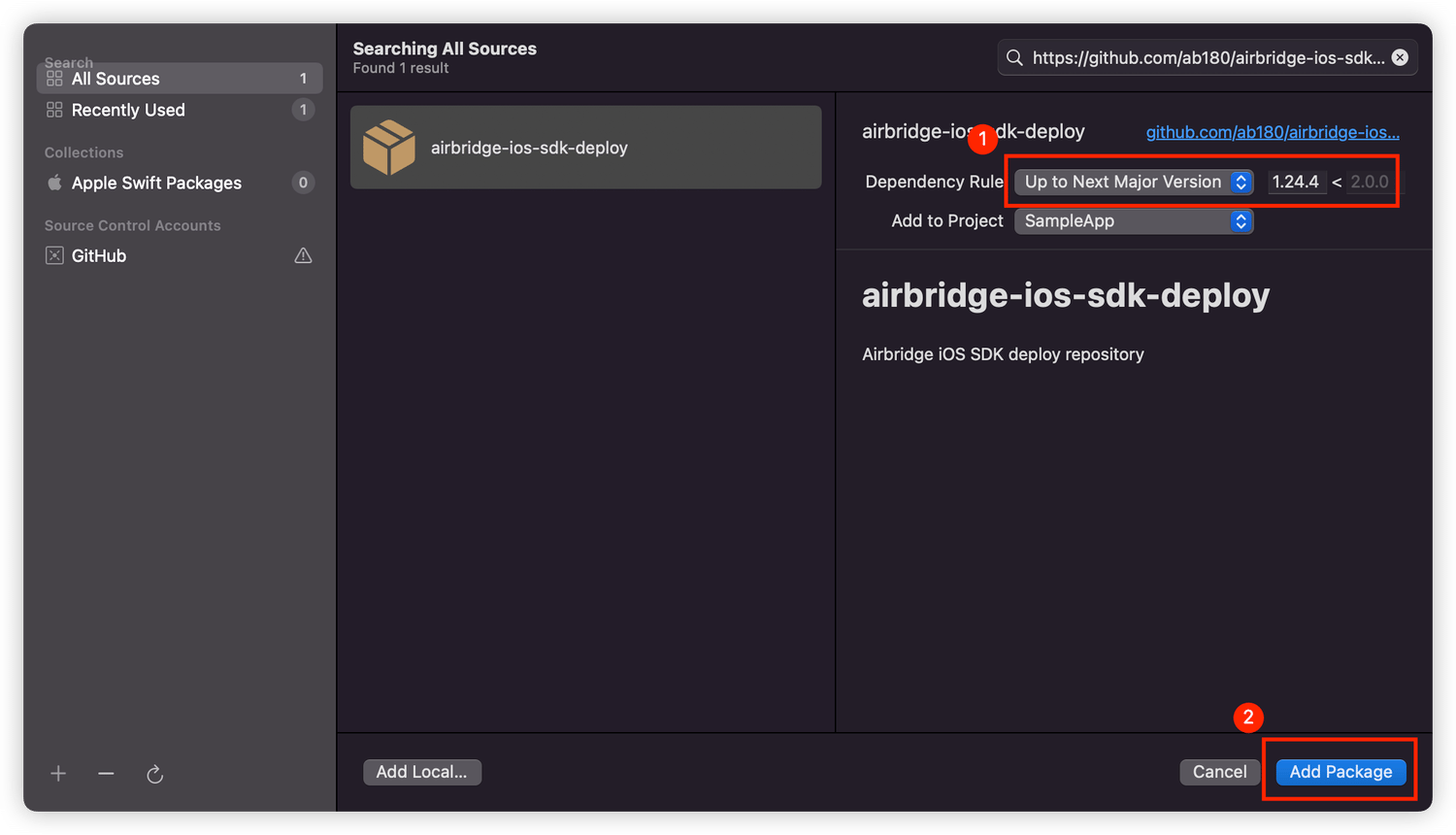
2. Search for "[https://github.com/ab180/airbridge-ios-sdk-deploy](https://github.com/ab180/airbridge-ios-sdk-deploy)" in the "Add Packages" window. Select the version you want to install and click **Add Package**.
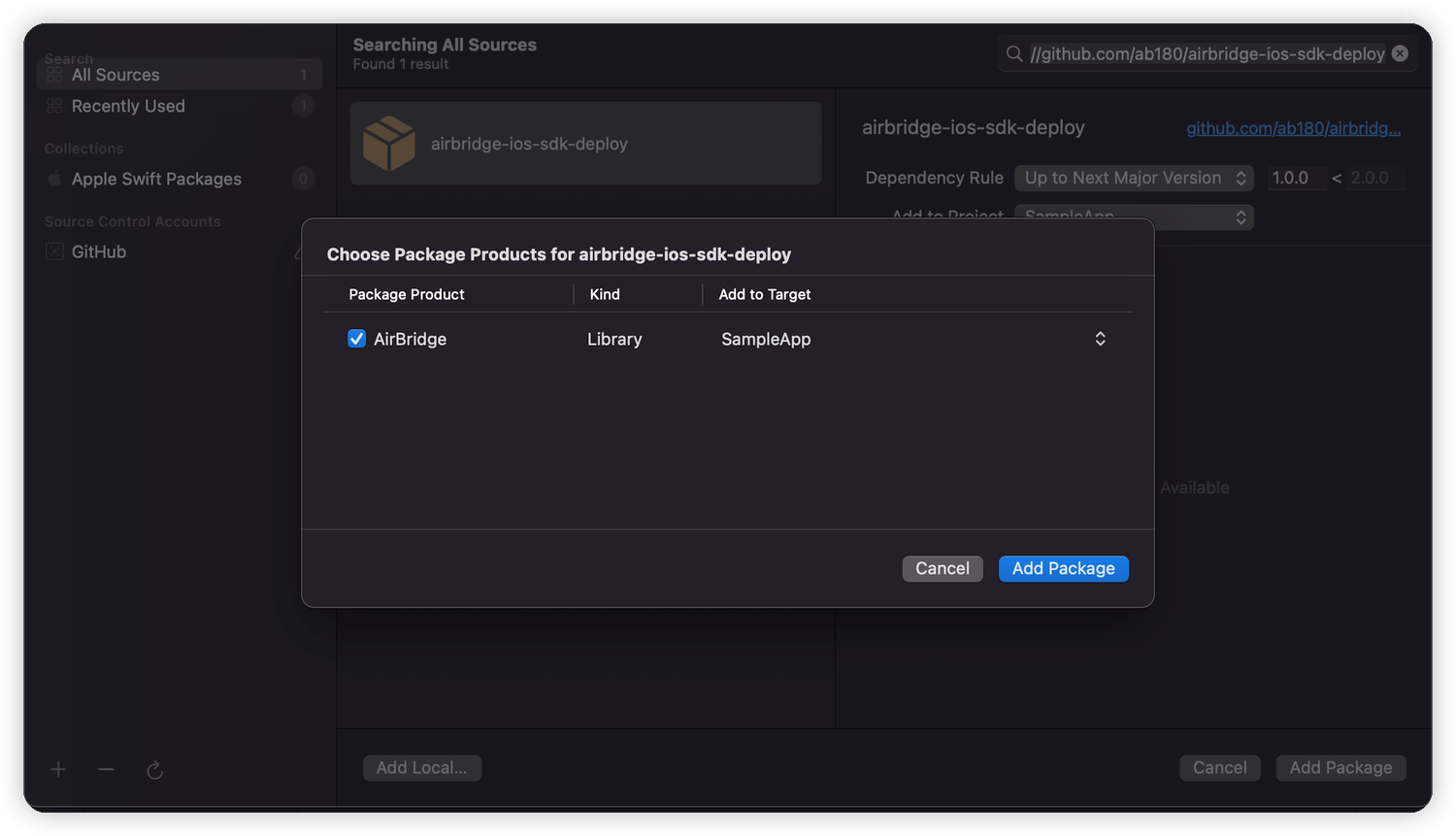
3. Select Target and click **Add Package**.
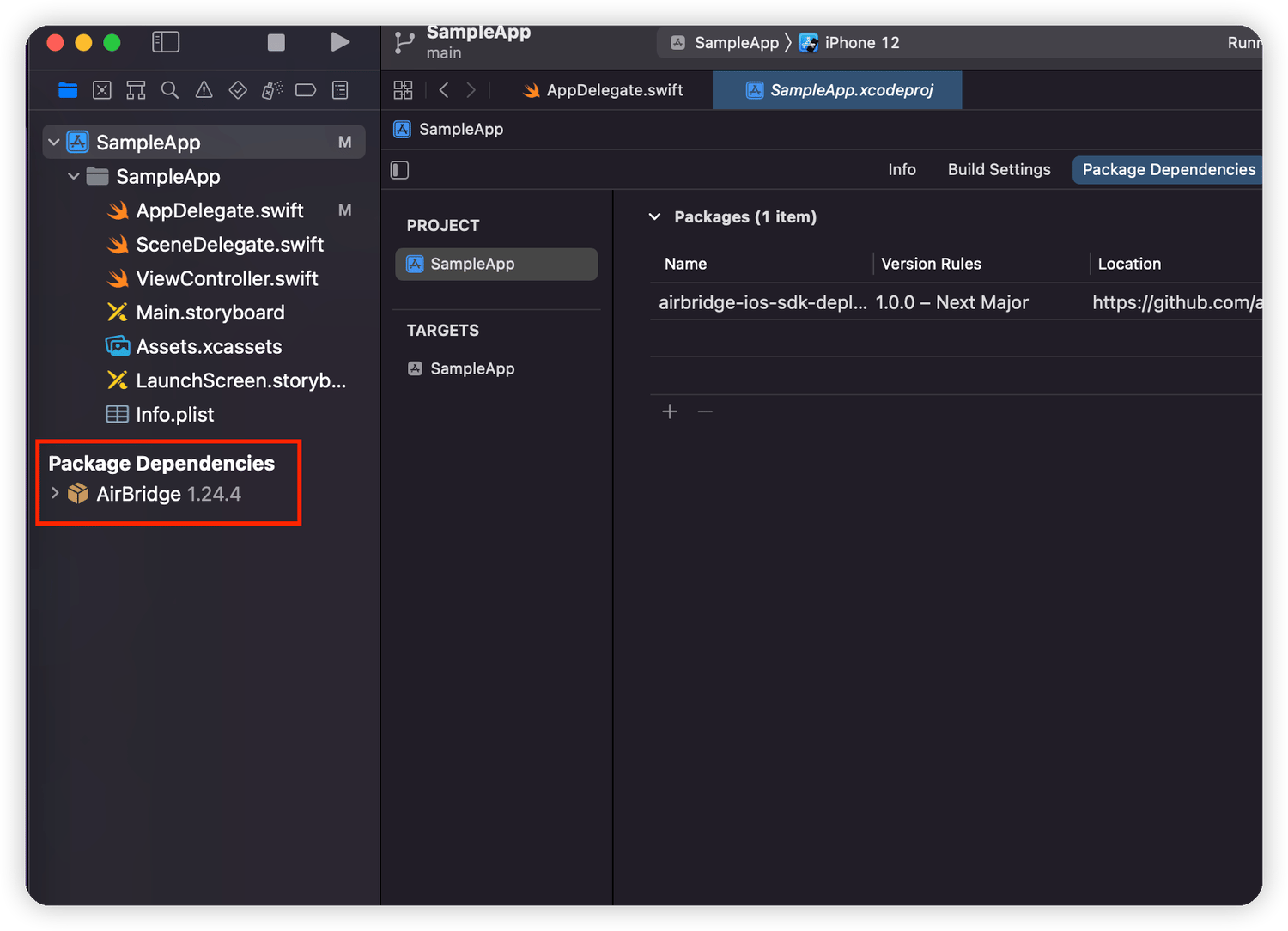
4. AirBridge will show under "Package Dependencies" if the SDK is properly installed.
#### Install manually
##### Add the `AirBridge.xcframework`
1. Download the [`AirBridge.xcframework`](https://sdk-download.airbridge.io/frameworks/AirBridge.xcframework-1.40.0.zip).
2. Navigate to **\[Xcode]>\[Project file]>\[General]>\[Frameworks, Libraries, and Embedded Content]** and click **+**.
3. Click **Add Other.. → Add Files..** at the bottom right.
4. Add the `AirBridge.xcframework` folder in the file downloaded in Step 1.
5. Set `AirBridge.xcframework` to "Embed & Sign."
##### Add Dependency Frameworks
1. Click **\[Xcode]>\[Project file]>\[General]>\[Frameworks, Libraries, and Embedded Content]** and click **+**.
2. Add the frameworks in the table below.
3. Set the frameworks as "Do not Embed."
4. Go to **\[Xcode]>\[Project file]>\[Build Phase]>\[Link Binary with Libraries]**.
5. Set the status of the framework below to `Optional`.
| Framework | Description |
| --------------------------------- | --------------------------------------------------------------------- |
| AdSupport.framework | Used to collect IDFA. |
| CoreTelephony.framework | Used to collect the carrier information. |
| StoreKit.framework | Used to collect the SKAdNetwork information. |
| AppTrackingTransparency.framework | Used to collect the user's consent status. |
| AdServices.framework | Used to collect Apple Search Ads attribution information. (iOS 14.3+) |
| WebKit.framework | Used to collect events using integration with Web SDK. |
### Set up project
#### Initialize SDK
Initialize the SDK by adding the following code at the beginning of the `application:didFinishLaunchingWithOptions:` method in the `AppDelegate` file.
```objective-c Objective-C lines theme={"theme":{"light":"github-dark-dimmed","dark":"github-dark-dimmed"}}
#import
- (BOOL)application:(UIApplication *)application didFinishLaunchingWithOptions:(NSDictionary*)launchOptions {
[AirBridge getInstance:@"YOUR_APP_SDK_TOKEN" appName:@"YOUR_APP_NAME" withLaunchOptions:launchOptions];
...
}
```
```swift Swift lines theme={"theme":{"light":"github-dark-dimmed","dark":"github-dark-dimmed"}}
import AirBridge
func application(_ application: UIApplication, didFinishLaunchingWithOptions launchOptions: [UIApplication.LaunchOptionsKey: Any]?) -> Bool {
AirBridge.getInstance("YOUR_APP_SDK_TOKEN", appName:"YOUR_APP_NAME", withLaunchOptions:launchOptions)
// ...
}
```
If you're using `SwiftUI` where `AppDelegate` doesn't exist, initialize the SDK through the `App` class with `@main`.
```swift Swift lines theme={"theme":{"light":"github-dark-dimmed","dark":"github-dark-dimmed"}}
// YourprojectApp.swift
import SwiftUI
import AirBridge
@main
struct OnlyUIApp: App {
init() {
AirBridge.getInstance("YOUR_APP_SDK_TOKEN", appName: "YOUR_APP_NAME")
}
var body: some Scene {
WindowGroup {
ContentView()
}
}
}
```
The YOUR\_APP\_NAME and YOUR\_APP\_SDK\_TOKEN can be found on the **\[Settings]>\[Tokens]** page in the Airbridge dashboard.
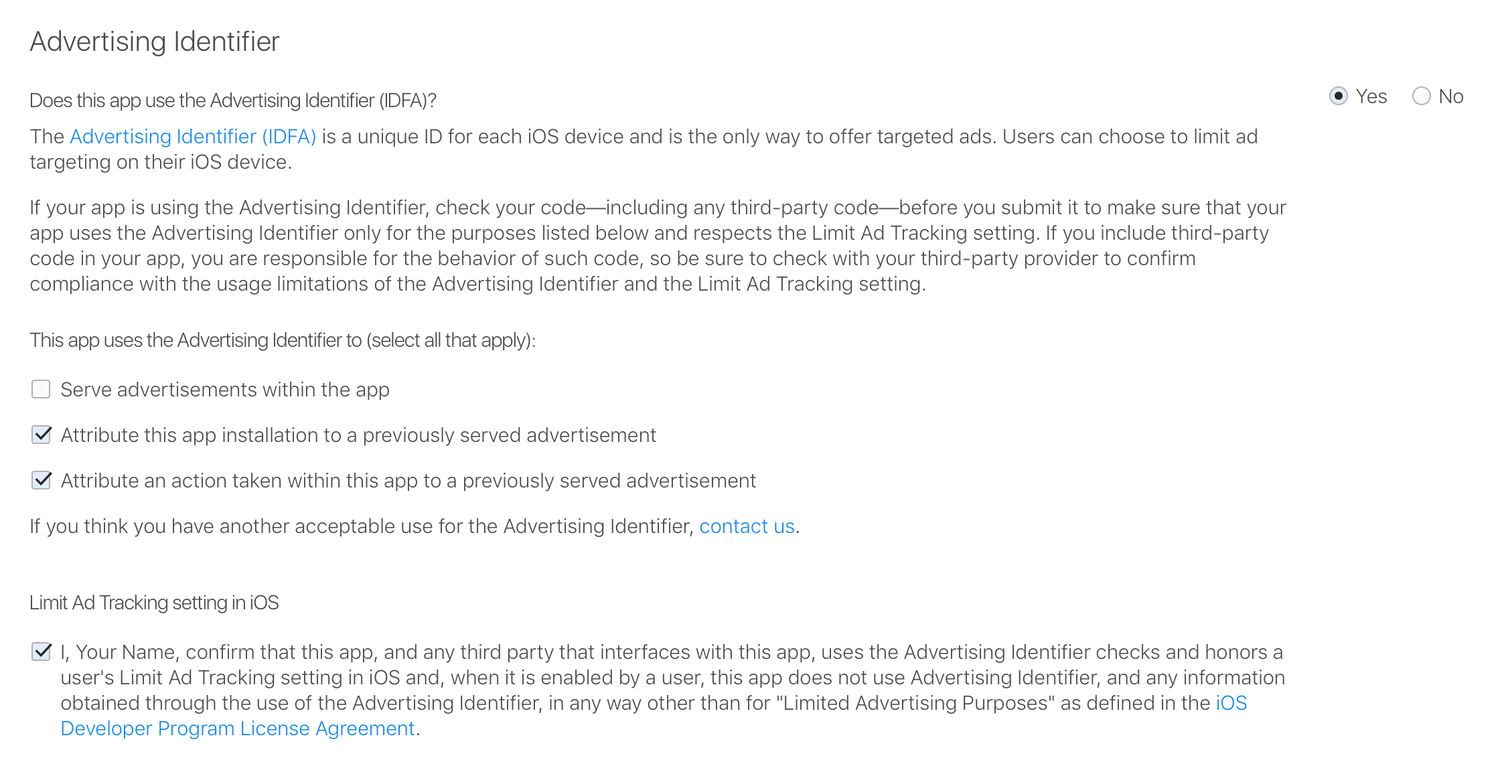
#### Accept IDFA Terms and Conditions
To use the SDK, you must agree to the "IDFA terms and conditions" when publishing your app to the App Store. Refer to the table below to fill out the form.
| Question and Checkboxes | Action |
| ------------------------------------------------------------------------------ | ----------- |
| Does this app use the Advertising Identifier (IDFA)? | Yes |
| Serve advertisements within the app | Don't check |
| Attribute this app Install to a previously served advertisement | Check |
| Attribute an action taken within this app to a previously served advertisement | Check |
| Limit Ad Tracking Setting in iOS | Check |
### SDK testing
After completing the Airbridge iOS SDK setup, you can test whether it works properly by following the methods below.
#### Using the Airbridge dashboard
1. Install and open the app on a test device.
2. Navigate to **\[Raw Data]>\[App Real-time Logs]** in the Airbridge dashboard.
3. Enter the IDFA of the test device into the search bar to find it in the logs.
It may take up to 5 minutes for the logs to be visible in the dashboard.
#### Using the logs
The logs will be printed to Xcode if you insert the following at the beginning of the SDK initialization code in your `AppDelegate` file.
```objective-c Objective-C lines theme={"theme":{"light":"github-dark-dimmed","dark":"github-dark-dimmed"}}
[AirBridge setLogLevel:AB_LOG_ALL];
[AirBridge getInstance:@"YOUR_APP_SDK_TOKEN" appName:@"YOUR_APP_NAME" withLaunchOptions:launchOptions];
```
```swift Swift lines theme={"theme":{"light":"github-dark-dimmed","dark":"github-dark-dimmed"}}
AirBridge.setLogLevel(.LOG_ALL)
AirBridge.getInstance("YOUR_APP_SDK_TOKEN", appName:"YOUR_APP_NAME", withLaunchOptions:launchOptions)
```
## Deep Linking
### Set up dashboard
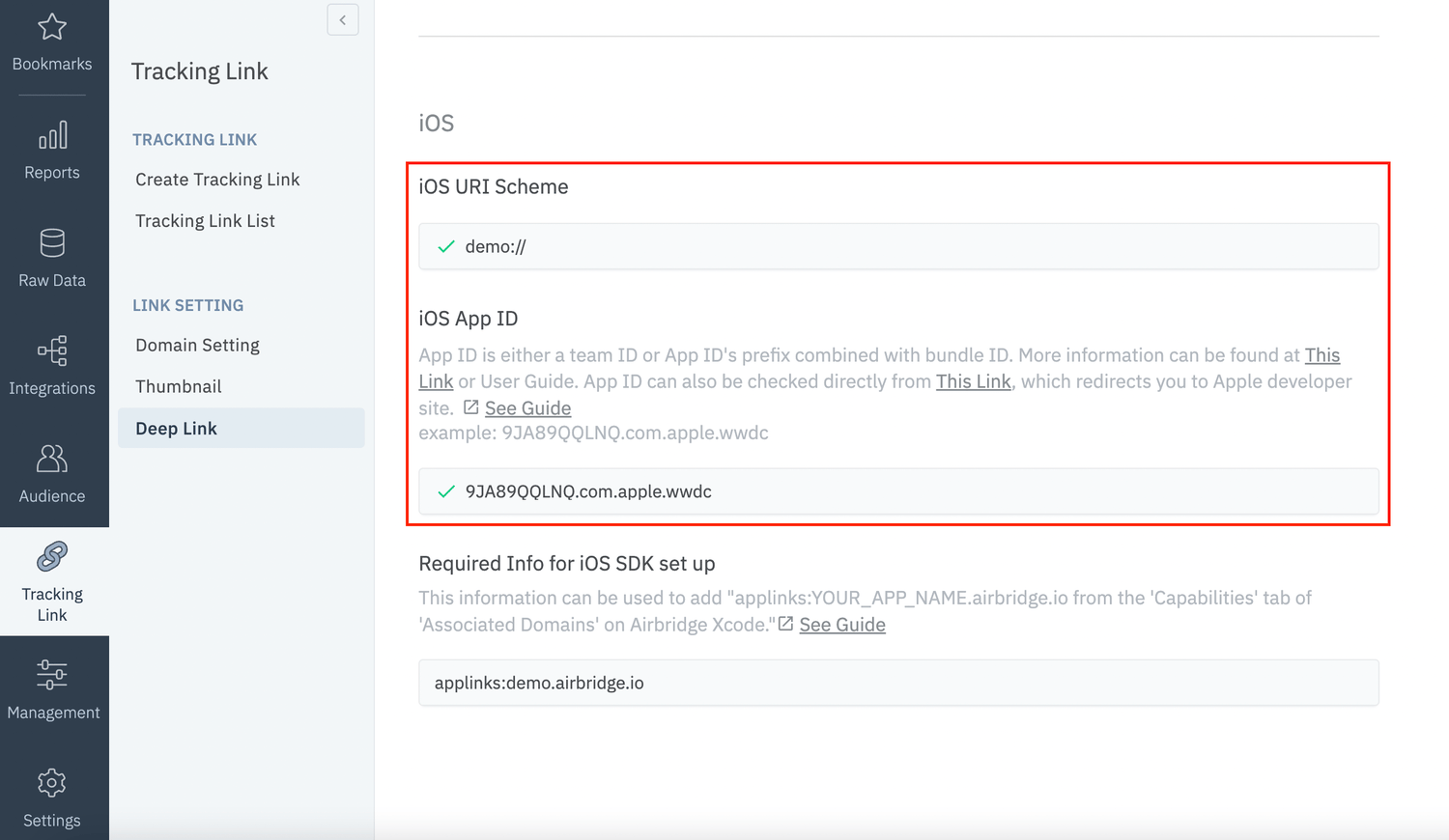
The following information must be entered on the **\[Tracking Link]>\[Deep Links]** page in the Airbridge dashboard.
* iOS URI Scheme
* iOS App ID
#### Enter the iOS URI Scheme
Enter the URI scheme into the iOS URI Scheme field, including `://`.
**Attention**
To redirect users as intended, submit the URI scheme differently for the production app and the development app.
#### Enter the iOS App ID
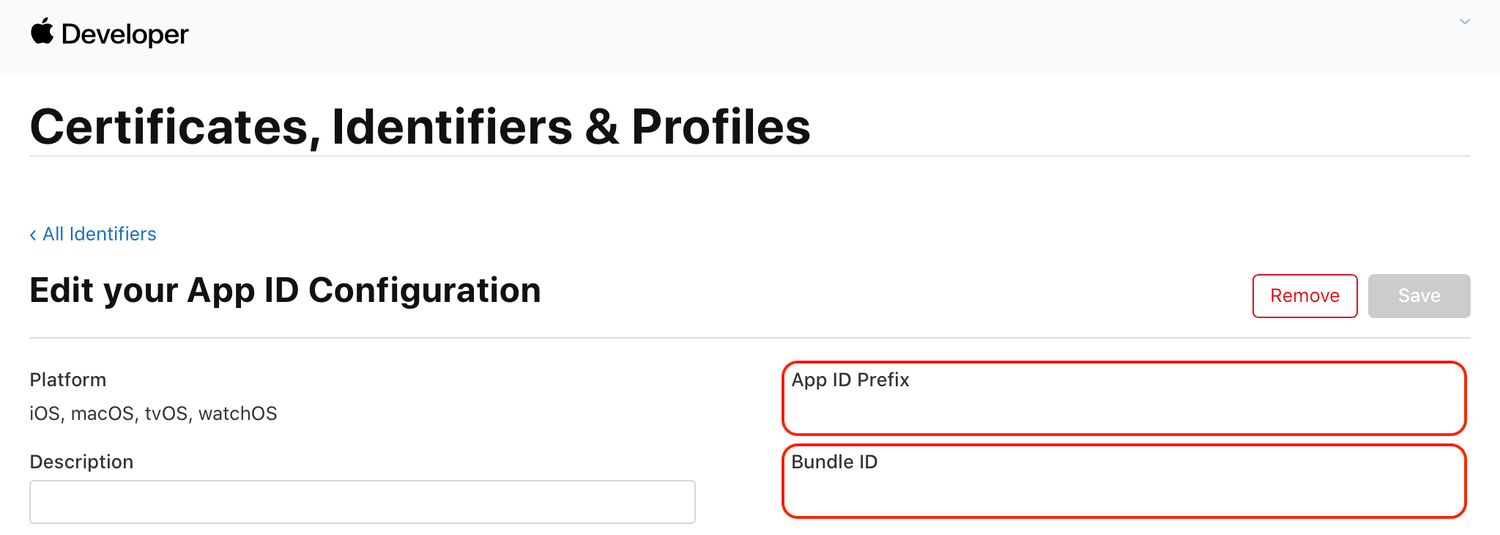
1. Go to `Identifiers` at [https://developer.apple.com/account/resources](https://developer.apple.com/account/resources).
2. Click the identifier of the app that you want to track.
3. Copy the identifier information and paste it to the iOS App ID field in the following format.
* `App ID Prefix` + `.` + `Bundle ID` (Example: `9JA89QQLNQ.com.apple.wwdc`)
### Set up project
#### Scheme
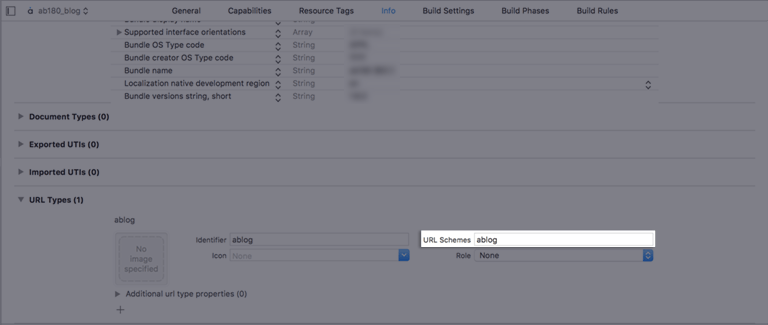
1. Go to **\[Xcode]>\[Project file]>\[Info]>\[URL Types]**.
From the Airbridge dashboard, copy "iOS URI Scheme" and paste it to the URL Schemes field in Xcode. Make sure not to include `://`.
#### Universal Link
1. Go to **\[Xcode]>\[Project file>\[Signing & Capabilities]**.
2. Click **+ Capability** and add **Associated Domains**.
3. Add `applinks:YOUR_APP_NAME.airbridge.io`to **Associated Domains**.
4. Add `applinks:YOUR_APP_NAME.abr.ge`to **Associated Domains**.
`YOUR_APP_NAME` can be found on the **\[Settings]>\[Token]** page in the Airbridge dashboard.
Refer to [Troubleshooting → Webcredentials](#webcredentials) if you want to use the autofill feature.
#### Send deep link information to SDK
##### When using AppDelegate
For apps that support iOS 12 and earlier, events are usually sent through the `application(_:open:options:)` method in `AppDelegate`.
1. Open `ios/[Project name]/AppDelegate`.
2. Call the `handleURLSchemeDeeplink` function at the top of the below function to pass the deep link information to the SDK when the app is opened with a scheme.
```objective-c Objective-C lines theme={"theme":{"light":"github-dark-dimmed","dark":"github-dark-dimmed"}}
- (BOOL)application:(UIApplication *)application
openURL:(NSURL *)url
options:(NSDictionary*)options
{
[AirBridge.deeplink handleURLSchemeDeeplink:url];
return YES;
}
```
```swift Swift lines theme={"theme":{"light":"github-dark-dimmed","dark":"github-dark-dimmed"}}
func application(_ app: UIApplication,
open url: URL,
options: [UIApplication.OpenURLOptionsKey : Any] = [:]) -> Bool
{
AirBridge.deeplink()?.handleURLSchemeDeeplink(url)
return true
}
```
3. Call the `handleUserActivity` function at the top of the below function to pass the deep link information to the SDK when the app is opened with a Universal Link.
```objective-c Objective-C lines theme={"theme":{"light":"github-dark-dimmed","dark":"github-dark-dimmed"}}
- (BOOL)application:(UIApplication*)application
continueUserActivity:(NSUserActivity*)userActivity
restorationHandler:(void (^)(NSArray* _Nullable))restorationHandler
{
[AirBridge.deeplink handleUserActivity:userActivity];
return YES;
}
```
```swift Swift lines theme={"theme":{"light":"github-dark-dimmed","dark":"github-dark-dimmed"}}
func application(_ application: UIApplication,
continue userActivity: NSUserActivity,
restorationHandler: @escaping ([UIUserActivityRestoring]?) -> Void) -> Bool
{
AirBridge.deeplink()?.handle(userActivity)
return true
}
```
**Attention**
When using `SceneDelegate`, the deep link is passed to `SceneDelegate` instead of `AppDelegate`. Refer to the next section on how to receive the deep link in `SceneDelegate`.
##### When using SceneDelegate
For apps that support iOS 13 and later, deep links are passed to the following methods.
* When the app was loaded from a "Not running" status: `scene(_:willConnectTo:options:)`
* In all other situations (e.g., background)
* Universal link: `scene(_:continue:)`
* Scheme link: `scene(_:openURLContexts:)`
```swift lines theme={"theme":{"light":"github-dark-dimmed","dark":"github-dark-dimmed"}}
import UIKit
import AirBridge
@available(iOS 13, *)
class SceneDelegate: UIWindowSceneDelegate {
var window: UIWindow?
// Receive links after the app's killed
func scene(_ scene: UIScene, willConnectTo session: UISceneSession, options connectionOptions: UIScene.ConnectionOptions) {
if let schemeLinkURL = connectionOptions.urlContexts.first?.url {
// Scheme
AirBridge.deeplink()?.handleURLSchemeDeeplink(schemeLinkURL)
} else if let userActivity = connectionOptions.userActivities.first {
// Universal
AirBridge.deeplink()?.handle(userActivity)
}
// ...
}
// Receive universal link
func scene(_ scene: UIScene, continue userActivity: NSUserActivity) {
AirBridge.deeplink().handle(userActivity)
// ...
}
// Receive scheme link
func scene(_ scene: UIScene, openURLContexts URLContexts: Set) {
guard let schemeLinkURL = URLContexts.first?.url else {
return
}
AirBridge.deeplink().handleURLSchemeDeeplink(schemeLinkURL)
// ...
}
}
```
##### When using SwiftUI without SceneDelegate
If you are using `SwiftUI` without `SceneDelegate`, deep links are passed to `onOpenURL`. Add this method to the App class with `@main`.
```swift lines theme={"theme":{"light":"github-dark-dimmed","dark":"github-dark-dimmed"}}
import SwiftUI
import AirBridge
@main
@available(iOS 14, *)
struct OnlyUIApp: App {
...
var body: some Scene {
WindowGroup {
ContentView()
.onOpenURL { url in
if url.scheme != "http" && url.scheme != "https" {
// Scheme Link
AirBridge.deeplink()?.handleURLSchemeDeeplink(url)
}
else {
// Universal Link
let userActivity = NSUserActivity(activityType: NSUserActivityTypeBrowsingWeb)
userActivity.webpageURL = url
AirBridge.deeplink().handle(userActivity)
}
}
}
}
}
```
**Attention**
If you are using `SwiftUI` with `SceneDelegate`, `onOpenUrl` cannot be used. In such a case, refer to this [section](/en/developers/deprecated-ios-sdk-v1#when-using-scenedelegate).
### Set up deep link callback
#### When using AppDelegate
1. Open `ios/[Project file]/AppDelegate`.
2. Use the `setDeeplinkCallback` function to set up the callback that should be called when the app is opened through a deep link.
```objective-c Objective-C lines theme={"theme":{"light":"github-dark-dimmed","dark":"github-dark-dimmed"}}
- (BOOL)application:(UIApplication *)application didFinishLaunchingWithOptions:(NSDictionary*)launchOptions {
[AirBridge getInstance:@"YOUR_APP_TOKEN" appName:@"YOUR_APP_NAME" withLaunchOptions:launchOptions];
[AirBridge.deeplink setDeeplinkCallback:^(NSString* deeplink) {
// Code to run when opening app with a deep link
// Deeplink from airbridge = YOUR_SCHEME://...
NSLog(@"DeeplinkCallback : %@", deeplink);
}];
}
```
```swift Swift lines theme={"theme":{"light":"github-dark-dimmed","dark":"github-dark-dimmed"}}
func application(_ application: UIApplication, didFinishLaunchingWithOptions launchOptions: [UIApplication.LaunchOptionsKey:
Any]?) -> Bool {
AirBridge.getInstance("YOUR_APP_TOKEN", appName: "YOUR_APP_NAME", withLaunchOptions: launchOptions)
AirBridge.deeplink()?.setDeeplinkCallback({ (deeplink) in
// Code to run when opening app with a deep link
// Airbridge Deeplink = YOUR_SCHEME://...
NSLog("DeeplinkCallback : %@", deeplink)
})
return true
}
```
#### When using SwiftUI
If you are not using `AppDelegate` or `SceneDelegate`, add the following method to the `App` class with `@main`.
```swift lines theme={"theme":{"light":"github-dark-dimmed","dark":"github-dark-dimmed"}}
import SwiftUI
import AirBridge
@main
@available(iOS 14, *)
struct OnlyUIApp: App {
init() {
AirBridge.getInstance("YOUR_APP_SDK_TOKEN", appName: "YOUR_APP_NAME")
AirBridge.deeplink()?.setDeeplinkCallback { deeplink in
print(deeplink)
}
}
var body: some Scene {
WindowGroup {
ContentView()
}
}
}
```
* For Airbridge iOS SDK v1.10.0 to 1.10.9: The Airbridge deep link is sent in the format of `https://YOUR_APP_NAME.airbridge.io/...`.
* For `Airbridge` iOS SDK v.1.20.0 to v1.9.10: The Airbridge deep link is sent in the format of either `https://YOUR_APP_NAME.airbridge.io/...` or `YOUR_SCHEME://...`.
#### Set up deferred deep linking
When setting up a deep link callback, information about deferred deep links will also be sent through that deep link callback. Refer to "[Set up deep link callback](/en/developers/deprecated-ios-sdk-v1#set-up-deep-link-callback)" to set up deferred deep link callbacks.
The deferred deep link callback is sent only once when the app is installed.
### Deep link testing
Check whether the app opens and the deep link event is sent when the Airbridge deep link is clicked on. The Airbridge deep link should follow the `YOUR_SCHEME://...` format. `Your_Scheme` is the iOS URI Scheme entered in your Airbridge dashboard.
1. Click the deep link.
2. Check whether the deep link event appears on the **\[Raw Data]>\[App Real-time Logs]** page in the Airbridge dashboard.
## User Data
### Set up user identifier
You can set up the SDK so that once a user identifier is sent to the SDK, all events collected thereafter contain the same user identifier.
```objective-c Objective-C lines theme={"theme":{"light":"github-dark-dimmed","dark":"github-dark-dimmed"}}
[AirBridge.state setUserID:@"personID"];
[AirBridge.state setUserEmail:@"persondoe@airbridge.io"];
[AirBridge.state setUserPhone:@"1(123)123-1234"]
// user alias changed with inserted dictionary.
[AirBridge.state setUserAlias:@{@"key": @"value"}];
// key, value is inserted to existed user alias.
[AirBridge.state addUserAliasWithKey:@"key" value:@"value"];
```
```swift Swift lines theme={"theme":{"light":"github-dark-dimmed","dark":"github-dark-dimmed"}}
AirBridge.state()?.setUserID("personID")
AirBridge.state()?.setUserEmail("persondoe@airbridge.io")
AirBridge.state()?.setUserPhone("(123)123-1234")
// user alias changed with inserted dictionary.
AirBridge.state()?.setUserAlias(["key": "value"])
// key, value is inserted to existed user alias.
AirBridge.state()?.addUserAlias(withKey: "key", value: "value")
```
| Name | Description | Limitations |
| ----- | ----------------- | ---------------------------------------------------------------------------------------------------------------------------------------------------------------------------------------------------------- |
| ID | User ID | - |
| Email | User Email | Hashed by default (SHA256, can be disabled) |
| Phone | User phone number | Hashed by default (SHA256, can be disabled) |
| Alias | User alias | - Maximum 10 aliases - `key`type is NSString, maximum 128 characters supported - `key`must satisfy `^[a-zA-Z_][a-z0-9_]*$`regex - `value`type is NSString, maximum 128 characters supported |
### Set up user attributes
Additional user attributes can be collected for a more accurate multi-touch attribution and in-depth data analysis.
```objective-c Objective-C lines theme={"theme":{"light":"github-dark-dimmed","dark":"github-dark-dimmed"}}
// user attributes changed with inserted dictionary.
[AirBridge.state setUserAttributes:@{@"key": @"value"}];
// key, value is inserted to existed user attributes.
[AirBridge.state addUserAttributesWithKey:@"key" value:@"value"];
```
```swift Swift lines theme={"theme":{"light":"github-dark-dimmed","dark":"github-dark-dimmed"}}
// user attributes changed with inserted dictionary.
AirBridge.state()?.setUserAttributes(["key": "value" as NSObject])
// 기존의 user attributes 에 해당 key, value 가 추가됩니다.
AirBridge.state()?.addUserAttributes(withKey: "key", value: "value" as NSObject)
```
| Name | Description | Limit |
| ---------- | --------------- | --------------------------------------------------------------------------------------------------------------------------------------------------------------------------------------------------------------------------------------------------- |
| Attributes | User attributes | - Maximum 100 attributes - `key`type is NSString, maximum 128 characters supported - `key`must satisfy `^[a-zA-Z_][a-z0-9_]*$`regex - `value`type is NSString or NSNumber - Maximum 1024 characters supported for NSString type |
### User data setup testing
Check whether the user data setup has been successfully completed by following the steps below.
1. Complete the user setup.
2. Send an event through the SDK.
3. Navigate to **\[Raw Data]>\[App Real-time Logs]** in the Airbridge dashboard, find the event sent, and check whether the user data is included under the `user` block in the JSON.
## Device Data
### Set up device alias
Set up the Airbridge SDK to collect device alias when collecting events. The alias won't be deleted even after the user closes the app unless the user deletes the app.
```objective-c Objective-C lines theme={"theme":{"light":"github-dark-dimmed","dark":"github-dark-dimmed"}}
[AirBridge.state setDeviceAliasWithKey: "ADD_YOUR_KEY", value: "AND_YOUR_VALUE"];
[AirBridge.state removeDeviceAliasWithKey: "DELETE_THIS_KEY"];
[AirBridge.state clearDeviceAlias];
```
```swift Swift lines theme={"theme":{"light":"github-dark-dimmed","dark":"github-dark-dimmed"}}
AirBridge.state()?.setDeviceAlias(key: "ADD_YOUR_KEY", value: "AND_YOUR_VALUE")
AirBridge.state()?.removeDeviceAlias(key: "DELETE_THIS_KEY")
AirBridge.state().clearDeviceAlias()
```
| Method | Description |
| ------------------------------------------------ | -------------------------------------------------------------------------------------- |
| `setDeviceAlias(withKey: String, value: String)` | Adds the key-value pair to the device identifier. |
| `removeDeviceAlias(withKey: String)` | Deletes the device alias of the key. If there is no identifier, no action is executed. |
| `clearDeviceAlias()` | Deletes all device aliases. |
## In-app Events
When important user actions occur, those actions can be collected as in-app events.
**Attention**
The `setCategory` function must be called to send events.
### Send in-app events
You can send in-app events through the SDK to Airbridge for ad performance measurement.
```objective-c Objective-C lines theme={"theme":{"light":"github-dark-dimmed","dark":"github-dark-dimmed"}}
#import
ABInAppEvent* event = [[ABInAppEvent alloc] init];
[event setCategory:@"category"];
[event setAction:@"action"];
[event setLabel:@"label"];
[event setValue:@(123)];
[event setCustoms:@{@"key": @"value"}];
// Semantic Attributes Option 1
ABSemanticAttributes* semanticAttributes = [[ABSemanticAttributes alloc] init];
semanticAttributes.transactionID = @"transaction_123";
[event setSemanticAttributes:semanticAttributes];
// Semantic Attributes Option 2
// For more details, please check following page
// https://developers.airbridge.io/docs/event-structure#semantic-attributes
[event setSemantics:@{@"transactionID": @"transaction_123"}];
[event send];
```
```swift Swift lines theme={"theme":{"light":"github-dark-dimmed","dark":"github-dark-dimmed"}}
let event = ABInAppEvent()
event?.setCategory("category")
event?.setAction("action")
event?.setLabel("label")
event?.setValue(123)
event?.setCustoms(["key": "value"])
// Semantic Attributes Option 1
let semanticAttributes = ABSemanticAttributes()
semanticAttributes?.transactionID = "transaction_123"
event?.setSemanticAttributes(semanticAttributes)
// Semantic Attributes Option 2
// For more details, please check following page
// https://developers.airbridge.io/docs/event-structure#semantic-attributes
event?.setSemantics(["transactionID": "transaction_123"])
event?.send()
```
| Parameter | Description |
| --------------------- | ------------------------------------ |
| setCategory | Event name (required) |
| setAction | Event attribute 1 |
| setLabel | Event attribute 2 |
| setValue | Event attribute value |
| setCustoms | Additional custom attributes |
| setSemanticAttributes | Additional semantic attributes (Map) |
### Send Standard Events
#### User Sign-Up
```objective-c Objective-C lines theme={"theme":{"light":"github-dark-dimmed","dark":"github-dark-dimmed"}}
#import
#import
#import
ABUser* user = [[ABUser alloc] init];
user.ID = @"testID";
user.email = @"testID@ab180.co";
user.phone = @"000-0000-0000";
user.alias = @{
@"key": @"value",
};
user.attributes = @{
@"key": @"value",
};
[AirBridge.state setUser:user];
ABInAppEvent* event = [[ABInAppEvent alloc] init];
[event setCategory:ABCategory.signUp];
[event send];
```
```swift Swift lines theme={"theme":{"light":"github-dark-dimmed","dark":"github-dark-dimmed"}}
let user = ABUser()
user.id = "testID"
user.email = "testID@ab180.co"
user.phone = "000-0000-0000"
user.attributes = [
"key": "value" as NSObject,
]
user.alias = [
"key": "value",
]
AirBridge.state().setUser(user)
let event = ABInAppEvent()
event?.setCategory(ABCategory.signUp)
event?.send()
```
#### User Sign-In
```objective-c Objective-C lines theme={"theme":{"light":"github-dark-dimmed","dark":"github-dark-dimmed"}}
#import
#import
#import
ABUser* user = [[ABUser alloc] init];
user.ID = @"testID";
user.email = @"testID@ab180.co";
user.phone = @"000-0000-0000";
user.alias = @{
@"key": @"value",
};
user.attributes = @{
@"key": @"value",
};
[AirBridge.state setUser:user];
ABInAppEvent* event = [[ABInAppEvent alloc] init];
[event setCategory:ABCategory.signIn];
[event send];
```
```swift Swift lines theme={"theme":{"light":"github-dark-dimmed","dark":"github-dark-dimmed"}}
let user = ABUser()
user.id = "testID"
user.email = "testID@ab180.co"
user.phone = "000-0000-0000"
user.attributes = [
"key": "value" as NSObject,
]
user.alias = [
"key": "value",
]
AirBridge.state().setUser(user)
let event = ABInAppEvent()
event?.setCategory(ABCategory.signIn)
event?.send()
```
#### User Sign-Out
```objective-c Objective-C lines theme={"theme":{"light":"github-dark-dimmed","dark":"github-dark-dimmed"}}
#import
#import
ABInAppEvent* event = [[ABInAppEvent alloc] init];
[event setCategory:ABCategory.signOut];
[AirBridge.state setUser:[[ABUser alloc] init]];
```
```swift Swift lines theme={"theme":{"light":"github-dark-dimmed","dark":"github-dark-dimmed"}}
let event = ABInAppEvent()
event?.setCategory(ABCategory.signOut)
event?.send()
AirBridge.state().setUser(ABUser())
```
#### View Home Screen
```objective-c Objective-C lines theme={"theme":{"light":"github-dark-dimmed","dark":"github-dark-dimmed"}}
#import
#import
ABInAppEvent* event = [[ABInAppEvent alloc] init];
[event setCategory:ABCategory.viewHome];
[event send];
```
```swift Swift lines theme={"theme":{"light":"github-dark-dimmed","dark":"github-dark-dimmed"}}
let event = ABInAppEvent()
event?.setCategory(ABCategory.viewHome)
event?.send()
```
#### View Product Detail
```objective-c Objective-C lines theme={"theme":{"light":"github-dark-dimmed","dark":"github-dark-dimmed"}}
#import
#import
#import
#import
ABProduct* product1 = [[ABProduct alloc] init];
product1.idx = @"idx1";
product1.name = @"name1";
product1.price = @100;
product1.currency = @"USD";
product1.orderPosition = @1;
product1.quantity = @1;
ABInAppEvent* event = [[ABInAppEvent alloc] init];
[event setCategory:ABCategory.viewProductDetail];
[event setSemantics:@{
ABSemanticsKey.products: @[product1.toDictionary],
}];
[event send];
```
```swift Swift lines theme={"theme":{"light":"github-dark-dimmed","dark":"github-dark-dimmed"}}
let product1 = ABProduct()
product1.idx = "idx1"
product1.name = "name1"
product1.price = 100
product1.currency = "USD"
product1.orderPosition = 1
product1.quantity = 1
let event = ABInAppEvent()
event?.setCategory(ABCategory.viewProductDetail)
event?.setSemantics([
ABSemanticsKey.products: [
product1.toDictionary(),
],
])
event?.send()
```
#### View Product List
```objective-c Objective-C lines theme={"theme":{"light":"github-dark-dimmed","dark":"github-dark-dimmed"}}
#import
#import
#import
#import
ABProduct* product1 = [[ABProduct alloc] init];
product1.idx = @"idx1";
product1.name = @"name1";
product1.price = @100;
product1.currency = @"USD";
product1.orderPosition = @1;
product1.quantity = @1;
ABProduct* product2 = [[ABProduct alloc] init];
product2.idx = @"idx2";
product2.name = @"name2";
product2.price = @200;
product2.currency = @"USD";
product2.orderPosition = @2;
product2.quantity = @2;
ABInAppEvent* event = [[ABInAppEvent alloc] init];
[event setCategory:ABCategory.viewProductList];
[event setSemantics:@{
ABSemanticsKey.products: @[
product1.toDictionary,
product2.toDictionary,
],
ABSemanticsKey.productListID: @"listID",
}];
[event send];
```
```swift Swift lines theme={"theme":{"light":"github-dark-dimmed","dark":"github-dark-dimmed"}}
let product1 = ABProduct()
product1.idx = "idx1"
product1.name = "name1"
product1.price = 100
product1.currency = "USD"
product1.orderPosition = 1
product1.quantity = 1
let product2 = ABProduct()
product2.idx = "idx2"
product2.name = "name2"
product2.price = 200
product2.currency = "USD"
product2.orderPosition = 2
product2.quantity = 2
let event = ABInAppEvent()
event?.setCategory(ABCategory.viewProductList)
event?.setSemantics([
ABSemanticsKey.products: [
product1.toDictionary(),
product2.toDictionary(),
],
ABSemanticsKey.productListID: "productListID",
])
event?.send()
```
#### View Search Result
```objective-c Objective-C lines theme={"theme":{"light":"github-dark-dimmed","dark":"github-dark-dimmed"}}
#import
#import
#import
#import
ABProduct* product1 = [[ABProduct alloc] init];
product1.idx = @"idx1";
product1.name = @"name1";
product1.price = @100;
product1.currency = @"USD";
product1.orderPosition = @1;
product1.quantity = @1;
ABProduct* product2 = [[ABProduct alloc] init];
product2.idx = @"idx2";
product2.name = @"name2";
product2.price = @200;
product2.currency = @"USD";
product2.orderPosition = @2;
product2.quantity = @2;
ABInAppEvent* event = [[ABInAppEvent alloc] init];
[event setCategory:ABCategory.viewSearchResult];
[event setSemantics:@{
ABSemanticsKey.products: @[
product1.toDictionary,
product2.toDictionary,
],
ABSemanticsKey.query: @"query",
}];
[event send];
```
```swift Swift lines theme={"theme":{"light":"github-dark-dimmed","dark":"github-dark-dimmed"}}
let product1 = ABProduct()
product1.idx = "idx1"
product1.name = "name1"
product1.price = 100
product1.currency = "USD"
product1.orderPosition = 1
product1.quantity = 1
let product2 = ABProduct()
product2.idx = "idx2"
product2.name = "name2"
product2.price = 200
product2.currency = "USD"
product2.orderPosition = 2
product2.quantity = 2
let event = ABInAppEvent()
event?.setCategory(ABCategory.viewSearchResult)
event?.setSemantics([
ABSemanticsKey.products: [
product1.toDictionary(),
product2.toDictionary(),
],
ABSemanticsKey.query: "query",
])
event?.send()
```
#### Add to Cart
```objective-c Objective-C lines theme={"theme":{"light":"github-dark-dimmed","dark":"github-dark-dimmed"}}
#import
#import
#import
#import
ABProduct* product1 = [[ABProduct alloc] init];
product1.idx = @"idx1";
product1.name = @"name1";
product1.price = @100;
product1.currency = @"USD";
product1.orderPosition = @1;
product1.quantity = @1;
ABProduct* product2 = [[ABProduct alloc] init];
product2.idx = @"idx2";
product2.name = @"name2";
product2.price = @200;
product2.currency = @"USD";
product2.orderPosition = @2;
product2.quantity = @2;
ABInAppEvent* event = [[ABInAppEvent alloc] init];
[event setCategory:ABCategory.addToCart];
[event setSemantics:@{
ABSemanticsKey.products: @[
product1.toDictionary,
product2.toDictionary,
],
ABSemanticsKey.cartID: @"cartID",
ABSemanticsKey.currency: @"currency"
}];
[event setValue:@300];
[event send];
```
```swift Swift lines theme={"theme":{"light":"github-dark-dimmed","dark":"github-dark-dimmed"}}
let product1 = ABProduct()
product1.idx = "idx1"
product1.name = "name1"
product1.price = 100
product1.currency = "USD"
product1.orderPosition = 1
product1.quantity = 1;
let product2 = ABProduct()
product2.idx = "idx2"
product2.name = "name2"
product2.price = 200
product2.currency = "USD"
product2.orderPosition = 2
product2.quantity = 2;
let event = ABInAppEvent()
event?.setCategory(ABCategory.addToCart)
event?.setSemantics([
ABSemanticsKey.products: [
product1.toDictionary(),
product2.toDictionary(),
],
ABSemanticsKey.cartID: "cartID",
ABSemanticsKey.currency: "KRW",
])
event.setValue(300)
event?.send()
```
#### Order Complete
```objective-c Objective-C lines theme={"theme":{"light":"github-dark-dimmed","dark":"github-dark-dimmed"}}
#import
#import
#import
#import
ABProduct* product1 = [[ABProduct alloc] init];
product1.idx = @"coke_zero";
product1.name = @"Coke Zero";
product1.price = @100;
product1.currency = @"USD";
product1.orderPosition = @1;
product1.quantity = @1;
ABProduct* product2 = [[ABProduct alloc] init];
product2.idx = @"burger_cheese_double";
product2.name = @"Double Cheeseburger";
product2.price = @200;
product2.currency = @"USD";
product2.orderPosition = @2;
product2.quantity = @2;
ABInAppEvent* event = [[ABInAppEvent alloc] init];
[event setCategory:ABCategory.purchase];
[event setSemantics:@{
ABSemanticsKey.products: @[
product1.toDictionary,
product2.toDictionary,
],
ABSemanticsKey.transcationID: @"transcationID",
ABSemanticsKey.currency: @"currency",
ABSemanticsKey.inAppPurchased: @YES
}];
[event setValue:@300];
[event send];
```
```swift Swift lines theme={"theme":{"light":"github-dark-dimmed","dark":"github-dark-dimmed"}}
let product1 = ABProduct()
product1.idx = "coke_zero"
product1.name = "Coke Zero"
product1.price = 100
product1.currency = "USD"
product1.orderPosition = 1
product1.quantity = 1
let product2 = ABProduct()
product2.idx = "burger_cheese_double"
product2.name = "Double Cheeseburger"
product2.price = 200
product2.currency = "USD"
product2.orderPosition = 2
product2.quantity = 2
let event = ABInAppEvent()
event?.setCategory(ABCategory.purchase)
event?.setSemantics([
ABSemanticsKey.products: [
product1.toDictionary(),
product2.toDictionary(),
],
ABSemanticsKey.transactionID: "transactionID",
ABSemanticsKey.currency: "KRW",
ABSemanticsKey.inAppPurchased: true
])
event?.setValue(300)
event?.send()
```
### Event transmission testing
Send an event through the SDK and check whether the event is available in the Airbridge dashboard.
1. Send an event through the SDK.
2. Navigate to **\[Raw Data]>\[App Real-time Logs]** in the Airbridge dashboard and search for the event.
## Advanced Settings
### Install Restricted SDK
Depending on policies and environments, restrictions on collecting [device ID](/en/guides/identifiers)s like GAID and IDFA may be required. When installing the Restricted SDK version, the device IDs are not collected. The Restricted SDK is supported in v1.34.9 and later.
#### Install using CocoaPods
1. Create a `Podfile` with the following command.
```bash lines theme={"theme":{"light":"github-dark-dimmed","dark":"github-dark-dimmed"}}
cd path/to/project
touch Podfile
```
2. Fill in the `Podfile` as follows.
```ruby Podfile lines theme={"theme":{"light":"github-dark-dimmed","dark":"github-dark-dimmed"}}
target '[Project Name]' do
pod 'AirBridgeRestricted'
end
```
To install the Airbridge iOS SDK version 1.18.0 or later, CocoaPods version 1.11.0 or later is required.
3. Open the terminal and enter the following command.
```bash lines theme={"theme":{"light":"github-dark-dimmed","dark":"github-dark-dimmed"}}
cd path/to/project
pod install --repo-update
```
When no `pod` command is found, install `cocoapods` with the below command.
* `sudo gem install cocoapods`
#### Install manually
AirBridge.framework(restricted): [Download](https://sdk-download.airbridge.io/frameworks/AirBridgeRestricted.xcframework-1.40.0.zip)
### Set up SDK Signature
With the SDK Signature, you can ensure SDK spoofing prevention and use verified events for ad performance measurement. Call the `setSDKSignatureSecret` function above the initialization code.
```objective-c Objective-C lines theme={"theme":{"light":"github-dark-dimmed","dark":"github-dark-dimmed"}}
[AirBridge setSDKSignatureSecretWithID: "YOUR_SDK_SIGNATURE_SECRET_ID", secret: "YOUR_SDK_SIGNATURE_SECRET"];
[AirBridge getInstance:@"YOUR_APP_SDK_TOKEN" appName:@"YOUR_APP_NAME" withLaunchOptions:launchOptions];
```
```swift Swift lines theme={"theme":{"light":"github-dark-dimmed","dark":"github-dark-dimmed"}}
AirBridge.setSDKSignatureSecret(id: "YOUR_SDK_SIGNATURE_SECRET_ID", secret: "YOUR_SDK_SIGNATURE_SECRET")
AirBridge.getInstance("YOUR_APP_SDK_TOKEN", appName:"YOUR_APP_NAME", withLaunchOptions:launchOptions)
```
The SDK Signature Credentials are required for the SDK Signature setup. Refer to this [article](/en/guides/sdk-signature#configuring-the-sdk-signature-credentials) to learn how to create them.
### Set up user identifier hashing
By default, the user email and phone number information is hashed using SHA256 before being sent to Airbridge.
To disable hashing, call the `setIsUserInfoHashed` function at the beginning of the SDK initialization code.
```objective-c Objective-C lines theme={"theme":{"light":"github-dark-dimmed","dark":"github-dark-dimmed"}}
// Disable user information hashing
[AirBridge setIsUserInfoHashed:NO];
[AirBridge getInstance:@"YOUR_APP_TOKEN" appName:@"YOUR_APP_NAME" withLaunchOptions:launchOptions];
```
```swift Swift lines theme={"theme":{"light":"github-dark-dimmed","dark":"github-dark-dimmed"}}
// Disable user information hashing
AirBridge.setIsUserInfoHashed(false)
AirBridge.getInstance("YOUR_APP_TOKEN", appName:"YOUR_APP_NAME", withLaunchOptions:launchOptions)
```
### Set up session timeout
You can set up the session timeout by calling the `setSessionTimeout` function at the beginning of the SDK initialization code.
* Session timeout is in milliseconds, and the value must range between 0 and 604800000 (7 days).
* Default value is `1000 * 60 * 5` (5 minutes).
```objective-c Objective-C lines theme={"theme":{"light":"github-dark-dimmed","dark":"github-dark-dimmed"}}
[AirBridge setSessionTimeout:1000 * 60 * 5];
[AirBridge getInstance:@"YOUR_APP_SDK_TOKEN" appName:@"YOUR_APP_NAME" withLaunchOptions:launchOptions];
```
```swift Swift lines theme={"theme":{"light":"github-dark-dimmed","dark":"github-dark-dimmed"}}
AirBridge.setSessionTimeout(1000 * 60 * 5)
AirBridge.getInstance("YOUR_APP_SDK_TOKEN", appName:"YOUR_APP_NAME", withLaunchOptions:launchOptions)
```
### Opt-in setup
The opt-in policy requires user consent before using user data.
Use the method below for collecting and transmitting data after obtaining consent for personal data tracking from users, especially when [GDPR](https://gdpr-info.eu/) or [CCPA](https://oag.ca.gov/privacy/ccpa) applies.
If the `autoStartTrackingEnabled` function is set to `false` before the SDK initialization code, events are not sent before the `startTracking` function is called.
For example, if a lifecycle event such as Deeplink Open occur while the app is not opened, and this event is sent before the `startTracking` function is called, the event may not be collected.
```objective-c Objective-C lines theme={"theme":{"light":"github-dark-dimmed","dark":"github-dark-dimmed"}}
AirBridge.autoStartTrackingEnabled = NO;
[AirBridge getInstance:@"YOUR_APP_SDK_TOKEN" appName:@"YOUR_APP_NAME" withLaunchOptions:launchOptions];
[AirBridge startTracking];
```
```swift Swift lines theme={"theme":{"light":"github-dark-dimmed","dark":"github-dark-dimmed"}}
AirBridge.setAutoStartTrackingEnabled(false)
AirBridge.getInstance("YOUR_APP_SDK_TOKEN", appName:"YOUR_APP_NAME", withLaunchOptions:launchOptions)
AirBridge.startTracking()
```
### Opt-out setup
**Attention**
The instructions below are optional. Proceed only if necessary.
The opt-out policy allows the use of user information until the user explicitly declines.
After setting the `setAutoStartTrackingEnabled` function to `true`, call the `stopTracking` function at the point where event data cannot be collected. From the moment the `stopTracking` function is called, the SDK will stop collecting events.
```objective-c Objective-C lines theme={"theme":{"light":"github-dark-dimmed","dark":"github-dark-dimmed"}}
#import
AirBridge.autoStartTrackingEnabled = YES;
[AirBridge getInstance:@"YOUR_APP_SDK_TOKEN" appName:@"YOUR_APP_NAME" withLaunchOptions:launchOptions];
[AirBridge stopTracking];
```
```swift Swift lines theme={"theme":{"light":"github-dark-dimmed","dark":"github-dark-dimmed"}}
import Airbridge
AirBridge.setAutoStartTrackingEnabled(true)
AirBridge.getInstance("YOUR_APP_SDK_TOKEN", appName: "YOUR_APP_NAME", withLaunchOptions: launchOptions)
AirBridge.stopTracking()
```
### Track Airbridge deep links only
Set the `setIsTrackAirbridgeDeeplinkOnly` function to `true` at the beginning of the SDK initialization code so that only Airbridge deep links are collected.
```objective-c Objective-C lines theme={"theme":{"light":"github-dark-dimmed","dark":"github-dark-dimmed"}}
// Send deeplink events only when application is opened with `Airbridge deeplinks`
[AirBridge setIsTrackAirbridgeDeeplinkOnly:YES];
[AirBridge getInstance:@"YOUR_APP_TOKEN" appName:@"YOUR_APP_NAME" withLaunchOptions:launchOptions];
```
```swift Swift lines theme={"theme":{"light":"github-dark-dimmed","dark":"github-dark-dimmed"}}
// Send deeplink events only when application is opened with `Airbridge deeplinks`
AirBridge.setIsTrackAirbridgeDeeplinkOnly(true)
AirBridge.getInstance("YOUR_APP_TOKEN", appName:"YOUR_APP_NAME", withLaunchOptions:launchOptions)
```
### Set up Facebook deferred app links
Follow the steps below to collect Facebook deferred app links through the SDK.
1. Install the Facebook SDK by following this Facebook [document](https://developers.facebook.com/docs/ios/getting-started).
2. Open `ios/[Project name]/AppDelegate`.
3. Call the `setIsFacebookDeferredAppLinkEnable` at the beginning of the SDK initialization code. When `isFacebookDeferredAppLinkEnabled` is set to `YES`(`true`) and the Facebook SDK is installed, the SDK collects the Facebook deferred app link.
```objective-c Objective-C lines theme={"theme":{"light":"github-dark-dimmed","dark":"github-dark-dimmed"}}
[AirBridge setIsFacebookDeferredAppLinkEnabled:YES];
[AirBridge getInstance:@"YOUR_APP_SDK_TOKEN" appName:@"YOUR_APP_NAME" withLaunchOptions:launchOptions];
```
```swift Swift lines theme={"theme":{"light":"github-dark-dimmed","dark":"github-dark-dimmed"}}
AirBridge.setIsFacebookDeferredAppLinkEnabled(true)
AirBridge.getInstance("YOUR_APP_SDK_TOKEN", appName: "YOUR_APP_NAME", withLaunchOptions: launchOptions)
```
### Set up Uninstall tracking
Airbridge sends a silent push daily between 3:00 PM and 4:00 PM (UTC) to users whose app event has been collected at least once in the last 6 months to check for uninstalls. Uninstall events can be monitored through Airbridge reports and raw data export files.
Refer to the article below for the detailed setup instructions.
* [Uninstall Tracking](/en/developers/uninstall-tracking-deprecated-ios-sdk-v1)
### Track Deeplink Opens from push notifications
When a user clicks a push notification, the `handleNotificationDeeplink` function should be called to pass the deep link in the push notification payload to the SDK.
```objective-c Objective-C lines theme={"theme":{"light":"github-dark-dimmed","dark":"github-dark-dimmed"}}
- (void)application:(UIApplication *)application
didReceiveRemoteNotification:(NSDictionary *)userInfo
fetchCompletionHandler:(void (^)(UIBackgroundFetchResult))completionHandler
{
if (UIApplication.sharedApplication.applicationState == UIApplicationStateInactive || UIApplication.sharedApplication.applicationState == UIApplicationStateBackground) {
NSURL* url = // deeplink of push notification's payload
[AirBridge.deeplink handleNotificationDeeplink:url];
}
}
- (void)userNotificationCenter:(UNUserNotificationCenter *)center
didReceiveNotificationResponse:(UNNotificationResponse *)response
withCompletionHandler:(void (^)(void))completionHandler API_AVAILABLE(ios(10.0))
{
if ((UIApplication.sharedApplication.applicationState == UIApplicationStateInactive || UIApplication.sharedApplication.applicationState == UIApplicationStateBackground)
&& [response.actionIdentifier isEqual:UNNotificationDefaultActionIdentifier])
{
NSURL* url = // deeplink of push notification's payload
[AirBridge.deeplink handleNotificationDeeplink:url];
}
}
```
```swift Swift lines theme={"theme":{"light":"github-dark-dimmed","dark":"github-dark-dimmed"}}
func application(_ application: UIApplication,
didReceiveRemoteNotification userInfo: [AnyHashable : Any],
fetchCompletionHandler completionHandler: @escaping (UIBackgroundFetchResult) -> Void)
{
if UIApplication.shared.applicationState == .inactive || UIApplication.shared.applicationState == .background {
let url = // deeplink of push notification's payload
AirBridge.deeplink()?.handleNotificationDeeplink(url)
}
}
@available(iOS 10.0, *)
func userNotificationCenter(_ center: UNUserNotificationCenter,
didReceive response: UNNotificationResponse, withCompletionHandler
completionHandler: @escaping () -> Void)
{
if UIApplication.shared.applicationState == .inactive || UIApplication.shared.applicationState == .background,
response.actionIdentifier == UNNotificationDefaultActionIdentifier
{
let url = // deeplink of push notification's payload
AirBridge.deeplink()?.handleNotificationDeeplink(url)
}
}
```
### Tracking authorize prompt
In iOS 14.5+, the [IDFA](https://developer.apple.com/documentation/adsupport/asidentifiermanager/advertisingidentifier) can only be collected if users consent to data tracking via the [App Tracking Transparency (ATT)](https://developer.apple.com/app-store/user-privacy-and-data-use/) prompt using the [AppTrackingTransparency.framework](https://developer.apple.com/documentation/apptrackingtransparency).
```objective-c Objective-C lines theme={"theme":{"light":"github-dark-dimmed","dark":"github-dark-dimmed"}}
if (@available(iOS 14, *)) {
[ATTrackingManager requestTrackingAuthorizationWithCompletionHandler:^(ATTrackingManagerAuthorizationStatus status) {
NSLog(@"ATTrackingManagerAuthorizationStatus: %lu", (unsigned long)status);
}];
}
```
```swift Swift lines theme={"theme":{"light":"github-dark-dimmed","dark":"github-dark-dimmed"}}
if #available(iOS 14, *) {
ATTrackingManager.requestTrackingAuthorization { status in
print(status.rawValue)
}
}
```
### Tracking authorize timeout
When using the [AppTrackingTransparency.framework](https://developer.apple.com/documentation/apptrackingtransparency) to display the ATT prompt to the user, the IDFA is not collected when the install event occurs because the ATT prompt only appears after the user installs the app.
By calling the `trackingAuthorizeTimeout` function before the SDK initialization code, the sending of the install event will be delayed for the set timeout period to wait for the user to finish responding to the ATT prompt.
* `trackingAuthorizeTimeout` is in milliseconds.
* The sending of the Install event can be delayed for as long as the `trackingAuthorizeTimeout` period.
* The `trackingAuthorizeTimeout` is initialized every time the app is relaunched.
When the user finishes responding to the ATT prompt, A deferred deep link is sent to the callback.
By default, the `trackingAuthorizeTimeout` is initialized every time the app is relaunched. To prevent this, set `isRestartTrackingAuthorizeTimeout` to `false`.
```objective-c Objective-C lines theme={"theme":{"light":"github-dark-dimmed","dark":"github-dark-dimmed"}}
AirBridge.setting.trackingAuthorizeTimeout = 30 * 1000;
AirBridge.setting.isRestartTrackingAuthorizeTimeout = NO;
[AirBridge getInstance:@"YOUR_APP_SDK_TOKEN" appName:@"YOUR_APP_NAME" withLaunchOptions:launchOptions];
```
```swift Swift lines theme={"theme":{"light":"github-dark-dimmed","dark":"github-dark-dimmed"}}
AirBridge.setting()?.trackingAuthorizeTimeout = 30 * 1000
AirBridge.setting()?.isRestartTrackingAuthorizeTimeout = false
AirBridge.getInstance("YOUR_APP_SDK_TOKEN", appName:"YOUR_APP_NAME", withLaunchOptions:launchOptions)
```
**Attention**
For iOS SDK v.1.32.1 and later, the `trackingAuthorizeTimeout` is 30 seconds by default. To optimize user experience, make sure to configure the value to a sufficient time period.
### Event buffer limit
When an event transmission failure occurs, the Airbridge SDK will store the event and retry later. The following settings will allow you to limit the storage used for such events. The new settings will apply starting from the next SDK initialization.
```objective-c Objective-C lines theme={"theme":{"light":"github-dark-dimmed","dark":"github-dark-dimmed"}}
// Event count limit
[AirBridge.setting setEventMaximumBufferCount:newValue]
// Event size limit (Byte)
[AirBridge.setting setEventMaximumBufferSize:newValue]
```
```swift Swift lines theme={"theme":{"light":"github-dark-dimmed","dark":"github-dark-dimmed"}}
// Event count limit
AirBridge.setting().setEventMaximumBufferCount(newValue)
// Event size limit (Byte)
AirBridge.setting().setEventMaximumBufferSize(newValue)
```
### Event transmission cycle
You can configure the event transmission cycle so that when the event transmission succeeds once, the next event transmission will take place in the next cycle. The default value is set to 0 milliseconds.
```objective-c Objective-C lines theme={"theme":{"light":"github-dark-dimmed","dark":"github-dark-dimmed"}}
// 이벤트 전송 주기 (Millisecond 단위)
[AirBridge.setting setEventTransmitInterval:newValue]
```
```swift Swift lines theme={"theme":{"light":"github-dark-dimmed","dark":"github-dark-dimmed"}}
// 이벤트 전송 주기 (Millisecond 단위)
AirBridge.setting().setEventTransmitInterval(newValue)
```
### Delete unprocessed events
Clear the device's internal database of unprocessed events that have not been sent to Airbridge.
```swift Swift lines theme={"theme":{"light":"github-dark-dimmed","dark":"github-dark-dimmed"}}
// 활성화
Airbridge.setResetEventBufferEnabled(true)
// 비활성화
Airbridge.setResetEventBufferEnabled(false)
```
**Attention**
The code above must be run before Airbridge starts tracking. If `autoStartTracking` is set to `true`, the code must be run before `getInstance`, and if `autoStartTracking` is set to `false`, the code must be run before `startTracking`. If not, the function won't work.
### Use tracking links within the app
**Attention**
When you set up the Airbridge iOS SDK v1.24.0 or later to use tracking links within apps, every time a tracking link is used within the app, Deeplink Pageviews are aggregated as [Target Events](/en/guides/airbridge-attribution-model#target-events). The deep link performance may be affected when Deeplink Pageviews occur frequently right after Deeplink Opens.
The attribution window for Deeplink Pageviews is set to 3 days by default. If you want to change the attribution window for Deeplink Pageviews, contact your Airbridge CSM. If you don't have a dedicated CSM, contact the [Airbridge Help Center](https://app.airbridge.io/supports).
You can use tracking links within the app. Note that custom domain tracking links with custom short IDs cannot don't function within the app. Use the method below to redirect users to specific in-app locations without sending them to an external browser.
```swift Swift lines theme={"theme":{"light":"github-dark-dimmed","dark":"github-dark-dimmed"}}
Airbridge.placement().click("https://abr.ge/~~~")
Airbridge.placement().impression("https://abr.ge/~~~")
```
###### Click
When a user clicks on the tracking link within the app, the `Airbridge.click` function is called. A click event is collected, and the user is redirected to the configured app or web fallback path.
###### Impression
When a user engages with a tracking link within the app, the `Airbridge.click` function is called. An impression event is collected.
### Set up attribution result callback
To get the attribution result from the Airbridge iOS SDK, the callback closer must be passed to the `attributionCallback`.
The attribution result callback is provided only once after the app install.
```swift Swift lines theme={"theme":{"light":"github-dark-dimmed","dark":"github-dark-dimmed"}}
AirBridge.setting().attributionCallback = { (attribution: [String : String]) in
// Process attribution data...
}
```
```objective-c Objective-C lines theme={"theme":{"light":"github-dark-dimmed","dark":"github-dark-dimmed"}}
[AirBridge.setting setAttributionCallback:^(NSDictionary * _Nonnull attribution) {
// Process attribution data...
}];
```
The table below lists the data fields that will be retrieved through the callback.
| Field | Description |
| -------------------------- | ---------------------------- |
| attributedChannel | Channel (String) |
| attributedCampaign | Campaign (String) |
| attributedAdGroup | Ad Group (String) |
| attributedAdCreative | Ad Creative (String) |
| attributedContent | Content (String) |
| attributedTerm | Keyword (String) |
| attributedSubPublisher | Sub Publisher (String) |
| attributedSubSubPublisher1 | Sub-sub Publisher 1 (String) |
| attributedSubSubPublisher2 | Sub-sub Publisher 2 (String) |
| attributedSubSubPublisher3 | Sub-sub Publisher 3 (String) |
If an event is unattributed, meaning that there is no attribution result, you will get the following response.
```json lines theme={"theme":{"light":"github-dark-dimmed","dark":"github-dark-dimmed"}}
{
"attributedChannel": "unattributed"
}
```
**Guidelines for using attribution result data**
###### When the attribution data exists
* Attribution data is forwarded within 40 seconds of SDK initialization.
* If the app is closed and the attribution data cannot be received, the attribution data is forwarded within 40 seconds when the app is opened again.
* On very rare occasions, it could take up to 5 minutes for the attribution data to be received.
**When the attribution data does not exist**
* The attribution data will be sent when the app is opened again after at least three hours have passed since the SDK was initialized.
* Note that it is not recommended to use the attribution data for real-time processing.
### Collect in-session lifecycle events
The following code allows you to collect lifecycle events (`ORGANIC_REOPEN`, `FOREGROUND`) within the session timeframe.
```objective-c Objective-C lines theme={"theme":{"light":"github-dark-dimmed","dark":"github-dark-dimmed"}}
[AirBridge.setting setTrackInSessionLifeCycleEventEnabled:YES];
```
```swift Swift lines theme={"theme":{"light":"github-dark-dimmed","dark":"github-dark-dimmed"}}
AirBridge.setting().setTrackInSessionLifeCycleEventEnabled(true)
```
### Deactivate Airbridge
All Airbridge functions can be turned off using the following method.
```swift Swift lines theme={"theme":{"light":"github-dark-dimmed","dark":"github-dark-dimmed"}}
// 활성화
Airbridge.setSDKEnabled(true)
// 비활성화
Airbridge.setSDKEnabled(false)
```
**Attention**
The above function must be run before the initialization code (`getInstance`). If not, the function won't work.
### Event collection in iOS Extension
Initialize the SDK using the `viewDidLoad` function in the iOS Extension and collect events using the functions listed [here](/en/developers/deprecated-ios-sdk-v1#send-events).
```swift lines theme={"theme":{"light":"github-dark-dimmed","dark":"github-dark-dimmed"}}
override func viewDidLoad() {
super.viewDidLoad()
AirBridge.getInstance("YOUR_APP_SDK_TOKEN", appName:"YOUR_APP_NAME", withLaunchOptions:launchOptions)
}
```
**Attention**
The following limitations exist when utilizing the Airbridge SDK in iOS Extensions.
* In iOS Extensions, lifecycle events such as Install, Open, Deeplink Open, and Foreground events are not collected.
* If event transmission from the iOS Extension is abruptly terminated, it will resume later when the Extension is launched again. The event transmission is not attempted when the app is launched.
* SKAN measurement is not recommended when using the Airbridge SDK in the iOS Extension, as the conversion value measurement may not work correctly.
### Compliance with Google DMA
To comply with the Digital Markets Act (DMA), you must pass user consent data to Airbridge. For more information about the DMA and whether it applies to your service, see the [Airbridge user guide](/en/guides/supporting-the-updated-google-eu-user-consent-policy).
If you are in the European Economic Area (EEA), you must always pass User Response information to Airbridge.
1. Confirm whether the end user launched the app in the EEA. If the end user did launch the app in the EEA (`eea=1`), confirm whether the consent values have already been stored for the session. If there are consent values stored, continue to Step 3.
If the end user launched the app from outside the EEA, it is not necessary to collect user consent.
**Note**
Airbridge cannot provide guidance on storing the user consent data and implementing the prompts. For assistance, consult legal professionals.
2. If there are no consent values stored, proceed to obtain user consent, such as with a privacy prompt. You must collect the `adPersonalization` and `adUserData` values in this step.
| Airbridge Field Name | Google Field Name | Description |
| --------------------------------------------------------------------------------------- | ------------------------------------------------------------------------------------ | -------------------------------------------------------------------------------------------------------------------------------------------------------- |
| `eea` \ | `eea` | Data indicating whether the user location is within the EEA or not - `0`: Non-EEA. DMA not applicable. - `1`: EEA. DMA applicable. |
| `adPersonalization` \ | `ad_personalization` | Data indicating whether the user allowed data tracking for ad personalization - `0`: User didn't allow tracking. - `1`: User allowed tracking. |
| `adUserData` \ | `ad_user_data` | Data indicating whether the user allowed data sharing with Google - `0`: User didn't allow sharing. - `1`: User allowed sharing. |
3. Initialize the Airbridge SDK and share the consent values with Airbridge before collecting the end user’s personal data.
**Attention**
Ensure to follow the instructions below.
* Use the field names specified by Airbridge: `eea`, `adPersonalization`, `adUserData`
* Input `0` or `1` following the consent data collected.
```swift Swift lines theme={"theme":{"light":"github-dark-dimmed","dark":"github-dark-dimmed"}}
// AppDelegate.swift
func application(
_ application: UIApplication,
didFinishLaunchingWithOptions launchOptions: [UIApplication.LaunchOptionsKey : Any]?
) {
AirBridge.setAutoStartTrackingEnabled(false)
AirBridge.getInstance("YOUR_APP_SDK_TOKEN", appName:"YOUR_APP_NAME", withLaunchOptions:launchOptions)
// Based on actual region
AirBridge.state()?.UserAlias(withKey:"eea", value:"0" or "1")
// Based on actual user consent
AirBridge.state()?.UserAlias(withKey:"adPersonalization", value:"0" or "1")
AirBridge.state()?.UserAlias(withKey:"adUserData", value:"0" or "1")
AirBridge.startTracking()
}
```
```objective-c Objective-C lines theme={"theme":{"light":"github-dark-dimmed","dark":"github-dark-dimmed"}}
// AppDelegate.m
- (BOOL) application:(UIApplication *)application
didFinishLaunchingWithOptions:(NSDictionary *)launchOptions
{
AirBridge.autoStartTrackingEnabled = NO;
[AirBridge getInstance:@"YOUR_APP_SDK_TOKEN" appName:@"YOUR_APP_NAME" withLaunchOptions:launchOptions];
// Based on actual region
[AirBridge.state addUserAliasWithKey:@"eea" value:"0" or "1"];
// Based on actual user consent
[AirBridge.state addUserAliasWithKey:@"adPersonalization" value:"0" or "1"];
[AirBridge.state addUserAliasWithKey:@"adUserData" value:"0" or "1"];
[AirBridge startTracking];
}
```
## Hybrid App Setup
### Sending events in WebView environments
**Attention**
Note that to utilize this feature, both SDKs must be installed: the Android SDK on the mobile native environment and the WebView SDK on the WebView environment's website.
The iOS SDK can handle event transmission occurring within the in-app website of a hybrid app instead of the Web SDK installed on the website.
Refer to the configuration below.
```objective-c Objective-C lines theme={"theme":{"light":"github-dark-dimmed","dark":"github-dark-dimmed"}}
WKWebViewConfiguration* configuration = [[WKWebViewConfiguration alloc] init];
WKUserContentController* controller = [[WKUserContentController alloc] init];
[AirBridge.webInterface injectTo:controller withWebToken:@"YOUR_WEB_TOKEN"];
configuration.userContentController = controller;
WKWebView* webview = [[WKWebView alloc] initWithFrame:CGRectZero configuration:configuration];
```
```swift Swift lines theme={"theme":{"light":"github-dark-dimmed","dark":"github-dark-dimmed"}}
let configuration = WKWebViewConfiguration()
let controller = WKUserContentController()
AirBridge.webInterface()?.inject(to: controller, withWebToken: "YOUR_WEB_TOKEN")
configuration.userContentController = controller
webView = WKWebView(frame: .zero, configuration: configuration)
```
You can find the `YOUR_WEB_TOKEN` on the **\[Settings]>\[Tokens]** page in your Airbridge dashboard.
## Troubleshooting
### Webcredentials
Users may see the domain of passwords stored with the [Password AutoFill](https://developer.apple.com/documentation/security/password-autofill) feature as `airbridge.io` or `abr.ge`. If you want to change the domain to store the password, follow the steps below.
1. Host the JSON below at `https://example.com/.well-known/apple-app-site-association`. Your prepared domain should be entered instead of `example.com`.
```json lines theme={"theme":{"light":"github-dark-dimmed","dark":"github-dark-dimmed"}}
{
"webcredentials": {
"apps": ["TEAM_ID.APP_BUNDLE_ID"]
}
}
```
Example: 9JA89QQLNQ.com.apple.wwdc
2. Navigate to **\[Xcode]>\[Project File]>\[Signing & Capabilities]>\[Associated Domains]**.
3. Click **`+`** and add `webcredentials:example.com.`
### Bitcode compile error
Airbridge iOS SDK does not support Bitcode from version 1.28.0. Note that Bitcode has been deprecated from Xcode 14. If you use Bitcode in an App project, you may encounter the following compile errors.
```html Text lines theme={"theme":{"light":"github-dark-dimmed","dark":"github-dark-dimmed"}}
Textld: XCFrameworkIntermediates/AirBridge/AirBridge.framework/AirBridge(AirBridge-arm64-master.o)' does not contain bitcode. You must rebuild it with bitcode enabled (Xcode setting ENABLE_BITCODE)
```
To solve this issue, you need to add the following to the Podfile.
```html Podfile lines theme={"theme":{"light":"github-dark-dimmed","dark":"github-dark-dimmed"}}
installer.pods_project.targets.each do |target|
target.build_configurations.each do |configuration|
configuration.build_settings['ENABLE_BITCODE'] = 'NO'
end
end
```
Or you may set the `ENABLE_BITCODE` to `No`.
Note that Bitcode has been deprecated, and the App Store automatically deletes the Bitcode when .ipa files using Bitcode are submitted.
### Build issues in Xcode 13
The Airbridge iOS SDK does not support Xcode 13 and iOS 9 or 10 starting from version 1.28.0.
If you need to use Xcode 13, use Airbridge iOS SDK versions 1.27.0 or earlier.
### Crashes occurring on iOS versions earlier than 14.2 when installing the SDK using Tuist fetch and SPM
The Airbridge iOS SDK utilizes several built-in iOS frameworks. Among them, AdServices requires the iOS version 14.2 or later. However, the Swift Package Manager has a feature that automatically links a framework as `Optional` if its minimum OS version is higher than the Target's minimum OS version. In contrast, when using Tuist fetch—which only retrieves metadata instead of utilizing Swift Package Manager—the framework is linked to `Required`, leading to this issue. You can find the relevant Tuist code [here](https://github.com/tuist/tuist/blob/93a06710b6ce738247436958a762c7ca282a790d/Sources/TuistDependencies/SwiftPackageManager/Utils/PackageInfoMapper.swift#L869).
In this case, you can resolve the problem by installing the SDK using the method "[Xcode Native Package Manager Support](https://docs.tuist.io/guides/third-party-dependencies)" provided by Tuist, or you can simply download AirBridge.xcframework and add it to the SDK.
```swift lines theme={"theme":{"light":"github-dark-dimmed","dark":"github-dark-dimmed"}}
.xcframework(path: "${YOUR_PATH}/AirBridge.xcframework")
.sdk(name: "AdSupport", type: .framework, status: .optional)
.sdk(name: "iAd", type: .framework, status: .optional)
.sdk(name: "AdServices", type: .framework, status: .optional)
.sdk(name: "CoreTelephony", type: .framework, status: .optional)
.sdk(name: "StoreKit", type: .framework, status: .optional)
.sdk(name: "AppTrackingTransparency", type: .framework, status: .optional)
.sdk(name: "WebKit", type: .framework, status: .optional)
```
## SDK Migration
When updating the SDK, consider the content regarding versions between the previous version and the later version or your updated version.
#### 1.36.0
For apps registered with Airbridge after November 4, 2023, an issue where the deep link URL provided in the deep link callback was decoded twice from the content entered in the Airbridge dashboard has been resolved. This issue was found in versions 1.34.0 to 1.35.1.
#### 1.34.0
For apps registered with Airbridge after September 4, 2023, the "airbridge\_referrer" will no longer be added to the deep link URL provided in the deep link callback and will instead pass it to the information entered in the Airbridge Dashboard.
#### 1.33.0
When updating the app from iOS SDK v1.33.0 or earlier to v1.33.0 or later, the last calculated SKAN conversion value will be finalized, and no additional calculation will be processed.
* For iOS SDK versions earlier than 1.33.0, the SKAN conversion value is calculated for up to 24 hours.
* There is no issue for users who newly install the SDK.
#### 1.32.1
The default setting for trackingAuthorizeTimeout changed from 0 seconds to 30 seconds.
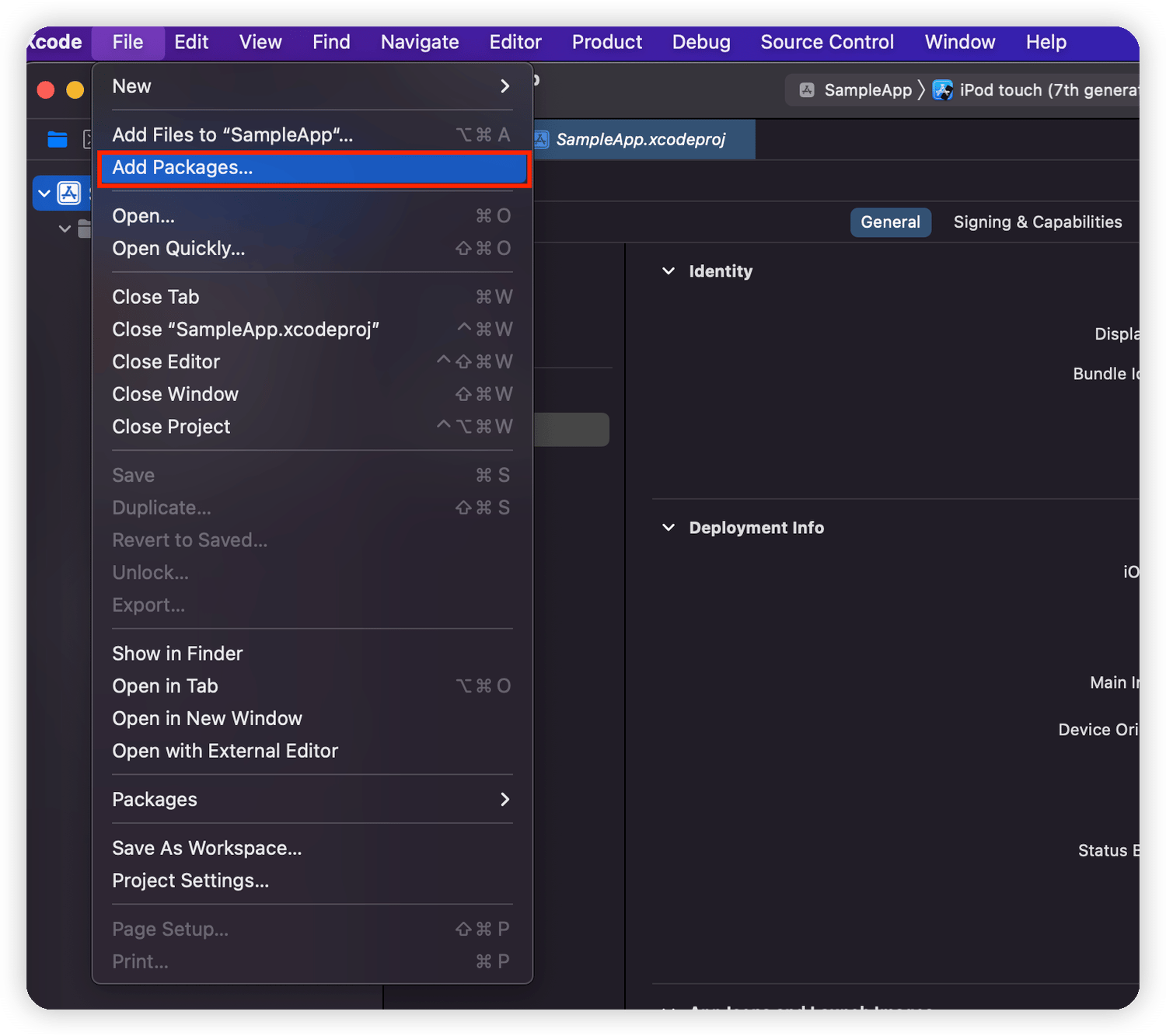 2. Search for "[https://github.com/ab180/airbridge-ios-sdk-deploy](https://github.com/ab180/airbridge-ios-sdk-deploy)" in the "Add Packages" window. Select the version you want to install and click **Add Package**.
 3. Select Target and click **Add Package**.
 4. AirBridge will show under "Package Dependencies" if the SDK is properly installed.
 #### Install manually
##### Add the `AirBridge.xcframework`
1. Download the [`AirBridge.xcframework`](https://sdk-download.airbridge.io/frameworks/AirBridge.xcframework-1.40.0.zip).
2. Navigate to **\[Xcode]>\[Project file]>\[General]>\[Frameworks, Libraries, and Embedded Content]** and click **+**.
3. Click **Add Other.. → Add Files..** at the bottom right.
4. Add the `AirBridge.xcframework` folder in the file downloaded in Step 1.
5. Set `AirBridge.xcframework` to "Embed & Sign."
##### Add Dependency Frameworks
1. Click **\[Xcode]>\[Project file]>\[General]>\[Frameworks, Libraries, and Embedded Content]** and click **+**.
2. Add the frameworks in the table below.
3. Set the frameworks as "Do not Embed."
4. Go to **\[Xcode]>\[Project file]>\[Build Phase]>\[Link Binary with Libraries]**.
5. Set the status of the framework below to `Optional`.
| Framework | Description |
| --------------------------------- | --------------------------------------------------------------------- |
| AdSupport.framework | Used to collect IDFA. |
| CoreTelephony.framework | Used to collect the carrier information. |
| StoreKit.framework | Used to collect the SKAdNetwork information. |
| AppTrackingTransparency.framework | Used to collect the user's consent status. |
| AdServices.framework | Used to collect Apple Search Ads attribution information. (iOS 14.3+) |
| WebKit.framework | Used to collect events using integration with Web SDK. |
### Set up project
#### Initialize SDK
Initialize the SDK by adding the following code at the beginning of the `application:didFinishLaunchingWithOptions:` method in the `AppDelegate` file.
#### Install manually
##### Add the `AirBridge.xcframework`
1. Download the [`AirBridge.xcframework`](https://sdk-download.airbridge.io/frameworks/AirBridge.xcframework-1.40.0.zip).
2. Navigate to **\[Xcode]>\[Project file]>\[General]>\[Frameworks, Libraries, and Embedded Content]** and click **+**.
3. Click **Add Other.. → Add Files..** at the bottom right.
4. Add the `AirBridge.xcframework` folder in the file downloaded in Step 1.
5. Set `AirBridge.xcframework` to "Embed & Sign."
##### Add Dependency Frameworks
1. Click **\[Xcode]>\[Project file]>\[General]>\[Frameworks, Libraries, and Embedded Content]** and click **+**.
2. Add the frameworks in the table below.
3. Set the frameworks as "Do not Embed."
4. Go to **\[Xcode]>\[Project file]>\[Build Phase]>\[Link Binary with Libraries]**.
5. Set the status of the framework below to `Optional`.
| Framework | Description |
| --------------------------------- | --------------------------------------------------------------------- |
| AdSupport.framework | Used to collect IDFA. |
| CoreTelephony.framework | Used to collect the carrier information. |
| StoreKit.framework | Used to collect the SKAdNetwork information. |
| AppTrackingTransparency.framework | Used to collect the user's consent status. |
| AdServices.framework | Used to collect Apple Search Ads attribution information. (iOS 14.3+) |
| WebKit.framework | Used to collect events using integration with Web SDK. |
### Set up project
#### Initialize SDK
Initialize the SDK by adding the following code at the beginning of the `application:didFinishLaunchingWithOptions:` method in the `AppDelegate` file.
 ### SDK testing
After completing the Airbridge iOS SDK setup, you can test whether it works properly by following the methods below.
#### Using the Airbridge dashboard
1. Install and open the app on a test device.
2. Navigate to **\[Raw Data]>\[App Real-time Logs]** in the Airbridge dashboard.
3. Enter the IDFA of the test device into the search bar to find it in the logs.
It may take up to 5 minutes for the logs to be visible in the dashboard.
#### Using the logs
The logs will be printed to Xcode if you insert the following at the beginning of the SDK initialization code in your `AppDelegate` file.
### SDK testing
After completing the Airbridge iOS SDK setup, you can test whether it works properly by following the methods below.
#### Using the Airbridge dashboard
1. Install and open the app on a test device.
2. Navigate to **\[Raw Data]>\[App Real-time Logs]** in the Airbridge dashboard.
3. Enter the IDFA of the test device into the search bar to find it in the logs.
It may take up to 5 minutes for the logs to be visible in the dashboard.
#### Using the logs
The logs will be printed to Xcode if you insert the following at the beginning of the SDK initialization code in your `AppDelegate` file.
 #### Enter the iOS URI Scheme
Enter the URI scheme into the iOS URI Scheme field, including `://`.
#### Enter the iOS URI Scheme
Enter the URI scheme into the iOS URI Scheme field, including `://`.
 ### Set up project
#### Scheme
1. Go to **\[Xcode]>\[Project file]>\[Info]>\[URL Types]**.
From the Airbridge dashboard, copy "iOS URI Scheme" and paste it to the URL Schemes field in Xcode. Make sure not to include `://`.
### Set up project
#### Scheme
1. Go to **\[Xcode]>\[Project file]>\[Info]>\[URL Types]**.
From the Airbridge dashboard, copy "iOS URI Scheme" and paste it to the URL Schemes field in Xcode. Make sure not to include `://`.
 #### Universal Link
1. Go to **\[Xcode]>\[Project file>\[Signing & Capabilities]**.
2. Click **+ Capability** and add **Associated Domains**.
3. Add `applinks:YOUR_APP_NAME.airbridge.io`to **Associated Domains**.
4. Add `applinks:YOUR_APP_NAME.abr.ge`to **Associated Domains**.
#### Universal Link
1. Go to **\[Xcode]>\[Project file>\[Signing & Capabilities]**.
2. Click **+ Capability** and add **Associated Domains**.
3. Add `applinks:YOUR_APP_NAME.airbridge.io`to **Associated Domains**.
4. Add `applinks:YOUR_APP_NAME.abr.ge`to **Associated Domains**.