> ## Documentation Index
> Fetch the complete documentation index at: https://help.airbridge.io/llms.txt
> Use this file to discover all available pages before exploring further.
# Android SDK
Install the Airbridge Android SDK and implement the necessary settings following the steps below.
## Install SDK
The Airbridge Android SDK can be installed using the method below. After installation, you can verify whether the SDK has been properly installed through an [Android SDK test](/en/developers/testing-android-sdk-v4).
1. Declare the Airbridge maven repository within the `repositories` block of your project's `build.gradle` file.
```groovy Groovy lines theme={"theme":{"light":"github-dark-dimmed","dark":"github-dark-dimmed"}}
allprojects {
repositories {
maven { url = uri("https://sdk-download.airbridge.io/maven") }
}
}
```
```kotlin Kotlin DSL lines theme={"theme":{"light":"github-dark-dimmed","dark":"github-dark-dimmed"}}
allprojects {
repositories {
maven { url = uri("https://sdk-download.airbridge.io/maven") }
}
}
```
2. Add the Airbridge Android SDK package to your app's `build.gradle` file. Then, click the link below to find the latest version and replace `$HERE_LATEST_VERSION` with the latest version.
* SDK version list: [Link](https://sdk-download.airbridge.io/maven/io/airbridge/sdk-android/index.html)
```groovy Groovy lines theme={"theme":{"light":"github-dark-dimmed","dark":"github-dark-dimmed"}}
dependencies {
// Replace $HERE_LATEST_VERSION with latest version
// - Versions: https://sdk-download.airbridge.io/maven
// - Example: implementation "io.airbridge:sdk-android:0.0.0"
implementation "io.airbridge:sdk-android:$HERE_LATEST_VERSION"
}
```
```groovy Kotlin DSL lines theme={"theme":{"light":"github-dark-dimmed","dark":"github-dark-dimmed"}}
dependencies {
// Replace $HERE_LATEST_VERSION with latest version
// - Versions: https://sdk-download.airbridge.io/maven
// - Example: implementation("io.airbridge:sdk-android:0.0.0")
implementation("io.airbridge:sdk-android:$HERE_LATEST_VERSION")
}
```
1. Declare the Airbridge maven repository within the `repositories` block of your project's `settings.gradle` file.
```groovy Groovy lines theme={"theme":{"light":"github-dark-dimmed","dark":"github-dark-dimmed"}}
dependencyResolutionManagement {
repositories {
maven { url = uri("https://sdk-download.airbridge.io/maven") }
}
}
```
```kotlin Kotlin DSL lines theme={"theme":{"light":"github-dark-dimmed","dark":"github-dark-dimmed"}}
dependencyResolutionManagement {
repositories {
maven { url = uri("https://sdk-download.airbridge.io/maven") }
}
}
```
2. Add the Airbridge Android SDK package to your app's `build.gradle` file.
```groovy Groovy lines theme={"theme":{"light":"github-dark-dimmed","dark":"github-dark-dimmed"}}
dependencies {
// Replace $HERE_LATEST_VERSION with latest version
// - Versions: https://sdk-download.airbridge.io/maven
// - Example: implementation "io.airbridge:sdk-android:0.0.0"
implementation "io.airbridge:sdk-android:$HERE_LATEST_VERSION"
}
```
```groovy Kotlin DSL lines theme={"theme":{"light":"github-dark-dimmed","dark":"github-dark-dimmed"}}
dependencies {
// Replace $HERE_LATEST_VERSION with latest version
// - Versions: https://sdk-download.airbridge.io/maven
// - Example: implementation("io.airbridge:sdk-android:0.0.0")
implementation("io.airbridge:sdk-android:$HERE_LATEST_VERSION")
}
```
**Note**
Airbridge Android SDK requires Kotlin stdlib and Kotlinx coroutines library version 1.6 or later.
The Airbridge Android SDK uses JetBrains' Kotlin and Coroutines libraries.
If you install directly through the `.aar`, you have to include the dependency library in your project. Refer to the following.
| Library | Link |
| -------------------------- | ----------------------------------------------------------------------------------------------- |
| Airbridge SDK | [Download](https://sdk-download.airbridge.io/maven/io/airbridge/sdk-android/index.html) |
| JetBrains Java Annotations | [Download](https://mvnrepository.com/artifact/org.jetbrains/annotations) |
| Kotlin Standard Library | [Download](https://mvnrepository.com/artifact/org.jetbrains.kotlin/kotlin-stdlib) |
| Kotlinx Coroutines Core | [Download](https://mvnrepository.com/artifact/org.jetbrains.kotlinx/kotlinx-coroutines-core) |
| Kotlinx Coroutines Android | [Download](https://mvnrepository.com/artifact/org.jetbrains.kotlinx/kotlinx-coroutines-android) |
| Play Services Appset | [Download](https://mvnrepository.com/artifact/com.google.android.gms/play-services-appset) |
**Note**
For the Gradle setup, refer to Gradle (build.gradle) if your project's `build.gradle` file contains `repositories` block, or refer to Gradle (settings.gradle) if your project's `settings.gradle` file contains `repositories` block.
### Install Restricted SDK
**Note**
Install only one version of the SDK, either the general SDK or the restricted SDK.
Depending on policies and environments, restrictions on collecting [device ID](/en/guides/identifiers)s like GAID and IDFA may be required. When installing the Restricted SDK version, the device IDs are not collected.
Install the Restricted SDK using the method below.
1. Declare the Airbridge maven repository within the `repositories` block of your project's `build.gradle` file.
```groovy Groovy lines theme={"theme":{"light":"github-dark-dimmed","dark":"github-dark-dimmed"}}
allprojects {
repositories {
maven { url = uri("https://sdk-download.airbridge.io/maven") }
}
}
```
```kotlin Kotlin DSL lines theme={"theme":{"light":"github-dark-dimmed","dark":"github-dark-dimmed"}}
allprojects {
repositories {
maven { url = uri("https://sdk-download.airbridge.io/maven") }
}
}
```
2. Add the Airbridge Android SDK package in your app's `build.gradle` file.
```groovy Groovy lines theme={"theme":{"light":"github-dark-dimmed","dark":"github-dark-dimmed"}}
dependencies {
// Replace $HERE_LATEST_VERSION` with latest version
// - Versions: https://sdk-download.airbridge.io/maven
// - Example: implementation "io.airbridge:sdk-android-restricted:0.0.0"
implementation "io.airbridge:sdk-android-restricted:$HERE_LATEST_VERSION"
}
```
```groovy Kotlin DSL lines theme={"theme":{"light":"github-dark-dimmed","dark":"github-dark-dimmed"}}
dependencies {
// Replace $HERE_LATEST_VERSION with latest version
// - Versions: https://sdk-download.airbridge.io/maven
// - Example: implementation("io.airbridge:sdk-android-restricted:0.0.0")
implementation("io.airbridge:sdk-android-restricted:$HERE_LATEST_VERSION")
}
```
1. Declare the Airbridge maven repository within the `repositories`block of your project's `settings.gradle` file.
```groovy Groovy lines theme={"theme":{"light":"github-dark-dimmed","dark":"github-dark-dimmed"}}
dependencyResolutionManagement {
repositories {
maven { url = uri("https://sdk-download.airbridge.io/maven") }
}
}
```
```kotlin Kotlin DSL lines theme={"theme":{"light":"github-dark-dimmed","dark":"github-dark-dimmed"}}
dependencyResolutionManagement {
repositories {
maven { url = uri("https://sdk-download.airbridge.io/maven") }
}
}
```
2. Add the Airbridge Android SDK package in your app's `build.gradle` file.
```groovy Groovy lines theme={"theme":{"light":"github-dark-dimmed","dark":"github-dark-dimmed"}}
dependencies {
// Replace $HERE_LATEST_VERSION` with latest version
// - Versions: https://sdk-download.airbridge.io/maven
// - Example: implementation "io.airbridge:sdk-android-restricted:0.0.0"
implementation "io.airbridge:sdk-android-restricted:$HERE_LATEST_VERSION"
}
```
```groovy Kotlin DSL lines theme={"theme":{"light":"github-dark-dimmed","dark":"github-dark-dimmed"}}
dependencies {
// Replace $HERE_LATEST_VERSION with latest version
// - Versions: https://sdk-download.airbridge.io/maven
// - Example: implementation("io.airbridge:sdk-android-restricted:0.0.0")
implementation("io.airbridge:sdk-android-restricted:$HERE_LATEST_VERSION")
}
```
**Note**
Airbridge Android SDK requires Kotlin stdlib and Kotlinx coroutines library version 1.6 or later.
The Airbridge Android SDK uses JetBrains' Kotlin and Coroutines libraries together.
If you install the SDK manually through the `.aar`, you have to include the dependency libraries in your project. Refer to the following.
| Library | Link |
| -------------------------- | -------------------------------------------------------------------------------------------------- |
| Airbridge SDK Restricted | [Download](https://sdk-download.airbridge.io/maven/io/airbridge/sdk-android-restricted/index.html) |
| JetBrains Java Annotations | [Download](https://mvnrepository.com/artifact/org.jetbrains/annotations) |
| Kotlin Standard Library | [Download](https://mvnrepository.com/artifact/org.jetbrains.kotlin/kotlin-stdlib) |
| Kotlinx Coroutines Core | [Download](https://mvnrepository.com/artifact/org.jetbrains.kotlinx/kotlinx-coroutines-core) |
| Kotlinx Coroutines Android | [Download](https://mvnrepository.com/artifact/org.jetbrains.kotlinx/kotlinx-coroutines-android) |
| Play Services Appset | [Download](https://mvnrepository.com/artifact/com.google.android.gms/play-services-appset) |
**Attention**
For the Gradle setup, refer to [Gradle (build.gradle)](#gradle-build-gradle-2) if your project's `build.gradle` file contains `repositories` block, or refer to [Gradle (settings.gradle)](#gradle-settings-gradle-2) if your project's `settings.gradle` file contains `repositories` block.
### Initialize SDK
Initializing the Airbridge Android SDK in the [Android Application class](https://developer.android.com/reference/android/app/Application) is recommended.
1. Create an Application class.
```kotlin Kotlin lines theme={"theme":{"light":"github-dark-dimmed","dark":"github-dark-dimmed"}}
import android.app.Application
class AndroidApplication: Application() {
override fun onCreate() {
super.onCreate()
}
}
```
```java Java lines theme={"theme":{"light":"github-dark-dimmed","dark":"github-dark-dimmed"}}
import android.app.Application;
public class AndroidApplication extends Application {
@Override
public void onCreate() {
super.onCreate();
}
}
```
2. Set the generated Application in `AndroidManifest.xml`.
```xml AndroidManifest.xml lines theme={"theme":{"light":"github-dark-dimmed","dark":"github-dark-dimmed"}}
```
3. Get `Airbridge` from the Application class.
```kotlin Kotlin lines theme={"theme":{"light":"github-dark-dimmed","dark":"github-dark-dimmed"}}
import co.ab180.airbridge.Airbridge
```
```java Java lines theme={"theme":{"light":"github-dark-dimmed","dark":"github-dark-dimmed"}}
import co.ab180.airbridge.Airbridge;
```
4. Add the following code snippet to the Application class file registered in `AndroidManifest.xml`.
The YOUR\_APP\_NAME and YOUR\_APP\_SDK\_TOKEN can be found on the **\[Settings]>\[Tokens]** page in the Airbridge dashboard.
```kotlin Kotlin lines theme={"theme":{"light":"github-dark-dimmed","dark":"github-dark-dimmed"}}
override fun onCreate() {
super.onCreate()
// YOUR_APP_NAME: input your app name
// YOUR_APP_SDK_TOKEN: input your app token
val option = AirbridgeOptionBuilder("YOUR_APP_NAME", "YOUR_APP_SDK_TOKEN")
.build()
Airbridge.initializeSDK(this, option)
}
```
```java Java lines theme={"theme":{"light":"github-dark-dimmed","dark":"github-dark-dimmed"}}
@Override
public void onCreate() {
super.onCreate();
// YOUR_APP_NAME: input your app name
// YOUR_APP_SDK_TOKEN: input your app token
AirbridgeOption option = new AirbridgeOptionBuilder("YOUR_APP_NAME", "YOUR_APP_SDK_TOKEN")
.build();
Airbridge.initializeSDK(this, option);
}
```
**Attention**
To ensure initializeSDK works correctly, follow the conditions below.
* Must be called in the `Application` class's `onCreate`.
* Must be called on the `Main thread`.
5. Set the following permissions.
Airbridge Android SDK requires permission to transmit events through the network.
Add the following permissions to your application's `AndroidManifest.xml`.
```xml lines theme={"theme":{"light":"github-dark-dimmed","dark":"github-dark-dimmed"}}
...
...
```
According to [Google](https://support.google.com/googleplay/android-developer/answer/6048248?hl=en), apps targeting Android 13 (API 33) or above must declare the Google Play services general permissions in the `AndroidManifest.xml` file to acquire the device's ADID.
From V2.13.0, the Airbridge Android SDK automatically adds the AD\_ID permission that can acquire the ADID.
If you have not set LAT(LimitAdTracking) and GAID appears as 00000000-0000-0000-0000-000000000000, you will need to add AD\_ID permission with the following code snippet. The issue occurs because the AD\_ID permission has been excluded, for example, by other third-party libraries.
```xml lines theme={"theme":{"light":"github-dark-dimmed","dark":"github-dark-dimmed"}}
...
...
```
6. If the `` tag in the **AndroidManifest.xml** file does not contain `xmlns:tools="http://schemas.android.com/tools"`, make sure to add this attribute.
```xml lines theme={"theme":{"light":"github-dark-dimmed","dark":"github-dark-dimmed"}}
```
**Attention**
Starting from Airbridge Android SDK 4.9.0, backup rule configuration is not required. Only refer to the [backup rule configuration](/en/developers/troubleshooting-android-sdk-v4#airbridge-sdk-backup-rule-configuration-sdk-below-4-9-0) in the troubleshooting guide if you are using a version below 4.9.0.
### Opt-in setup
**Attention**
Optional settings. Configure only if necessary.
The opt-in policy requires user consent before using user data.
After setting the `autoStartTrackingEnabled` to `false`, call the `startTracking` function at the point where you can collect events. When the `startTracking` function is called, the SDK will start collecting events.
1. Initialize SDK in the Application class. Prevent automatic event tracking after initialization through the `autoStartTrackingEnabled`.
```kotlin kotlin lines theme={"theme":{"light":"github-dark-dimmed","dark":"github-dark-dimmed"}}
// Default Auto Start Tracking Enabled = true
val option = AirbridgeOptionBuilder("YOUR_APP_NAME", "YOUR_APP_SDK_TOKEN")
.setAutoStartTrackingEnabled(false)
.build()
Airbridge.initializeSDK(this, option)
```
```java java lines theme={"theme":{"light":"github-dark-dimmed","dark":"github-dark-dimmed"}}
// Default Auto Start Tracking Enabled = true
AirbridgeOption option = new AirbridgeOptionBuilder("YOUR_APP_NAME", "YOUR_APP_SDK_TOKEN")
.setAutoStartTrackingEnabled(false)
.build();
Airbridge.initializeSDK(this, option);
```
2. Collect user responses to the collection and use of personal information. If the user agrees to the collection and use of personal information, start tracking events.
```kotlin kotlin lines theme={"theme":{"light":"github-dark-dimmed","dark":"github-dark-dimmed"}}
// Set a variable like below
if (properties.isGDPRAccepted) {
Airbridge.startTracking()
}
```
```java java lines theme={"theme":{"light":"github-dark-dimmed","dark":"github-dark-dimmed"}}
// Set a variable like below
if (properties.isGDPRAccepted) {
Airbridge.startTracking();
}
```
### Opt-out setup
**Attention**
Optional settings. Configure only if necessary.
The opt-out policy allows the use of user information until the user explicitly declines.
After setting the `setAutoStartTrackingEnabled` function to `true`, call the `stopTracking` function at the point where event data cannot be collected. From the moment the `stopTracking` function is called, the SDK will stop collecting events.
```kotlin kotlin lines theme={"theme":{"light":"github-dark-dimmed","dark":"github-dark-dimmed"}}
val option = AirbridgeOptionBuilder("YOUR_APP_NAME", "YOUR_APP_SDK_TOKEN")
.setAutoStartTrackingEnabled(true)
.build()
Airbridge.initializeSDK(this, option)
...
Airbridge.stopTracking()
```
```java java lines theme={"theme":{"light":"github-dark-dimmed","dark":"github-dark-dimmed"}}
AirbridgeOption option = new AirbridgeOptionBuilder("YOUR_APP_NAME", "YOUR_APP_SDK_TOKEN")
.setAutoStartTrackingEnabled(true)
.build();
Airbridge.initializeSDK(this, option);
...
Airbridge.stopTracking();
```
### SDK Signature
**Attention**
Optional settings. Configure only if necessary.
With the SDK Signature, you can ensure SDK spoofing prevention and use verified events for ad performance measurement.
For the SDK Signature setup, the SDK Signature Credentials are required, which include the Secret ID and the Secret. The required SDK Signature Credentials can be found in the Airbridge dashboard. For more details about the SDK Signature Credentials, refer to this [Airbridge guide](/en/guides/sdk-signature).
You can set the SDK Signature by calling the `setSDKSignature` function above the SDK initialization code.
```kotlin Kotlin lines theme={"theme":{"light":"github-dark-dimmed","dark":"github-dark-dimmed"}}
val option = AirbridgeOptionBuilder("YOUR_APP_NAME", "YOUR_APP_SDK_TOKEN")
.setSDKSignature("YOUR_SDK_SIGNATURE_SECRET_ID", "YOUR_SDK_SIGNATURE_SECRET")
.build()
Airbridge.initializeSDK(this, option)
```
```java Java lines theme={"theme":{"light":"github-dark-dimmed","dark":"github-dark-dimmed"}}
AirbridgeOption option = new AirbridgeOptionBuilder("YOUR_APP_NAME", "YOUR_APP_SDK_TOKEN")
.setSDKSignature("YOUR_SDK_SIGNATURE_SECRET_ID", "YOUR_SDK_SIGNATURE_SECRET")
.build();
Airbridge.initializeSDK(this, option);
```
The information required for the setup is as follows.
* YOUR\_APP\_NAME: The name of your app on Airbridge. Navigate to **\[Settings]>\[Tokens]** in the Airbridge dashboard to find it.
* YOUR\_APP\_SDK\_TOKEN: Android SDK Token. Navigate to **\[Settings]>\[Tokens]** in the Airbridge dashboard to find it.
* YOUR\_SDK\_SIGNATURE\_SECRET\_ID: Secret ID. Navigate to **\[Management]>\[Fraud Validation Rules]>\[SDK Signature]** in the Airbridge dashboard to find it.
* YOUR\_SDK\_SIGNATURE\_SECRET: Signature Secret. Navigate to **\[Management]>\[Fraud Validation Rules]>\[SDK Signature]** in the Airbridge dashboard to find it.
## Deep Linking
Deep linking allows you to redirect users from ads to specific locations within your app. The data collected from the tracking link enables you to monitor the performance of the deep link in Airbridge.
* [Understanding Tracking Links (User Guide)](/en/guides/understanding-tracking-link)
* [Understanding Deep Links (User Guide)](/en/guides/understanding-deep-link)
### How Airbridge Deep Links work
When a user clicks on the Airbridge tracking link, the scheme deep link embedded in the tracking link is converted into an Airbridge Deep Link, which can be either an HTTP deep link or a scheme deep link. This Airbridge Deep Link redirects the user to the desired app location. Then, the Airbridge SDK converts the Airbridge Deep Link back to the original scheme deep link embedded in the tracking link and passes it to the app.
* Example scheme deep link embedded in the tracking link: YOUR\_SCHEME://product/12345
* Examples of Airbridge Deep Links
* HTTP deep link format 1: https://YOUR\_APP\_NAME.airbridge.io/\~\~\~
* HTTP deep link format 2: https://YOUR\_APP\_NAME.abr.ge/\~\~\~
* Scheme deep link format: YOUR\_SCHEME://product/12345?airbridge\_referrer=\~\~\~
When the app is installed on the device and the tracking link is clicked, the app opens through the Airbridge Deep Link. The Airbridge SDK converts the Airbridge Deep Link into the scheme deep embedded in the tracking link and passes it to the app.
When the app is not installed on the device and the tracking link is clicked, the Airbridge SDK saves the Airbridge Deep Link. After the user is redirected to the app store or website and the app is installed and launched, the Airbridge SDK converts the saved Airbridge Deep Link into the scheme deep link embedded in the tracking link and passes it to the app.
### Set up deep linking
For the deep linking setup, the following information is required.
* Deep link information submitted in the Airbridge dashboard
* In-app location address for user redirection
First, submit the deep link information to the Airbridge dashboard.
For the deep linking setup, the following information must be entered into the Airbridge dashboard.
* Android URI scheme: The Airbridge Deep Link is converted to a schema deep link using the Android URI scheme. This information is necessary for the App Link and URI scheme.
* Package name: This is the Android app identifier necessary for the App Link and URI scheme.
* [Android sha256\_cert\_fingerprints](https://developer.android.com/training/app-links/verify-android-applinks): This is used for setting the App Link domain. This information is necessary for the App Link.
**Attention**
* To redirect users as intended, submit the Android URI scheme and the sha256\_cert\_fingerprints differently for the production app and the development app.
* You can register multiple sha256\_cert\_fingerprints on the dashboard by entering them separated by commas(**,**).
For apps that use Google Play's Play App Signing, Google's servers re-sign the APK after the developer uploads it. This changes the Android sha256\_cert\_fingerprints, so you must register the final signing value from the Google Play Console—not from your local keystore—for App Links to work correctly. Register the Android URI scheme, package name, and Android sha256\_cert\_fingerprints in Airbridge according to your signing method.
1. Naviagate to **\[Tracking Link]>\[Deep Links]** in the Airbridge dashboard.
2. Enter the Android URI scheme into the **Android URI Scheme** field. Include `://`. For example, if the URI scheme is `demo`, you must enter `demo://`.
3. Enter the package name in the **Package name** field.
4. Go to the Google Play Console and select your app.
5. Navigate to **\[App integrity]**.
6. Copy the SHA-256 certificate fingerprint from the **App signing key certificate** section.
**Attention**
Make sure to copy from the correct section. This page contains two certificate entries:
* **App signing key certificate** ← Use this value
* **Upload key certificate** ← Do NOT use this value
These are two different values. Registering the upload key certificate will cause App Links to stop working.
7. Enter the SHA256 value into the **sha256\_cert\_fingerprints** field.
1. Naviagate to **\[Tracking Link]>\[Deep Links]** in the Airbridge dashboard.
2. Enter the Android URI scheme into the **Android URI Scheme** field. Include `://`. For example, if the URI scheme is `demo`, you must enter `demo://`.
3. Enter the package name in the **Package name** field.
4. You need to find the sha256\_cert\_fingerprints. Run the following command from the keystore file you are deploying.
```bash lines theme={"theme":{"light":"github-dark-dimmed","dark":"github-dark-dimmed"}}
keytool -J-Duser.language=en -list -v -keystore YOUR_KEYSTORE.keystore
```
5. Find the SHA256 value in the results. The SHA256 value is the sha256\_cert\_fingerprints.
```bash lines theme={"theme":{"light":"github-dark-dimmed","dark":"github-dark-dimmed"}}
Certificate fingerprints:
MD5: 4C:65:04:52:F0:3F:F8:65:08:D3:71:86:FC:EF:C3:49
SHA1: C8:BF:B7:B8:94:EA:5D:9D:38:59:FE:99:63:ED:47:B2:D9:5A:4E:CC
SHA256: B5:EF:4D:F9:DC:95:E6:9B:F3:9A:5E:E9:D6:E0:D8:F6:7B:AB:79:C8:78:67:34:D9:A7:01:AB:6A:86:01:0E:99
```
6. Enter the SHA256 value into the **sha256\_cert\_fingerprints** field.
After submitting the deep link information to the Airbridge dashboard, additional setup is required to enable the following.
* App launch with Airbridge Deep Links
* User redirection with Airbridge Deep Links
For detailed instructions, refer to the information below.
Follow the steps below to enable app launch with Airbridge Deep Links after the user clicks on a tracking link.
1. Add an Activity that handles the deep link. Add an Activity class file to the src.
```kotlin Kotlin lines theme={"theme":{"light":"github-dark-dimmed","dark":"github-dark-dimmed"}}
import android.os.Bundle
import androidx.appcompat.app.AppCompatActivity
class DeeplinkActivity: AppCompatActivity() {
override fun onCreate(savedInstanceState: Bundle?) {
super.onCreate(savedInstanceState)
}
}
```
```java Java lines theme={"theme":{"light":"github-dark-dimmed","dark":"github-dark-dimmed"}}
import android.os.Bundle;
import androidx.annotation.Nullable;
import androidx.appcompat.app.AppCompatActivity;
public class DeeplinkActivity extends AppCompatActivity {
@Override
protected void onCreate(@Nullable Bundle savedInstanceState) {
super.onCreate(savedInstanceState);
}
}
```
Add the Activity to the `AndroidManifest.xml` file.
```xml AndroidManifest.xml lines theme={"theme":{"light":"github-dark-dimmed","dark":"github-dark-dimmed"}}
```
2. For the scheme deep link setup, add an intent filter to the Activity that handles the deep link in the `AndroidManifest.xml`.
The intent filter you add must use the Android URI Scheme you entered into the Airbridge dashboard. Enter the Android URI scheme, excluding `://`.
```xml lines theme={"theme":{"light":"github-dark-dimmed","dark":"github-dark-dimmed"}}
...
...
```
**Attention**
Always use separate `` tags. If you add all `` tags to a single `` tag, deep links may not open your app properly.
3. For the App Links setup, add an intent filter under the Activity that handles the deep link in the `AndroidManifest.xml`. `YOUR_APP_NAME`is the App Name.
```xml lines theme={"theme":{"light":"github-dark-dimmed","dark":"github-dark-dimmed"}}
...
...
```
**Attention**
Always use separate `` tags. If you add all `` tags to a single `` tag, deep links may not open your app properly.
When an Airbridge Deep Link is executed, the Activity that handles the deep link uses the `Airbridge.handleDeeplink` function to convert the Airbridge Deep Link into a scheme deep link.
Use the converted scheme deep link to redirect users to the intended destination.
```kotlin Kotlin lines theme={"theme":{"light":"github-dark-dimmed","dark":"github-dark-dimmed"}}
// when activity is opened with scheme deeplink or app links
override fun onResume() {
super.onResume()
// handle airbridge deeplink
val isAirbridgeDeeplink = Airbridge.handleDeeplink(intent) {
// when app is opened with airbridge deeplink
// show proper content using url (YOUR_SCHEME://...)
}
if (isAirbridgeDeeplink) return
// when app is opened with other deeplink
// use existing logic as it is
}
override fun onNewIntent(intent: Intent?) {
super.onNewIntent(intent)
setIntent(intent)
}
```
```java Java lines theme={"theme":{"light":"github-dark-dimmed","dark":"github-dark-dimmed"}}
// when activity is opened with scheme deeplink or app links
@Override
protected void onResume() {
super.onResume();
boolean isAirbridgeDeeplink = Airbridge.handleDeeplink(
getIntent(),
uri -> {
// when app is opened with airbridge deeplink
// show proper content using url (YOUR_SCHEME://...)
}
);
if (isAirbridgeDeeplink) return;
// when app is opened with other deeplink
// use existing logic as it is
}
@Override
protected void onNewIntent(Intent intent) {
super.onNewIntent(intent);
setIntent(intent);
}
```
**Attention**
The `Airbridge.handleDeeplink` function passes `true` with the scheme deep link to `onSuccess` when an Airbridge Deep Link is input. For deep links other than Airbridge Deep Links, `false` is passed without a callback.
The `Airbridge.handleDeeplink` function does not support user redirection. The redirection must be implemented using the URI passed to `onSuccess` of the `Airbridge.handleDeeplink` function.
### Set up deferred deep linking
When a user clicks on a tracking link with deferred deep linking capabilities and your app is not installed on the device, the Airbridge SDK collects the deep link as follows.
After initialization, the Airbridge SDK attempts to collect a deep link when all of the following conditions are met. When the app is closed before collection, the Airbridge SDK considers it as if there has not been an Airbridge Deep Link.
* The `Airbridge.startTracking` function is called with the opt-in settings in place. Or, opt-in has not been set.
The `Airbridge.handleDeferredDeeplink` function retrieves the stored Airbridge deep link and converts it into a scheme deep link to pass it to the app. Users are redirected to the intended destination using the converted scheme deep link.
```kotlin Kotlin lines theme={"theme":{"light":"github-dark-dimmed","dark":"github-dark-dimmed"}}
val isFirstCalled = Airbridge.handleDeferredDeeplink { uri ->
// when handleDeferredDeeplink is called firstly after install
if (uri != null) {
// show proper content using uri (YOUR_SCHEME://...)
}
}
```
```java Java lines theme={"theme":{"light":"github-dark-dimmed","dark":"github-dark-dimmed"}}
boolean isFirstCalled = Airbridge.handleDeferredDeeplink(uri -> {
// when handleDeferredDeeplink is called firstly after install
if (uri != null) {
// show proper content using uri (YOUR_SCHEME://...)
}
});
```
The `Airbridge.handleDeferredDeeplink` function returns `true` if it has been called for the first time after the install and waits for the Airbridge Deep Link to be retrieved, converts it to a scheme deep link, and passes it to `onSuccess`. You can use this scheme deep link to send users to the intended destination.
If there is no stored Airbridge Deep Link, `null` is passed to `onSuccess`. If the SDK is not initialized or if the `Airbridge.handleDeferredDeeplink` function has not been called for the first time, `false` will be returned.
The scheme deep link is usually a URL in the form of `YOUR_SCHEME://...` If you use services like Meta Deferred App Links, a different form of URL may be passed.
**Attention**
When the app is opened via a deep link, Airbridge passes null to onSuccess regardless of whether a deferred deep link exists or not, ensuring that only the deep link is processed.
### Set up custom domain
**Attention**
Optional settings. Configure only if necessary.
1. Enter the custom domain address into the Airbridge dashboard by referring to this [article](/en/guides/custom-domain)
2. When initializing the Airbridge SDK, use the `setTrackingLinkCustomDomains`function to add the custom domain address. The `YOUR_APP_CUSTOM_DOMAIN` should be the Fully Qualified Domain Name (FQDN).
```kotlin Kotlin lines theme={"theme":{"light":"github-dark-dimmed","dark":"github-dark-dimmed"}}
// YOUR_APP_NAME: input your app name
// YOUR_APP_SDK_TOKEN: input your app token
// YOUR_APP_CUSTOM_DOMAIN: input your app custom domain. ex) example.domain.com
val option = AirbridgeOptionBuilder("YOUR_APP_NAME", "YOUR_APP_SDK_TOKEN")
.setTrackingLinkCustomDomains(listOf("YOUR_APP_CUSTOM_DOMAIN"))
.build()
Airbridge.initializeSDK(this, option)
```
```java Java lines theme={"theme":{"light":"github-dark-dimmed","dark":"github-dark-dimmed"}}
// YOUR_APP_NAME: input your app name
// YOUR_APP_SDK_TOKEN: input your app token
// YOUR_APP_CUSTOM_DOMAIN: input your app custom domain. ex) example.domain.com
AirbridgeOption option = new AirbridgeOptionBuilder("YOUR_APP_NAME", "YOUR_APP_SDK_TOKEN")
.setTrackingLinkCustomDomains(Arrays.asList("YOUR_APP_CUSTOM_DOMAIN"))
.build();
Airbridge.initializeSDK(this, option);
```
**Attention**
The custom domain address you add to the SDK should be the same as the custom domain address entered into the Airbridge dashboard.
## In-app Events
The Airbridge SDK collects user actions from the app as per settings and sends them as in-app events.
* [Understanding Airbridge Events ](/en/guides/airbridge-event)
### Send in-app events
**SDK setup for hybrid apps**
You can set up the Android SDK to handle Airbridge-related tasks within the in-app website without changing the website's code for your hybrid app.
* [Hybrid App Setup (v4)](/en/developers/hybrid-app-settings-android-sdk-v4)
Use the `trackEvent` method to send events. Call Airbridge to use the `trackEvent` method.
```kotlin Kotlin lines theme={"theme":{"light":"github-dark-dimmed","dark":"github-dark-dimmed"}}
import co.ab180.airbridge.Airbridge
```
```java Java lines theme={"theme":{"light":"github-dark-dimmed","dark":"github-dark-dimmed"}}
import co.ab180.airbridge.Airbridge;
```
Call the `AirbridgeCategory`, `AirbridgeAttribute` to use the category names and attributes predefined by Airbridge.
```kotlin Kotlin lines theme={"theme":{"light":"github-dark-dimmed","dark":"github-dark-dimmed"}}
import co.ab180.airbridge.common.AirbridgeCategory
import co.ab180.airbridge.common.AirbridgeAttribute
```
```java Java lines theme={"theme":{"light":"github-dark-dimmed","dark":"github-dark-dimmed"}}
import co.ab180.airbridge.common.AirbridgeCategory;
import co.ab180.airbridge.common.AirbridgeAttribute;
```
Refer to the information below about the required `trackEvent` function components and their types.
```kotlin Kotlin lines theme={"theme":{"light":"github-dark-dimmed","dark":"github-dark-dimmed"}}
fun trackEvent(
category: String,
semanticAttributes: Map? = null,
customAttributes: Map? = null
)
```
```java Java lines theme={"theme":{"light":"github-dark-dimmed","dark":"github-dark-dimmed"}}
void trackEvent(@NonNull String category)
void trackEvent(
@NonNull String category,
@Nullable Map semanticAttributes
)
void trackEvent(
@NonNull String category,
@Nullable Map semanticAttributes
@Nullable Map customAttributes
)
```
| Component | Required or Optional | Type | Description |
| ------------------ | -------------------- | ------------------ | -------------------------------- |
| category | Required | String | Event name |
| semanticAttributes | Optional | Map\ | Semantic Attributes of the event |
| customAttributes | Optional | Map\ | Custom Attributes of the event |
Refer to the component definition and available strings below.
The Standard Event Categories provided by the Airbridge SDK can be found in the AirbridgeCategory. You can also enter the Event Categories from the list of Standard Events.
* [Lists of Standard Events](/en/guides/airbridge-event-types#list-of-standard-events)
Custom events can be sent by entering the event names in the [event taxonomy](/en/guides/airbridge-event-taxonomy).
Refer to the example below.
```kotlin Kotlin lines theme={"theme":{"light":"github-dark-dimmed","dark":"github-dark-dimmed"}}
// track standard event (provided by sdk)
Airbridge.trackEvent(AirbridgeCategory.ORDER_COMPLETED)
// track standard event (not provided by sdk)
Airbridge.trackEvent("airbridge.ecommerce.order.canceled")
// track custom event
Airbridge.trackEvent("eventViewed")
```
```java Java lines theme={"theme":{"light":"github-dark-dimmed","dark":"github-dark-dimmed"}}
// track standard event (provided by sdk)
Airbridge.trackEvent(AirbridgeCategory.ORDER_COMPLETED);
// track standard event (not provided by sdk)
Airbridge.trackEvent("airbridge.ecommerce.order.canceled");
// track custom event
Airbridge.trackEvent("eventViewed");
```
**Attention**
The Airbridge SDK v4 attributes differ from the previous version. The previous version's attributes do not include action, label, and value.
Additional information about the event can be collected using attributes.
* Action, Label: Collect information that can be used as GroupBys in the Airbridge reports
* Value: Collect information that can be used for sales analysis. Airbridge can perform calculations using the collected data.
* Semantic Attribute: Collect predefined attributes by Airbridge.
* Custom Attributes: Collect attributes defined by Airbridge users.
You can enter Action, Label, Value, and Semantic Attributes through the semanticAttributes parameter of the `Airbridge.trackEvent` function and enter Custom Attributes through the customAttributes parameter.
In the `Airbridge.trackEvent` function, you can enter Action, Label, Value, and Semantic Attributes using the `semanticAttributes` parameter and Custom Attributes using the `customAttributes` parameter.
The semantic attributes predefined by Airbridge can be found in the user guide below.
* [List of semantic attributes](/en/guides/airbridge-event-elements#list-of-semantic-attributes)
Refer to the example below.
```kotlin Kotlin lines theme={"theme":{"light":"github-dark-dimmed","dark":"github-dark-dimmed"}}
Airbridge.trackEvent(
AirbridgeCategory.ORDER_COMPLETED,
mapOf(
// action
AirbridgeAttribute.ACTION to "Tool",
// label
AirbridgeAttribute.LABEL to "Hammer",
// value
AirbridgeAttribute.VALUE to 10,
// semantic attribute (provided by sdk)
AirbridgeAttribute.CURRENCY to "USD",
AirbridgeAttribute.PRODUCTS to listOf(
mapOf(
// semantic attribute value (provided by sdk)
AirbridgeAttribute.PRODUCT_ID to "12345",
// semantic attribute value (not provided by sdk)
"name" to "PlasticHammer",
),
),
// semantic attribute (not provided by sdk)
"totalQuantity" to 1,
),
mapOf(
// custom attribute
"promotion" to "FirstPurchasePromotion",
)
)
```
```java Java lines theme={"theme":{"light":"github-dark-dimmed","dark":"github-dark-dimmed"}}
Airbridge.trackEvent(
AirbridgeCategory.ORDER_COMPLETED,
new HashMap() {{
// action
put(AirbridgeAttribute.ACTION, "Tool");
// label
put(AirbridgeAttribute.LABEL, "Hammer");
// value
put(AirbridgeAttribute.VALUE, 10);
// semantic attribute (provided by sdk)
put(AirbridgeAttribute.CURRENCY, "USD");
put(AirbridgeAttribute.PRODUCTS, Arrays.asList(
new HashMap() {{
// semantic attribute value (provided by sdk)
put(AirbridgeAttribute.PRODUCT_ID, "12345");
// semantic attribute value (not provided by sdk)
put("name", "PlasticHammer");
}}
));
// semantic attribute (not provided by sdk)
put("totalQuantity", 1);
}},
new HashMap() {{
// custom attribute
put("promotion", "FirstPurchasePromotion");
}}
);
```
**Attention**
Semantic attributes and custom attributes only allow JSON as a data type.
* JSON types: String, Number, Boolean, Object\, Array\
* Types that cannot be used in semantic attributes and custom attributes: Struct, Class, etc.
The Standard Event Categories and Semantic Attributes provided by the SDK are as follows.
| Key | Data |
| ----------------------- | ---------------------------------------- |
| SIGN\_UP | airbridge.user.signup |
| SIGN\_IN | airbridge.user.signin |
| SIGN\_OUT | airbridge.user.signout |
| HOME\_VIEWED | airbridge.ecommerce.home.viewed |
| PRODUCT\_LIST\_VIEWED | airbridge.ecommerce.productList.viewed |
| SEARCH\_RESULTS\_VIEWED | airbridge.ecommerce.searchResults.viewed |
| PRODUCT\_VIEWED | airbridge.ecommerce.product.viewed |
| ADD\_PAYMENT\_INFO | airbridge.addPaymentInfo |
| ADD\_TO\_WISHLIST | airbridge.addToWishlist |
| ADDED\_TO\_CART | airbridge.ecommerce.product.addedToCart |
| INITIATE\_CHECKOUT | airbridge.initiateCheckout |
| ORDER\_COMPLETED | airbridge.ecommerce.order.completed |
| ORDER\_CANCELED | airbridge.ecommerce.order.canceled |
| START\_TRIAL | airbridge.startTrial |
| SUBSCRIBE | airbridge.subscribe |
| UNSUBSCRIBE | airbridge.unsubscribe |
| AD\_IMPRESSION | airbridge.adImpression |
| AD\_CLICK | airbridge.adClick |
| COMPLETE\_TUTORIAL | airbridge.completeTutorial |
| ACHIEVE\_LEVEL | airbridge.achieveLevel |
| UNLOCK\_ACHIEVEMENT | airbridge.unlockAchievement |
| RATE | airbridge.rate |
| SHARE | airbridge.share |
| SCHEDULE | airbridge.schedule |
| SPEND\_CREDITS | airbridge.spendCredits |
| Key | Data | Data type |
| ------------------------------------- | ------------------------------- | --------- |
| ACTION | action | string |
| LABEL | label | string |
| VALUE | value | float |
| CURRENCY | currency | string |
| PRODUCTS | products | array |
| PRODUCT\_ID | productID | string |
| PRODUCT\_NAME | name | string |
| PRODUCT\_PRICE | price | float |
| PRODUCT\_QUANTITY | quantity | int |
| PRODUCT\_CURRENCY | currency | string |
| PRODUCT\_POSITION | position | int |
| PRODUCT\_CATEGORY\_ID | categoryID | string |
| PRODUCT\_CATEGORY\_NAME | categoryName | string |
| PRODUCT\_BRAND\_ID | brandID | string |
| PRODUCT\_BRAND\_NAME | brandName | string |
| PERIOD | period | string |
| IS\_RENEWAL | isRenewal | boolean |
| RENEWAL\_COUNT | renewalCount | int |
| PRODUCT\_LIST\_ID | productListID | string |
| CART\_ID | cartID | string |
| TRANSACTION\_ID | transactionID | string |
| TRANSACTION\_TYPE | transactionType | string |
| TRANSACTION\_PAIRED\_EVENT\_CATEGORY | transactionPairedEventCategory | string |
| TRANSACTION\_PAIRED\_EVENT\_TIMESTAMP | transactionPairedEventTimestamp | int |
| TOTAL\_QUANTITY | totalQuantity | int |
| QUERY | query | string |
| IN\_APP\_PURCHASED | inAppPurchased | boolean |
| CONTRIBUTION\_MARGIN | contributionMargin | float |
| LIST\_ID | listID | string |
| RATE\_ID | rateID | string |
| RATE | rate | float |
| MAX\_RATE | maxRate | float |
| ACHIEVEMENT\_ID | achievementID | string |
| SHARED\_CHANNEL | sharedChannel | string |
| DATE\_TIME | datetime | string |
| DESCRIPTION | description | string |
| IS\_REVENUE | isRevenue | boolean |
| PLACE | place | string |
| SCHEDULE\_ID | scheduleID | string |
| TYPE | type | string |
| LEVEL | level | string |
| SCORE | score | float |
| AD\_PARTNERS | adPartners | array |
| IS\_FIRST\_PER\_USER | isFirstPerUser | boolean |
Refer to the example codes for each data type below.
```kotlin Kotlin lines theme={"theme":{"light":"github-dark-dimmed","dark":"github-dark-dimmed"}}
Airbridge.trackEvent(
"event",
mapOf(
AirbridgeAttribute.VALUE to 10,
),
mapOf(
"string" to "string",
"number" to 1000,
"boolean" to true,
"object" to mapOf("key" to "value"),
"array" to listOf("value"),
)
)
```
```java Java lines theme={"theme":{"light":"github-dark-dimmed","dark":"github-dark-dimmed"}}
Airbridge.trackEvent(
"event",
new HashMap() {{
put(AirbridgeAttribute.VALUE, 10);
}},
new HashMap() {{
put("string", "string");
put("number", 1000);
put("boolean", true);
put("object", new HashMap() {{
put("key", "value");
}});
put("array", Arrays.asList(
"value"
));
}}
)
```
### Additional in-app event settings
**Attention**
The default settings will apply if no additional settings are configured. Proceed after reviewing whether additional settings are necessary.
Configure additional settings for sending in-app events if necessary.
The Airbridge SDK includes session information when sending event data.
When the app moves to the background or the process is terminated, the background entry time is recorded. When the app returns to the foreground or the process is restarted, the re-entry time is recorded. If the time difference between the last background entry and re-entry exceeds the session timeout, the previous session ends and a new session begins.
The default session timeout is 300 seconds (5 minutes). You can set this value to up to 604,800 seconds (7 days) using the `setSessionTimeout` function.
```kotlin Kotlin lines theme={"theme":{"light":"github-dark-dimmed","dark":"github-dark-dimmed"}}
// Default Session Timeout = 300 sec
val option = AirbridgeOptionBuilder("YOUR_APP_NAME", "YOUR_APP_SDK_TOKEN")
.setSessionTimeout(300)
.build()
Airbridge.initializeSDK(this, option)
```
```java Java lines theme={"theme":{"light":"github-dark-dimmed","dark":"github-dark-dimmed"}}
// Default Session Timeout = 300 sec
AirbridgeOption option = new AirbridgeOptionBuilder("YOUR_APP_NAME", "YOUR_APP_SDK_TOKEN")
.setSessionTimeout(300)
.build();
Airbridge.initializeSDK(this, option);
```
The default transmission interval is set to 0 seconds. Using the `setEventTransmitInterval` function, you can modify it to a maximum of 86,400 seconds (1 day).
Refer to the example below.
```kotlin Kotlin lines theme={"theme":{"light":"github-dark-dimmed","dark":"github-dark-dimmed"}}
// Default Event Transmit Interval = 0 millisecond
val option = AirbridgeOptionBuilder("YOUR_APP_NAME", "YOUR_APP_SDK_TOKEN")
.setEventTransmitInterval(3000)
.build()
Airbridge.initializeSDK(this, option)
```
```java Java lines theme={"theme":{"light":"github-dark-dimmed","dark":"github-dark-dimmed"}}
// Default Event Transmit Interval = 0 millisecond
AirbridgeOption option = new AirbridgeOptionBuilder("YOUR_APP_NAME", "YOUR_APP_SDK_TOKEN")
.setEventTransmitInterval(3000)
.build();
Airbridge.initializeSDK(this, option);
```
The following table shows the default and maximum values for the number of events and storage size.
| | Number of Events | Storage Size |
| --------------------- | ---------------- | ------------ |
| Default Value | INT\_MAX | 1024 GiB |
| Maximum Value Allowed | INT\_MAX | 1024 GiB |
If you want to limit the number of events the SDK stores, use the `setEventBufferCountLimit` function, and to limit the storage size of the SDK, use the `setEventBufferSizeLimit` function.
Refer to the examples below.
```kotlin Kotlin lines theme={"theme":{"light":"github-dark-dimmed","dark":"github-dark-dimmed"}}
val option = AirbridgeOptionBuilder("YOUR_APP_NAME", "YOUR_APP_SDK_TOKEN")
.setEventBufferCountLimit(1_000)
.build()
Airbridge.initializeSDK(this, option)
```
```java Java lines theme={"theme":{"light":"github-dark-dimmed","dark":"github-dark-dimmed"}}
AirbridgeOption option = new AirbridgeOptionBuilder("YOUR_APP_NAME", "YOUR_APP_SDK_TOKEN")
.setEventBufferCountLimit(1000)
.build();
Airbridge.initializeSDK(this, option);
```
```kotlin Kotlin lines theme={"theme":{"light":"github-dark-dimmed","dark":"github-dark-dimmed"}}
val option = AirbridgeOptionBuilder("YOUR_APP_NAME", "YOUR_APP_SDK_TOKEN")
.setEventBufferSizeLimit(1_000)
.build()
Airbridge.initializeSDK(this, option)
```
```java Java lines theme={"theme":{"light":"github-dark-dimmed","dark":"github-dark-dimmed"}}
AirbridgeOption option = new AirbridgeOptionBuilder("YOUR_APP_NAME", "YOUR_APP_SDK_TOKEN")
.setEventBufferSizeLimit(1000L)
.build();
Airbridge.initializeSDK(this, option);
```
When the event deletion option is activated, all in-app events that are not transmitted during the initialization process of the Airbridge SDK are deleted. By default, the event deletion option is inactive.
By setting the `setClearEventBufferOnInitializeEnabled` function to `true`, the event deletion option is activated.
```kotlin Kotlin lines theme={"theme":{"light":"github-dark-dimmed","dark":"github-dark-dimmed"}}
val option = AirbridgeOptionBuilder("YOUR_APP_NAME", "YOUR_APP_SDK_TOKEN")
.setClearEventBufferOnInitializeEnabled(true)
.build()
Airbridge.initializeSDK(this, option)
```
```java Java lines theme={"theme":{"light":"github-dark-dimmed","dark":"github-dark-dimmed"}}
AirbridgeOption option = new AirbridgeOptionBuilder("YOUR_APP_NAME", "YOUR_APP_SDK_TOKEN")
.setClearEventBufferOnInitializeEnabled(true)
.build();
Airbridge.initializeSDK(this, option);
```
The Airbridge SDK supports functions to include device identifiers in all events for transmission.
| Function | Description |
| ----------------------------- | ----------------------------------------------------------------------------------------------------------------------------------------------------------------------------------------------------- |
| `Airbridge.setDeviceAlias` | Adds additional device identifiers. Up to 10 items can be added. - key: Up to 128 characters. Must follow the regular expression `^[a-zA-Z_][a-zA-Z0-9_]*$`. - value: Up to 128 characters. |
| `Airbridge.removeDeviceAlias` | Deletes only specified device identifiers. |
| `Airbridge.clearDeviceAlias` | Deletes all device identifiers. |
Refer to the example below.
```java Java lines theme={"theme":{"light":"github-dark-dimmed","dark":"github-dark-dimmed"}}
Airbridge.setDeviceAlias("ADD_YOUR_KEY", "AND_YOUR_VALUE");
Airbridge.removeDeviceAlias("DELETE_THIS_KEY");
Airbridge.clearDeviceAlias();
```
```kotlin Kotlin lines theme={"theme":{"light":"github-dark-dimmed","dark":"github-dark-dimmed"}}
Airbridge.setDeviceAlias("ADD_YOUR_KEY", "AND_YOUR_VALUE")
Airbridge.removeDeviceAlias("DELETE_THIS_KEY")
Airbridge.clearDeviceAlias()
```
### Example codes
Airbridge collects in-app events that are classified as Standard Events and Custom Events. Standard Events are events predefined by Airbridge. Refer to the example codes below.
###### SignUp
```kotlin Kotlin lines theme={"theme":{"light":"github-dark-dimmed","dark":"github-dark-dimmed"}}
Airbridge.setUserID("string")
Airbridge.setUserAlias("string", "string")
Airbridge.setUserEmail("string")
Airbridge.setUserPhone("string")
Airbridge.setUserAttribute("string", "string")
Airbridge.trackEvent(
AirbridgeCategory.SIGN_UP
)
```
```java Java lines theme={"theme":{"light":"github-dark-dimmed","dark":"github-dark-dimmed"}}
Airbridge.setUserID("string");
Airbridge.setUserAlias("string", "string");
Airbridge.setUserEmail("string");
Airbridge.setUserPhone("string");
Airbridge.setUserAttribute("string", "string");
Airbridge.trackEvent(
AirbridgeCategory.SIGN_UP
);
```
###### SignIn
```kotlin Kotlin lines theme={"theme":{"light":"github-dark-dimmed","dark":"github-dark-dimmed"}}
Airbridge.setUserID("string")
Airbridge.setUserAlias("string", "string")
Airbridge.setUserEmail("string")
Airbridge.setUserPhone("string")
Airbridge.setUserAttribute("string", "string")
Airbridge.trackEvent(
AirbridgeCategory.SIGN_IN
)
```
```java Java lines theme={"theme":{"light":"github-dark-dimmed","dark":"github-dark-dimmed"}}
Airbridge.setUserID("string");
Airbridge.setUserAlias("string", "string");
Airbridge.setUserEmail("string");
Airbridge.setUserPhone("string");
Airbridge.setUserAttribute("string", "string");
Airbridge.trackEvent(
AirbridgeCategory.SIGN_UP
);
```
###### SingOut
```kotlin Kotlin lines theme={"theme":{"light":"github-dark-dimmed","dark":"github-dark-dimmed"}}
Airbridge.trackEvent(
AirbridgeCategory.SIGN_OUT
)
Airbridge.clearUser()
```
```java Java lines theme={"theme":{"light":"github-dark-dimmed","dark":"github-dark-dimmed"}}
Airbridge.trackEvent(
AirbridgeCategory.SIGN_OUT
);
Airbridge.clearUser();
```
###### Home Screen View
```kotlin Kotlin lines theme={"theme":{"light":"github-dark-dimmed","dark":"github-dark-dimmed"}}
Airbridge.trackEvent(
AirbridgeCategory.HOME_VIEWED
)
```
```java Java lines theme={"theme":{"light":"github-dark-dimmed","dark":"github-dark-dimmed"}}
Airbridge.trackEvent(
AirbridgeCategory.HOME_VIEWED
);
```
###### Product List View
```kotlin Kotlin lines theme={"theme":{"light":"github-dark-dimmed","dark":"github-dark-dimmed"}}
Airbridge.trackEvent(
AirbridgeCategory.PRODUCT_LIST_VIEWED,
mapOf(
AirbridgeAttribute.LIST_ID to "84e6e236-38c4-48db-9b49-16e4cc064386",
AirbridgeAttribute.CURRENCY to "USD",
AirbridgeAttribute.PRODUCTS to listOf(
mapOf(
AirbridgeAttribute.PRODUCT_ID to "0117b32a-5a6c-4d4c-b64c-7858e07dba78",
AirbridgeAttribute.PRODUCT_NAME to "PlasticHammer",
AirbridgeAttribute.PRODUCT_PRICE to 10,
AirbridgeAttribute.PRODUCT_QUANTITY to 1,
AirbridgeAttribute.PRODUCT_CURRENCY to "USD",
),
mapOf(
AirbridgeAttribute.PRODUCT_ID to "d6ab2fbe-decc-4362-b719-d257a131e91e",
AirbridgeAttribute.PRODUCT_NAME to "PlasticFork",
AirbridgeAttribute.PRODUCT_PRICE to 1,
AirbridgeAttribute.PRODUCT_QUANTITY to 1,
AirbridgeAttribute.PRODUCT_CURRENCY to "USD",
),
),
)
)
```
```java Java lines theme={"theme":{"light":"github-dark-dimmed","dark":"github-dark-dimmed"}}
Airbridge.trackEvent(
AirbridgeCategory.PRODUCT_LIST_VIEWED,
new HashMap() {{
put(AirbridgeAttribute.LIST_ID, "84e6e236-38c4-48db-9b49-16e4cc064386");
put(AirbridgeAttribute.CURRENCY, "USD");
put(AirbridgeAttribute.PRODUCTS, Arrays.asList(
new HashMap() {{
put(AirbridgeAttribute.PRODUCT_ID, "0117b32a-5a6c-4d4c-b64c-7858e07dba78");
put(AirbridgeAttribute.PRODUCT_NAME, "PlasticHammer");
put(AirbridgeAttribute.PRODUCT_PRICE, 10);
put(AirbridgeAttribute.PRODUCT_QUANTITY, 1);
put(AirbridgeAttribute.PRODUCT_CURRENCY, "USD");
}},
new HashMap() {{
put(AirbridgeAttribute.PRODUCT_ID, "d6ab2fbe-decc-4362-b719-d257a131e91e");
put(AirbridgeAttribute.PRODUCT_NAME, "PlasticFork");
put(AirbridgeAttribute.PRODUCT_PRICE, 1);
put(AirbridgeAttribute.PRODUCT_QUANTITY, 1);
put(AirbridgeAttribute.PRODUCT_CURRENCY, "USD");
}}
));
}}
);
```
###### Search result viewed
```kotlin Kotlin lines theme={"theme":{"light":"github-dark-dimmed","dark":"github-dark-dimmed"}}
Airbridge.trackEvent(
AirbridgeCategory.SEARCH_RESULTS_VIEWED,
mapOf(
AirbridgeAttribute.QUERY to "Plastic",
AirbridgeAttribute.CURRENCY to "USD",
AirbridgeAttribute.PRODUCTS to listOf(
mapOf(
AirbridgeAttribute.PRODUCT_ID to "0117b32a-5a6c-4d4c-b64c-7858e07dba78",
AirbridgeAttribute.PRODUCT_NAME to "PlasticHammer",
AirbridgeAttribute.PRODUCT_PRICE to 10,
AirbridgeAttribute.PRODUCT_QUANTITY to 1,
AirbridgeAttribute.PRODUCT_CURRENCY to "USD",
),
mapOf(
AirbridgeAttribute.PRODUCT_ID to "d6ab2fbe-decc-4362-b719-d257a131e91e",
AirbridgeAttribute.PRODUCT_NAME to "PlasticFork",
AirbridgeAttribute.PRODUCT_PRICE to 1,
AirbridgeAttribute.PRODUCT_QUANTITY to 1,
AirbridgeAttribute.PRODUCT_CURRENCY to "USD",
),
),
)
)
```
```java Java lines theme={"theme":{"light":"github-dark-dimmed","dark":"github-dark-dimmed"}}
Airbridge.trackEvent(
AirbridgeCategory.SEARCH_RESULTS_VIEWED,
new HashMap() {{
put(AirbridgeAttribute.QUERY, "Plastic");
put(AirbridgeAttribute.CURRENCY, "USD");
put(AirbridgeAttribute.PRODUCTS, Arrays.asList(
new HashMap() {{
put(AirbridgeAttribute.PRODUCT_ID, "0117b32a-5a6c-4d4c-b64c-7858e07dba78");
put(AirbridgeAttribute.PRODUCT_NAME, "PlasticHammer");
put(AirbridgeAttribute.PRODUCT_PRICE, 10);
put(AirbridgeAttribute.PRODUCT_QUANTITY, 1);
put(AirbridgeAttribute.PRODUCT_CURRENCY, "USD");
}},
new HashMap() {{
put(AirbridgeAttribute.PRODUCT_ID, "d6ab2fbe-decc-4362-b719-d257a131e91e");
put(AirbridgeAttribute.PRODUCT_NAME, "PlasticFork");
put(AirbridgeAttribute.PRODUCT_PRICE, 1);
put(AirbridgeAttribute.PRODUCT_QUANTITY, 1);
put(AirbridgeAttribute.PRODUCT_CURRENCY, "USD");
}}
));
}}
);
```
###### Product viewed
```kotlin Kotlin lines theme={"theme":{"light":"github-dark-dimmed","dark":"github-dark-dimmed"}}
Airbridge.trackEvent(
AirbridgeCategory.PRODUCT_VIEWED,
mapOf(
AirbridgeAttribute.CURRENCY to "USD",
AirbridgeAttribute.PRODUCTS to listOf(
mapOf(
AirbridgeAttribute.PRODUCT_ID to "0117b32a-5a6c-4d4c-b64c-7858e07dba78",
AirbridgeAttribute.PRODUCT_NAME to "PlasticHammer",
AirbridgeAttribute.PRODUCT_PRICE to 10,
AirbridgeAttribute.PRODUCT_QUANTITY to 1,
AirbridgeAttribute.PRODUCT_CURRENCY to "USD",
),
),
)
)
```
```java Java lines theme={"theme":{"light":"github-dark-dimmed","dark":"github-dark-dimmed"}}
Airbridge.trackEvent(
AirbridgeCategory.PRODUCT_VIEWED,
new HashMap() {{
put(AirbridgeAttribute.CURRENCY, "USD");
put(AirbridgeAttribute.PRODUCTS, Arrays.asList(
new HashMap() {{
put(AirbridgeAttribute.PRODUCT_ID, "0117b32a-5a6c-4d4c-b64c-7858e07dba78");
put(AirbridgeAttribute.PRODUCT_NAME, "PlasticHammer");
put(AirbridgeAttribute.PRODUCT_PRICE, 10);
put(AirbridgeAttribute.PRODUCT_QUANTITY, 1);
put(AirbridgeAttribute.PRODUCT_CURRENCY, "USD");
}}
));
}}
);
```
###### Add payment info
```kotlin Kotlin lines theme={"theme":{"light":"github-dark-dimmed","dark":"github-dark-dimmed"}}
Airbridge.trackEvent(
AirbridgeCategory.ADD_PAYMENT_INFO,
mapOf(
AirbridgeAttribute.TYPE to "CreditCard",
)
)
```
```java Java lines theme={"theme":{"light":"github-dark-dimmed","dark":"github-dark-dimmed"}}
Airbridge.trackEvent(
AirbridgeCategory.ADD_PAYMENT_INFO,
new HashMap() {{
put(AirbridgeAttribute.TYPE, "CreditCard");
}}
);
```
###### Add to wishlist
```kotlin Kotlin lines theme={"theme":{"light":"github-dark-dimmed","dark":"github-dark-dimmed"}}
Airbridge.trackEvent(
AirbridgeCategory.ADD_TO_WISHLIST,
mapOf(
AirbridgeAttribute.LIST_ID to "189a2f8b-83ee-4074-8158-726be54e57d4",
AirbridgeAttribute.CURRENCY to "USD",
AirbridgeAttribute.PRODUCTS to listOf(
mapOf(
AirbridgeAttribute.PRODUCT_ID to "0117b32a-5a6c-4d4c-b64c-7858e07dba78",
AirbridgeAttribute.PRODUCT_NAME to "PlasticHammer",
AirbridgeAttribute.PRODUCT_PRICE to 10,
AirbridgeAttribute.PRODUCT_QUANTITY to 1,
AirbridgeAttribute.PRODUCT_CURRENCY to "USD",
),
),
)
)
```
```java Java lines theme={"theme":{"light":"github-dark-dimmed","dark":"github-dark-dimmed"}}
Airbridge.trackEvent(
AirbridgeCategory.ADD_TO_WISHLIST,
new HashMap() {{
put(AirbridgeAttribute.LIST_ID, "189a2f8b-83ee-4074-8158-726be54e57d4");
put(AirbridgeAttribute.CURRENCY, "USD");
put(AirbridgeAttribute.PRODUCTS, Arrays.asList(
new HashMap() {{
put(AirbridgeAttribute.PRODUCT_ID, "0117b32a-5a6c-4d4c-b64c-7858e07dba78");
put(AirbridgeAttribute.PRODUCT_NAME, "PlasticHammer");
put(AirbridgeAttribute.PRODUCT_PRICE, 10);
put(AirbridgeAttribute.PRODUCT_QUANTITY, 1);
put(AirbridgeAttribute.PRODUCT_CURRENCY, "USD");
}},
));
}}
);
```
###### Add to cart
```kotlin Kotlin lines theme={"theme":{"light":"github-dark-dimmed","dark":"github-dark-dimmed"}}
Airbridge.trackEvent(
AirbridgeCategory.ADDED_TO_CART,
mapOf(
AirbridgeAttribute.CART_ID to "421eaeb7-6e80-4694-933e-f2e1a55e9cbd",
AirbridgeAttribute.CURRENCY to "USD",
AirbridgeAttribute.PRODUCTS to listOf(
mapOf(
AirbridgeAttribute.PRODUCT_ID to "0117b32a-5a6c-4d4c-b64c-7858e07dba78",
AirbridgeAttribute.PRODUCT_NAME to "PlasticHammer",
AirbridgeAttribute.PRODUCT_PRICE to 10,
AirbridgeAttribute.PRODUCT_QUANTITY to 1,
AirbridgeAttribute.PRODUCT_CURRENCY to "USD",
),
),
)
)
```
```java Java lines theme={"theme":{"light":"github-dark-dimmed","dark":"github-dark-dimmed"}}
Airbridge.trackEvent(
AirbridgeCategory.ADDED_TO_CART,
new HashMap() {{
put(AirbridgeAttribute.CART_ID, "421eaeb7-6e80-4694-933e-f2e1a55e9cbd");
put(AirbridgeAttribute.CURRENCY, "USD");
put(AirbridgeAttribute.PRODUCTS, Arrays.asList(
new HashMap() {{
put(AirbridgeAttribute.PRODUCT_ID, "0117b32a-5a6c-4d4c-b64c-7858e07dba78");
put(AirbridgeAttribute.PRODUCT_NAME, "PlasticHammer");
put(AirbridgeAttribute.PRODUCT_PRICE, 10);
put(AirbridgeAttribute.PRODUCT_QUANTITY, 1);
put(AirbridgeAttribute.PRODUCT_CURRENCY, "USD");
}},
));
}}
);
```
###### Initiate checkout
```kotlin Kotlin lines theme={"theme":{"light":"github-dark-dimmed","dark":"github-dark-dimmed"}}
Airbridge.trackEvent(
AirbridgeCategory.INITIATE_CHECKOUT,
mapOf(
AirbridgeAttribute.TRANSACTION_ID to "0a7ee1ec-33da-4ffb-b775-89e80e75978a",
AirbridgeAttribute.CURRENCY to "USD",
AirbridgeAttribute.PRODUCTS to listOf(
mapOf(
AirbridgeAttribute.PRODUCT_ID to "0117b32a-5a6c-4d4c-b64c-7858e07dba78",
AirbridgeAttribute.PRODUCT_NAME to "PlasticHammer",
AirbridgeAttribute.PRODUCT_PRICE to 10,
AirbridgeAttribute.PRODUCT_QUANTITY to 1,
AirbridgeAttribute.PRODUCT_CURRENCY to "USD",
),
mapOf(
AirbridgeAttribute.PRODUCT_ID to "d6ab2fbe-decc-4362-b719-d257a131e91e",
AirbridgeAttribute.PRODUCT_NAME to "PlasticFork",
AirbridgeAttribute.PRODUCT_PRICE to 1,
AirbridgeAttribute.PRODUCT_QUANTITY to 1,
AirbridgeAttribute.PRODUCT_CURRENCY to "USD",
),
),
)
)
```
```java Java lines theme={"theme":{"light":"github-dark-dimmed","dark":"github-dark-dimmed"}}
Airbridge.trackEvent(
AirbridgeCategory.INITIATE_CHECKOUT,
new HashMap() {{
put(AirbridgeAttribute.TRANSACTION_ID, "0a7ee1ec-33da-4ffb-b775-89e80e75978a");
put(AirbridgeAttribute.CURRENCY, "USD");
put(AirbridgeAttribute.PRODUCTS, Arrays.asList(
new HashMap() {{
put(AirbridgeAttribute.PRODUCT_ID, "0117b32a-5a6c-4d4c-b64c-7858e07dba78");
put(AirbridgeAttribute.PRODUCT_NAME, "PlasticHammer");
put(AirbridgeAttribute.PRODUCT_PRICE, 10);
put(AirbridgeAttribute.PRODUCT_QUANTITY, 1);
put(AirbridgeAttribute.PRODUCT_CURRENCY, "USD");
}},
new HashMap() {{
put(AirbridgeAttribute.PRODUCT_ID, "d6ab2fbe-decc-4362-b719-d257a131e91e");
put(AirbridgeAttribute.PRODUCT_NAME, "PlasticFork");
put(AirbridgeAttribute.PRODUCT_PRICE, 1);
put(AirbridgeAttribute.PRODUCT_QUANTITY, 1);
put(AirbridgeAttribute.PRODUCT_CURRENCY, "USD");
}},
));
}}
);
```
###### Order completed
```kotlin Kotlin lines theme={"theme":{"light":"github-dark-dimmed","dark":"github-dark-dimmed"}}
Airbridge.trackEvent(
AirbridgeCategory.ORDER_COMPLETED,
mapOf(
AirbridgeAttribute.VALUE to 11,
AirbridgeAttribute.TRANSACTION_ID to "8065ef16-162b-4a82-b683-e51aefdda7d5",
AirbridgeAttribute.CURRENCY to "USD",
AirbridgeAttribute.IN_APP_PURCHASED to true,
AirbridgeAttribute.PRODUCTS to listOf(
mapOf(
AirbridgeAttribute.PRODUCT_ID to "0117b32a-5a6c-4d4c-b64c-7858e07dba78",
AirbridgeAttribute.PRODUCT_NAME to "PlasticHammer",
AirbridgeAttribute.PRODUCT_PRICE to 10,
AirbridgeAttribute.PRODUCT_QUANTITY to 1,
AirbridgeAttribute.PRODUCT_CURRENCY to "USD",
),
mapOf(
AirbridgeAttribute.PRODUCT_ID to "d6ab2fbe-decc-4362-b719-d257a131e91e",
AirbridgeAttribute.PRODUCT_NAME to "PlasticFork",
AirbridgeAttribute.PRODUCT_PRICE to 1,
AirbridgeAttribute.PRODUCT_QUANTITY to 1,
AirbridgeAttribute.PRODUCT_CURRENCY to "USD",
),
),
)
)
```
```java Java lines theme={"theme":{"light":"github-dark-dimmed","dark":"github-dark-dimmed"}}
Airbridge.trackEvent(
AirbridgeCategory.ORDER_COMPLETED,
new HashMap() {{
put(AirbridgeAttribute.VALUE, 11);
put(AirbridgeAttribute.TRANSACTION_ID, "8065ef16-162b-4a82-b683-e51aefdda7d5");
put(AirbridgeAttribute.CURRENCY, "USD");
put(AirbridgeAttribute.IN_APP_PURCHASED, true);
put(AirbridgeAttribute.PRODUCTS, Arrays.asList(
new HashMap() {{
put(AirbridgeAttribute.PRODUCT_ID, "0117b32a-5a6c-4d4c-b64c-7858e07dba78");
put(AirbridgeAttribute.PRODUCT_NAME, "PlasticHammer");
put(AirbridgeAttribute.PRODUCT_PRICE, 10);
put(AirbridgeAttribute.PRODUCT_QUANTITY, 1);
put(AirbridgeAttribute.PRODUCT_CURRENCY, "USD");
}},
new HashMap() {{
put(AirbridgeAttribute.PRODUCT_ID, "d6ab2fbe-decc-4362-b719-d257a131e91e");
put(AirbridgeAttribute.PRODUCT_NAME, "PlasticFork");
put(AirbridgeAttribute.PRODUCT_PRICE, 1);
put(AirbridgeAttribute.PRODUCT_QUANTITY, 1);
put(AirbridgeAttribute.PRODUCT_CURRENCY, "USD");
}},
));
}}
);
```
###### Order canceled
```kotlin Kotlin lines theme={"theme":{"light":"github-dark-dimmed","dark":"github-dark-dimmed"}}
Airbridge.trackEvent(
AirbridgeCategory.ORDER_CANCELED,
mapOf(
AirbridgeAttribute.VALUE to 11,
AirbridgeAttribute.TRANSACTION_ID to "8065ef16-162b-4a82-b683-e51aefdda7d5",
AirbridgeAttribute.CURRENCY to "USD",
AirbridgeAttribute.IN_APP_PURCHASED to true,
AirbridgeAttribute.PRODUCTS to listOf(
mapOf(
AirbridgeAttribute.PRODUCT_ID to "0117b32a-5a6c-4d4c-b64c-7858e07dba78",
AirbridgeAttribute.PRODUCT_NAME to "PlasticHammer",
AirbridgeAttribute.PRODUCT_PRICE to 10,
AirbridgeAttribute.PRODUCT_QUANTITY to 1,
AirbridgeAttribute.PRODUCT_CURRENCY to "USD",
),
mapOf(
AirbridgeAttribute.PRODUCT_ID to "d6ab2fbe-decc-4362-b719-d257a131e91e",
AirbridgeAttribute.PRODUCT_NAME to "PlasticFork",
AirbridgeAttribute.PRODUCT_PRICE to 1,
AirbridgeAttribute.PRODUCT_QUANTITY to 1,
AirbridgeAttribute.PRODUCT_CURRENCY to "USD",
),
),
)
)
```
```java Java lines theme={"theme":{"light":"github-dark-dimmed","dark":"github-dark-dimmed"}}
Airbridge.trackEvent(
AirbridgeCategory.ORDER_CANCELED,
new HashMap() {{
put(AirbridgeAttribute.VALUE, 11);
put(AirbridgeAttribute.TRANSACTION_ID, "8065ef16-162b-4a82-b683-e51aefdda7d5");
put(AirbridgeAttribute.CURRENCY, "USD");
put(AirbridgeAttribute.IN_APP_PURCHASED, true);
put(AirbridgeAttribute.PRODUCTS, Arrays.asList(
new HashMap() {{
put(AirbridgeAttribute.PRODUCT_ID, "0117b32a-5a6c-4d4c-b64c-7858e07dba78");
put(AirbridgeAttribute.PRODUCT_NAME, "PlasticHammer");
put(AirbridgeAttribute.PRODUCT_PRICE, 10);
put(AirbridgeAttribute.PRODUCT_QUANTITY, 1);
put(AirbridgeAttribute.PRODUCT_CURRENCY, "USD");
}},
new HashMap() {{
put(AirbridgeAttribute.PRODUCT_ID, "d6ab2fbe-decc-4362-b719-d257a131e91e");
put(AirbridgeAttribute.PRODUCT_NAME, "PlasticFork");
put(AirbridgeAttribute.PRODUCT_PRICE, 1);
put(AirbridgeAttribute.PRODUCT_QUANTITY, 1);
put(AirbridgeAttribute.PRODUCT_CURRENCY, "USD");
}},
));
}}
);
```
###### Start trial
```kotlin Kotlin lines theme={"theme":{"light":"github-dark-dimmed","dark":"github-dark-dimmed"}}
Airbridge.trackEvent(
AirbridgeCategory.START_TRIAL,
mapOf(
AirbridgeAttribute.TRANSACTION_ID to "ef1e5271-0370-407c-b1e9-669a8df1dc2c",
AirbridgeAttribute.CURRENCY to "USD",
AirbridgeAttribute.PERIOD to "P1M",
AirbridgeAttribute.PRODUCTS to listOf(
mapOf(
AirbridgeAttribute.PRODUCT_ID to "306a57cb-f653-4220-a208-8405d8e4d506",
AirbridgeAttribute.PRODUCT_NAME to "MusicStreamingMemebership",
AirbridgeAttribute.PRODUCT_PRICE to 15,
AirbridgeAttribute.PRODUCT_CURRENCY to "USD",
),
),
)
)
```
```java Java lines theme={"theme":{"light":"github-dark-dimmed","dark":"github-dark-dimmed"}}
Airbridge.trackEvent(
AirbridgeCategory.START_TRIAL,
new HashMap() {{
put(AirbridgeAttribute.TRANSACTION_ID, "ef1e5271-0370-407c-b1e9-669a8df1dc2c");
put(AirbridgeAttribute.CURRENCY, "USD");
put(AirbridgeAttribute.PERIOD, "P1M");
put(AirbridgeAttribute.PRODUCTS, Arrays.asList(
new HashMap() {{
put(AirbridgeAttribute.PRODUCT_ID, "306a57cb-f653-4220-a208-8405d8e4d506");
put(AirbridgeAttribute.PRODUCT_NAME, "MusicStreamingMemebership");
put(AirbridgeAttribute.PRODUCT_PRICE, 15);
put(AirbridgeAttribute.PRODUCT_CURRENCY, "USD");
}},
));
}}
);
```
###### Subscribe
```kotlin Kotlin lines theme={"theme":{"light":"github-dark-dimmed","dark":"github-dark-dimmed"}}
Airbridge.trackEvent(
AirbridgeCategory.SUBSCRIBE,
mapOf(
AirbridgeAttribute.VALUE to 15,
AirbridgeAttribute.CURRENCY to "USD",
AirbridgeAttribute.TRANSACTION_ID to "cbe718c7-e44e-4707-b5cd-4a6a29f29649",
AirbridgeAttribute.PERIOD to "P1M",
AirbridgeAttribute.IS_RENEWAL to true,
AirbridgeAttribute.PRODUCTS to listOf(
mapOf(
AirbridgeAttribute.PRODUCT_ID to "306a57cb-f653-4220-a208-8405d8e4d506",
AirbridgeAttribute.PRODUCT_NAME to "MusicStreamingMemebership",
AirbridgeAttribute.PRODUCT_PRICE to 15,
AirbridgeAttribute.PRODUCT_CURRENCY to "USD",
),
),
)
)
```
```java Java lines theme={"theme":{"light":"github-dark-dimmed","dark":"github-dark-dimmed"}}
Airbridge.trackEvent(
AirbridgeCategory.SUBSCRIBE,
new HashMap() {{
put(AirbridgeAttribute.VALUE, 15);
put(AirbridgeAttribute.CURRENCY, "USD");
put(AirbridgeAttribute.TRANSACTION_ID, "cbe718c7-e44e-4707-b5cd-4a6a29f29649");
put(AirbridgeAttribute.PERIOD, "P1M");
put(AirbridgeAttribute.IS_RENEWAL, true);
put(AirbridgeAttribute.PRODUCTS, Arrays.asList(
new HashMap() {{
put(AirbridgeAttribute.PRODUCT_ID, "306a57cb-f653-4220-a208-8405d8e4d506");
put(AirbridgeAttribute.PRODUCT_NAME, "MusicStreamingMemebership");
put(AirbridgeAttribute.PRODUCT_PRICE, 15);
put(AirbridgeAttribute.PRODUCT_CURRENCY, "USD");
}},
));
}}
);
```
###### Unubscribe
```kotlin Kotlin lines theme={"theme":{"light":"github-dark-dimmed","dark":"github-dark-dimmed"}}
Airbridge.trackEvent(
AirbridgeCategory.UNSUBSCRIBE,
mapOf(
AirbridgeAttribute.VALUE to 15,
AirbridgeAttribute.CURRENCY to "USD",
AirbridgeAttribute.TRANSACTION_ID to "cbe718c7-e44e-4707-b5cd-4a6a29f29649",
AirbridgeAttribute.IS_RENEWAL to true,
AirbridgeAttribute.PRODUCTS to listOf(
mapOf(
AirbridgeAttribute.PRODUCT_ID to "306a57cb-f653-4220-a208-8405d8e4d506",
AirbridgeAttribute.PRODUCT_NAME to "MusicStreamingMemebership",
AirbridgeAttribute.PRODUCT_PRICE to 15,
AirbridgeAttribute.PRODUCT_CURRENCY to "USD",
),
),
)
)
```
```java Java lines theme={"theme":{"light":"github-dark-dimmed","dark":"github-dark-dimmed"}}
Airbridge.trackEvent(
AirbridgeCategory.UNSUBSCRIBE,
new HashMap() {{
put(AirbridgeAttribute.VALUE, 15);
put(AirbridgeAttribute.CURRENCY, "USD");
put(AirbridgeAttribute.TRANSACTION_ID, "cbe718c7-e44e-4707-b5cd-4a6a29f29649");
put(AirbridgeAttribute.IS_RENEWAL, true);
put(AirbridgeAttribute.PRODUCTS, Arrays.asList(
new HashMap() {{
put(AirbridgeAttribute.PRODUCT_ID, "306a57cb-f653-4220-a208-8405d8e4d506");
put(AirbridgeAttribute.PRODUCT_NAME, "MusicStreamingMemebership");
put(AirbridgeAttribute.PRODUCT_PRICE, 15);
put(AirbridgeAttribute.PRODUCT_CURRENCY, "USD");
}},
));
}}
);
```
###### Add impression
```kotlin Kotlin lines theme={"theme":{"light":"github-dark-dimmed","dark":"github-dark-dimmed"}}
Airbridge.trackEvent(
AirbridgeCategory.AD_IMPRESSION,
mapOf(
AirbridgeAttribute.VALUE to 0.01,
AirbridgeAttribute.AD_PARTNERS to mapOf(
"mopub" to mapOf(
"app_version" to "5.18.0",
"adunit_id" to "12345",
"adunit_name" to "12345",
"adunit_format" to "Banner",
"id" to "12345",
"currency" to "USD",
"publisher_revenue" to 12345.123,
"adgroup_id" to "12345",
"adgroup_name" to "12345",
"adgroup_type" to "12345",
"adgroup_priority" to "12345",
"country" to "kr",
"precision" to "publisher_defined",
"network_name" to "12345",
"network_placement_id" to "12345",
"demand_partner_data" to "12345",
),
),
)
)
```
```java Java lines theme={"theme":{"light":"github-dark-dimmed","dark":"github-dark-dimmed"}}
Airbridge.trackEvent(
AirbridgeCategory.AD_IMPRESSION,
new HashMap() {{
put(AirbridgeAttribute.VALUE, 0.01);
put(AirbridgeAttribute.AD_PARTNERS, new HashMap() {{
put("mopub", new HashMap() {{
put("app_version", "5.18.0");
put("adunit_id", "12345");
put("adunit_name", "12345");
put("adunit_format", "Banner");
put("id", "12345");
put("currency", "USD");
put("publisher_revenue", 12345.123);
put("adgroup_id", "12345");
put("adgroup_name", "12345");
put("adgroup_type", "12345");
put("adgroup_priority", "12345");
put("country", "kr");
put("precision", "publisher_defined");
put("network_name", "12345");
put("network_placement_id", "12345");
put("demand_partner_data", "12345");
}});
}});
}}
);
```
###### Ad click
```kotlin Kotlin lines theme={"theme":{"light":"github-dark-dimmed","dark":"github-dark-dimmed"}}
Airbridge.trackEvent(
AirbridgeCategory.AD_CLICK,
mapOf(
AirbridgeAttribute.VALUE to 0.1,
AirbridgeAttribute.AD_PARTNERS to mapOf(
"mopub" to mapOf(
"app_version" to "5.18.0",
"adunit_id" to "12345",
"adunit_name" to "12345",
"adunit_format" to "Banner",
"id" to "12345",
"currency" to "USD",
"publisher_revenue" to 12345.123,
"adgroup_id" to "12345",
"adgroup_name" to "12345",
"adgroup_type" to "12345",
"adgroup_priority" to "12345",
"country" to "kr",
"precision" to "publisher_defined",
"network_name" to "12345",
"network_placement_id" to "12345",
"demand_partner_data" to "12345",
),
),
)
)
```
```java Java lines theme={"theme":{"light":"github-dark-dimmed","dark":"github-dark-dimmed"}}
Airbridge.trackEvent(
AirbridgeCategory.AD_CLICK,
new HashMap() {{
put(AirbridgeAttribute.VALUE, 0.1);
put(AirbridgeAttribute.AD_PARTNERS, new HashMap() {{
put("mopub", new HashMap() {{
put("app_version", "5.18.0");
put("adunit_id", "12345");
put("adunit_name", "12345");
put("adunit_format", "Banner");
put("id", "12345");
put("currency", "USD");
put("publisher_revenue", 12345.123);
put("adgroup_id", "12345");
put("adgroup_name", "12345");
put("adgroup_type", "12345");
put("adgroup_priority", "12345");
put("country", "kr");
put("precision", "publisher_defined");
put("network_name", "12345");
put("network_placement_id", "12345");
put("demand_partner_data", "12345");
}});
}});
}}
);
```
###### Complete tutorial
```kotlin Kotlin lines theme={"theme":{"light":"github-dark-dimmed","dark":"github-dark-dimmed"}}
Airbridge.trackEvent(
AirbridgeCategory.COMPLETE_TUTORIAL,
mapOf(
AirbridgeAttribute.DESCRIPTION to "Finish Initial Tutorial",
)
)
```
```java Java lines theme={"theme":{"light":"github-dark-dimmed","dark":"github-dark-dimmed"}}
Airbridge.trackEvent(
AirbridgeCategory.COMPLETE_TUTORIAL,
new HashMap() {{
put(AirbridgeAttribute.DESCRIPTION, "Finish Initial Tutorial");
}}
);
```
###### Achieve level
```kotlin Kotlin lines theme={"theme":{"light":"github-dark-dimmed","dark":"github-dark-dimmed"}}
Airbridge.trackEvent(
AirbridgeCategory.ACHIEVE_LEVEL,
mapOf(
AirbridgeAttribute.LEVEL to 13,
)
)
```
```java Java lines theme={"theme":{"light":"github-dark-dimmed","dark":"github-dark-dimmed"}}
Airbridge.trackEvent(
AirbridgeCategory.ACHIEVE_LEVEL,
new HashMap() {{
put(AirbridgeAttribute.LEVEL, 13);
}}
);
```
###### Unlock achievement
```kotlin Kotlin lines theme={"theme":{"light":"github-dark-dimmed","dark":"github-dark-dimmed"}}
Airbridge.trackEvent(
AirbridgeCategory.UNLOCK_ACHIEVEMENT,
mapOf(
AirbridgeAttribute.ACHIEVEMENT_ID to "36a0f0bb-b153-4be1-a3e0-3cb5b2b076c1",
AirbridgeAttribute.DESCRIPTION to "Get Score Over 50",
AirbridgeAttribute.SCORE to 80,
)
)
```
```java Java lines theme={"theme":{"light":"github-dark-dimmed","dark":"github-dark-dimmed"}}
Airbridge.trackEvent(
AirbridgeCategory.UNLOCK_ACHIEVEMENT,
new HashMap() {{
put(AirbridgeAttribute.ACHIEVEMENT_ID, "36a0f0bb-b153-4be1-a3e0-3cb5b2b076c1");
put(AirbridgeAttribute.DESCRIPTION, "Get Score Over 50");
put(AirbridgeAttribute.SCORE, 80);
}}
);
```
###### Rate
```kotlin Kotlin lines theme={"theme":{"light":"github-dark-dimmed","dark":"github-dark-dimmed"}}
Airbridge.trackEvent(
AirbridgeCategory.RATE,
mapOf(
AirbridgeAttribute.RATE_ID to "531c64b3-4704-4780-a306-89014ec18daf",
AirbridgeAttribute.RATE to 4.5,
AirbridgeAttribute.MAX_RATE to 5,
AirbridgeAttribute.CURRENCY to "USD",
AirbridgeAttribute.PRODUCTS to listOf(
mapOf(
AirbridgeAttribute.PRODUCT_ID to "0117b32a-5a6c-4d4c-b64c-7858e07dba78",
AirbridgeAttribute.PRODUCT_NAME to "PlasticHammer",
AirbridgeAttribute.PRODUCT_PRICE to 10,
AirbridgeAttribute.PRODUCT_CURRENCY to "USD",
),
),
)
)
```
```java Java lines theme={"theme":{"light":"github-dark-dimmed","dark":"github-dark-dimmed"}}
Airbridge.trackEvent(
AirbridgeCategory.RATE,
new HashMap() {{
put(AirbridgeAttribute.RATE_ID, "531c64b3-4704-4780-a306-89014ec18daf");
put(AirbridgeAttribute.RATE, 4.5);
put(AirbridgeAttribute.MAX_RATE, 5);
put(AirbridgeAttribute.CURRENCY, "USD");
put(AirbridgeAttribute.PRODUCTS, Arrays.asList(
new HashMap() {{
put(AirbridgeAttribute.PRODUCT_ID, "0117b32a-5a6c-4d4c-b64c-7858e07dba78");
put(AirbridgeAttribute.PRODUCT_NAME, "PlasticHammer");
put(AirbridgeAttribute.PRODUCT_PRICE, 10);
put(AirbridgeAttribute.PRODUCT_CURRENCY, "USD");
}}
));
}}
);
```
###### Share
```kotlin Kotlin lines theme={"theme":{"light":"github-dark-dimmed","dark":"github-dark-dimmed"}}
Airbridge.trackEvent(
AirbridgeCategory.SHARE,
mapOf(
AirbridgeAttribute.DESCRIPTION to "Share Promotion",
AirbridgeAttribute.SHARED_CHANNEL to "CopyLink",
)
)
```
```java Java lines theme={"theme":{"light":"github-dark-dimmed","dark":"github-dark-dimmed"}}
Airbridge.trackEvent(
AirbridgeCategory.SHARE,
new HashMap() {{
put(AirbridgeAttribute.DESCRIPTION, "Share Promotion");
put(AirbridgeAttribute.SHARED_CHANNEL, "CopyLink");
}}
);
```
###### Schedule
```kotlin Kotlin lines theme={"theme":{"light":"github-dark-dimmed","dark":"github-dark-dimmed"}}
Airbridge.trackEvent(
AirbridgeCategory.SCHEDULE,
mapOf(
AirbridgeAttribute.SCHEDULE_ID to "75712915-2cd9-4e42-a85e-8d42f356f4c6",
AirbridgeAttribute.DATE_TIME to "2024-01-01T00:00:00+00:00",
AirbridgeAttribute.PLACE to "ConferenceRoom",
AirbridgeAttribute.PRODUCTS to listOf(
mapOf(
AirbridgeAttribute.PRODUCT_ID to "abb3e65d-17bc-4b28-89e3-5e356c0ea697",
AirbridgeAttribute.PRODUCT_NAME to "ConferenceRoom",
),
),
)
)
```
```java Java lines theme={"theme":{"light":"github-dark-dimmed","dark":"github-dark-dimmed"}}
Airbridge.trackEvent(
AirbridgeCategory.SCHEDULE,
new HashMap() {{
put(AirbridgeAttribute.SCHEDULE_ID, "75712915-2cd9-4e42-a85e-8d42f356f4c6");
put(AirbridgeAttribute.DATE_TIME, "2024-01-01T00:00:00+00:00");
put(AirbridgeAttribute.PLACE, "ConferenceRoom");
put(AirbridgeAttribute.PRODUCTS, Arrays.asList(
new HashMap() {{
put(AirbridgeAttribute.PRODUCT_ID, "abb3e65d-17bc-4b28-89e3-5e356c0ea697");
put(AirbridgeAttribute.PRODUCT_NAME, "ConferenceRoom");
}},
));
}}
);
```
###### Spend credits
```kotlin Kotlin lines theme={"theme":{"light":"github-dark-dimmed","dark":"github-dark-dimmed"}}
Airbridge.trackEvent(
AirbridgeCategory.SPEND_CREDITS,
mapOf(
AirbridgeAttribute.TRANSACTION_ID to "22eb193d-be11-4fe4-95da-c91a196faf1c",
AirbridgeAttribute.CURRENCY to "USD",
AirbridgeAttribute.PRODUCTS to listOf(
mapOf(
AirbridgeAttribute.PRODUCT_ID to "0117b32a-5a6c-4d4c-b64c-7858e07dba78",
AirbridgeAttribute.PRODUCT_NAME to "PlasticHammer",
AirbridgeAttribute.PRODUCT_PRICE to 10,
AirbridgeAttribute.PRODUCT_CURRENCY to "USD",
),
),
)
)
```
```java Java lines theme={"theme":{"light":"github-dark-dimmed","dark":"github-dark-dimmed"}}
Airbridge.trackEvent(
AirbridgeCategory.SPEND_CREDITS,
new HashMap() {{
put(AirbridgeAttribute.TRANSACTION_ID, "22eb193d-be11-4fe4-95da-c91a196faf1c");
put(AirbridgeAttribute.CURRENCY, "USD");
put(AirbridgeAttribute.PRODUCTS, Arrays.asList(
new HashMap() {{
put(AirbridgeAttribute.PRODUCT_ID, "0117b32a-5a6c-4d4c-b64c-7858e07dba78");
put(AirbridgeAttribute.PRODUCT_NAME, "PlasticHammer");
put(AirbridgeAttribute.PRODUCT_PRICE, 10);
put(AirbridgeAttribute.PRODUCT_CURRENCY, "USD");
}}
));
}}
);
```
Custom Events are events defined by Airbridge users to track user actions that are unique to their services. Refer to the example code below.
```kotlin Kotlin lines theme={"theme":{"light":"github-dark-dimmed","dark":"github-dark-dimmed"}}
Airbridge.trackEvent(
"event",
mapOf(
AirbridgeAttribute.VALUE to 10,
),
mapOf(
"string" to "string",
"number" to 1000,
"boolean" to true,
"object" to ["key": "value"],
"array" to ["value"],
)
)
```
```java Java lines theme={"theme":{"light":"github-dark-dimmed","dark":"github-dark-dimmed"}}
Airbridge.trackEvent(
"event",
new HashMap() {{
put(AirbridgeAttribute.VALUE, 10);
}},
new HashMap() {{
put("string", "string");
put("number", 1000);
put("boolean", true);
put("object", new HashMap() {{
put("key", "value");
}});
put("array", Arrays.asList(
"value",
));
}}
);
```
## User Data
Airbridge sends user data along with events. User data allows for a more accurate ad performance measurement.
### Set up User ID
User IDs refer to the user identifier used in a service. User IDs should be unique IDs that can identify unique users across websites and apps.
| Function | Description |
| ---------------------------------------------------------------------------- | ----------------------------------------------------------------------------------------------------------------------------------------------------------------------------------------------- |
| `Airbridge.setUserID` | Inputs user ID. |
| `Airbridge.clearUserID` | Deletes user ID. |
| `Airbridge.setUserAlias` | Adds additional identifiers. Up to 10 items can be added. - key: Up to 128 characters. Must follow the regular expression `^[a-zA-Z_][a-zA-Z0-9_]*$`. - value: Up to 1024 characters. |
| `Airbridge.removeUserAlias` | Deletes only specified identifiers. |
| `Airbridge.clearUserAlias` | Deletes all additional identifiers. |
Refer to the example below.
```kotlin Kotlin lines theme={"theme":{"light":"github-dark-dimmed","dark":"github-dark-dimmed"}}
// ID
Airbridge.setUserID("testID")
// alias
Airbridge.setUserAlias("ADD_YOUR_KEY", "value")
Airbridge.removeUserAlias("DELETE_THIS_KEY")
Airbridge.clearUserAlias()
```
```java Java lines theme={"theme":{"light":"github-dark-dimmed","dark":"github-dark-dimmed"}}
// ID
Airbridge.setUserID("testID");
// alias
Airbridge.setUserAlias("ADD_YOUR_KEY", "value");
Airbridge.removeUserAlias("DELETE_THIS_KEY");
Airbridge.clearUserAlias();
```
### Send additional user information
**Attention**
Sensitive user information may be included. Send after a thorough review with a legal advisor.
Refer to the functions below to send additional user information.
| Function | Description |
| ---------------------------------------------------------------------------- | ------------------------------------------------------------------------------------------------------------------------------------------------------------------------------------------------------------------------------------------------------------ |
| `Airbridge.setUserEmail` | Inputs user's email. The data is hashed using SHA256. |
| `Airbridge.clearUserEmail` | Deletes user email. |
| `Airbridge.setUserPhone` | Inputs user's phone number. The data is hashed using SHA256. |
| `Airbridge.clearUserPhone` | Deletes user's phone number. |
| `Airbridge.setUserAttribute` | Adds additional user attributes. Up to 100 items can be entered. - key: Up to 128 characters. Must follow the regular expression `^[a-zA-Z_][a-zA-Z0-9_]*$`. - value: Only string, number, and Boolean types are supported. Up to 1024 characters. |
| `Airbridge.removeUserAttribute` | Deletes only specified attributes from the additional attributes. |
| `Airbridge.clearUserAttributes` | Deletes all additional user attributes. |
Refer to the example below.
```kotlin Kotlin lines theme={"theme":{"light":"github-dark-dimmed","dark":"github-dark-dimmed"}}
// Automatically hashed on client side using SHA256
// Can turn off hashing feature with special flag
Airbridge.setUserEmail("testID@ab180.co")
Airbridge.setUserPhone("821012341234")
// attributes
Airbridge.setUserAttribute("ADD_YOUR_KEY", 1)
Airbridge.setUserAttribute("ADD_YOUR_KEY", 1L)
Airbridge.setUserAttribute("ADD_YOUR_KEY", 1f)
Airbridge.setUserAttribute("ADD_YOUR_KEY", 1.0)
Airbridge.setUserAttribute("ADD_YOUR_KEY", "1")
Airbridge.setUserAttribute("ADD_YOUR_KEY", true)
Airbridge.removeUserAttribute("DELETE_THIS_KEY")
Airbridge.clearUserAttributes()
```
```java Java lines theme={"theme":{"light":"github-dark-dimmed","dark":"github-dark-dimmed"}}
// Automatically hashed on client side using SHA256
// Can turn off hashing feature with special flag
Airbridge.setUserEmail("testID@ab180.co");
Airbridge.setUserPhone("821012341234");
// attributes
Airbridge.setUserAttribute("ADD_YOUR_KEY", 1);
Airbridge.setUserAttribute("ADD_YOUR_KEY", 1L);
Airbridge.setUserAttribute("ADD_YOUR_KEY", 1f);
Airbridge.setUserAttribute("ADD_YOUR_KEY", 1.0);
Airbridge.setUserAttribute("ADD_YOUR_KEY", "1");
Airbridge.setUserAttribute("ADD_YOUR_KEY", true);
Airbridge.removeUserAttribute("DELETE_THIS_KEY");
Airbridge.clearUserAttributes();
```
When the `Airbridge.setHashUserInformationEnabled` function is set to `false`, user emails and phone numbers are transmitted without being hashed. The default setting is `true`.
```java Java lines theme={"theme":{"light":"github-dark-dimmed","dark":"github-dark-dimmed"}}
// Default User Info Hash Enabled = true
AirbridgeOption option = new AirbridgeOptionBuilder("YOUR_APP_NAME", "YOUR_APP_SDK_TOKEN")
.setHashUserInformationEnabled(false)
.build();
Airbridge.initializeSDK(this, option);
```
```kotlin Kotlin lines theme={"theme":{"light":"github-dark-dimmed","dark":"github-dark-dimmed"}}
// Default User Info Hash Enabled = true
val option = AirbridgeOptionBuilder("YOUR_APP_NAME", "YOUR_APP_SDK_TOKEN")
.setHashUserInformationEnabled(false)
.build()
Airbridge.initializeSDK(this, option)
```
### Clear user data
You can reset user information with the `Airbridge.clearUser` function.
```kotlin Kotlin lines theme={"theme":{"light":"github-dark-dimmed","dark":"github-dark-dimmed"}}
Airbridge.clearUser()
```
```java Java lines theme={"theme":{"light":"github-dark-dimmed","dark":"github-dark-dimmed"}}
Airbridge.clearUser();
```
### Include User Information in Install/Open Events
The SDK automatically sends install and open events immediately after initialization. Therefore, if you call user information functions right after initialization, the user information may not be included in the install/open events depending on the event transmission timing.
To ensure user information is included in install/open events, control the timing of event transmission through [Opt-In setup](#opt-in-setup).
Implement in the following order:
```kotlin Kotlin lines theme={"theme":{"light":"github-dark-dimmed","dark":"github-dark-dimmed"}}
// 1. initialize SDK. Opt-in setup
val option = AirbridgeOptionBuilder("YOUR_APP_NAME", "YOUR_APP_SDK_TOKEN")
.setAutoStartTrackingEnabled(false)
.build()
Airbridge.initializeSDK(this, option)
// 2. Set up user data
Airbridge.setUserID("testID")
Airbridge.setUserEmail("testID@ab180.co")
// 3. Explicitly start tracking
Airbridge.startTracking()
```
```java Java lines theme={"theme":{"light":"github-dark-dimmed","dark":"github-dark-dimmed"}}
// 1. Initialize SDK. Opt-in setup
AirbridgeOption option = new AirbridgeOptionBuilder("YOUR_APP_NAME", "YOUR_APP_SDK_TOKEN")
.setAutoStartTrackingEnabled(false)
.build();
Airbridge.initializeSDK(this, option);
// 2. Set up user data
Airbridge.setUserID("testID");
Airbridge.setUserEmail("testID@ab180.co");
// 3. Explicitly start tracking
Airbridge.startTracking();
```
## Additional SDK Settings
Refer to the information below for additional setup.
**Attention**
Optional settings. Configure only if necessary.
### Using Multiple Instance Apps
**Attention**
Android SDK v.4.9.0 or later is required.
By default, the SDK is controlled through the global `Airbridge` object. However, in certain situations, you may need an independent SDK instance.
The SDK supports multi-tenant environments where multiple Airbridge projects can be operated simultaneously within a single app.
You can create a new instance using `AirbridgeInterface`.
##### Instance Creation and Initialization
```kotlin Kotlin lines theme={"theme":{"light":"github-dark-dimmed","dark":"github-dark-dimmed"}}
object CustomInstance: AirbridgeInterface()
val option = AirbridgeOptionBuilder("YOUR_APP_NAME", "YOUR_APP_SDK_TOKEN")
.build()
CustomInstance.initializeSDK(this, option)
```
```java Java lines theme={"theme":{"light":"github-dark-dimmed","dark":"github-dark-dimmed"}}
class Custom extends AirbridgeInterface {
private Custom() { }
public static Custom getInstance() {
return Holder.INSTANCE;
}
private static class Holder {
private static final Custom INSTANCE = new Custom();
}
}
AirbridgeOption option = new AirbridgeOptionBuilder("YOUR_APP_NAME", "YOUR_APP_SDK_TOKEN")
.build();
Custom.getInstance().initializeSDK(this, option);
```
Each instance operates completely independently from the global `Airbridge` object and other instances, allowing you to use all SDK features, including initialization, independently.
##### Event Tracking Example
```kotlin Kotlin lines theme={"theme":{"light":"github-dark-dimmed","dark":"github-dark-dimmed"}}
CustomInstance.trackEvent(
"event",
mapOf(
AirbridgeAttribute.VALUE to 10,
),
mapOf(
"string" to "string",
"number" to 1000,
"boolean" to true,
"object" to ["key": "value"],
"array" to ["value"],
)
)
```
```java Java lines theme={"theme":{"light":"github-dark-dimmed","dark":"github-dark-dimmed"}}
Custom.getInstance().trackEvent(
"event",
new HashMap() {{
put(AirbridgeAttribute.VALUE, 10);
}},
new HashMap() {{
put("string", "string");
put("number", 1000);
put("boolean", true);
put("object", new HashMap() {{
put("key", "value");
}});
put("array", Arrays.asList(
"value",
));
}}
);
```
### Set Up Deferred Deeplinks for Multiple Instance Apps
**Attention**
Android SDK v.4.10.0 or later is required.
To receive deferred deeplinks in a multi-app environment, use the `Airbridge.handleDeferredDeeplink(apps:onSuccess:onFailure)` function.
When using the existing `Airbridge.handleDeferredDeeplink(onSuccess:onFailure)` function in a multi-app environment, each Airbridge instance may independently receive the deferred deeplink from the tracking link that was clicked, resulting in duplicate deliveries. This causes the `onSuccess` callback to be invoked multiple times, which can lead to unintended navigation behavior.
The `Airbridge.handleDeferredDeeplink(apps:onSuccess:onFailure)` function delivers via callback only the deferred deeplink from the most recently clicked tracking link, determined across all Airbridge instances passed through `apps`. The deferred deeplink is delivered only once per app install.
**Attention**
In a multi-app environment, always use `Airbridge.handleDeferredDeeplink(apps:onSuccess:onFailure)` instead of `Airbridge.handleDeferredDeeplink(onSuccess:onFailure)`.
For details on how deferred deeplinks are retrieved, see [Handling Deferred Deeplinks](https://app.notion.com/p/ab180/25aa69a82507809b9712f82ae535ec14?v=280a69a8250780eda460000c0ff7b132\&p=365a69a825078025b621e530f516c7c0\&pm=s#).
```kotlin Kotlin lines theme={"theme":{"light":"github-dark-dimmed","dark":"github-dark-dimmed"}}
// CustomInstance1 and CustomInstance2 are objects that implement AirbridgeInterface.
// They should be declared before calling handleDeferredDeeplink.
//
// object CustomInstance1 : AirbridgeInterface { ... }
// object CustomInstance2 : AirbridgeInterface { ... }
CustomInstance1.handleDeferredDeeplink(
apps = listOf(CustomInstance1, CustomInstance2),
onSuccess = { uri ->
// when handleDeferredDeeplink is called firstly after install
if (uri != null) {
// show proper content using url (YOUR_SCHEME://...)
}
},
onFailure = { throwable ->
// Deferred deeplink retrieval failed.
// This may occur due to network issues, server errors, or SDK initialization failure.
// You can log the error or silently ignore it depending on your use case.
}
)
```
```java Java lines theme={"theme":{"light":"github-dark-dimmed","dark":"github-dark-dimmed"}}
// CustomInstance1 and CustomInstance2 are classes that implement AirbridgeInterface.
// They should be declared before calling handleDeferredDeeplink.
//
// public class CustomInstance1 implements AirbridgeInterface { ... }
// public class CustomInstance2 implements AirbridgeInterface { ... }
CustomInstance1.handleDeferredDeeplink(
Arrays.asList(CustomInstance1.getInstance(), CustomInstance2.getInstance()),
uri -> {
// when handleDeferredDeeplink is called firstly after install
if (uri != null) {
// show proper content using url (YOUR_SCHEME://...)
}
},
throwable -> {
// Deferred deeplink retrieval failed.
// This may occur due to network issues, server errors, or SDK initialization failure.
// You can log the error or silently ignore it depending on your use case.
}
);
```
### Restricting Identifier Tracking
You can prevent the SDK from collecting certain identifier data.
Android SDK v.4.7.0 or later is required.
When initializing the SDK, call the `setTrackingBlocklist` method to specify which identifiers should be blocked. Events sent after this configuration will not include those identifiers.
```kotlin Kotlin lines theme={"theme":{"light":"github-dark-dimmed","dark":"github-dark-dimmed"}}
val option = AirbridgeOptionBuilder("YOUR_APP_NAME", "YOUR_APP_SDK_TOKEN")
.setTrackingBlocklist(listOf(
AirbridgeTrackingBlocklist.GAID,
AirbridgeTrackingBlocklist.OAID,
AirbridgeTrackingBlocklist.APP_SET_ID
))
.build()
Airbridge.initializeSDK(this, option)
```
```java Java lines theme={"theme":{"light":"github-dark-dimmed","dark":"github-dark-dimmed"}}
AirbridgeOption option = new AirbridgeOptionBuilder("YOUR_APP_NAME", "YOUR_APP_SDK_TOKEN")
.setTrackingBlocklist(new ArrayList() {{
add(AirbridgeTrackingBlocklist.GAID);
add(AirbridgeTrackingBlocklist.OAID);
add(AirbridgeTrackingBlocklist.APP_SET_ID);
}})
.build();
Airbridge.initializeSDK(this, option);
```
Check the restricted data in the [identifier restriction list](#identifier-restriction-list).
**Attention**
Android SDK v.4.9.0 or later is required.
While the SDK is running, you can use the `allowTrackingItem` and `blockTrackingItem` functions to set the data to be restricted. The specified identifier items will be excluded or included. This does not affect events that have already been stored.
```kotlin Kotlin lines theme={"theme":{"light":"github-dark-dimmed","dark":"github-dark-dimmed"}}
fun allowTrackingItem(item: AirbridgeTrackingBlocklist)
fun blockTrackingItem(item: AirbridgeTrackingBlocklist)
```
```java Java lines theme={"theme":{"light":"github-dark-dimmed","dark":"github-dark-dimmed"}}
void allowTrackingItem(@NonNull AirbridgeTrackingBlocklist: item);
void blockTrackingItem(@NonNull AirbridgeTrackingBlocklist: item);
```
Check the restricted data in the [identifier restriction list](#identifier-restriction-list).
| Identifier | Required | Description |
| ------------ | -------- | -------------------------------------------------------- |
| GAID | 4.7.0 | Restricts the collection of IDFA. |
| OAID | 4.7.0 | Restricts the collection of Huawei advertising ID. |
| APP\_SET\_ID | 4.7.0 | Restricts the collection of Huawei advertising AppsetID. |
| FAID | 4.8.0 | Restricts the collection of Fire OS advertising ID. |
### Create tracking links within the app
Android SDK v.4.3.0 or later is required.
Tracking links are links that are embedded in ads for data collection. When users click on the ad, the tracking link is used to pass the touchpoint data to Airbridge, allowing for ad attribution.
Also, users who click on the ad with a tracking link can be redirected to a specific destination.
Use the `createTrackingLink` function to create tracking links. Refer to the code examples and the parameter details below.
```kotlin Kotlin lines theme={"theme":{"light":"github-dark-dimmed","dark":"github-dark-dimmed"}}
fun createTrackingLink(
channel: String,
option: Map,
onSuccess: OnSuccess
)
fun createTrackingLink(
channel: String,
option: Map,
onSuccess: OnSuccess,
onFailure: OnFailure?
)
```
```java Java lines theme={"theme":{"light":"github-dark-dimmed","dark":"github-dark-dimmed"}}
public void createTrackingLink(
@NonNull String channel,
@NonNull Map option,
@NonNull OnSuccess onSuccess
)
public void createTrackingLink(
@NonNull String channel,
@NonNull Map option,
@NonNull OnSuccess onSuccess,
@Nullable OnFailure onFailure
)
```
| Name | Required or Optional | Type | Description |
| --------- | -------------------- | --------------------------------- | ---------------------------------------------- |
| channel | Required | String | The ad channel where the tracking link is used |
| option | Required | Map\ | Options for creating tracking links |
| onSuccess | Required | OnSuccess\ | Success callback |
| onFailure | Optional | OnFailure | Fail callback |
Use the `option` parameter in the `createTrackingLink` function to configure tracking link options.
| Key | Type | Description |
| ------------------------------------------------------------- | ------------------------------------ | ------------------------------------------------------------------------------------------------------------------------------------------------------------------------------------------------------------------------------------------------------------------------------------------------------------------------------------------------------------------------------------------------------------------------------------------------------------------------------------------------------------------------------------------------------------------------------------------------------------------------------------------------------------------------------------------------------------------- |
| AirbridgeTrackingLinkOption.CAMPAIGN | String | The campaign credited with the winning touchpoint or conversion. |
| AirbridgeTrackingLinkOption.AD\_GROUP | String | The ad group credited with the winning touchpoint or conversion. |
| AirbridgeTrackingLinkOption.AD\_CREATIVE | String | The ad creative credited with the winning touchpoint or conversion. |
| AirbridgeTrackingLinkOption.CONTENT | String | The content credited with the winning touchpoint or conversion. |
| AirbridgeTrackingLinkOption.TERM | String | The search term credited with the winning touchpoint or conversion. |
| AirbridgeTrackingLinkOption.SUB\_ID | String | The sub publisher that generated the touchpoint. Sub media values are usually provided by predefined "integrated" channels. |
| AirbridgeTrackingLinkOption.SUB\_ID\_1 | String | The 1st level sub-sub publisher that generated the touchpoint. Sub media values are usually provided by predefined "integrated" channels. |
| AirbridgeTrackingLinkOption.SUB\_ID\_2 | String | The 2nd level sub-sub publisher that generated the touchpoint. Sub media values are usually provided by predefined "integrated" channels. |
| AirbridgeTrackingLinkOption.SUB\_ID\_3 | String | The 3rd level sub-sub publisher that generated the touchpoint. Sub media values are usually provided by predefined "integrated" channels. |
| AirbridgeTrackingLinkOption.DEEPLINK\_URL | (Custom Scheme URL String) | Deeplink URL |
| AirbridgeTrackingLinkOption.DEEPLINK\_STOPOVER | Boolean | Whether to enable the stopover feature of Deeplink true : enable false : disable |
| AirbridgeTrackingLinkOption.FALLBACK\_IOS | ("store" \| Web URL String) | ios fallback when app is not installed |
| AirbridgeTrackingLinkOption.FALLBACK\_ANDROID | ("store" \| Web URL String) | android fallback when app is not installed |
| AirbridgeTrackingLinkOption.FALLBACK\_DESKTOP | (Web URL String) | desktop fallback when app is not installed |
| AirbridgeTrackingLinkOption.FALLBACK\_IOS\_STORE\_PPID | String | The ppid for the Custom Product Page in the Apple App Store. Enable the custom product page to be shown when landing in the App Store. |
| AirbridgeTrackingLinkOption.FALLBACK\_ANDROID\_STORE\_LISTING | String | The Custom Store Listing listing value for the Google Play Store. Enables the display of your custom store listing when landing on the Google Play Store. |
| AirbridgeTrackingLinkOption.OGTAG\_TITLE | String | `og:title` for tracking link |
| AirbridgeTrackingLinkOption.OGTAG\_DESCRIPTION | String | `og:description` for tracking link |
| AirbridgeTrackingLinkOption.OGTAG\_IMAGE\_URL | (Web URL String) | `og:image` for tracking link |
| AirbridgeTrackingLinkOption.OGTAG\_WEBSITE\_CRAWL | ("desktop") | When the tracking link is shared, the social media platform directly crawls the Open Graph of the desktop URL specified in fallbackPaths and uses it for the social share preview. Dynamic URLs are also supported, and any change to the Open Graph is reflected automatically from the next time the link is shared. The values set for title, description, and imageUrl will be ignored. |
| AirbridgeTrackingLinkOption.CUSTOM\_SHORT\_ID | String | Configure the short ID of tracking links depending on your campaign or contents. If not passed, a random short ID will be generate, and can not be changed once generated. |
| AirbridgeTrackingLinkOption.IS\_REENGAGEMENT | ("off" \| "on\_true" \| "on\_false") | Configure the Re-engagement parameter. The Re-engagement parameter has three options. off: OFF is the default setting. The touchpoint can be attributed to both install events and post-install events (in-app events). on\_true: ON-TRUE is used for re-engagement campaigns for installed users. The touchpoint generated by the tracking link is attributed only to the deeplink open and the following in-app events, not to the install event. on\_false: ON-FALSE is used for user acquisition campaigns targeting uninstalled users. The touchpoint generated by the tracking link is attributed only to the install event and the following in-app events, not to the 'deeplink open' event. |
Use the `onSuccess` callback in the `createTrackingLink` function to pass the `AirbridgeTrackingLink`.
```kotlin Kotlin lines theme={"theme":{"light":"github-dark-dimmed","dark":"github-dark-dimmed"}}
data class AirbridgeTrackingLink(
val shortURL: Uri,
val qrcodeURL: Uri
)
```
```java Java lines theme={"theme":{"light":"github-dark-dimmed","dark":"github-dark-dimmed"}}
public class AirbridgeTrackingLink {
Uri shortURL;
Uri qrcodeURL;
}
```
| Name | Type | Description |
| --------- | ---- | ------------------------------------ |
| shortURL | Uri | The short URL of the tracking link |
| qrcodeURL | Uri | The QR code URL of the tracking link |
Refer to the example codes below.
```kotlin Kotlin lines theme={"theme":{"light":"github-dark-dimmed","dark":"github-dark-dimmed"}}
Airbridge.createTrackingLink(
channel = "test_channel",
option = mapOf(
AirbridgeTrackingLinkOption.CAMPAIGN to "test_campaign",
AirbridgeTrackingLinkOption.DEEPLINK_URL to "YOUR_SCHEME://...",
AirbridgeTrackingLinkOption.FALLBACK_IOS to "store",
AirbridgeTrackingLinkOption.FALLBACK_ANDROID to "store",
AirbridgeTrackingLinkOption.FALLBACK_DESKTOP: "https://example.com/")
onSuccess = { trackingLink ->
// Handling created tracking-link
},
onFailure = { error ->
// Handling error
}
)
```
```java Java lines theme={"theme":{"light":"github-dark-dimmed","dark":"github-dark-dimmed"}}
Airbridge.createTrackingLink(
"test_channel",
new HashMap() {{
put(AirbridgeTrackingLinkOption.CAMPAIGN, "test_campaign");
put(AirbridgeTrackingLinkOption.DEEPLINK_URL, "YOUR_SCHEME://...");
put(AirbridgeTrackingLinkOption.FALLBACK_IOS, "store");
put(AirbridgeTrackingLinkOption.FALLBACK_ANDROID, "store");
put(AirbridgeTrackingLinkOption.FALLBACK_DESKTOP, "https://example.com/");
}},
(OnSuccess) trackingLink -> {
},
(OnFailure) error -> {
}
);
```
```kotlin Kotlin lines theme={"theme":{"light":"github-dark-dimmed","dark":"github-dark-dimmed"}}
Airbridge.createTrackingLink(
channel = "test_channel",
option = mapOf(
AirbridgeTrackingLinkOption.CAMPAIGN to "test_campaign",
AirbridgeTrackingLinkOption.DEEPLINK_URL to "sample://home",
AirbridgeTrackingLinkOption.FALLBACK_IOS to "https://example.com/",
AirbridgeTrackingLinkOption.FALLBACK_ANDROID to "https://example.com/",
AirbridgeTrackingLinkOption.FALLBACK_DESKTOP to "https://example.com/"),
onSuccess = { trackingLink ->
// Handling created tracking-link
},
onFailure = { error ->
// Handling error
}
)
```
```java Java lines theme={"theme":{"light":"github-dark-dimmed","dark":"github-dark-dimmed"}}
Airbridge.createTrackingLink(
"test_channel",
new HashMap() {{
put(AirbridgeTrackingLinkOption.CAMPAIGN, "test_campaign");
put(AirbridgeTrackingLinkOption.DEEPLINK_URL, "sample://home");
put(AirbridgeTrackingLinkOption.FALLBACK_IOS, "https://example.com/");
put(AirbridgeTrackingLinkOption.FALLBACK_ANDROID, "https://example.com/");
put(AirbridgeTrackingLinkOption.FALLBACK_DESKTOP, "https://example.com/");
}},
(OnSuccess) trackingLink -> {
},
(OnFailure) error -> {
}
);
```
```kotlin Kotlin lines theme={"theme":{"light":"github-dark-dimmed","dark":"github-dark-dimmed"}}
Airbridge.createTrackingLink(
channel = "test_channel",
option = mapOf(
AirbridgeTrackingLinkOption.CAMPAIGN to "test_campaign",
AirbridgeTrackingLinkOption.FALLBACK_IOS to "store",
AirbridgeTrackingLinkOption.FALLBACK_ANDROID to "store",
AirbridgeTrackingLinkOption.FALLBACK_DESKTOP to "https://example.com/"),
onSuccess = { trackingLink ->
// Handling created tracking-link
},
onFailure = { error ->
// Handling error
}
)
```
```java Java lines theme={"theme":{"light":"github-dark-dimmed","dark":"github-dark-dimmed"}}
Airbridge.createTrackingLink(
"test_channel",
new HashMap() {{
put(AirbridgeTrackingLinkOption.CAMPAIGN, "test_campaign");
put(AirbridgeTrackingLinkOption.FALLBACK_IOS, "store");
put(AirbridgeTrackingLinkOption.FALLBACK_ANDROID, "store");
put(AirbridgeTrackingLinkOption.FALLBACK_DESKTOP, "https://example.com/");
}},
(OnSuccess) trackingLink -> {
},
(OnFailure) error -> {
}
);
```
```kotlin Kotlin lines theme={"theme":{"light":"github-dark-dimmed","dark":"github-dark-dimmed"}}
Airbridge.createTrackingLink(
channel = "test_channel",
option = mapOf(
AirbridgeTrackingLinkOption.CAMPAIGN to "test_campaign",
AirbridgeTrackingLinkOption.FALLBACK_IOS to "https://example.com/",
AirbridgeTrackingLinkOption.FALLBACK_ANDROID to "https://example.com/",
AirbridgeTrackingLinkOption.FALLBACK_ANDROID to "https://example.com/"),
onSuccess = { trackingLink ->
// Handling created tracking-link
},
onFailure = { error ->
// Handling error
}
)
```
```java Java lines theme={"theme":{"light":"github-dark-dimmed","dark":"github-dark-dimmed"}}
Airbridge.createTrackingLink(
"test_channel",
new HashMap() {{
put(AirbridgeTrackingLinkOption.CAMPAIGN, "test_campaign");
put(AirbridgeTrackingLinkOption.FALLBACK_IOS, "https://example.com");
put(AirbridgeTrackingLinkOption.FALLBACK_ANDROID, "https://example.com");
put(AirbridgeTrackingLinkOption.FALLBACK_DESKTOP, "https://example.com");
}},
(OnSuccess) trackingLink -> {
},
(OnFailure) error -> {
}
);
```
### Use tracking links within the app
Depending on the method of opening the link, it may be challenging to properly use the tracking link within the app.
By using the `Airbridge.click` function or the `Airbridge.impression` function, you can properly use the tracking link within the app without sending users to an external browser.
When a user clicks on the tracking link within the app, the `Airbridge.click` function is called.
Depending on the tracking link settings, the scheme deep link will be passed to the app, or the user will be redirected to the configured app store or website.
```kotlin Kotlin lines theme={"theme":{"light":"github-dark-dimmed","dark":"github-dark-dimmed"}}
fun click(
trackingLink: String,
onSuccess: OnSuccess? = null,
onFailure: OnFailure? = null
): Boolean
```
```java Java lines theme={"theme":{"light":"github-dark-dimmed","dark":"github-dark-dimmed"}}
boolean click(
@NonNull String trackingLink,
@Nullable OnSuccess onSuccess,
@Nullable OnFailure onFailure
)
```
When a user engages with the tracking link, the `Airbridge.impression` function is called, and the impression event data is collected.
```kotlin Kotlin lines theme={"theme":{"light":"github-dark-dimmed","dark":"github-dark-dimmed"}}
fun impression(
trackingLink: String,
onSuccess: OnSuccess? = null,
onFailure: OnFailure? = null
): Boolean
```
```java Java lines theme={"theme":{"light":"github-dark-dimmed","dark":"github-dark-dimmed"}}
boolean impression(
@NonNull String trackingLink,
@Nullable OnSuccess onSuccess,
@Nullable OnFailure onFailure
)
```
**Attention**
When you set up the Airbridge Android SDK v2.18.0 or later to use tracking links within apps, every time a tracking link is used within the app, Deeplink Pageviews are aggregated, which are [Target Events](/en/guides/airbridge-attribution-model#target-events). The deep link performance may be affected when Deeplink Pageviews occur frequently right after Deeplink Opens.
The attribution window for Deeplink Pageviews is set to 3 days by default. If you want to change the attribution window for Deeplink Pageviews, contact your Airbridge CSM. If you don't have a designated CSM, contact the [Airbridge Help Center](https://app.airbridge.io/supports).
### Get attribution results
**Attention**
It takes some time for the Airbridge SDK to collect attribution results. We do not recommend using attribution results for functionalities requiring real-time processing.
Use the `AirbridgeOptionBuilder.setOnAttributionReceived` to get the attribution data of install events.
```kotlin Kotlin lines theme={"theme":{"light":"github-dark-dimmed","dark":"github-dark-dimmed"}}
val option = AirbridgeOptionBuilder("YOUR_APP_NAME", "YOUR_APP_SDK_TOKEN")
.setOnAttributionReceived(object : OnAttributionResultReceiveListener {
override fun onAttributionResultReceived(result: Map) {
// Process attribution data
}
})
.build()
Airbridge.initializeSDK(application, option)
```
```java Java lines theme={"theme":{"light":"github-dark-dimmed","dark":"github-dark-dimmed"}}
AirbridgeOption option = new AirbridgeOptionBuilder("YOUR_APP_NAME", "YOUR_APP_SDK_TOKEN")
.setOnAttributionReceived(new OnAttributionResultReceiveListener() {
@Override
public void onAttributionResultReceived(@NonNull Map result) {
// Process attribution data
}
})
.build();
Airbridge.initializeSDK(application, option);
```
Depending on whether the attribution result exists or not, data is passed as follows.
You can view the following data through the Attribution Result callback. The data is passed in a map format.
The attribution results are passed to the callback within 1 minute after SDK initialization. If the app is closed before the attribution result is passed, the previous attribution results will be passed to the callback within 1 minute the next time the app is launched. Depending on network conditions and other factors, there may be a delay of up to 5 minutes.
| Key | Type | Description |
| -------------------------- | ------ | ------------------- |
| attributedChannel | String | Channel |
| attributedCampaign | String | Campaign |
| attributedAdGroup | String | Ad Group |
| attributedAdCreative | String | Ad Creative |
| attributedContent | String | Content |
| attributedTerm | String | Keyword |
| attributedSubPublisher | String | Sub Publisher |
| attributedSubSubPublisher1 | String | Sub Sub Publisher 1 |
| attributedSubSubPublisher2 | String | Sub Sub Publisher 2 |
| attributedSubSubPublisher3 | String | Sub Sub Publisher 3 |
If there is no attribution result, the following data will show.
```json lines theme={"theme":{"light":"github-dark-dimmed","dark":"github-dark-dimmed"}}
{
"attributedChannel": "unattributed"
}
```
### Track only Airbridge Deep Links
The Airbridge SDK collects deep link events when the app is opened through a deep link, even if the deep link is not an Airbridge Deep Link. Set the `setTrackAirbridgeDeeplinkOnlyEnabled` function to `true` to collect deep link events only if the app is opened through an Airbridge Deep Link and prevent unnecessary event collection.
```kotlin Kotlin lines theme={"theme":{"light":"github-dark-dimmed","dark":"github-dark-dimmed"}}
// Default Track Airbridge Link Only = false
val option = AirbridgeOptionBuilder("YOUR_APP_NAME", "YOUR_APP_SDK_TOKEN")
.setTrackAirbridgeDeeplinkOnlyEnabled(true)
.build()
Airbridge.initializeSDK(application, option)
```
```java Java lines theme={"theme":{"light":"github-dark-dimmed","dark":"github-dark-dimmed"}}
// Default Track Airbridge Link Only = false
AirbridgeOption option = new AirbridgeOptionBuilder("YOUR_APP_NAME", "YOUR_APP_SDK_TOKEN")
.setTrackAirbridgeDeeplinkOnlyEnabled(true)
.build();
Airbridge.initializeSDK(application, option);
```
### Compliance with Google DMA
To comply with the Digital Markets Act (DMA), the user consent data must be sent to Airbridge. For more information about the DMA and whether it applies to your service, refer to the [Airbridge user guide](/en/guides/supporting-the-updated-google-eu-user-consent-policy).
**Attention**
Advertisers must collect user consent data from all existing and new users in the EEA at least once starting March 6, 2024.
If you are collecting user consent data using a consent management platform that complies with the Transparency and Consent Framework v2.2 protocol, refer to the following method to pass the user consent data to the Airbridge SDK.
**Note**
Android SDK v.4.4.0 or later is required.
1. When initializing the SDK within the Application class, set the `setCollectTCFDataEnabled` function to `true` and the `setAutoStartTrackingEnabled` function to `false`.
```kotlin Kotlin lines theme={"theme":{"light":"github-dark-dimmed","dark":"github-dark-dimmed"}}
val option = AirbridgeOptionBuilder("YOUR_APP_NAME", "YOUR_APP_SDK_TOKEN")
// Make Airbridge SDK explicitly Collect TCFData
.setCollectTCFDataEnabled(true)
// Make Airbridge SDK explicitly start tracking
.setAutoStartTrackingEnabled(false)
.build()
Airbridge.initializeSDK(application, option)
```
```java Java lines theme={"theme":{"light":"github-dark-dimmed","dark":"github-dark-dimmed"}}
AirbridgeOption option = new AirbridgeOptionBuilder("YOUR_APP_NAME", "YOUR_APP_SDK_TOKEN")
// Make Airbridge SDK explicitly Collect TCFData
.setCollectTCFDataEnabled(true)
// Make Airbridge SDK explicitly start tracking
.setAutoStartTrackingEnabled(false)
.build();
Airbridge.initializeSDK(application, option);
```
2. After the user consent data is stored in the consent management platform, call the `startTracking` function.
```kotlin Kotlin lines theme={"theme":{"light":"github-dark-dimmed","dark":"github-dark-dimmed"}}
// Explicitly start tracking
Airbridge.startTracking()
```
```java Java lines theme={"theme":{"light":"github-dark-dimmed","dark":"github-dark-dimmed"}}
// Explicitly start tracking
Airbridge.startTracking();
```
For all other cases, refer to the following method.
**Note**
Airbridge cannot provide guidance on storing the user consent data and implementing the prompts. For assistance, consult legal professionals.
1. Check the location of the users who launched the app. If their location is within the EEA, check whether the user consent data has been previously collected. If not, user consent data collection is not required.
```kotlin Kotlin lines theme={"theme":{"light":"github-dark-dimmed","dark":"github-dark-dimmed"}}
// Initialize Airbridge SDK
val option = AirbridgeOptionBuilder("YOUR_APP_NAME", "YOUR_APP_SDK_TOKEN")
// Make Airbridge SDK explicitly start tracking
.setAutoStartTrackingEnabled(false)
.build()
Airbridge.initializeSDK(application, option)
```
```java Java lines theme={"theme":{"light":"github-dark-dimmed","dark":"github-dark-dimmed"}}
// Initialize Airbridge SDK
AirbridgeOption option = new AirbridgeOptionBuilder("APP_NAME", "APP_TOKEN")
// Make Airbridge SDK explicitly start tracking
.setAutoStartTrackingEnabled(false)
.build();
Airbridge.initializeSDK(application, option);
```
2. If no user consent data has been collected previously, you may collect the data using a prompt or other means. The user consent data fields that need to be collected are `adPersonalization`, `adUserData.`
After initializing the Airbridge SDK, send the user consent data and the user location data (`eea`) to the Airbridge SDK using the `Airbridge.setDeviceAlias` function.
```kotlin Kotlin lines theme={"theme":{"light":"github-dark-dimmed","dark":"github-dark-dimmed"}}
// Based on actual region
Airbridge.setDeviceAlias("eea", "0" or "1")
// Based on actual user consent
Airbridge.setDeviceAlias("adPersonalization", "0" or "1")
Airbridge.setDeviceAlias("adUserData", "0" or "1")
```
```java Java lines theme={"theme":{"light":"github-dark-dimmed","dark":"github-dark-dimmed"}}
// Based on actual region
Airbridge.setDeviceAlias("eea", "0" or "1");
// Based on actual user consent
Airbridge.setDeviceAlias("adPersonalization", "0" or "1");
Airbridge.setDeviceAlias("adUserData", "0" or "1");
```
Refer to the table below for the user consent data and the user location data that need to be sent to the Airbridge SDK. Note that the Airbridge field names listed in the table below must be used to successfully send data.
| Airbridge Field Name | Google Field Name | Description |
| --------------------------------------------------------------------------------------- | ------------------------------------------------------------------------------------ | -------------------------------------------------------------------------------------------------------------------------------------------------------- |
| `eea` \ | `eea` | Data indicating whether the user location is within the EEA or not - `0`: Non-EEA. DMA not applicable. - `1`: EEA. DMA applicable. |
| `adPersonalization` \ | `ad_personalization` | Data indicating whether the user allowed data tracking for ad personalization - `0`: User didn't allow tracking. - `1`: User allowed tracking. |
| `adUserData` \ | `ad_user_data` | Data indicating whether the user allowed data sharing with Google - `0`: User didn't allow sharing. - `1`: User allowed sharing. |
3. After the user consent data and the user location data are sent to the Airbridge SDK, call the `startTracking` function.
```kotlin Kotlin lines theme={"theme":{"light":"github-dark-dimmed","dark":"github-dark-dimmed"}}
// Explicitly start tracking
Airbridge.startTracking()
```
```java Java lines theme={"theme":{"light":"github-dark-dimmed","dark":"github-dark-dimmed"}}
// Explicitly start tracking
Airbridge.startTracking();
```
### Set up Meta deferred app links
**Attention**
Upon completing the SDK setup to use Meta deferred app links, Facebook SDK's `fetchDeferredAppLink` function should not be used.
Follow the steps below to use deferred deep linking in Meta ads. The Airbridge SDK collects the Meta deferred app links first above others. If there are no Meta deferred app links, Airbridge deferred deep links are collected.
Note that Meta does not support Meta deferred app links for SKAdNetwork campaigns. For more details, refer to the [Meta ads documentation](https://developers.facebook.com/docs/app-ads/deep-linking).
1. Add the following repository to the `project/build.gradle` file.
```groovy lines theme={"theme":{"light":"github-dark-dimmed","dark":"github-dark-dimmed"}}
allprojects {
...
repositories {
...
mavenCentral()
...
}
...
}
```
2. Add the following code to the `dependencies` block in the `app/build.gradle` file.
```groovy lines theme={"theme":{"light":"github-dark-dimmed","dark":"github-dark-dimmed"}}
dependencies {
...
implementation 'com.facebook.android:facebook-android-sdk:latest.release'
...
}
```
3. Add the following string below to the `app/res/values/string.xml` file.
```xml lines theme={"theme":{"light":"github-dark-dimmed","dark":"github-dark-dimmed"}}
...
FACEBOOK_APP_IDFACEBOOK_CLIENT_TOKEN
...
```
4. Add the following `` to the `` element in the `AndroidManifest.xml` file.
```xml lines theme={"theme":{"light":"github-dark-dimmed","dark":"github-dark-dimmed"}}
...
...
...
...
```
5. Set the `setTrackMetaDeferredAppLinkEnabled` function to `true` to enable Meta deferred app links during the SDK initialization.
```kotlin Kotlin lines theme={"theme":{"light":"github-dark-dimmed","dark":"github-dark-dimmed"}}
// Default meta Deferred App Link Enabled = false
val option = AirbridgeOptionBuilder("YOUR_APP_NAME", "YOUR_APP_SDK_TOKEN")
.setTrackMetaDeferredAppLinkEnabled(true)
.build()
Airbridge.initializeSDK(application, option)
```
```java Java lines theme={"theme":{"light":"github-dark-dimmed","dark":"github-dark-dimmed"}}
// Default meta Deferred App Link Enabled = false
AAirbridgeOption option = new AirbridgeOptionBuilder("YOUR_APP_NAME", "YOUR_APP_SDK_TOKEN")
.setTrackMetaDeferredAppLinkEnabled(true)
.build();
Airbridge.initializeSDK(application, option);
```
### Initialize the Airbridge SDK with all functions disabled
**Attention**
If the SDK is not enabled immediately after the SDK initialization, the Install, Open, and Deeplink Openbvevents may not be collected.
Upon initialization, all functions of the SDK are enabled by default. By setting the `setSDKEnabled` function to `false`, the SDK can be initialized with all functions disabled.
```kotlin Kotlin lines theme={"theme":{"light":"github-dark-dimmed","dark":"github-dark-dimmed"}}
val option = AirbridgeOptionBuilder("YOUR_APP_NAME", "YOUR_APP_SDK_TOKEN")
.setSdkEnabled(false)
.build()
Airbridge.initializeSDK(application, option)
```
```java Java lines theme={"theme":{"light":"github-dark-dimmed","dark":"github-dark-dimmed"}}
AirbridgeOption option = new AirbridgeOptionBuilder("YOUR_APP_NAME", "YOUR_APP_SDK_TOKEN")
.setSdkEnabled(false)
.build();
Airbridge.initializeSDK(application, option);
```
You can also check the activation status of the Airbridge SDK and enable or disable all functions, as in the following example.
```kotlin Kotlin lines theme={"theme":{"light":"github-dark-dimmed","dark":"github-dark-dimmed"}}
// Checks whether the SDK is currently enabled.
// @return Boolean
Airbridge.isSDKEnabled()
// Enables the SDK.
Airbridge.enableSDK()
// Disables the SDK.
Airbridge.disableSDK()
```
```java Java lines theme={"theme":{"light":"github-dark-dimmed","dark":"github-dark-dimmed"}}
// Checks whether the SDK is currently enabled.
// @return boolean
Airbridge.isSDKEnabled();
// Enables the SDK.
Airbridge.enableSDK();
// Disables the SDK.
Airbridge.disableSDK();
```
### Set up Meta Install Referrer collection
To collect the Meta Install Referrer, the Meta app ID should be passed to the `setMetaInstallReferrer` function during the SDK initialization.
```kotlin Kotlin lines theme={"theme":{"light":"github-dark-dimmed","dark":"github-dark-dimmed"}}
val option = AirbridgeOptionBuilder("YOUR_APP_NAME", "YOUR_APP_SDK_TOKEN")
.setMetaInstallReferrer("YOUR_FACEBOOK_APP_ID")
.build()
Airbridge.initializeSDK(application, option)
```
```java Java lines theme={"theme":{"light":"github-dark-dimmed","dark":"github-dark-dimmed"}}
AirbridgeOption option = new AirbridgeOptionBuilder("YOUR_APP_NAME", "YOUR_APP_SDK_TOKEN")
.setMetaInstallReferrer("YOUR_FACEBOOK_APP_ID")
.build();
Airbridge.initializeSDK(application, option);
```
Note that the decryption key must be submitted to the Airbridge dashboard to read the decrypted Meta Install Referrer. Refer to this [user guide](/en/guides/meta-business-channel-integration#how-to-provide-the-app-id-and-the-decryption-key) to learn how to enter the decryption key.
### Set up uninstall tracking
Airbridge sends a silent push every day between 3:00 PM and 4:00 PM (UTC) to users who performed an app event at least once in the last 6 months to check if the app has been deleted. You can check the uninstall event in the Airbridge reports and raw data export files.
Refer to the article below for the detailed setup instructions.
* [Uninstall Tracking Setup - Android SDK (v4)](/en/developers/uninstall-tracking-android-sdk-v4)
### Integrate with third-party solutions
An additional SDK setup is required to integrate with some third-party solutions. It is recommended that you complete this setup before collecting data with the Airbridge SDK.
Refer to the articles listed below for integrating with third-party solutions.
* [Amplitude](/en/guides/amplitude)
* [Google Analytics 4 (GA4)](/en/guides/google-analytics-4)
* [Mixpanel](/en/guides/mixpanel)
* [MoEngage](/en/guides/moengage)
* [Braze](/en/guides/braze)
* [CleverTap](/en/guides/clevertap)
* [RevenueCat](/en/guides/revenuecat)
* [Adapty](/en/guides/adapty)
* [AppLovin MAX](/en/guides/applovin-max)
* [GameAnalytics](/en/guides/gameanalytics)
* [App Store Connect](/en/guides/app-store-connect)
* [SearchAds.com](/en/guides/search-ads-dot-com)
* [Segment](/en/guides/segment)
* [Unity LevelPlay (ironSource)](/en/guides/unity-levelplay)
### SDK logs
The logs provided by the Airbridge SDK are categorized into `Debug`, `Info`, `Warning`, `Error`, and `Fault` levels. The `Debug` level is the least critical log, while the `Fault` level is the most critical log.
By default, the Airbridge SDK provides logs at `Warning`, `Error`, and `Fault` levels. By configuring the `setLogLevel` function with a specific log level, the logs from that specified level up to the `Fault` level will be available.
```kotlin Kotlin lines theme={"theme":{"light":"github-dark-dimmed","dark":"github-dark-dimmed"}}
// Default log level = Log.INFO
val option = AirbridgeOptionBuilder("YOUR_APP_NAME", "YOUR_APP_SDK_TOKEN")
.setLogLevel(AirbridgeLogLevel.DEBUG)
.build()
Airbridge.initializeSDK(this, option)
```
```java Java lines theme={"theme":{"light":"github-dark-dimmed","dark":"github-dark-dimmed"}}
AirbridgeOption option = new AirbridgeOptionBuilder("YOUR_APP_NAME", "YOUR_APP_SDK_TOKEN")
.setLogLevel(AirbridgeLogLevel.DEBUG)
.build();
Airbridge.initializeSDK(this, option);
```
 Install the Airbridge Android SDK and implement the necessary settings following the steps below.
## Install SDK
The Airbridge Android SDK can be installed using the method below. After installation, you can verify whether the SDK has been properly installed through an [Android SDK test](/en/developers/testing-android-sdk-v4).
Install the Airbridge Android SDK and implement the necessary settings following the steps below.
## Install SDK
The Airbridge Android SDK can be installed using the method below. After installation, you can verify whether the SDK has been properly installed through an [Android SDK test](/en/developers/testing-android-sdk-v4).
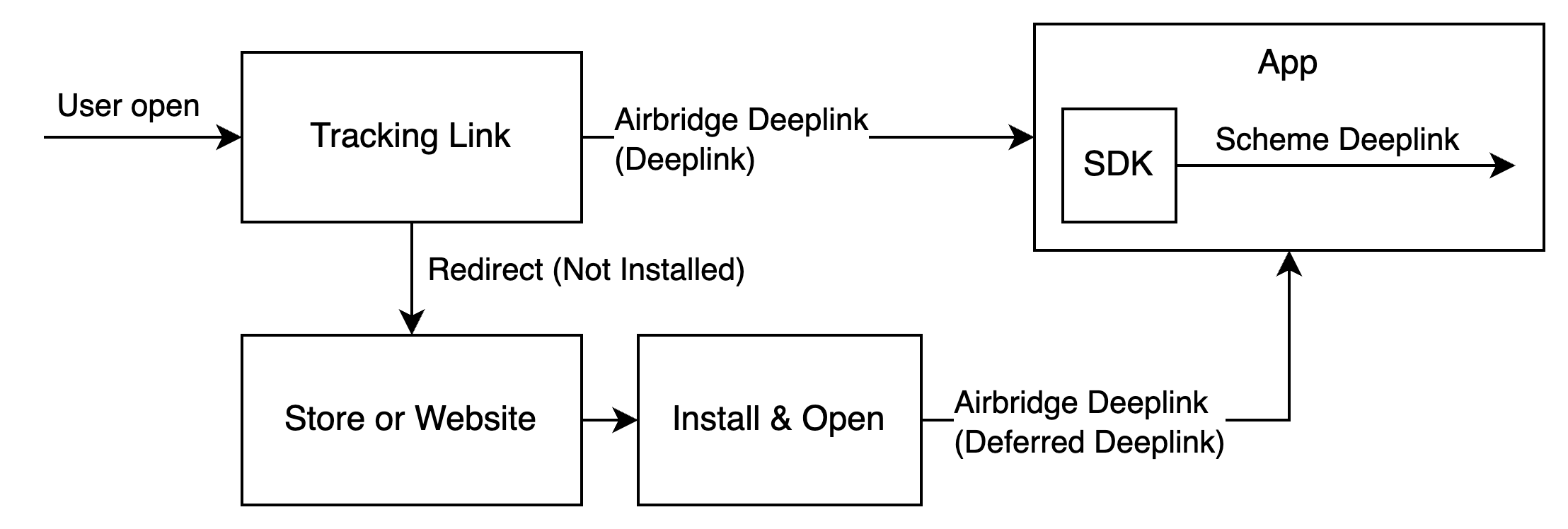 ### Set up deep linking
For the deep linking setup, the following information is required.
* Deep link information submitted in the Airbridge dashboard
* In-app location address for user redirection
First, submit the deep link information to the Airbridge dashboard.
### Set up deep linking
For the deep linking setup, the following information is required.
* Deep link information submitted in the Airbridge dashboard
* In-app location address for user redirection
First, submit the deep link information to the Airbridge dashboard.