> ## Documentation Index
> Fetch the complete documentation index at: https://help.airbridge.io/llms.txt
> Use this file to discover all available pages before exploring further.
# DeepLink - Apply Deep Links to Tracking Links
If you apply deep links when creating tracking links, you can send users directly to specific app pages or to the app store to help them install the app, depending on their app installation status. This ensures a seamless user experience and drives more conversions.
## **Apply Deep Links**
**Note**
You need to prepare the specific app page URLs for deep links. Airbridge delivers these URLs as deep links to the app through tracking links and sends users who clicked ads or content to the URL destinations.
First, register deep link information in the Airbridge dashboard. Then, create tracking links with deep links as the destination.
### **Register Deep Link Information in Airbridge**
Go to **\[Tracking Link]>\[Deep Links]** in the Airbridge dashboard to register information needed to apply deep links. See the instruction below for your operating systems.
**Note**
Register all deep link information to ensure users are reliably sent to the intended app pages in various situations. Airbridge supports URL scheme deep links, App Links, and Universal Links, automatically selecting the most appropriate method based on the operating system, browser, app installation status, and more, when the app opens.
Register the following deep link information in **\[Tracking Link]>\[Deep Links]** for Android deep linking.
| Deep link information | Description |
| -------------------------------------------------------------------------------------------------------------------- | --------------------------------------------------------------------------------------------------------------------------------------------------------------------------------------------------------- |
| URL scheme | Enter your deep link URL scheme followed by `://` in **\[Android URL Scheme]**. For example, if your URL scheme is `ablog`, enter it as `ablog://`. Only lowercase letters, numbers, and `+` are allowed. |
| Package name | This will be automatically entered in **\[Android Package Name]**. |
| [Android sha256\_cert\_fingerprints](https://developer.android.com/training/app-links/verify-android-applinks?hl=ko) | Enter all Android sha256\_cert\_fingerprints in **\[sha256\_cert\_fingerprints]**. Separate multiple entries with commas (`,`). |
**Note**
Register all deep link information to ensure users are reliably sent to the intended app pages in various situations. Airbridge supports URL scheme deep links, App Links, and Universal Links, automatically selecting the most appropriate method based on the operating system, browser, app installation status, and more, when the app opens.
Register the following deep link information in **\[Tracking Link]>\[Deep Links]** for iOS deep linking.
| Deep link information | Description |
| --------------------- | --------------------------------------------------------------------------------------------------------------------------------------------------------------------------------------------------------------------------------------------------------------- |
| URL scheme | Enter your deep link URL scheme followed by `://` in **\[iOS URL Scheme]**. For example, if your URL scheme is `ablog`, enter it as `ablog://`. Only lowercase letters, numbers, and `+` are allowed. |
| App ID | Enter the App ID in **\[iOS App ID]**. The App ID is a combination of `App ID Prefix` + `.` + `Bundle ID`. You can obtain App ID Prefix and Bundle ID from [Apple Developer Dashboard](https://developer.apple.com/account/resources) **\[App]>\[Identifier]**. |
### **Create Tracking Links with Deep Links as Destination**
**Set up deep links in Airbridge SDK first**
For deep linking to work, you must first set up deep links in the Airbridge SDK before creating tracking links. Ask your developer for help.
* [Set up deep linking (Android)](/en/deeplink-developers/android-sdk-v4#set-up-deep-linking)
* [Set up deep linking (iOS)](/en/deeplink-developers/ios-sdk-v4#set-up-deep-linking)
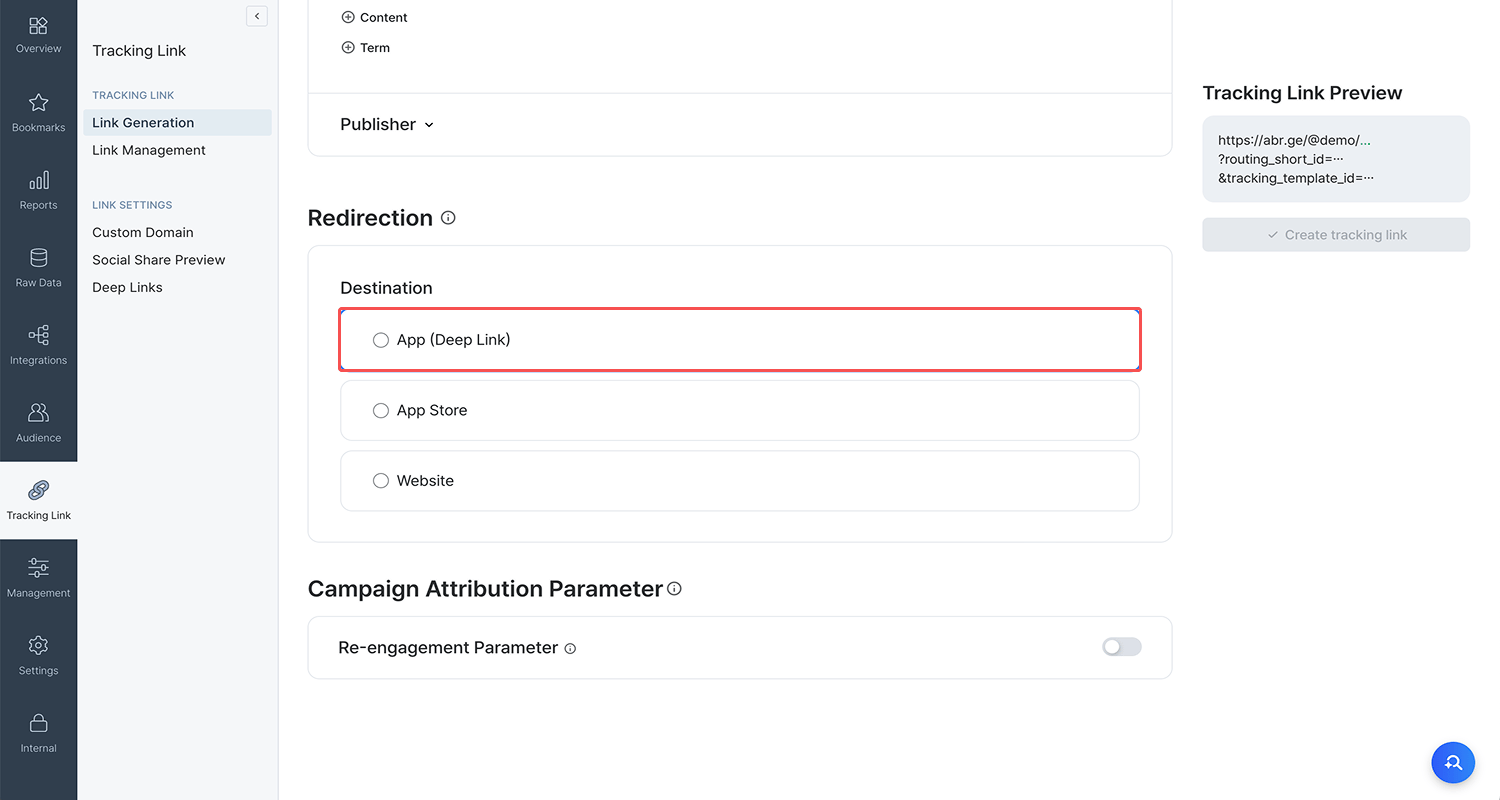
After registering all deep link information in the Airbridge dashboard, go to **\[Tracking Link]>\[Link Generation]>\[Redirection]**, and select **\[App (Deep Link)]** as **\[Destination]**. In **\[Deep Link]** below, enter a specific app page URL where you want to send users.
**Attention**
* You can enter only URL scheme deep links in **\[Deep Link]**. Enter a specific app page URL that starts with the URL scheme you’ve registered in Airbridge.
* You must encode any characters other than letters, numbers, and the special characters = ? & #
After entering all necessary information including the deep link, click **Create tracking link** on the right to create your tracking link.
## **Apply Deferred Deep Links**
**Set up deferred deep links in Airbridge SDK first**
For deferred deep linking to work, you must first set up deferred deep links in the Airbridge SDK before creating tracking links. Ask your developer for help.
* [Set up deferred deep linking (Android)](/en/deeplink-developers/android-sdk-v4#set-up-deep-linking)
* [Set up deferred deep linking (iOS)](/en/deeplink-developers/ios-sdk-v4#set-up-deferred-deep-linking)
Deferred deep linking is automatically enabled when you apply deep links to tracking links. Deferred deep linking sends users without the app to the app store for installation, then sends them to the intended app pages when they open the app for the first time. Deferred deep linking has a time limit. See below for details.
Deferred deep linking works for 1 hour after users click ads or content with tracking links. This means users without the app must install and open it within 1 hour for deferred deep linking to work. See the scenario below.
* 9 AM: A user without the app clicks an ad with a tracking link.
* Before 10 AM: When the user installs and opens the app for the first time, they are sent to the specific app page set as the deep link destination.
* After 10 AM: The deferred deep linking time limit has expired. When the user installs and opens the app for the first time, they are sent to the app’s default page, such as the home page.
**Note**
Deferred deep linking works on iOS 14.5 and later despite [Apple’s App Tracking Transparency (ATT)](https://developer.apple.com/app-store/user-privacy-and-data-use/) policy, as the underlying tracking links do not collect user information or send it to Airbridge.
## **Add Airbridge Macros to Deep Links**
**Airbridge macros**
Airbridge macros are macros supported in Airbridge tracking links, enclosed in curly braces (`{ }`).
You can add Airbridge macros to the deep link entered as the tracking link’s destination to send users to relevant product detail pages based on the ads or content they clicked.
1. Go to **\[Tracking Link]>\[Link Generation]>\[Redirection]**, and select **App (Deep Link)** as **\[Destination]**.
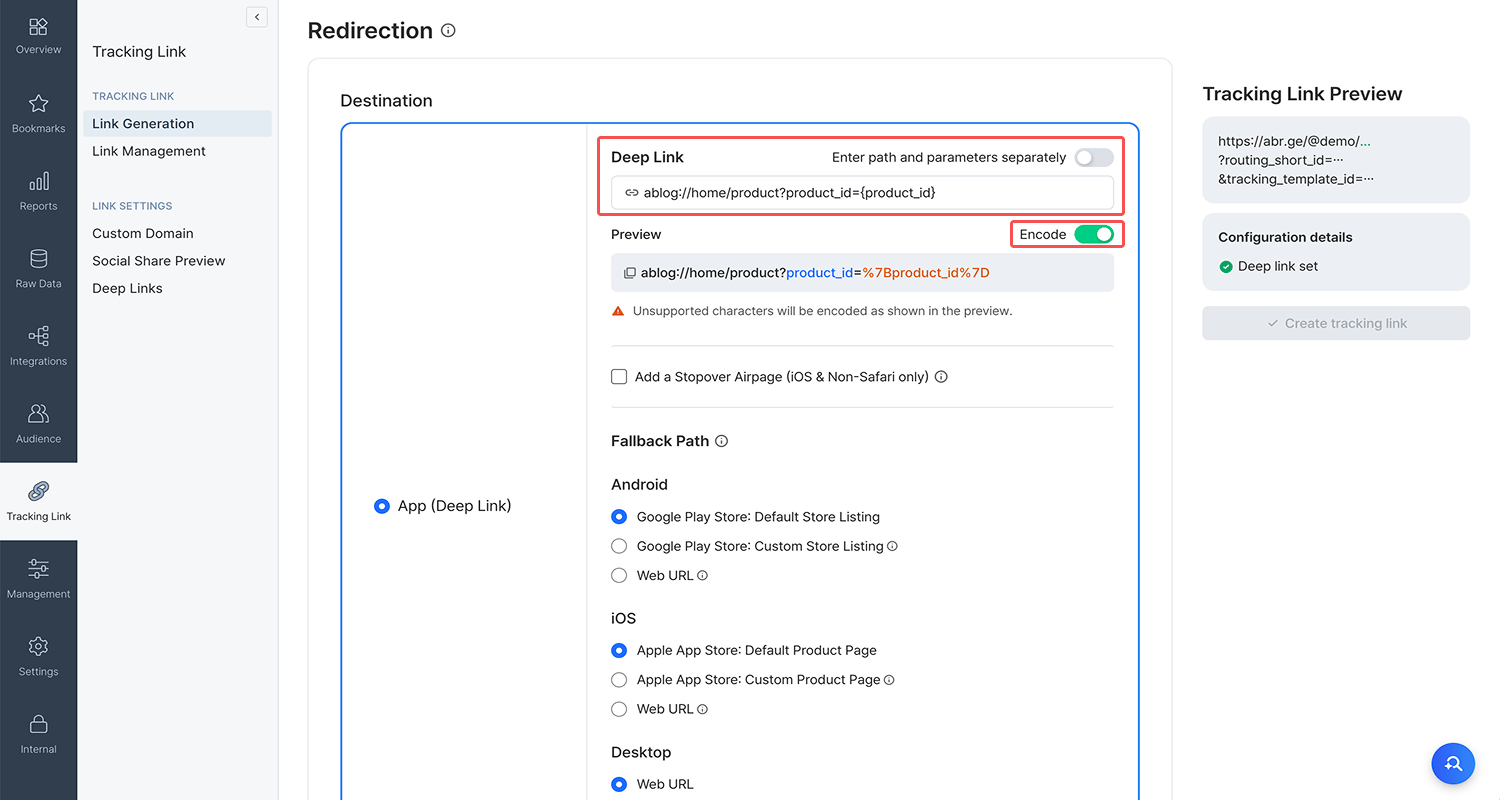
2. In **\[Deep Link]**, enter a deep link that contains Airbridge macros (`{ }`) at the desired positions. For example, if the deep link is differentiated by product ID, you can enter the deep link as shown in the image below. You can add Airbridge macros to deep links in several ways:
* appscheme://path?`product={product_id}`
* appscheme://path/`{product_id}`
3. Click **Create tracking link** on the right to create a tracking link applied with the deep link you just entered. If you created a custom channel tracking link, you need to manually add parameters containing Airbridge macros to the short link. For example, if you added `product={product_id}` in the deep link, copy and paste the short link into a text editor, then manually add `?product={product_id}` at the end of the short link.
4. If the link is an integrated channel tracking link, send it to the ad channel contact and ask them to enable dynamic filling of Airbridge macro values. You may also need to share information on the values to be filled into the macros with your contact, or enter that information directly in the ad channel’s dashboard during campaign setup.
If the link is a custom channel tracking link, send it to the developers and ask them to enable dynamic filling of Airbridge macro values.
Values filled into Airbridge macros (`{ }`) in tracking links are delivered to the deep link through the following process.
1. Add Airbridge macros to the deep link entered as the tracking link’s destination when creating the tracking link.
* **Deep link example**
appscheme://path?`{airbridge_macro}`
2. Below is an example tracking link with the above deep link applied. You can see the tracking link contains the Airbridge macro from the deep link.
* **Tracking link example**
https://abr.ge/@app\_name/channel\_name?\[...]&`airbridge_macro={airbridge_macro}`
3. When users click ads or content, Airbridge macros in the tracking link are filled with values. These values are then delivered to the corresponding Airbridge macros in the deep link, completing the deep link address that gets delivered to the app.
* **Tracking link when ad for Product 1234 is clicked**
https://abr.ge/@app\_name/channel\_name?\[...]&`airbridge_macro=1234`&\[...]
* **Deep link address delivered to the app when ad for Product 1234 is clicked**
appscheme://path?`airbridge_macro=1234`
* **Tracking link when ad for Product 5678 is clicked**
https://abr.ge/@app\_name/channel\_name?\[...]&`airbridge_macro=5678`&\[...]
* **Deep link address delivered to the app when ad for Product 5678 is clicked**
appscheme://path?`airbridge_macro=5678`
4. The app sends users to the specific app page that corresponds to the above deep link.
***
📍**Learn more**
* [What is Deep linking and How Does It Work? URI Scheme, Universal Link, App Link](https://www.airbridge.io/blog/what-is-deep-link)
 2. In **\[Deep Link]**, enter a deep link that contains Airbridge macros (`{ }`) at the desired positions. For example, if the deep link is differentiated by product ID, you can enter the deep link as shown in the image below. You can add Airbridge macros to deep links in several ways:
* appscheme://path?`product={product_id}`
* appscheme://path/`{product_id}`
2. In **\[Deep Link]**, enter a deep link that contains Airbridge macros (`{ }`) at the desired positions. For example, if the deep link is differentiated by product ID, you can enter the deep link as shown in the image below. You can add Airbridge macros to deep links in several ways:
* appscheme://path?`product={product_id}`
* appscheme://path/`{product_id}`
 3. Click **Create tracking link** on the right to create a tracking link applied with the deep link you just entered. If you created a custom channel tracking link, you need to manually add parameters containing Airbridge macros to the short link. For example, if you added `product={product_id}` in the deep link, copy and paste the short link into a text editor, then manually add `?product={product_id}` at the end of the short link.
4. If the link is an integrated channel tracking link, send it to the ad channel contact and ask them to enable dynamic filling of Airbridge macro values. You may also need to share information on the values to be filled into the macros with your contact, or enter that information directly in the ad channel’s dashboard during campaign setup.
If the link is a custom channel tracking link, send it to the developers and ask them to enable dynamic filling of Airbridge macro values.
3. Click **Create tracking link** on the right to create a tracking link applied with the deep link you just entered. If you created a custom channel tracking link, you need to manually add parameters containing Airbridge macros to the short link. For example, if you added `product={product_id}` in the deep link, copy and paste the short link into a text editor, then manually add `?product={product_id}` at the end of the short link.
4. If the link is an integrated channel tracking link, send it to the ad channel contact and ask them to enable dynamic filling of Airbridge macro values. You may also need to share information on the values to be filled into the macros with your contact, or enter that information directly in the ad channel’s dashboard during campaign setup.
If the link is a custom channel tracking link, send it to the developers and ask them to enable dynamic filling of Airbridge macro values.